 Mineforgian
Salt's Inventory Update
A complete overhaul of the minecraft inventory system. Turning every container into a window, where multiple can be open at the same time.
- Загрузки
- 927
- Подписчики
- 40
- Обновлён
- 2 июля 2026 г.
- Лицензия
- MIT
Опубликован 24 июня 2026 г.
Salt's Inventory Update
Salt's Inventory Update is early in development. Please report any issues you find, especially UI bugs, item movement problems, multiplayer weirdness, or compatibility issues.
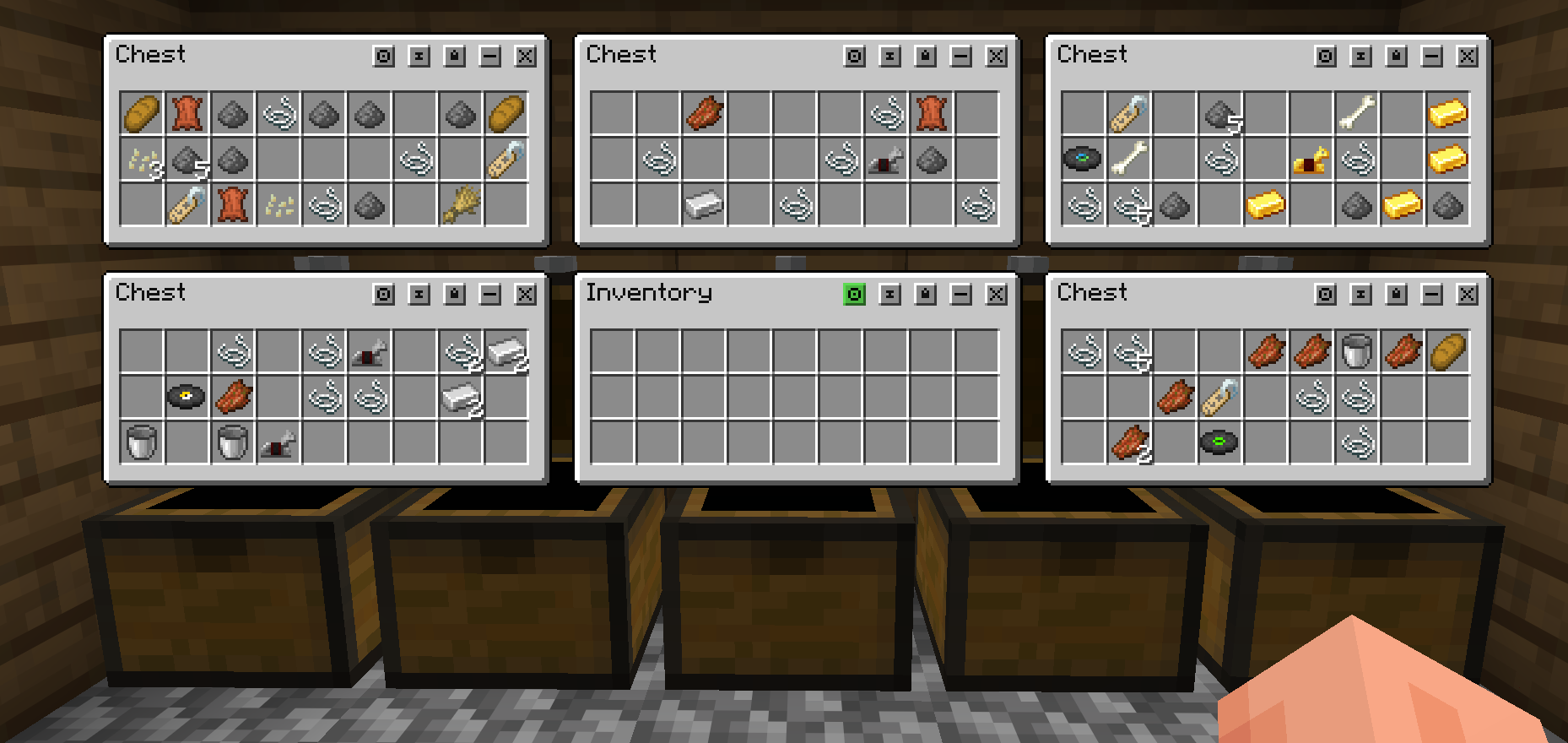
Salt's Inventory Update reworks Minecraft inventory management into a flexible desktop-style interface. Instead of every container taking over the whole screen and repeating your player inventory underneath it, inventories open as separate movable windows that can stay on screen together.
Desktop-Style Inventory Windows
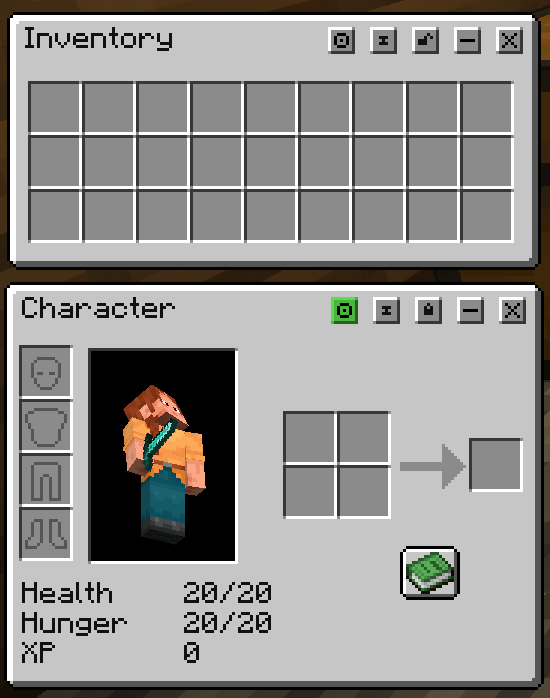
Containers, your player inventory, creative inventory, and character controls open as individual windows. Windows can be moved, minimized, focused, pinned, locked, and, where supported, resized.
This makes it easier to compare inventories, move items between containers, keep useful windows nearby, and organize your screen around the way you actually play.
A Cleaner Player Inventory
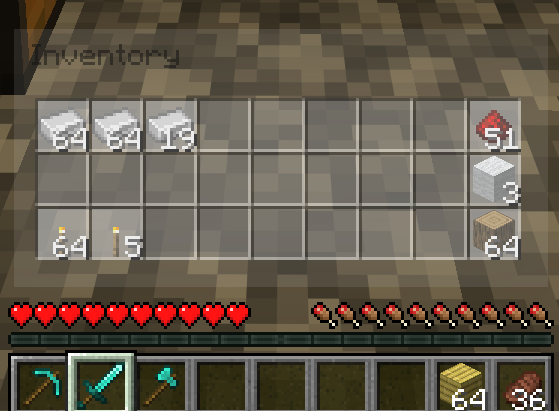
The player inventory is split away from container screens. Your main inventory appears as its own window, while the hotbar stays as the actual hotbar on the HUD instead of being duplicated inside every inventory screen.
The result is less repeated UI, more usable screen space, and a more natural workflow when moving items between storage, tools, and your active hotbar.
Interactive Hotbar And Offhand
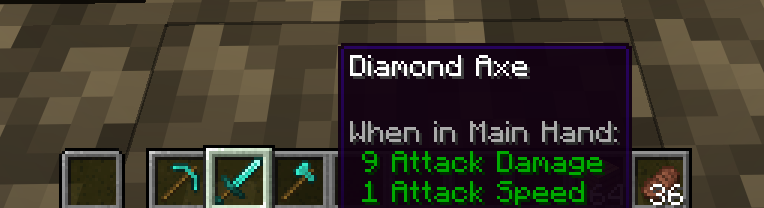
When the Salt desktop is active, the real hotbar becomes interactive. You can move items into, out of, and around the hotbar directly, and the offhand slot is also available beside it.
You can also hold Alt with no inventory windows open to interact with the hotbar using the mouse.
Character Window
Armor, player preview, health, hunger, XP, potion effects, and the 2x2 crafting grid are moved into a dedicated Character Window opened with C.
This keeps the main inventory focused on storage while still giving you quick access to equipment, status, and small crafting.
Optional Expandable Inventory
Salt's Inventory Update includes an optional expandable inventory system. When enabled in the config, players can spend XP levels to unlock extra inventory slots over time.
Extra slots save with the player, sync in multiplayer, and behave like real inventory storage for item movement, searching, dropping, and clearing.
Move While Managing Inventory
The inventory desktop is designed to feel less like a full pause screen. You can keep windows open while still moving around, and hold Alt to give the mouse back to camera control when needed.
This is especially useful when sorting loot, working around storage rooms, or managing items while staying aware of the world.
Pinning, Ghost Pins, And Saved Layouts
Windows can be pinned so they reopen where you left them. Optional ghost pins let windows collapse into translucent previews instead of disappearing completely, making frequently used containers easier to return to.
Window positions, sizes, lock states, and pin modes are saved per world or server.
Configurable Experience
The mod includes an in-game config screen available through:
/saltsinventory config/salts_inventory config- Mod Menu on Fabric
You can toggle the mod, enable expandable inventory, change window placement behavior, allow resizing, enable snapping, configure ghost pins, adjust ghost opacity, and tune the hold-to-close-all timing.
Compatibility And API
Salt's Inventory Update includes a desktop window API for other developers who want to make their own container UIs compatible with Salt's window system.
The API lets mods register custom desktop windows, render their own UI inside Salt windows, handle custom inputs, sync server payloads, use virtual item grids, support resizing, and save per-window state.
API docs: https://salt-and-fries.github.io/Salt-s-Inventory-Update/
Developers are encouraged to try the API and report anything that makes compatibility difficult.
JEI Compatibility
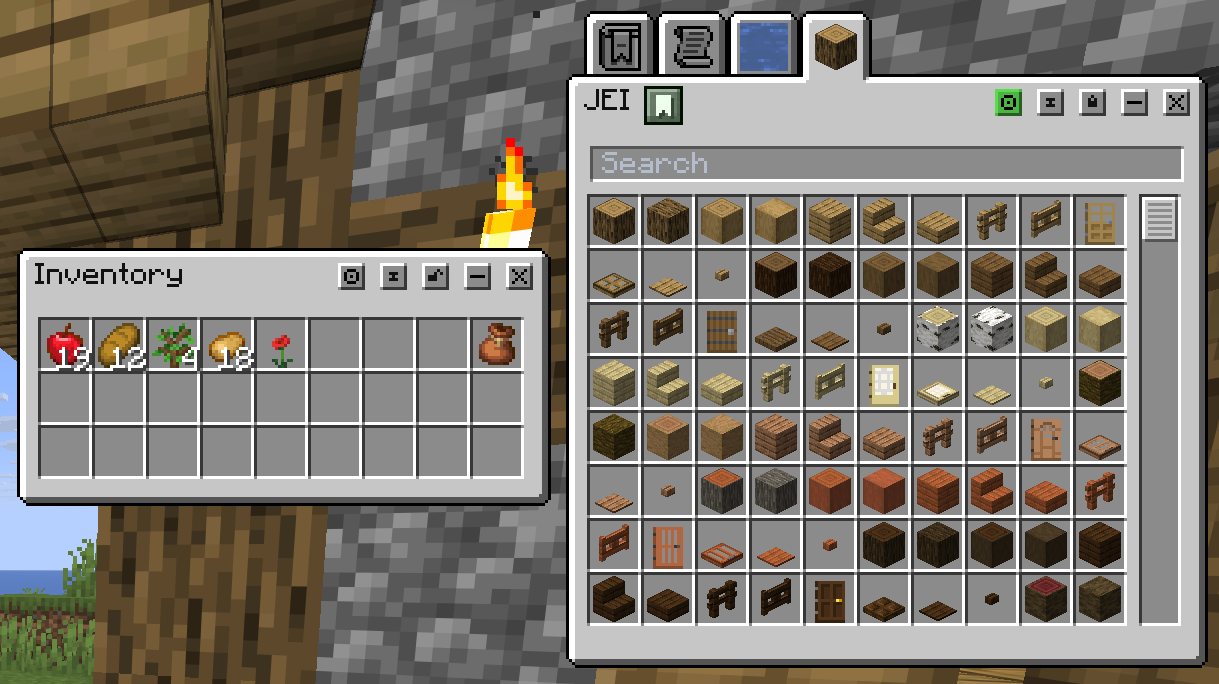
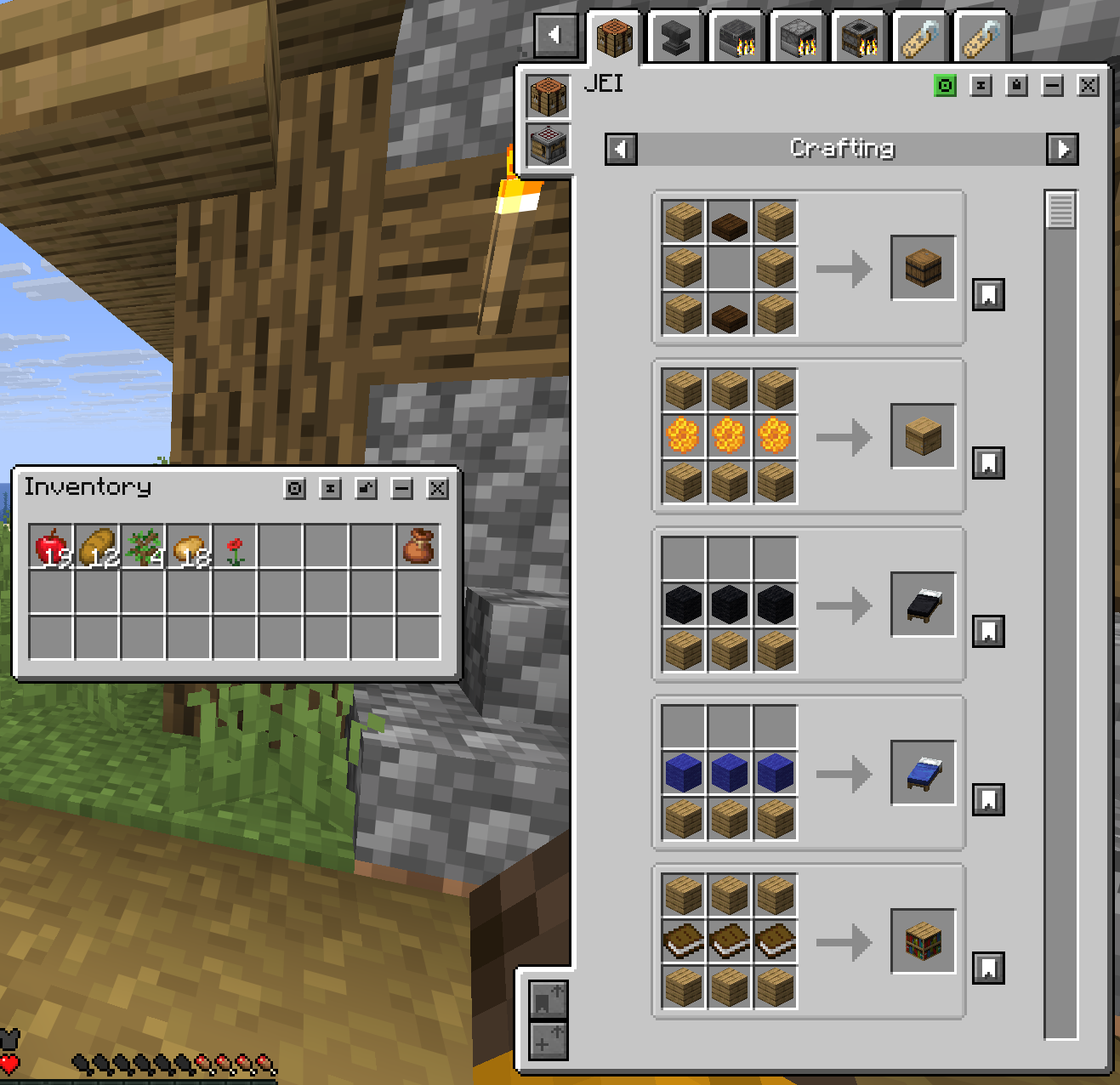
When Just Enough Items is installed, Salt adds a dedicated JEI desktop window opened with H. It keeps JEI browsing inside Salt's movable window system instead of sending you back to a full-screen menu.
The JEI window supports JEI search syntax, ingredient tabs, Favorites, Recent lookups, recipe and uses pages, category and crafting-station tabs, recipe history, R/U hover lookups, bookmarks, and Move Items buttons for compatible open Salt crafting windows.
Mod Compatibility
Salt's Inventory Update includes built-in compatibility work for Tom's Simple Storage, including desktop-style support for storage terminals, crafting terminals, filters, links, emitters, and filing cabinets.
Unsupported modded screens should fall back to their normal UI instead of being forced into a Salt window.
Multiplayer Notes
For multiplayer, Salt's desktop features need server-side support from the mod. If a remote server does not support Salt desktop networking, the mod will disable the desktop behavior for that server instead of trying to desync inventory state.
Why Use It?
Salt's Inventory Update is for players who want inventory management to feel more flexible, persistent, and powerful. It helps when organizing storage, comparing containers, crafting, managing equipment, and moving items around without constantly reopening full-screen menus.
Ченджлог
0.1.1Альфа26.2 · 2 июля 2026 г.
Salt's Inventory Update 0.1.1
This update brings a huge JEI compatibility pass, smoother item dragging, better crafting behavior, and new tools for handling modded containers in Salt's desktop-style inventory windows.
New: JEI Desktop Window
If Just Enough Items is installed, Salt now has its own JEI window built directly into the desktop inventory system.
Press H to open it.
You can now:
- Browse JEI ingredients inside a movable Salt window
- Search items with JEI-backed search
- Use Favorites and Recent tabs
- Open recipes with left-click
- Open uses with right-click
- Use
RandUwhile hovering items - Bookmark recipes
- Scroll through multiple recipe previews
- Sort recipes with JEI-style controls
The JEI window is optional. Salt still works normally if JEI is not installed.
JEI Recipe Transfer
Compatible crafting windows now support a JEI-style Move Items button.
When a supported Salt crafting/container window is open, you can move ingredients into the crafting grid directly from JEI recipes. It can pull from your player inventory and visible Salt container windows.
It also supports:
- Missing ingredient warnings
- Red highlights for missing recipe slots
- Repeated clicks to stack more recipe crafts
- Shift-click to move as many crafts as possible
- Server-side validation so transfers stay safe and synced
Better Item Dragging
Dragging stacks across slots now shows vanilla-style previews before you release the mouse.
You will see:
- How many items each slot will receive
- How many items will remain on your cursor
- Correct previews for hotbar, offhand, and supported custom/API slots
- Better filtering for slots that cannot accept the dragged item
Items are still only placed when you release the mouse, matching vanilla behavior.
Crafting Fixes
Shift-clicking result slots now behaves much closer to vanilla.
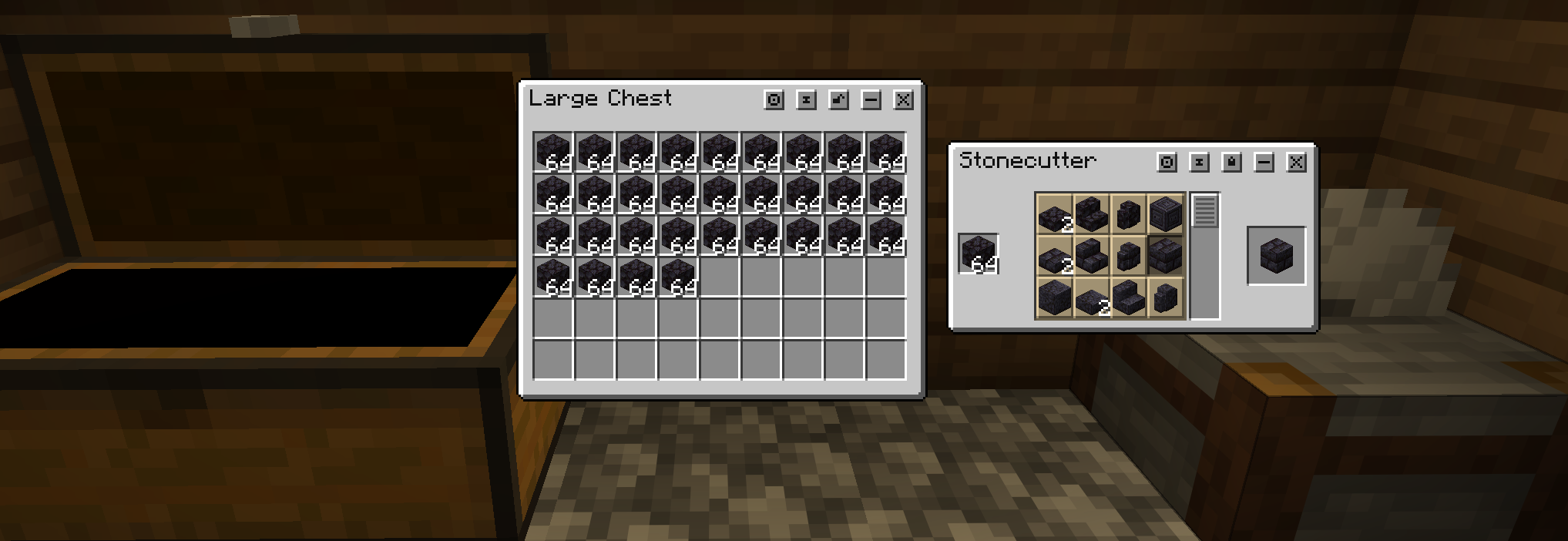
This fixes cases like the stonecutter only crafting one item at a time. Result slots for crafting-style containers now try to craft and transfer as many items as vanilla allows.
This applies to containers like crafting tables, furnaces, anvils, cartography tables, grindstones, merchants, smithing tables, stonecutters, and similar result-slot screens.
Inventory Sync Fixes
Standalone player inventory windows should no longer visually freeze after moving items through Salt desktop windows.
The inventory was still working before, but the visuals could fall behind. This update improves syncing so player inventory slots better match the server-confirmed state after clicks, quick moves, recipe actions, and other desktop inventory operations.
New Config Tools
There is a new Force Containers as Windows config submenu.
This lets you choose specific vanilla or modded container types and force them to open through Salt's desktop window system. Containers that are not forced will keep using their normal vanilla or mod-provided screens.
There is also a new Enable Detailed Console Logs option for testing packs and reporting bugs.
0.1.1Альфа26.2 · 2 июля 2026 г.
Salt's Inventory Update 0.1.1
This update brings a huge JEI compatibility pass, smoother item dragging, better crafting behavior, and new tools for handling modded containers in Salt's desktop-style inventory windows.
New: JEI Desktop Window
If Just Enough Items is installed, Salt now has its own JEI window built directly into the desktop inventory system.
Press H to open it.
You can now:
- Browse JEI ingredients inside a movable Salt window
- Search items with JEI-backed search
- Use Favorites and Recent tabs
- Open recipes with left-click
- Open uses with right-click
- Use
RandUwhile hovering items - Bookmark recipes
- Scroll through multiple recipe previews
- Sort recipes with JEI-style controls
The JEI window is optional. Salt still works normally if JEI is not installed.
JEI Recipe Transfer
Compatible crafting windows now support a JEI-style Move Items button.
When a supported Salt crafting/container window is open, you can move ingredients into the crafting grid directly from JEI recipes. It can pull from your player inventory and visible Salt container windows.
It also supports:
- Missing ingredient warnings
- Red highlights for missing recipe slots
- Repeated clicks to stack more recipe crafts
- Shift-click to move as many crafts as possible
- Server-side validation so transfers stay safe and synced
Better Item Dragging
Dragging stacks across slots now shows vanilla-style previews before you release the mouse.
You will see:
- How many items each slot will receive
- How many items will remain on your cursor
- Correct previews for hotbar, offhand, and supported custom/API slots
- Better filtering for slots that cannot accept the dragged item
Items are still only placed when you release the mouse, matching vanilla behavior.
Crafting Fixes
Shift-clicking result slots now behaves much closer to vanilla.
This fixes cases like the stonecutter only crafting one item at a time. Result slots for crafting-style containers now try to craft and transfer as many items as vanilla allows.
This applies to containers like crafting tables, furnaces, anvils, cartography tables, grindstones, merchants, smithing tables, stonecutters, and similar result-slot screens.
Inventory Sync Fixes
Standalone player inventory windows should no longer visually freeze after moving items through Salt desktop windows.
The inventory was still working before, but the visuals could fall behind. This update improves syncing so player inventory slots better match the server-confirmed state after clicks, quick moves, recipe actions, and other desktop inventory operations.
New Config Tools
There is a new Force Containers as Windows config submenu.
This lets you choose specific vanilla or modded container types and force them to open through Salt's desktop window system. Containers that are not forced will keep using their normal vanilla or mod-provided screens.
There is also a new Enable Detailed Console Logs option for testing packs and reporting bugs.
0.1.1Альфа26.1.2 · 2 июля 2026 г.
Salt's Inventory Update 0.1.1
This update brings a huge JEI compatibility pass, smoother item dragging, better crafting behavior, and new tools for handling modded containers in Salt's desktop-style inventory windows.
New: JEI Desktop Window
If Just Enough Items is installed, Salt now has its own JEI window built directly into the desktop inventory system.
Press H to open it.
You can now:
- Browse JEI ingredients inside a movable Salt window
- Search items with JEI-backed search
- Use Favorites and Recent tabs
- Open recipes with left-click
- Open uses with right-click
- Use
RandUwhile hovering items - Bookmark recipes
- Scroll through multiple recipe previews
- Sort recipes with JEI-style controls
The JEI window is optional. Salt still works normally if JEI is not installed.
JEI Recipe Transfer
Compatible crafting windows now support a JEI-style Move Items button.
When a supported Salt crafting/container window is open, you can move ingredients into the crafting grid directly from JEI recipes. It can pull from your player inventory and visible Salt container windows.
It also supports:
- Missing ingredient warnings
- Red highlights for missing recipe slots
- Repeated clicks to stack more recipe crafts
- Shift-click to move as many crafts as possible
- Server-side validation so transfers stay safe and synced
Better Item Dragging
Dragging stacks across slots now shows vanilla-style previews before you release the mouse.
You will see:
- How many items each slot will receive
- How many items will remain on your cursor
- Correct previews for hotbar, offhand, and supported custom/API slots
- Better filtering for slots that cannot accept the dragged item
Items are still only placed when you release the mouse, matching vanilla behavior.
Crafting Fixes
Shift-clicking result slots now behaves much closer to vanilla.
This fixes cases like the stonecutter only crafting one item at a time. Result slots for crafting-style containers now try to craft and transfer as many items as vanilla allows.
This applies to containers like crafting tables, furnaces, anvils, cartography tables, grindstones, merchants, smithing tables, stonecutters, and similar result-slot screens.
Inventory Sync Fixes
Standalone player inventory windows should no longer visually freeze after moving items through Salt desktop windows.
The inventory was still working before, but the visuals could fall behind. This update improves syncing so player inventory slots better match the server-confirmed state after clicks, quick moves, recipe actions, and other desktop inventory operations.
New Config Tools
There is a new Force Containers as Windows config submenu.
This lets you choose specific vanilla or modded container types and force them to open through Salt's desktop window system. Containers that are not forced will keep using their normal vanilla or mod-provided screens.
There is also a new Enable Detailed Console Logs option for testing packs and reporting bugs.
0.1.1Альфа26.1.2 · 2 июля 2026 г.
Salt's Inventory Update 0.1.1
This update brings a huge JEI compatibility pass, smoother item dragging, better crafting behavior, and new tools for handling modded containers in Salt's desktop-style inventory windows.
New: JEI Desktop Window
If Just Enough Items is installed, Salt now has its own JEI window built directly into the desktop inventory system.
Press H to open it.
You can now:
- Browse JEI ingredients inside a movable Salt window
- Search items with JEI-backed search
- Use Favorites and Recent tabs
- Open recipes with left-click
- Open uses with right-click
- Use
RandUwhile hovering items - Bookmark recipes
- Scroll through multiple recipe previews
- Sort recipes with JEI-style controls
The JEI window is optional. Salt still works normally if JEI is not installed.
JEI Recipe Transfer
Compatible crafting windows now support a JEI-style Move Items button.
When a supported Salt crafting/container window is open, you can move ingredients into the crafting grid directly from JEI recipes. It can pull from your player inventory and visible Salt container windows.
It also supports:
- Missing ingredient warnings
- Red highlights for missing recipe slots
- Repeated clicks to stack more recipe crafts
- Shift-click to move as many crafts as possible
- Server-side validation so transfers stay safe and synced
Better Item Dragging
Dragging stacks across slots now shows vanilla-style previews before you release the mouse.
You will see:
- How many items each slot will receive
- How many items will remain on your cursor
- Correct previews for hotbar, offhand, and supported custom/API slots
- Better filtering for slots that cannot accept the dragged item
Items are still only placed when you release the mouse, matching vanilla behavior.
Crafting Fixes
Shift-clicking result slots now behaves much closer to vanilla.
This fixes cases like the stonecutter only crafting one item at a time. Result slots for crafting-style containers now try to craft and transfer as many items as vanilla allows.
This applies to containers like crafting tables, furnaces, anvils, cartography tables, grindstones, merchants, smithing tables, stonecutters, and similar result-slot screens.
Inventory Sync Fixes
Standalone player inventory windows should no longer visually freeze after moving items through Salt desktop windows.
The inventory was still working before, but the visuals could fall behind. This update improves syncing so player inventory slots better match the server-confirmed state after clicks, quick moves, recipe actions, and other desktop inventory operations.
New Config Tools
There is a new Force Containers as Windows config submenu.
This lets you choose specific vanilla or modded container types and force them to open through Salt's desktop window system. Containers that are not forced will keep using their normal vanilla or mod-provided screens.
There is also a new Enable Detailed Console Logs option for testing packs and reporting bugs.
0.1.1Альфа1.21.11 · 2 июля 2026 г.
Salt's Inventory Update 0.1.1
This update brings a huge JEI compatibility pass, smoother item dragging, better crafting behavior, and new tools for handling modded containers in Salt's desktop-style inventory windows.
New: JEI Desktop Window
If Just Enough Items is installed, Salt now has its own JEI window built directly into the desktop inventory system.
Press H to open it.
You can now:
- Browse JEI ingredients inside a movable Salt window
- Search items with JEI-backed search
- Use Favorites and Recent tabs
- Open recipes with left-click
- Open uses with right-click
- Use
RandUwhile hovering items - Bookmark recipes
- Scroll through multiple recipe previews
- Sort recipes with JEI-style controls
The JEI window is optional. Salt still works normally if JEI is not installed.
JEI Recipe Transfer
Compatible crafting windows now support a JEI-style Move Items button.
When a supported Salt crafting/container window is open, you can move ingredients into the crafting grid directly from JEI recipes. It can pull from your player inventory and visible Salt container windows.
It also supports:
- Missing ingredient warnings
- Red highlights for missing recipe slots
- Repeated clicks to stack more recipe crafts
- Shift-click to move as many crafts as possible
- Server-side validation so transfers stay safe and synced
Better Item Dragging
Dragging stacks across slots now shows vanilla-style previews before you release the mouse.
You will see:
- How many items each slot will receive
- How many items will remain on your cursor
- Correct previews for hotbar, offhand, and supported custom/API slots
- Better filtering for slots that cannot accept the dragged item
Items are still only placed when you release the mouse, matching vanilla behavior.
Crafting Fixes
Shift-clicking result slots now behaves much closer to vanilla.
This fixes cases like the stonecutter only crafting one item at a time. Result slots for crafting-style containers now try to craft and transfer as many items as vanilla allows.
This applies to containers like crafting tables, furnaces, anvils, cartography tables, grindstones, merchants, smithing tables, stonecutters, and similar result-slot screens.
Inventory Sync Fixes
Standalone player inventory windows should no longer visually freeze after moving items through Salt desktop windows.
The inventory was still working before, but the visuals could fall behind. This update improves syncing so player inventory slots better match the server-confirmed state after clicks, quick moves, recipe actions, and other desktop inventory operations.
New Config Tools
There is a new Force Containers as Windows config submenu.
This lets you choose specific vanilla or modded container types and force them to open through Salt's desktop window system. Containers that are not forced will keep using their normal vanilla or mod-provided screens.
There is also a new Enable Detailed Console Logs option for testing packs and reporting bugs.
0.1.1Альфа1.21.11 · 2 июля 2026 г.
Salt's Inventory Update 0.1.1
This update brings a huge JEI compatibility pass, smoother item dragging, better crafting behavior, and new tools for handling modded containers in Salt's desktop-style inventory windows.
New: JEI Desktop Window
If Just Enough Items is installed, Salt now has its own JEI window built directly into the desktop inventory system.
Press H to open it.
You can now:
- Browse JEI ingredients inside a movable Salt window
- Search items with JEI-backed search
- Use Favorites and Recent tabs
- Open recipes with left-click
- Open uses with right-click
- Use
RandUwhile hovering items - Bookmark recipes
- Scroll through multiple recipe previews
- Sort recipes with JEI-style controls
The JEI window is optional. Salt still works normally if JEI is not installed.
JEI Recipe Transfer
Compatible crafting windows now support a JEI-style Move Items button.
When a supported Salt crafting/container window is open, you can move ingredients into the crafting grid directly from JEI recipes. It can pull from your player inventory and visible Salt container windows.
It also supports:
- Missing ingredient warnings
- Red highlights for missing recipe slots
- Repeated clicks to stack more recipe crafts
- Shift-click to move as many crafts as possible
- Server-side validation so transfers stay safe and synced
Better Item Dragging
Dragging stacks across slots now shows vanilla-style previews before you release the mouse.
You will see:
- How many items each slot will receive
- How many items will remain on your cursor
- Correct previews for hotbar, offhand, and supported custom/API slots
- Better filtering for slots that cannot accept the dragged item
Items are still only placed when you release the mouse, matching vanilla behavior.
Crafting Fixes
Shift-clicking result slots now behaves much closer to vanilla.
This fixes cases like the stonecutter only crafting one item at a time. Result slots for crafting-style containers now try to craft and transfer as many items as vanilla allows.
This applies to containers like crafting tables, furnaces, anvils, cartography tables, grindstones, merchants, smithing tables, stonecutters, and similar result-slot screens.
Inventory Sync Fixes
Standalone player inventory windows should no longer visually freeze after moving items through Salt desktop windows.
The inventory was still working before, but the visuals could fall behind. This update improves syncing so player inventory slots better match the server-confirmed state after clicks, quick moves, recipe actions, and other desktop inventory operations.
New Config Tools
There is a new Force Containers as Windows config submenu.
This lets you choose specific vanilla or modded container types and force them to open through Salt's desktop window system. Containers that are not forced will keep using their normal vanilla or mod-provided screens.
There is also a new Enable Detailed Console Logs option for testing packs and reporting bugs.
0.1.1Альфа1.21.1 · 2 июля 2026 г.
Salt's Inventory Update 0.1.1
This update brings a huge JEI compatibility pass, smoother item dragging, better crafting behavior, and new tools for handling modded containers in Salt's desktop-style inventory windows.
New: JEI Desktop Window
If Just Enough Items is installed, Salt now has its own JEI window built directly into the desktop inventory system.
Press H to open it.
You can now:
- Browse JEI ingredients inside a movable Salt window
- Search items with JEI-backed search
- Use Favorites and Recent tabs
- Open recipes with left-click
- Open uses with right-click
- Use
RandUwhile hovering items - Bookmark recipes
- Scroll through multiple recipe previews
- Sort recipes with JEI-style controls
The JEI window is optional. Salt still works normally if JEI is not installed.
JEI Recipe Transfer
Compatible crafting windows now support a JEI-style Move Items button.
When a supported Salt crafting/container window is open, you can move ingredients into the crafting grid directly from JEI recipes. It can pull from your player inventory and visible Salt container windows.
It also supports:
- Missing ingredient warnings
- Red highlights for missing recipe slots
- Repeated clicks to stack more recipe crafts
- Shift-click to move as many crafts as possible
- Server-side validation so transfers stay safe and synced
Better Item Dragging
Dragging stacks across slots now shows vanilla-style previews before you release the mouse.
You will see:
- How many items each slot will receive
- How many items will remain on your cursor
- Correct previews for hotbar, offhand, and supported custom/API slots
- Better filtering for slots that cannot accept the dragged item
Items are still only placed when you release the mouse, matching vanilla behavior.
Crafting Fixes
Shift-clicking result slots now behaves much closer to vanilla.
This fixes cases like the stonecutter only crafting one item at a time. Result slots for crafting-style containers now try to craft and transfer as many items as vanilla allows.
This applies to containers like crafting tables, furnaces, anvils, cartography tables, grindstones, merchants, smithing tables, stonecutters, and similar result-slot screens.
Inventory Sync Fixes
Standalone player inventory windows should no longer visually freeze after moving items through Salt desktop windows.
The inventory was still working before, but the visuals could fall behind. This update improves syncing so player inventory slots better match the server-confirmed state after clicks, quick moves, recipe actions, and other desktop inventory operations.
New Config Tools
There is a new Force Containers as Windows config submenu.
This lets you choose specific vanilla or modded container types and force them to open through Salt's desktop window system. Containers that are not forced will keep using their normal vanilla or mod-provided screens.
There is also a new Enable Detailed Console Logs option for testing packs and reporting bugs.
0.1.1Альфа1.21.1 · 2 июля 2026 г.
Salt's Inventory Update 0.1.1
This update brings a huge JEI compatibility pass, smoother item dragging, better crafting behavior, and new tools for handling modded containers in Salt's desktop-style inventory windows.
New: JEI Desktop Window
If Just Enough Items is installed, Salt now has its own JEI window built directly into the desktop inventory system.
Press H to open it.
You can now:
- Browse JEI ingredients inside a movable Salt window
- Search items with JEI-backed search
- Use Favorites and Recent tabs
- Open recipes with left-click
- Open uses with right-click
- Use
RandUwhile hovering items - Bookmark recipes
- Scroll through multiple recipe previews
- Sort recipes with JEI-style controls
The JEI window is optional. Salt still works normally if JEI is not installed.
JEI Recipe Transfer
Compatible crafting windows now support a JEI-style Move Items button.
When a supported Salt crafting/container window is open, you can move ingredients into the crafting grid directly from JEI recipes. It can pull from your player inventory and visible Salt container windows.
It also supports:
- Missing ingredient warnings
- Red highlights for missing recipe slots
- Repeated clicks to stack more recipe crafts
- Shift-click to move as many crafts as possible
- Server-side validation so transfers stay safe and synced
Better Item Dragging
Dragging stacks across slots now shows vanilla-style previews before you release the mouse.
You will see:
- How many items each slot will receive
- How many items will remain on your cursor
- Correct previews for hotbar, offhand, and supported custom/API slots
- Better filtering for slots that cannot accept the dragged item
Items are still only placed when you release the mouse, matching vanilla behavior.
Crafting Fixes
Shift-clicking result slots now behaves much closer to vanilla.
This fixes cases like the stonecutter only crafting one item at a time. Result slots for crafting-style containers now try to craft and transfer as many items as vanilla allows.
This applies to containers like crafting tables, furnaces, anvils, cartography tables, grindstones, merchants, smithing tables, stonecutters, and similar result-slot screens.
Inventory Sync Fixes
Standalone player inventory windows should no longer visually freeze after moving items through Salt desktop windows.
The inventory was still working before, but the visuals could fall behind. This update improves syncing so player inventory slots better match the server-confirmed state after clicks, quick moves, recipe actions, and other desktop inventory operations.
New Config Tools
There is a new Force Containers as Windows config submenu.
This lets you choose specific vanilla or modded container types and force them to open through Salt's desktop window system. Containers that are not forced will keep using their normal vanilla or mod-provided screens.
There is also a new Enable Detailed Console Logs option for testing packs and reporting bugs.
Комментарии
Загружаем…