 Mineforgian
RoadArchitect
Travel around the world without barriers: RoadArchitect automatically scans your world, finds villages, and other structures, and then lays a network of roads between them.
- Загрузки
- 83K
- Подписчики
- 397
- Обновлён
- 3 мая 2026 г.
- Лицензия
- Apache-2.0
Опубликован 9 августа 2025 г.




RoadArchitect
RoadArchitect is a mod that automatically scans the world for villages and other structures and connects them with roads to form a persistent travel network.
Roads adapt their style to the biome, and the network is saved between game sessions.
Wiki: RoadArchitect Wiki
✨ Features
- 🏘 Automatic detection of villages and other structures
- 🎨 Biome-aware road styles for better immersion
- 🧭 Smart pathfinding using A* with terrain caching
- 💾 Persistent network — roads remain between sessions
- 🔄 Fully automated, minimal setup
- 🧰 Configurable via Cloth Config (required on Fabric / Quilt / NeoForge)
- 🌐 Localization included: English, Russian, Ukrainian, Spanish, French, German, Chinese
- 🛰 Visual road-graph debugger with pan/zoom, tooltips, and a color legend; in singleplayer, clicking a node teleports to it (default hotkey H)
- 🗺 Terralith-ready — works out of the box with the Terralith world-generation datapack
🧩 Add-ons
- RoadArchitect Encounters: Modrinth / Curseforge / Github
📷 Screenshots
Plains (with lamp decorations)
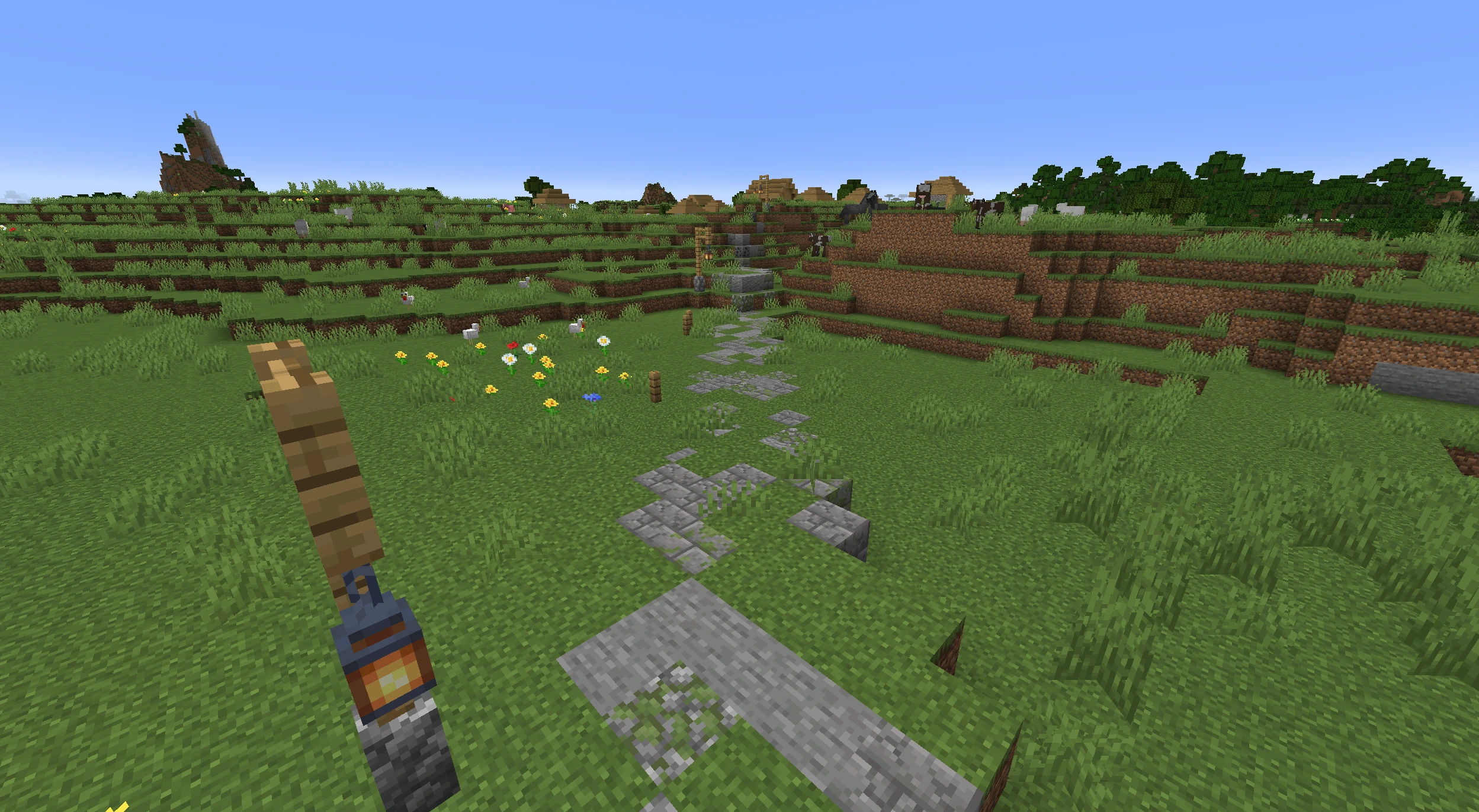
Plains
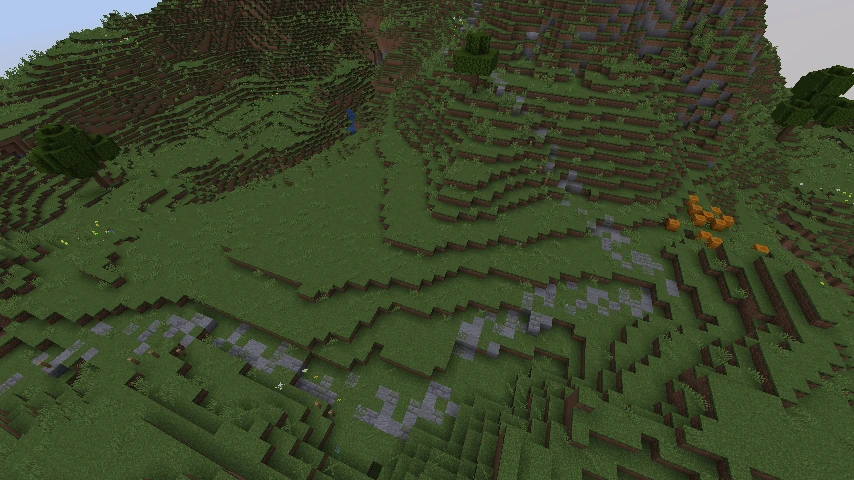
Savanna
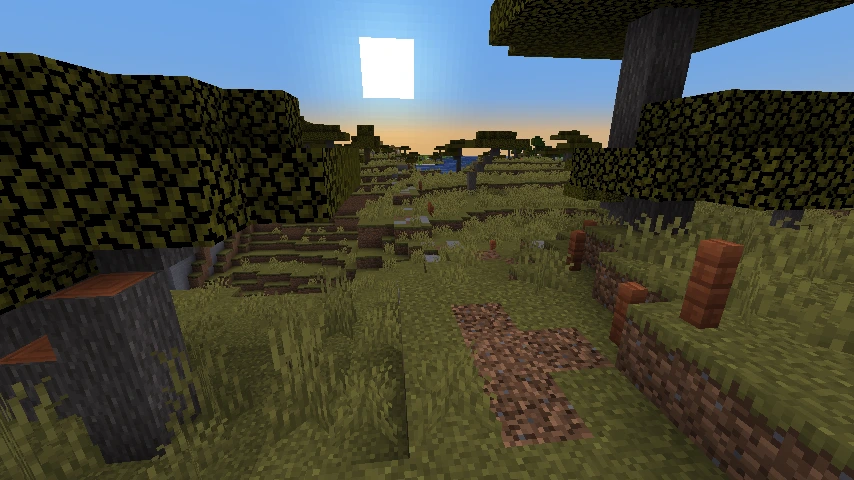
Desert
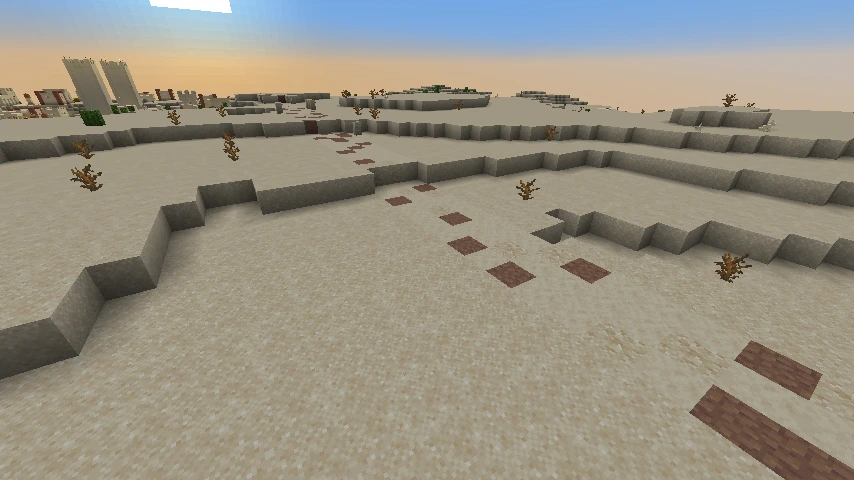
Forest
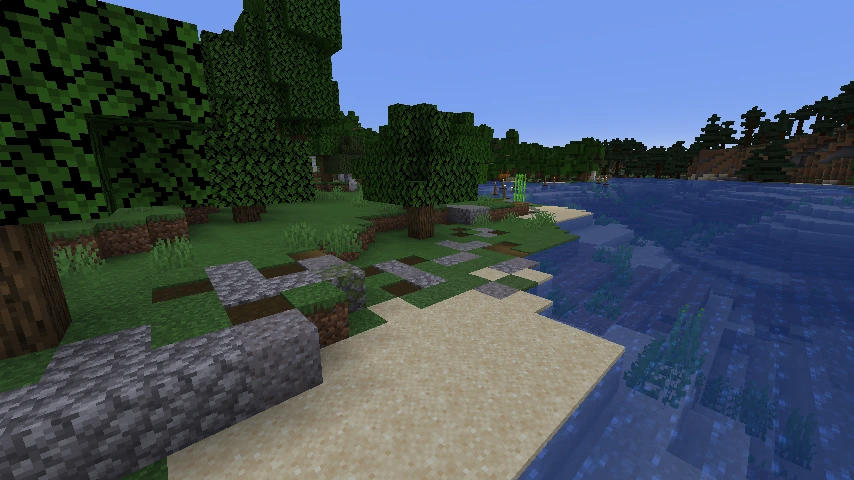
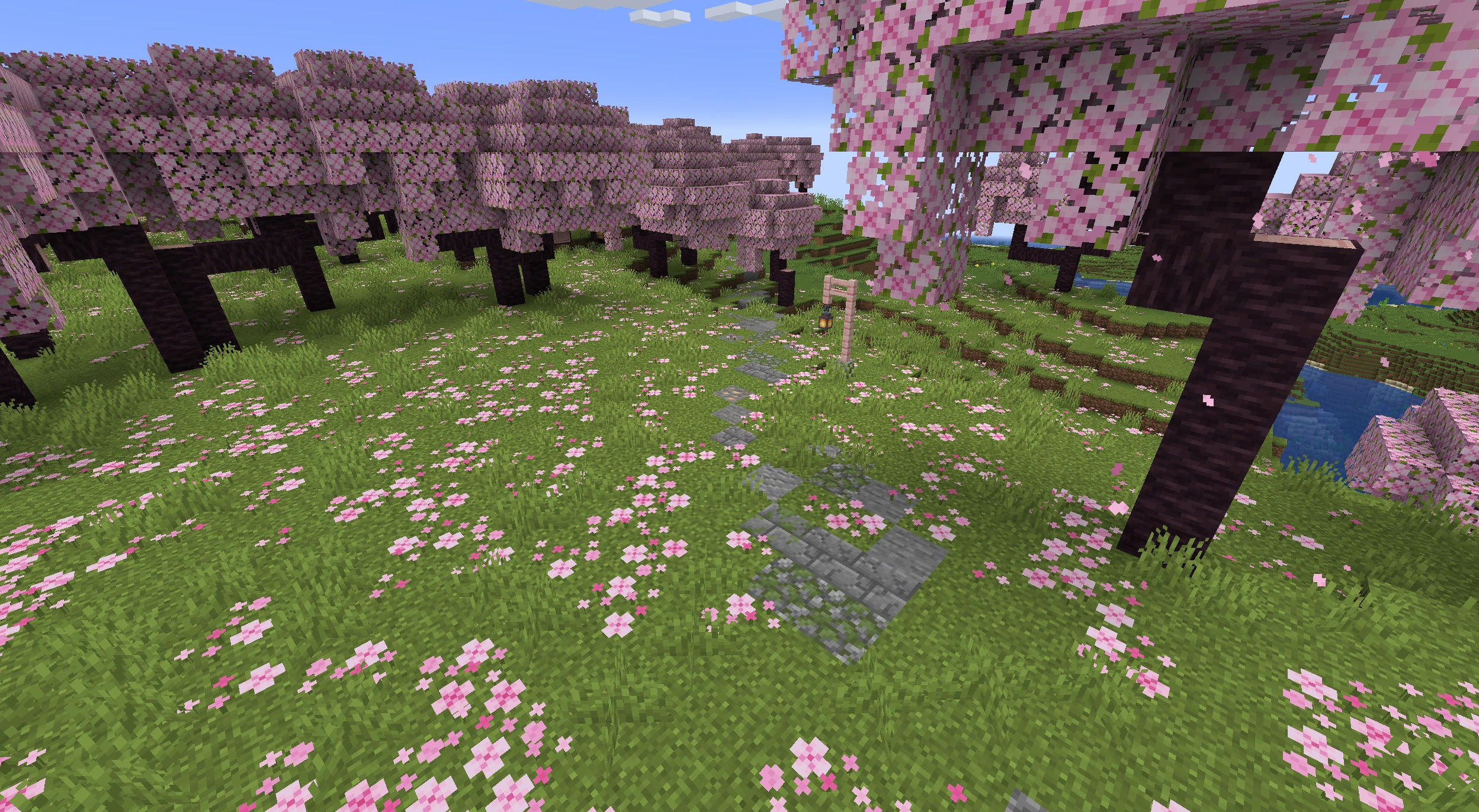
Cherry grove

Cherry grove (with lamp decorations)
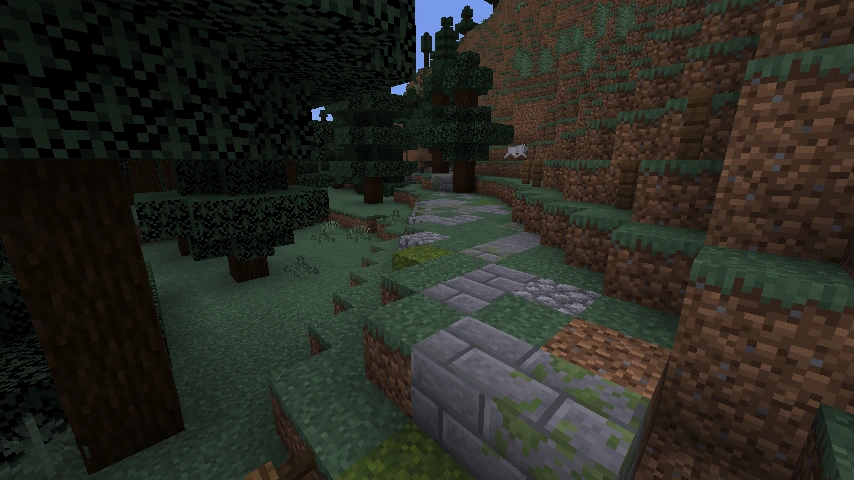
Taiga
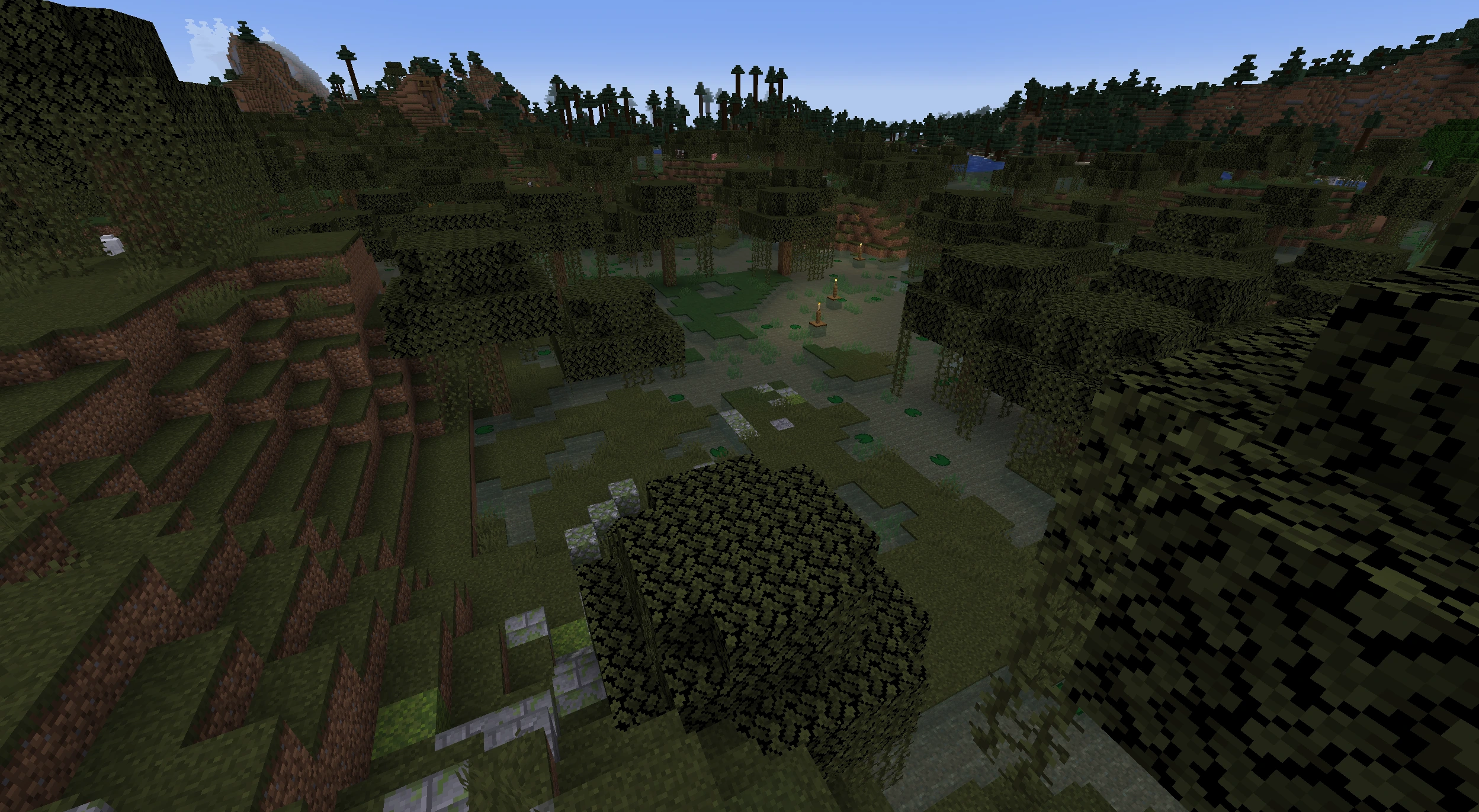
Swamp
Old growth spruce taiga

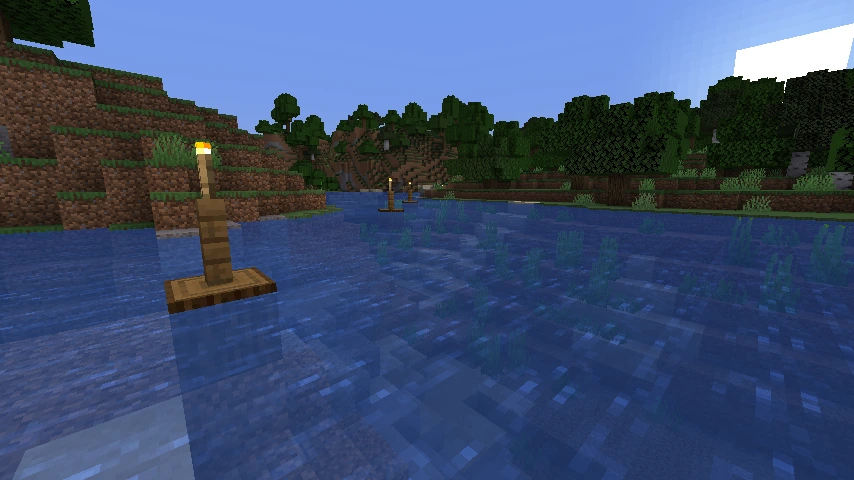
River
🗒️ Recent changes
v1.6.0 — performance improvements, biome styles, more flexible configuration
Highlights
- ⚡ Performance: significant speedup (up to ~2×) in structure scanning and pathfinding;
- 🌲 Route clearing: automatic removal of trees from the road corridor;
- 🎨 Biome styles: more default presets for vanilla biomes; broad coverage for
Biomes O' Plenty; - 🧰 Configuration:
- works across dimensions;
- road style customization;
- lamppost customization;
- road width customization;
- 🔧 Debugging: new “Debug & Diagnostics (Advanced)” tab in the config; outputs debug messages and pipeline profiler results;
- 🐞 Fixes: corrected translation keys for NeoForge.
Compatibility: no world reset required. Save format unchanged. Existing settings are preserved. Biomes O' Plenty support is optional and activates when the mod is present. The “Detailed debug logging” flag is off by default.
v1.5.0 — Smarter pathfinding, Terrain Analyzer (beta)
Highlights
- 🧭 Terrain Analyzer (beta): clearer recognition of mountainous terrain, with new config options and full translations
- 🧠 Pathfinding controls: configurable land preference and water behavior (acceptable water level, coastal buffer, max coastal speed)
- 🛣️ Partial paths: when a full route can’t be completed, high-progress searches can return the best partial path instead
- 🌊 Safer defaults: oceans are no longer hard-blocked; default “prohibited biomes” now include
#minecraft:is_oceanand#minecraft:is_deep_ocean - 🔒 Stability: thread-safe biome selector cache (eliminates race conditions in concurrent scans)
- 🔧 Fixes: correct player direction on the debug map and reliable point teleportation packet handling; RA config tweaks
- 🧩 Compatibility: improved boot behavior when Distant Horizons is installed
- 🌐 Localization & data: updated category labels, new keys for fresh options, translations split and refreshed (EN/RU/ES/FR/DE/ZH/UK)
Compatibility: No world resets needed. Defaults for water/ocean behavior changed — review new pathfinding options if you rely on custom configs.
v1.4.0 — Add-ons support
Highlights
- 🧩 Add-ons support: official API so other mods can extend Road Architect (events, read-only core views, and per-world storage).
- 📴 No changes out of the box: there are no built-in add-ons; gameplay stays the same unless you install one.
Compatibility: No visible gameplay changes by default; add-ons are optional.
v1.3.0 — Smarter scans & deterministic decorations
Highlights
- 🧠 Smarter scanning: major performance boost for large-area scans and many structure types—smoother gameplay, cleaner road graphs, and more reliable structure detection.
- 🌲 Deterministic decorations: consistent, per-path placement of decorations (lamps, buoys, side pieces) across chunk loads—less pop-in and cleaner chunk borders. Also fixes common issues like floating fence posts or off-grid buoys.
- 💡 New Lamp decorations: fresh styles and better fence integration where appropriate.
- 🧭 Debug map: shows your position and direction (red dot + arrow).
- ⚙️ New settings (all loaders):
- Lamp interval
- Side decoration interval
- Buoy interval
- Mask erosion near land/water transitions
- Toggle for deterministic decorations
- 🛤️ Smoother road profiles: post-processing reduces spikes and clamps extreme slopes for cleaner elevation transitions.
- 🌐 Localization & UI: updated strings (EN/RU/ES/FR/DE/ZH) and a small progress-stage label fix (“initialisation”).
Compatibility: No breaking changes; existing worlds remain compatible.
v1.2.0 — Vanilla loading, convenient settings, visual debug
Highlights
- 🪄 Progress screen: dropped
owo-liband switched to vanilla rendering (Fabric/Quilt and NeoForge), showing the current pipeline stage. - 🧭 Road-graph debug screen: pan/zoom, tooltips, and a color legend; in singleplayer, clicking a node teleports to it. Opens with H.
- 🧰 Settings: Cloth Config on all loaders; Mod Menu support (Fabric/Quilt); Catalogue support (NeoForge).
- 🌐 Localizations: English, Russian, Spanish, French, German, Chinese.
Compatibility: No breaking changes; existing worlds remain compatible.
v1.1.0 — Smoother paths, smarter junctions, cleaner buoys
Highlights
- ⚙️ Pathfinding (A* / ARA*): adjusted heuristic, removed early termination, expanded profiling.
- 🏗️ Post-processing: trimming roads near nodes, improved junction merging and stabilization.
- 🌊 Buoys: placed only on “clean” water, spaced by real distance, interval increased 12 → 18.
- 🔧 Fixed client ↔ server sync when registering command arguments.
- 🐛 Fixed swamp style: uses
MOSSY_COBBLESTONE_WALLinstead ofMOSSY_COBBLESTONE. - 📦 Reduced mod size.
Compatibility: No breaking changes; worlds from 1.0.1 remain fully compatible.
❓ FAQ
Is this mod server side? or is it both server-client sided?
The mod is both server and client sided.To join a server, the mod must be installed on both the server and the client.
Does it work with the Terralith world-generation datapack?
Yes — RoadArchitect is fully compatible with Terralith. Roads scan and connect structures in Terralith biomes out of the box.Only villages are being connected?
Not only! RoadArchitect can connect any structure discoverable via /locate structure. Add the structure IDs or a #tag in the config, then reload/restart the world to rescan.
🌉 Related mods & inspiration
- Countered’s Settlement Roads — generates roads between villages with curving paths and smart A* pathfinding.
- All Roads — automatically generates roads between villages and other structures; includes waypoints over water.
Thanks to the authors and the community for pushing this idea forward.
📜 License
This project is licensed under the Apache License 2.0 — see the LICENSE file for details.
Full license text: Apache 2.0
Crafted with ❤️ for the Minecraft community
Ченджлог
1.6.6-fabricРелиз1.20.1 · 3 мая 2026 г.
v1.6.6 — Feature parity with the 1.21.x line
Fixes
- 🛡️ Corrupted cache files quarantined instead of poisoning new writes
- 💾 Hardened cache writes (fsync before commit)
- 🚀 Memory budget actually respected
- ⚡ No more multi-second freezes on world load
- 🧵 No more
NoSuchFileExceptionspam from concurrent flushes - 🛡️ Broken selector lists no longer crash the mod
- 💬 "Did you mean ..." hint for mistyped structure ids
Added
- 🎛️ Hide the scanning progress bar (Debug → Show Scanning Bar)
- 🗺️ Disable the road graph debug map (Debug → Enable Debug Map)
- ⚙️ Async Worker Threads setting (Debug → Async Worker Threads, requires restart)
- 📊 F3 cache stats overlay (Debug → Show Cache Stats Overlay)
Tuning
- ⚖️ Smarter default RAM split (runtime 128 / snapshot 32 / pages 192 MiB)
Compatibility
- Existing v1.6.1 configs preserved with safe defaults
- Legacy
road_cache.datauto-moved to.legacyon first open; new region cache rebuilds from chunk loads
1.6.6-forgeРелиз1.20.1 · 3 мая 2026 г.
v1.6.6 — Feature parity with the 1.21.x line
Fixes
- 🛡️ Corrupted cache files quarantined instead of poisoning new writes
- 💾 Hardened cache writes (fsync before commit)
- 🚀 Memory budget actually respected
- ⚡ No more multi-second freezes on world load
- 🧵 No more
NoSuchFileExceptionspam from concurrent flushes - 🛡️ Broken selector lists no longer crash the mod
- 💬 "Did you mean ..." hint for mistyped structure ids
Added
- 🎛️ Hide the scanning progress bar (Debug → Show Scanning Bar)
- 🗺️ Disable the road graph debug map (Debug → Enable Debug Map)
- ⚙️ Async Worker Threads setting (Debug → Async Worker Threads, requires restart)
- 📊 F3 cache stats overlay (Debug → Show Cache Stats Overlay)
Tuning
- ⚖️ Smarter default RAM split (runtime 128 / snapshot 32 / pages 192 MiB)
Compatibility
- Existing v1.6.1 configs preserved with safe defaults
- Legacy
road_cache.datauto-moved to.legacyon first open; new region cache rebuilds from chunk loads
1.6.6-fabricРелиз1.21.10 · 2 мая 2026 г.
v1.6.6 — Cache flush race fix
Fixes
- 🧵 No more
NoSuchFileExceptionspam in the log when the cache is busy. Two background workers could try to save the same region at the same moment and step on each other's temporary file, leaving a stack trace in the log every time it happened. Each save now uses its own private temp file, and any leftovers from a previous crashed run are cleaned up at startup.
v1.6.5 — Config robustness
Fixes
- 🛡️ Broken selector lists no longer crash the mod. A truncated or partially-corrupt config file (e.g. after a game crash mid-write) sometimes left
nullentries insidestructureSelectors/dimensionSelectors/forbiddenBiomes.selectors. These are now filtered out at load time and the mod keeps running on whatever entries are still valid. - 💬 Helpful hint when a structure id is mistyped. Invalid selectors used to log a flat
Structure selector 'X' is invalid. The mod now searches the registry for the closest-matching id or tag and addsdid you mean 'Y'?— handy when adding ids from Mo' Structures, Tectonic, etc.
v1.6.4 — Config & performance toggles
Added
- 🎛️ Hide the scanning progress bar. New Debug → Show Scanning Bar toggle removes the road scanning overlay from the world loading screen for players who find it noisy. On by default.
- 🗺️ Disable the road graph debug map. New Debug → Enable Debug Map toggle gates the keybind that opens the in-game graph view. On by default; turn it off if you don't want the map (or its draw cost) at all.
- ⚙️ Choose how many cores RoadArchitect can use. New Debug → Async Worker Threads setting controls the size of the background worker pool.
0keeps the auto-sized default (CPU cores − 2, leaving headroom for the OS, the main game thread, and vanilla worldgen workers). Setting an explicit number above 0 caps it at that value. Useful for capping RA on shared servers or under Distant Horizons-heavy setups. Requires a game restart.
v1.6.3 — Cache stability hotfix
Fixes
- 🛡️ Corrupted cache files no longer poison your world. If a region cache file ever ends up unreadable (after a server kill, disk hiccup, or any other failure), it is now safely set aside and the cache rebuilds from scratch — instead of silently spreading the damage across new writes.
- 💾 Hardened cache writes. Cache files are now flushed to disk before being committed, so a server kill or power loss while saving no longer leaves you with a
ZipException: invalid stored block lengthson the next launch. - 🚀 Memory budget actually respected. The cache previously underestimated its own size and could keep growing past the configured RAM limit, dragging TPS down. The accounting is fixed — the limit you set in the Cache config now reflects reality.
Tuning
- ⚖️ Smarter default RAM split. Default Cache budgets retuned for typical 2–4 GB heap setups: runtime 256 → 128 MiB, snapshots 64 → 32 MiB, pages 128 → 192 MiB. Total drops from 448 to 352 MiB while the main page cache grows by 50 % — hot regions stay in RAM instead of being read from disk on every chunk load. Existing configs are untouched; only fresh installs pick up the new values (use Cache → Reset to defaults if you want them).
- ⚡ No more multi-second freezes when loading into a world. Cache writes triggered by chunk loads are now handled on a background worker. Returning to a world with hundreds of chunks streaming in at once no longer stalls the server tick for seconds while region files decompress.
Compatibility: existing caches are read as before, no world migration needed.
1.6.6-neoforgeРелиз1.21.10 · 2 мая 2026 г.
v1.6.6 — Cache flush race fix
Fixes
- 🧵 No more
NoSuchFileExceptionspam in the log when the cache is busy. Two background workers could try to save the same region at the same moment and step on each other's temporary file, leaving a stack trace in the log every time it happened. Each save now uses its own private temp file, and any leftovers from a previous crashed run are cleaned up at startup.
v1.6.5 — Config robustness
Fixes
- 🛡️ Broken selector lists no longer crash the mod. A truncated or partially-corrupt config file (e.g. after a game crash mid-write) sometimes left
nullentries insidestructureSelectors/dimensionSelectors/forbiddenBiomes.selectors. These are now filtered out at load time and the mod keeps running on whatever entries are still valid. - 💬 Helpful hint when a structure id is mistyped. Invalid selectors used to log a flat
Structure selector 'X' is invalid. The mod now searches the registry for the closest-matching id or tag and addsdid you mean 'Y'?— handy when adding ids from Mo' Structures, Tectonic, etc.
v1.6.4 — Config & performance toggles
Added
- 🎛️ Hide the scanning progress bar. New Debug → Show Scanning Bar toggle removes the road scanning overlay from the world loading screen for players who find it noisy. On by default.
- 🗺️ Disable the road graph debug map. New Debug → Enable Debug Map toggle gates the keybind that opens the in-game graph view. On by default; turn it off if you don't want the map (or its draw cost) at all.
- ⚙️ Choose how many cores RoadArchitect can use. New Debug → Async Worker Threads setting controls the size of the background worker pool.
0keeps the auto-sized default (CPU cores − 2, leaving headroom for the OS, the main game thread, and vanilla worldgen workers). Setting an explicit number above 0 caps it at that value. Useful for capping RA on shared servers or under Distant Horizons-heavy setups. Requires a game restart.
v1.6.3 — Cache stability hotfix
Fixes
- 🛡️ Corrupted cache files no longer poison your world. If a region cache file ever ends up unreadable (after a server kill, disk hiccup, or any other failure), it is now safely set aside and the cache rebuilds from scratch — instead of silently spreading the damage across new writes.
- 💾 Hardened cache writes. Cache files are now flushed to disk before being committed, so a server kill or power loss while saving no longer leaves you with a
ZipException: invalid stored block lengthson the next launch. - 🚀 Memory budget actually respected. The cache previously underestimated its own size and could keep growing past the configured RAM limit, dragging TPS down. The accounting is fixed — the limit you set in the Cache config now reflects reality.
Tuning
- ⚖️ Smarter default RAM split. Default Cache budgets retuned for typical 2–4 GB heap setups: runtime 256 → 128 MiB, snapshots 64 → 32 MiB, pages 128 → 192 MiB. Total drops from 448 to 352 MiB while the main page cache grows by 50 % — hot regions stay in RAM instead of being read from disk on every chunk load. Existing configs are untouched; only fresh installs pick up the new values (use Cache → Reset to defaults if you want them).
- ⚡ No more multi-second freezes when loading into a world. Cache writes triggered by chunk loads are now handled on a background worker. Returning to a world with hundreds of chunks streaming in at once no longer stalls the server tick for seconds while region files decompress.
Compatibility: existing caches are read as before, no world migration needed.
1.6.6-fabricРелиз1.21.9 · 2 мая 2026 г.
v1.6.6 — Cache flush race fix
Fixes
- 🧵 No more
NoSuchFileExceptionspam in the log when the cache is busy. Two background workers could try to save the same region at the same moment and step on each other's temporary file, leaving a stack trace in the log every time it happened. Each save now uses its own private temp file, and any leftovers from a previous crashed run are cleaned up at startup.
v1.6.5 — Config robustness
Fixes
- 🛡️ Broken selector lists no longer crash the mod. A truncated or partially-corrupt config file (e.g. after a game crash mid-write) sometimes left
nullentries insidestructureSelectors/dimensionSelectors/forbiddenBiomes.selectors. These are now filtered out at load time and the mod keeps running on whatever entries are still valid. - 💬 Helpful hint when a structure id is mistyped. Invalid selectors used to log a flat
Structure selector 'X' is invalid. The mod now searches the registry for the closest-matching id or tag and addsdid you mean 'Y'?— handy when adding ids from Mo' Structures, Tectonic, etc.
v1.6.4 — Config & performance toggles
Added
- 🎛️ Hide the scanning progress bar. New Debug → Show Scanning Bar toggle removes the road scanning overlay from the world loading screen for players who find it noisy. On by default.
- 🗺️ Disable the road graph debug map. New Debug → Enable Debug Map toggle gates the keybind that opens the in-game graph view. On by default; turn it off if you don't want the map (or its draw cost) at all.
- ⚙️ Choose how many cores RoadArchitect can use. New Debug → Async Worker Threads setting controls the size of the background worker pool.
0keeps the auto-sized default (CPU cores − 2, leaving headroom for the OS, the main game thread, and vanilla worldgen workers). Setting an explicit number above 0 caps it at that value. Useful for capping RA on shared servers or under Distant Horizons-heavy setups. Requires a game restart.
v1.6.3 — Cache stability hotfix
Fixes
- 🛡️ Corrupted cache files no longer poison your world. If a region cache file ever ends up unreadable (after a server kill, disk hiccup, or any other failure), it is now safely set aside and the cache rebuilds from scratch — instead of silently spreading the damage across new writes.
- 💾 Hardened cache writes. Cache files are now flushed to disk before being committed, so a server kill or power loss while saving no longer leaves you with a
ZipException: invalid stored block lengthson the next launch. - 🚀 Memory budget actually respected. The cache previously underestimated its own size and could keep growing past the configured RAM limit, dragging TPS down. The accounting is fixed — the limit you set in the Cache config now reflects reality.
Tuning
- ⚖️ Smarter default RAM split. Default Cache budgets retuned for typical 2–4 GB heap setups: runtime 256 → 128 MiB, snapshots 64 → 32 MiB, pages 128 → 192 MiB. Total drops from 448 to 352 MiB while the main page cache grows by 50 % — hot regions stay in RAM instead of being read from disk on every chunk load. Existing configs are untouched; only fresh installs pick up the new values (use Cache → Reset to defaults if you want them).
- ⚡ No more multi-second freezes when loading into a world. Cache writes triggered by chunk loads are now handled on a background worker. Returning to a world with hundreds of chunks streaming in at once no longer stalls the server tick for seconds while region files decompress.
Compatibility: existing caches are read as before, no world migration needed.
1.6.6-neoforgeРелиз1.21.9 · 2 мая 2026 г.
v1.6.6 — Cache flush race fix
Fixes
- 🧵 No more
NoSuchFileExceptionspam in the log when the cache is busy. Two background workers could try to save the same region at the same moment and step on each other's temporary file, leaving a stack trace in the log every time it happened. Each save now uses its own private temp file, and any leftovers from a previous crashed run are cleaned up at startup.
v1.6.5 — Config robustness
Fixes
- 🛡️ Broken selector lists no longer crash the mod. A truncated or partially-corrupt config file (e.g. after a game crash mid-write) sometimes left
nullentries insidestructureSelectors/dimensionSelectors/forbiddenBiomes.selectors. These are now filtered out at load time and the mod keeps running on whatever entries are still valid. - 💬 Helpful hint when a structure id is mistyped. Invalid selectors used to log a flat
Structure selector 'X' is invalid. The mod now searches the registry for the closest-matching id or tag and addsdid you mean 'Y'?— handy when adding ids from Mo' Structures, Tectonic, etc.
v1.6.4 — Config & performance toggles
Added
- 🎛️ Hide the scanning progress bar. New Debug → Show Scanning Bar toggle removes the road scanning overlay from the world loading screen for players who find it noisy. On by default.
- 🗺️ Disable the road graph debug map. New Debug → Enable Debug Map toggle gates the keybind that opens the in-game graph view. On by default; turn it off if you don't want the map (or its draw cost) at all.
- ⚙️ Choose how many cores RoadArchitect can use. New Debug → Async Worker Threads setting controls the size of the background worker pool.
0keeps the auto-sized default (CPU cores − 2, leaving headroom for the OS, the main game thread, and vanilla worldgen workers). Setting an explicit number above 0 caps it at that value. Useful for capping RA on shared servers or under Distant Horizons-heavy setups. Requires a game restart.
v1.6.3 — Cache stability hotfix
Fixes
- 🛡️ Corrupted cache files no longer poison your world. If a region cache file ever ends up unreadable (after a server kill, disk hiccup, or any other failure), it is now safely set aside and the cache rebuilds from scratch — instead of silently spreading the damage across new writes.
- 💾 Hardened cache writes. Cache files are now flushed to disk before being committed, so a server kill or power loss while saving no longer leaves you with a
ZipException: invalid stored block lengthson the next launch. - 🚀 Memory budget actually respected. The cache previously underestimated its own size and could keep growing past the configured RAM limit, dragging TPS down. The accounting is fixed — the limit you set in the Cache config now reflects reality.
Tuning
- ⚖️ Smarter default RAM split. Default Cache budgets retuned for typical 2–4 GB heap setups: runtime 256 → 128 MiB, snapshots 64 → 32 MiB, pages 128 → 192 MiB. Total drops from 448 to 352 MiB while the main page cache grows by 50 % — hot regions stay in RAM instead of being read from disk on every chunk load. Existing configs are untouched; only fresh installs pick up the new values (use Cache → Reset to defaults if you want them).
- ⚡ No more multi-second freezes when loading into a world. Cache writes triggered by chunk loads are now handled on a background worker. Returning to a world with hundreds of chunks streaming in at once no longer stalls the server tick for seconds while region files decompress.
Compatibility: existing caches are read as before, no world migration needed.
1.6.6-fabricРелиз1.21.8 · 2 мая 2026 г.
v1.6.6 — Cache flush race fix
Fixes
- 🧵 No more
NoSuchFileExceptionspam in the log when the cache is busy. Two background workers could try to save the same region at the same moment and step on each other's temporary file, leaving a stack trace in the log every time it happened. Each save now uses its own private temp file, and any leftovers from a previous crashed run are cleaned up at startup.
v1.6.5 — Config robustness
Fixes
- 🛡️ Broken selector lists no longer crash the mod. A truncated or partially-corrupt config file (e.g. after a game crash mid-write) sometimes left
nullentries insidestructureSelectors/dimensionSelectors/forbiddenBiomes.selectors. These are now filtered out at load time and the mod keeps running on whatever entries are still valid. - 💬 Helpful hint when a structure id is mistyped. Invalid selectors used to log a flat
Structure selector 'X' is invalid. The mod now searches the registry for the closest-matching id or tag and addsdid you mean 'Y'?— handy when adding ids from Mo' Structures, Tectonic, etc.
v1.6.4 — Config & performance toggles
Added
- 🎛️ Hide the scanning progress bar. New Debug → Show Scanning Bar toggle removes the road scanning overlay from the world loading screen for players who find it noisy. On by default.
- 🗺️ Disable the road graph debug map. New Debug → Enable Debug Map toggle gates the keybind that opens the in-game graph view. On by default; turn it off if you don't want the map (or its draw cost) at all.
- ⚙️ Choose how many cores RoadArchitect can use. New Debug → Async Worker Threads setting controls the size of the background worker pool.
0keeps the auto-sized default (CPU cores − 2, leaving headroom for the OS, the main game thread, and vanilla worldgen workers). Setting an explicit number above 0 caps it at that value. Useful for capping RA on shared servers or under Distant Horizons-heavy setups. Requires a game restart.
v1.6.3 — Cache stability hotfix
Fixes
- 🛡️ Corrupted cache files no longer poison your world. If a region cache file ever ends up unreadable (after a server kill, disk hiccup, or any other failure), it is now safely set aside and the cache rebuilds from scratch — instead of silently spreading the damage across new writes.
- 💾 Hardened cache writes. Cache files are now flushed to disk before being committed, so a server kill or power loss while saving no longer leaves you with a
ZipException: invalid stored block lengthson the next launch. - 🚀 Memory budget actually respected. The cache previously underestimated its own size and could keep growing past the configured RAM limit, dragging TPS down. The accounting is fixed — the limit you set in the Cache config now reflects reality.
Tuning
- ⚖️ Smarter default RAM split. Default Cache budgets retuned for typical 2–4 GB heap setups: runtime 256 → 128 MiB, snapshots 64 → 32 MiB, pages 128 → 192 MiB. Total drops from 448 to 352 MiB while the main page cache grows by 50 % — hot regions stay in RAM instead of being read from disk on every chunk load. Existing configs are untouched; only fresh installs pick up the new values (use Cache → Reset to defaults if you want them).
- ⚡ No more multi-second freezes when loading into a world. Cache writes triggered by chunk loads are now handled on a background worker. Returning to a world with hundreds of chunks streaming in at once no longer stalls the server tick for seconds while region files decompress.
Compatibility: existing caches are read as before, no world migration needed.
1.6.6-neoforgeРелиз1.21.8 · 2 мая 2026 г.
v1.6.6 — Cache flush race fix
Fixes
- 🧵 No more
NoSuchFileExceptionspam in the log when the cache is busy. Two background workers could try to save the same region at the same moment and step on each other's temporary file, leaving a stack trace in the log every time it happened. Each save now uses its own private temp file, and any leftovers from a previous crashed run are cleaned up at startup.
v1.6.5 — Config robustness
Fixes
- 🛡️ Broken selector lists no longer crash the mod. A truncated or partially-corrupt config file (e.g. after a game crash mid-write) sometimes left
nullentries insidestructureSelectors/dimensionSelectors/forbiddenBiomes.selectors. These are now filtered out at load time and the mod keeps running on whatever entries are still valid. - 💬 Helpful hint when a structure id is mistyped. Invalid selectors used to log a flat
Structure selector 'X' is invalid. The mod now searches the registry for the closest-matching id or tag and addsdid you mean 'Y'?— handy when adding ids from Mo' Structures, Tectonic, etc.
v1.6.4 — Config & performance toggles
Added
- 🎛️ Hide the scanning progress bar. New Debug → Show Scanning Bar toggle removes the road scanning overlay from the world loading screen for players who find it noisy. On by default.
- 🗺️ Disable the road graph debug map. New Debug → Enable Debug Map toggle gates the keybind that opens the in-game graph view. On by default; turn it off if you don't want the map (or its draw cost) at all.
- ⚙️ Choose how many cores RoadArchitect can use. New Debug → Async Worker Threads setting controls the size of the background worker pool.
0keeps the auto-sized default (CPU cores − 2, leaving headroom for the OS, the main game thread, and vanilla worldgen workers). Setting an explicit number above 0 caps it at that value. Useful for capping RA on shared servers or under Distant Horizons-heavy setups. Requires a game restart.
v1.6.3 — Cache stability hotfix
Fixes
- 🛡️ Corrupted cache files no longer poison your world. If a region cache file ever ends up unreadable (after a server kill, disk hiccup, or any other failure), it is now safely set aside and the cache rebuilds from scratch — instead of silently spreading the damage across new writes.
- 💾 Hardened cache writes. Cache files are now flushed to disk before being committed, so a server kill or power loss while saving no longer leaves you with a
ZipException: invalid stored block lengthson the next launch. - 🚀 Memory budget actually respected. The cache previously underestimated its own size and could keep growing past the configured RAM limit, dragging TPS down. The accounting is fixed — the limit you set in the Cache config now reflects reality.
Tuning
- ⚖️ Smarter default RAM split. Default Cache budgets retuned for typical 2–4 GB heap setups: runtime 256 → 128 MiB, snapshots 64 → 32 MiB, pages 128 → 192 MiB. Total drops from 448 to 352 MiB while the main page cache grows by 50 % — hot regions stay in RAM instead of being read from disk on every chunk load. Existing configs are untouched; only fresh installs pick up the new values (use Cache → Reset to defaults if you want them).
- ⚡ No more multi-second freezes when loading into a world. Cache writes triggered by chunk loads are now handled on a background worker. Returning to a world with hundreds of chunks streaming in at once no longer stalls the server tick for seconds while region files decompress.
Compatibility: existing caches are read as before, no world migration needed.
Комментарии
Загружаем…