 Mineforgian
ResourcePackSettings
Add individual settings to the texture
- Загрузки
- 531
- Подписчики
- 9
- Обновлён
- 7 августа 2026 г.
- Лицензия
- All-Rights-Reserved
Опубликован 17 июля 2026 г.
We have released a version with UI improvements specifically for 1.21.11 (though it is not yet perfect). We plan to release further updated versions for all versions soon.
Resource Pack Settings
Turn individual files inside any resource pack on or off — without editing or unzipping the pack.
A settings (gear) button appears on every pack in the resource pack selection screen. Open it to browse everything the pack contains and toggle each file one by one. Works with any resource pack, no setup required.
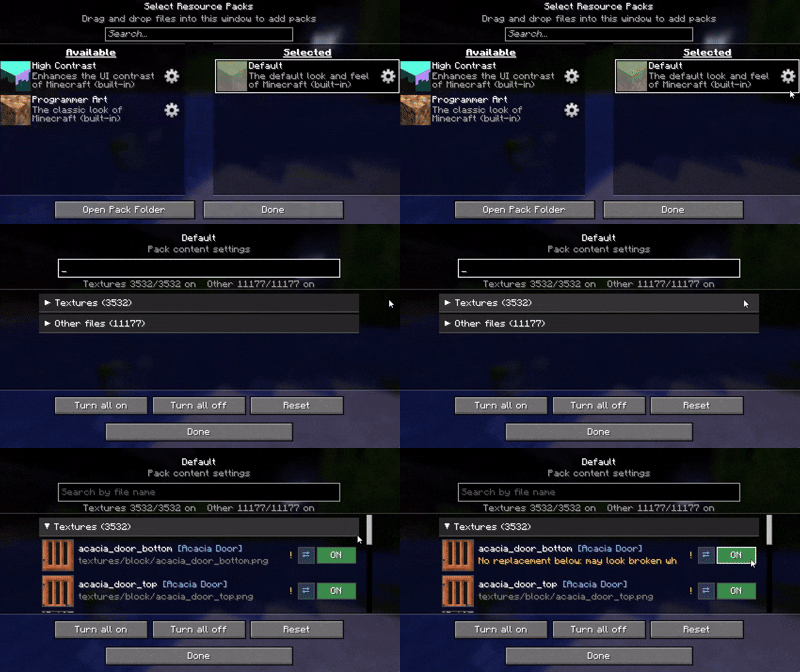
If possible, I recommend using a mod such as Remove Reloading Screen alongside it.
Features
- ⚙️ Gear button on every resource pack (available and selected lists alike)
- 🖼️ Per-file ON / OFF with a live thumbnail and the file name
- 🔎 Search by file name
- ⚠️ warnings — it reads how textures and JSON files reference each other, and only warns you when a change would actually break rendering (the purple-and-black missing texture)
- 🔗 Jump between related files, review all current warnings, and reset with a confirmation step
How it works
Disabling a file never modifies the pack. The mod hides that file so the game falls back to the pack below it (or vanilla). Changes apply on the next resource reload.
Language
Follows your game language automatically, with translations in English, 日本語, Deutsch, Français, Português, हिन्दी and 中文. Any other language falls back to English.
License
All Rights Reserved. Personal use and unmodified inclusion in modpacks (with credit and a link back) are allowed. Re-uploading elsewhere or distributing modified versions is not permitted.
Комментарии
Загружаем…