 Mineforgian
Resourceful
A texture pack utility for Better Than Adventure (A heavily modified version of beta 1.7.3) allows you to use multiple texture packs at the same time!
- Загрузки
- 1K
- Подписчики
- 3
- Обновлён
- 24 марта 2024 г.
- Лицензия
- CC0-1.0
Опубликован 22 февраля 2024 г.
This mod uses a modified version of Fabric (Babric) and is designed only for Better than Adventure, a heavily modified version of Minecraft b1.7.3!
For more information, join the discord server provided on this projects page.
About
Resourceful is a texture pack utility mod for BTA which allows you to use multiple texture packs at the same time, texturepacks are applied bottom to top meaning the highest packs in the list have the most priority.
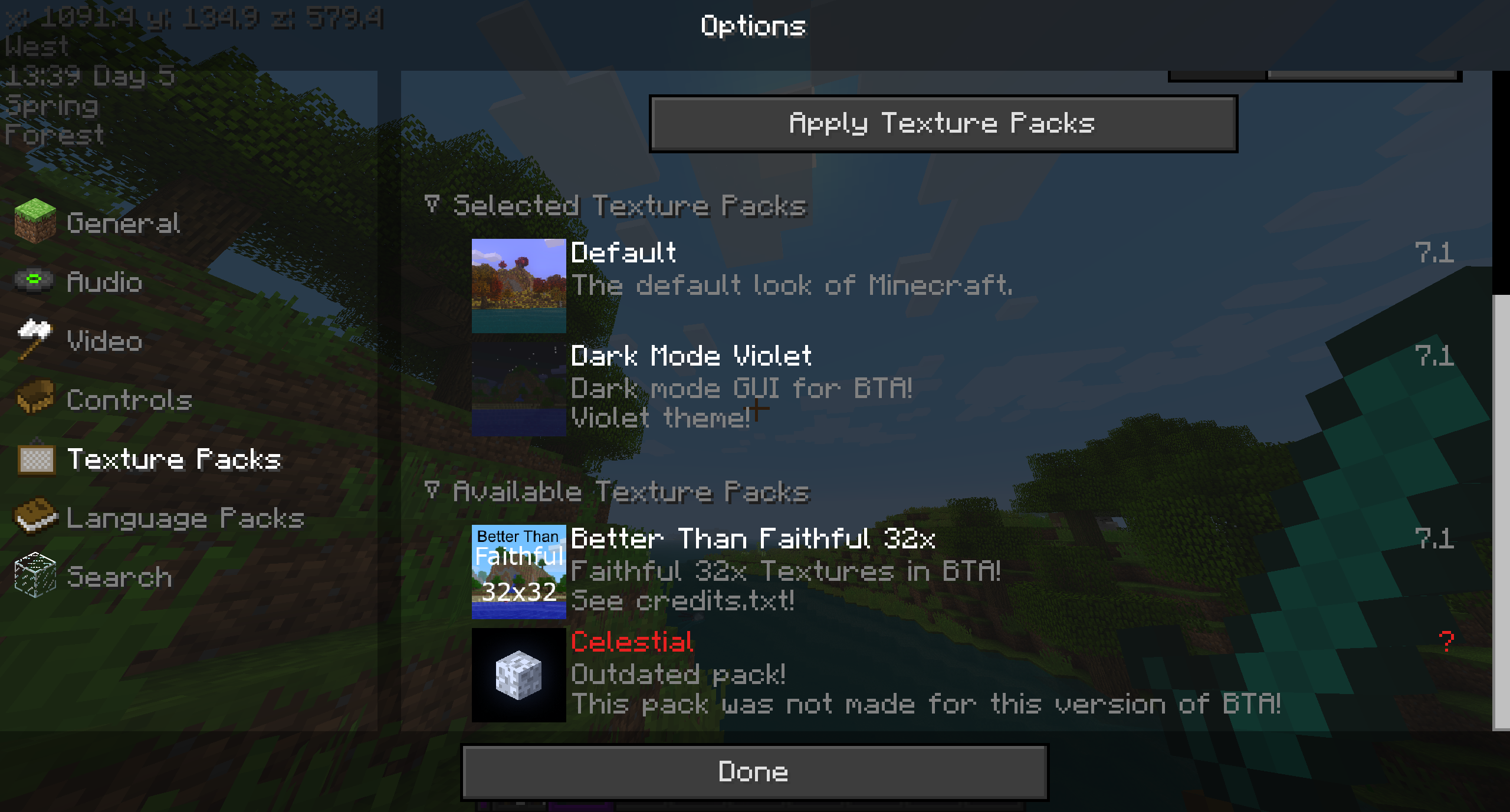
Usage
Resourceful should recognize any packs that BTA would normally recognize.
You can rearrage your pack list by clicking and dragging the texture pack buttons inside the selected packs list.
Installation
This mod needs a specific MultiMC/Prism instance to run and other mods as a dependencies not available here on Modrinth (yet):
Requires:
- HalpLibe by Turnip Labs
Credits
Resourceful is developed solely by Useless
Libraries used:
- Turnip Labs - halplibe
BTA Developers:
- jonkadelic
- maggandgeez
- nebulabc
- bestsoft100
- sunsetsatellite (Martin)
- useless
Babric (fork of Fabric for Beta Minecraft) Maintainers:
- calmilamsy
- 6pak
Special thanks:
- Better than Adventure Discord Server (biggest fork of b1.7.3 with many cool features)
- BTA Modding Discord Server (community of modding pioneers of this fork, because it was possible and nobody stopped us)
Ченджлог
1.3.0Релизb1.7.3 · 24 марта 2024 г.
Dependencies:
- BTA 7.1 Babric instance
- HalpLibe >= 3.4.17: (https://modrinth.com/mod/halplibe)
Changelog
- Updated to 7.1-pre2a
- Changed the GUI to fit in with the new options screen (which is identical to the one which will eventually be officially implemented)
1.2.0-7.1Релизb1.7.3 · 22 февраля 2024 г.
Dependencies:
- BTA 7.1 Babric instance
- HalpLibe >= 3.1.0: https://github.com/Turnip-Labs/bta-halplibe/releases
Changelog
- Better integrated pack management screen with the rest of the option pages
- Added sidebar to access the additional texturepack options
- Texture packs now only reload when you press the refresh button or leave the menu
- You can now shift click the move up or down button to move a pack to the top or bottom
Комментарии
Загружаем…