 Mineforgian
Reliable EMI (REMI)
A mod adding many configurable features to EMI!
- Загрузки
- 349K
- Подписчики
- 55
- Обновлён
- 19 августа 2026 г.
- Лицензия
- MIT
Опубликован 23 декабря 2025 г.
Reliable EMI



Reliable EMI (REMI) is an addon for EMI, adding a variety of useful features, improvements, and customization options to enhance your recipe viewing experience!
Features
REMI provides the following enhancements:
- Stack Grouping: Cleans up the EMI item list by grouping related items together (e.g., keeping all colored wools in one expandable entry).
- Creative Tabs in EMI: Displays vanilla and modded Creative Mode tabs directly in the EMI interface for easy
browsing.
- The appearance of the creative tabs change, dependent on the EMI theme (vanilla or modern).
- Works especially well with custom Recreative tabs!
- Custom Tag Pages (1.21+): Adds new EMI tag tabs for Item Tags, Block Tags, Fluid Tags, and Entity
Tags.
- Right-click spawn eggs to view entity tags, and search entity & fluid tags using
#tag_id.
- Right-click spawn eggs to view entity tags, and search entity & fluid tags using
Configuration
REMI offers extensive configuration options to tweak the interface to your needs. You can configure the mod via the in-game config screen with YACL installed or by editing the configuration file directly.
Customizing Stack Groups
You can define new custom stack groups or modify existing ones using standard JSON files.
REMI loads stack groups from the config/remi/stack_groups directory. For example, to create a custom group, create a
JSON file in config/remi/stack_groups/my_group.json.
JSON Structure:
| Field | Type | Description |
|---|---|---|
id |
String | A unique identifier (e.g., "mypack:currency"). |
name |
String (Optional) | A translation key or string for the group's name (e.g., "mypack.group.currency" or "Currency"). |
type |
String | Determines how the group is built. Can be "remi:group", "remi:tag", or "remi:regex". |
enabled |
Boolean (Optional) | Set to false to disable this group. |
priority |
Integer (Optional) | Controls match order when an item could belong to multiple groups. Higher values are checked first (default 0). |
contents |
List | (For remi:group) A list of items or tags to include. |
exclusions |
List | (For remi:group/remi:regex) Items to remove from the group (useful when using broad tags or regexes). |
regex |
String | (For remi:group/remi:regex) A regular expression pattern used to match item IDs dynamically. |
regexes |
List (Optional) | (For remi:group) Like regex, but accepts a list of multiple patterns. |
Example: Creating a shiny things group (standard list)
{
  "id": "mypack:shiny_things",
  "type": "remi:group",
  "contents": [
    "minecraft:diamond",
    "minecraft:emerald",
    "minecraft:gold_ingot",
    "#c:glass_blocks"
  ],
  "exclusions": [
    "minecraft:purple_stained_glass"
  ]
}
Example: Creating a group using Regex
You can use the "remi:regex" type to dynamically group items based on their naming patterns. The example below groups
all items that end in _sword (from any namespace):
{
  "id": "mypack:swords",
  "type": "remi:regex",
  "regex": ".*:.*_sword",
  "name": "Swords"
}
Virtual Objects (Fluids, Modifiers, etc.):
Reliable EMI also supports grouping non-item objects such as Fluids, JEED effects, etc. To do this,
prefix the entry with its EMI registry type using the format <type>:<namespace>:<path>.
Example: Creating a special group
{
  "id": "mypack:basic_fluids",
  "name": "mypack.stack_group.basic_fluids",
  "type": "remi:group",
  "contents": [
    "fluid:minecraft:water",
    "fluid:minecraft:lava",
    "jeed:effect:minecraft:speed"
  ]
}
Disabling Default Groups
All stack groups are easily togglable using the in-game config screen, in the Stack Groups category.
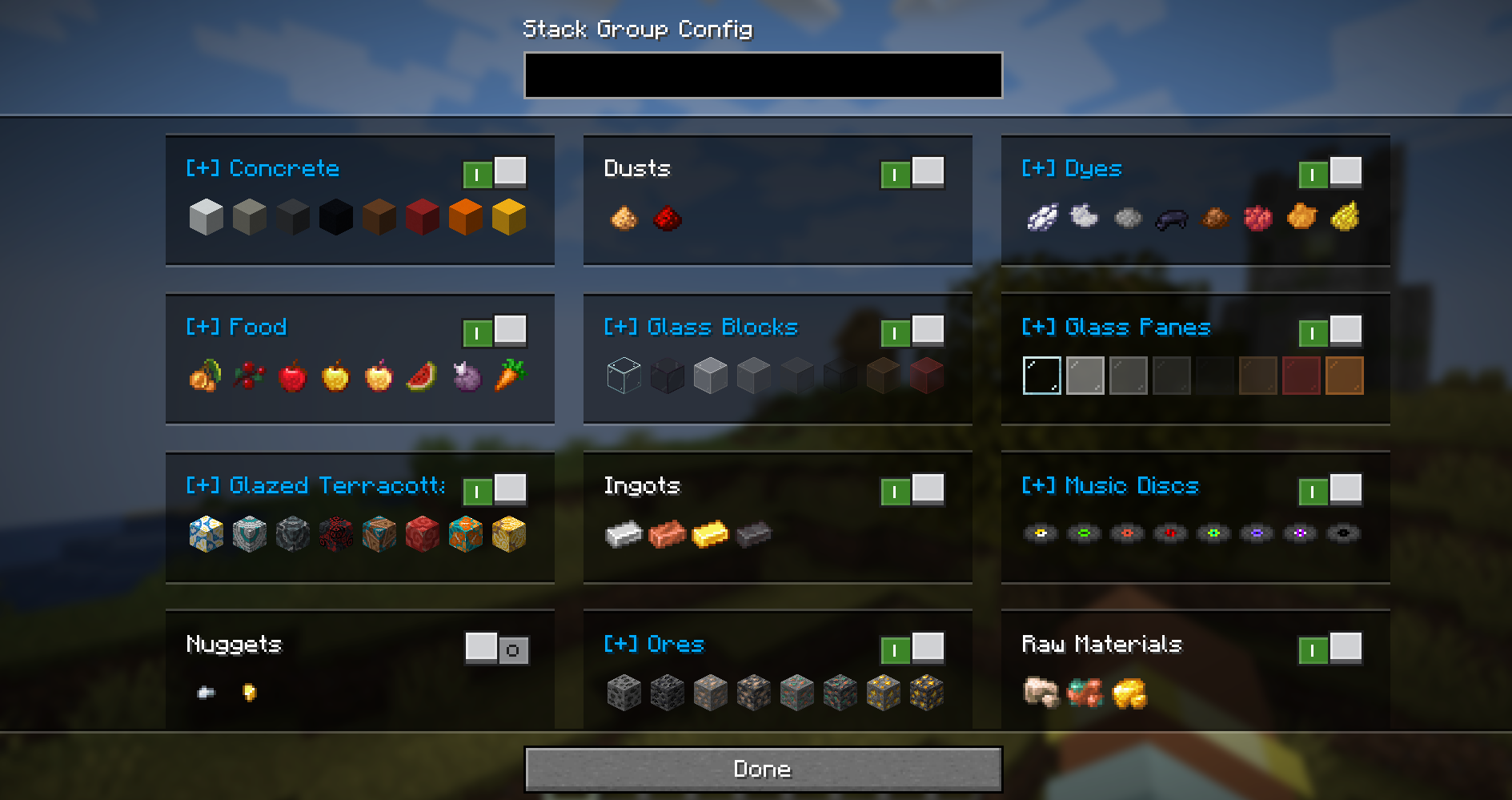
To disable a default stack group, you can also override its definition. Create a file with the same
path/ID as the default group and set "enabled": false.
Example: Disabling the spawn eggs group
File: config/remi/stack_groups/spawn_eggs.json
{
  "enabled": false
}
License

Ченджлог
4.6.2-1.21.1-fabricРелиз1.21.1 · 19 августа 2026 г.
Fixed
- Various small fixes (@Kobber).
4.6.2-1.21.1-neoforgeРелиз1.21.1 · 19 августа 2026 г.
Fixed
- Various small fixes (@Kobber).
4.6.1-1.21.1-fabricРелиз1.21.1 · 19 августа 2026 г.
Fixed
- Fixed divide by zero crash.
- Fixed search bar text being invisible on first open.
- Fix certain config options resetting.
4.6.1-1.21.1-neoforgeРелиз1.21.1 · 19 августа 2026 г.
Fixed
- Fixed divide by zero crash.
- Fixed search bar text being invisible on first open.
- Fix certain config options resetting.
4.6.0-1.21.1-fabricРелиз1.21.1 · 18 августа 2026 г.
Note for Resource Pack creators: Extensive changes have been made to tab textures, you will need to update your pack.
Changed
- Major rework of Creative Mode Tabs
- Creative Tabs are now set to either "Horizontal" or "Vertical" and both now have new textures for both the transparent/modern and vanilla theme.
- If all tabs are able to fit, the arrow buttons are now hidden to maximise available space.
- Added Tab Alignment config: Start/Middle/End or Stretch-To-Fit (Stretching is the new default).
- Added Tab Width/Height and Icon Size config: You can now fine tune the size of tabs. By default, icons are now 16px in both themes, the vertical tabs are a little smaller and the horizontal a little larger.
- Improved tab and button placement and alignment, now properly accounting for things like vertical scrollbars and hidden headers.
- Lots of small fixes and improvements.
- Minor tweaks to stack group textures.
Fixed
- Fixed 1px misalignment in vertical scrollbar position and updated textures to compensate.
- Fixed search bar width not accounting for vertical scrollbar.
4.6.0-1.21.1-neoforgeРелиз1.21.1 · 18 августа 2026 г.
Note for Resource Pack creators: Extensive changes have been made to tab textures, you will need to update your pack.
Changed
- Major rework of Creative Mode Tabs
- Creative Tabs are now set to either "Horizontal" or "Vertical" and both now have new textures for both the transparent/modern and vanilla theme.
- If all tabs are able to fit, the arrow buttons are now hidden to maximise available space.
- Added Tab Alignment config: Start/Middle/End or Stretch-To-Fit (Stretching is the new default).
- Added Tab Width/Height and Icon Size config: You can now fine tune the size of tabs. By default, icons are now 16px in both themes, the vertical tabs are a little smaller and the horizontal a little larger.
- Improved tab and button placement and alignment, now properly accounting for things like vertical scrollbars and hidden headers.
- Lots of small fixes and improvements.
- Minor tweaks to stack group textures.
Fixed
- Fixed 1px misalignment in vertical scrollbar position and updated textures to compensate.
- Fixed search bar width not accounting for vertical scrollbar.
4.5.2-1.21.1-neoforgeРелиз1.21.1 · 18 августа 2026 г.
Fixed
- Fixed scrollbar visibility not updating when switching tabs.
- Fixed sidebar centering calculations with searchbar under index enabled.
4.5.2-1.21.1-fabricРелиз1.21.1 · 18 августа 2026 г.
Fixed
- Fixed scrollbar visibility not updating when switching tabs.
- Fixed sidebar centering calculations with searchbar under index enabled.
Комментарии
Загружаем…