 Mineforgian
RC Vehicles
"Remote-control cars, Planes, Boats, and heli with a bindable remote and first-person camera"
- Загрузки
- 2K
- Подписчики
- 4
- Обновлён
- 27 августа 2026 г.
- Лицензия
- MIT
Опубликован 29 июня 2026 г.
🚗 RC Vehicles
Remote-control vehicles for Minecraft. Drive, sail and fly them yourself, control them from a distance with a handheld remote — or build your own from parts.
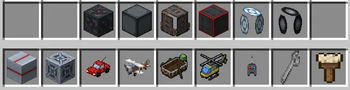
🔧 Build Your Own
Place part blocks — Controller, Engine, Wheel, Wing, Rotor, Pontoon, Seat, and Frame — then use the Wrench on the Controller to assemble them into a working vehicle. How you build it decides how it behaves:
- Rotor — hovers like a helicopter, up and down with your view
- Wing — flies like a plane: build up airspeed for lift, stall if you slow down
- Pontoon — floats on water
- Wheels — drives on land; more wheels turn sharper
- Engines — more engines, more speed
- Seat — required to ride, or control any build with the RC Remote
- Frames — structure and weight; bigger builds are heavier
When you assemble a vehicle it tells you how to fuel it up, so you're never left wondering why it won't move. Wrench the vehicle again to disassemble it and get every part back.
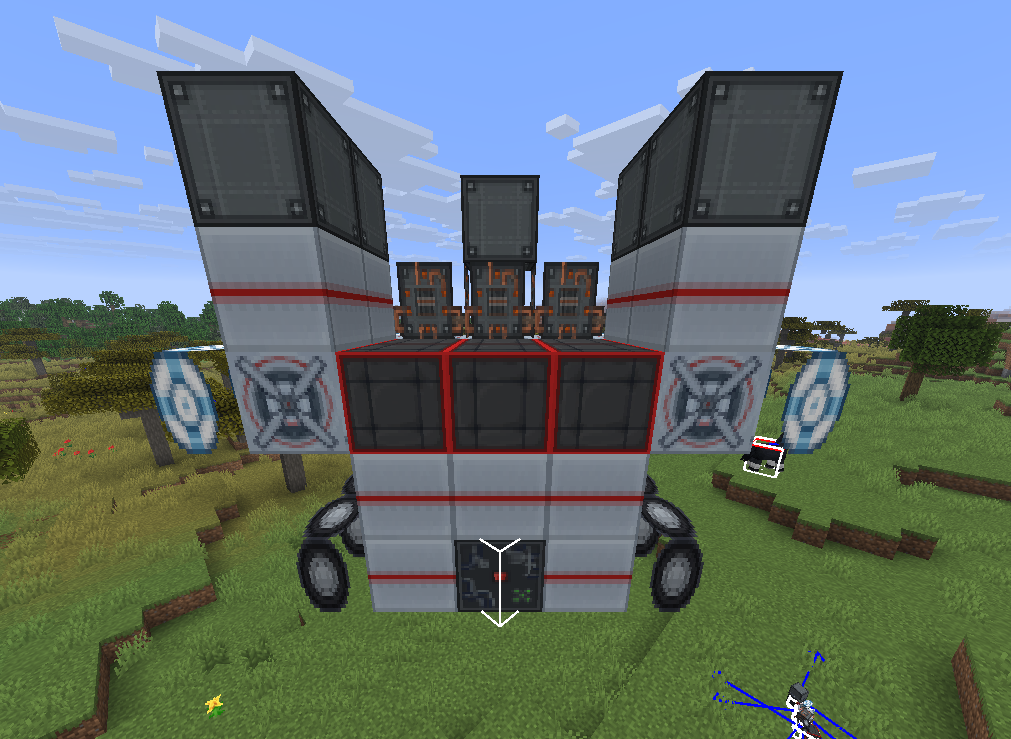
🏎️ Four Prebuilt Vehicles
Prefer to just drive? Four ready-made vehicles are included:
- RC Car — climbs blocks and handles rough terrain
- RC Boat — floats and cuts through water, and crawls if you beach it
- RC Plane — realistic flight: build up airspeed to stay airborne, and stall if you slow down too much
- RC Helicopter — hovers in place, takes off vertically, and rotates on the spot. No stall speed
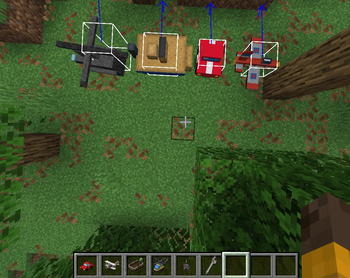
🎨 Paint & Customize
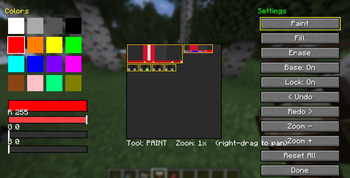
Make every vehicle yours. Craft a Paintbrush, right-click any vehicle, and design its look pixel by pixel in a full painter.
- Mix any color with RGB sliders, or grab one of 16 presets
- Paint, fill, and erase straight onto the vehicle's texture
- Undo and redo every change, zoom in for fine detail, and right-drag to pan around
- Part outlines mark out the body, cabin, wheels, and other sections so you know exactly what you're painting
- Toggle the base texture — paint over the original design, or start from a blank canvas
- Every design saves to that specific vehicle and is visible to everyone in multiplayer
Works on all five vehicles — car, plane, boat, helicopter, and your own assembled builds. The Paintbrush is craftable in survival and unlocked from the start.
📡 The Remote
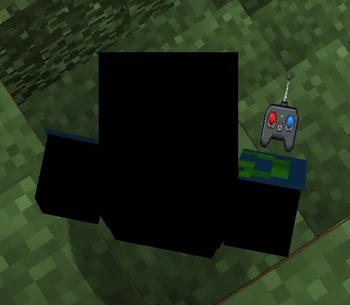
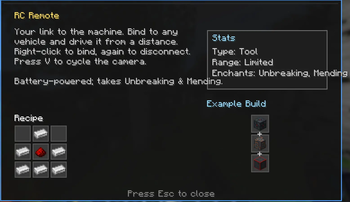
Craft an RC Remote, then right-click any vehicle to bind to it. Right-click it again to disconnect. Once bound, you control that vehicle from a distance.
Press V to cycle the camera: first-person from the vehicle, third-person behind it, then back to yourself.
The remote runs on a battery — its durability drains while you're driving, and it accepts Unbreaking and Mending.
Like a real RC, the remote has a limited range. Send a vehicle too far and you'll lose the signal.

📊 Info HUD
Press H to bring up an on-screen readout for the vehicle you're looking at — a quick tooltip showing its stats and status at a glance. Works on every vehicle, both the prebuilt ones and your own custom builds.
⛽ Fuel
Every vehicle runs on coal, charcoal, or blaze powder — right-click a vehicle with fuel to top it up. A newly built vehicle tells you to fuel it, warns you when it's running dry, and shows its fuel level each time you refuel.

🎮 Controls
- Right-click a vehicle with the remote — bind or disconnect
- W / S — throttle and brake
- A / D — turn
- Space / Shift — climb and dive (plane, helicopter, rotor builds)
- V — cycle camera
- H — show the info HUD
- Wrench a Controller to assemble, or a vehicle to disassemble
- Paintbrush a vehicle to customize its look
🛠️ Crafting
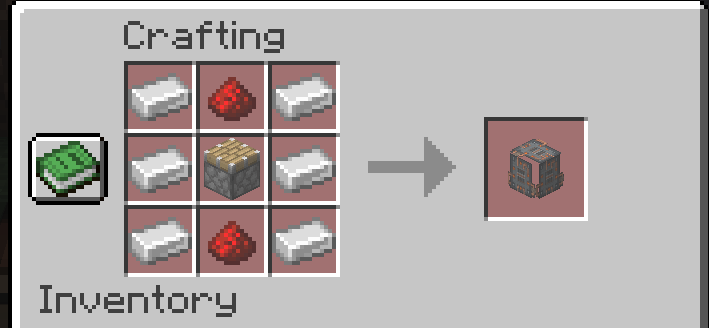
Every vehicle, every part, the remote, and the paintbrush are crafted from common survival materials — iron, redstone, and more — and all recipes unlock in your recipe book automatically.
✅ Requirements
- Fabric Loader + Fabric API
- Minecraft 1.21.4–1.21.11
- Required on both client and server
📺 Subscribe: MC_Infographic
Ченджлог
0.8.0.0+mc1.21.11Релиз1.21.11 · 27 августа 2026 г.
0.8.0 — Vehicle Painting
Every RC vehicle can now be painted and customized. Craft a paintbrush, right-click any vehicle, and design its look pixel by pixel.
New
- Paintbrush item — craftable in survival and unlocked from the start
- Full painter GUI with a color palette and custom RGB color mixing
- Paint, fill, and erase tools
- Undo and redo for every change
- Zoom and pan for detailed work — scroll to zoom, right-drag to pan
- Base texture toggle — paint over the original design, or on a blank canvas
- Part outlines guide you on cars, boats, and planes
- Works on all vehicles: car, plane, boat, helicopter, and assembled builds
- Paint saves per vehicle and syncs in multiplayer
Supports Minecraft 1.21.4 through 1.21.11.
0.7.1.0+mc1.21.11Релиз1.21.11 · 18 августа 2026 г.
RC Vehicles 0.7.1
Fixes
- Fixed the RC Plane, Boat, and Helicopter turning the wrong way under remote control — left now turns left## RC Vehicles 0.7.1
0.7.0+mc1.21.11Релиз1.21.11 · 10 августа 2026 г.
RC Vehicles 0.7.0 — Fuel Feedback & Full 1.21.4–1.21.11 Support
This release makes the fuel system clear and finishes multi-version support across Minecraft 1.21.4–1.21.11.
Fuel System — Now Clear Newly assembled vehicles now tell you exactly what they need:
- Assemble a vehicle and it announces itself with clear on-screen instructions to fuel it up
- Fuel any vehicle with coal, charcoal, or blaze powder to get it running
- A bright warning appears if you try to drive on an empty tank
- Refueling shows your current fuel level so you always know where you stand
Vehicle Fixes
- Fixed all four prebuilt vehicles (Car, Plane, Boat, Helicopter) facing the wrong direction — they now orient correctly
- Fixed assembled vehicles freezing or ignoring their parts right after building
- Smoother, more responsive steering on the RC Car — eased, speed-scaled turning with grip
Multi-Version Supports Minecraft 1.21.4 through 1.21.11 — download the jar matching your version.
0.6.0+mc1.21.11Релиз1.21.11 · 6 августа 2026 г.
RC Vehicles 6.0 — Full Release
First stable release, now with multi-version support across Minecraft 1.21.4–1.21.11.
Modular Build System
Build your own vehicles from part blocks. Place parts, then Wrench a controller to assemble them into a working vehicle:
- Wheels drive, wings fly, rotors hover, pontoons float
- Engines scale speed and fuel burn, seats enable riding, frames add structure
- Built vehicles render as the actual blocks you placed
- Disassemble anytime with the Wrench to recover your parts
Prebuilt Vehicles
Four craftable ready-to-go vehicles: RC Car, RC Plane (with climb/dive/stall physics), RC Boat, and RC Helicopter (hover control).
Controls
- Ride seated vehicles directly, or remote-control any vehicle with the RC Remote
- Toggleable FPV camera (first and third person) — see from the vehicle itself
Fuel & Survival
- Vehicles run on coal, charcoal, or blaze powder
- Every part, tool, and vehicle is fully craftable in survival
- Press H on any item for an in-game info screen with its recipe and build details
Multi-Version
Supports Minecraft 1.21.4 through 1.21.11 — download the jar matching your version.
0.5.0+mc1.21.11Бета1.21.11 · 4 августа 2026 г.
5.0.0 (MAJOR)
Added
- Build-your-own vehicles — place part blocks and use the Wrench on a Controller to assemble them into a working vehicle
- 8 part blocks — Controller, Engine, Wheel, Wing, Rotor, Pontoon, Seat, and Frame
- The Wrench — assemble a build by right-clicking the Controller; wrench the finished vehicle to take it apart and get every part back
- Parts decide behavior: Rotor hovers, Wing flies with plane-style lift, Pontoon floats, Wheels drive
- Engines scale top speed — more engines, more speed
- Wheels improve handling — more wheels turn sharper
- Seat is required to ride; seatless builds are remote-only
- Frames add weight — bigger builds are heavier and slower
- Built vehicles render as the actual blocks you assembled them from
- Full survival crafting recipes for every part and the Wrench, all unlocked in the recipe book automatically
Changed
- Part-based physics runs correctly whether you're riding or using the remote
- Vehicle mode and layout sync to the client so builds behave and render identically everywhere
The four prebuilt vehicles from 4.0 — RC Car, Boat, Plane, and Helicopter — are all still included.
0.4.0+mc1.21.11Альфа1.21.11 · 24 июля 2026 г.
0.4.0 (MAJOR)
Added
- RC Boat — floats and handles properly in water, sluggish on land
- RC Helicopter — true hover, vertical takeoff, rotates on the spot
- Remote battery: the RC Remote now has durability that drains while driving
- The remote accepts Unbreaking and Mending
- Camera now cycles first-person → third-person → off with V
- Right-clicking a bound vehicle with the remote disconnects it
Fixed
- Vehicles no longer appear to freeze at a distance (tracking range raised)
- Player movement now only locks while a remote is actually bound
- Boats can climb lily pads and low obstacles
- Camera reliably targets your bound vehicle instead of the nearest one
Changed
- Rewrote vehicle code onto a shared base — new vehicles are far easier to add
- Vehicles hold nearby chunks loaded while being driven
0.3.0+mc1.21.11Альфа1.21.11 · 23 июля 2026 г.
0.3.0
Fixed
- Vehicles no longer disappear when you reload the world
- Remote bindings now persist across restarts — no need to re-bind every session
Changed
- Cleaned up the remote binding message
0.2.0+mc1.21.11Альфа1.21.11 · 23 июля 2026 г.
0.2.0
Changed
- Cleaned up the remote binding message
- Version numbering now follows the standard format (mod version + Minecraft version)
Комментарии
Загружаем…