 Mineforgian
QuickHost
This mod adds a simple way to with your friends on your own world without any port forwarding with the power of UPnP
- Загрузки
- 4
- Подписчики
- 0
- Обновлён
- 23 июня 2026 г.
- Лицензия
- CTK-Minecraft-Creations
Опубликован 23 июня 2026 г.
QuickHost
This mod allows you to play with your friends without any port forwarding
--WHAT IS THIS MOD--
QuickHost is a mod, that makes playing with your friends easier by allowing your friends to connect to your world without any port forwarding or server! Simple and efficient
--FEATURES--
- Play with your friends in your world without any struggles
- Host Console (http://localhost:6767)
- Host config (See galery)
- Your friends can play without the mod!
--HOW--
Using the technologies of UPnP, the mod automatically port forwards your world to everyone, so your friends can play with you.
--WHY WOULD I EVER USE IT--
It is way easier & faster than doing port forwarding and setup work yourself.
--FAQ--
What is UPnP
UPnP is a service that is enabled on every router by default allowing applications like Discord to automatically open a port forwarding temporarely.
How do I host?
You open a singleplayer world, then press escape, then Host using UPnP
Is there a console?
Yes! Once you click the host using UPnP button in the pause menu, it will give you a link to your server console.
Is there any config?
Yes! In the pause menu, underneath the Host using UPnP button there is a Host Config button
How do my friends connect?
Go to localhost:6767 (your server console) and copy the IP + Port given and send it to them
Do my friends need the mod?
No! Not at all! They can just go into Multiplayer -> Add server and enter your ip as the server ip.
Are other mods supported?
Yes! Your friends need the same mods though or else they won't be able to connect.
HELP!! In the public IP text it says "unmapped"
Sadly, you have disabled UPnP in your settings router.
How do I enable UPnP?
Orange's Livebox Router
Example for Orange (Livebox) mobile:
1.Access your router at http://192.168.1.1
2.Login with your router password
Where to find the password?
On your livebox, there should be a sticker with a default password. If there is none, I am pretty sure you can reset it someway but I don't know how to.3.Go to Advanced Settings

4.Go to UPnP
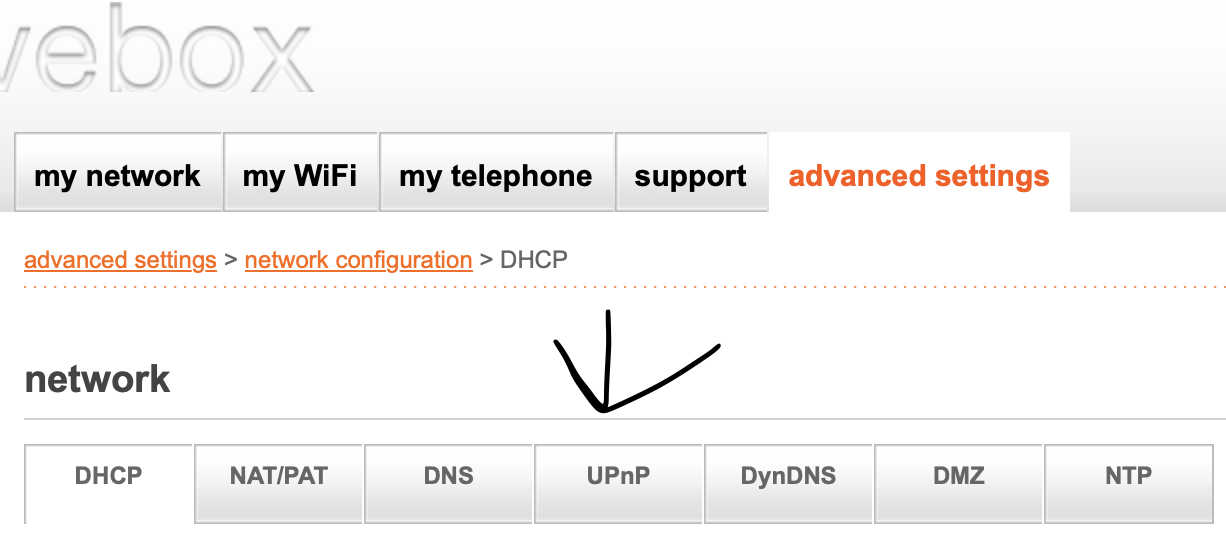
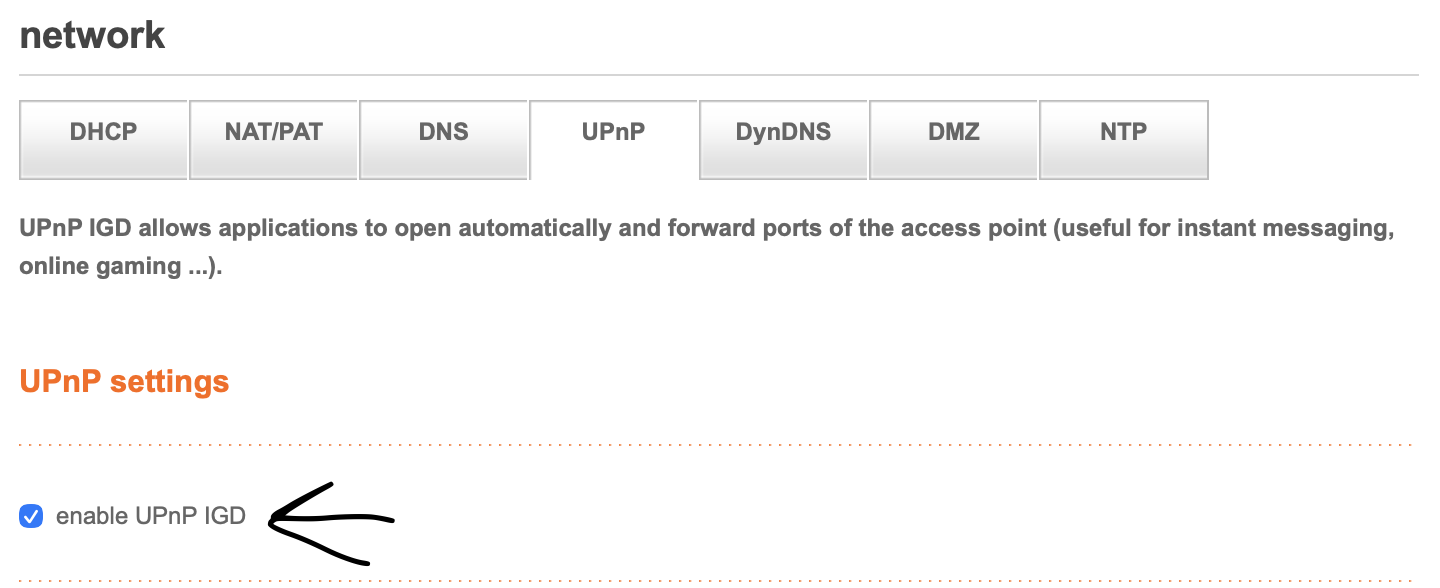
5.Enable UPnP
Ченджлог
1.0.0Релиз1.21.9, 1.21.10, 1.21.11 · 23 июня 2026 г.
Release
Комментарии
Загружаем…