 Mineforgian
PingNameTags
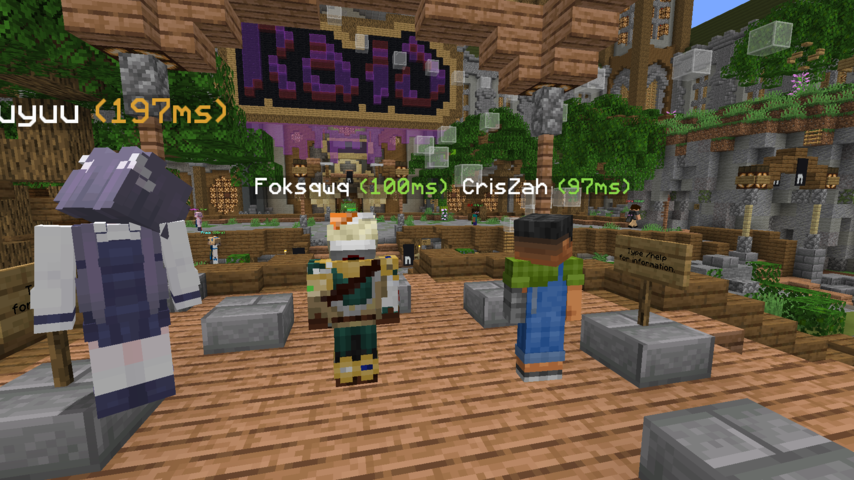
Adds colored ping inside player's nametag
- Загрузки
- 91K
- Подписчики
- 49
- Обновлён
- 11 апреля 2026 г.
- Лицензия
- MIT
Опубликован 30 мая 2024 г.
PingNameTags
Displays the ping next to player name tags ingame.
Numbers change colour based on ping
Configurable through Mod Menu
Requirements/Installation
Install the Fabric Loader:
- Download the Fabric Loader from the Fabric website.
- Run the Fabric Loader installer and follow the on-screen instructions to install it for your Minecraft version.
Install the Fabric API and Cloth Config API:
- Download the Fabric API and Cloth Config API
- Place the downloaded JAR file into your Minecraft
modsfolder (located in the.minecraftdirectory).
Configuration
The configuration can be edited in-game if Mod Menu is installed.
| Option | Type | Default Value | Description |
|---|---|---|---|
enabled |
boolean |
true |
Whether ping nametags are enabled or not. |
togglepingnametags |
Key |
G |
The key that toggles ping nametags on and off. |
pingTextPosition |
Left | Right |
Right |
The position of the ping text placed next to the name. |
pingTextFormatString |
String |
"(%dms)" |
The format string for ping text. Must include a %d, which will be replaced dynamically by the actual ping value. |
Demo

Ченджлог
26.1.1Релиз26.1.1, 26.1.2, 26.2 · 11 апреля 2026 г.
Added keybinding configuration to Config GUI
3.0.1Релиз1.21.9, 1.21.10, 1.21.11 · 11 октября 2025 г.
- support for
1.21.9through1.21.10
3.0.0Релиз1.21.6, 1.21.7, 1.21.8 · 11 октября 2025 г.
- support for
1.21.2through1.21.8
1.1.1Релиз1.20.6, 1.21, 1.21.1 · 16 августа 2024 г.
support 1.21.1
1.1.0Релиз1.20.5, 1.20.6, 1.21 · 12 августа 2024 г.
Updated to be compatible with some versions
Комментарии
Загружаем…