 Mineforgian
Perfect Messages (PM) — Convenient Message Management in Minecraft
Are you tired of /title? Want to make colorful notifications that stay in a message log, send cinematic dialogues, or create immersive NPC conversations?
With Perfect Messages (PM), you can do it all — easily and beautifully. Discord Channel visit the mod’s project page.
Features
🚀 Pop-Up Messages Display smooth, fading notifications with customizable text, colors, and duration. Supports all Minecraft color codes and HEX formatting.
🎨 HEX Color Support Use any custom color via:
&#RRGGBBExample:
&#FF5733Hello!🔢 Dynamic Placeholders
%player_name%— Player’s name%player_health%— Current health%player_xp%— XP level%item_in_hand%— Item in main hand
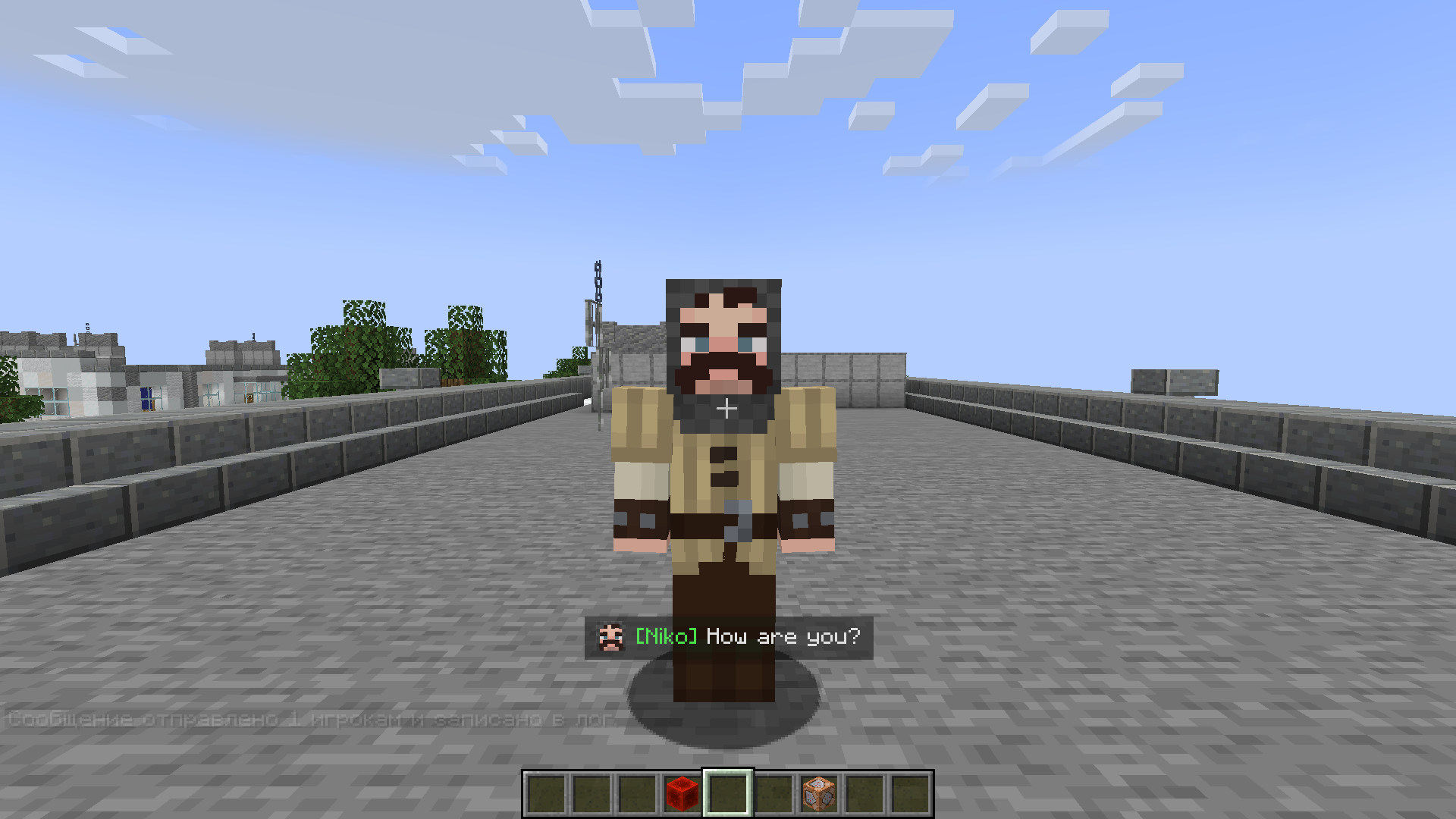
🖼️ Image Support Add icons or portraits to messages:
/perfectmessage @a "pic.png Hello, %player_name%!" 5 trueAll images are stored in
mods/pm/images/(created automatically). Images appear at the start of messages and align properly with multiline text.📝 Message Log View all previous messages in a smooth, scrollable message window. Perfect for quests, story mods, or chat-style dialogues.
🔍 Commands
/perfectmessage— Send a custom message with adjustable duration and optional logging/clearmessages— Clear all messages from the log
Example:
/perfectmessage @a "b50d4Welcome, %player_name%!" 10 true⌨️ Customizable Key Bindings Open or close the message log directly from in-game (default key:
N). The key can be changed in Options → Controls → PM: Toggle Message Log.🪄 Text Effects
&k— Obfuscated (glitched) text&r— Reset formatting**text**— Shaking text effect
How to Use
Send a Message
/perfectmessage @a "&#FF5733Hello, %player_name%!"Add an Image
/perfectmessage @a "pic.png &aYou found a treasure!" 5 trueOpen the Message Log Press N (or your chosen key) to view past messages.
Clear the Log
/clearmessages
Configuration
You can adjust:
- Whether logging is enabled
- Fade duration and transparency
- Maximum stored messages
- Visual effects like shaking or gradients
The config file is automatically created in your Forge config directory.
Installation
- Install Forge (Minecraft 1.19.2 or 1.20.1).
- Place the mod file into the
modsfolder. - Launch Minecraft — the folder
mods/pm/images/will be created automatically. - Configure your controls and enjoy stylish messages!
Compatibility
- Minecraft Versions: 1.19.2, 1.20.1
- Mod Loader: Forge
- Languages: English, Russian
For Modpack Creators
Perfect Messages is ideal for cinematic storytelling, quest systems, or interactive cutscenes. You can easily script dialogue sequences using command blocks, scripts, or datapacks.
💬 Example: NPC Dialogue Chain
/perfectmessage @a "npc.png &#ffc107Villager: &rHello, traveler!" 5 true
/perfectmessage @a "npc.png &#ffffffVillager: &rThe forest ahead is dangerous..." 5 true
/perfectmessage @a "npc.png &#ff0000Villager: &rBeware of the shadows!" 5 true
🪄 Example: Quest Reward Message
/perfectmessage @a "chest.png �ff00You received 50 gold and a new sword!" 5 true
🧙 Tip
Combine it with mods like KubeJS, Custom NPCs, or Quest Frameworks to create immersive stories with timed, animated dialogue.
Support & Feedback
If you encounter any issues or want to share ideas, join our Discord Channel or visit the mod’s project page.
Perfect Messages — Your Messages, Your Story.
Create cinematic notifications, immersive storytelling, and expressive communication in Minecraft with ease.
Ченджлог
1.0.4Релиз1.19.2 · 18 декабря 2025 г.
just small bugfix
1.0.4Релиз1.20.1 · 18 октября 2025 г.
🧩 Perfect Messages v1.0.4 — Visual Power & Smooth Control
✨ New Features
🖼️ Image Support in Messages You can now insert custom 128×128 images at the beginning of messages:
/perfectmessage @a "pic.png b50d4Hello, %player_name%!"▫️ Images are stored in
mods/pm/images/— the folder is automatically created on launch. ▫️ Works perfectly with multiline messages and aligns vertically.⌨️ Customizable Key Binding The message log window can now be toggled via Settings → Controls → PM: Toggle Message Log. Default key:
N(you can now freely change it — it works correctly).💬 Command Rename The main command is now:
/perfectmessage(replaces
/showmessagein previous versions)
⚙️ Improvements
- 🪶 Optimized message log rendering — significantly less FPS drop when many messages are shown.
- 🕓 Smoother fade in/out transitions for pop-up messages.
- 🌈 Better transparency balance for message backgrounds.
- 🧠 Improved placeholder parsing and color handling (
&,&#hex, gradients, and obfuscated text). - 📁 Automatic folder creation for
mods/pm/imageson first run.
🐛 Bug Fixes
- Fixed: Key binding always stuck to
Nand couldn’t be changed. - Fixed: Rare flicker on message disappearance.
- Fixed: Message duration overlapping from previous message timings.
- Fixed: Occasional texture reload issues for new image messages.
🧰 Technical Notes
- Works on Minecraft 1.19.2 and 1.20.1 (Forge).
- Full client-side sync for LAN multiplayer.
- Uses efficient texture caching and lazy loading for images.
❤️ Perfect Messages — Your Messages, Your Story.
Cinematic messages, smooth fades, and image-enhanced dialogues — now even better.
1.0.4Релиз1.19.2 · 18 октября 2025 г.
🧩 Perfect Messages v1.0.4 — Visual Power & Smooth Control
✨ New Features
🖼️ Image Support in Messages You can now insert custom 128×128 images at the beginning of messages:
/perfectmessage @a "pic.png b50d4Hello, %player_name%!"▫️ Images are stored in
mods/pm/images/— the folder is automatically created on launch. ▫️ Works perfectly with multiline messages and aligns vertically.⌨️ Customizable Key Binding The message log window can now be toggled via Settings → Controls → PM: Toggle Message Log. Default key:
N(you can now freely change it — it works correctly).💬 Command Rename The main command is now:
/perfectmessage(replaces
/showmessagein previous versions)
⚙️ Improvements
- 🪶 Optimized message log rendering — significantly less FPS drop when many messages are shown.
- 🕓 Smoother fade in/out transitions for pop-up messages.
- 🌈 Better transparency balance for message backgrounds.
- 🧠 Improved placeholder parsing and color handling (
&,&#hex, gradients, and obfuscated text). - 📁 Automatic folder creation for
mods/pm/imageson first run.
🐛 Bug Fixes
- Fixed: Key binding always stuck to
Nand couldn’t be changed. - Fixed: Rare flicker on message disappearance.
- Fixed: Message duration overlapping from previous message timings.
- Fixed: Occasional texture reload issues for new image messages.
🧰 Technical Notes
- Works on Minecraft 1.19.2 and 1.20.1 (Forge).
- Full client-side sync for LAN multiplayer.
- Uses efficient texture caching and lazy loading for images.
❤️ Perfect Messages — Your Messages, Your Story.
Cinematic messages, smooth fades, and image-enhanced dialogues — now even better.
1.0.3Релиз1.20.1 · 2 марта 2025 г.
PerfectMessages - Update & Usage Guide
Changelog
Latest Update (v1.0.3)
- New Placeholder Added:
%item_in_hand%- Displays the name of the item currently held in the player's main hand.
- Obfuscated Text Support:
- Use
&kto display obfuscated text with dynamic, randomized characters.
- Use
- Formatting Reset:
- Use
&rto reset text formatting and return to normal display.
- Use
- Bug Fixes:
- Various issues have been resolved to improve stability and performance.
How to Use
New Placeholder: %item_in_hand%
Simply include %item_in_hand% in your message to show the name of the item the player is holding. For example:
You are holding: %item_in_hand%
Obfuscated Text
Use &k in your messages to apply an obfuscated effect, making the text appear scrambled. For example:
&kSecret Message&r
The effect will be removed after using &r or by resetting the formatting.
General Usage
Combine placeholders and formatting codes to create dynamic messages. Example:
Hello, %player_name%! Your current item is: %item_in_hand%.
Support & Feedback
If you encounter any issues or have suggestions, feel free to report them on our project page or join our Discord Channel for feedback.
Enjoy the update!
1.0.3Релиз1.19.2 · 2 марта 2025 г.
PerfectMessages - Update & Usage Guide
Changelog
Latest Update (v1.0.3)
- New Placeholder Added:
%item_in_hand%- Displays the name of the item currently held in the player's main hand.
- Obfuscated Text Support:
- Use
&kto display obfuscated text with dynamic, randomized characters.
- Use
- Formatting Reset:
- Use
&rto reset text formatting and return to normal display.
- Use
- Bug Fixes:
- Various issues have been resolved to improve stability and performance.
How to Use
New Placeholder: %item_in_hand%
Simply include %item_in_hand% in your message to show the name of the item the player is holding. For example:
You are holding: %item_in_hand%
Obfuscated Text
Use &k in your messages to apply an obfuscated effect, making the text appear scrambled. For example:
&kSecret Message&r
The effect will be removed after using &r or by resetting the formatting.
General Usage
Combine placeholders and formatting codes to create dynamic messages. Example:
Hello, %player_name%! Your current item is: %item_in_hand%.
Support & Feedback
If you encounter any issues or have suggestions, feel free to report them on our project page or join our Discord Channel for feedback.
Enjoy the update!
1.0.2Релиз1.20.1 · 25 февраля 2025 г.
PerfectMessages - Update & Usage Guide
Changelog
Latest Update
- Added Hex Color Support: You can now use hex colors in messages.
- Added Placeholders: New placeholders are available for messages:
%player_name%- Displays the player's name.%player_health%- Shows the player's current health.%player_xp%- Displays the player's experience points.
- Bug Fixes: Fixed various issues to improve stability and performance.
How to Use
Hex Color Support
You can use hex colors in messages by formatting them as &#RRGGBB. Example:
&fHello &#FF5733World!
This will display: Hello (white) World! (orange-red)
Placeholders
Placeholders can be used in messages to display dynamic information about the player. Example usage:
Welcome, %player_name%! You have %player_health% health left.
If a player named Alex has 10 health, the message will display:
Welcome, Alex! You have 10 health left.
Support & Feedback
If you encounter any issues or have suggestions, feel free to report them on the project page and on Discord Chanel.
Enjoy the update!
1.0.2Релиз1.19.2 · 25 февраля 2025 г.
PerfectMessages - Update & Usage Guide
Changelog
Latest Update
- Added Hex Color Support: You can now use hex colors in messages.
- Added Placeholders: New placeholders are available for messages:
%player_name%- Displays the player's name.%player_health%- Shows the player's current health.%player_xp%- Displays the player's experience points.
- Bug Fixes: Fixed various issues to improve stability and performance.
How to Use
Hex Color Support
You can use hex colors in messages by formatting them as &#RRGGBB. Example:
&fHello &#FF5733World!
This will display: Hello (white) World! (orange-red)
Placeholders
Placeholders can be used in messages to display dynamic information about the player. Example usage:
Welcome, %player_name%! You have %player_health% health left.
If a player named Alex has 10 health, the message will display:
Welcome, Alex! You have 10 health left.
Support & Feedback
If you encounter any issues or have suggestions, feel free to report them on the project page and on Discord Chanel.
Enjoy the update!
1.0.1Релиз1.19.2 · 24 февраля 2025 г.
PerfectMessages 1.19.2!!
Комментарии
Загружаем…