 Mineforgian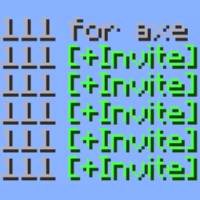
Party Inviter (mcpvp.club)
A customisable party inviter for mcpvp.club (and other servers :))
- Загрузки
- 94
- Подписчики
- 1
- Обновлён
- 10 июня 2026 г.
- Лицензия
- MIT
Опубликован 10 июня 2026 г.
MCPVP Party Inviter
Host a party by typing a number — everyone who replies with it becomes one click to invite.
Type 222 for axe, and the next players who type 222 in chat get a clickable [+Invite] on their message. Click it (or let it auto-invite) and they're in. No more squinting at chat and re-typing names.
How it works
- You host — send a message with a number and
for(e.g.222 for axe). - Joiners light up — anyone who then types
222gets their message highlighted with a clickable [+Invite]. - One click invites them — runs your invite command (
/p invite {player}by default). - Someone else claims it? If another player posts the same number with
for, your party hands off and your invites stop.
Features
- One-click invites — joiner messages become clickable; the whole line or a tidy
[+Invite]button. - Auto-invite mode — skip the click entirely. The first joiner is invited instantly, the rest are queued and released one per interval (default 700 ms) so you don't get muted for spam.
- Hand-off detection — if another host claims your number, your invites switch off automatically.
- Smart auto-stop — the party ends when you enter a match or switch sub-servers.
- Anti-spam aware — if the server blocks your host message ("sending too quickly", "too similar"), the party simply never starts.
- Fully configurable — color, underline, invite command, keywords, sounds, and more.
Config
Open it from Mod Menu → MCPVP Party Inviter, or with /pinv config. Every option is also settable via command and saved to config/partyinviter.json.
| Setting | Default | What it does |
|---|---|---|
inviteCommand |
/p invite {player} |
Command run on invite ({player} = name) |
autoInvite |
false |
Invite automatically, no click |
autoInviteCooldownMs |
700 |
Spacing between queued invites |
requireForToHost |
true |
Only host when your message has for |
stopPartyOnServerChange |
true |
End the party when you enter a match |
cancelPartyOnDeniedMessage |
true |
Don't start if the server blocks your message |
Commands
| Command | Description |
|---|---|
/pinv status |
Show current party and settings |
/pinv host <number> |
Start hosting a number manually |
/pinv clear |
Stop hosting |
/pinv set <key> <value> |
Change a setting |
/pinv config |
Open the config GUI |
/pinv test <text> |
Preview how a chat line is parsed |
it's vibe coded btw
Ченджлог
1.0.0Релиз26.1.1 · 10 июня 2026 г.
idk
1.0.0Релиз26.1.2 · 10 июня 2026 г.
initial
Комментарии
Загружаем…