 Mineforgian
OneBar
Everything you need to know to survive, in a single bar HUD!
- Загрузки
- 16K
- Подписчики
- 64
- Обновлён
- 29 июня 2026 г.
- Лицензия
- MPL-2.0
Опубликован 20 февраля 2021 г.
A sleek HUD mod for Minecraft: Java Edition using Fabric mod loader.
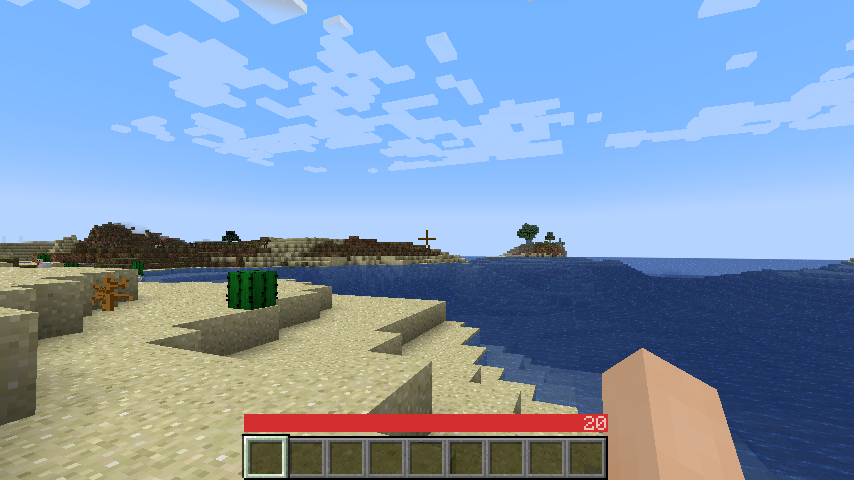
Reviews by Niche Duck: main mod (v1.2.2), config (v1.2.2). Mob arena gameplay with customized OneBar (v2.3.1) by agata_m
How it works
See the gallery for a tutorial image!
Tips:
- Every value and bar is displayed only when you need it.
- The positive effects, including health itself, are displayed left-to-right; negative effects are displayed right-to-left.
- If you get hungry, the hunger overlay is displayed over the health by its value.
- If you eat, you'll lose the overlay and the value, because you no longer need it.
- If you are also underwater, the water bar is displayed on top of health and hunger because it is the most important value in this case.
- Health is always the first number and hunger is almost always the last number (except when you have the hunger effect).
- Everything in between is an estimate, additional health or damage source (can be disabled).
- You can also enable "Show additional symbols" in options to get icons for those
- Remember old Minecraft without hunger and experience? This mod gives you a visually similar experience without losing modern functionality.

The mod only uses client-side data, so it is never needed on a server. There are also a lot of settings for configuring the colors and visibility of various elements.
Meanings of the colors and icons
Installation
- Install Minecraft 1.16 or later
- Install Fabric Loader
- Download OneBar, Fabric API, Mod Menu, Cloth Config API
- Place the JARs you downloaded to your Minecraft's mods folder
- Run the game!
Currently also works on Quilt, though no effort has yet been made to explicitly support it. See #21.
Mod compatibility
- Raised - moves OneBar and hotbar upwards, height of both can be adjusted
- Auto HUD - automatically shows and hides certain elements of OneBar as needed
- Exordium (beta) - improve HUD performance
- OneBar + MCC Island Compat (unofficial) - disables OneBar when you have no health bar on MCC Island
- Flour's Various Tweaks and Head-down display - partial compatibility for the auto-hide feature, does not hide OneBar elements
FAQ
Q: Why do I have to download Cloth Config API separately?
A: Because it's big, gets updated a lot and you probably have a mod or two that requires it anyway. If one of your mods already bundles it, you don't have to download it at all :)
Q: How do I edit the colors?
A: Click Esc -> Mods -> OneBar -> config button. Colors are formatted as opacity + RGB in HEX, so choose an opacity from this list and use any HEX color picker for choosing a color. For example if I want 80% opacity (CC) on blue (0000FF), I will enter #CC0000FF.
Q: Forge support?
A: No. Feel free to fork according to the license or check out my resource pack that inspired this.
Q: Backports?
A: No, latest is greatest.
Q: Snapshots?
A: Sometimes. If not published here, check GitHub Actions.
Ченджлог
5.2.2Релиз26.2 · 29 июня 2026 г.
Updated to 26.2
5.2.1Релиз26.1, 26.1.1, 26.1.2 · 27 марта 2026 г.
Ported to 26.1
5.2.0Релиз1.21.11 · 13 декабря 2025 г.
- Ported to 1.21.11
- Nautilus uses the same "dash bar" as the Camel
- Same goes for all other unknown mobs you may add by other mods
- Jump bar and dash bar distance estimations are now improved but also opt-in
- Because they still may not be accurate enough
- Added an indicator for Breath of the Nautilus effect
- Unlike Water Breathing and Conduit effect, this one only pauses the air, instead of slowly regenerating it
- Fixed Diamond and Netherite armor showing the same value on horses and nautili
5.1.3Релиз1.21.10 · 5 ноября 2025 г.
- Updated to 1.21.10
- Fixed Soul Fire detection on 1.21.10
- Migrated to Mojang mappings 🎉
5.1.2Релиз1.21.9, 1.21.10-rc1, 1.21.10 · 4 октября 2025 г.
Updated for 1.21.9/1.21.10-rc1
5.1.1Релиз1.21.6, 1.21.7, 1.21.8 · 30 июля 2025 г.
🔧 Mending indicator (opt-in)
Appears above XP level if you are holding item(s) that has durability <100% and mending enchantment, to show where your XP is going
🐞 Bugfixes
- Fixed crash when attempting to mount a sitting camel
- Fixed jump bar showing while on a boat
5.1.0Релиз1.21.6, 1.21.7, 1.21.8 · 4 июля 2025 г.
🛡️ Shield bars!
- Durability
- Similar to elytra bar, appears only when holding shield up
- Indicates durability of the shield
- Cooldown
- While you are raising the shield, it shows durability in a different color (to show it is not ready yet)
- If you got struck by an axe, it shows a cooldown bar
- Both are opt-in
🐞 Bugfixes
- Fixed location bar visibility logic in double mode
- Fixed boss bar moving logic in double mode
5.0.0Релиз1.21.6, 1.21.7 · 3 июля 2025 г.
🔍 Locator bar support!
- Two position options - above hotbar and above bossbar
- Can be turned off client side
- Does not auto-hide when collecting XP, etc.
- Optional 🔍 icon that is shown on OneBar when others can locate you
- "Mob heads" now shows
l🙂("locator") when you are wearing player, dragon or wither skeleton head- Only visible when locator bar is available as they are only effective against the locator bar
🔢 More useful numbers
- Raid Omen indicator now shows how many waves will you get
- Trial Omen indicator now shows how long the trial will last
- Mob heads indicator now indicates the minimum distance you can safely be from the mob (including sneaking and invisibility)
↕️ Compatibility mode → Double mode
- Now works by moving OneBar up and all vanilla HUD elements are displayed, hence the rename
- Reworked "adaptive tooltips" setting to work with it
- Fixed the bug in F3 TPS view staying up after F3 view is hidden
⚙️ Minor settings reorganization
- Compatibility option moved to main settings
- Saturation bar moved to "good things"
- Improved some setting names and tooltips
Works on 1.21.6 and 1.21.7.
Комментарии
Загружаем…