 Mineforgian
NeoSync
Inspired by the original Sync mod, NeoSync lets you clone yourself into shells each with its own inventory, XP, and gamemode and swap minds between them across time and space.
- Загрузки
- 2K
- Подписчики
- 6
- Обновлён
- 19 августа 2026 г.
- Лицензия
- MIT
Опубликован 22 апреля 2026 г.

NeoSync
One mind. Many bodies.
NeoSync brings the legendary Sync experience to NeoForge 1.21.1.
Grow extra bodies, or shells, each with its own inventory, experience level, and gamemode. Swap your consciousness between them at will. Die in a shell? You wake up in another. Leave one parked in the Nether while you mine the Overworld. Keep a spare set of enchanted gear loaded in a shell halfway across the server. The possibilities are yours.
How it works
- Craft a Shell Constructor and place it down.
- Provide a genetic sample — right-click with an empty hand.
⚠️ With default config this costs 20 HP (40 in hardcore). Hold a totem, eat a golden apple, or flip
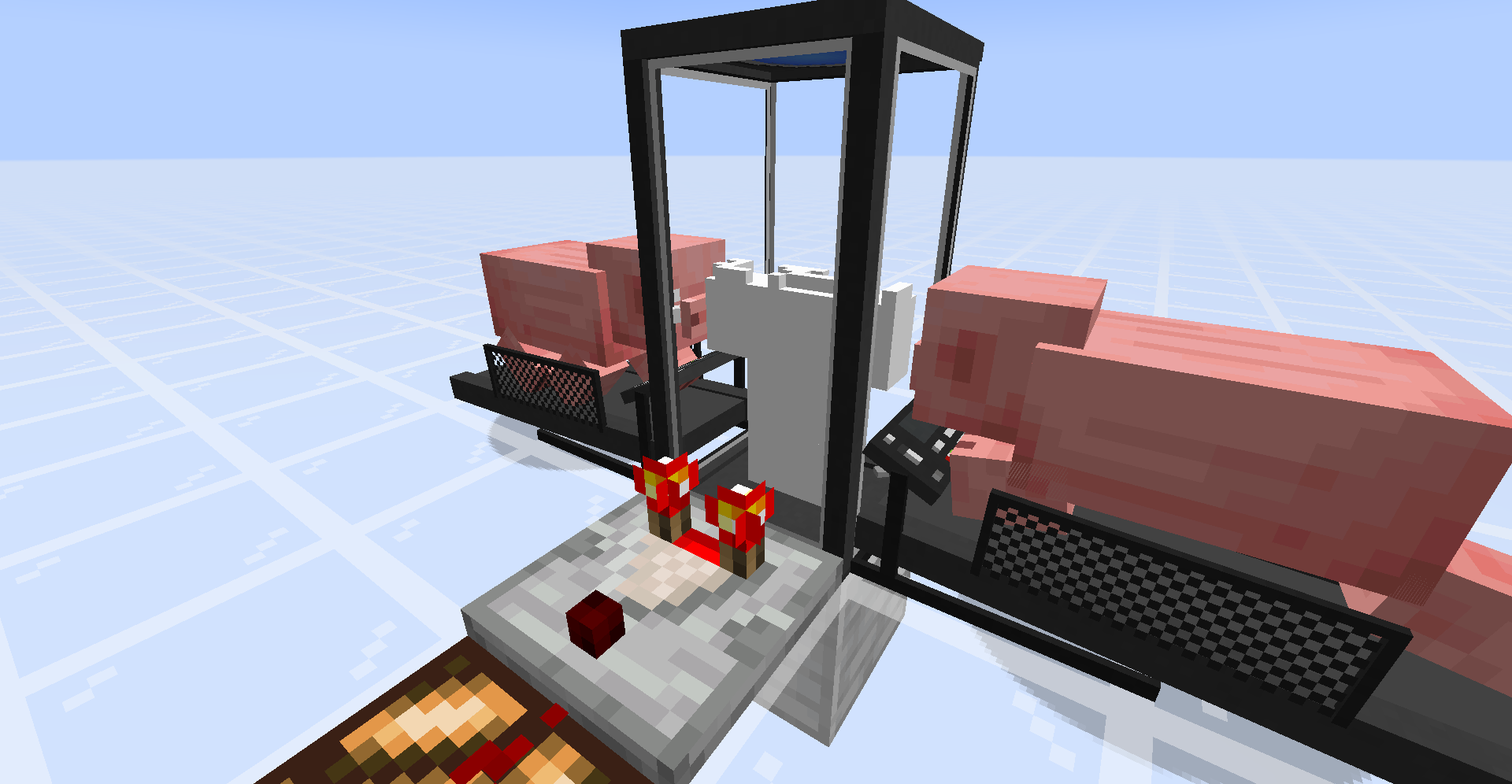
warnPlayerInsteadOfKillingin the config if you'd rather not die for science. - Power the Constructor. Place a Treadmill next to it, lure a pig or wolf onto the front block, and piggawatts flow. Or hook it up to any Forge Energy source from your favourite tech mod.
- Craft a Shell Storage, place it, and feed it redstone or FE.
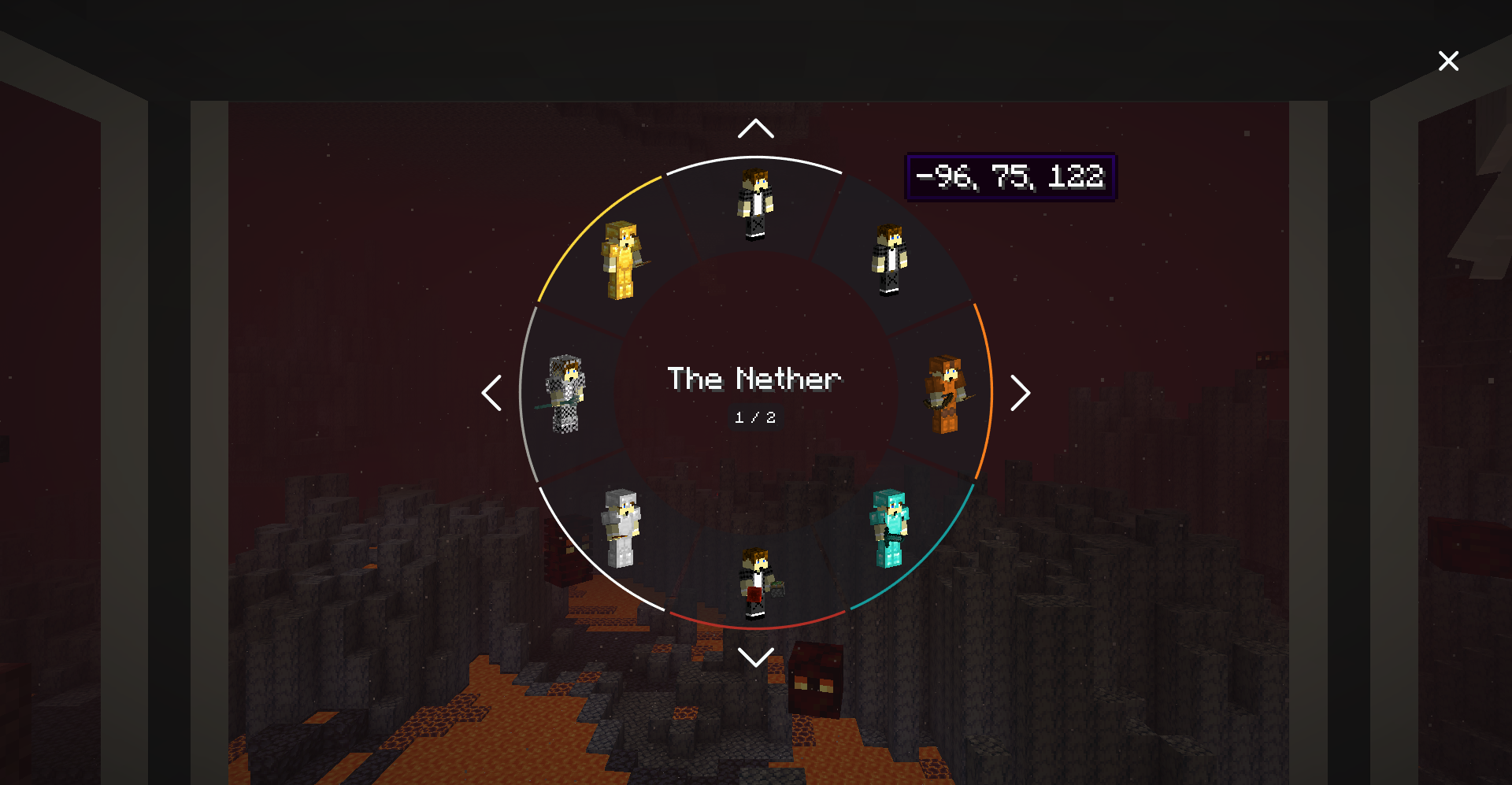
- Walk into an open Shell Storage and a radial shell menu appears — pick your destination body and sync.
Features
- Cross-dimensional syncing. Park shells in the Overworld, Nether, End, or any modded dimension and sync between them instantly.
- Per-shell inventory, XP, and gamemode. Each shell is a fully independent body with its own loadout and progression.
- Death handoff. If a shell dies, you auto-sync back to your original body or to a random remaining shell if the original is gone. Shell deaths don't count toward your death counter.
- Automation support. Pipe armor and tools into a Shell Storage to equip the parked shell, or pull gear back out.
- Dye your storages. Right-click a Shell Storage with dye to color-code it makes spotting "the mining shell" across a dozen containers easier.
- Configurable sync priority. On death, auto-sync to the
NATURAL,NEAREST, or dye-color-matched shell of your choice. - Flexible power. Shell Storages accept raw redstone signal and/or FE. Treadmills output FE to any energy-accepting block.
- Comparator output. Containers emit signal based on either build progress or inventory fullness — right-click with a wrench (stick by default) to toggle.
Blocks & Items
| Block / Item | Purpose |
|---|---|
| Shell Constructor | Consumes FE to grow a new shell from your genetic sample. |
| Shell Storage | Houses a shell; walking in opens the radial selector. Needs power to keep the shell alive. |
| Treadmill | Two-block structure. Lure an animal on; it walks; FE flows. |
| Sync Core | Key crafting ingredient — combine with gray concrete to make either shell container. |
Mod Integration
- JEI — in-depth info panels on every sync block explaining the workflow, plus a Treadmill Energy Sources category listing every supported entity and its FE/tick output.
- Jade — crosshair tooltips for Shell Constructors, Storages, and Treadmills showing owner, build progress, color, powered state, and energy.
Both are optional. NeoSync runs fine without them.
Configuration
Everything is tunable in config/neosync-common.toml. A taste of the knobs:
| Key | Default | Effect |
|---|---|---|
enableInstantShellConstruction |
false |
Instant shell builds in creative. |
warnPlayerInsteadOfKilling |
false |
Don't kill low-HP players on fingerstick. |
fingerstickDamage / hardcoreFingerstickDamage |
20 / 40 |
HP consumed per shell sample. |
shellConstructorCapacity |
256000 |
FE needed to finish a shell. |
shellStorageCapacity / shellStorageConsumption |
320 / 16 |
FE buffer + per-tick drain to keep a shell alive. |
shellStorageAcceptsRedstone |
true |
Accept raw redstone signal as power. |
shellStorageMaxUnpoweredLifespan |
20 |
Ticks a storage holds a shell without power. |
energyMap |
chicken=2, pig=16, player=20, wolf=22, villager=25, creeper=80, enderman=160 | FE/tick each entity generates on a treadmill. |
syncPriority |
NATURAL |
On-death auto-sync target: NATURAL, NEAREST, or any dye color. |
wrench |
minecraft:stick |
Item that toggles a container's comparator output. |
Credits & License
- Original concept: iChun — the original Sync mod.
- Fabric reimplementation: Kir_Antipov.
- NeoForge 1.21.1 port: BreakinBlocks.
Licensed under MIT. See the LICENSE file for details.
Ченджлог
1.21.1-1.6.1Релиз1.21.1 · 19 августа 2026 г.
NeoSync 1.6.1
Server operators get a new command. /neosync purge <players> [dimension] removes a player's shells completely, both their own record of them and the copies held in blocks. Any body still inside a block drops its inventory and experience where it stood. Leave the dimension off to clear every shell a player owns, and once they have none left they stop counting as artificial.
Syncing out of a body that was not sitting in a Shell Storage or Shell Constructor no longer errors on the server. The sync itself went through, but the shell list stopped updating and old entries stayed in the selector until you rejoined.
1.21.1-1.6.0Релиз1.21.1 · 18 августа 2026 г.
NeoSync 1.6.0
Radiation from Mekanism now belongs to the body instead of following you around. Sync into a fresh shell and you wake up clean. The body you leave behind in a shell storage keeps whatever dose it picked up, so syncing back into it gives you the radiation back rather than letting you wash it off by body hopping. Shells that come out of the constructor and bodies you respawn into from an anchor both start clean.
This only applies when Mekanism is installed. Nothing changes without it.
26.1.2-1.5.3Релиз26.1.2 · 15 августа 2026 г.
NeoSync 1.5.3
Shell Storage and Shell Constructor, including the Zero Point versions, no longer drop two items when you break them. Breaking the bottom half in creative no longer leaves a stray item behind either.
Breaking the bottom half of a shell container no longer leaves the top half floating. The two halves are linked again.
A sync that gets refused by another mod no longer half finishes. Before, you could end up still standing where you started with your items, a copy of that inventory sitting in the stored shell, and the shell you were syncing to gone. The sync now teleports first and only uses up the target shell once the teleport works. If it fails, your stored shell is put back and you get the usual failure message. This covers both normal syncs and ones that finish through death and respawn.
Syncing to a world that no longer exists now writes a warning to the log instead of failing with no trace.
For mod and pack authors, NeoSync can now tell you when a teleport is part of a sync, so mods that restrict dimension travel can let sync travel through instead of guessing.
1.21.1-1.5.3Релиз1.21.1 · 15 августа 2026 г.
NeoSync 1.5.3
Shell Storage and Shell Constructor, including the Zero Point versions, no longer drop two items when you break them. Breaking the bottom half in creative no longer leaves a stray item behind either.
A sync that gets refused by another mod no longer half finishes. Before, you could end up still standing where you started with your items, a copy of that inventory sitting in the stored shell, and the shell you were syncing to gone. The sync now teleports first and only uses up the target shell once the teleport works. If it fails, your stored shell is put back and you get the usual failure message. This covers both normal syncs and ones that finish through death and respawn.
Syncing to a world that no longer exists now writes a warning to the log instead of failing with no trace.
For mod and pack authors, NeoSync can now tell you when a teleport is part of a sync, so mods that restrict dimension travel can let sync travel through instead of guessing.
26.1.2-1.5.0Релиз26.1.2 · 14 августа 2026 г.
NeoSync 1.5.0
You can name your shells now. Open the shell menu, right click the shell you want to name, type a name and press Enter. Escape backs out without changing anything, and clearing the box puts the coordinates back.
Every slice of the menu shows its shell's name, so a wall of storages reads as Home, Mining Base and Nether Camp instead of a wall of numbers. Hover a slice and the middle of the dial shows the full name. Shells you have not named still show where they are, exactly as before.
Names stick with the shell. They save with the storage block and travel with respawn anchors, so they survive a relog and are there for everyone on a server.
Shell blocks can now be dyed. Sneak and right click a Shell Constructor or Shell Storage, regular or Zero Point, with any dye to color its trim, so different setups are easy to tell apart at a glance. Regular blocks start plain and Zero Point blocks keep their cyan trim until you dye them. Shells built or stored in a dyed block pick up that color in the shell menu, and dyeing the block they sit in later recolors them again.
Fixed a serialization issues with shell inventories
Also fixed in this release: /neosync anchor ensure now checks the dimension it is aimed at. It used to skip creating the anchor whenever the player owned a finished shell anywhere at all, so anyone who had synced even once could never be given an anchor in a new dimension, and pack scripts built on it fell back to plain teleports. It now skips only when the player already has a finished shell in that same dimension.
1.21.1-1.5.0Релиз1.21.1 · 13 августа 2026 г.
NeoSync 1.5.0
You can name your shells now. Open the shell menu, right click the shell you want to name, type a name and press Enter. Escape backs out without changing anything, and clearing the box puts the coordinates back.
Every part of the menu shows its shell's name, so a wall of storages reads as Home, Mining Base and Nether Camp instead of a wall of numbers. Shells you have not named still show where they are, exactly as before.
Names stick with the shell. They save with the storage block and travel with respawn anchors, so they survive a relog and are there for everyone on a server.
Shell blocks can now be dyed. Sneak and right click a Shell Constructor or Shell Storage, regular or Zero Point, with any dye to color its trim, so different setups are easy to tell apart at a glance. Regular blocks start plain and Zero Point blocks keep their cyan trim until you dye them. Shells built or stored in a dyed block pick up that color in the shell menu, and dyeing the block they sit in later recolors them again.
Fixed a serialization issues with shell inventories
Also fixed in this release: /neosync anchor ensure now checks the dimension it is aimed at. It used to skip creating the anchor whenever the player owned a finished shell anywhere at all, so anyone who had synced even once could never be given an anchor in a new dimension, and pack scripts built on it fell back to plain teleports. It now skips only when the player already has a finished shell in that same dimension.
26.1.2-1.4.4Релиз26.1.2 · 12 августа 2026 г.
NeoSync 1.4.4
Shells saved by an older build load again. A shell written before a field was added to the save format could turn players away at the door with "Invalid player data" and fail to load shell storages and constructors placed in the world. Anything an older shell was saved without now falls back to a sensible value, and the shell is written out complete the next time it saves.
1.21.1-1.4.4Релиз1.21.1 · 12 августа 2026 г.
NeoSync 1.4.4
Shells made before 1.4.0 load again. They were saved without the details that airship support later added, and a world carried forward from an older version would turn players away at the door with "Invalid player data" and fail to load shell storages and constructors placed in the world. Anything an older shell was saved without now falls back to a sensible value, and the shell is written out complete the next time it saves.
Комментарии
Загружаем…