 Mineforgian
Music Interface
A modern in-game music player for Minecraft with playlists, favorites, album covers and full control over custom music libraries.
- Загрузки
- 11K
- Подписчики
- 8
- Обновлён
- 19 августа 2026 г.
- Лицензия
- All-Rights-Reserved
Опубликован 20 марта 2026 г.
Music Interface
Music Interface is a modern in-game music player for Minecraft that lets players manage custom music in a clean, immersive interface.
Browse tracks, view covers, create playlists, mark favorites, and control your music without leaving the game.
Features
- Modern in-game music player
- Open the GUI with
Kby default - Quick access from the title screen and pause menu
- Custom music library support
- Album cover display
- Search system
- Favorites
- Playlists
- Random and ordered playback
- Playback history
- Grid and list views
- Configurable Now Playing toast
- Advanced playback settings
- Vanilla music compatibility options
- Track disabling and filtering
- Uses Minecraft's native Music volume slider
- Template pack generation for custom music packs
- Cobblemon-friendly support
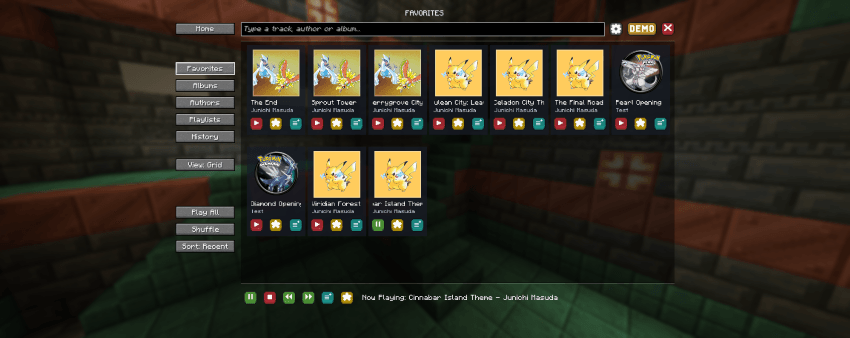
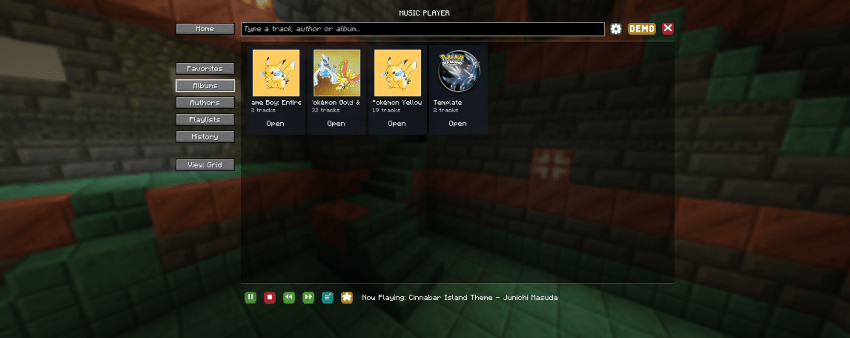
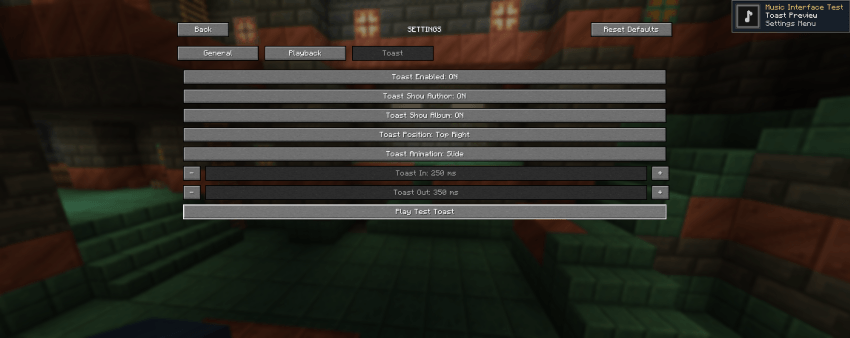
Custom Music Support
Music Interface lets players and modpack creators build fully custom music libraries for Minecraft.
Supported content includes:
- Audio files
- Album covers
- Track title
- Artist name
- Album name
The mod also includes a template system to help create and organize custom music packs more easily.
Feedback
Feedback, suggestions, and bug reports are welcome.
Discord: Our Story Network
Patreon: Our Story Collection
License
This mod may be used freely in public or private modpacks.
You may also create and distribute resource packs, music packs, or other content made for Music Interface.
Please do not reupload the mod itself or claim the project as your own. When possible, link to the official project page.
Ченджлог
1.9Релиз1.21.1 · 19 августа 2026 г.
Music Interface v1.9
New
- Added a title-screen track setting to reserve one specific song for the menu and exclude it from in-world autoplay
- Added resource-pack diagnostics with
/musicinterface diagnosticsand/musicinterface_diagnostics
Changes
- Leaving the title-screen track empty now disables custom music autoplay in menus
- Improved diagnostics for missing covers, sound events, duplicate IDs, pack counts, and loaded tracks
Fixes
- Fixed multiple music resource packs not being merged correctly
- Fixed higher-priority packs not reliably overriding duplicate track IDs
- Fixed malformed
music_data.jsonfiles preventing other active packs from loading - Fixed misleading missing audio warnings when sound events used a different OGG path
- Fixed resource reloads potentially retaining outdated track definitions Music Interface v1.9
1.9Релиз1.21.1 · 19 августа 2026 г.
Music Interface v1.9
New
- Added a title-screen track setting to reserve one specific song for the menu and exclude it from in-world autoplay
- Added resource-pack diagnostics with
/musicinterface diagnosticsand/musicinterface_diagnostics
Changes
- Leaving the title-screen track empty now disables custom music autoplay in menus
- Improved diagnostics for missing covers, sound events, duplicate IDs, pack counts, and loaded tracks
Fixes
- Fixed multiple music resource packs not being merged correctly
- Fixed higher-priority packs not reliably overriding duplicate track IDs
- Fixed malformed
music_data.jsonfiles preventing other active packs from loading - Fixed misleading missing audio warnings when sound events used a different OGG path
- Fixed resource reloads potentially retaining outdated track definitions
1.8Релиз1.21.1 · 15 августа 2026 г.
Music Interface v1.8
New
- Added CobbleSafari music compatibility, automatically suspending Music Interface whenever CobbleSafari is playing its own music.
- Added a CobbleSafari music status in Music Interface while external Safari music is active.
- Music Interface playback controls are now temporarily locked during CobbleSafari music, preventing Next, Previous, Play/Pause, playlists, and automatic playback from starting another track.
- Music Interface automatically returns to normal playback behavior once CobbleSafari finishes playing music.
1.8Релиз1.21.1 · 15 августа 2026 г.
Music Interface v1.8
New
- Added CobbleSafari music compatibility, automatically suspending Music Interface whenever CobbleSafari is playing its own music.
- Added a CobbleSafari music status in Music Interface while external Safari music is active.
- Music Interface playback controls are now temporarily locked during CobbleSafari music, preventing Next, Previous, Play/Pause, playlists, and automatic playback from starting another track.
- Music Interface automatically returns to normal playback behavior once CobbleSafari finishes playing music.
1.7Релиз1.21.1 · 11 августа 2026 г.
Music Interface v1.7
New
- Added configurable Stop and Play / Pause controls:
- HOME: Stop music
- END: Play / Pause music
- Added real per-track pause and resume that preserves the current playback position.
- Added action bar feedback for music stopped, paused, and resumed.
Fixes
- Fixed resource-pack track overrides so the highest-priority pack correctly replaces duplicate track IDs.
- Fixed Strict Exclusive Music so disabling it no longer blocks Music Interface music because another music source is active.
- Fixed paused tracks incorrectly allowing autoplay, playlist progression, or replacement music to start.
1.7Релиз1.21.1 · 11 августа 2026 г.
Music Interface v1.7
New
- Added configurable Stop and Play / Pause controls:
- HOME: Stop music
- END: Play / Pause music
- Added real per-track pause and resume that preserves the current playback position.
- Added action bar feedback for music stopped, paused, and resumed.
Fixes
- Fixed resource-pack track overrides so the highest-priority pack correctly replaces duplicate track IDs.
- Fixed Strict Exclusive Music so disabling it no longer blocks Music Interface music because another music source is active.
- Fixed paused tracks incorrectly allowing autoplay, playlist progression, or replacement music to start.
1.6Релиз1.21.1 · 27 июля 2026 г.
Music Interface v1.6
New
- Added Cloth Config support for in-game settings
- Added Page Down for next track and Page Up for previous track
- Added Stop music on death
- Added playlist import/export with share codes
- Added playlist sharing in chat with clickable import
- Added resource pack incomplete warnings
- Added Open resourcepacks folder chat action
- Added smoother Music Interface actionbar overlay with fade-in and fade-out
Changes
- Settings are now managed by Cloth Config when installed
- Without Cloth Config, settings must be edited manually in
config/musicinterface/config.json - Improved settings categories with clearer labels and tooltips
- Improved template pack generation so existing files are not overwritten
- Improved template generation chat messages with clearer actions
- Improved music control messages with track names and better styling
- Improved menu button placement for better mod compatibility
- Restricted NeoForge compatibility to Minecraft 1.21.1
Fixes
- Fixed Reset to defaults using a different max delay than new configs
- Fixed GUI scale 4 now-playing text overlapping playback buttons
- Fixed server risk from oversized or malformed track sync packets
- Fixed synced track data not being cleaned after player disconnects
- Fixed JSON saves to reduce risk of corrupted configs, playlists, favorites, and disabled tracks
- Fixed recovery behavior for invalid or corrupted JSON files
- Fixed Cobblemon integration staying optional and safer when its API is absent or incompatible
- Fixed resource pack template wording that implied existing files would be updated
- Fixed crash risk from malformed client network data
Removed
- Removed the built-in Music Interface settings screen
- Removed leftover Fabric example classes
1.6Релиз1.21.1 · 27 июля 2026 г.
Music Interface v1.6
New
- Added Cloth Config support for in-game settings
- Added Page Down for next track and Page Up for previous track
- Added Stop music on death
- Added playlist import/export with share codes
- Added playlist sharing in chat with clickable import
- Added resource pack incomplete warnings
- Added Open resourcepacks folder chat action
- Added smoother Music Interface actionbar overlay with fade-in and fade-out
Changes
- Settings are now managed by Cloth Config when installed
- Without Cloth Config, settings must be edited manually in
config/musicinterface/config.json - Improved settings categories with clearer labels and tooltips
- Improved template pack generation so existing files are not overwritten
- Improved template generation chat messages with clearer actions
- Improved music control messages with track names and better styling
- Improved menu button placement for better mod compatibility
- Restricted NeoForge compatibility to Minecraft 1.21.1
Fixes
- Fixed Reset to defaults using a different max delay than new configs
- Fixed GUI scale 4 now-playing text overlapping playback buttons
- Fixed server risk from oversized or malformed track sync packets
- Fixed synced track data not being cleaned after player disconnects
- Fixed JSON saves to reduce risk of corrupted configs, playlists, favorites, and disabled tracks
- Fixed recovery behavior for invalid or corrupted JSON files
- Fixed Cobblemon integration staying optional and safer when its API is absent or incompatible
- Fixed resource pack template wording that implied existing files would be updated
- Fixed crash risk from malformed client network data
Removed
- Removed the built-in Music Interface settings screen
- Removed leftover Fabric example classes
Комментарии
Загружаем…