 Mineforgian
Music Control
Take control of Minecraft music!
- Загрузки
- 440K
- Подписчики
- 297
- Обновлён
- 6 октября 2025 г.
- Лицензия
- MIT
Опубликован 25 мая 2023 г.



NO PORT TO FORGE PLANNED! (but feel free to port it by yourself and link it)
The mod is fully configurable to enable only changes that you like
Description
This mod allows you to take full control of Minecraft music. If you ever felt like you had to wait too much time between music, or if you ever wanted to skip a music, this mod is made for you.
And it doesn't stop here! You can switch music player mode to play music as before, discs only, resource pack/modded music only, or any music of the game. You may also replay a music, display its name, and even change music volume directly with keybinds.
Last but not least, you can completely customize which music plays when with a new GUI. In this music panel, you can select any music or sound event to play it. You can also configure for each music, in which sound events it can be played, and vice versa. New events are added for each biomes, dimensions, and even some miscellaneous ones.
This is a short description, full description below.
FAQ
Do I need it on my server? No. This mod is client side, so you shouldn't put it on your server
Can I include it in my modpack? Yes, you are free to include this mod into your modpack
For any other things: Feel free to share your experience, problems, enhancement ideas in the Discord server, or directly creating issues on the GitHub
Full description
Commands
Keybinding
Music panel: Open the music panel. M key
Previous/next music: Play the previous/next music. LEFT/RIGHT ARROW keys
Volume up/down: Increase/Decrease music category volume. UP/DOWN ARROW keys
Pause/resume music: Pause or resume music. RIGHT SHIFT key
Previous/next music category: Change the current music category and play a music from this category. PAGE UP/DOWN keys
Display music: Display the name of the music currently playing. RIGHT CTRL key
Loop: Enable/Disable loop over the same music. unassigned key
Note that you can change the keybinds at any moment in Minecraft control options.
Resourcepacks
If you want Minecraft to play other custom music, you can do this via resource packs. For this, nothing hard: just follow the instructions described there.
An example resourcepack can be found here.
Music category
Default music player mode is vanilla, which depends on events triggered by biome or location. You can change mode with keybinds and also configure the mod to be by default on another category when launching the game.
- default: Minecraft default behavior, playing a music depending on sound events like biomes or under water
- disc: Minecraft music discs, also detecting custom discs from mods
- all: any music playable in Minecraft, including resource packs and mods' ones
- namespace: for each mod and resource pack adding custom music to the game, there will be a new category created with their own music
Music panel
Play
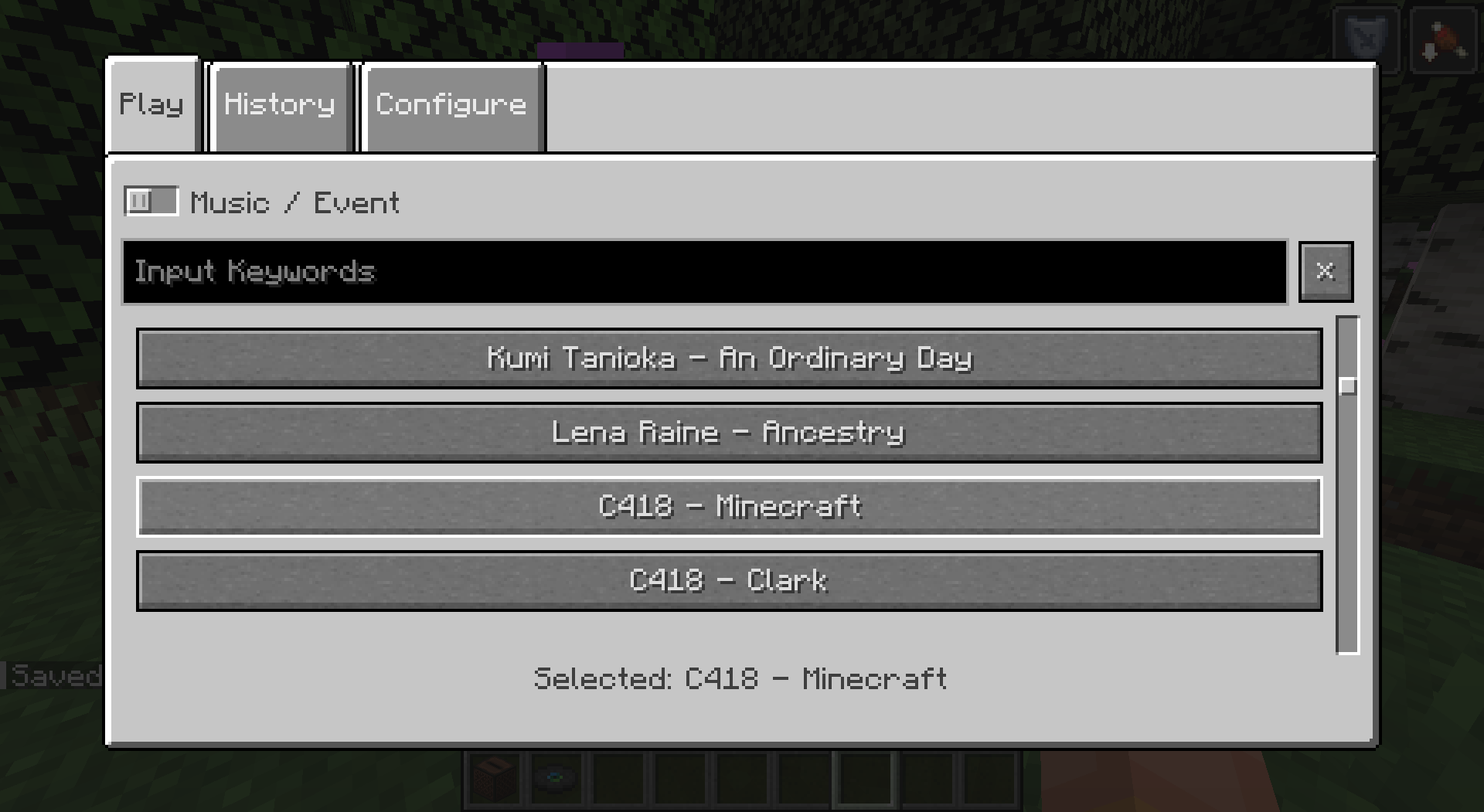
In the Play tab, you can select any music or sound event and it will be played when closing the panel. Sound events may contain several music, so selecting a sound event will randomly pick one in its list.
History
You can keep track of the last music that were played in this tab. Music in history won't be picked again randomly, unless every music of the current sound event are in, or if you select one manually. Number of music to be kept in history is configurable.
Configure
Overview
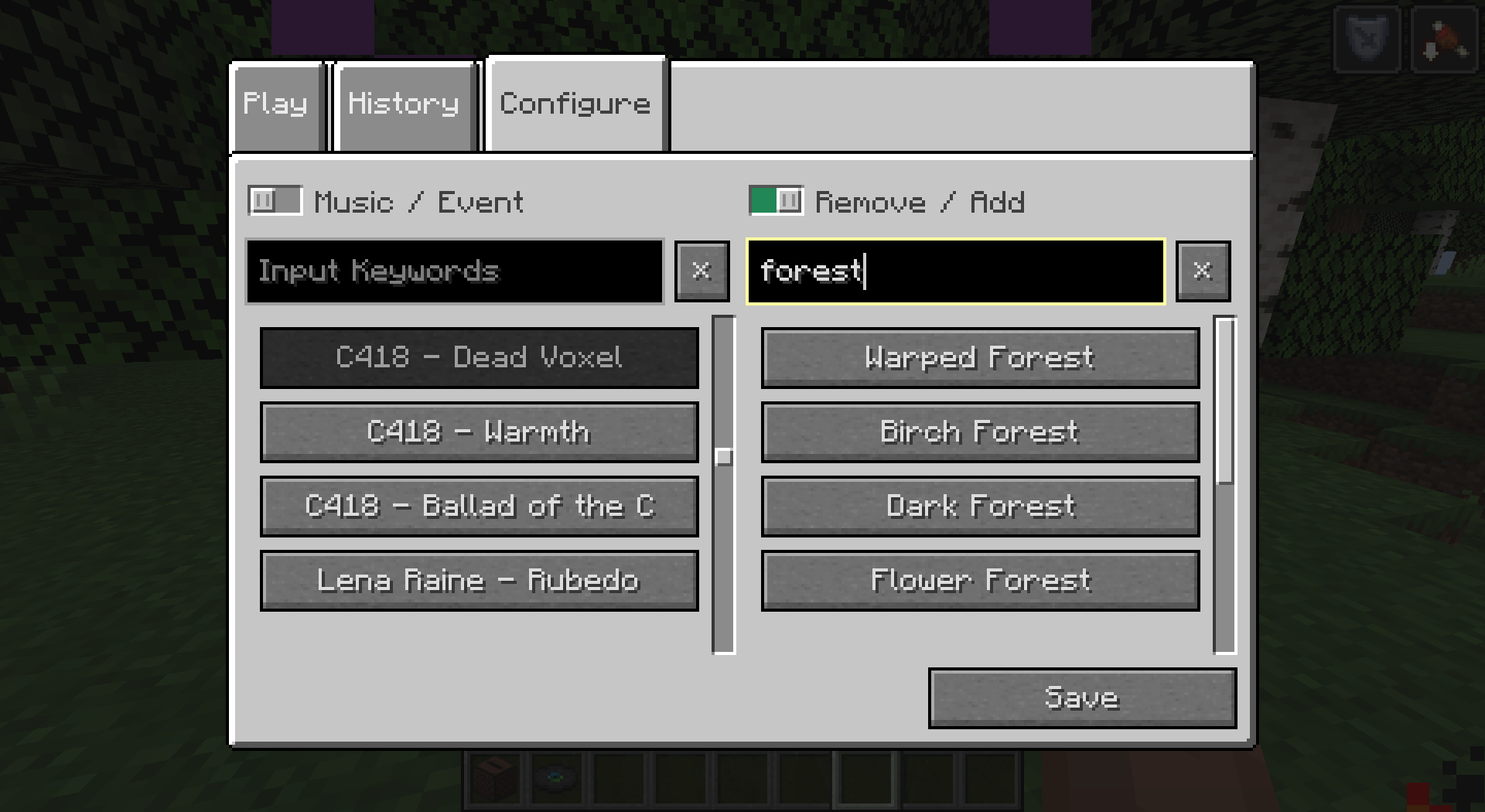
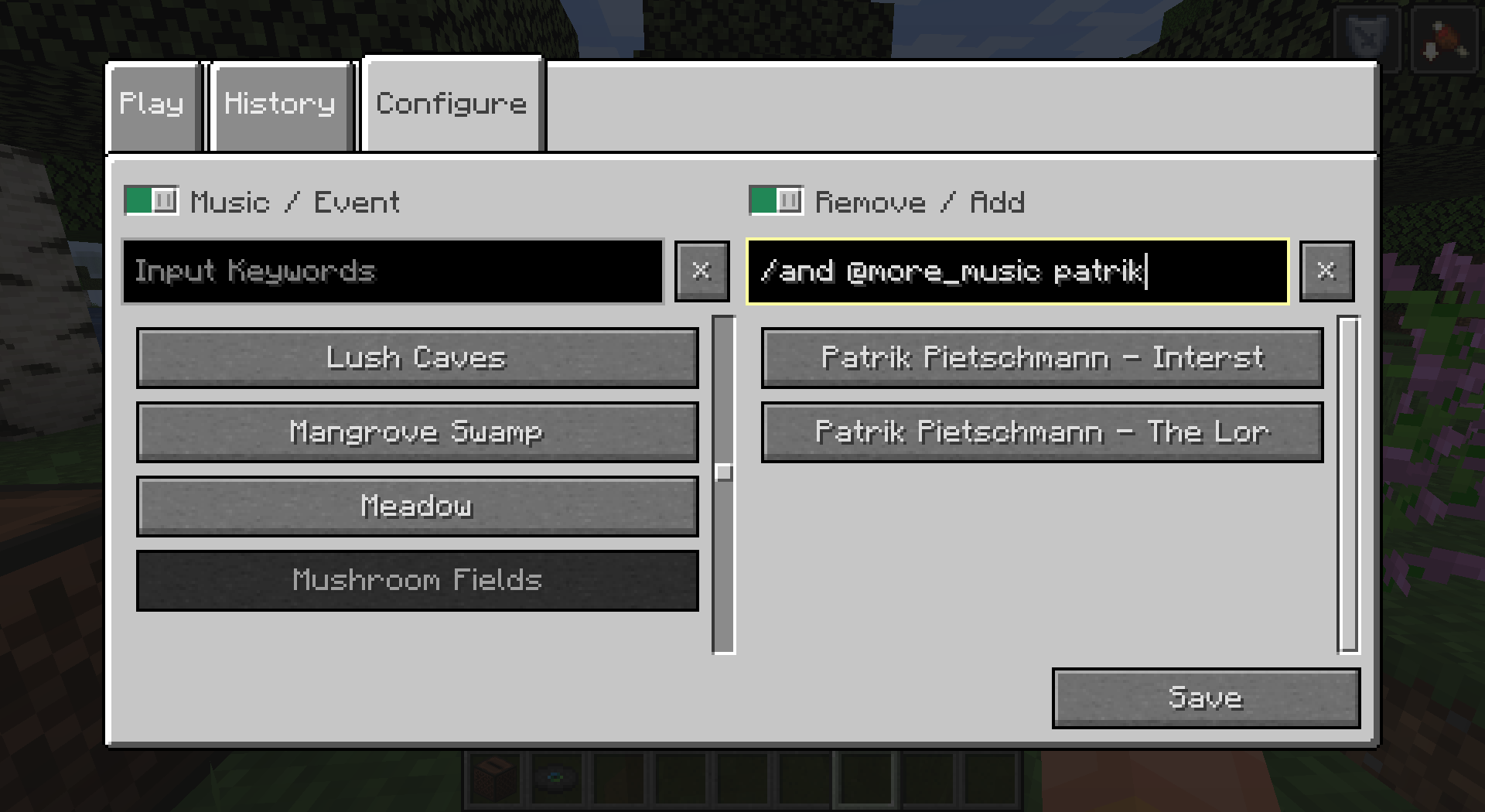
You can completely customize which music plays when. Indeed, you can configure for each music, in which sound events it can be played, or for each sound event, what music it can play. Once again, this includes any custom music/sound event added to the game. Sound events can also contain other sound event, to ease the configuration.
For your comfort, filters were added to navigate easily on the menu. Just fill in the text area to filter music/events containing what you typed in their name. Some special character allow you an even more advanced filtering (see the tooltip).
Events
For more customization, I added new sound events for each biomes in the game. This includes biomes from the End dimension. By default, they remain empty but it's up to you to configure them how you like.
Dimension sound events were added to replace the common "Game" event that would play in the Overworld (and in the Nether if there was biomes without sound events). They have a specific behavior to replace the "Game" behavior. You can choose if you want them to play on fallback (similarly to default "Game" event, when a biome has no music), half the time, proportionnally to the number of music the dimension/biome event contain, or never (this allows biomes without music to not play music at all for a creepy atmosphere).
Miscellaneous sound events were also added for things like "Raining", "Thundering" or "Night" for example. They have a specific behavior as they can happen more often than the biome ones. You can choose if you want them to play always when they can, half the time, or proportionnally to the number of music the misc/biome event contain.
Fun bonus: music discs have their own sound event. This means you can add more than one music to a music disc, so it will play a random music when used.

Ченджлог
1.9.2+1.21.6Релиз1.21.6, 1.21.7, 1.21.8 · 29 июня 2025 г.
- Remove "musicDontPause" option as it's now vanilla since 1.21.6
- Remove "randomDelay" option as frequency is now manageable since 1.21.6
- If frequency is set to constant, the random delay is disabled
- Otherwise, it is random (between maxDelay/2 and maxDelay still)
- Use better mixins for better mod compatibility
1.9.1+1.21.5Релиз1.21.5 · 27 апреля 2025 г.
- Fix time and weather (misc) events so they can be triggered only in the overworld
- Split the riding (misc) event in two to differentiate living and non-living mounts
- Riding event: for any living entity
- Driving event: for other entities, such as boats
1.9+1.21.4Релиз1.21.4 · 23 февраля 2025 г.
- When detecting a new sound event to be played (for example changing biomes),
fades out current music, then fades in next music.
- The fade duration is configurable. Setting it to 0 removes this behavior
- If the current sound event and the next one are both empty, don't change music (if playing dimension on fallback or a misc event for example)
- If the next sound event contains current music, don't change music
- Creative music on fallback is added in the pool of music, even when dimension events are also on fallback. This fixes creative music never been played on this case.
1.8.4+1.21.4Релиз1.21.4 · 5 февраля 2025 г.
Music can't play in biomes with zeroed volume (Pale Garden).
In these biomes, a message is displayed when trying to play music
1.8.3+1.21Релиз1.21, 1.21.1 · 26 июля 2024 г.
- Add missing biome sound event (deep_lukewarm_ocean)
- Add missing music disc event translation
1.8.2+1.20.1Релиз1.20.1 · 4 июля 2024 г.
Fix night music not triggered
1.8.1+1.20.1Релиз1.20.1 · 15 мая 2024 г.
- Add dimension event chance, replacing dimension fallback config
- Use proper modded biome naming
- Remove music duplicates in list of playable music
1.8+1.20.1Релиз1.20.1 · 7 мая 2024 г.
Fixes
- Fix potential crash (#54)
- Fix built-in resource packs not copying mod icon
- Fix compatibility issue with Wilder Wild (#50), and maybe some others
Events
- Properly save events contained in events
- Add a panel to configure events of events
- Add end biomes events
- Add nether dimension event
- Add misc events, such as rain and thunder
- Add misc events config to choose the chance to play them
GUI
- Buttons scroll the text if it's too long on hover
- Add button scroll speed config
- Text filter takes into account formatting, such as "Biome:"
- Add tooltip to the text filter
- Add filter operator config and set AND as default
- Remove identifier character and add inverter character
- Improve events formatting
- GUI improvements to avoid confusion, such as instant list update
Other
- Overall refactor of configs
- Remove volume up to 200% config, as it's not supported anymore in Minecraft options
- Replace game fallback with per dimension fallbacks
- Keep discs in history when playing all/disc categories (#56)
Комментарии
Загружаем…