 Mineforgian
MTR:Japan-ticket-MOD
A highly realistic Japanese ticketing add-on for Minecraft Transit Railway. Adds functional ticket machines, automatic ticket gates, IC cards, paper tickets, a reservation smartphone, a configuration wrench, and decorative ticket machine variants.
- Загрузки
- 5K
- Подписчики
- 10
- Обновлён
- 17 августа 2026 г.
- Лицензия
- All-Rights-Reserved-with-Personal-Modification-Permission
Опубликован 17 мая 2026 г.


You can also use it with Forge by using Sinytra Connector!**
MJTM adds a realistic Japanese railway ticketing system to MTR, bringing authentic ticket purchasing, fare calculation, and station operations into Minecraft.
Instead of simply opening gates, players can buy tickets from ticket machines, use IC cards, pass through ticket gates, transfer between railway companies, purchase commuter passes, reserve seats, and travel using realistic Japanese fare systems.
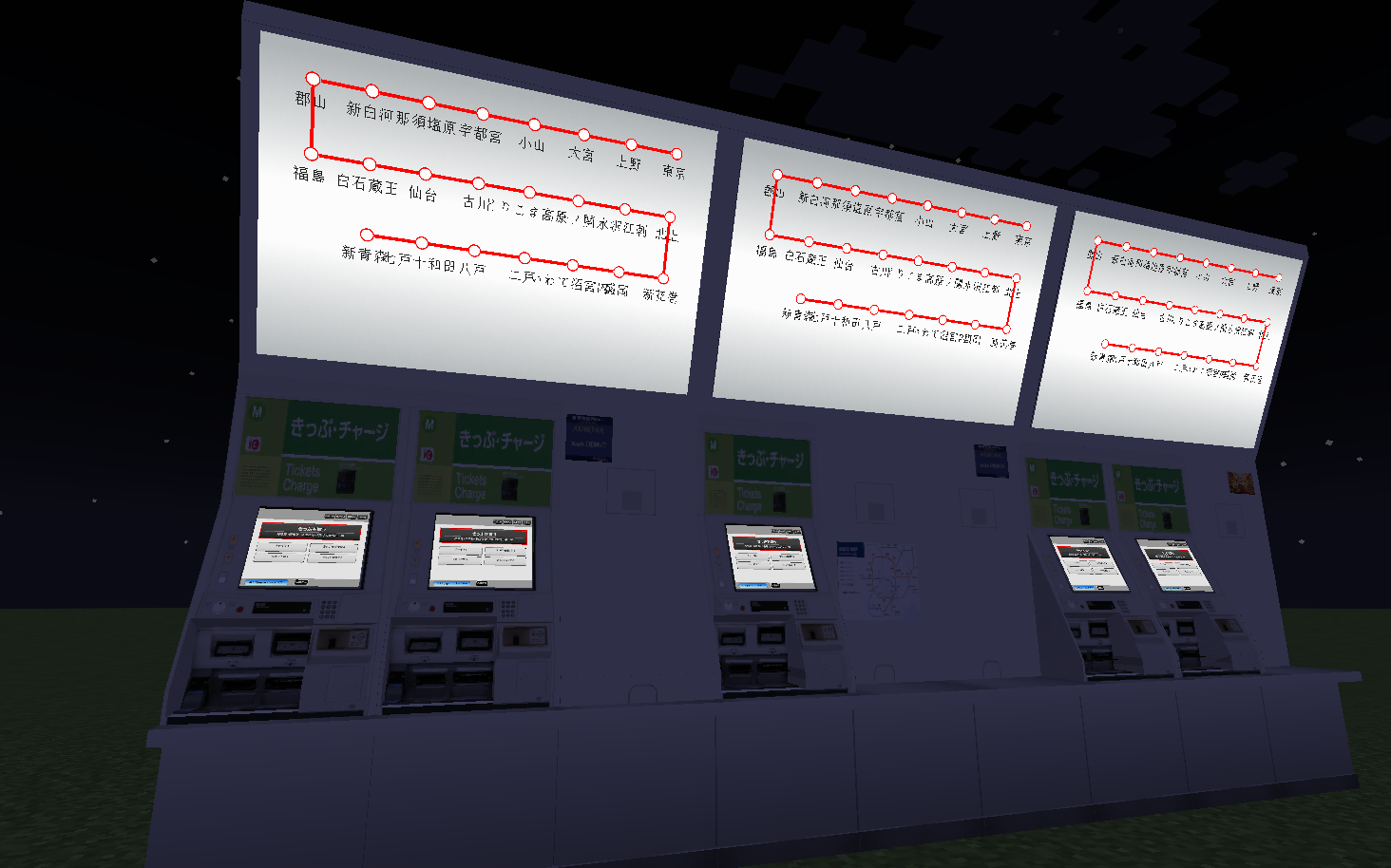
MJTM is designed for both survival gameplay and large multiplayer railway servers, allowing operators to build fully functional railway networks with customizable fare tables, multiple railway companies, and realistic passenger experiences.
This mod works with both MTR4 and MTR3—it runs regardless of the MTR version!
📖 Setup Guide (Click to Expand)
MJTM Guide
Items
Wrench
The Wrench is the most important setup tool in MJTM.
It is required for configuring:
- Ticket Gates
- IC Gates
- Transfer Gates
- Ticket Machines
- Fare Adjustment Machines
- Other MJTM blocks
Most configuration screens are opened by:
Sneak + Right Click
When looking at a configurable block while holding a wrench, a setup preview will appear above the block showing its current settings.
Smartphone
The Smartphone is used for ticket reservations.
Features:
- Reserve tickets remotely
- Receive reservation tickets from ticket machines
- Access notifications
- Receive coupons after making reservations
Each reservation can grant coupons that can be used in supported ticket systems.
Notice Tool
The Notice Tool allows railway operators to send messages directly to player smartphones.
Features:
- Send announcements
- Send promotional campaigns
- Send sales to specific presets
- Manually end active campaigns
Players can view these messages in the smartphone notification tab.
Tickets
Tickets are obtained from ticket machines and used at ticket gates.
Features:
- Standard railway tickets
- Express tickets
- Reserved-seat tickets
- Transfer tickets
Transfer tickets contain a transfer order and must be used at transfer gates in the correct sequence.
IC Cards and Commuter Passes
IC Card
The IC Card is a stored-value smart card.
Features:
- Convenient tap-in/tap-out travel
- Automatic fare calculation
- Automatic balance deduction
Fares are calculated using:
- Entry station configured on the gate
- Exit station configured on the gate
- Fare tables configured in the ticket machine preset
Commuter Pass
A commuter pass allows unlimited travel between selected stations for a specified period.
Features:
- Configurable validity period
- Station-to-station travel
- Round-trip support
Ticket Gate Setup
MJTM provides several types of gates.
IC Gate
The IC Gate is a ticket gate that only supports IC cards.
Features:
- Realistic gate sounds
- Realistic error sounds
- Ticket insertion animations removed
- IC-only operation
Entry Gate
Configure the gate mode as Enter.
Setup
Select:
- One or more Presets
- One or more Lines
- One or more Stations
Multiple selections are useful when a preset contains several lines and tickets should be accepted across all of them.
Behavior
When a valid ticket is inserted:
- The gate opens
- The ticket is returned
- The player takes the ticket back
- The gate closes
This simulates real Japanese entry gates.
Exit Gate
Configure the gate mode as Exit.
Setup
Select:
- One Preset
- One Line
- One Station
Flexible Matching
The setting:
Require All Matches
can be disabled.
When disabled, only the station name must match.
This allows:
- Shared station exits
- Large terminals
- Multiple railway operators using the same exit area
Behavior
When a valid ticket is inserted:
- The gate opens
- The ticket is collected
- The gate automatically closes after 60 ticks
The ticket is not returned.
Transfer Gate Setup
Transfer gates are used when changing from one railway service to another.
Setup
Configure:
Before Transfer
- Preset
- Line
- Station
After Transfer
- Preset
- Line
- Station
In most cases the station name remains the same and only the operator or line changes.
Examples:
- Tokyo Station
- Shin-Osaka Station
- Major interchange hubs
Behavior
When a valid transfer ticket is inserted:
- The transfer is validated
- The ticket enters the gate
- The ticket is returned
- The gate behaves similarly to an entry gate
The transfer order must match the ticket's transfer data.
Ticket Machine Setup
MJTM uses a hierarchical structure:
Preset
 └─ Line
     └─ Station
Think of a Preset as a railway company or fare network.
Creating a Preset
Create a preset first.
A preset contains:
- Lines
- Stations
- Fare tables
- Ticket types
- Vehicle data
Creating Lines
Inside a preset, create one or more railway lines.
Examples:
- Tokaido Shinkansen
- Yamanote Line
- Chuo Line
Creating Stations
Stations are added inside a line.
When at least two stations exist, fare entries appear between them.
Click a fare entry to configure the fare.
These fares are used for:
- Ticket purchases
- IC card fare calculations
- Commuter pass calculations
Vehicle Configuration
Vehicles can be created inside a preset.
Each vehicle can be:
- Reserved Seat
- Non-Reserved Seat
Configure:
- Vehicle name
- Car number
- Fare multiplier
Fare Multiplier
Examples:
| Value | Result |
|---|---|
| 0.0 | Base fare |
| 0.5 | 1.5× fare |
| 1.0 | 2.0× fare |
Ticket Type Configuration
Ticket types are created inside a preset.
First select the line used for fare calculation.
The purchase screen will use this line's fare table.
Basic Ticket
Default settings:
- Ticket name
- Ticket fare multiplier
Multiplier examples:
| Value | Result |
|---|---|
| 0.0 | Base fare |
| 0.5 | 1.5× fare |
| 1.0 | 2.0× fare |
Express Fare
Enable Express Fare.
Additional settings become available:
- Express service name
- Express fare multiplier
Examples:
- Nozomi
- Hikari
- Kodama
- Rapid
- Limited Express
Express fare multipliers are applied separately from vehicle multipliers, matching real-world Japanese railway systems.
A multiplier of 0 can be used if only the service name is desired.
Vehicle Selection Mode
Enable Vehicle Selection.
You can then select previously created vehicles.
When enabled:
- Ticket name settings disappear
- Ticket pricing is based on the selected vehicle
- Players choose vehicles during purchase
Examples:
- Green Car
- Reserved Seat
- Sleeper Car
- Premium Class
Buying Tickets
Ticket machines provide several options:
- Buy IC Card
- Add IC Balance
- Collect Reserved Tickets
- Buy Commuter Pass
- Buy Tickets
IC cards and commuter passes use the base fare system.
Ticket Purchase Flow
1. Select Ticket Type
Choose the ticket to purchase.
2. Choose Seat Type
Depending on configuration:
- Non-Reserved Seat
- Reserved Seat
If only one option exists, the choice is automatic.
3. Select Vehicle
If reserved seating is enabled:
Choose one of the configured vehicles.
Examples:
- Car 1
- Car 5
- Green Car
4. Select Stations
Choose:
- Departure Station
- Arrival Station
5. Add Transfers (Optional)
Transfers can be added if required.
Each transfer repeats the station selection process.
6. Final Confirmation
Review:
- Ticket information
- Route
- Vehicle
- Transfers
- Total fare
Then confirm the purchase.
Ticket Machine Decorations
MJTM includes decorative ticket machine variants.
Available versions:
- Ticket machine with random posters
- Ticket machine without posters
Poster variants are selected automatically when placed, allowing stations to feel more varied and realistic.
📙 Major Features (Click to Expand)
## Features🎫 Realistic Ticket System
Purchase and use various types of railway tickets.
- Standard Tickets
- Express Tickets
- Reserved Seat Tickets
- Transfer Tickets
💳 IC Cards
Travel by simply tapping in and out.
- Stored-value IC cards
- Automatic fare calculation
- Automatic balance deduction
- Multi-line fare support
🚉 Realistic Ticket Gates
Several gate types are available.
- Entry Gates
- Exit Gates
- IC-only Gates
- Transfer Gates
Each gate behaves similarly to real Japanese railway stations.
🚄 Reserved Seating
Configure vehicles such as:
- Green Car
- Reserved Seat
- Sleeper Car
- Premium Class
Each vehicle can have its own fare multiplier.
📱 Smartphone System
Players can:
- Reserve tickets remotely
- Receive reservation tickets
- View notifications
- Receive promotional coupons
Railway operators can send announcements and campaigns directly to players.

Ченджлог
5.4.1Релиз1.20.4 · 17 августа 2026 г.
MTR Japan Ticket Mod ver 5.4.1
Summary
This update focuses on improving Admission Tickets, refining refund-related messages, and fixing ticket gate animation issues.
Added
Added passenger count selection for Admission Tickets
Added station selection for Admission Tickets
- This helps prevent Admission Tickets from being improperly used for travel between stations.
Changed
Improved translation data related to non-refundable tickets
Changed:
- "This ticket cannot be refunded."
To:
- "You do not have a ticket that can be refunded."
- "Commuter passes, IC cards, and special tickets cannot be refunded."
Fixed
- Fixed an issue where Admission Tickets and Special Tickets did not have gate animations
- Fixed various minor bugs and stability issues
Technical Changes
- None.
Known Issues
- No major known issues at this time.
Next Version
- No features are currently planned.
These plans are subject to change.
Thank you for using MTR Japan Ticket Mod.
5.4.1Релиз1.20.1 · 17 августа 2026 г.
MTR Japan Ticket Mod ver 5.4.1
Summary
This update focuses on improving Admission Tickets, refining refund-related messages, and fixing ticket gate animation issues.
Added
Added passenger count selection for Admission Tickets
Added station selection for Admission Tickets
- This helps prevent Admission Tickets from being improperly used for travel between stations.
Changed
Improved translation data related to non-refundable tickets
Changed:
- "This ticket cannot be refunded."
To:
- "You do not have a ticket that can be refunded."
- "Commuter passes, IC cards, and special tickets cannot be refunded."
Fixed
- Fixed an issue where Admission Tickets and Special Tickets did not have gate animations
- Fixed various minor bugs and stability issues
Technical Changes
- None.
Known Issues
- No major known issues at this time.
Next Version
- No features are currently planned.
These plans are subject to change.
Thank you for using MTR Japan Ticket Mod.
5.4.0Релиз1.20.1 · 16 августа 2026 г.
MTR Japan Ticket Mod ver 5.4.0
Summary
This update focuses on a major overhaul of the UI and reservation system, improvements to tickets and currency settings, and various fixes related to transfers and IC cards.
The reservation system has also been redesigned to provide a more realistic ticket collection experience.
Added
- Added Admission Tickets
- Added an Info button that allows users to view detailed information
- Added additional slots to the currency settings UI, allowing prices to be assigned to each currency slot
Changed
Significantly improved the Ticket Machine UI
Improved buttons throughout the UI
Improved the passenger count selection screen
Removed character input limits for station names, route names, preset names, ticket names, and related fields
Changed the duration settings for special tickets and commuter passes from manually entered values to predefined periods:
- 1 day
- 7 days
- 1 month
- 3 months
- 1 year
Improved the UI for duration selection
Adjusted coupon balance and usage
Improved the reservation system
Unified the overall UI with a clean black design
Improved translation data
- Changed "Emerald" to a more general money-related term, as displaying "Emerald" could be confusing when using a custom currency
Improved transfer handling when using IC cards
Fixed
- Fixed an issue where an IC card could not be used to exit after transferring without a transfer gate when an intermediate station had the same name as a station on the exit route
- Fixed an issue where some gate UI text could overflow outside the UI
- Fixed various minor bugs and stability issues
Technical Changes
Completely redesigned the reservation ticket collection system
- Reservation tickets are now retrieved by entering a short, randomly generated code instead of selecting them from a scrollable list
- The code is automatically generated when making a reservation and is stored server-side
- The code is designed to be approximately five characters long for easier memorization
Redesigned the reservation list
The list now displays only the reservation date and reservation code
Selecting a reservation opens a detailed UI containing information such as:
- Departure and arrival stations
- Transfer information
- Seat information
- Reservation code
- Other reservation details
Reworked the currency system
- Please reopen the currency settings after updating to ver 5.4.0
Known Issues
- No major known issues at this time.
Important Notice About Translations
Due to the increasing difficulty of maintaining a large number of languages, the number of officially supported languages will be reduced.
We apologize for the inconvenience.
If you would like to continue using a previously supported language, the translation data from the previous version will be provided so that it can be applied through a resource pack or another method.
Next Version
- No features are currently planned.
These plans are subject to change.
Thank you for using MTR Japan Ticket Mod.
5.4.0Релиз1.20.4 · 16 августа 2026 г.
MTR Japan Ticket Mod ver 5.4.0
Summary
This update focuses on a major overhaul of the UI and reservation system, improvements to tickets and currency settings, and various fixes related to transfers and IC cards.
The reservation system has also been redesigned to provide a more realistic ticket collection experience.
Added
- Added Admission Tickets
- Added an Info button that allows users to view detailed information
- Added additional slots to the currency settings UI, allowing prices to be assigned to each currency slot
Changed
Significantly improved the Ticket Machine UI
Improved buttons throughout the UI
Improved the passenger count selection screen
Removed character input limits for station names, route names, preset names, ticket names, and related fields
Changed the duration settings for special tickets and commuter passes from manually entered values to predefined periods:
- 1 day
- 7 days
- 1 month
- 3 months
- 1 year
Improved the UI for duration selection
Adjusted coupon balance and usage
Improved the reservation system
Unified the overall UI with a clean black design
Improved translation data
- Changed "Emerald" to a more general money-related term, as displaying "Emerald" could be confusing when using a custom currency
Improved transfer handling when using IC cards
Fixed
- Fixed an issue where an IC card could not be used to exit after transferring without a transfer gate when an intermediate station had the same name as a station on the exit route
- Fixed an issue where some gate UI text could overflow outside the UI
- Fixed various minor bugs and stability issues
Technical Changes
Completely redesigned the reservation ticket collection system
- Reservation tickets are now retrieved by entering a short, randomly generated code instead of selecting them from a scrollable list
- The code is automatically generated when making a reservation and is stored server-side
- The code is designed to be approximately five characters long for easier memorization
Redesigned the reservation list
The list now displays only the reservation date and reservation code
Selecting a reservation opens a detailed UI containing information such as:
- Departure and arrival stations
- Transfer information
- Seat information
- Reservation code
- Other reservation details
Reworked the currency system
- Please reopen the currency settings after updating to ver 5.4.0
Known Issues
- No major known issues at this time.
Important Notice About Translations
Due to the increasing difficulty of maintaining a large number of languages, the number of officially supported languages will be reduced.
We apologize for the inconvenience.
If you would like to continue using a previously supported language, the translation data from the previous version will be provided so that it can be applied through a resource pack or another method.
Next Version
- No features are currently planned.
These plans are subject to change.
Thank you for using MTR Japan Ticket Mod.
5.3.0Бета1.20.4 · 10 июля 2026 г.
MTR Japan Ticket Mod ver 5.3.0
Important
MTR Japan Ticket Mod is currently developed by a single developer and does not have dedicated testers. Please make a backup of your world before updating.
Summary
This update introduces a new Special Pass Ticket system, refreshes ticket visuals, and improves how commuter pass expiration dates are displayed.
Added
- Added Special Pass Tickets, allowing travel across multiple routes, similar to special discount tickets used in Japan
Changed
- Updated the appearance of ticket items
- Changed commuter pass expiration dates from Minecraft tick values to real-world date and time for improved readability
Fixed
- Fixed an issue where button text was not displayed in black on Minecraft 1.20.4
- Fixed various minor bugs and stability issues
Technical Changes
- None.
Known Issues
- No major known issues at this time.
Next Version
- No features are currently planned.
Thank you for using MTR Japan Ticket Mod.
5.3.0Бета1.20.1 · 10 июля 2026 г.
MTR Japan Ticket Mod ver 5.3.0
Important
MTR Japan Ticket Mod is currently developed by a single developer and does not have dedicated testers. Please make a backup of your world before updating.
Summary
This update introduces a new Special Pass Ticket system, refreshes ticket visuals, and improves how commuter pass expiration dates are displayed.
Added
- Added Special Pass Tickets, allowing travel across multiple routes, similar to special discount tickets used in Japan
Changed
- Updated the appearance of ticket items
- Changed commuter pass expiration dates from Minecraft tick values to real-world date and time for improved readability
Fixed
- Fixed an issue where button text was not displayed in black on Minecraft 1.20.4
- Fixed various minor bugs and stability issues
Technical Changes
- None.
Known Issues
- No major known issues at this time.
Next Version
- No features are currently planned.
Thank you for using MTR Japan Ticket Mod.
5.2.1Бета1.20.4 · 6 июля 2026 г.
MTR Japan Ticket Mod ver 5.2.1
Important
MTR Japan Ticket Mod is currently developed by a single developer and does not have dedicated testers. Please make a backup of your world before updating.
Summary
This maintenance update focuses on improving the reliability of the currency system and fixing a critical issue affecting change (refund) payments.
Added
- No new features in this update.
Changed
- Improved the reliability of the currency system by fully migrating its stored data from items to world data, ensuring greater data safety across server and world restarts.
- Updated the collection system by replacing the legacy implementation with a newer one.
Fixed
- Fixed a critical issue where players would sometimes not receive their change after making a payment.
- Fixed various minor bugs and stability issues.
Technical Changes
- None.
Known Issues
- No major known issues at this time.
Next Version
- No features are currently planned.
Thank you for using MTR Japan Ticket Mod.
5.2.1Бета1.20.1 · 6 июля 2026 г.
MTR Japan Ticket Mod ver 5.2.1
Important
MTR Japan Ticket Mod is currently developed by a single developer and does not have dedicated testers. Please make a backup of your world before updating.
Summary
This maintenance update focuses on improving the reliability of the currency system and fixing a critical issue affecting change (refund) payments.
Added
- No new features in this update.
Changed
- Improved the reliability of the currency system by fully migrating its stored data from items to world data, ensuring greater data safety across server and world restarts.
- Updated the collection system by replacing the legacy implementation with a newer one.
Fixed
- Fixed a critical issue where players would sometimes not receive their change after making a payment.
- Fixed various minor bugs and stability issues.
Technical Changes
- None.
Known Issues
- No major known issues at this time.
Next Version
- No features are currently planned.
Thank you for using MTR Japan Ticket Mod.
Комментарии
Загружаем…