 Mineforgian
Minimap CE
A faithful, lightweight minimap addon for Better Than Wolves CE 3.0.0+
Обновлён 19 мая 2026 г. · опубликован 24 февраля 2026 г.
Minimap CE
A faithful, lightweight minimap mod for Better Than Wolves CE 3.0.0 and above (Minecraft 1.6.4).
Minimap CE provides all the classic minimap functionality you need, themed to feel right at home with old-school Minecraft and BTW. It runs client-side only.
Features
Classic Minimap
- Texture-sampled block colors — reads Minecraft's terrain atlas for accurate per-block colors.
- Topographic shading — height-based lighting for terrain depth.
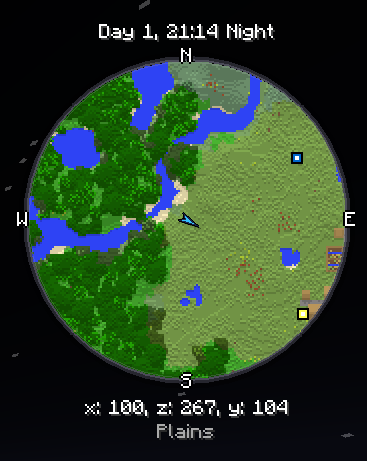
- Circular map with a premium beveled frame and compass labels (N/E/S/W).
- Zoom — scroll to zoom in/out, entities and waypoints track at all zoom levels.
- Dynamic HUD Proportions — Minimap text automatically scales based on the size/zoom of your minimap for a perfectly clean look.
- Chunk grid overlay (toggleable).
- Biome tinting for grass, leaves, and foliage.
Full-Screen Topography
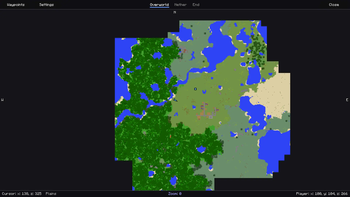
- Full-Screen Map — A scalable, draggable full-screen map interface.
- Persistent Terrain — Explored areas save to disk and display on the full-screen map even when far away, with intelligent silent patching if a chunk is loaded with missing data.
- Cross-Dimension Viewing — Seamlessly browse map data from the Nether, End, or Overworld via UI tabs, without needing to travel there.
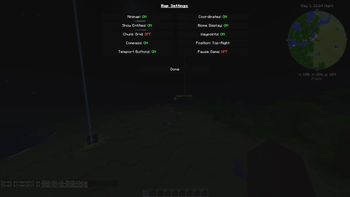
- Unpaused Journeys — The settings menu allows you to leave the game unpaused while viewing the fullscreen map, perfect for long journeys or AFKing.
Waypoint Management
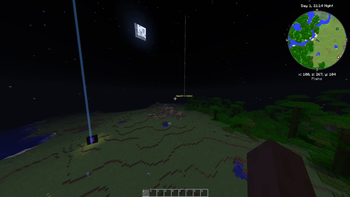
- Minimalist Map Markers — Half-size clean square markers designed to reduce visual clutter against any terrain.
- Hoverable Labels — To avoid map clutter, waypoint titles on the fullscreen map are hidden by default and appear seamlessly when hovered over!
- Add/Edit/Delete classic waypoint markers.
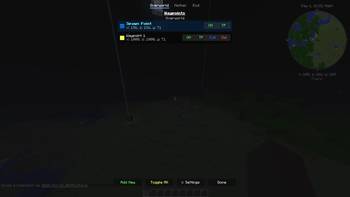
- Cross-Dimension Waypoint List — Access, manage, and toggle waypoints for any dimension natively from the waypoint GUI.
- Rei's "Add New" button layout inside the waypoint manager.
- Death Waypoints — Automatically saves your coordinates upon death and natively numbers subsequent deaths (e.g., Death, Death 2).
- In-world beacons — Translucent beams with waypoint icons visible from any distance.
- Teleport directly to any waypoint (lands you safely above ground).
- Per-world saving — separates waypoint lists automatically based on the singleplayer world or multiplayer server.
Entity Radar
- Mob arrows visible on the minimap — categorized by color: Red (hostile), Green (passive), Yellow (neutral).
- Player chevron in a distinctive gold colour.
Info HUD
- Tracks Time — Day count, HH:MM, Day/Night indicator.
- Tracks Coordinates — (x, z, y).
- Displays current Biome name.
Controls
| Key | Action |
|---|---|
J |
Open full-screen map |
O |
Open minimap settings |
B |
Open waypoint manager |
F |
Toggle entity radar |
] |
Increase minimap size |
[ |
Decrease minimap size |
Scroll |
Zoom in/out |
Installation
- Install Better Than Wolves CE 3.0.x and the Fabric Loader (0.14.19 or later recommended).
- Download the
minimap-ce-3.0.2.jarfrom the versions tab. - Drop the
.jarinto your Minecraft.minecraft/mods/folder. - Launch the game!
Версии
| Версия | Канал | Игра | Загрузчики | Дата | Скачать |
|---|---|---|---|---|---|
| 3.5.0 | Релиз | 1.6.4 | legacy-fabric | 19 мая 2026 г. | .jar (87 КБ) |
| 3.4.0 | Релиз | 1.6.4 | legacy-fabric | 12 мая 2026 г. | .jar (87 КБ) |
| 3.3.0 | Релиз | 1.6.4 | legacy-fabric | 28 апреля 2026 г. | .jar (87 КБ) |
| 3.2.0 | Релиз | 1.6.4 | legacy-fabric | 23 апреля 2026 г. | .jar (86 КБ) |
| 3.1.0 | Релиз | 1.6.4 | legacy-fabric | 22 апреля 2026 г. | .jar (86 КБ) |
| 3.0.2 | Релиз | 1.6.4 | legacy-fabric | 9 марта 2026 г. | .jar (83 КБ) |
| 3.0.1 | Релиз | 1.6.4 | legacy-fabric | 1 марта 2026 г. | .jar (83 КБ) |
| 2.0.1 | Релиз | 1.6.4 | legacy-fabric | 24 февраля 2026 г. | .jar (52 КБ) |
Ченджлог
3.5.0Релиз1.6.4 · 19 мая 2026 г.
3.5.0
Features
- Double-Click Waypoint Placement: Double-click anywhere on the fullscreen map to instantly create a waypoint at that location. Opens the waypoint editor with coordinates pre-filled so you can name it and pick a color.
Bug Fixes
- Removed unreliable biome display: The fullscreen map bottom bar no longer shows biome names, which were frequently inaccurate due to BTW CE's modified world generation conflicting with seed-based biome lookups.
- Fixed cursor coordinate precision: Cursor-to-world coordinate conversion now uses
Math.floor()consistently (matching the map renderer), eliminating off-by-one misalignment at negative coordinates and high zoom levels.
Technical
- Hoisted
IChunkProviderlookup out of inner loop insaveExploredChunks(was re-fetched per chunk). - Moved
GL_TEXTURE_2Dstate toggles outside waypoint render loop (was toggled per-waypoint). - Eliminated redundant
cachedMapSizefield (duplicate ofcacheSize). - Cache invalidation no longer forces array reallocation — reuses existing buffers on pan/zoom.
- Updated
gradle.properties→mod_version = 3.5.0.
3.4.0Релиз1.6.4 · 12 мая 2026 г.
3.4.0
Features
- Accurate Chunk Grid: The grid is now locked to world coordinates (16-block intervals). Moving across boundaries now shows your player icon crossing the grid lines, rather than the grid following the player. Perfect for slime chunk identification and technical builds!
Technical
- Updated
gradle.properties→mod_version = 3.4.0. - Implemented world-aligned modular math in
MinimapRenderer.renderGrid.
3.3.0Релиз1.6.4 · 28 апреля 2026 г.
3.3.0
Features
- Adaptive Chunk Grid: Restored the native scaling logic. Grid squares now become smaller and more frequent as you zoom out, and larger when you zoom in, matching the terrain perfectly.
- Default Settings: Chunk grid lines are now disabled by default for a cleaner first-time experience.
Bug Fixes
- Consistent Waypoint Labels: Waypoint labels now maintain a consistent visual size on your screen regardless of your render distance. This fixes the issue where labels would appear oversized on "Tiny" or "Short" render settings due to projection clamping.
- Grid Scaling Fix: Corrected a math error in the minimap rendering that caused the grid to scale inversely to the map terrain.
Technical Changes
- Optimized
WaypointBeamRendererto use rendered physical distance for scaling calculations.
3.2.0Релиз1.6.4 · 23 апреля 2026 г.
Minimap CE v3.2.0 Changelog
🕒 Clock & Time Synchronization
- 20-Minute Real-Time Cycle: Refactored the HUD clock to use a 20-minute cycle (00:00 - 19:59), accurately reflecting the real-time duration of a Minecraft day.
- Improved Day/Night Logic: Updated the day/night prefix to sync with
world.isDaytime(), ensuring the labels align with actual game light levels.
🌍 World Identity & Persistence
- Seed-Based Identification: Fixed the "world collision" bug where map data would persist across deleted worlds. The mod now generates a unique ID using the World Seed + Save Folder Name for singleplayer.
- Spawn Point Uniqueness: Updated the
SpawnTrackerto use the new unique identification system, ensuring "Spawn Point" waypoints are unique to each world even if the folder name is reused. - Multiplayer Identification: Switched multiplayer world mapping to use the Server IP instead of the generic world name for better data partitioning.
- Centralized Logic: Consolidated world-prefix generation into
WaypointManagerto ensure consistency across Map Tiles, Waypoints, and Spawn tracking.
🖥️ UI & Aesthetic Refinements
- Smart HUD Stacking: Improved HUD positioning for bottom-aligned maps. Coordinates and biome info now move above the map to prevent them from being cut off by the screen edge.
- Flush UI Support: Reduced the gap between the map and info boxes to 2 pixels when padding is disabled, creating a sleek, premium look.
- Dynamic Layout: Info boxes now intelligently stack (Clock above Coords above Map) to maintain visibility regardless of screen position.
[!NOTE] This update ensures that map data is partitioned correctly by world seed. If you recreate a world with the same folder name but a different seed, a new map cache will be created automatically.
3.1.0Релиз1.6.4 · 22 апреля 2026 г.
Minimap CE v3.1.0
This update focuses on fixing visual quality issues with the fullscreen map, ensuring keybinds save correctly, and providing better UI customization.
🗺️ Fullscreen Map Overhaul
- Texture-Based Rendering: The fullscreen map now uses a single OpenGL texture. This eliminates pixelation at all zoom levels and provides a significant performance boost.
- Topographic Shading Fix: Fixed the "flat area" around the player. The map now correctly saves and displays height data for all explored areas, ensuring consistent 3D shading.
- Auto-Upgrade System: Old map data (which was missing height info) will now automatically be re-sampled and upgraded with topographic shading as you walk through previously explored areas.
🛠️ Keybinds & Controls
- Persistence Fix: Keybinds now correctly save to your
options.txtand will no longer reset to defaults when you restart the game. - Better Organization: All mod keybinds are now prefixed with
[Minimap]so they are grouped together in the Controls menu, making them much easier to find.
✨ Visuals & UI
- Minimap Padding Option: Added a new setting to remove the 10-pixel gap from the corner. You can now sit the minimap flush against the edge of your screen.
- Smart Alignment: When padding is removed, the UI intelligently maintains just enough space for the clock and compass labels (N/S/E/W) to stay visible.
🔧 Bug Fixes
- Fixed vertical and horizontal "seams" and "stripes" that appeared on the map when panning or zooming.
- Fixed a bug where the map would occasionally sample "empty" data from unloaded chunks.
- Cleaned up rendering loops for better overall stability.
3.0.2Релиз1.6.4 · 9 марта 2026 г.
Minimap CE v3.0.2
✨ New Features
- Redesigned Waypoint Markers: The 8-pointed star icons have been replaced with a minimalist, clean, half-size square marker designed to reduce visual clutter while remaining highly visible against any terrain.
- Dynamic Info Text: The text displaying the current time and coordinates beneath the minimap now automatically scales in size based on your chosen minimap zoom/size to remain perfectly proportioned!
- Cleaner Overlays: Removed the harsh black background box behind the time/coordinate text for a sleeker, unobstructed HUD.
- Hoverable Fullscreen Labels: Waypoint titles on the Fullscreen Map are now completely hidden by default, leaving just the minimalist marker icons to keep your map uncluttered. To see a waypoint's name, simply hover your mouse pointer over it! (As always, holding right-click still force-hides everything, including hovered labels).
- Fullscreen Un-Pause Toggle: The 'Settings' menu now includes an option to let the game continue running while the Fullscreen map is open, perfect for long journeys or AFKing while checking your route.
🐛 Bug Fixes
- Fixed Fullscreen Markers Missing: Fixed an OpenGL rendering issue where the new minimalist markers were completely invisible on the Fullscreen Map.
- Fixed Waypoint Title Overlap: Fixed a rendering bug where a waypoint's marker could occasionally be drawn over another waypoint's text label when clustered close together. Text labels are now guaranteed to render on top of all icons.
- Fixed Permanent Black Map Stripes: Fixed several severe mathematical bugs in the map caching system that were causing large, permanent horizontal or vertical black stripes (holes) to be saved to your hard drive, particularly when exploring in negative coordinates. The missing chunks will now silently and permanently patch themselves as you walk near them!
- Fixed Edge-of-Vision Gaps: The game now correctly pads the chunk saving radius to ensure it perfectly captures chunks right on the edge of your render distance, preventing chunks being skipped if you move too fast.
⚡ Optimizations
- Faster Terrain Rendering: Extracted complex mathematical multiplication operations out of the inner terrain rendering loops, resulting in a slightly faster and smoother framerate while running the minimap on lower-end computers.
3.0.1Релиз1.6.4 · 1 марта 2026 г.
What's New
- Cross-Dimension Waypoints Manager — Full access to view, edit, toggle, and delete your waypoints for any dimension from anywhere
- Cross-Dimension Fullscreen Map — Instantly view explored map data from the Nether, End, or Overworld without actually traveling there
- Redesigned Dimension Tabs — Sleek, custom-drawn text tabs with active blue underlines for switching dimensions in the Waypoints and Fullscreen Map menus
Fixes & Polish
- Map data cache instantly invalidates when switching tabs, preventing stale Overworld terrain from rendering briefly on the Nether map
- Spawn Point logic completely overhauled — coordinates mathematically scale appropriately depending on the dimension the player is in
- Overworld Spawn height (Y-level) is now statically locked to its true generation level instead of randomly locking to Y: 64 after leaving the End
- "Add Here" Waypoint Button string is now "Add New", bringing the terminology closer to classic Rei's Minimap
- Fixed a severe core initialization crash that occurred when Typesafe config failed to parse
{}tokens in the minimap configuration - Added extra vertical spacing to the Waypoints menu to preventing title and tab overlap
Controls
| Key | Action |
|---|---|
| J | Full-screen map |
| O | Settings |
| F | Toggle entity radar |
| B | Waypoints |
| [ ] | Resize minimap |
Полная история изменений — на Modrinth.
Комментарии
Загружаем…