 Mineforgian
MC-Banking
This adds a banking system to minecraft with support for the Minecraft Transit Railways Mod, Includes ATM'S a management computer. Debit cards, Cash, Business Accounts. As well as an API to link other mods to it for purchases and other things!
- Загрузки
- 78
- Подписчики
- 0
- Обновлён
- 9 июля 2026 г.
- Лицензия
- All-Rights-Reserved
Опубликован 6 июля 2026 г.
🏦 MC-Banking
A full-featured banking, economy, and finance mod for Minecraft. Create banks, open accounts, use ATMs, invest in stocks, take out loans, run businesses, and more — all with immersive pixel-art UIs and realistic mechanics.
✨ Features
🏧 ATMs
- Place ATMs anywhere — link them to a bank network with the Network Configurator
- Insert your debit card (hold it and right-click) to access your account
- Withdraw cash with a bill selector — choose exact denominations ($1, $5, $10, $20, $50, $100)
- Check balance, transfer funds, deposit cheques, view transaction history, print receipts
- ATMs inside bank zones offer full services (deposits, cheques, loans, stocks)
- ATMs outside bank zones (e.g. train stations) offer withdrawals, transfers, and balance only
- Bank branding — ATM header shows bank color and emoji logo
- Out-of-network fees when using another bank's ATM
🧑💼 Bank Tellers
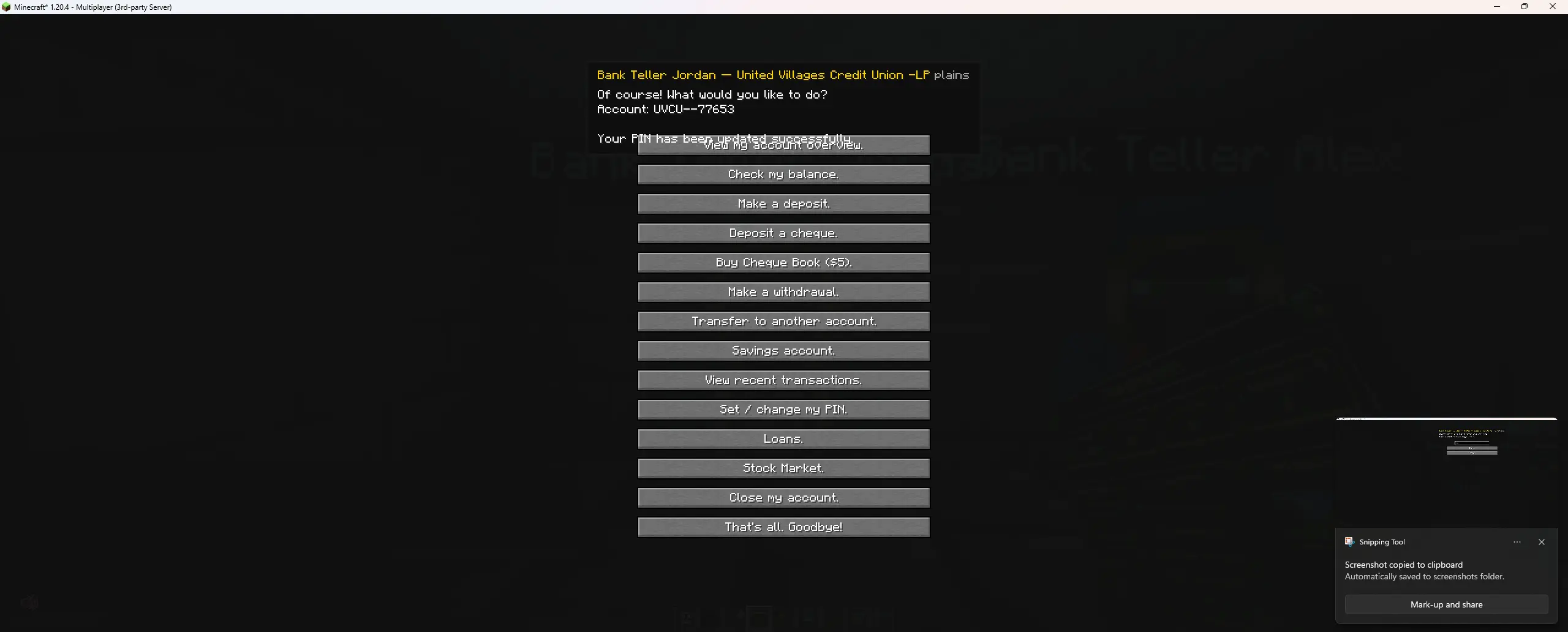
- NPC tellers inside bank zones provide full banking services
- Open accounts, get debit cards, set PINs, deposit/withdraw, transfer funds
- Each bank is independent — you need a separate account at each bank
- PIN is masked with bullet characters for security
🗺️ Bank Dashboard
- Use the Bank Dashboard item to manage your banking empire
- Create bank areas on a live world map with click-to-place corners
- Set bank colors, emoji logos, ATM fees
- Create branches that auto-name from nearby MTR stations
- View all clients and their account statistics (balance, savings, loans, stocks)
- Branch numbering system (e.g. ENB-B1, ENB-B2)
💻 Bank Computer
- Place inside a bank zone for staff and owner management
- Overview tab: network ID, rating, ATM fee, bank funds, accounts, staff count
- Hire/fire staff, clock in/out system, dispense ATMs and computers
- View all ATMs on your network with coordinates and location names
- Stock market access for all users
- Staff roles: Teller, ATM Technician, Branch Manager, Owner
💳 Debit Cards
- Three card styles: Classic Blue, Gold Premium, Midnight Black
- HUD overlay shows card details when held (bank name, card number, expiry, holder, account ID)
- Cards are bank-specific — one per bank
- PIN required at ATMs
💼 Business Accounts
- Open a business account at any teller
- Issue employee cards with daily spending limits (or unlimited)
- Pre-generated PINs shown to the owner for distribution
- Deactivate/reactivate cards without revoking them
- Employees get decline messages: "Card declined — deactivated. Please contact [Business]."
- Full business overview screen with employee cards, PINs, and transaction history
- Deposit cash, cheques, or transfer from personal account
- Rename business, close account (issues cheque for remaining balance)
📈 Stock Market
- Stocks now based on player business accounts like:
- MINE (MineCorp) — price driven by blocks mined
- SLAY (SlayerInc) — price driven by mob kills
- CRFT (CraftWorks) — price driven by items crafted
- POP (PopIndex) — price driven by players online
- Buy and sell shares from the teller, ATM (bank zone), or bank computer
- Portfolio tracking with real-time price changes
- Prices update every quarter in-game day
💰 Loans
- Apply for loans based on your credit score (300–850)
- Credit score improves with paid-off loans, drops with missed payments
- 5% interest per in-game day, 10% minimum payment
- Account freezes after 3 missed payments
- Check loan status, remaining balance, and credit score at any time
🏦 Savings & Interest
- Move money between checking and savings accounts
- Savings earn 0.1% interest per in-game day (minimum $10 balance)
💸 Cheques
- Write cheques to other players from a cheque book ($5 at the teller)
- Deposit at teller (instant) or ATM (30% immediate, 70% on 5-day hold for large amounts)
- Cheque HUD overlay shows recipient, amount, and signer when held
- Issued on account closure with full remaining balance
🔄 Cross-Network Transfers
- Transfer between different banks with a 3% + $2 conversion fee
- Automatic detection — same network = free, different network = fee applied
💵 Physical Cash
- Coins: 5¢, 10¢, 25¢
- Bills: $1, $5, $10, $20, $50, $100
- Deposit cash at tellers or bank-zone ATMs
- Withdraw as specific bill denominations with the bill selector
🏢 Bank Health & Ratings
- Banks are rated A+ to F based on operating funds, staff, accounts, and loan defaults
- Distressed banks show warnings at ATMs with withdrawal limits
- Bankrupt banks freeze all accounts — players receive insurance payouts (80% up to $500)
- Other banks can acquire bankrupt banks
💼 Payroll
- Staff get paid automatically when clocked in
- Teller: $5, ATM Tech: $7.50, Branch Manager: $10 per half in-game day
- Paid from bank operating funds
🏛️ Taxes
- 2% tax every 7 in-game days on accounts over $50
- Exempt accounts below threshold
- Tax revenue goes to server treasury
🔫 ATM Robberies
- Attempt to rob ATMs (35% success rate)
- Success: steal $50–$500 in cash, speed boost to escape
- Failure: $100 fine, slowness, glowing for 30 seconds
- 3 in-game day cooldown, alerts nearby players and bank owner
🚂 MTR Integration
- Ticket machine override — pay for train tickets with cash or bank balance instead of emeralds
- Branch auto-naming from nearest MTR station
- ATM location names from MTR stations in the bank computer
🗺️ Squaremap Integration
- Bank areas shown as colored rectangles on the web map
- Bank icons at area centers with hover tooltips
- Branch numbers displayed
## 📦 Dependencies

| Mod | Required? |
|-----|-----------|
| [Fabric API](https://modrinth.com/mod/fabric-api) | ✅ Required |
| [Special Model Loader](https://modrinth.com/mod/special-model-loader) | ✅ Required (OBJ block models) |
| [MTR](https://modrinth.com/mod/mtr) | ❌ Optional (ticket machine + station names) |
| [Squaremap](https://modrinth.com/mod/squaremap) | ❌ Optional (web map markers) |
| Decocraft | ❌ Optional (ATM block compatibility, disabled by default) |
---

## ⚙️ Configuration

Config file: `config/mc-banking.json`

```json
{
  "ticketMachineOverride": true,
  "decocraftAtmCompat": false,
  "decocraftAtmBlockIds": ["decocraft:atm", "decocraft:atm_machine"]
}
| Option | Default | Description |
|---|---|---|
ticketMachineOverride |
true |
Replaces MTR's ticket machine UI with MC-Banking's payment screen |
decocraftAtmCompat |
false |
Right-clicking Decocraft ATM blocks opens MC-Banking ATM |
decocraftAtmBlockIds |
["decocraft:atm", ...] |
Block IDs that act as ATMs when compat is enabled |
🎮 Getting Started
- Create a bank — Use the Bank Dashboard item to define a bank area on the map
- Place a teller — Spawn a Bank Teller NPC inside your bank area
- Open an account — Right-click the teller and choose "Open an account"
- Get a debit card — Choose your card style and set a PIN
- Place ATMs — Use the bank computer to dispense ATMs, then link them with the Network Configurator
- Start banking! — Hold your card and right-click any ATM
🔌 Developer API
MC-Banking provides a full API for other mods to integrate with the economy system.
Getting Started
import com.banking.mod.api.BankingAPI;

BankingAPI api = BankingAPI.getInstance();
Personal Banking
// Check balance (in cents — $5.00 = 500)
long balance = api.getBalance(playerUuid);
long savings = api.getSavings(playerUuid);

// Deposit / Withdraw
api.deposit(playerUuid, 500, "MyMod", "Quest reward");
api.withdraw(playerUuid, 250, "MyMod", "Shop purchase");

// Charge (alias for withdraw with clearer intent)
api.charge(player, 200, "TollMod", "Bridge toll");

// Flexible charge — tries cash first, then bank balance
api.chargeFlexible(player, 500, "MarketMod", "Stall fee", true);

// Pay in physical cash notes
api.payCash(player, 13700, "WageMod", "Weekly wage");

// Transfer between players
api.transfer(fromUuid, toUuid, 1000, "TradePlugin");
Business Cards
// Charge a business card — returns null on success, or decline reason
String error = api.chargeBusinessCard(playerUuid, 2500, "Office supplies");
if (error != null) {
    // "Card declined — deactivated. Please contact Acme Corp."
    // "Card declined — daily spending limit reached."
    // "Card declined — insufficient business funds."
    player.sendMessage(Text.literal(error), true);
}

// Check card status
boolean hasCard = api.hasActiveBusinessCard(playerUuid);
long remaining = api.getBusinessCardRemaining(playerUuid);
String bizName = api.getBusinessName(playerUuid);
Cash & Inventory
// Count physical cash in player's inventory
long cash = api.getCashInInventory(player);

// Remove cash items from inventory
long removed = api.takeCashFromInventory(player, 1000);
Transaction History & Hooks
// Read history
List<TransactionEntry> history = api.getHistory(playerUuid);

// Post a note (no money moved)
api.postNote(playerUuid, "LoanMod", "Loan application approved");

// Hook into every transaction
api.onTransaction((uuid, entry) -> {
    if (entry.type.equals("WITHDRAW") && entry.amountCents >= 1000) {
        System.out.println(uuid + " withdrew " + entry.getFormattedAmount());
    }
});
Dependency Setup
dependencies {
    modImplementation fileTree(dir: 'libs', include: ['mc-banking-*.jar'])
}
// fabric.mod.json
{ "suggests": { "mc-banking": "*" } }
All API methods must be called on the server thread. Full documentation in DEBIT_API.md.
📁 Data Storage
All banking data is stored per-world in the world/mc-banking/ folder. Files are automatically migrated from the server root on first load if upgrading from an older version.
📋 Minecraft Version
- Minecraft: 1.20.4
- Mod Loader: Fabric
- Java: 17+
## 📜 License

© 2025 MC-Banking. All rights reserved.

- ✅ You may use this mod on any Minecraft server (commercial or non-commercial)
- ✅ You may include this mod in modpacks with credit
- ✅ You may use the API to build integrations
- ❌ You may NOT redistribute this mod outside of Modrinth without permission
- ❌ You may NOT decompile, modify, or rebrand this mod and claim it as your own
- ❌ You may NOT sell this mod or any modified version of it

**Credit required:** If you include MC-Banking in a modpack or use it on a public server, please credit "MC-Banking by RecklessMetro" with a link to the Modrinth page.
Ченджлог
5.7.1Релиз1.20.4, 1.20.5, 1.20.6 · 9 июля 2026 г.
MC-Banking v5.7.1 Changelog
API — Dollar-Based Amounts
All API methods now accept double dollar amounts (e.g. 5.00, 25.50)
Internally converts to cents using Math.round(dollars * 100.0)
Old long cents methods still work but are marked @deprecated
New getBalance() and getSavings() return dollars as double
Added getBalanceCents() and getSavingsCents() for raw internal values
Added getCashInInventoryDollars() and takeCashFromInventoryDollars() dollar overloads
API — Debit Card Account Resolution
charge(player, ...), chargeByCard(...), chargeFlexible(...), and chargeFlexibleByCard(...) now resolve the account from the player's held debit card (main hand → off hand → inventory → fallback)
External mods automatically charge the correct bank account without needing to specify which one
API — Cheque Cashing
Added cashCheque(player, chequeStack) — cash a specific cheque ItemStack
Added cashFirstCheque(player) — find and cash first valid cheque in inventory, removes on success
Added cashChequeAtSlot(player, slot) — cash cheque at specific slot, removes on success
All return null on success or an error string on failure
API — Business Card Dollar Overload
Added chargeBusinessCard(uuid, double amount, description)
Added chargeBusinessCard(player, double amount, description)
BankAccountManager Fix
Fixed getOrCreate(uuid) — when called without a bank name, now reliably finds any existing account instead of potentially creating a phantom ACC- account with $0
Usage Example
BankingAPI api = BankingAPI.getInstance(); api.charge(player, 25.50, "MC-Economy", "Land purchase: plot-42"); api.deposit(player, 100.0, "MyMod", "Quest reward"); double balance = api.getBalance(player.getUuid()); String err = api.cashFirstCheque(player);
5.6.9Релиз1.20.4, 1.20.5, 1.20.6 · 9 июля 2026 г.
Fake Cheque Rename
Renamed registry ID from fake_cheque to cheque_copy so F3+H no longer reveals it's counterfeit
Renamed recipe and model files to match
Bank Sign Fix
Fixed placement so sign faces toward the player when placed on floor/ceiling
Fixed blockstate rotations so the model faces the correct direction
Fixed text renderer so text appears on the correct outward-facing side for all directions (N/S/E/W)
Cheque System Overhaul
Cheques no longer deduct funds when signed — money is only taken from the signer's account when the recipient cashes it
Cheques now store SignerAccountId to identify which specific bank account to draw from
Cheque books store the purchaser's account ID — all cheques torn from a book are tied to that bank
Cheques bounce if the signer has insufficient funds at cash time
Cheques bounce if the signer's account no longer exists
Added "Order Cheque Book ($5)" button to teller menu
API Improvements
Fixed BankAccountManager.getOrCreate() — no longer creates phantom ACC- accounts when called without a bank name
chargeFlexible now resolves the correct account from the player's held debit card (main hand → off hand → inventory)
Added chargeByCard(player, ...) and chargeFlexibleByCard(player, ...) methods
charge(ServerPlayerEntity) now uses card-based account lookup
External mods (mc-economy, ticket master, etc.) automatically benefit without code changes
5.6.8Релиз1.20.4, 1.20.5, 1.20.6 · 9 июля 2026 г.
MC Banking v5.6.8 New Features Bank Teller Robbery System Attack a Bank Teller NPC with a sword or axe to initiate a robbery
5-second countdown — must stay within 5 blocks of the teller
Steals 5% of the bank's operating funds (min $50, max $10,000) dispensed as physical cash
1 in-game day cooldown between robbery attempts
Silent alarm sent to MC Police mod (if installed) — auto-issues warrant
Bank owner receives in-game alert
Discord webhook notification
Logged to web dashboard activity feed
Bank Sign Block
Wall-mounted flat black digital display panel
Shows bank name, biome-based street address, and OPEN/CLOSED status
Cycles through 3 pages: info, current time + hours, weather
Unique address number per sign (consistent within same bank zone)
Multiple street name variants per biome for variety
Plays ascending bell jingle when bank opens at dawn
Text auto-scales to fit long bank names
Frozen Account Resolution
Players with frozen accounts (from fraud) can now visit a teller to pay their bounty
Teller shows the bounty amount owed and accepts cash payment from inventory
Account automatically unfreezes after full payment
Transaction logged as BOUNTY_PAID
Fixes Doors
Bank Entrance Door and Vault Door now render correctly as iron doors when placed
Added blockstate files with all facing/hinge/open variants
Added item models so doors show iron door texture in creative menu
Vault Blocks Rewrote vault models with proper 3D frame design (corner pillars, colour overlay, open interior)
Rewrote BankVaultRenderer to render translucent colored energy fill based on stored amount
Fixed visual capacity — Small: $10k, Medium: $1M, Large: $1B (was $64/$1.7k/$3.4k)
Fixed duplicate capacity values in block entity that caused vaults to always appear full
Bank Sign Renderer Fixed text not appearing on all facing directions
Sign now wall-mounts on the clicked face (like paintings)
Requires solid wall behind it to place
Network Configurator
Network IDs hidden from the selection list display
Clicking a network no longer auto-fills the text field
Must manually type the network code to link an ATM
Bank Dashboard
Clicking the network ID text now copies it to clipboard instead of entering edit mode
Stock Market
Added price history tracking (last 8 tick prices per stock)
Mini bar charts now display on the web dashboard
Web Dashboard Rebuilt in-mod web UI with improved styling (hover effects, transitions, better layout)
Updated ?dashboard bank manager preview to match actual in-game Bank Computer interface
Stock market section now shows price history mini charts
Web preview moved to wiki route ( ?p=web-preview-live)
Internal Removed docs/ from git repository (hosted separately)
Removed development checklists from repo
BankTellerScreen fully rewritten to extend BankBaseScreen with custom textured UI
4.1.0Релиз1.20.4 · 6 июля 2026 г.
 # 🏦 MC-Banking
A full-featured banking, economy, and finance mod for Minecraft. Create banks, open accounts, use ATMs, invest in stocks, take out loans, run businesses, and more — all with immersive pixel-art UIs and realistic mechanics.
✨ Features
🏧 ATMs
- Place ATMs anywhere — link them to a bank network with the Network Configurator
- Insert your debit card (hold it and right-click) to access your account
- Withdraw cash with a bill selector — choose exact denominations ($1, $5, $10, $20, $50, $100)
- Check balance, transfer funds, deposit cheques, view transaction history, print receipts
- ATMs inside bank zones offer full services (deposits, cheques, loans, stocks)
- ATMs outside bank zones (e.g. train stations) offer withdrawals, transfers, and balance only
- Bank branding — ATM header shows bank color and emoji logo
- Out-of-network fees when using another bank's ATM
🧑💼 Bank Tellers
- NPC tellers inside bank zones provide full banking services
- Open accounts, get debit cards, set PINs, deposit/withdraw, transfer funds
- Each bank is independent — you need a separate account at each bank
- PIN is masked with bullet characters for security
🗺️ Bank Dashboard
- Use the Bank Dashboard item to manage your banking empire
- Create bank areas on a live world map with click-to-place corners
- Set bank colors, emoji logos, ATM fees
- Create branches that auto-name from nearby MTR stations
- View all clients and their account statistics (balance, savings, loans, stocks)
- Branch numbering system (e.g. ENB-B1, ENB-B2)
💻 Bank Computer
- Place inside a bank zone for staff and owner management
- Overview tab: network ID, rating, ATM fee, bank funds, accounts, staff count
- Hire/fire staff, clock in/out system, dispense ATMs and computers
- View all ATMs on your network with coordinates and location names
- Stock market access for all users
- Staff roles: Teller, ATM Technician, Branch Manager, Owner
💳 Debit Cards
- Three card styles: Classic Blue, Gold Premium, Midnight Black
- HUD overlay shows card details when held (bank name, card number, expiry, holder, account ID)
- Cards are bank-specific — one per bank
- PIN required at ATMs
💼 Business Accounts
- Open a business account at any teller
- Issue employee cards with daily spending limits (or unlimited)
- Pre-generated PINs shown to the owner for distribution
- Deactivate/reactivate cards without revoking them
- Employees get decline messages: "Card declined — deactivated. Please contact [Business]."
- Full business overview screen with employee cards, PINs, and transaction history
- Deposit cash, cheques, or transfer from personal account
- Rename business, close account (issues cheque for remaining balance)
📈 Stock Market
- Four stocks driven by server activity:
- MINE (MineCorp) — price driven by blocks mined
- SLAY (SlayerInc) — price driven by mob kills
- CRFT (CraftWorks) — price driven by items crafted
- POP (PopIndex) — price driven by players online
- Buy and sell shares from the teller, ATM (bank zone), or bank computer
- Portfolio tracking with real-time price changes
- Prices update every quarter in-game day
💰 Loans
- Apply for loans based on your credit score (300–850)
- Credit score improves with paid-off loans, drops with missed payments
- 5% interest per in-game day, 10% minimum payment
- Account freezes after 3 missed payments
- Check loan status, remaining balance, and credit score at any time
🏦 Savings & Interest
- Move money between checking and savings accounts
- Savings earn 0.1% interest per in-game day (minimum $10 balance)
💸 Cheques
- Write cheques to other players from a cheque book ($5 at the teller)
- Deposit at teller (instant) or ATM (30% immediate, 70% on 5-day hold for large amounts)
- Cheque HUD overlay shows recipient, amount, and signer when held
- Issued on account closure with full remaining balance
🔄 Cross-Network Transfers
- Transfer between different banks with a 3% + $2 conversion fee
- Automatic detection — same network = free, different network = fee applied
💵 Physical Cash
- Coins: 5¢, 10¢, 25¢
- Bills: $1, $5, $10, $20, $50, $100
- Deposit cash at tellers or bank-zone ATMs
- Withdraw as specific bill denominations with the bill selector
🏢 Bank Health & Ratings
- Banks are rated A+ to F based on operating funds, staff, accounts, and loan defaults
- Distressed banks show warnings at ATMs with withdrawal limits
- Bankrupt banks freeze all accounts — players receive insurance payouts (80% up to $500)
- Other banks can acquire bankrupt banks
💼 Payroll
- Staff get paid automatically when clocked in
- Teller: $5, ATM Tech: $7.50, Branch Manager: $10 per half in-game day
- Paid from bank operating funds
🏛️ Taxes
- 2% tax every 7 in-game days on accounts over $50
- Exempt accounts below threshold
- Tax revenue goes to server treasury
🔫 ATM Robberies
- Attempt to rob ATMs (35% success rate)
- Success: steal $50–$500 in cash, speed boost to escape
- Failure: $100 fine, slowness, glowing for 30 seconds
- 3 in-game day cooldown, alerts nearby players and bank owner
🚂 MTR Integration
- Ticket machine override — pay for train tickets with cash or bank balance instead of emeralds
- Branch auto-naming from nearest MTR station
- ATM location names from MTR stations in the bank computer
🗺️ Squaremap Integration
- Bank areas shown as colored rectangles on the web map
- Bank icons at area centers with hover tooltips
- Branch numbers displayed
📦 Dependencies
| Mod | Required? |
|---|---|
| Fabric API | ✅ Required |
| Special Model Loader | ✅ Required (OBJ block models) |
| MTR | ❌ Optional (ticket machine + station names) |
| Squaremap | ❌ Optional (web map markers) |
| Decocraft | ❌ Optional (ATM block compatibility, disabled by default) |
⚙️ Configuration
Config file: config/mc-banking.json
{
  "ticketMachineOverride": true,
  "decocraftAtmCompat": false,
  "decocraftAtmBlockIds": ["decocraft:atm", "decocraft:atm_machine"]
}
| Option | Default | Description |
|---|---|---|
ticketMachineOverride |
true |
Replaces MTR's ticket machine UI with MC-Banking's payment screen |
decocraftAtmCompat |
false |
Right-clicking Decocraft ATM blocks opens MC-Banking ATM |
decocraftAtmBlockIds |
["decocraft:atm", ...] |
Block IDs that act as ATMs when compat is enabled |
🎮 Getting Started
- Create a bank — Use the Bank Dashboard item to define a bank area on the map
- Place a teller — Spawn a Bank Teller NPC inside your bank area
- Open an account — Right-click the teller and choose "Open an account"
- Get a debit card — Choose your card style and set a PIN
- Place ATMs — Use the bank computer to dispense ATMs, then link them with the Network Configurator
- Start banking! — Hold your card and right-click any ATM
🔌 Developer API
MC-Banking provides a full API for other mods to integrate with the economy system.
Getting Started
import com.banking.mod.api.BankingAPI;

BankingAPI api = BankingAPI.getInstance();
Personal Banking
// Check balance (in cents — $5.00 = 500)
long balance = api.getBalance(playerUuid);
long savings = api.getSavings(playerUuid);

// Deposit / Withdraw
api.deposit(playerUuid, 500, "MyMod", "Quest reward");
api.withdraw(playerUuid, 250, "MyMod", "Shop purchase");

// Charge (alias for withdraw with clearer intent)
api.charge(player, 200, "TollMod", "Bridge toll");

// Flexible charge — tries cash first, then bank balance
api.chargeFlexible(player, 500, "MarketMod", "Stall fee", true);

// Pay in physical cash notes
api.payCash(player, 13700, "WageMod", "Weekly wage");

// Transfer between players
api.transfer(fromUuid, toUuid, 1000, "TradePlugin");
Business Cards
// Charge a business card — returns null on success, or decline reason
String error = api.chargeBusinessCard(playerUuid, 2500, "Office supplies");
if (error != null) {
    // "Card declined — deactivated. Please contact Acme Corp."
    // "Card declined — daily spending limit reached."
    // "Card declined — insufficient business funds."
    player.sendMessage(Text.literal(error), true);
}

// Check card status
boolean hasCard = api.hasActiveBusinessCard(playerUuid);
long remaining = api.getBusinessCardRemaining(playerUuid);
String bizName = api.getBusinessName(playerUuid);
Cash & Inventory
// Count physical cash in player's inventory
long cash = api.getCashInInventory(player);

// Remove cash items from inventory
long removed = api.takeCashFromInventory(player, 1000);
Transaction History & Hooks
// Read history
List<TransactionEntry> history = api.getHistory(playerUuid);

// Post a note (no money moved)
api.postNote(playerUuid, "LoanMod", "Loan application approved");

// Hook into every transaction
api.onTransaction((uuid, entry) -> {
    if (entry.type.equals("WITHDRAW") && entry.amountCents >= 1000) {
        System.out.println(uuid + " withdrew " + entry.getFormattedAmount());
    }
});
Dependency Setup
dependencies {
    modImplementation fileTree(dir: 'libs', include: ['mc-banking-*.jar'])
}
// fabric.mod.json
{ "suggests": { "mc-banking": "*" } }
All API methods must be called on the server thread. Full documentation in DEBIT_API.md.
📁 Data Storage
All banking data is stored per-world in the world/mc-banking/ folder. Files are automatically migrated from the server root on first load if upgrading from an older version.
📋 Minecraft Version
- Minecraft: 1.20.4
- Mod Loader: Fabric
- Java: 17+
Комментарии
Загружаем…