 Mineforgian
Litematica Material HUD & Chest Finder
Displays a list of materials and the chests in which they are located
- Загрузки
- 2K
- Подписчики
- 12
- Обновлён
- 20 августа 2026 г.
- Лицензия
- GPL-3.0-or-later
Опубликован 27 июля 2026 г.
Displays a list of materials and the chests in which they are located
Add-on for Litematica that shows what you need to build, where the blocks are located, and helps you build using EasyPlace fixes, along with many other features described below
Fully client-side. Nothing to install on the server, no custom packets, Litematica's protocol untouched.
🚀 Quick Start
- Load a schematic in Litematica
- Pick a Render Layers mode: one layer, a range, everything above/below, or the whole schematic.
- Y — the material list for that layer appears.
- U — every chest, barrel, copper chest and shulker holding those blocks gets a colored mark. Ctrl + U clears them.
- Layer done? Ctrl + B highlights what's missing, wrong or extra.
📋 Material List for the Current Layer
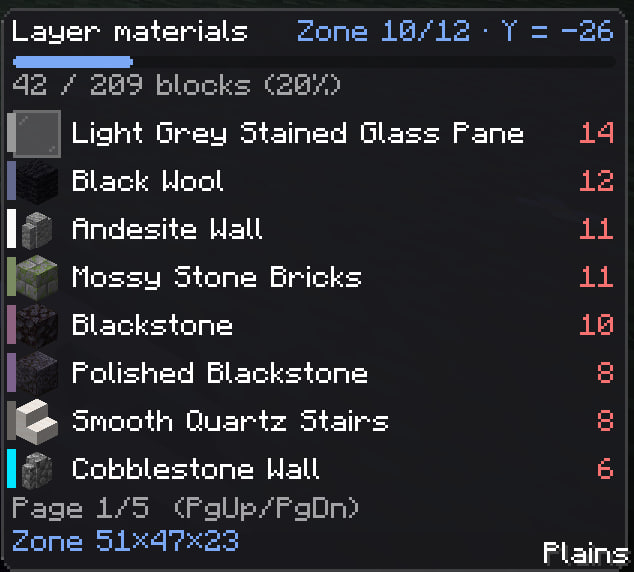
A simple and easy-to-understand list of materials.
Place a block and it drops off the list, so the panel always shows what's actually left — with a progress bar for the layer, and counts in single blocks, stacks and shulker boxes.
Colors follow your inventory: 🟢 enough · 🟡 some · 🔴 none, plus an optional red need N.
Sorted by what's needed most; long lists can flip with Page Up / Page
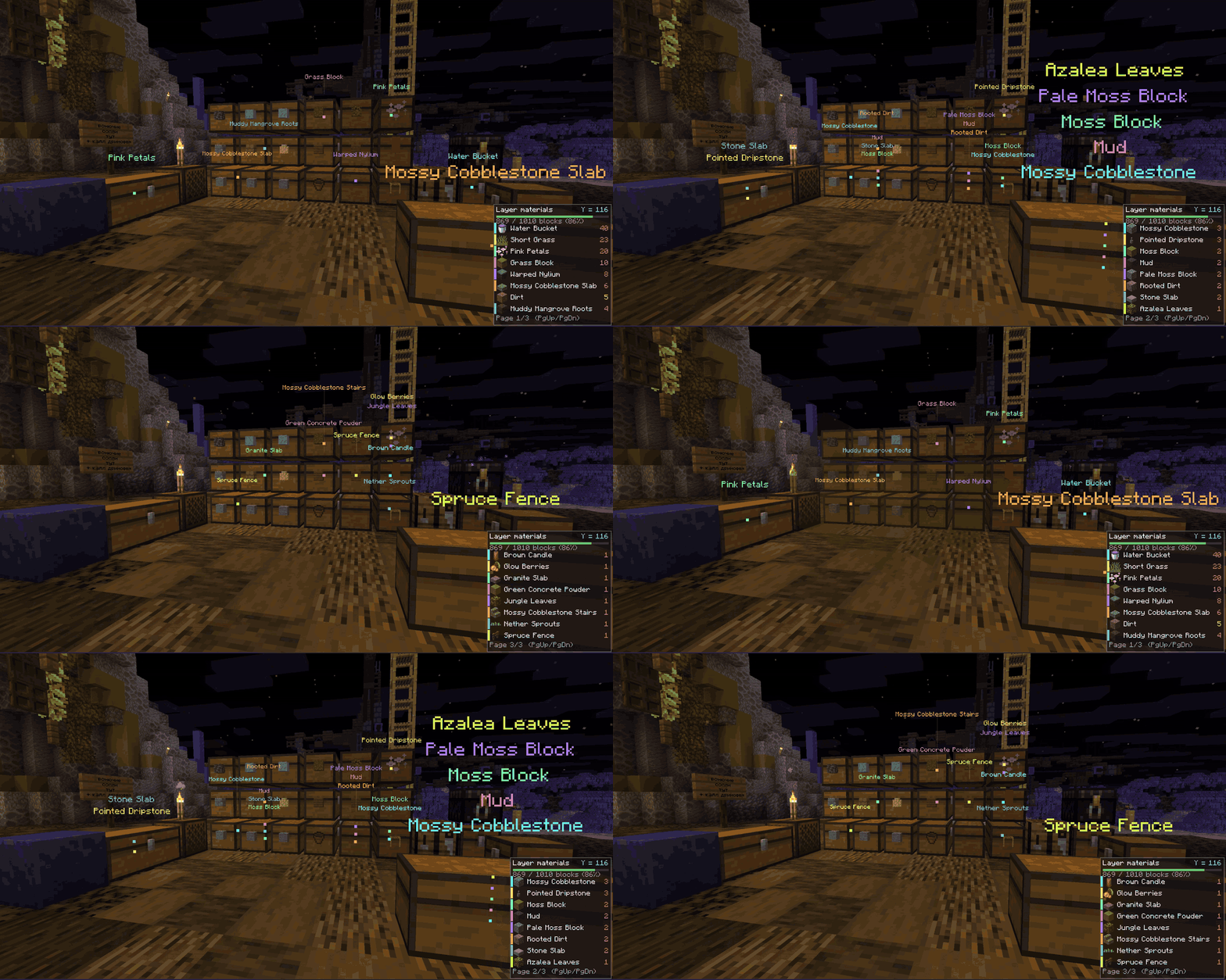
🔍 Chest Finder
Every container you open is quietly noted — contents and location, remembered per world and per server even after you log off. An item frame on a container counts too, no need to open it.
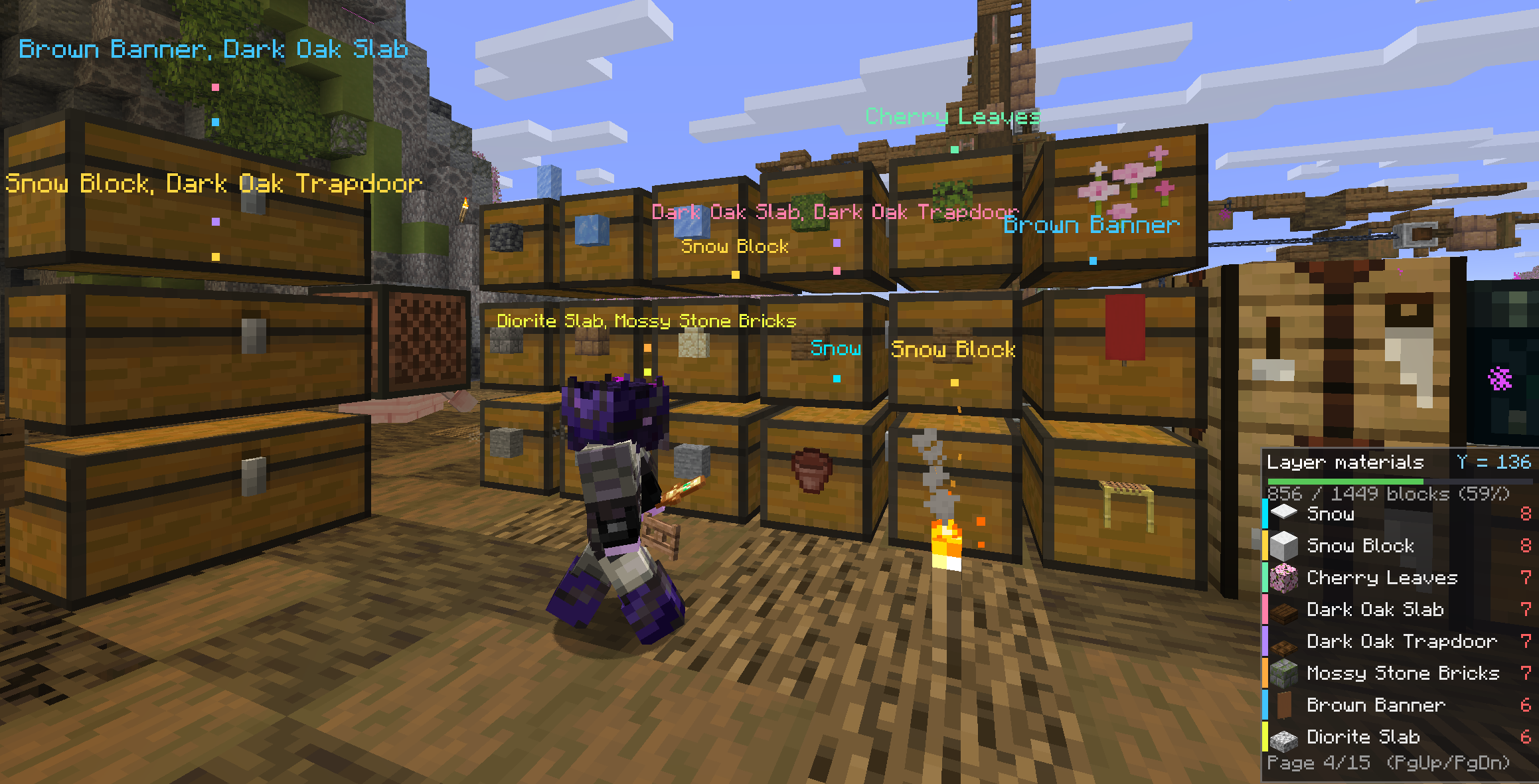
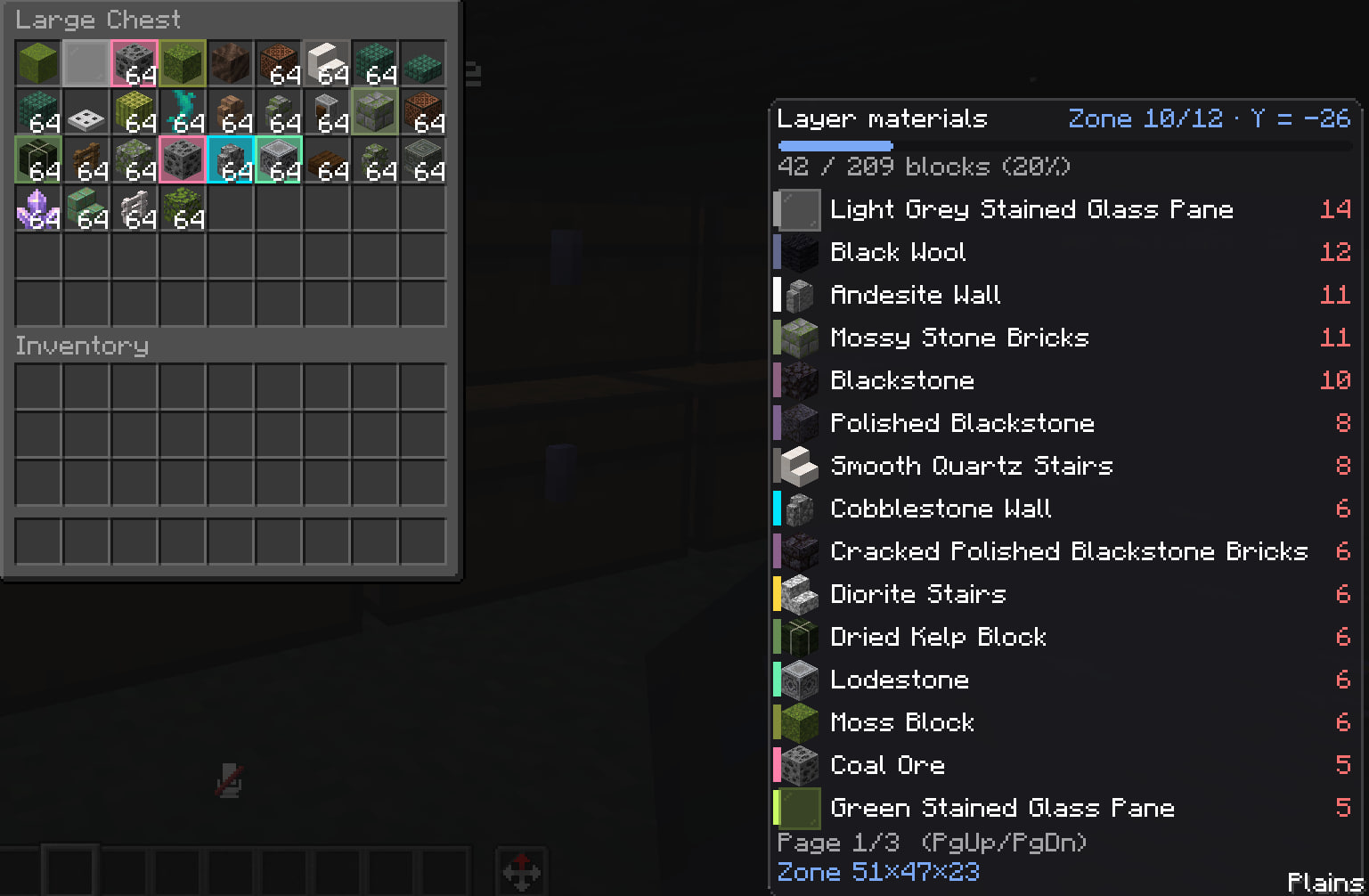
Press U and every storage within 96 blocks (up to 256) holding something from the current page lights up through walls, each block in its own color matching its stripe in the HUD. Names float above each mark, one line per block. Open the chest and the matching slots glow in the same colors — shulker boxes and bundles get outlined too, so you're not opening them one by one. Already carrying enough of something? It's skipped, so the search only ever points at what you're short on.
✔️ Verification
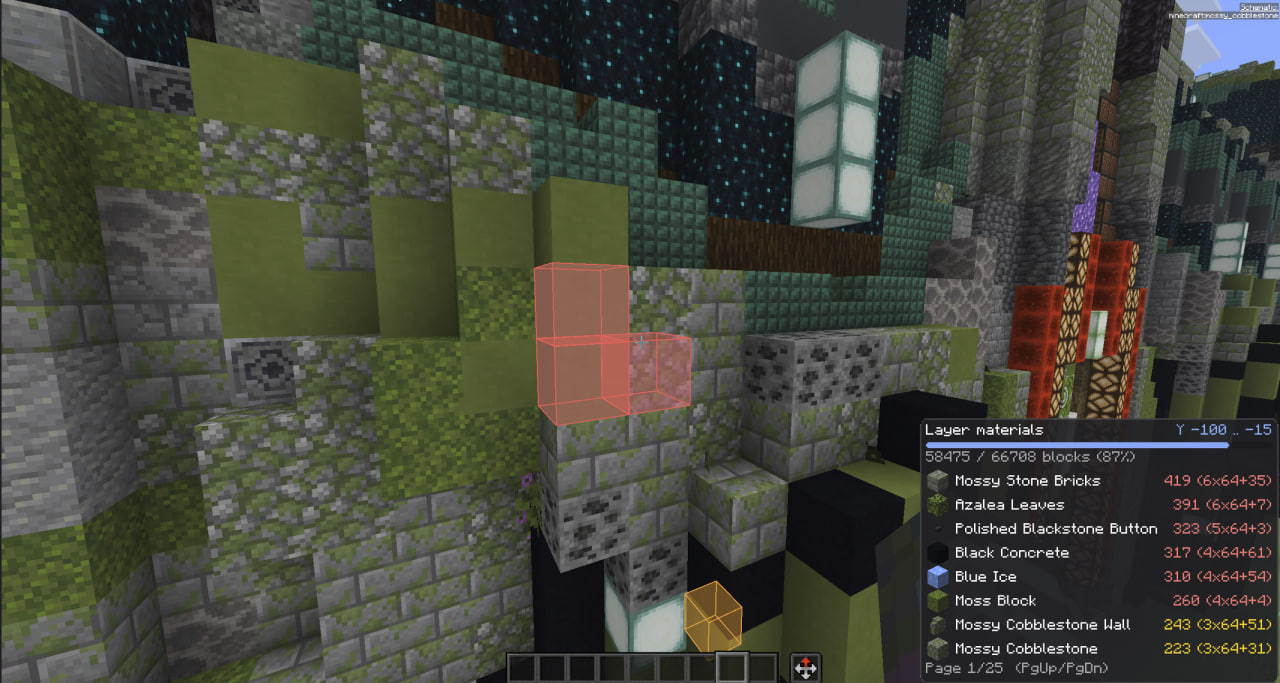
It scans for incorrectly installed blocks and highlights them (even through walls)
🔴 missing · 🟠 wrong block · 🟡 wrong state (stair direction, repeater delay, door) · 🔵 extra. X-ray keeps the boxes visible through terrain, and a draw range plus a box cap keep FPS steady on massive builds.
👻 Ghost Alpha
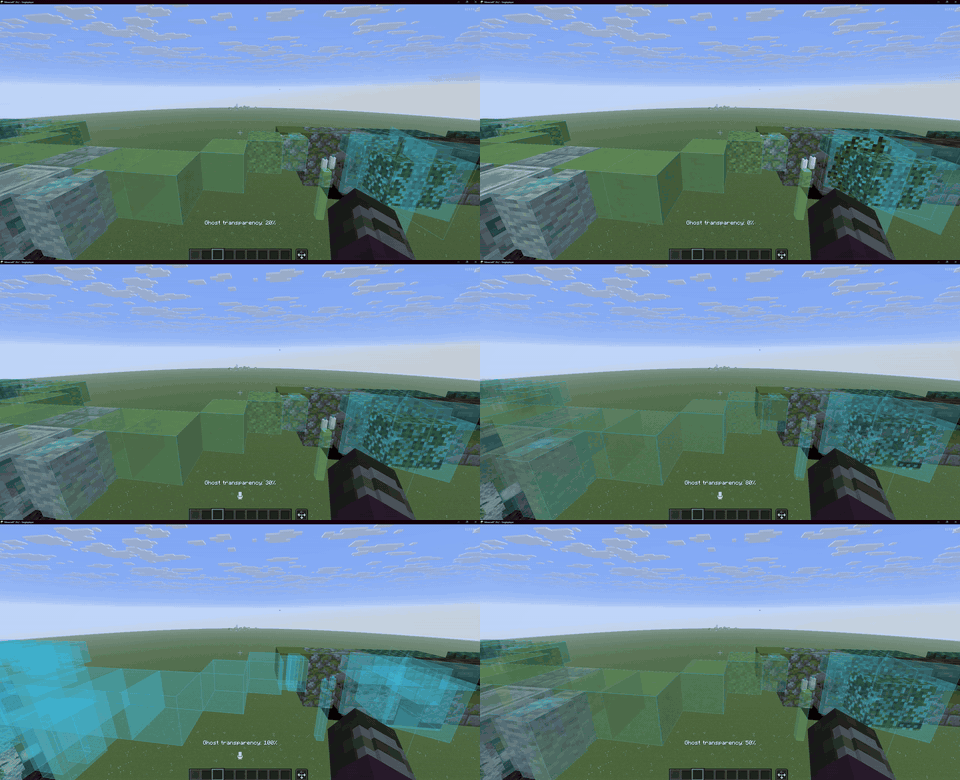
Adjusts the hologram's transparency with a simple slider, plus a few more nerdy settings
🔧 Easy Place Fixes
A module with fixes and additions for EasyPlace that resolves old issues and adds useful features
- Never overshoot. Candles, sea pickles, turtle eggs, petals, moss carpet and snow layers get exactly as many clicks as the schematic asks, each waiting for the server to confirm the last.
- Right state, first try. Every click candidate is simulated against the schematic across all properties — rotation, axis, half, door hinge, bell attachment, stair side, all 16 sign and skull rotations. If the orientation can't be matched, the position is skipped instead of filled crooked. Sneak is sent as a real input packet, so blocks go flush against chests, furnaces and doors instead of opening them.
- States you can't place, only interact. Flint and steel lights candles and campfires, a shovel puts them out, a water bucket handles waterlogging, and doors, trapdoors and gates get opened to match — one use per click, only toward the schematic.
- Banners, decorated pots and player heads. Their pattern, sherds and profile live in item components, not block state, so three banners of one color look identical to Litematica and the pattern came out random. Now the required item is built with its block data and matched on the identifying components — and if you don't have that pattern, the position is skipped rather than ruined.
- Shelves stay empty. Automatic clicks on a shelf go with sneak, so the block gets placed instead of the shelf getting filled.
- Plays nice with EasyPlaceFix. If the standalone mod is present it's switched off while this module is on — two rotation spoofers in one click is exactly how builds go crooked. Toggle the module off and the other mod returns to whatever state it was in, with a chat notice both ways.
ZoneFocus Module
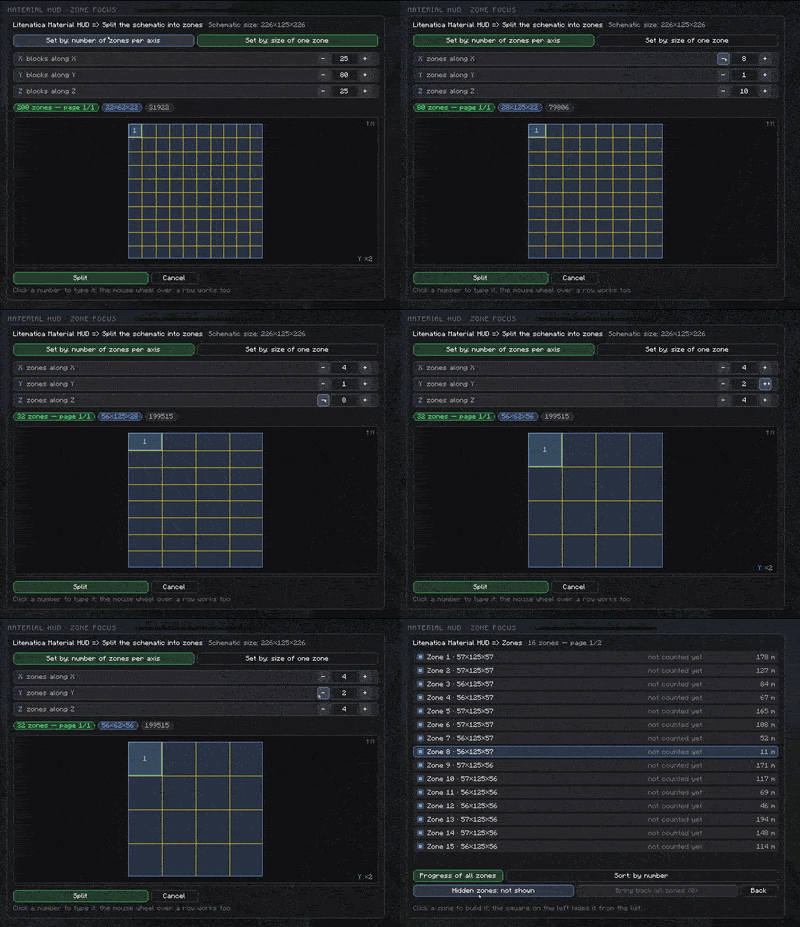
An integrated version of the ZoneFocus mod, which splits the schematic into sections, making it easier to work with large schematics and reducing the load on your computer (and perhaps your brain)
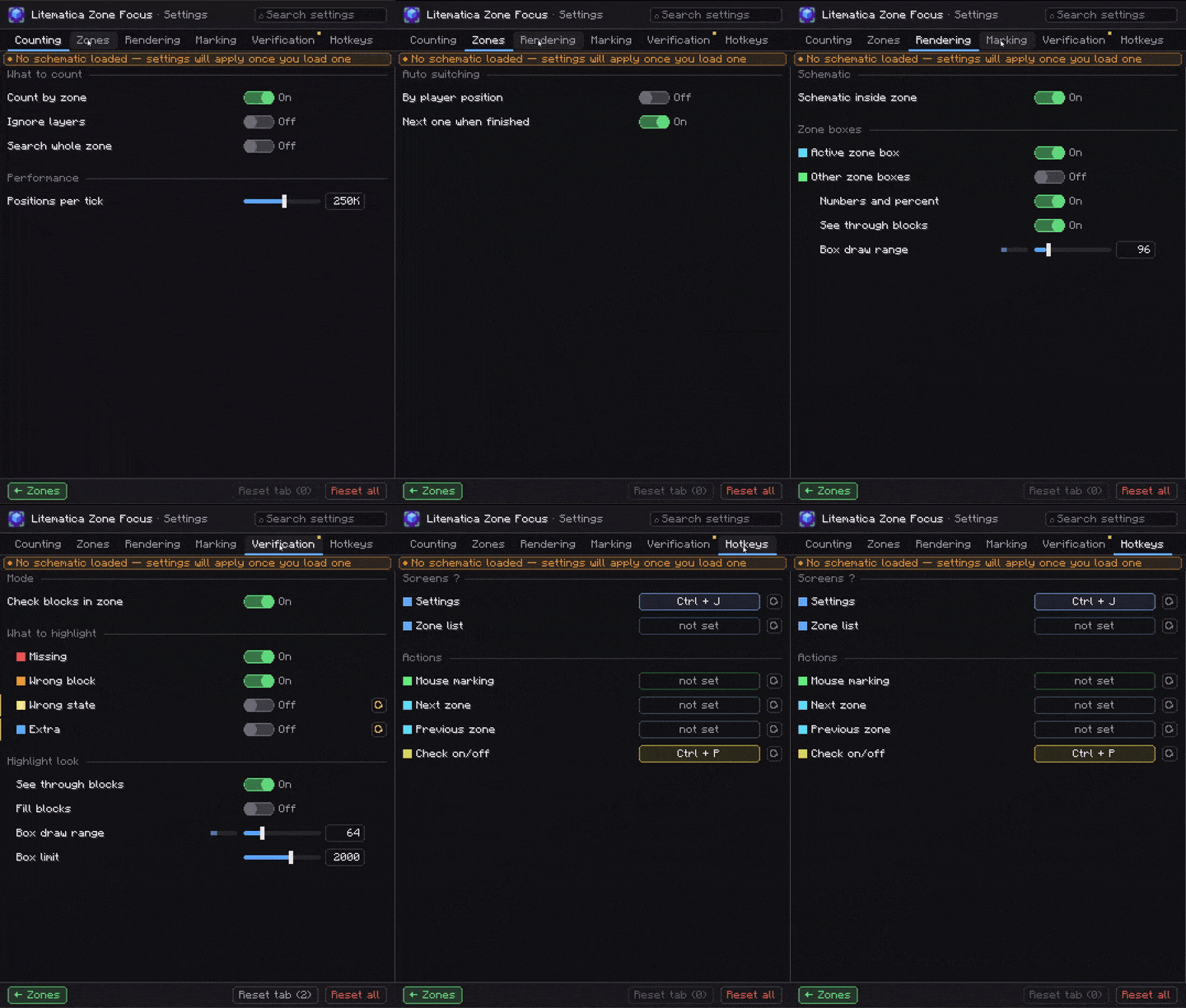
⌨️ Keys
| Key | What it does |
|---|---|
| Y | Show / hide the material list |
| Page Up / Page Down | Flip list pages — works with a container open |
| U | Mark nearby storage holding blocks from the current page |
| Ctrl + U | Clear all marks |
| Ctrl + B | Toggle verification |
| Ctrl + Y | Settings |
| Alt + Y | Move the panel (drag & drop, scale 0.25×–3.0×) |
Screens on Alt, settings on Ctrl. Everything is rebindable, mouse side buttons included.
⚙️ Settings
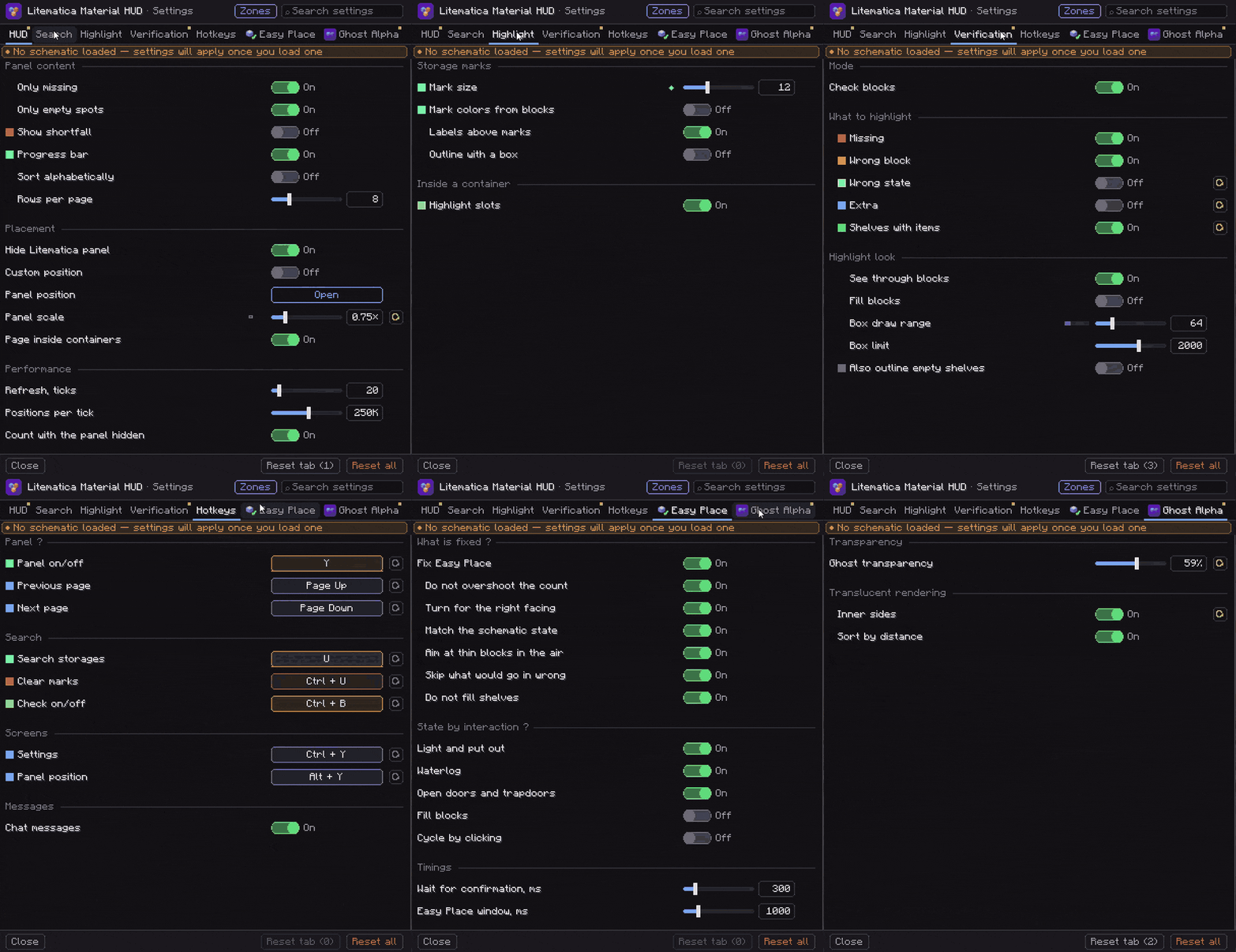
Seven tabs — HUD, Search, Highlight, Verification, Hotkeys, Ghost Alpha, Easy Place — with a search box to jump to a setting by name, a reset button on every row, and one-click reset for a tab or for everything. Rows share colors with whatever they control in the world. The Ghost Alpha and Easy Place tabs appear only when you don't have those standalone mods installed.
Reachable from Ctrl + Y, the Material HUD… button on Litematica's own screens, or Mod Menu. Alt + Y opens drag-and-drop panel placement that snaps to edges and center, with Cancel to put everything back.
🧩 Works Great With Zone Focus
Litematica Zone Focus narrows your schematic down to just the part you're actually building. Pair the two and the material list follows that zone — its own list, its own chest markers, one shared settings screen.
💡 Building something huge? Both the list and the chest marks then only ever show the one small area you're working on right now.

📦 Requirements
| Minecraft | 26.2 · 26.1.x · 1.21.11 |
| Fabric Loader | 0.18.2+ |
| Java | 25+ |
| Required | Litematica (tested on 0.28.4) · malilib · Fabric API |
| Optional | Mod Menu — adds a settings button |
Ченджлог
0.0.14+26.2Бета26.2 · 20 августа 2026 г.
New: Litematica ZoneFocus module



Zone Focus splits a placed schematic into zones so you can build it piece by piece. It lives as Material HUD's third built-in module, next to Ghost Alpha and Easy Place, on a tab of its own.
- Off by default. One toggle on the new Zone Focus tab turns it on; all keybinds ship unbound.
- Every zone action lives on the tab: split into a grid (by zone count or by zone size), one zone per sub-region, a zone from your Litematica selection, the zone list with progress, clear. An action that can't run right now is greyed out with the reason.

- Materials are counted for the active zone, and Litematica layers keep working inside it — you scroll layers within the zone as usual (or count the whole zone at once, there's a toggle). Storage search can cover the whole zone too.
- Everything outside the zone is simply not rendered: no geometry is built for it at all, so a huge schematic stops weighing on FPS while you build its piece.
- Mark a zone with the mouse: hold LMB and drag a box right in the world; the scroll wheel moves a face. There's a slot-like button next to your inventory for it.
- The split screen shows a top-down diagram: it repeats the actual shape of the schematic and draws the cut lines and the first zone in the same colours you see in the world. Numbers can now be typed in — click a number, type, Enter.
- No duplicated settings. Zone blocks are checked by Material HUD's usual block check and chests are found by its usual storage search — both simply follow the active zone.
- Plays nice with the standalone mod. If the separate Litematica Zone Focus is installed, it keeps running the engine, and the tab here edits its settings — the values are the same on both screens.
In action
📦 You need
Minecraft 26.2 · Fabric Loader 0.18.2+ · Fabric API · malilib · Litematica · Java 25
0.0.13+26.2Бета26.2 · 16 августа 2026 г.
New icon
0.0.12+26.2Бета26.2 · 14 августа 2026 г.
🔧 Fixed
- fixed — Rails now land in the exact orientation the schematic shows — straight lines, turns and slopes, all four rail types.
- fixed — Rails no longer get skipped or misplaced while waiting for neighbours; no more permanent holes in the track.
- fixed — Double chests: the second half no longer stays a single chest. It's placed with a sneak click on the first chest — reliable on servers, all copper variants included.
✨ New
- new — Levers are switched to match the schematic — right after placement or when you aim at one set wrong. Toggle: "Open doors, set levers".
0.0.11+26.2Бета26.2 · 13 августа 2026 г.
🔧 Fixed
- fixed — Crash (
ArrayIndexOutOfBoundsException) while counting materials on schematics whose declared region size is larger than the actual block container. The counter walked past the end of the schematic data instead of stopping at its edge; such cells are now skipped, the way Litematica itself handles them.
📦 You need
Minecraft 26.2 · Fabric Loader 0.18.2+ · Fabric API · malilib · Litematica · Java 25
0.0.10+26.2Бета26.2 · 12 августа 2026 г.
Material HUD 0.0.10 - EasyPlace update
✨ New
- Finishing blocks with tools. Copper is de-oxidized with an axe and waxed with a honeycomb, dirt becomes farmland with a hoe and a path with a shovel, a candle lands on its cake. Where survival has no item at all (candle cake, farmland, path), the base block goes down first — but only if the finishing tool is in your inventory.
- Stripped logs. No stripped log in your chests? The mod places a plain one and strips it with an axe from your inventory. If you have the stripped one, it places that.
- Shelf filling. Chiseled bookshelves and item shelves are filled to match the schematic: books and items go into their slots with clicks, the way a player does it. A wrong item on a shelf is swapped out in one click.
- "Blocks per second" — placement speed as one simple slider (default 10). Anticheat complaining? Set it to 5.
- "Never turn the player" and "Treat the server as vanilla" — for servers with an anticheat: they remove the camera snaps and the "impossible" clicks that get you kicked.
- "Schematic only" — Easy Place can no longer put a stray block inside the schematic (that random extra fence). If something you need stops placing, turn it off.
- Copper golem poses. A statue is clicked with an empty hand until it matches the schematic pose (sitting, running, star).
- "Easy Place debug" — tells you in chat why a block did not place. Handy when something is not working.
- Fewer settings: everything that should always work now just works — no toggles.
🔧 Fixed
- fixed — Flowers, grass, saplings, lichen now place by aiming at their cell — no need to hit the thin stem.
- fixed — Glow berries, vines, kelp, hanging moss finally place. A vine can be grown by aiming anywhere along its ghost.
- fixed — Double chests finally build. The first half goes down as a single chest and vanilla merges the pair the moment the second half lands. All 12 chests: regular, trapped and the copper ones. Before, the pair never even started.
- fixed — Double slabs no longer stay single. The mod sends the second click itself, aimed at the slab's real surface — all 68 slab blocks.
- fixed — Signs no longer pop the edit screen: a freshly placed schematic sign gets its text straight from the schematic, no editor window on every signpost. Clicking an already-written sign still opens the editor, the vanilla way.
- fixed — Doors and trapdoors open/close to match the schematic right away instead of staying however they landed.
- fixed — Lily pads and frogspawn place outside the schematic again. With Easy Place on RMB they used to be blocked everywhere in the world.
- fixed —
UandCtrl+Uwork inside an open chest — no need to close it to toggle or clear the search. - fixed — Storage search no longer switches itself off when a page is collected: turn the page and the chest marks are back.
- fixed — Search marks no longer linger from an unloaded schematic — remove the schematic and the chest marks go out on their own.
- fixed — Server confirmation is read from the packet number instead of a 300 ms timer: no more vine columns growing past the schematic or extra candles on a laggy connection — and no idle waiting on a fast one.
- fixed — A cell the server keeps refusing is dropped after six confirmed refusals, with one chat message saying where and why — instead of being clicked every two seconds forever.
- fixed — Lanterns no longer stand upright where the schematic wants them hanging: the cell waits until its ceiling is built.
0.0.9+26.2Бета26.2 · 10 августа 2026 г.
🔧 Fixed
🪴 Potted plants
A potted plant is two blocks in one cell — an empty pot, and a plant put into it afterwards. Easy Place could build neither half.
- The pot goes down first. A potted plant has no item of its own, so Litematica asked for the plant: you got a dandelion in the ground instead of a pot. The empty pot is now placed first.
- A pot that already stands gets filled. An occupied cell used to kill the position outright; now the next click puts the plant in — from your hand, offhand, hotbar or inventory.
- Sent without sneaking, so the flower goes into the pot, not on top of it. Server confirmation is awaited between the two clicks. Every pot variant, vanilla and modded.
- New toggle in Easy Place: Pot the plants (on). Material list unchanged.
🖱️ Automated clicks
The mod's own clicks on blocks that already stand — flint and steel, bucket, bare hand, plant into a pot — no longer go back through placement analysis. Their position, face, item and angle are already worked out; re-deciding them could only cancel a click that was correct.
0.0.8+26.2Бета26.2 · 10 августа 2026 г.
EasyPlace
🔧 Fixed
- Patterned banners are no longer placed at random. The pattern lives in the item, not in the block, so Easy Place could only tell banners apart by colour: out of three white banners with different patterns you got whichever came first. The mod now takes exactly the banner the schematic asks for.
- No banner with the right pattern in your inventory — the spot is skipped instead of being filled with the wrong one.
- A renamed banner with the same pattern still works.
- Same fix for decorated pots and player heads — their differences live in the item too.
Everything else is as in 0.0.7.
0.0.7+26.2Бета26.2 · 10 августа 2026 г.
✨ Added
🌫️ Ghost Alpha
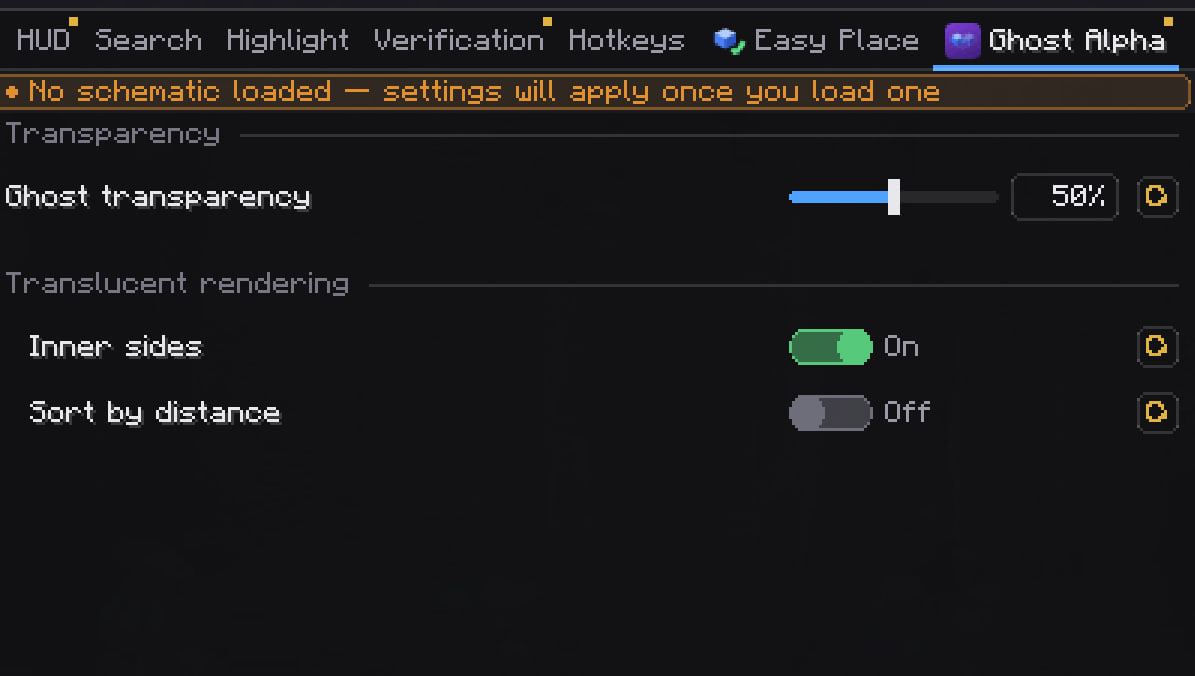
Built-in module with its own settings tab. Ghost transparency runs from 0% (the usual solid ghosts) to 100% (ghosts gone, schematic still working) — shared with Litematica's own setting and applied in the same frame.
Rest of the settings
- Inner sides — also draw the faces between neighbouring ghosts. Off, a see-through wall reads as one shell instead of a stack of boxes.
- Lean inner sides (on) — inner faces only where two different blocks meet. Same picture as Litematica's stock mode, but megabytes of video memory instead of gigabytes on a large schematic.
- Sort by distance — overlapping ghosts blend in the right order (costs a few frames).
- Got the standalone Ghost Alpha mod? The module stands down, that mod owns the settings, nothing is duplicated.
🧱 Easy Place
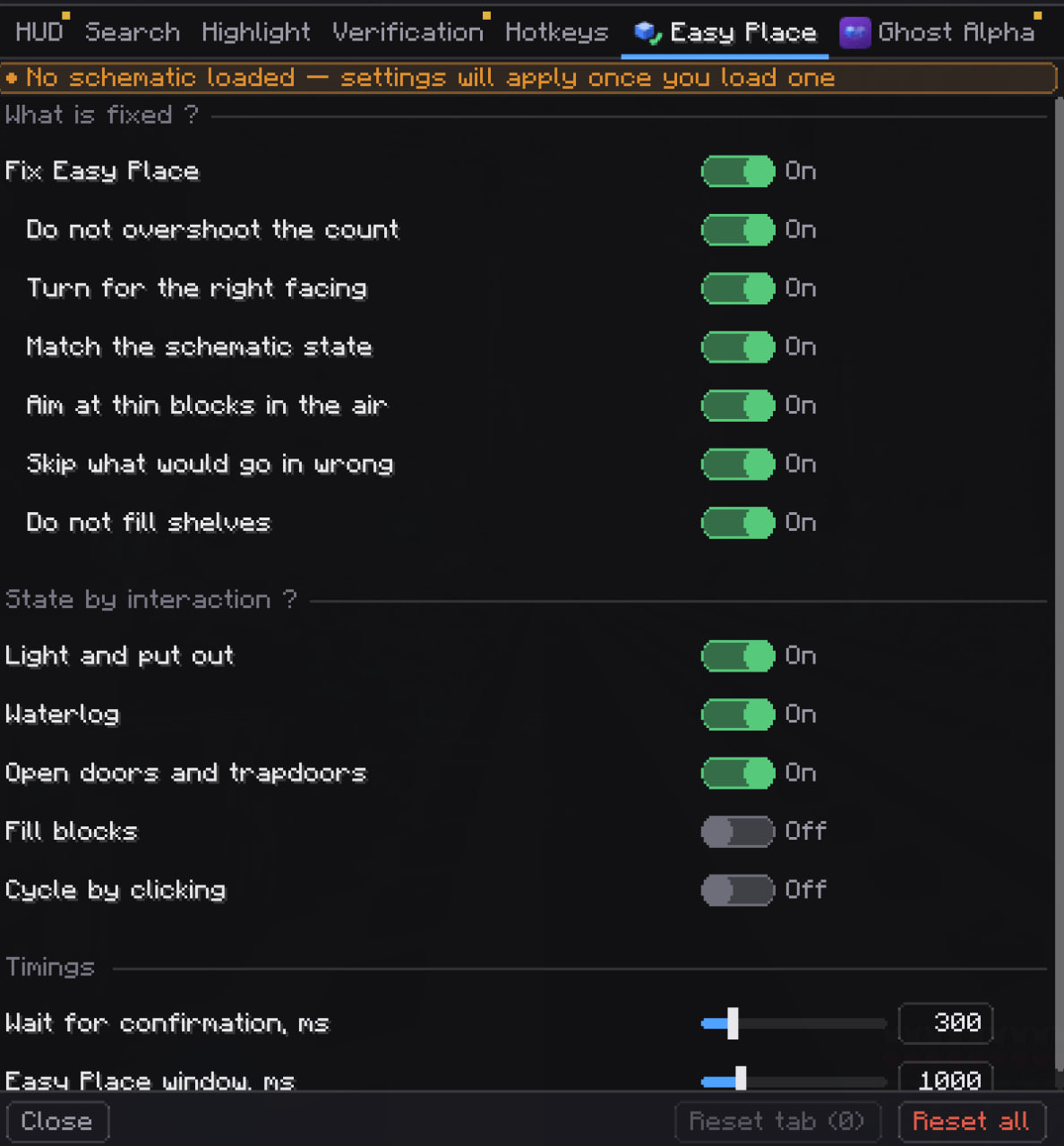
Built-in module with its own settings tab, fixing the blocks Litematica's Easy Place has always got wrong. Master switch Fix Easy Place (on) — off, Litematica places exactly as before.
What it fixes
- Match the schematic state (on) — picks the face, hit spot, look angle and sneak state that reproduce exactly the state the schematic asks for: facing, axis, slab and stair half, door hinge, bell attachment, stair side, all 16 rotations of signs and skulls.
- Sneaking goes out as a real input packet, so blocks land flush against chests, furnaces and doors instead of opening them.
- Do not overshoot the count (on) — candles, sea pickles, turtle eggs, pink petals, leaf litter and now snow layers get exactly as many clicks as the schematic asks for, and the next click waits for the server to confirm.
- Turn for the right facing (on) — petals, leaf litter and grindstones take their facing from where you look, so the mod turns you for the click and turns back right after.
- Grindstones and other attachable blocks go up in mid-air, in the orientation the schematic asks for. Levers and buttons genuinely need support, so those wait until it exists.
- Aim at thin blocks in the air (on) — candles, chains and hanging signs are targeted by their whole block, so you can place them pointing at empty space instead of a two-pixel outline.
- Light and put out (on) — flint and steel or a fire charge lights candles, candle cakes and campfires, a shovel puts a campfire out, a bare hand snuffs a candle.
- Waterlog (on) — a water bucket fills the block, an empty bucket drains it.
- Open doors and trapdoors (on) — doors, trapdoors and fence gates the schematic wants open get one bare right click.
- Skip what would go in wrong (on) — if no click can give the state the schematic asks for, usually because the block it must attach to is not built yet, the position is skipped instead of placed wrong.
- Do not fill shelves (on) — automated clicks on a shelf go through as sneaking, so the block is placed and nothing is dropped into the shelf.
- Fill blocks (off) — glowstone into a respawn anchor, an eye of ender into an end portal frame, water into a cauldron. Off by default, it spends items.
- Cycle by clicking (off) — repeater delay, comparator mode, daylight detector and note block are stepped one click at a time until they match.
- Laggy server? Raise Wait for confirmation, ms.
- Running third-party EasyPlaceFix? Its master toggle is held off while our module is on and Material HUD does all the fixes, so grindstones stop landing sideways or one cell above. Switch our module off with its own toggle and EasyPlaceFix is re-enabled exactly as it was, with a chat notice both ways.
🗄️ Shelves with items — new check
With the block check (Ctrl+B) on, Shelves with items (off) marks shelves holding items green and filled, so you see at a glance where resources are lying. The client knows a shelf's contents without opening it, so the search is instant and, unlike container search, does not need you to visit each one. Radius and marker cap are shared with the block check, and Also outline empty shelves (off) puts a thin outline on the empty ones.
🔧 Fixed
- Counting no longer stops together with the hidden panel (Y) — the numbers are right the moment you show it. The old behaviour stays as Count with the panel hidden (on).
- The reset confirmation no longer wipes your settings when you click No.
Interface fixes
- Settings tabs never wrap to a second row: padding shrinks, then labels are ellipsised with the full label in the tooltip, then the strip scrolls. The changed-settings dot no longer pushes the next tab out, and the tile widens itself to fit the tab row.
- Section notes no longer spill out of the tile — the title carries a ? and the note opens as a tooltip, in full. No more Format Error in labels and tooltips.
- Add-on buttons no longer vanish in a narrow window (a ... list stays behind), Back no longer shrinks to zero width, and the button on Litematica's screens no longer covers its search bar — it is now an icon square with a hover label, in the tab row.
- Keybinds: the button shows the keys as you press them, Escape without typing restores the previous binding (also on tab switch and on closing the screen), and capture no longer breaks after the first key.
- Space in the search box no longer toggles the focused setting, and searching no longer overwrites the tab's remembered scroll position.
📦 Requirements
Minecraft 26.2 · Fabric Loader 0.18.2+ · Fabric API · malilib · Litematica · Java 25
Комментарии
Загружаем…