 Mineforgian
Material Counter
Material Counter is a datapack that lets you quickly calculate which materials and how many of each are required to recreate a selected structure in Minecraft.
Simply select an area using the dedicated Material Counter Position Selector, and the datapack will automatically analyze every block and generate a complete list of the required materials.
Features
- Counts every block within the selected area.
- Displays a complete list of the required materials.
- Shows the exact quantity of every block needed.
- Dedicated Position Selector tool.
- Automatic in-game User Guide.
- Chat Mode and Book Mode for displaying results.
- Toggleable position outline particles.
- Crafting recipes for both the Position Selector and the User Guide.
Usage
1. Obtain the Position Selector
You can get the tool in two ways.
a) Craft it using the following recipe:
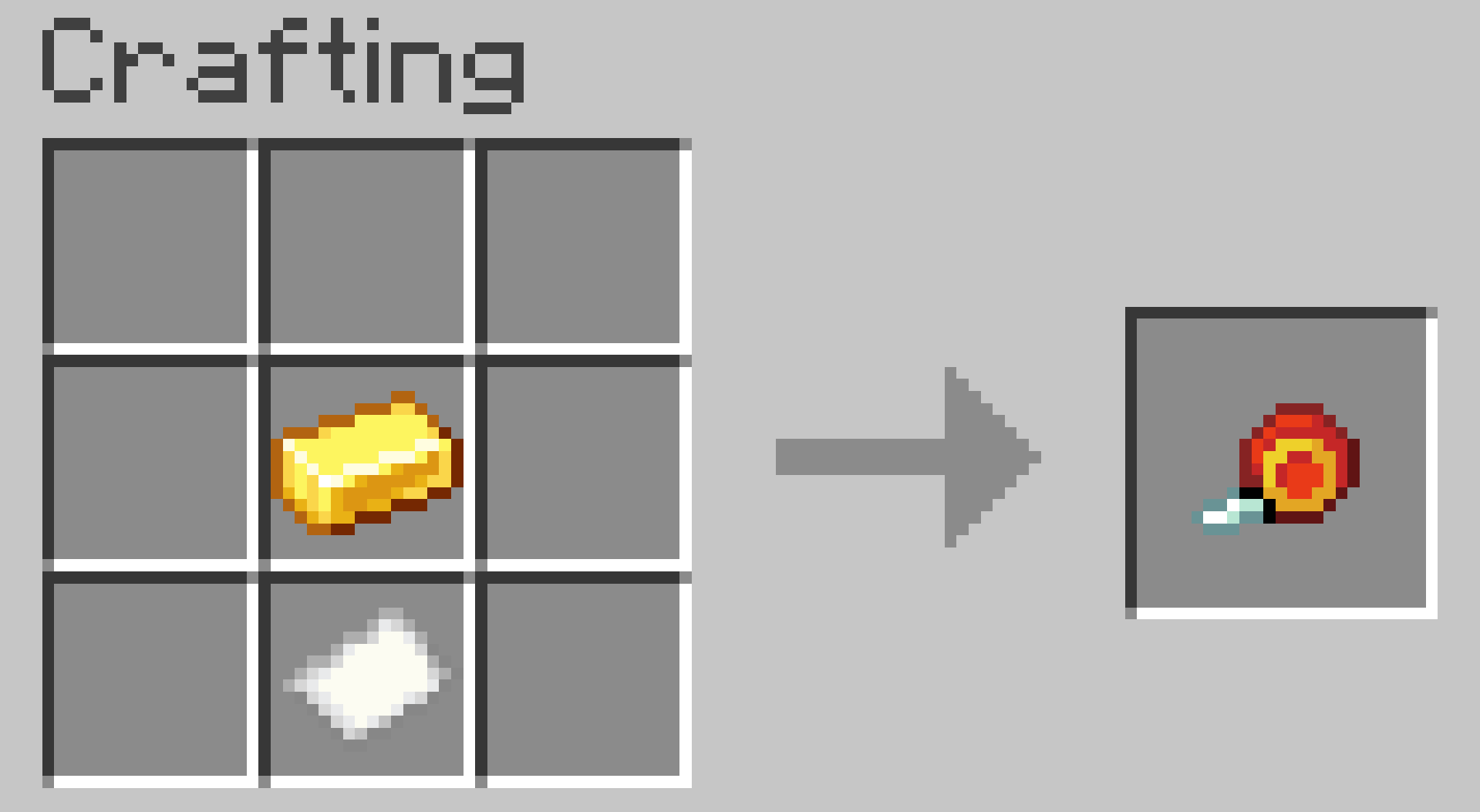
b) Obtain it instantly by running:
/trigger give
2. Select Position 1
Go to one corner of your build and right-click an empty block face.
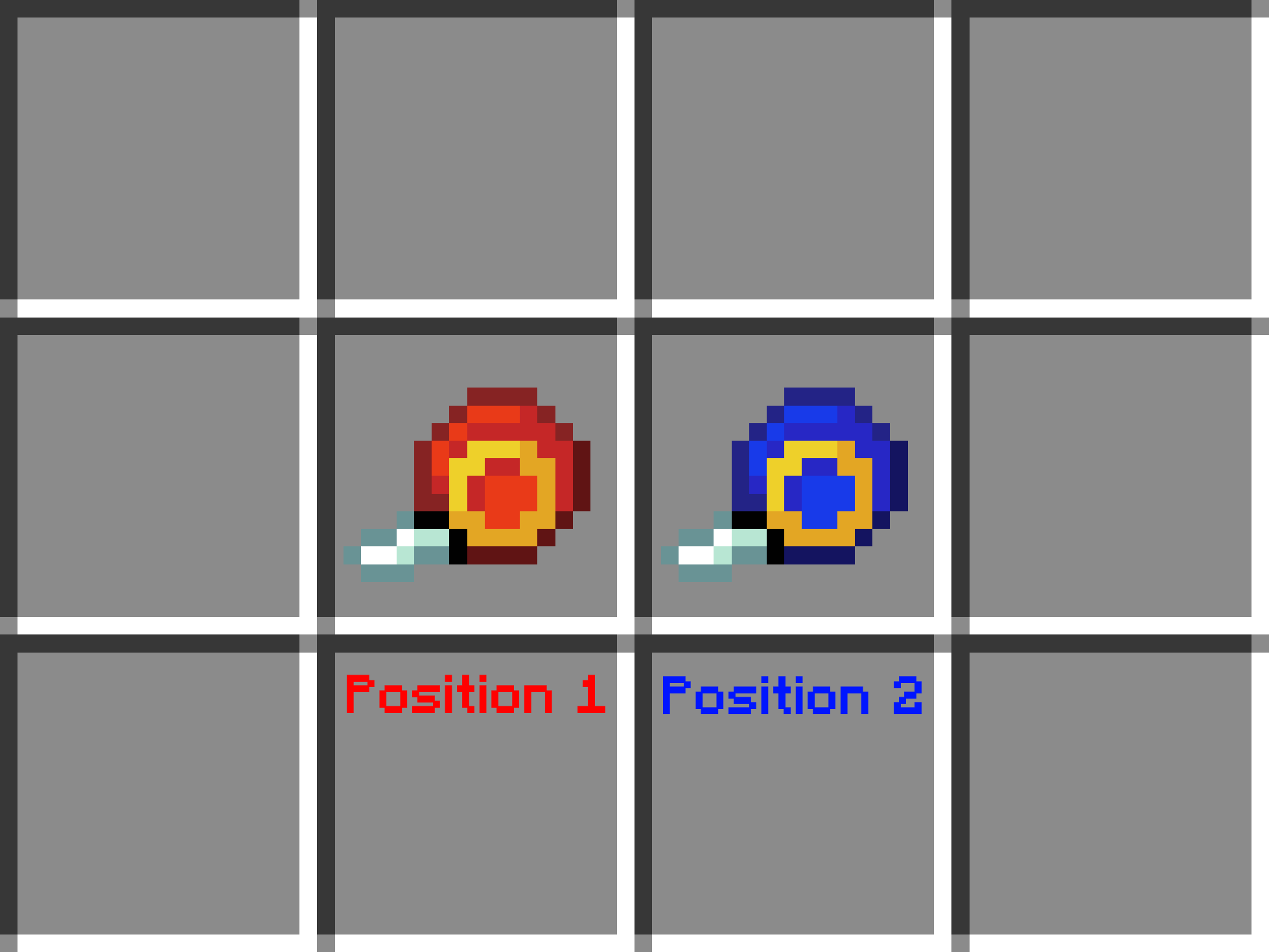
The Position Selector will change its appearance, indicating that the next step is selecting Position 2.
3. Select Position 2
Go to the opposite corner of the build and right-click again.
4. Wait for the calculation
The datapack will analyze every block inside the selected area.
Large selections may take longer depending on the size of the build and your computer's performance.
5. View the results
By default, the material list appears in chat.
If you prefer, you can switch to Book Mode, which generates a book containing the complete material list.
Settings
The datapack includes two optional settings.
/trigger list
Switches between:
- Chat Mode (default)
- Book Mode
- Dialog Mode
/trigger position_outlines
Enables or disables the particles that mark Position 1 and Position 2.
Enabled by default.
User Guide
The first time you join a world with the datapack installed, you'll automatically receive an in-game User Guide explaining every feature.
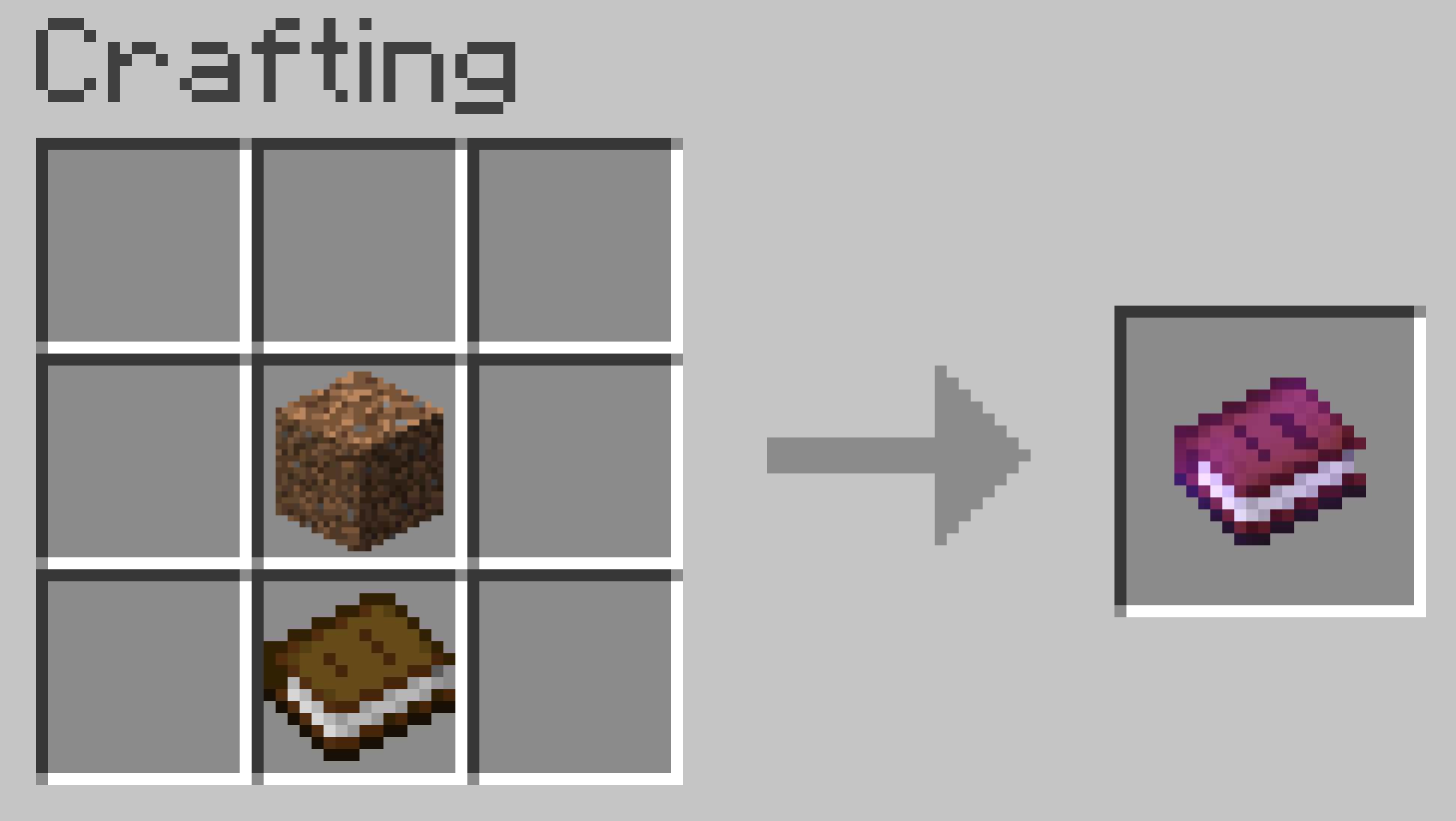
If you lose it, you can craft another copy using its crafting recipe.
Compatibility
No additional mods or libraries are required.
Place the datapack in your world's datapacks folder.
To enable the custom textures for the Position Selector, place the same ZIP file in the
resourcepacksfolder as well.
Warning
Selecting extremely large areas may cause Minecraft to freeze or crash.
Your world should remain safe, as Minecraft Java Edition can restore backups if a crash occurs during datapack execution.
Credits
Creator: MrKazanek
Special thanks: Bluezers
Thank you to everyone who supported this project! ❤️
Ченджлог
1.3Релиз26.2 · 25 июля 2026 г.
New Material Count Display Mode – Dialog Mode
You can enable Dialog Mode using the /trigger list command. It is now the third display mode available. Previously, this command only switched between Chat Mode and Book Mode. Now, when you're in Book Mode, running /trigger list again will switch to Dialog Mode.
Instead of displaying the materials in chat or a book, Dialog Mode opens a custom dialog interface containing the complete list of required materials. This makes large material lists much easier to read and navigate.
We recommend using Dialog Mode for larger builds, as it provides a cleaner and more organized overview of all required materials.

Bug Fixes
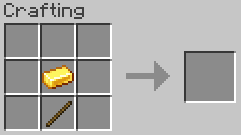
- Fixed an issue where the tool could be used to craft items that required a stick in their recipe.
The tool is now an enchanted book, which prevents it from being used in any crafting recipes.
IMPORTANT: If you were using an older version of the datapack in your world and update to this version, your existing tool will no longer work. You will need to obtain a new one by crafting it again or using the /trigger give command.
1.2Релиз26.2 · 24 июля 2026 г.
Fixed major issues:
- The entire first page of the Required Materials book was incorrectly bolded instead of only the header.
- The Required Materials book no longer cuts off block names or values when there is too much text on a page.
- The datapack now counts only water source blocks instead of all water levels.
- The datapack now counts only lava source blocks instead of all lava levels.
- The datapack no longer counts portal blocks:
Nether Portal,End Portal, andEnd Gateway.
1.1Релиз26.2 · 18 июля 2026 г.
Improvements & New Features
🎨 Position Selector Visual Feedback
The Material Counter Position Selector now changes its appearance after Position 1 has been selected. The tool turns blue, making it clear that the next step is selecting Position 2.
📖 Added In-Game User Guide
A complete User Guide has been added.
Players automatically receive the guide the first time they join a world with the datapack installed. It explains every feature and how to use the datapack step by step.
If you lose the book, you can craft a new copy using the following recipe:
⚡ Easier to Obtain the Position Selector
Getting the Material Counter Position Selector is now much easier.
You can now obtain it at any time by running:
/trigger give
Previously, the only command-based method was:
/function materialcounter:give_item
However, that required cheats to be enabled, making it unavailable in many survival worlds. Using /trigger works without operator permissions, making it much more convenient.
The tool can still be crafted in a Crafting Table as before.
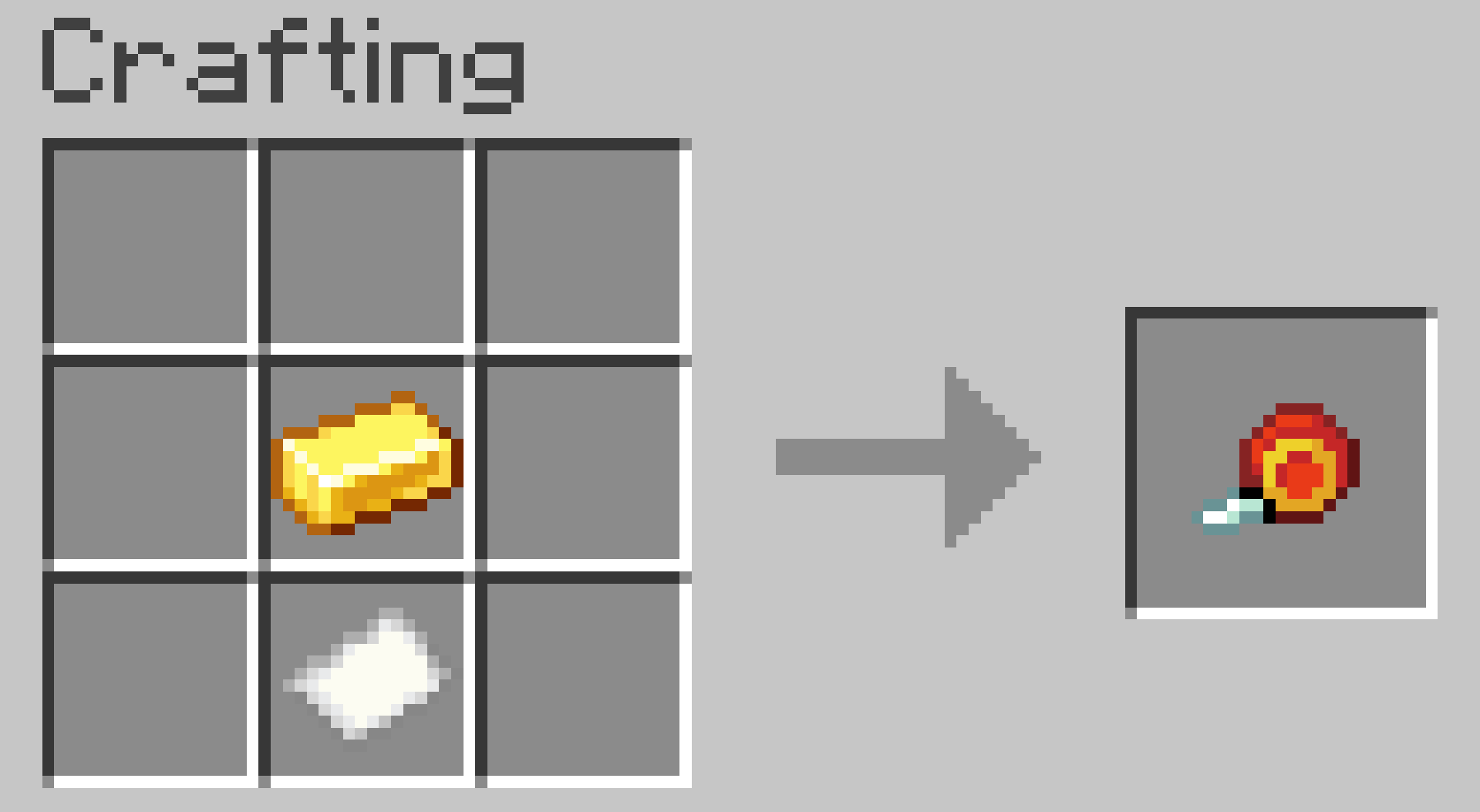
🛠️ Updated Crafting Recipe
Based on community feedback, the crafting recipe for the Material Counter Position Selector has been updated.
Instead of requiring a Stick, it now requires Paper.
⚙️ New Datapack Settings
Two new toggleable settings have been added.
🟢 Position Outline Particles
Use:
/trigger position_outlines
to enable or disable the particle outlines that mark Position 1 and Position 2.
Default: Enabled
📚 Material List Display Mode
Use:
/trigger list
to switch between two result display modes.
💬 Chat Mode (Default)
Displays the material list directly in chat.
This works well for smaller builds, but Minecraft's chat has a line limit, so very large structures may not display the entire list.
📖 Book Mode
Generates a book containing the complete material list every time you calculate a structure.
This mode is recommended for larger and more complex builds because the full list is always preserved.
🔄 How the Toggle Commands Work
The new /trigger commands do not require any arguments.
Simply run the command to switch to the next option.
For example:
/trigger list- First use → Book Mode
- Second use → Chat Mode
- Third use → Book Mode again
The same behavior applies to /trigger position_outlines.
1.0Релиз26.2 · 16 июля 2026 г.
Project Started
Old Tool Recipe:
Комментарии
Загружаем…