 Mineforgian
MapFrontiers
This mod is an addon for JourneyMap that allows you to divide the map into regions and assign them names and colors.
- Загрузки
- 1.0M
- Подписчики
- 315
- Обновлён
- 20 июля 2026 г.
- Лицензия
- MIT
Опубликован 18 декабря 2022 г.
This mod is an addon for JourneyMap that allows you to divide the map into regions and assign them names and colors.
Version 3
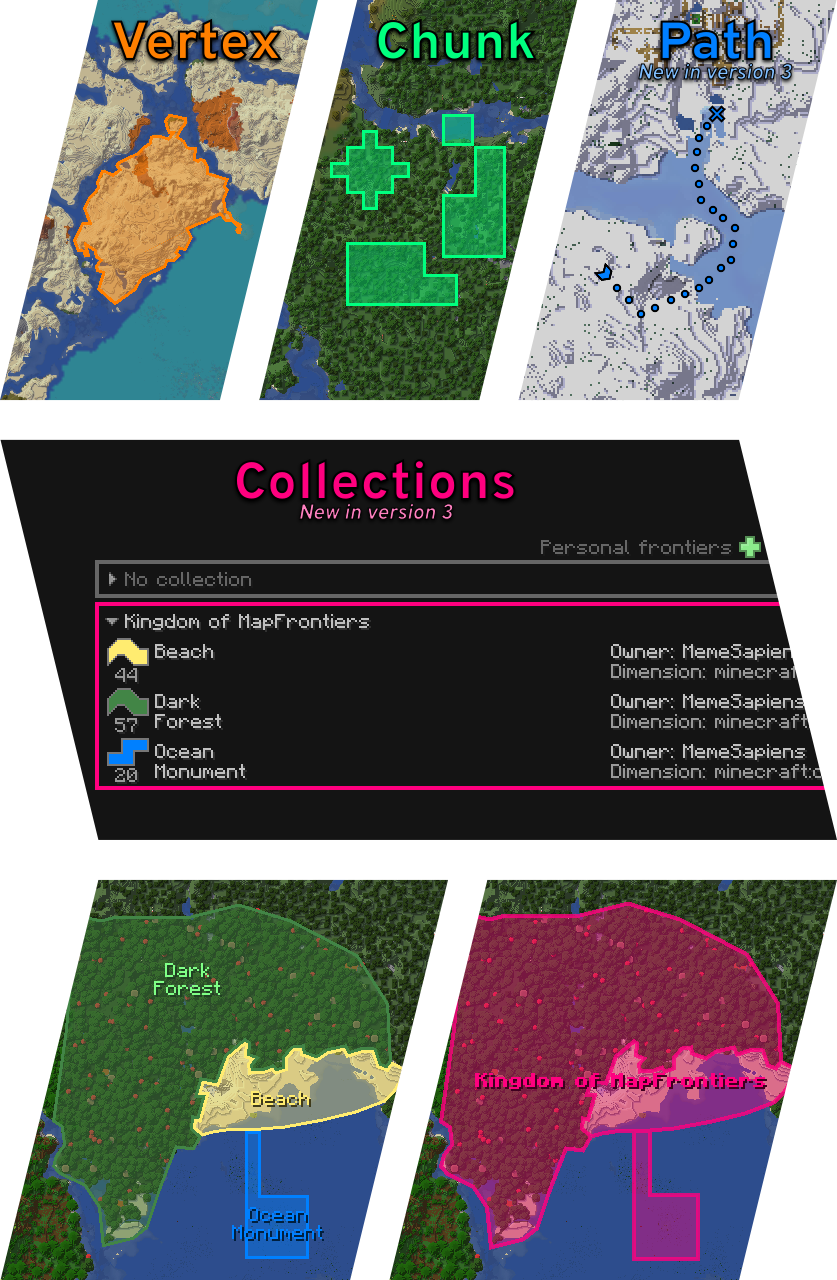
Big changes are coming in this new version. The features already implemented are Path as a new shape, Collections for organizing frontiers, and an API so that anyone can create a plugin that interacts with MapFrontiers.
The API is published as SNAPSHOT and its design is not yet finalized.
From this version onwards, Forge Config API Port is no longer needed.
Features
- Vertex Frontier: A single polygon in any shape you want. Use the left mouse button to drag vertices. Use the right mouse button to open the menu where you can add and remove vertices.
- Chunk Frontier: A group of chunks that you can add and remove individually with the right mouse button.
- Path Frontier: A trail of markers. Use the left mouse button to drag points. Use the right mouse button to open the menu where you can add and remove points.
- Collections: Organize your frontiers into collections. Make them visible on the map when you zoom out.
- HUD: Next to the JourneyMap minimap, you can see which frontier you're within. You can edit appearance and screen location in settings.
- Banner: You can assign any banner you have in your hand to your frontiers. It can be displayed on the map and in the HUD.
- Permissions: In settings, players with OP permissions can change who can create, modify, and delete global frontiers.
Client or Server?
The mod is optional on both sides. It is placed on the client for the player who wants to see and use the frontiers. It is placed on the server so that global frontiers can be created (which can be seen by everyone who has the mod on their client) and so that personal frontiers can be shared with other players.
Current limitations
- Doesn't support vertex frontiers that intersect themselves.
- JourneyMap moves Minecraft effect indicators with the minimap. MapFrontiers doesn't do that so they end up in front of the frontier indicator.
You can see this and my other projects in alejandrocoria.games.
If you want to say something you can leave a comment here, create an issue on GitHub or write in the map-frontiers channel of the JourneyMap discord.
Patreon
Thank you s10w10rr1s for being my patreon for so long!
If you like the mod, you can become a patron and support me, or you can join for free and read my occasional updates.
Ченджлог
26.2-3.0.0-beta.11-neoforgeБета26.2 · 20 июля 2026 г.
Beta 11:
- Fixed: Some lists could appear cut off or disappear when using larger GUI scale settings.
Beta 10:
- Changed: Dialog Save buttons are now enabled only for effective changes.
Beta 9:
- Fixed: The selected editable point marker animation could play much faster than intended.
- Fixed: Some GUI widgets could react to mouse clicks even when hidden, inactive, or clicked outside their bounds.
Beta 8:
- Fixed: Very large frontiers could freeze the client when loading or connecting to a world.
Beta 7:
- Added: A hint in player name fields indicating that Alt can be used for player autocompletion.
- Changed: Many confirmation dialogs can now be skipped by holding Shift while clicking the action button.
- Fixed: Changing a frontier between personal and global could do nothing when the frontier belonged to a collection.
- Fixed: Legacy banner data could prevent worlds from loading correctly after upgrading from older Minecraft versions.
Beta 6:
- Added: Configurable default names, colors, visibility, and Path frontier styles for new frontiers and collections.
- Added: Restore default buttons for individual client settings and default options.
- Added: RGB, HSV, and Hex input modes to color editors.
Beta 5:
- Added: Collections can now be shown on maps with their own labels, banners, and visibility settings.
- Changed: Significant performance optimizations were made to the server, client, and network.
Beta 4:
- Added: Frontier collections, including grouped sections and per-collection actions in the frontier list.
- Added: HUD now supports a fourth slot and includes Collection by default (Name, Collection, Owner, Banner).
- Added: Temporary personal frontiers can now be created directly from the GUI for session-only use.
- Added: Frontier info paste options now support copying Path style between Path frontiers.
- Changed: Frontier creation from the frontier list now stays in the list unless shape editing is selected.
- Changed: Renamed frontier mode to shape across the GUI and client config for clearer terminology.
- Changed: Replaced the frontier list Type filter with a Shape filter (All, Vertex, Chunk, Path).
- Changed: Improved keyboard navigation across many GUI screens and widgets, including tabs, scroll lists, group settings, the color palette, and the color picker.
- Fixed: Changing frontier info paste options no longer sends unnecessary frontier updates to the server.
- Fixed: OP permission changes from the server only applying after the player disconnected and reconnected.
Beta 3:
- Added: More colors to the color palette.
- Changed: Screens can now be closed with the configured inventory key, and settings can also be closed with the configured MapFrontiers settings key.
- Changed: Screens and dialogs now scale and fit their contents more consistently at small window sizes.
- Fixed: Filter reset not saving changes.
- Fixed: Personal frontiers from a previous singleplayer world could be carried over into a newly opened world.
Beta 2:
- API - Added: Temporary personal frontiers that exist only for the current session and are not saved, synchronized, or shareable.
- Added: New Path frontier mode for open line-shaped frontiers, including editable points, marker styles, creation presets, and API support.
- Added: Save and cancel buttons to dialogs.
- Changed: Incomplete Vertex frontiers now have a distinct temporary look.
- Changed: Frontier names now support up to 48 characters per line, and the frontier info and list screens were updated to display longer names more cleanly.
- Changed: Frontier labels and banners now use improved shape-aware placement, keeping them better inside the frontier.
- Changed: Selected frontiers now remain highlighted on the fullscreen map even when hidden by visibility settings.
- Changed: Frontier lists now use mode icons to show each frontier mode and shape count more clearly.
- Fixed: Strange behavior of the maximum limit of int text box.
Beta 1:
- Added: API available soon.
- Changed: Reorganized the client config file into grouped sections and removed the dependency on ForgeConfigApiPort, so it no longer needs to be installed just for this mod.
- Changed: Existing client configs are now migrated automatically to the new layout, with backup/recovery when the client config file is invalid or unreadable.
- Change: Reduced the number of times frontier changes are written to the file.
- Change: The copy button puts the frontier ID on the clipboard.
- Change: Improved several translations across existing languages. If you notice anything that sounds off, feedback and corrections from native speakers are very welcome.
- Fixed: HUD continues to display with F1.
- Fixed: owned personal frontiers disappear when reconnecting after the server no longer has the mod.
- Fixed: MapFrontiers now fails gracefully when JourneyMap does not initialize its plugin. In-world features are disabled, but the mod no longer breaks.
To see previous changes, go to the changelog for version 2.7.0-beta.21
Includes:
- MapFrontiers API: 0.1.0-SNAPSHOT
Requirements:
- NeoForge: 26.2.0.0-beta
- JourneyMap: 26.2-6.0.0
26.2-3.0.0-beta.11-forgeБета26.2 · 20 июля 2026 г.
Beta 11:
- Fixed: Some lists could appear cut off or disappear when using larger GUI scale settings.
Beta 10:
- Changed: Dialog Save buttons are now enabled only for effective changes.
Beta 9:
- Fixed: The selected editable point marker animation could play much faster than intended.
- Fixed: Some GUI widgets could react to mouse clicks even when hidden, inactive, or clicked outside their bounds.
Beta 8:
- Fixed: Very large frontiers could freeze the client when loading or connecting to a world.
Beta 7:
- Added: A hint in player name fields indicating that Alt can be used for player autocompletion.
- Changed: Many confirmation dialogs can now be skipped by holding Shift while clicking the action button.
- Fixed: Changing a frontier between personal and global could do nothing when the frontier belonged to a collection.
- Fixed: Legacy banner data could prevent worlds from loading correctly after upgrading from older Minecraft versions.
Beta 6:
- Added: Configurable default names, colors, visibility, and Path frontier styles for new frontiers and collections.
- Added: Restore default buttons for individual client settings and default options.
- Added: RGB, HSV, and Hex input modes to color editors.
Beta 5:
- Added: Collections can now be shown on maps with their own labels, banners, and visibility settings.
- Changed: Significant performance optimizations were made to the server, client, and network.
Beta 4:
- Added: Frontier collections, including grouped sections and per-collection actions in the frontier list.
- Added: HUD now supports a fourth slot and includes Collection by default (Name, Collection, Owner, Banner).
- Added: Temporary personal frontiers can now be created directly from the GUI for session-only use.
- Added: Frontier info paste options now support copying Path style between Path frontiers.
- Changed: Frontier creation from the frontier list now stays in the list unless shape editing is selected.
- Changed: Renamed frontier mode to shape across the GUI and client config for clearer terminology.
- Changed: Replaced the frontier list Type filter with a Shape filter (All, Vertex, Chunk, Path).
- Changed: Improved keyboard navigation across many GUI screens and widgets, including tabs, scroll lists, group settings, the color palette, and the color picker.
- Fixed: Changing frontier info paste options no longer sends unnecessary frontier updates to the server.
- Fixed: OP permission changes from the server only applying after the player disconnected and reconnected.
Beta 3:
- Added: More colors to the color palette.
- Changed: Screens can now be closed with the configured inventory key, and settings can also be closed with the configured MapFrontiers settings key.
- Changed: Screens and dialogs now scale and fit their contents more consistently at small window sizes.
- Fixed: Filter reset not saving changes.
- Fixed: Personal frontiers from a previous singleplayer world could be carried over into a newly opened world.
Beta 2:
- API - Added: Temporary personal frontiers that exist only for the current session and are not saved, synchronized, or shareable.
- Added: New Path frontier mode for open line-shaped frontiers, including editable points, marker styles, creation presets, and API support.
- Added: Save and cancel buttons to dialogs.
- Changed: Incomplete Vertex frontiers now have a distinct temporary look.
- Changed: Frontier names now support up to 48 characters per line, and the frontier info and list screens were updated to display longer names more cleanly.
- Changed: Frontier labels and banners now use improved shape-aware placement, keeping them better inside the frontier.
- Changed: Selected frontiers now remain highlighted on the fullscreen map even when hidden by visibility settings.
- Changed: Frontier lists now use mode icons to show each frontier mode and shape count more clearly.
- Fixed: Strange behavior of the maximum limit of int text box.
Beta 1:
- Added: API available soon.
- Changed: Reorganized the client config file into grouped sections and removed the dependency on ForgeConfigApiPort, so it no longer needs to be installed just for this mod.
- Changed: Existing client configs are now migrated automatically to the new layout, with backup/recovery when the client config file is invalid or unreadable.
- Change: Reduced the number of times frontier changes are written to the file.
- Change: The copy button puts the frontier ID on the clipboard.
- Change: Improved several translations across existing languages. If you notice anything that sounds off, feedback and corrections from native speakers are very welcome.
- Fixed: HUD continues to display with F1.
- Fixed: owned personal frontiers disappear when reconnecting after the server no longer has the mod.
- Fixed: MapFrontiers now fails gracefully when JourneyMap does not initialize its plugin. In-world features are disabled, but the mod no longer breaks.
To see previous changes, go to the changelog for version 2.7.0-beta.21
Includes:
- MapFrontiers API: 0.1.0-SNAPSHOT
Requirements:
- Forge: 65.0.0
- JourneyMap: 26.2-6.0.0
26.2-3.0.0-beta.11-fabricБета26.2 · 20 июля 2026 г.
Beta 11:
- Fixed: Some lists could appear cut off or disappear when using larger GUI scale settings.
Beta 10:
- Changed: Dialog Save buttons are now enabled only for effective changes.
Beta 9:
- Fixed: The selected editable point marker animation could play much faster than intended.
- Fixed: Some GUI widgets could react to mouse clicks even when hidden, inactive, or clicked outside their bounds.
Beta 8:
- Fixed: Very large frontiers could freeze the client when loading or connecting to a world.
Beta 7:
- Added: A hint in player name fields indicating that Alt can be used for player autocompletion.
- Changed: Many confirmation dialogs can now be skipped by holding Shift while clicking the action button.
- Fixed: Changing a frontier between personal and global could do nothing when the frontier belonged to a collection.
- Fixed: Legacy banner data could prevent worlds from loading correctly after upgrading from older Minecraft versions.
Beta 6:
- Added: Configurable default names, colors, visibility, and Path frontier styles for new frontiers and collections.
- Added: Restore default buttons for individual client settings and default options.
- Added: RGB, HSV, and Hex input modes to color editors.
Beta 5:
- Added: Collections can now be shown on maps with their own labels, banners, and visibility settings.
- Changed: Significant performance optimizations were made to the server, client, and network.
Beta 4:
- Added: Frontier collections, including grouped sections and per-collection actions in the frontier list.
- Added: HUD now supports a fourth slot and includes Collection by default (Name, Collection, Owner, Banner).
- Added: Temporary personal frontiers can now be created directly from the GUI for session-only use.
- Added: Frontier info paste options now support copying Path style between Path frontiers.
- Changed: Frontier creation from the frontier list now stays in the list unless shape editing is selected.
- Changed: Renamed frontier mode to shape across the GUI and client config for clearer terminology.
- Changed: Replaced the frontier list Type filter with a Shape filter (All, Vertex, Chunk, Path).
- Changed: Improved keyboard navigation across many GUI screens and widgets, including tabs, scroll lists, group settings, the color palette, and the color picker.
- Fixed: Changing frontier info paste options no longer sends unnecessary frontier updates to the server.
- Fixed: OP permission changes from the server only applying after the player disconnected and reconnected.
Beta 3:
- Added: More colors to the color palette.
- Changed: Screens can now be closed with the configured inventory key, and settings can also be closed with the configured MapFrontiers settings key.
- Changed: Screens and dialogs now scale and fit their contents more consistently at small window sizes.
- Fixed: Filter reset not saving changes.
- Fixed: Personal frontiers from a previous singleplayer world could be carried over into a newly opened world.
Beta 2:
- API - Added: Temporary personal frontiers that exist only for the current session and are not saved, synchronized, or shareable.
- Added: New Path frontier mode for open line-shaped frontiers, including editable points, marker styles, creation presets, and API support.
- Added: Save and cancel buttons to dialogs.
- Changed: Incomplete Vertex frontiers now have a distinct temporary look.
- Changed: Frontier names now support up to 48 characters per line, and the frontier info and list screens were updated to display longer names more cleanly.
- Changed: Frontier labels and banners now use improved shape-aware placement, keeping them better inside the frontier.
- Changed: Selected frontiers now remain highlighted on the fullscreen map even when hidden by visibility settings.
- Changed: Frontier lists now use mode icons to show each frontier mode and shape count more clearly.
- Fixed: Strange behavior of the maximum limit of int text box.
Beta 1:
- Added: API available soon.
- Changed: Reorganized the client config file into grouped sections and removed the dependency on ForgeConfigApiPort, so it no longer needs to be installed just for this mod.
- Changed: Existing client configs are now migrated automatically to the new layout, with backup/recovery when the client config file is invalid or unreadable.
- Change: Reduced the number of times frontier changes are written to the file.
- Change: The copy button puts the frontier ID on the clipboard.
- Change: Improved several translations across existing languages. If you notice anything that sounds off, feedback and corrections from native speakers are very welcome.
- Fixed: HUD continues to display with F1.
- Fixed: owned personal frontiers disappear when reconnecting after the server no longer has the mod.
- Fixed: MapFrontiers now fails gracefully when JourneyMap does not initialize its plugin. In-world features are disabled, but the mod no longer breaks.
To see previous changes, go to the changelog for version 2.7.0-beta.21
Includes:
- MapFrontiers API: 0.1.0-SNAPSHOT
Requirements:
- Fabric API: 0.152.1+26.2
- JourneyMap: 26.2-6.0.0
- Mod Menu (Optional): 20.0.0-beta.2
26.1.2-3.0.0-beta.11-neoforgeБета26.1.2 · 20 июля 2026 г.
Beta 11:
- Fixed: Some lists could appear cut off or disappear when using larger GUI scale settings.
Beta 10:
- Changed: Dialog Save buttons are now enabled only for effective changes.
Beta 9:
- Fixed: The selected editable point marker animation could play much faster than intended.
- Fixed: Some GUI widgets could react to mouse clicks even when hidden, inactive, or clicked outside their bounds.
Beta 8:
- Fixed: Very large frontiers could freeze the client when loading or connecting to a world.
Beta 7:
- Added: A hint in player name fields indicating that Alt can be used for player autocompletion.
- Changed: Many confirmation dialogs can now be skipped by holding Shift while clicking the action button.
- Fixed: Changing a frontier between personal and global could do nothing when the frontier belonged to a collection.
- Fixed: Legacy banner data could prevent worlds from loading correctly after upgrading from older Minecraft versions.
Beta 6:
- Added: Configurable default names, colors, visibility, and Path frontier styles for new frontiers and collections.
- Added: Restore default buttons for individual client settings and default options.
- Added: RGB, HSV, and Hex input modes to color editors.
Beta 5:
- Added: Collections can now be shown on maps with their own labels, banners, and visibility settings.
- Changed: Significant performance optimizations were made to the server, client, and network.
Beta 4:
- Added: Frontier collections, including grouped sections and per-collection actions in the frontier list.
- Added: HUD now supports a fourth slot and includes Collection by default (Name, Collection, Owner, Banner).
- Added: Temporary personal frontiers can now be created directly from the GUI for session-only use.
- Added: Frontier info paste options now support copying Path style between Path frontiers.
- Changed: Frontier creation from the frontier list now stays in the list unless shape editing is selected.
- Changed: Renamed frontier mode to shape across the GUI and client config for clearer terminology.
- Changed: Replaced the frontier list Type filter with a Shape filter (All, Vertex, Chunk, Path).
- Changed: Improved keyboard navigation across many GUI screens and widgets, including tabs, scroll lists, group settings, the color palette, and the color picker.
- Fixed: Changing frontier info paste options no longer sends unnecessary frontier updates to the server.
- Fixed: OP permission changes from the server only applying after the player disconnected and reconnected.
Beta 3:
- Added: More colors to the color palette.
- Changed: Screens can now be closed with the configured inventory key, and settings can also be closed with the configured MapFrontiers settings key.
- Changed: Screens and dialogs now scale and fit their contents more consistently at small window sizes.
- Fixed: Filter reset not saving changes.
- Fixed: Personal frontiers from a previous singleplayer world could be carried over into a newly opened world.
Beta 2:
- API - Added: Temporary personal frontiers that exist only for the current session and are not saved, synchronized, or shareable.
- Added: New Path frontier mode for open line-shaped frontiers, including editable points, marker styles, creation presets, and API support.
- Added: Save and cancel buttons to dialogs.
- Changed: Incomplete Vertex frontiers now have a distinct temporary look.
- Changed: Frontier names now support up to 48 characters per line, and the frontier info and list screens were updated to display longer names more cleanly.
- Changed: Frontier labels and banners now use improved shape-aware placement, keeping them better inside the frontier.
- Changed: Selected frontiers now remain highlighted on the fullscreen map even when hidden by visibility settings.
- Changed: Frontier lists now use mode icons to show each frontier mode and shape count more clearly.
- Fixed: Strange behavior of the maximum limit of int text box.
Beta 1:
- Added: API available soon.
- Changed: Reorganized the client config file into grouped sections and removed the dependency on ForgeConfigApiPort, so it no longer needs to be installed just for this mod.
- Changed: Existing client configs are now migrated automatically to the new layout, with backup/recovery when the client config file is invalid or unreadable.
- Change: Reduced the number of times frontier changes are written to the file.
- Change: The copy button puts the frontier ID on the clipboard.
- Change: Improved several translations across existing languages. If you notice anything that sounds off, feedback and corrections from native speakers are very welcome.
- Fixed: HUD continues to display with F1.
- Fixed: owned personal frontiers disappear when reconnecting after the server no longer has the mod.
- Fixed: MapFrontiers now fails gracefully when JourneyMap does not initialize its plugin. In-world features are disabled, but the mod no longer breaks.
To see previous changes, go to the changelog for version 2.7.0-beta.21
Includes:
- MapFrontiers API: 0.1.0-SNAPSHOT
Requirements:
- NeoForge: 26.1.2.22-beta
- JourneyMap: 26.1.2-6.0.0
26.1.2-3.0.0-beta.11-forgeБета26.1.2 · 20 июля 2026 г.
Beta 11:
- Fixed: Some lists could appear cut off or disappear when using larger GUI scale settings.
Beta 10:
- Changed: Dialog Save buttons are now enabled only for effective changes.
Beta 9:
- Fixed: The selected editable point marker animation could play much faster than intended.
- Fixed: Some GUI widgets could react to mouse clicks even when hidden, inactive, or clicked outside their bounds.
Beta 8:
- Fixed: Very large frontiers could freeze the client when loading or connecting to a world.
Beta 7:
- Added: A hint in player name fields indicating that Alt can be used for player autocompletion.
- Changed: Many confirmation dialogs can now be skipped by holding Shift while clicking the action button.
- Fixed: Changing a frontier between personal and global could do nothing when the frontier belonged to a collection.
- Fixed: Legacy banner data could prevent worlds from loading correctly after upgrading from older Minecraft versions.
Beta 6:
- Added: Configurable default names, colors, visibility, and Path frontier styles for new frontiers and collections.
- Added: Restore default buttons for individual client settings and default options.
- Added: RGB, HSV, and Hex input modes to color editors.
Beta 5:
- Added: Collections can now be shown on maps with their own labels, banners, and visibility settings.
- Changed: Significant performance optimizations were made to the server, client, and network.
Beta 4:
- Added: Frontier collections, including grouped sections and per-collection actions in the frontier list.
- Added: HUD now supports a fourth slot and includes Collection by default (Name, Collection, Owner, Banner).
- Added: Temporary personal frontiers can now be created directly from the GUI for session-only use.
- Added: Frontier info paste options now support copying Path style between Path frontiers.
- Changed: Frontier creation from the frontier list now stays in the list unless shape editing is selected.
- Changed: Renamed frontier mode to shape across the GUI and client config for clearer terminology.
- Changed: Replaced the frontier list Type filter with a Shape filter (All, Vertex, Chunk, Path).
- Changed: Improved keyboard navigation across many GUI screens and widgets, including tabs, scroll lists, group settings, the color palette, and the color picker.
- Fixed: Changing frontier info paste options no longer sends unnecessary frontier updates to the server.
- Fixed: OP permission changes from the server only applying after the player disconnected and reconnected.
Beta 3:
- Added: More colors to the color palette.
- Changed: Screens can now be closed with the configured inventory key, and settings can also be closed with the configured MapFrontiers settings key.
- Changed: Screens and dialogs now scale and fit their contents more consistently at small window sizes.
- Fixed: Filter reset not saving changes.
- Fixed: Personal frontiers from a previous singleplayer world could be carried over into a newly opened world.
Beta 2:
- API - Added: Temporary personal frontiers that exist only for the current session and are not saved, synchronized, or shareable.
- Added: New Path frontier mode for open line-shaped frontiers, including editable points, marker styles, creation presets, and API support.
- Added: Save and cancel buttons to dialogs.
- Changed: Incomplete Vertex frontiers now have a distinct temporary look.
- Changed: Frontier names now support up to 48 characters per line, and the frontier info and list screens were updated to display longer names more cleanly.
- Changed: Frontier labels and banners now use improved shape-aware placement, keeping them better inside the frontier.
- Changed: Selected frontiers now remain highlighted on the fullscreen map even when hidden by visibility settings.
- Changed: Frontier lists now use mode icons to show each frontier mode and shape count more clearly.
- Fixed: Strange behavior of the maximum limit of int text box.
Beta 1:
- Added: API available soon.
- Changed: Reorganized the client config file into grouped sections and removed the dependency on ForgeConfigApiPort, so it no longer needs to be installed just for this mod.
- Changed: Existing client configs are now migrated automatically to the new layout, with backup/recovery when the client config file is invalid or unreadable.
- Change: Reduced the number of times frontier changes are written to the file.
- Change: The copy button puts the frontier ID on the clipboard.
- Change: Improved several translations across existing languages. If you notice anything that sounds off, feedback and corrections from native speakers are very welcome.
- Fixed: HUD continues to display with F1.
- Fixed: owned personal frontiers disappear when reconnecting after the server no longer has the mod.
- Fixed: MapFrontiers now fails gracefully when JourneyMap does not initialize its plugin. In-world features are disabled, but the mod no longer breaks.
To see previous changes, go to the changelog for version 2.7.0-beta.21
Includes:
- MapFrontiers API: 0.1.0-SNAPSHOT
Requirements:
- Forge: 64.0.4
- JourneyMap: 26.1.2-6.0.0
26.1.2-3.0.0-beta.11-fabricБета26.1.2 · 20 июля 2026 г.
Beta 11:
- Fixed: Some lists could appear cut off or disappear when using larger GUI scale settings.
Beta 10:
- Changed: Dialog Save buttons are now enabled only for effective changes.
Beta 9:
- Fixed: The selected editable point marker animation could play much faster than intended.
- Fixed: Some GUI widgets could react to mouse clicks even when hidden, inactive, or clicked outside their bounds.
Beta 8:
- Fixed: Very large frontiers could freeze the client when loading or connecting to a world.
Beta 7:
- Added: A hint in player name fields indicating that Alt can be used for player autocompletion.
- Changed: Many confirmation dialogs can now be skipped by holding Shift while clicking the action button.
- Fixed: Changing a frontier between personal and global could do nothing when the frontier belonged to a collection.
- Fixed: Legacy banner data could prevent worlds from loading correctly after upgrading from older Minecraft versions.
Beta 6:
- Added: Configurable default names, colors, visibility, and Path frontier styles for new frontiers and collections.
- Added: Restore default buttons for individual client settings and default options.
- Added: RGB, HSV, and Hex input modes to color editors.
Beta 5:
- Added: Collections can now be shown on maps with their own labels, banners, and visibility settings.
- Changed: Significant performance optimizations were made to the server, client, and network.
Beta 4:
- Added: Frontier collections, including grouped sections and per-collection actions in the frontier list.
- Added: HUD now supports a fourth slot and includes Collection by default (Name, Collection, Owner, Banner).
- Added: Temporary personal frontiers can now be created directly from the GUI for session-only use.
- Added: Frontier info paste options now support copying Path style between Path frontiers.
- Changed: Frontier creation from the frontier list now stays in the list unless shape editing is selected.
- Changed: Renamed frontier mode to shape across the GUI and client config for clearer terminology.
- Changed: Replaced the frontier list Type filter with a Shape filter (All, Vertex, Chunk, Path).
- Changed: Improved keyboard navigation across many GUI screens and widgets, including tabs, scroll lists, group settings, the color palette, and the color picker.
- Fixed: Changing frontier info paste options no longer sends unnecessary frontier updates to the server.
- Fixed: OP permission changes from the server only applying after the player disconnected and reconnected.
Beta 3:
- Added: More colors to the color palette.
- Changed: Screens can now be closed with the configured inventory key, and settings can also be closed with the configured MapFrontiers settings key.
- Changed: Screens and dialogs now scale and fit their contents more consistently at small window sizes.
- Fixed: Filter reset not saving changes.
- Fixed: Personal frontiers from a previous singleplayer world could be carried over into a newly opened world.
Beta 2:
- API - Added: Temporary personal frontiers that exist only for the current session and are not saved, synchronized, or shareable.
- Added: New Path frontier mode for open line-shaped frontiers, including editable points, marker styles, creation presets, and API support.
- Added: Save and cancel buttons to dialogs.
- Changed: Incomplete Vertex frontiers now have a distinct temporary look.
- Changed: Frontier names now support up to 48 characters per line, and the frontier info and list screens were updated to display longer names more cleanly.
- Changed: Frontier labels and banners now use improved shape-aware placement, keeping them better inside the frontier.
- Changed: Selected frontiers now remain highlighted on the fullscreen map even when hidden by visibility settings.
- Changed: Frontier lists now use mode icons to show each frontier mode and shape count more clearly.
- Fixed: Strange behavior of the maximum limit of int text box.
Beta 1:
- Added: API available soon.
- Changed: Reorganized the client config file into grouped sections and removed the dependency on ForgeConfigApiPort, so it no longer needs to be installed just for this mod.
- Changed: Existing client configs are now migrated automatically to the new layout, with backup/recovery when the client config file is invalid or unreadable.
- Change: Reduced the number of times frontier changes are written to the file.
- Change: The copy button puts the frontier ID on the clipboard.
- Change: Improved several translations across existing languages. If you notice anything that sounds off, feedback and corrections from native speakers are very welcome.
- Fixed: HUD continues to display with F1.
- Fixed: owned personal frontiers disappear when reconnecting after the server no longer has the mod.
- Fixed: MapFrontiers now fails gracefully when JourneyMap does not initialize its plugin. In-world features are disabled, but the mod no longer breaks.
To see previous changes, go to the changelog for version 2.7.0-beta.21
Includes:
- MapFrontiers API: 0.1.0-SNAPSHOT
Requirements:
- Fabric API: 0.146.1+26.1.2
- JourneyMap: 26.1.2-6.0.0
- Mod Menu (Optional): 18.0.0-beta.1
1.21.11-3.0.0-beta.11-neoforgeБета1.21.11 · 20 июля 2026 г.
Beta 11:
- Fixed: Some lists could appear cut off or disappear when using larger GUI scale settings.
Beta 10:
- Changed: Dialog Save buttons are now enabled only for effective changes.
Beta 9:
- Fixed: The selected editable point marker animation could play much faster than intended.
- Fixed: Some GUI widgets could react to mouse clicks even when hidden, inactive, or clicked outside their bounds.
Beta 8:
- Fixed: Very large frontiers could freeze the client when loading or connecting to a world.
Beta 7:
- Added: A hint in player name fields indicating that Alt can be used for player autocompletion.
- Changed: Many confirmation dialogs can now be skipped by holding Shift while clicking the action button.
- Fixed: Changing a frontier between personal and global could do nothing when the frontier belonged to a collection.
- Fixed: Legacy banner data could prevent worlds from loading correctly after upgrading from older Minecraft versions.
Beta 6:
- Added: Configurable default names, colors, visibility, and Path frontier styles for new frontiers and collections.
- Added: Restore default buttons for individual client settings and default options.
- Added: RGB, HSV, and Hex input modes to color editors.
Beta 5:
- Added: Collections can now be shown on maps with their own labels, banners, and visibility settings.
- Changed: Significant performance optimizations were made to the server, client, and network.
Beta 4:
- Added: Frontier collections, including grouped sections and per-collection actions in the frontier list.
- Added: HUD now supports a fourth slot and includes Collection by default (Name, Collection, Owner, Banner).
- Added: Temporary personal frontiers can now be created directly from the GUI for session-only use.
- Added: Frontier info paste options now support copying Path style between Path frontiers.
- Changed: Frontier creation from the frontier list now stays in the list unless shape editing is selected.
- Changed: Renamed frontier mode to shape across the GUI and client config for clearer terminology.
- Changed: Replaced the frontier list Type filter with a Shape filter (All, Vertex, Chunk, Path).
- Changed: Improved keyboard navigation across many GUI screens and widgets, including tabs, scroll lists, group settings, the color palette, and the color picker.
- Fixed: Changing frontier info paste options no longer sends unnecessary frontier updates to the server.
- Fixed: OP permission changes from the server only applying after the player disconnected and reconnected.
Beta 3:
- Added: More colors to the color palette.
- Changed: Screens can now be closed with the configured inventory key, and settings can also be closed with the configured MapFrontiers settings key.
- Changed: Screens and dialogs now scale and fit their contents more consistently at small window sizes.
- Fixed: Filter reset not saving changes.
- Fixed: Personal frontiers from a previous singleplayer world could be carried over into a newly opened world.
Beta 2:
- API - Added: Temporary personal frontiers that exist only for the current session and are not saved, synchronized, or shareable.
- Added: New Path frontier mode for open line-shaped frontiers, including editable points, marker styles, creation presets, and API support.
- Added: Save and cancel buttons to dialogs.
- Changed: Incomplete Vertex frontiers now have a distinct temporary look.
- Changed: Frontier names now support up to 48 characters per line, and the frontier info and list screens were updated to display longer names more cleanly.
- Changed: Frontier labels and banners now use improved shape-aware placement, keeping them better inside the frontier.
- Changed: Selected frontiers now remain highlighted on the fullscreen map even when hidden by visibility settings.
- Changed: Frontier lists now use mode icons to show each frontier mode and shape count more clearly.
- Fixed: Strange behavior of the maximum limit of int text box.
Beta 1:
- Added: API available soon.
- Changed: Reorganized the client config file into grouped sections and removed the dependency on ForgeConfigApiPort, so it no longer needs to be installed just for this mod.
- Changed: Existing client configs are now migrated automatically to the new layout, with backup/recovery when the client config file is invalid or unreadable.
- Change: Reduced the number of times frontier changes are written to the file.
- Change: The copy button puts the frontier ID on the clipboard.
- Change: Improved several translations across existing languages. If you notice anything that sounds off, feedback and corrections from native speakers are very welcome.
- Fixed: HUD continues to display with F1.
- Fixed: owned personal frontiers disappear when reconnecting after the server no longer has the mod.
- Fixed: MapFrontiers now fails gracefully when JourneyMap does not initialize its plugin. In-world features are disabled, but the mod no longer breaks.
To see previous changes, go to the changelog for version 2.7.0-beta.21
Includes:
- MapFrontiers API: 0.1.0-SNAPSHOT
Requirements:
- NeoForge: 21.11.0-beta
- JourneyMap: 1.21.11-6.0.0
1.21.11-3.0.0-beta.11-forgeБета1.21.11 · 20 июля 2026 г.
Beta 11:
- Fixed: Some lists could appear cut off or disappear when using larger GUI scale settings.
Beta 10:
- Changed: Dialog Save buttons are now enabled only for effective changes.
Beta 9:
- Fixed: The selected editable point marker animation could play much faster than intended.
- Fixed: Some GUI widgets could react to mouse clicks even when hidden, inactive, or clicked outside their bounds.
Beta 8:
- Fixed: Very large frontiers could freeze the client when loading or connecting to a world.
Beta 7:
- Added: A hint in player name fields indicating that Alt can be used for player autocompletion.
- Changed: Many confirmation dialogs can now be skipped by holding Shift while clicking the action button.
- Fixed: Changing a frontier between personal and global could do nothing when the frontier belonged to a collection.
- Fixed: Legacy banner data could prevent worlds from loading correctly after upgrading from older Minecraft versions.
Beta 6:
- Added: Configurable default names, colors, visibility, and Path frontier styles for new frontiers and collections.
- Added: Restore default buttons for individual client settings and default options.
- Added: RGB, HSV, and Hex input modes to color editors.
Beta 5:
- Added: Collections can now be shown on maps with their own labels, banners, and visibility settings.
- Changed: Significant performance optimizations were made to the server, client, and network.
Beta 4:
- Added: Frontier collections, including grouped sections and per-collection actions in the frontier list.
- Added: HUD now supports a fourth slot and includes Collection by default (Name, Collection, Owner, Banner).
- Added: Temporary personal frontiers can now be created directly from the GUI for session-only use.
- Added: Frontier info paste options now support copying Path style between Path frontiers.
- Changed: Frontier creation from the frontier list now stays in the list unless shape editing is selected.
- Changed: Renamed frontier mode to shape across the GUI and client config for clearer terminology.
- Changed: Replaced the frontier list Type filter with a Shape filter (All, Vertex, Chunk, Path).
- Changed: Improved keyboard navigation across many GUI screens and widgets, including tabs, scroll lists, group settings, the color palette, and the color picker.
- Fixed: Changing frontier info paste options no longer sends unnecessary frontier updates to the server.
- Fixed: OP permission changes from the server only applying after the player disconnected and reconnected.
Beta 3:
- Added: More colors to the color palette.
- Changed: Screens can now be closed with the configured inventory key, and settings can also be closed with the configured MapFrontiers settings key.
- Changed: Screens and dialogs now scale and fit their contents more consistently at small window sizes.
- Fixed: Filter reset not saving changes.
- Fixed: Personal frontiers from a previous singleplayer world could be carried over into a newly opened world.
Beta 2:
- API - Added: Temporary personal frontiers that exist only for the current session and are not saved, synchronized, or shareable.
- Added: New Path frontier mode for open line-shaped frontiers, including editable points, marker styles, creation presets, and API support.
- Added: Save and cancel buttons to dialogs.
- Changed: Incomplete Vertex frontiers now have a distinct temporary look.
- Changed: Frontier names now support up to 48 characters per line, and the frontier info and list screens were updated to display longer names more cleanly.
- Changed: Frontier labels and banners now use improved shape-aware placement, keeping them better inside the frontier.
- Changed: Selected frontiers now remain highlighted on the fullscreen map even when hidden by visibility settings.
- Changed: Frontier lists now use mode icons to show each frontier mode and shape count more clearly.
- Fixed: Strange behavior of the maximum limit of int text box.
Beta 1:
- Added: API available soon.
- Changed: Reorganized the client config file into grouped sections and removed the dependency on ForgeConfigApiPort, so it no longer needs to be installed just for this mod.
- Changed: Existing client configs are now migrated automatically to the new layout, with backup/recovery when the client config file is invalid or unreadable.
- Change: Reduced the number of times frontier changes are written to the file.
- Change: The copy button puts the frontier ID on the clipboard.
- Change: Improved several translations across existing languages. If you notice anything that sounds off, feedback and corrections from native speakers are very welcome.
- Fixed: HUD continues to display with F1.
- Fixed: owned personal frontiers disappear when reconnecting after the server no longer has the mod.
- Fixed: MapFrontiers now fails gracefully when JourneyMap does not initialize its plugin. In-world features are disabled, but the mod no longer breaks.
To see previous changes, go to the changelog for version 2.7.0-beta.21
Includes:
- MapFrontiers API: 0.1.0-SNAPSHOT
Requirements:
- Forge: 1.21.11-61.0.2
- JourneyMap: 1.21.11-6.0.0
Комментарии
Загружаем…