 Mineforgian
MacTime
This plugin allows tracking of the online time for players.
Features
- Only online time tracking plugin that is updated to the latest minecraft version
- Almost every message is configurable via messages.yml
- GUI which showcases various ontime data for players (Updates in real time at an interval which can be configured) (v1.21+)
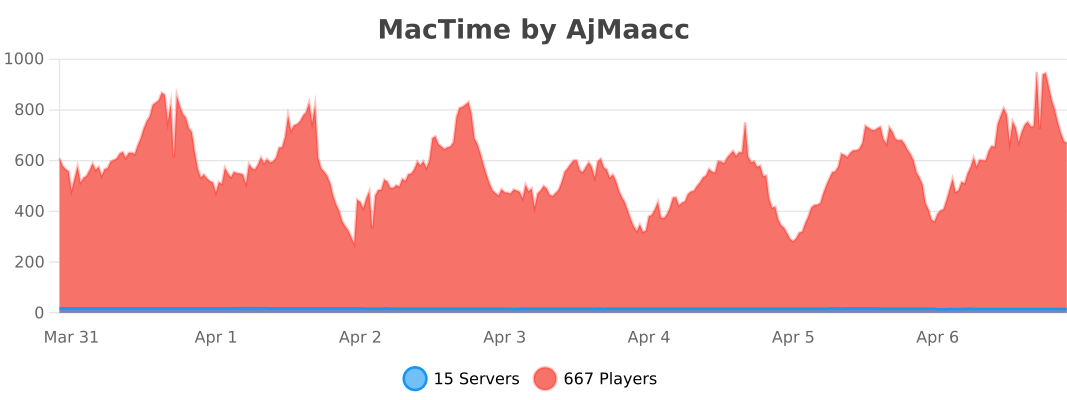
- 0% thread usage on a single instance with over 500 players while tracking more than 50 staff members (via spark)
- MySQL support
- Folia Support
- Administrator friendly commands, permission nodes, and error messages to pinpoint issues
- Discord Webhook support
- All commands (besides /mactime gui) can be executed by console
- Hex support for configurable messages
- PlaceholderAPI Support
- AFK time tracking (with EssentialsX)
Commands
Admin Commands
/mactime export <all:player> [username]- If discord webhooks are enabled, this allows you to export all ontime data for either a specific player or all players being tracked.
/mactime gui [groupname:online:offline:other]- Opens a GUI with all players showcasing their ontime data. If you have luckperms on your server, you can sort players in the gui by group weights.
- You are also able to set the real time update interval for the GUI (If you would not like this, set
gui.updateintervalto0in config.yml) - If you would like to view players' ontimes that are in a specific group, you can specify any included groups under
gui.whitelisted-groupsand run/mactime gui [groupname] - You are also able to specify viewing online players or offline players data by running
/mactime gui [online:offline] - If a player was previously in a group specified under
gui.whitelisted-groupsbut now isn't, you can view their data by running/mactime gui [other]
(If you would like their data wiped on their next join if they no longer have themactime.trackpermission node, you can enableother.remove-if-no-permin config.yml)
/mactime help- Displays the help menu
/mactime reload [config:messages]- Reloads either the config.yml file or messages.yml file. If no choice is specified, both will be reloaded.
/mactime reset <player:group> <groupname:username>- Resets ontime data for either a player or a group (if luckperms is on your server).
If you would like the user data to be permanently removed from your server after running this command, you can setreset.delete-data-on-resettotruein the config.yml.
- Resets ontime data for either a player or a group (if luckperms is on your server).
/ontime <username>- View ontime data for a specific player
Player Commands
/ontime- Displays ontime data based on the player's permissions.
Permissions
| Permission | Description |
|---|---|
mactime.* |
Grants all permissions. |
ontime.track |
Allows the plugin to track the player's on-time. |
mactime.admin |
Provides access to /mactime command. |
mactime.command.* |
Provides access to all /mactime commands and their subcommands. |
mactime.command.help |
Grants access to /mactime help. |
mactime.command.reload |
Grants access to /mactime reload [config:messages]. |
mactime.command.export |
if discord webhooks are enabled, this allows you to export player’s ontime data to a webhook. |
mactime.command.reset |
Grants access to /mactime reset command. |
mactime.command.gui |
Grants access to the /mactime gui command. |
ontime.own |
Allows use of /ontime command. |
ontime.own.* |
Provides access to see all on-time statistics. |
ontime.own.afk |
Provides access to see AFK time via /ontime. |
ontime.own.daily |
Provides access to see daily time via /ontime. |
ontime.own.weekly |
Provides access to see weekly time via /ontime. |
ontime.own.monthly |
Provides access to see monthly time via /ontime. |
ontime.own.yearly |
Provides access to see yearly time via /ontime. |
ontime.own.alltime |
Provides access to see all-time via /ontime. |
ontime.others |
Allows usage of /ontime to view other player's on-times. |
ontime.others.* |
Provides access to see all on-time statistics for other players. |
ontime.others.afk |
Provides access to see AFK time via /ontime for other players. |
ontime.others.daily |
Provides access to see daily time via /ontime for other players. |
ontime.others.weekly |
Provides access to see weekly time via /ontime for other players. |
ontime.others.monthly |
Provides access to see monthly time via /ontime for other players. |
ontime.others.yearly |
Provides access to see yearly time via /ontime for other players. |
ontime.others.alltime |
Provides access to see all-time via /ontime for other players. |
Placeholders
| Permission | Description |
|---|---|
%mactime_current% |
Displays the current ontime of the user looking at the placeholder |
%mactime_daily% |
Displays the daily ontime of the user looking at the placeholder |
%mactime_weekly% |
Displays the weekly ontime of the user looking at the placeholder |
%mactime_monthly% |
Displays the monthly ontime of the user looking at the placeholder |
%mactime_yearly% |
Displays the yearly ontime of the user looking at the placeholder |
%mactime_alltime% |
Displays the alltime ontime of the user looking at the placeholder |
%mactime_afktime% |
Displays the afktime of the user looking at the placeholder |
%mactime_lastonline% |
This will always return Player is currently online! |
For other players, you can add their username to the end of the placeholder.
For example,
%mactime_daily_notch%- This will return the daily ontime for "Notch".
If the player specified has no data, then the placeholder will displayPlayer has no data.
For%mactime_lastonline_notch%, this will return how long it has been since the player logged off of the server.
- This will return the daily ontime for "Notch".
If you would like the raw value in seconds, you can add _raw to the end of any time related placeholder.
For example,
%mactime_daily_raw%- If I had 5 minutes of daily ontime, this would return
300
- If I had 5 minutes of daily ontime, this would return
Hooks
This plugin hooks into 3 plugins for optional features
- Luckperms
- Mactime hooks into luckperms to enable group sorting by weights and adding the player's prefix inside the GUI
- EssentialsX
- For enabling the tracking of time spent afk
- PlaceholderAPI
- For placeholders.
Showcase
GUI

Ontime Command

Discord Webhook

Placeholders

Default config.yml
# MacTime, by AjMaacc

# Storage options
# Data is stored in plugins/MacTime/playerdata/mactime.db
# Default storage type is SQLite

sql:
  # To use MySQL, set below to true
  # Default: false
  enabled: false
  # Your database's server address
  address: '127.0.0.1:3306'

  # Database name, username and password.
  database: ""
  username: ""
  password: ""

  # options
  usessl: false

# At the end of every week you can save players ontimes to a file in leaderboard fashion
ontime-saving:

  # Toggle this feature on/off
  # Default: true
  enabled: true

  # Day of the week ontime will be saved
  # Options: Monday, Tuesday, Wednesday, Thursday, Friday, Saturday, Sunday
  # Default: Monday
  dayofweek: 'Monday'

  # Order of which times will sort by
  # Options: Alphabetical, Ascending, Descending, Group.
  # Group will sort by Luckperms group, requires Luckperms to be installed!
  # Default: Descending
  order: "Descending"

# MacTime Admin Command Configurations

# Reset
# Options for the /mactime reset command
reset:
  # Delay before any un-confirmed /mactime reset queries are cancelled in seconds
  # Default: 10
  delay: 10

  # Removes data entirely versus restarting the count after reset
  # Default: false
  delete-data-on-reset: false

  # Sets who is able to use /mactime reset * (resets everyone's ontime)
  # Options: "None", "Console", "Player", "All"
  # Default: None
  wildcard-reset: 'None'

# AFK Checker
# The AFK Status of a player is determined by MacTime hooking into Essentials.
# You will need to have essentials on your server for this to work.
afk-checker:
  # Enable AFK time tracking
  # Default: false
  enabled: false

luckperms:
  # Luckperm groups to be included for sorting by groups
  # You must have Luckperms installed for this to be relevant
  # Default:
  #  - owner
  #  - manager
  #  - admin
  #  - jradmin
  #  - dev
  #  - srmod
  #  - mod
  #  - jrmod
  #  - helper
  whitelisted-groups:
    - owner
    - manager
    - admin
    - jradmin
    - dev
    - srmod
    - mod
    - jrmod
    - helper

# GUI
# Options for the /mactime gui command
gui:
  # Sorts /mactime gui by Luckperm groups specified under "luckpermgroups"
  # You need to have Luckperms on your server for this to work!
  # Default: false
  sort-by-luckperm-group: false

  # Duration in seconds to update the gui
  # Set this to 0 to disable this feature
  # Default: 10
  update-interval: 10

# Discord Webhooks
webhook:
  # Enable this feature
  # Default: false
  enabled: false
  # Webhook url
  url: ''
  # Username for the webhook. If this is not set (or empty), this will default to "MacTime"
  username: ''

  join:
    # Enables player join webhooks to be sent
    # Default: true
    enabled: true
    # If you want this specific embed to be sent to a separate webhook,
    # add the secondary webhook's url here
    # If left empty, this defaults to use the main webhook url defined under "webhook.url"
    url: ''
    # If you would like the webhook's username to differ from the original username (webhook.username)
    # Leaving this blank defaults to webhook.username
    username: ''

  leave:
    # Enables player leave webhooks to be sent
    # Default: true
    enabled: true
    url: ''
    username: ''

  afkstart:
    # Enables webhooks to be sent for when a player goes afk
    # Default: true
    enabled: true
    url: ''
    username: ''

  afkend:
    # Enables webhooks to be sent when a player returns from being afk
    # Default: true
    enabled: true
    url: ''
    username: ''

  print:
    # Enables the "/mactime export" command and allows playerdata to be sent by the webhook
    # Default: true
    enabled: true
    url: ''
    username: ''

  saving:
    # Enables weekly data saved during the ontime-saving section to be sent by the webhook
    # Default: true
    enabled: true
    url: ''
    username: ''

other:
  # Enables the beautiful MacTime signature in console on startup
  # If you don't want this, set below to false
  # Default: true
  signature: true

  # Removes a player's ontime data if they are no longer have the `ontime.track` permission
  # This deletes their data on the player's next join
  # Default: false
  remove-if-no-perm: false

  # Your timezone
  # Use https://pastebin.com/mfdYhnu7 to find the format for your timezone
  timezone: "America/New_York"

# Date of when ontime first started recording
# This resets when you do /mactime reset *
# Don't touch pls
start: ''

# Config version (don't touch or u get malaria)
version: '1.0.4'
Default messages.yml
version: '1.0.3'
prefix: '&e☀ &e&lMacTime &8&l» '
online: '&a●'
offline: '&c●'
afk: '&8[&7&lAFK&8]'
no-permission: '&cNo Permission'

# %player_name% = Player's Username
command:
  ontime:
    player:
      # Header for /ontime
      self-header: '&7&m    &r &a%player_name%''s Ontime &7&m    &r'
      # Header for /ontime <username>
      other-header: '&a%player_name%''s Ontime'
      no-ontime-data: '&c %player_name% &chas no ontime data!'
      divider: '&7&l&m                              '
    console:
      invalid: 'This Command cannot be executed by console.'
      player-does-not-have-data: 'This player does not have any ontime data!'
  reload:
    messages: '&7Successfully Reloaded Module: &fMessages&7.'
    config: '&7Successfully Reloaded Module: &fConfiguration&7.'
    all: '&7Successfully Reloaded Modules: &fConfigurations &7and &fMessages&7.'

  # %player_name% = Player's Username
  # {0} = Luckperm group prefix
  # {1} = Total players
  reset:
    expired:
      player: '&cOntime removal request for %player_name% has expired!'
      group: '&cOntime removal request for {0} group has expired!'
      wild: '&cOntime removal request for all users have expired!'
    confirm:
      player: '&7Are you sure you want to reset &f%player_name%''s &7ontime stats? &7[Click to Confirm]'
      group: '&7Are you sure you want to reset ontimes for players in the &f{0}&7 group? &7[Click to Confirm]'
      wild: '&cAre you sure you want to reset all ontime statistics? &7[Click to Confirm]'
    success:
      player: '&7Reset ontime for &f%player_name%&7!'
      group: '&7Reset ontime for &f{1} &7players in &f{0}&7 group!'
      wild: '&7Reset ontime statistics for &f{1} &7players!'
    invalid:
      player: '&cYou have entered an invalid username!'
      group: '&cYou have entered an invalid group name!'
      wild: '&cThis action is currently disabled!'
    player-does-not-have-data: ' &c%player_name% has no ontime data!'
    # %command% - Reset command ex. "/mactime reset player Notch"
    hover-msg: '&a&lCLICK ME&r'

#
# Ontime Command (/ontime)
#
ontime:
  player:
    current-ontime: '&fCurrent Ontime &8➡ &e%mactime_current%'
    daily-ontime: '&fDaily Ontime &8➡ &e%mactime_daily%'
    weekly-ontime: '&fWeekly Ontime &8➡ &e%mactime_weekly%'
    monthly-ontime: '&fMonthly Ontime &8➡ &e%mactime_monthly%'
    yearly-ontime: '&fYearly Ontime &8➡ &e%mactime_yearly%'
    alltime-ontime: '&fAll-Time Ontime &8➡ &e%mactime_alltime%'
    afk-time: '&fTotal AFK Time &8➡ &e%mactime_afktime%'
    last-online: '&fLast Online &8➡ &e%mactime_lastonline%'
  console:
    current-ontime: '* Current Ontime ➡ %mactime_current%'
    daily-ontime: '* Daily Ontime ➡ %mactime_daily%'
    weekly-ontime: '* Weekly Ontime ➡ %mactime_weekly%'
    monthly-ontime: '* Monthly Ontime ➡ %mactime_monthly%'
    yearly-ontime: '* Yearly Ontime ➡ %mactime_yearly%'
    alltime-ontime: '* All-Time Ontime ➡ %mactime_alltime%'
    afk-time: '* AFK Time ➡ %mactime_afktime%'
    last-online: '* Last Online ➡ %mactime_lastonline%'


#
# GUI message configuration (/mactime gui)
#
gui:
  # Player Ontimes
  # {0} = Total Players
  po:
    title: 'Staff On-Times ({0})'
    online: '&a&lONLINE'
    offline: '&c&lOFFLINE'
    current-ontime: '&e| &fCurrent Ontime &8➡ &e%mactime_current%'
    daily-ontime: '&e| &fDaily Ontime &8➡ &e%mactime_daily%'
    weekly-ontime: '&e| &fWeekly Ontime &8➡ &e%mactime_weekly%'
    monthly-ontime: '&e| &fMonthly Ontime &8➡ &e%mactime_monthly%'
    yearly-ontime: '&e| &fYearly Ontime &8➡ &e%mactime_yearly%'
    alltime-ontime: '&e| &fAll-Time Ontime &8➡ &e%mactime_alltime%'
    afk-time: '&e| &fTotal AFK Time &8➡ &e%mactime_afktime%'
    last-online: '&e| &fLast Online &8➡ &e%mactime_lastonline% &fAgo'

  # Sorted player ontimes (GUI Without luckperms sorting)
  # {0} = Total Players
  spo:
    title: 'Staff On-Times ({0})'

  # Individual Group Ontimes (/mactime gui [groupname])
  # {0} = Luckperms group prefix
  # {1} = Total Players
  igo:
    titles:
      main: '{0}&8On-Times ({1})'
      other: 'Other Members On-Times ({1})'
    error:
      invalid-group: '&cInvalid Group'
      group-does-not-exist: '&cGroup does not exist in luckperms!'
  # Individual Player Ontime Data Menu
  # This is the menu that is shown when you click a player head inside /mactime gui
  io:
    title: 'Data for %player_name%'

  # Sorted Ontimes
  # {0} = Luckperms Group Prefix
  # {1} = Total Players
  so:
    title: '{0} &8Player On-Times ({1})'

  # {0} = Date (ex. 1/20, 3/10)
  # {1} = Time
  history-item:
    title: 'Past 7 days of ontime'
    entry: '&3{0} &8➡ &3{1}'
    empty: '&cPlayer has not logged on in the past 7 days!'

# AFK notifications logged to console
# {0} = Total time AFK (formatted as hh:mm:ss)
AFK-Detection:
  afk: 'is now afk'
  not-afk: 'is no longer afk'
  afk-time: 'was afk for {0}'

#
# Webhook Embeds
#

webhook:
  join:
    title: $username has joined
    color: 0x00ff00
    # Available Placeholders
    # $time - Timestamp when the player joined the server
    content:
      - "• Time Joined: `$time`"
  leave:
    title: $username has left
    color: 0xff0000
    # Available Placeholders
    # $time_joined - Timestamp when the player joined the server
    # $time_left - Timestamp when the player left the server
    # $time_online - Total time the player was on the server for
    content:
      - "• Time Joined: `$time_joined`"
      - "• Time Left: `$time_left`"
      - "• Total time online: `$time_online`"
  afk-start:
    title: $username is now afk
    color: 0xff9a00
    # Available Placeholders
    # $time - Timestamp when the player became afk
    # $afk_time - Total time the player has been afk on the server
    content:
      - "• Afk Starting at: `$time`"
      - "• Total AFK Time: `$afk_time`"
  afk-end:
    # Available placeholder ($username)
    title: $username is no longer afk
    color: 0xff9a00
    # Available Placeholders
    # $time - Timestamp when the player was afk
    # $afk_time - Time the player was afk for
    # $total_afk_time - Total time the player has been afk
    content:
      - "• Afk Since: `$time`"
      - "• Time Afk: `$afk_time`"
      - "• Total AFK Time: `$total_afk_time`"
  print:
    title: Ontime Statistics for $username
    color: 0xffffff
    # Available Placeholders
    # $date
    # $uuid
    # $daily_ontime
    # $weekly_ontime
    # $monthly_ontime
    # $yearly_ontime
    # $alltime_ontime
    # $afk_time
    # $last_online
    content:
      - "• Date: `$date`"
      - "• UUID: `$uuid`"
      - "• Daily Ontime: `$daily_ontime`"
      - "• Weekly Ontime: `$weekly_ontime`"
      - "• Monthly Ontime: `$monthly_ontime`"
      - "• Yearly Ontime: `$yearly_ontime`"
      - "• All time Ontime: `$alltime_ontime`"
      - "• Afk time: `$afk_time`"
      - "• Last Online: `$last_online`"
  saving:
    # Available placeholder ($range)
    title: Weekly Ontimes for $range
    color: 0xffffff
Support & Contact
To report bugs, suggest a feature, or anything else, contact me via discord.
- Direct Contact
- -> ajmac
bStats
Ченджлог
1.1.7Релиз1.20.4, 1.20.5, 1.20.6 · 19 июня 2026 г.
MacTime v1.1.7
Updated
messages.yml(v1.1.0)- You are now able to enable or disable certain data lines in
/mactime guiand/ontime
- You are now able to enable or disable certain data lines in
Updated
config.yml(v1.0.5)- Added option to disable AFK time being added to all other forms of time tracking (daily, weekly, etc.)
- Option is
afk-checker.include-afk-timewhich defaults totrue
- Option is
- Added option to disable the AFK notifications displayed in console when a player goes in or out of AFK status
- Option is
afk-checker.enable-notifywhich defaults totrue
- Option is
- Added option to disable AFK time being added to all other forms of time tracking (daily, weekly, etc.)
Removed blank lines from above first line and below last line in
/mactime guiwhen you hover over a skullPrevious page and next page buttons now only display in gui when there is a previous or next page.
Bug Fixes
- Fixed issue where gui skulls would sometimes appear in other guis, inventories, or chests when switched to quickly after exiting
/mactime gui
Future Plans
- MC v26 support for
/mactime gui
If you have any requests for features or if you have found a bug, feel free to contact me via discord -> ajmac
1.1.6Релиз1.21.9, 1.21.10, 1.21.11 · 7 апреля 2026 г.
MacTime v1.1.6
- Fixed exception when the ontime file is saved with no players tracked
- Dependency Updates
1.1.5Релиз1.21.9, 1.21.10, 1.21.11 · 10 февраля 2026 г.
MacTime v1.1.5
- Updated dependencies
- GUI should now work with minecraft versions
1.21.11and1.21.9
- GUI should now work with minecraft versions
- Improved tab completion for all commands
- Typed arguments will now only display matching results instead of all options all the time (this includes usernames & group names in
/ontime,/mactime gui [player:group], etc.)
- Typed arguments will now only display matching results instead of all options all the time (this includes usernames & group names in
Bug Fixes
- Fixed bug where
/mactime reset player [username]was not tab completing usernames - Fixed bug where the ontime saving file would sometimes save with blank data if server was restarted on the same day the data was saved
If you have any requests for features or if you have found a bug, feel free to contact me via discord -> ajmac
1.1.4Релиз1.21.6, 1.21.7, 1.21.8 · 9 сентября 2025 г.
MacTime v1.1.4
- Added default
config.ymlandmessages.ymlto plugin description - Reduced "Invalid skin url" error to only notify when a java user has an invalid skin url
Bug Fixes
- Fixed issue where the SQLite database would not update immediately and would only update after a server restart
- Fixed
/mactime gui onlineand/mactime gui offlinenot displaying players who were not in groups listed inwhitelisted-groupswhensort-by-luckperm-groupwas set tofalse
1.1.3Релиз1.21.6, 1.21.7, 1.21.8 · 1 сентября 2025 г.
MacTime v1.1.3
- GUI support for
1.21.8 - Added option to send webhook message when weekly ontimes are saved to a file (if enabled)
- Updated layout of saved weekly ontime file
- Updated messages.yml
1.0.2->1.0.3 - Updated config.yml
1.0.2->1.0.4 - Various code cleanup and performance improvements
Config Changes
- Changed
ontime-saving.orderto use "Alphabetical, Ascending, Descending, Group" instead of numerical options - Added "Group" option for sorting in
ontime-savingsection - Added
webhook.savingto webhook section
Messages Changes
- Moved
gui.whitelisted-groupstoluckperms.whitelisted-groupsMove your group data if you use this setting - Added
webhook.savingoptions
Bug Fixes
- Fixed
/ontime <username>showing incorrect data when the user was offline - Fixed bug where ontime would not always reset at 12:00AM (00:00)
- Fixed various issues related to weekly ontime file saving and resetting
- Fixed various bugs related to modifications done on the incorrect table
- Fixed issue where player online status would sometime not reset on server restart
- Fixed error message not appearing when
afkchecker.enabledwas set totruewithout essentialsx on the server - Fixed hover confirm message for ontime removal not working on 1.21.6+
If you have any requests for features or if you have found a bug, feel free to contact me via discord -> ajmac
1.1.2Релиз1.21.3, 1.21.4, 1.21.5 · 20 апреля 2025 г.
MacTime v1.1.2
- Plugin is now folia compatible
- 1.21.5 Support
Bug Fixes
- Fixed instances where a user whose data was reset disconnects would cause a random UUID named entry to be added to the database
- Fixed issue where if a player changed their username then their data would not load correctly
- Fixed formatting issue for wildcard reset players message
If you have any requests for features or if you have found a bug, feel free to contact me via discord -> ajmac
1.1.1Релиз1.21.2, 1.21.3, 1.21.4 · 1 марта 2025 г.
MacTime v1.1.1
- Various performance improvements related to scrapping usages of OfflinePlayer objects
- Player's name is replaced by UUID if by any means their username is null when received
- Added another download link to update message
- Updated
messages.yml1.0.1->1.0.2- Added
command.ontime.player.self-headerandcommand.ontime.player.other-header - Removed
command.ontime.player.header,command.ontime.player.title, andcommand.ontime.player-does-not-exist
- Added
Bug Fixes
- Fixed instances of players being named "Unknown" in
/mactime gui - Fixed issue where some player's data were unable to be looked up via
/ontime <username>
If you have any requests for features or if you have found a bug, feel free to contact me via discord -> ajmac
1.1.0Релиз1.21.2, 1.21.3, 1.21.4 · 22 февраля 2025 г.
MacTime v1.1.0
- Restricted
/mactime guiusage to servers on version 1.21.0 and above
Due to how inventories are handled in MC versions 1.21 and higher, the GUI feature will only be enabled for those versions that support it
- Updated how new config and message file updates are handled
No more
config_old.ymlandmessages_old.yml! When a new update for either files is added, the additions will just be added to the file along with your existing data.
- Updated depencencies to support latest MC version
- Added command aliases for
/mactime(/mt&/mtime) and/ontime(/ot&/otime) - Shrunk jar size from 3.8 MB to 3.06 MB
- Extreme performance improvements done to handling of offline player objects
- Removed
/ontimeand/ontime <username>from/mactime helpin favor of/ontime help - Changed color of
/ontime helpand/mactime helpcommands from cyan to yellow - Added command headers to both
/mactime helpand/ontime help - Truncated
/mactime exportdescription in/mactime help - Added storage type to
/mactimecommand - Added (Latest) or (Outdated) to
/mactimecommand - Updated in game message and added console message for new plugin updates
- Added option in
config.ymlfor ontime text file to save weekly ontimes in ascending or descending order - Command misuse now only displays help info for that specific command
- Performance improvements related to
/mactime export allcommand
Bug Fixes
- Fixed bug where invalid usernames passed in /ontime command would not parse in error message
- Fixed issue with
/mactime resetbugging out when saving with player online - Fixed bug where setting
gui.update-intervalto a value less than or equal to 0 would default to 1 second instead of 10 seconds - Fixed bug with rate limitation issues with exporting large amounts of ontimes to discord
- Fixed bug where usernames had to be case-sensitive in order to check their ontimes via
/ontime <username>when ran by console
If you have any requests for features or if you have found a bug, feel free to contact me via discord -> ajmac
Комментарии
Загружаем…