 Mineforgian
LootRun
LootRun is a loot–extract gameplay mod for Minecraft 1.20.1 Forge, inspired by hardcore extraction shooters like Delta Force: Hawk Ops and Escape from Tarkov.
- Загрузки
- 3K
- Подписчики
- 3
- Обновлён
- 14 июля 2026 г.
- Лицензия
- AGPL-3.0-only
Опубликован 23 июня 2026 г.
LootRun Mod: Hardcore Loot-and-Extract Experience
LootRun is a loot-extraction gameplay mod for Minecraft 1.20.1 Forge, inspired by hardcore extraction shooters such as Delta Force: Hawk Ops and Escape from Tarkov.
Prepare in your hideout, accept contracts, join timed raids into random or custom dimensions, scavenge, fight, complete objectives, and reach the extraction point before time runs out. Successfully extracted items are saved to your persistent global stash. Failure means losing most of what you found, unless protected by insurance.
Part One: Player Essentials
Hideout
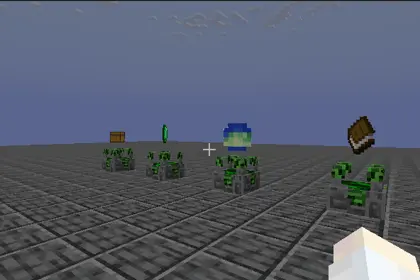
This is your base for trading, storage, contract selection, and map choice. The hideout is locked to daytime with clear weather. Hunger and saturation are automatically restored, and hostile mob spawning as well as player-versus-player damage are prevented.
Global Stash
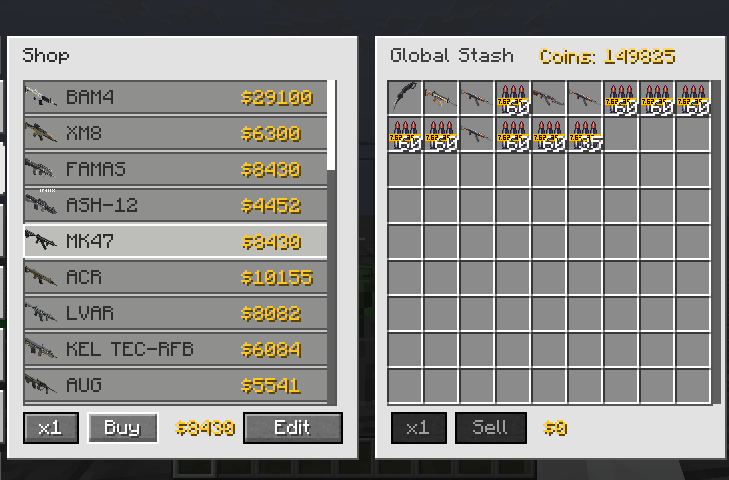
This is the permanent storage space for all extracted gear and loot. It supports depositing, withdrawing, sorting, categorising, and filtering. You can also purchase insurance for up to four item stacks. Even if a raid fails, insured equipment will be returned to your stash.
Contracts (Quest System)
Before a raid, you can accept up to five side contracts at the quest terminal. Upon entering a raid, a primary main task is automatically assigned. Quest types are varied and include killing specific entities, collecting certain items, exploring target locations, defending positions, activating blocks, and hunting elite bosses. Rewards are granted only upon successful extraction.
Map Selection and Difficulty Levels
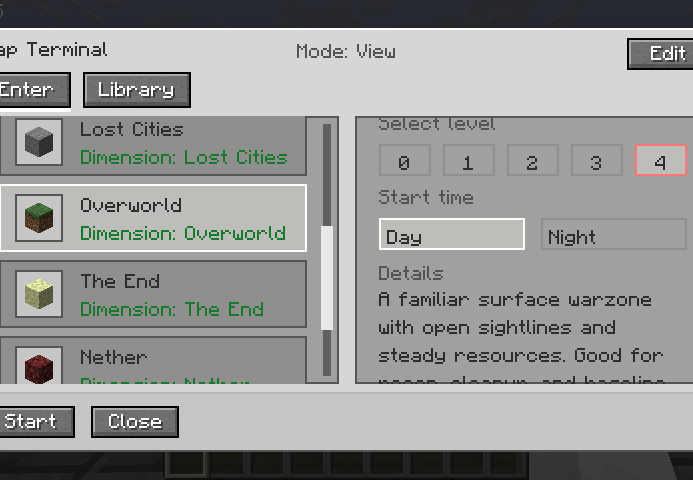
You can choose between vanilla dimensions such as the Overworld, the Nether, and the End, compatible mod dimensions like the Twilight Forest and the Lost Cities, or custom imported maps. Difficulty levels range from 0 to 4. Higher levels increase the raid area size and provide higher quest reward multipliers, up to three times. Levels 0 and 1 have only one extraction point and no guards, while levels 2 to 4 feature multiple extraction points and may spawn extraction guards.
Extraction Rules
Follow the red X marker and the beacon beam of light to locate the extraction point. Stand inside the red carpet ring and wait for the countdown to finish, which is set to 10 seconds by default. Leaving the ring immediately resets the countdown, so you must remain inside continuously. Each extraction point can only be used once per raid.
Tactical Terminal (In-Raid Tracking and Navigation)
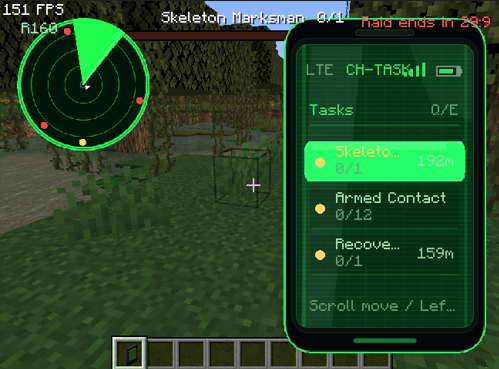
Upon entering a raid, you receive a temporary tactical terminal item. This is your primary tool for navigation and target tracking during the raid.
- Right-click while holding the terminal to open the tracking list, where you can view tasks, teammates, and extraction points.
- Shift-right-click to toggle the minimap display in the top-left corner of your screen.
- In the tracking list, press Q or E to switch between the task, player, extraction, and map tool pages.
- Use the mouse wheel to highlight different entries, then left-click a highlighted entry to manually track that target.
- Once a target is tracked, its direction, distance, and name are shown on the heads-up display.
- The tactical terminal is temporary. It cannot be deposited into the stash, insured, or sold, and it disappears automatically when the raid ends.
Death and Insurance
Dying in a raid causes you to drop all items that were acquired during the raid. However, equipment that you brought into the raid can be protected. This can be done either through the vanilla keepInventory rule or through LootRun's insurance system, which covers up to four stacks. Protected gear is returned to your global stash upon raid failure.
Party System
Up to four players can form a party. The party leader proposes a map and difficulty level, and all members must confirm their readiness before the raid begins. Party members share quest progress and must complete objectives and extract together.
Part Two: Compatibility and Mod Integration
JEI integration allows LootRun to automatically read all recipes and recursively calculate item prices, generating a complete price library. The modpack author needs to configure this only once. After that, players do not need JEI installed to use the generated pricing system.
The Lost Cities mod is supported with an automatic City Raid dimension, and world generation is adjusted to better integrate with the raid gameplay.
Timeless and Classics Zero support ensures that guns, ammunition, and attachments are distinguished by stable IDs, giving each variant an independent price and preventing confusion caused by NBT differences.
Other mods receive general support through the Forge registry, recipes, and JEI. As long as a custom machine correctly exposes its recipes, its products can also be priced.
Additional task and mechanic support is provided for mods such as The Twilight Forest, Ice and Fire, Create, Cataclysm, SearchCarefully, and Simple Enemy Mod.
Part Three: Guide for Modpack Authors and Server Owners
Setting Prices and Generating the Economy Library
First, enter Creative mode with operator permission level 2. Then open the trade terminal and switch to edit mode. Set a shop price for raw materials. The system will automatically calculate its base value, which serves as the seed for recipe derivation. Click Scan JEI Prices, and LootRun will recursively compute prices for all recipes, generating these two files: config/lootrun/trade_config.json and config/lootrun/generated_recipe_prices.json.
Custom Quests
Use the in-game task author mode to create new quests and save them to config/lootrun/tasks/. The task_overrides.json file allows you to hide or disable built-in tasks, as well as adjust their weights, categories, and visibility.
Custom Maps
Place a 1.20.1 Java edition world folder into lootrun/maps/imports/. Then use the in-game map editor to set spawn points, extraction points, loot chests, and task locations. Once edited, the map is stored in lootrun/maps/library/ and can be packaged for distribution.
Adjusting Server Configuration
Edit the file at worldfolder/serverconfig/lootrun-server.json to configure raid duration, which is 30 minutes by default, extraction countdown time, which is 10 seconds by default, number of extraction points, guard spawn chances and maximum counts, maximum insurable item stacks, entry chunk loading count, and item blacklists.
Distributing Your Modpack
Include the generated config/lootrun/ folder containing all price and quest data, as well as lootrun/maps/ if you have custom maps, in your modpack. Players do not need JEI installed, because the price library is already built in.
Part Four: Disclaimer and Important Notes
This mod is developed by an individual. Although it has been extensively tested, there may still be undiscovered bugs, compatibility issues, or balance imperfections.
Please be sure to back up your worlds and configuration files. Custom maps must be in Java 1.20.1 format. Bedrock worlds or worlds from newer versions may fail to load. Large modpacks may cause long JEI scanning or map preloading times, so please be patient. The first time you enter a new world, the hideout may experience a brief stutter during loading. This is a normal part of the warm-up process.
If you encounter issues, check the logs or report them to the community. I will try to fix problems, but I cannot guarantee perfect compatibility with every mod. By using this mod, you acknowledge that you have read and accept these risks.
Thank you to all testers and community members for your feedback. Good luck with your looting and stay safe on extraction. github
Ченджлог
1.0.10Релиз1.20.4, 1.20.5, 1.20.6 · 13 июля 2026 г.
LootRun 1.0.10 Changelog
LootRun 1.0.10 is a compatibility hotfix built after 1.0.9. It keeps the stable 1.0.9 gameplay feature set and intentionally does not include the experimental broad death-state compatibility rewrite that was tested locally, so future compatibility fixes can be handled one mod at a time.
Compatibility Strategy
- Kept raid failure settlement on the known 1.0.9 behavior.
- Kept the current focused compatibility approach instead of applying broad global player-state changes.
- Future compatibility fixes should target specific mods and specific events, reducing the chance of new side effects.
Raid Death And Return Stability
- Keeps the existing extraction-failure flow used by ordinary fatal damage, raid timeout, self
/kill, and PlayerRevive bleed-out handling. - Keeps the existing hideout-return timing, failure lock, and result sync behavior.
- Avoids broad immediate-respawn and persistent pending-death-return logic that could interact unpredictably with other mods.
Upgrade Notes
- Replace
lootrun-1.0.9.jarwithlootrun-1.0.10.jaron every client and the server. - LootRun 1.0.10 does not intentionally change map data, player data, custom hideouts, custom maps, prices, tasks, or loot chest settings.
- Existing 1.0.9 worlds should remain compatible.
- Back up the world and LootRun configuration before updating a production server.
Recommended Testing
- Test ordinary raid death and verify the extraction-failure screen appears.
- Test PlayerRevive bleed-out or give-up if that mod is installed.
- Return to the hideout after a failed raid and verify movement, jumping, sprinting, and status effects are normal.
- Enter a custom map and verify tasks, extraction points, custom loot chests, and custom hideout behavior still work as in 1.0.9.
1.0.8Релиз1.20.4, 1.20.5, 1.20.6 · 11 июля 2026 г.
LootRun 1.0.8 Changelog LootRun 1.0.8 focuses on custom-map authoring, multiplayer consistency, extraction reliability, and compatibility fixes reported after 1.0.7.
New Features Added a custom hideout template system. Added a hideout selection tool with an in-world selection preview. Added a hideout spawn marker for choosing the player arrival position. Custom hideout tools are available from the Tools & Utilities creative tab. Added dynamic loot-table selection for custom-map loot chests. Sneak-right-click a registered custom-map chest to open the loot-table picker. The picker automatically discovers loaded chest loot tables from vanilla, data packs, and installed mods. Added search by loot-table name, mod name, namespace, or full resource ID. Added a per-custom-map game-mode option with Survival and Adventure choices. Custom-map editor sessions still use Creative mode regardless of the raid game-mode setting. Custom Map Improvements Each placed loot chest now stores its own selected loot table. Loot-table choices are persisted in the custom-map manifest and restored in raid instances. Only loot tables under loot_tables/chests/ are shown, preventing entity, block, fishing, and unrelated reward tables from appearing in the picker. Added server-side validation for loot-table selection packets, including editor state, distance, registered chest position, and loaded table checks. Existing custom maps default to Survival mode and remain compatible. Players entering Adventure-mode maps can interact with the map normally without breaking protected structures. The player's previous game mode is restored after extraction, raid failure, death return, reconnect recovery, or any other return to the hideout. Custom-map spawn selection now respects the active world border. Improved custom-map task placement so configured task counts are replenished instead of silently shrinking when an initial location cannot be used. Custom Hideout Improvements Pack authors can select and save a custom hideout structure directly in game. The saved hideout is applied once per world instead of repeatedly restoring terminals or blocks to old fixed positions. Moving terminals or decorating the hideout no longer causes the original template positions to respawn on the next load. Added /lootrun hideout reset to remove the custom template and restore the default hideout. Multiplayer And Synchronization Fixes Fixed clients receiving incomplete generated-price data and disagreeing about whether the same item can be sold. Clients now wait for the server's generated-price synchronization to complete before finalizing the trade catalog. The server now sends an explicit completion packet even when the generated-price map is empty. Updated the network protocol for the new custom-map fields and loot-table picker packets. All players connecting to the same server must use LootRun 1.0.8. Insurance And Extraction Fixes Fixed insured held weapons being moved to the global stash after a successful extraction. Fixed successful extraction removing the insurance state from insured player-owned items. Insured items that remain with the player now preserve their insurance data correctly. Fixed raid-failure returns leaving players slowed, unable to jump, flying, downed, or otherwise unable to move in the hideout. Failure return cleanup now runs after the player actually arrives in the hideout. Improved PlayerRevive cleanup for bleed-out, give-up, and unresolved downed states. Portal And Dimension Fixes Fixed the End dragon return portal being bypassed by the cross-dimension travel configuration. Added a dimension-change settlement fallback for the first End poem transition. Fixed returning players remaining suspended in the air when they entered the return portal while flying. Improved compatibility with custom dimensions and teleport flows that return players through a nonstandard dimension transition. Loot Compatibility Fixes Fixed custom-map loot chests appearing empty when another mod's global loot modifier expected a block-state context. LootRun now generates custom chest contents with origin, block state, and block entity context before the chest is opened. Fixed an invalid ALL_PARAMS loot context that could require combat-only parameters and crash the server during raid preparation. SearchCarefully compatibility remains available for generated custom-map chest contents. Task Fixes Fixed raids sometimes starting with fewer active tasks than the five tasks selected in the terminal. Failed initial task-point placement no longer permanently removes the task from the raid display. Improved task recovery and placement behavior for flat or restricted custom maps. Existing no-location tasks continue to show objective progress instead of remaining on the loading label. Upgrade Notes Replace lootrun-1.0.7.jar with lootrun-1.0.8.jar on both the client and server. Do not mix 1.0.7 and 1.0.8 clients or servers because the network protocol has changed. Existing worlds, player data, trade settings, tasks, custom maps, and custom-map markers are preserved. Existing custom maps use Survival mode until changed in the map information editor. Existing registered loot chests keep their saved loot-table IDs. Back up the world and LootRun configuration before updating a production server. Configuration And Usage Open the map terminal in edit mode and edit a custom map's information to switch its raid game mode between Survival and Adventure. Enter custom-map edit mode and place a loot chest with the custom-map loot chest tool. Sneak-right-click the registered chest to open the searchable loot-table picker. Select any loaded table from a loot_tables/chests/ directory to assign it to that chest. Use the hideout template tool to select the custom hideout bounds and place the hideout spawn marker before saving the template. Use /lootrun hideout reset if the custom hideout must be removed and the default hideout restored.
1.0.7Релиз1.20.4, 1.20.5, 1.20.6 · 1 июля 2026 г.
LootRun 1.0.7 Changelog Main Changes Fixed recipe-derived prices not updating correctly after editing base material prices. Fixed manual trade prices being unable to go below LootRun’s default generated price. Improved vanilla recipe pricing for armor, tools, buckets, and netherite equipment. Rebalanced enchanted book and enchanted gear pricing so high-level enchantments are no longer extremely cheap. Fixed price balance issues such as empty buckets vs filled buckets and netherite gear being cheaper than diamond gear. Added a search box to the trade terminal shop list. Added search support in trade edit mode for both the shop list and item library. Fixed trade terminal buttons showing item tooltips from items underneath them. Added per-custom-map raid duration settings. Fixed some Simple Enemy / TaCZ weapon-kill tasks staying forever on “loading”. Added optional PlayerRevive compatibility. Fixed PlayerRevive bleed-out or give-up deaths skipping the extraction-failed screen. Fixed players returning to the hideout while still stuck in PlayerRevive’s downed state. Raid death failure now clears active effects like vanilla death. Upgrade Notes Replace lootrun-1.0.6.jar with lootrun-1.0.7.jar. Both client and server must update. Existing player data, custom maps, trade configs, price configs, and RarityCore settings are kept. Price rule changes will invalidate old generated price cache and recalculate affected item values.
1.0.6Релиз1.20.4, 1.20.5, 1.20.6 · 30 июня 2026 г.
LootRun 1.0.6 Changelog
This update focuses on custom-map entry reliability and Global Stash stability, especially in modpacks that include inventory helper mods.
Main Fixes
- Fixed custom maps that could be opened in edit mode but timed out or stayed on the loading screen during normal raid entry.
- Custom-map extraction points are now treated as a candidate pool. LootRun selects the number of extraction points required by the chosen raid difficulty.
- If a custom map has more extraction points than the current difficulty needs, LootRun randomly chooses the needed count for that raid.
- If a custom map has fewer extraction points than the current difficulty normally expects, LootRun uses the configured points instead of blocking entry. A custom map still needs at least one extraction point unless it uses a non-point extraction mode.
- Stopped applying normal random-map distance and spacing validation to manually placed custom-map extraction points.
- Added safer spawn-point backfill for custom maps so imported or edited maps are less likely to appear selectable but fail normal entry.
- Reduced custom-map startup and import hangs by avoiding deep region NBT scans during automatic discovery and normal import paths.
- Improved high-world-height custom-map handling by treating custom maps as tall-world candidates when their source cannot be safely inspected at startup.
- Added a raid-preparation timeout path so invalid map preparation closes the loading UI and returns a clear unavailable-map message instead of waiting forever.
- Reworked Global Stash Shift-click deposit handling to avoid vanilla
QUICK_MOVEloops with virtual stash storage. - Improved compatibility with Inventory Essentials and similar inventory helper mods by having LootRun own stash Shift-click deposits from the client side.
- Added a server-side
QUICK_MOVEfallback that consumes direct mod-triggered quick-move attempts once instead of letting helper mods repeatedly retry the same stash transfer. - Batched Global Stash deposit refreshes so repeated or mod-assisted Shift-click deposits do not rebuild the stash window, mark player data dirty, and request syncs once per stack.
- Fixed trade-terminal multi-select behavior so Shift-click selling an already selected stash item sells all selected items. Shift-clicking an unselected item still sells only that item.
Why These Issues Happened
- Custom-map edit mode only needs to teleport the player into the map dimension, but normal raid entry also prepared loot chests, selected an arrival point, prepared extraction points, and waited for destination chunks. Some custom maps passed the editor path but failed the stricter normal raid path.
- Custom-map extraction points were previously fed back through the normal random-map validation rules. Those rules expect algorithm-generated points at specific distances from the raid center, which is not appropriate for hand-authored maps.
- The Global Stash is virtual storage backed by LootRun player data, not a normal block inventory. Treating player-inventory Shift-click as vanilla
QUICK_MOVEcould confuse inventory helper mods, especially when those mods attempted to optimize or repeat quick-move operations. - Each old stash deposit could immediately reload the visible stash window and schedule sync work. Even a single Shift-click could become expensive or be retried by another mod if the container state changed in an unexpected order.
Upgrade Notes
- Replace
lootrun-1.0.5.jarwithlootrun-1.0.6.jar. - Update both clients and servers. The network protocol did not add a new packet shape, but the stash fix depends on both client-side screen handling and server-side menu handling.
- Existing player data, custom maps, trade configs, price configs, and RarityCore settings are kept.
- If a custom map still cannot enter normally, open it in edit mode and confirm it has at least one spawn point and one extraction point.
- If players use Inventory Essentials or another inventory helper mod, retest Global Stash Shift-click deposits with a single item stack first, then with repeated deposits.
Testing Checklist
- Open the Global Stash in the hideout and Shift-click one item stack from the player inventory into the stash. Confirm the game does not freeze or time out.
- Repeat the same stash Shift-click test with Inventory Essentials installed.
- Shift-click several different item stacks into the Global Stash and confirm they appear after the stash window refreshes.
- Open a custom map in edit mode, save it, then enter it normally from the map terminal.
- Put multiple extraction points in a custom map and confirm low-difficulty raids choose one point while higher difficulties choose the required number.
- Select multiple stash items in the trade terminal, Shift-click one selected item, and confirm all selected items are sold together.
1.0.5Релиз1.20.4, 1.20.5, 1.20.6 · 29 июня 2026 г.
LootRun 1.0.5 Changelog
This update focuses on stability in large modpacks, trade-terminal quality of life, and safer price scanning.
Main Fixes
- Fixed enchanted books showing
Cannot buy: No price sourcein the trade terminal. - Fixed raid return/extraction teleport clearing the player's experience level and progress.
- Added exact full-stack selling support in the trade terminal so stacks with non-power-of-two counts no longer leave awkward leftovers.
- Fixed multi-select selling from the trade terminal triggering server anti-spam kicks.
- Added a dedicated batch sell packet for selected stash items. The client now sends one packet instead of many
/lootrun trade sell_stashcommands. - Batch selling now validates all selected stash entries on the server, processes them together, saves once, and syncs player data once.
- Added
jeiPriceScannerconfig for the JEI price scanner. It is enabled by default and hot-reloadable. - Improved Create 6.x compatibility by guarding Create recipe reflection behind optional runtime checks.
- Reduced the chance of large modpacks freezing or exiting during startup because of broken third-party JEI recipe categories.
- Deferred expensive generated-price refresh behavior while editing trade prices so editing does not repeatedly rebuild prices mid-input.
- Kept the manual
lootrun trade sell_stashcommand available for admin/debug use, but the trade screen no longer uses command spam for normal selling.
New Config
Configuration file:
config/lootrun-common.toml
Section:
[compatibility]
New option:
jeiPriceScanner = true
What it does:
true: creative operators and singleplayer owners may scan JEI recipe layouts to provide extra generated price seeds.false: LootRun will not run the JEI layout scanner. This can help very large modpacks that have broken JEI categories or severe startup memory pressure.- The option is hot-reloadable. Save the config while the game/server is running and LootRun will resync trade configuration to online players.
Why These Issues Happened
- The old multi-sell flow sent one client command per selected stash row. Selling many selected items could send many commands in one moment, which some servers treated as command/chat spam.
- Enchanted books use runtime enchantment data instead of a simple registry-item price. Some buy checks did not route through the runtime price path correctly, so the trade terminal could report no price source.
- Minecraft/Forge teleport paths can reset or desync experience data during dimension changes. LootRun now snapshots and restores player experience around internal hideout teleports.
- JEI layout scanning is useful for unusual recipe displays, but some modpacks contain JEI categories that throw errors while building recipe layouts. LootRun already catches those errors, but the scan can still be expensive in large packs, so it now has a config switch.
- Create recipe APIs can change between Create versions. LootRun now treats Create special recipe reads as optional reflective compatibility instead of assuming a fixed API shape.
Upgrade Notes
- Replace
lootrun-1.0.4.jarwithlootrun-1.0.5.jar. - Clients and servers must both update to 1.0.5 because the network protocol changed for the new batch sell packet.
- If a server or LAN pack still feels slow while opening a world, try setting
jeiPriceScanner = falseinconfig/lootrun-common.toml. - If JEI price scanning is disabled, normal server-side recipe pricing still works. The disabled part is only the client-side JEI layout scan for extra unusual recipe data.
- Existing trade configs and player data are kept.
Testing Checklist
- Buy an enchanted book from the trade terminal and confirm it no longer says
No price source. - Extract or return to the hideout with experience levels and confirm the experience is preserved.
- Select many stash items in the trade terminal and sell them at once, then confirm the server does not kick the player for spam.
- Sell a stack with a non-power-of-two count and confirm the full-stack sell action can sell the whole stack.
- In a large modpack with JEI installed, start a world with
jeiPriceScanner = true, then toggle it tofalseand confirm the config hot reloads without restart. - Test with Create 6.x installed and confirm LootRun no longer crashes from Create recipe API differences.
1.0.4Релиз1.20.4, 1.20.5, 1.20.6 · 29 июня 2026 г.
Edit mode adjustment: After turning on the 'Basic Only' filter, the price button will switch from 'Store Price' to 'Material Price'; changing material prices will factor into the recipe chain calculations and update the derived item prices, while the regular 'Store Price' still only affects buy and sell quotes.
1.0.3Релиз1.20.4, 1.20.5, 1.20.6 · 27 июня 2026 г.
bugbugbug
1.0.2Релиз1.20.4, 1.20.5, 1.20.6 · 27 июня 2026 г.
Applied emergency fixes to address several issues.
Комментарии
Загружаем…