 Mineforgian
Location Copy
Simple location copy tool
- Загрузки
- 8K
- Подписчики
- 19
- Обновлён
- 10 июля 2026 г.
- Лицензия
- All-Rights-Reserved
Опубликован 6 августа 2023 г.
!!! IMPORTANT !!!
In Minecraft v1.21.6(LocationCopy v1.2.8), the default key for LocationCopy has been changed to 'G' -> 'B' because the new feature 'Quick Actions' uses the default key 'G'.
If you have used LocationCopy before, make sure that the key does not overlap in 'Options -> Controls -> Key Binds'.
Location Copy
This mod makes copying location in Minecraft much more convenient.
Function
Simply press the "B" key(LocationCopy v1.2.8 or higher) to copy your current location and world.
(You can also customize the key to something else in the key bind settings.)
If you install ModMenu as an additional mod, it's convenient because you can easily adjust the settings from the main screen. (Optional)
You can set the mod by pressing the "I" key in the game or using the ModMenu interface. If you want a more precise configuration, you can adjust it in "config\LocationCopy.properties".
(v0.0.3 ~ v1.0.5 are available in "config\locationcopy\config.properties")
How to set up "Advanced" mode (LocationCopy v1.2.0 or higher)
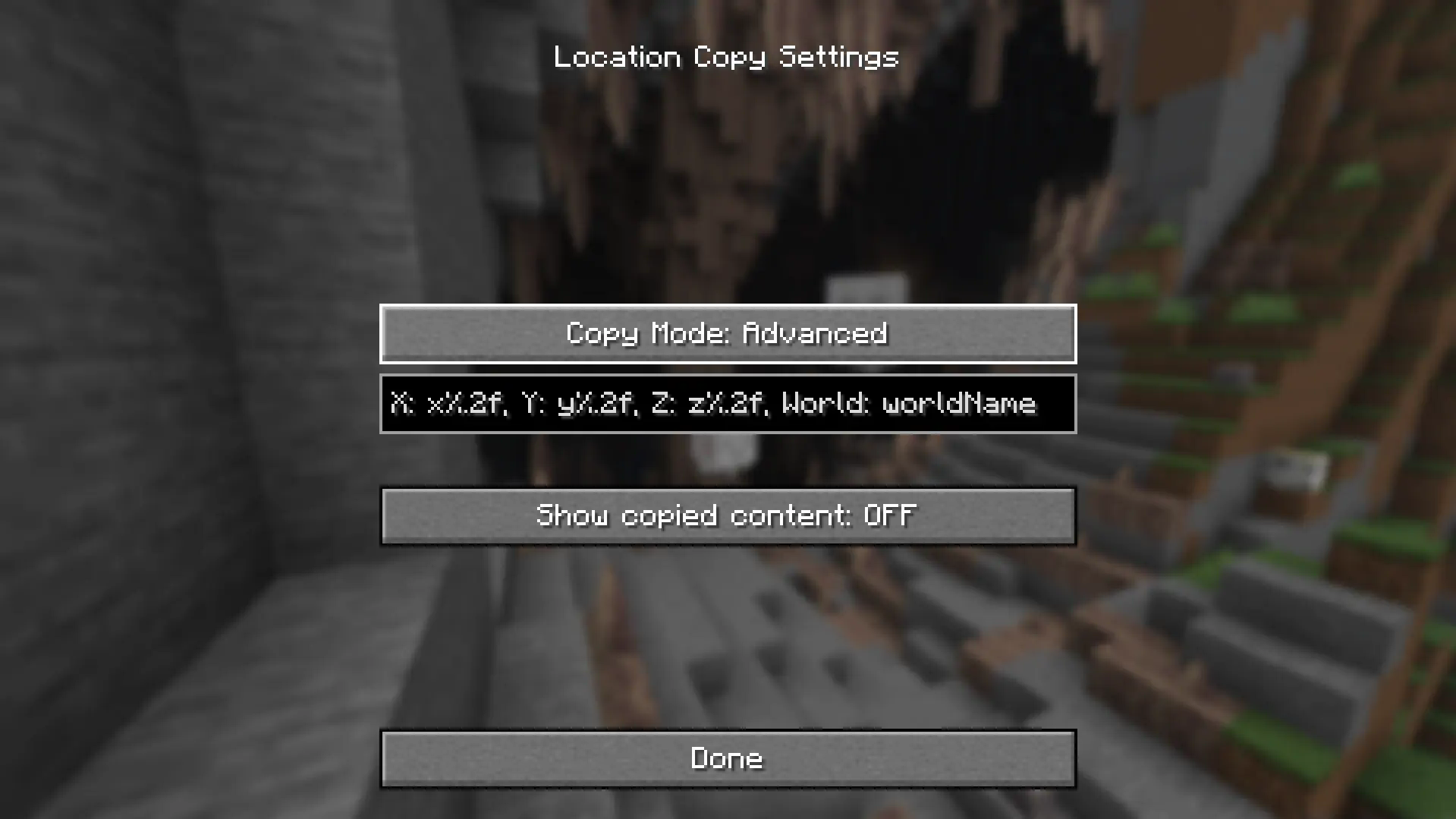
“%.nf” in advanced settings, "n" represents the number of decimal places. It is set to 2 by default and you can adjust this number. If you enter 0, only integer value will appear.
If you want to display only some of the three locations (e.g. Show only x and z locations), remove the location you want to clear (e.g. y%.2f). It will not be displayed.
x-value: x%.2f
y-value: y%.2f
z-value: z%.2f
World Name: worldName
"worldName" represents the world name. If you want to display the world name, use this. If you do not want the world name to be included in the copied field, remove "worldName".
How to set up "Advanced" mode (LocationCopy v1.1.0 - v1.1.3)
“%.nf” in advanced settings, "n" represents the number of decimal places. It is set to 2 by default and you can adjust this number. If you enter 0, only integer value will appear.
"%s" represents the world name. If you want to display the world name, use this. If you do not want the world name to be included in the copied field, remove "%s".
But be careful. If incorrect values are entered in advanced mode, Minecraft may crash when copying the location!
If an incorrect value is assigned, it will be restored to its original state when switching to another mode and then setting it back to advanced mode.
!! IMPORTANT !!
You can avoid errors only by using a version that is compatible with your version of Minecraft.
Issues
If you find translation problems or mod issues, please report them to Issues.
Ченджлог
1.3.0Релиз26.2 · 10 июля 2026 г.
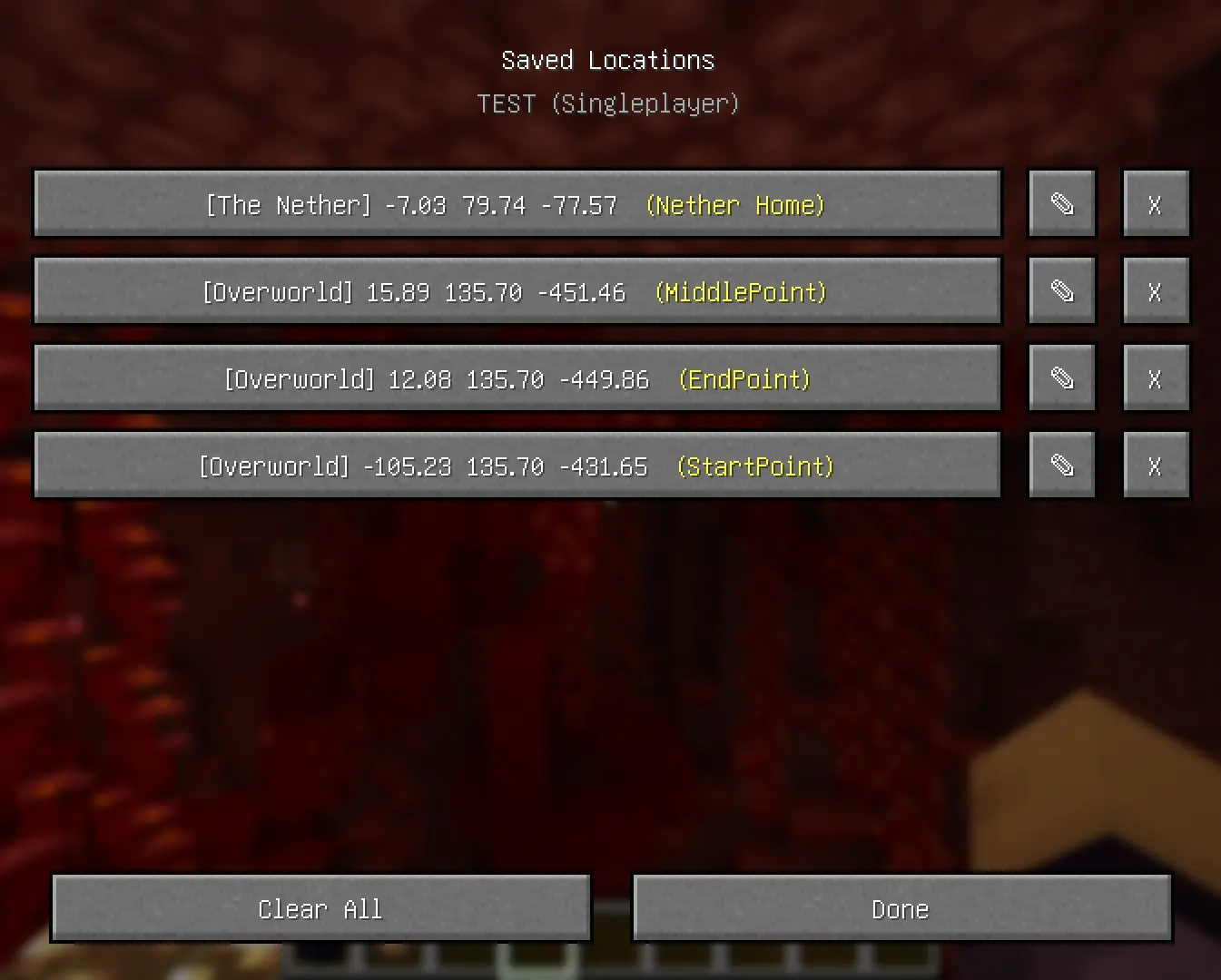
New features have been added!
You can now save world locations as a list. This supports both singleplayer and multiplayer, and is available for each world. You can also add notes for each location.
If you find any bugs in the new features, please report them via GitHub!
1.2.12Релиз26.2 · 9 июля 2026 г.
Several internal code improvements and optimizations have been made for Minecraft v26.2
New requirements
- fabric loader version: fabric 26.2 v0.19.3 or higher
- fabric API: v0.152.1+26.2 or higher
- Mod Menu: v20.0.0 or higher
1.2.11Релиз26.1, 26.1.1, 26.1.2 · 9 июля 2026 г.
Several internal code improvements and optimizations have been made for Minecraft v26.1
New requirements
- fabric loader version: fabric 26.1 v0.19.3 or higher
- fabric API: v0.145.1+26.1 or higher
- Mod Menu: v18.0.0 or higher
This version applies a new Java version (Java 25) and many modifications have been made to make v26.1 compatible. Therefore, please be sure to report any errors you encounter!
1.2.10Релиз1.21.11 · 10 декабря 2025 г.
Several internal code improvements and optimizations have been made for Minecraft v1.21.11
New requirements
- fabric loader version: fabric 1.21.11 v0.18.2 or higher
- fabric API: v0.139.4+1.21.11 or higher
- Mod Menu: v17.0.0-alpha.1 or higher
1.2.9Релиз1.21.9, 1.21.10 · 4 октября 2025 г.
Several internal code improvements and optimizations have been made for Minecraft v1.21.9
New requirements
- fabric loader version: fabric 1.21.9 v0.17.2 or higher
- fabric API: v0.133.14+1.21.9 or higher
- Mod Menu: v16.0.0-rc.1 or higher
1.2.8Релиз1.21.6, 1.21.7, 1.21.8 · 20 июня 2025 г.
IMPORTANT
In Minecraft v1.21.6, the default key for LocationCopy has been changed to 'G' -> 'B' because the new feature 'Quick Actions' uses the default key 'G'.
If the 'G' key of 'Copy Location' overlaps with the 'G' key of 'Quick Actions', the location copy does not work properly.
If you have used LocationCopy before, make sure that the key does not overlap in 'Options -> Controls -> Key Binds'.
New requirements
- fabric loader version: fabric 1.21.6 v0.16.14 or higher
- fabric API: v0.127.0+1.21.6 or higher
- Mod Menu: v15.0.0-beta.1 or higher
1.2.7.1Релиз1.21.5 · 30 апреля 2025 г.
ToolTip bug fix.
1.2.7Релиз1.21.5 · 26 марта 2025 г.
Improved features
- "worldName" display has been improved.
"minecraft:overworld" now displays as just "Overworld",
"minecraft:the_nether" now displays as "The Nether", and
"minecraft:the_end" now displays as "The End".
(Other worlds will still be copied as "minecraft:[worldname]")
- Internal optimization.
New requirements
- fabric loader version: fabric 1.21.5 v0.16.10 or higher
- fabric API: v0.119.5+1.21.5 or higher
- Mod Menu: v11.0.0 or higher
Комментарии
Загружаем…