 Mineforgian
LeaderBoards Datapack
A Datapack to place LeaderBoards Ranking players of your server on a given scoreboard objective.
- Загрузки
- 2K
- Подписчики
- 22
- Обновлён
- 30 декабря 2025 г.
- Лицензия
- MIT
Опубликован 15 июня 2024 г.
LeaderBoards Datapack 1.21.6+
A Datapack to place LeaderBoards Ranking players of your server on a given scoreboard objective
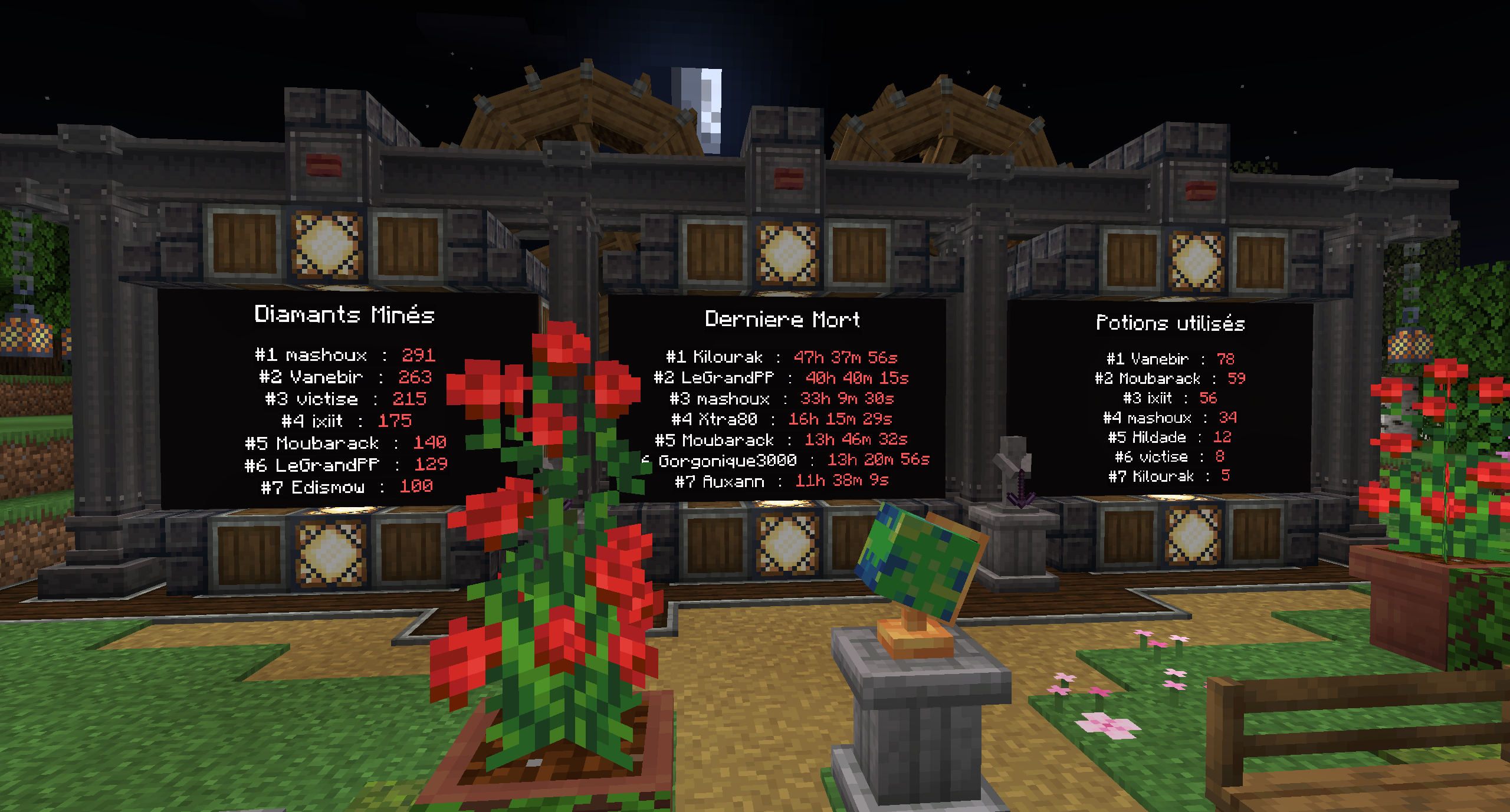
How to use
LeaderBoards Datapack 1.21.6+ uses the Dialog feature to provide an easy to use interface to create and edit Leaderboards
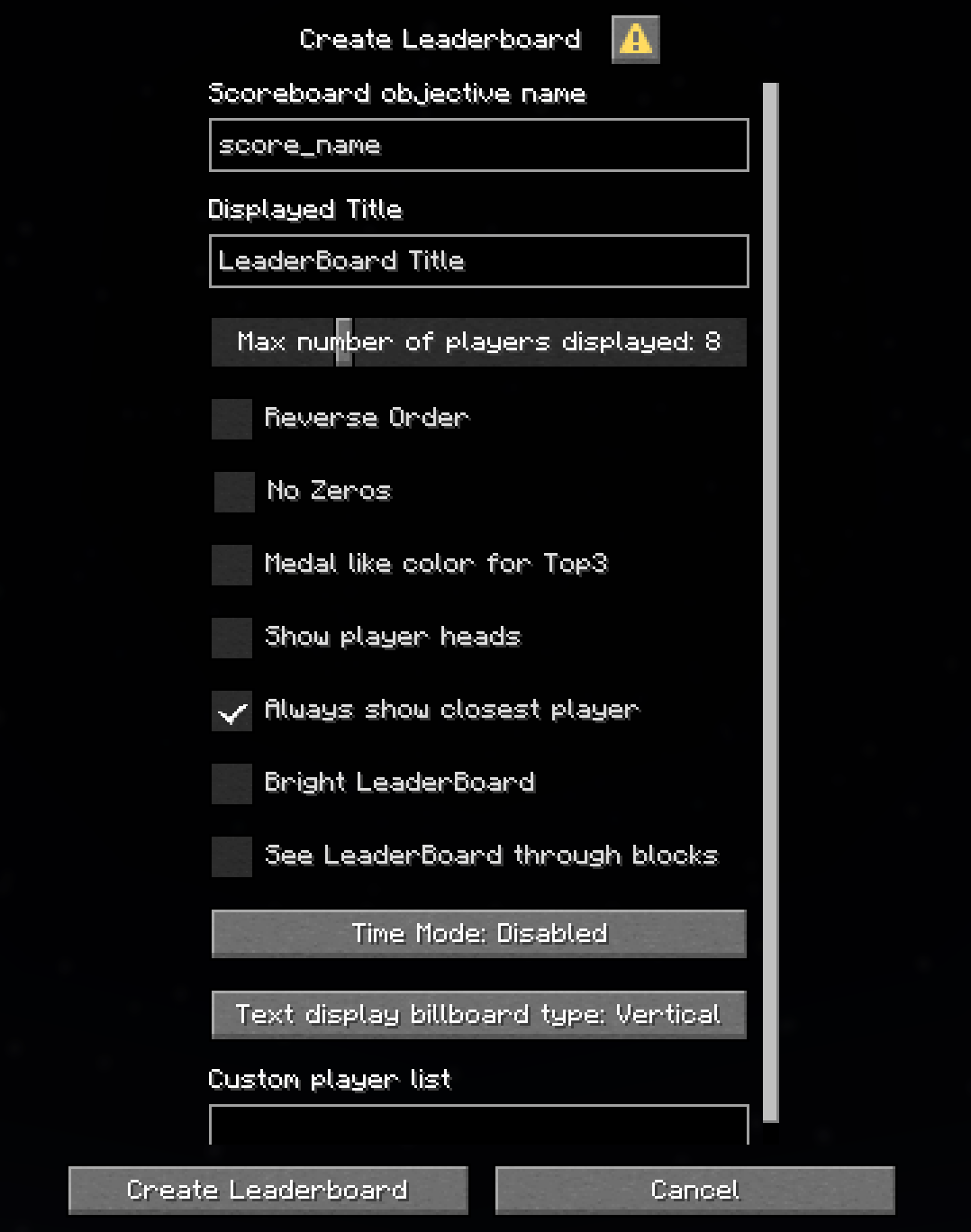
Add a LeaderBoard
/function leaderboard:_dialog/add_leaderboard_dialog
Scoreboard objective name is the most important parameter, it sets the scoreboard objective to be displayed in the Leaderboard. This MUST match the exact score name.
Example: if you create a scoreboard with the command:/scoreboard objectives add score_name dummy "My score", the Scoreboard objective name to use will bescore_nameand NOTMy scoreDisplayed Title is the name that will be displayed on top of the leaderboard
time_mode option displays the score as a time with hours, minutes, seconds and 1/20th of a second (ticks). It requires the given score to be a time in ticks.
Extended, keeps ms even when value is larger than 1 hour
Stopwatch, is more suited for the new/stopwatchcommand release in 1.21.11. It requires the given socre to be a time in ms. To get such a time you can use the following example:/execute store result score @p score_name run stopwatch query minecraft:foo 1000Note that the x1000 scaling allows to get a time in msreverse_order option reverses the order of the players in the LeaderBoard. Puts the lowest score first
no_zero option removes players with either no score or a score that equals 0 from the LeaderBoard. This is especially useful in reverse mode to avoid having new players at the top of the LeaderBoard by default
billboard option sets the billboard type that the LeaderBoard will use
It can be set to vertical, horizontal or fixed
When using fixed billboard type, the direction is set from the head direction of the player executing the command
tips: you can use/tp @s ~ ~ ~ x y, with x and y set to the rotation if you want the leaderboard to be aligned to a specific anglemedal_color option adds medal like colors the the top 3 ranks
show_heads option adds the player heads next to it's name (1.21.9+ only)
always_show_closest_player option highlights the line of the nearest player. If this player's rank is not present in the base list (cause of max_players option), it will add an extra line under the default one with the closest player score
bright option sets the text_displays with constant full brigthness
Custom player list this is an advanced feature, leave empty to get the default list of player built by the datapack
This parameter allows to use a different storage list for a specific Leaderboard. This can be used to display scoreboard scores that aren't directly related to a player. For example a custom objective tracking teams scores
The syntax is<storage_name> <list_name>
For example if you create your list this way:/data modify storage my_storage:custom_namelist names set value ["Team1","Team2","Team3"]you need to usemy_storage:custom_namelist namesin the Custom player list field
warning: this might have some unexpected behaviour when used withalways_show_closest_playerand a list that does not contain the nearest player
Remove a LeaderBoard
This will remove the nearest LeaderBoard
/function leaderboard:commands/remove_leaderboard
Edit a LeaderBoard
This will edit the nearest LeaderBoard
/function leaderboard:_dialog/edit_leaderboard_dialog
Uninstall
/function leaderboard:commands/uninstall
(Only keeps the storage leaderboard:namelist in case you want to re-enable it)
Back compatibility
Versions of the datapack prior to 1.21.6 are still available but won't be updated anymore
You can find tutorials on how to use legacy verisons on the Github link
Contact
Feel free to join the discord for any question, bug report or feature request
Discord invite
Ченджлог
4.1Релиз1.21.11 · 30 декабря 2025 г.
LeaderBoards Datapack : v4.1
New features
- time_mode: Stopwatch (3) New mode for the time format,
Uses 1 = 1ms instead of the 1 = 50ms (1 game-tick) of the other time modes
Bug fixes
- Fix a Warning in the server logs (related to the bright option)
How to update ?
Just replace the old archive LeaderBoards_1.21.9_v4.0.zip with the new one, then use the /reload command
4.0Релиз1.21.9, 1.21.10, 1.21.11 · 4 октября 2025 г.
LeaderBoards Datapack : v4.0
New features
- New show_heads option
How to update ?
Just replace the old archive LeaderBoards_1.21.6-1.21.8_v3.2.zip with the new one, then use the /reload command
3.2Релиз1.21.6, 1.21.7, 1.21.8 · 4 октября 2025 г.
LeaderBoards Datapack : v3.2
New features
- Massive performance improvements
How to update ?
Just replace the old archive LeaderBoards_1.21.6-1.21.8_v3.1.zip with the new one, then use the /reload command
3.1Релиз1.21.6, 1.21.7, 1.21.8 · 24 сентября 2025 г.
LeaderBoards Datapack : v3.1
New features
- Custom Player List
Bug fixes
- Increased the max size for the
score_name&Displayed Namefrom 32 to 512 charaters - Fixed a bug when using special charaters for player names
- Fix bug when using invalid
score_namefor the first created leaderboard
How to update ?
Just replace the old archive LeaderBoards_1.21.6_v3.0.zip with the new one, then use the /reload command
3.0Релиз1.21.6, 1.21.7, 1.21.8 · 24 июня 2025 г.
LeaderBoards Datapack : v3.0
New features
- Dialog based interface
- New bright option
- New see_through option
Bug fixes
- Major optimizations using entity data instead of tags for the parameters
/!\ How to update ?
- Before updating the pack, uninstall the last version
LeaderBoards_1.21_v2.4.zip
using/function leaderboard:commands/uninstall - Replace the old archive LeaderBoards_1.21_v2.4.zip with the new one
LeaderBoards_1.21.6_v3.0.zipthen use the/reloadcommand - You can use the
/function leaderboard:commands/remove_leaderboardcommand to delete old Leaderboards before adding them back with the new dialog
2.4.1Релиз1.21.5 · 12 июня 2025 г.
LeaderBoards Datapack : v2.4.1
Bug fixes
- Fix an issue for new installs of the datapack
- Tweak to avoid being impacted by some bugs in other datapacks
How to update ?
- Replace the old archive LeaderBoards_1.21_v2.4.zip with the new one, then use the
/reloadcommand
2.4Релиз1.21.5 · 1 мая 2025 г.
LeaderBoards Datapack : v2.4
New features
- New medal_color option
- New always_show_closest_player option
Bug fixes
- Removed the need for forceload
- Major optimizations for servers with many unique players
How to update ?
- Replace the old archive LeaderBoards_1.21_v2.3.zip with the new one, then use the
/reloadcommand - If you don't need the
forceload 0 0for other purposes, click in the chat 'here' after the reload
2.3Релиз1.20.4 · 10 апреля 2025 г.
Update for the 1.20.4 version of the datapack to add the features and bugfixes of the last version
Комментарии
Загружаем…