 Mineforgian
Better Item Frames
Easily turn your item frames invisible or visible in Survival! You can also lock your item frames rotation to avoid miss-click issues.
- Загрузки
- 22K
- Подписчики
- 187
- Обновлён
- 18 июня 2026 г.
- Лицензия
- CC-BY-NC-SA-4.0
Опубликован 25 апреля 2024 г.
Better Item Frames
Invisible & fixed item frames in Survival!
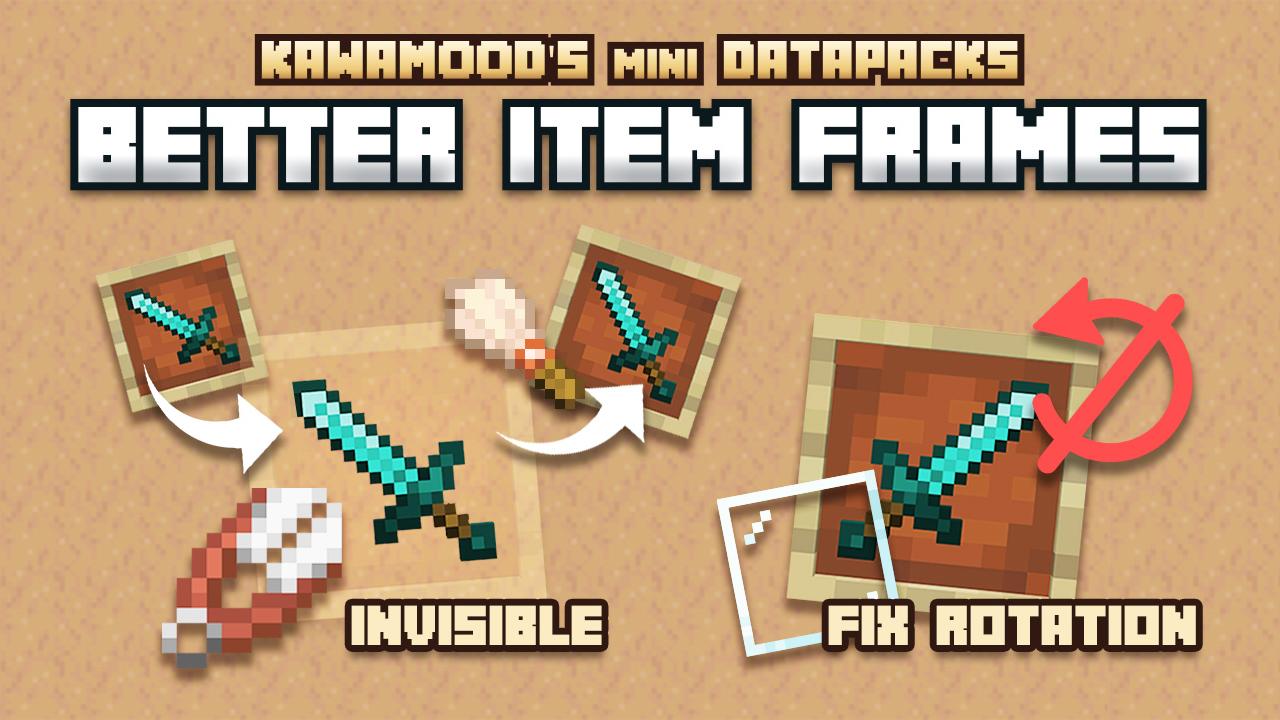
Easily turn your (glow or regular) item frames invisible or visible in Survival!
You can also lock your item frames rotation to avoid miss-click issues.
This presentation concerns the latest version of the data pack
For older ones, you can check them on Github:
🪄 How to use?
Make Invisible item frames
In order to make your (glow or regular) item frames invisible, you need to right-click an item frame while sneaking and having Shears in the main hand.
The background will then be cut from the item frame, making it invisible. This action will consume the Shears durability, the process will take into account the Unbreaking enchantment (even levels greater than 3).
Make them visible back
There are two ways to make their background reappear: you can either completely remove the item frame and place it back, or if you already set up several of them and you want to save time, you can also right-click these item frames while sneaking and having a Brush in the main hand.
The background will then be glued back to the item frame, making it visible. This action will consume the Brush durability, the process will take into account the Unbreaking enchantment (even levels greater than 3).
Lock item rotation
In order to lock item frame rotation, you can right-click an item frame while sneaking and having Glass Panes in the main hand.
It will consume a Glass Pane, as if it was fixed on the item frame. The item itself can be changed, but it won't be able to be rotated anymore. In order to unlock the rotation, you will need to break the item frame, and place it back.
⚙️Settings
Always turn item frames visible when empty
If enabled, item frames will automatically turn visible back if a player removes its item. You can enable, disable or get the current state of the setting using these following commands respectively:
/function pk_be_it:settings/visible_when_empty/true
/function pk_be_it:settings/visible_when_empty/false
/function pk_be_it:settings/visible_when_empty/get
🧹 Uninstall
Better Item Frames comes with an uninstallation process. Running it will:
- Remove all scores and storage specific to the Better Item Frames data pack
- If there is no more KawaMood data packs installed, also remove all common scores and storages
It won't turn visible or unfix the rotation of already modified item frames, though you would just need to break and place them back manually before or after the uninstallation.
The command to start the uninstalling process is the following one:
/function pk_be_it:cmd/uninstall
🪠 Report an issue
If you encountered an issue with this data pack, preferably join the Discord server, and open a post in the dedicated #data-pack-issues channel to describe your problem. Please, don't forget to provide all necessary informations including:
- The Minecraft version you're using.
- The version of the concerned data pack you're using.
- If you're using any modified version like Forge, Paper or Spigot.
- If you do, the plugins or mods you're using that may alter the functioning of data packs.
- The list of other data packs you're using, if you have others.
- A clear description of your issue, and a way to reproduce it.
- If necessary, a video or a screenshot of the issue in game.
📌 Other links
Thank you for using Better Item Frames! It makes me happy to know people are enjoying it. If you want to support its development and the development of other data packs, you can support me on my other social networks:
- Youtube
- Planet Minecraft
- Or if you're in a generous mood, I accept donation on paypal or buy me a kawa (slang term for "coffee")!
Ченджлог
V.3.0.5Релиз26.2 · 18 июня 2026 г.
- Updated for 26.2.
V.3.0.4Релиз26.1, 26.1.1, 26.1.2 · 26 марта 2026 г.
- Updated for 26.1.
- Normalized text components syntax.
V.3.0.3Релиз1.21.9, 1.21.10, 1.21.11 · 3 октября 2025 г.
- Updated for 1.21.9.
V.3.0.3Релиз25w31a · 29 июля 2025 г.
- Updated for 25w31a with new pack format properties.
V.3.0.3Релиз1.21.6, 1.21.7, 1.21.8 · 13 августа 2024 г.
- When the setting
visible_when_emptyis on true, it now automatically hides back an unveiled item frame from this mechanic when you set an item back in it.
V.3.0.3Релиз1.20.5, 1.20.6 · 13 августа 2024 г.
- When the setting
visible_when_emptyis on true, it now automatically hides back an unveiled item frame from this mechanic when you set an item back in it.
V.3.0.2Релиз1.21, 1.21.1 · 1 августа 2024 г.
- Added a setting that allows you to automatically turn item frames visible back if its item is removed.
V.3.0.2Релиз1.20.5, 1.20.6 · 1 августа 2024 г.
- Added a setting that allows you to automatically turn item frames visible back if its item is removed.
Комментарии
Загружаем…