 Mineforgian
Custom Recipes
A modern plugin that allows to create fully customizable crafting recipes with an intuitive GUI.
- Загрузки
- 1K
- Подписчики
- 5
- Обновлён
- 25 ноября 2025 г.
- Лицензия
- GPL-3.0-or-later
Опубликован 15 ноября 2025 г.
Custom Recipes
Create your own custom Crafting and Furnace recipes with tons of configuration options and Full GUI Support.
Customize vanilla recipes, add random results, craft events, and a lot of functions.




You don't need to use configs to create, customize crafts or change settings, full GUI support.
CustomRecipes allows you to create, edit, and customize CUSTOM and VANILLA recipes for wide selection of workstations including:
- Crafting Table - Shaped and shapeless recipes with full customization
- Furnace - Custom smelting recipes with custom fuels and conditions
- More stations coming soon: Blast Furnace, Smoker, Brewing Stand, Smithing Table, and more!
Integrates with other plugins:
- Vault - Economy integration for recipe costs
- More integrations coming soon
In addition, you can switch vanilla recipes at your discretion, as well as disable and override them (I made it, and now it is available to you)
Support
For any questions or support join the Discord

Features
Recipe Types
- Vanilla Recipe Editing - Customize all 801 vanilla Minecraft recipes
- Multi-Variant Recipes - Support recipes with multiple ingredient options (different wood types, etc.)
- Exact Ingredient Matching - Recipes requiring specific durability, enchantments, or NBT data
- Shaped Recipes - Create custom 3x3 crafting grid patterns with exact positions
- Shapeless Recipes - Position-independent recipes (any arrangement works)
- Bulk Crafting - Configure recipes to produce multiple items (1-64)
- Hidden Recipes - Hide from recipe viewer mods until player discovers them
- Random Results - Weighted outcome system with multiple possible results
- Craft Events - Trigger sounds, particles, and commands when recipes are used
- Failure Chance - Configure recipes with chance to fail and produce nothing
Recipe Management
- Recipe Creator GUI - Create recipes in-game with drag-and-drop interface
- Recipe Editor GUI - Modify existing recipes visually and edit recipe patterns
- Recipe Pattern Editor - Click-to-modify ingredient grid for existing recipes
- Item Editor - Customize result items with:
- GUI Name & Description (shown in recipe browser)
- Crafted Name & Description (shown on crafted item)
- CustomModelData support for resource packs
- NBT data and custom tags
- Enchantments with custom levels via Enchantment Selector GUI
- Enchantment visibility toggle
- Item Flags (HIDE_ENCHANTS, HIDE_ATTRIBUTES, etc.)
- Variant Switcher for editing each random result independently
- Per-World Restrictions - Enable/disable recipes per world (Overworld, Nether, End)
- Hot Reload - Reload recipes without restarting the server
Furnace Recipe System
- Furnace Recipe Creator - Create custom smelting recipes in-game
- Custom Fuel Support - Use any item as fuel for your recipes
- Smelting Conditions - XP requirements, permissions, money costs, cooldowns, and usage limits
- Experience Rewards - Grant XP when recipes are smelted
- Burn Time Configuration - Adjust cooking time per recipe
- Random Results - Furnace recipes support weighted outcomes
Random Results & Craft Events
- Random Results GUI - Configure weighted probability outcomes (up to 27 variants)
- Failure Chance - Set 0-100% chance for recipes to fail completely
- Craft Events - Execute actions when recipes are crafted or smelted:
- Play sounds with custom pitch and volume
- Spawn particle effects with full customization
- Run console commands with placeholder support
- Event Presets - Save and reuse event configurations across recipes
Multi-Language Support
- 4 Languages Available - English, Russian, Ukrainian, German
- Language Selector GUI - Switch language in-game per player
- Fully Translated - All menus, messages, and tooltips in all languages
- Automatic Fallback - Missing translations default to English
Vanilla Recipe System
- Vanilla Recipe Editor - Modify any vanilla Minecraft recipe
- Category Filtering - Browse by Building, Decorations, Redstone, Food, Tools, Combat, etc.
- Recipe Search - Find recipes by name with partial matching
- Bulk Management - Enable/disable all vanilla recipes at once
- Reset Functionality - Restore recipes to original vanilla state
User Experience
- Recipe Browser GUI - View all recipes in an interactive interface
- Recipe Viewer - Inspect individual recipe patterns visually
- Automatic Pagination - Handles large recipe collections
- MiniMessage Support - Rich text formatting with gradients and colors
- Permission System - Granular permission control
- Update Notifications - Automatic alerts for new versions (for admins)
Commands
/customrecipes list - Browse all custom recipes
Permission: customrecipes.list(for custom opened only) and
customrecipes.list.all (for all custom recipes)
/customrecipes help - Show admin help menu
Permission: customrecipes.manage (or reload/gui)
/customrecipes reload - Reload configuration
Permission: customrecipes.reload
/customrecipes gui - Open admin GUI menu
Permission: customrecipes.gui
Alias: /cr, /crecipes, /customrecipe
Permissions
customrecipes.*- All permissions (op)customrecipes.list- Browse custom recipes (true) - Allows viewing custom recipes list only available/unlocked recipescustomrecipes.list.all- Browse custom recipes (op) - Allows viewing ALL recipescustomrecipes.reload- Reload configuration (op)customrecipes.gui- Open admin GUI interface (op)customrecipes.manage- Create, edit, and delete recipes (op)customrecipes.update.notify- Receive update notifications on join (op)
Color Codes
This plugin supports MiniMessage format for text coloring:
- <red>, <green>, <blue>, etc. - Named colors
- <#FF0000> - Hex colors
- <gradient:#FF0000:#00FF00>Text</gradient> - Gradients
- <rainbow>Text</rainbow> - Rainbow effect
- <bold>, <italic>, <underline> - Formatting
See MiniMessage Documentation for more options.
Roadmap
Completed
- [✨] Furnace Recipes - Complete custom smelting system with conditions and custom fuels
- [✨] Random Results - Weighted outcome system with failure chance
- [✨] Craft Events - Sounds, particles, and commands on recipe use
- [✨] Multi-Language - 4 languages (English, Russian, Ukrainian, German)
- [✨] Item Flags - Full ItemFlag support with dedicated GUI
Planned Features
- Blast Furnace Recipes - Faster ore smelting recipes
- Smoker Recipes - Custom food cooking recipes
- Campfire Recipes - Custom campfire cooking
- Brewing Recipes - Custom potion recipes
- Smithing Recipes - Custom smithing table recipes
- MySQL Support - Store recipes in database
- Per-Player Recipes - Unlock recipes per player
- Recipe Dependencies - Require other recipes first
Installation
- Download the latest CustomRecipes-2.0.0.jar from releases
- Place the jar file in your server's plugins folder
- Start your server to generate the default configuration
- Use /customrecipes gui or /cr gui with GUI-Create system.
Usage
For Players:
- Use /cr list to browse all available custom recipes
- Click on any recipe to view its crafting pattern
For Administrators:
- Use /cr gui to open the admin management interface
- Create, edit, enable/disable, and delete custom or vanilla recipes
- Configure plugin settings with GUI
Compatibility
- Minecraft Version: 1.18.2 - 1.21.10
- Server Software: Paper/Spigot/Purpur (or compatible fork)
- Java Version: Java 17+


Made with ❤️ for the Minecraft community
Ченджлог
2.0.0Релиз1.21.8, 1.21.9, 1.21.10 · 25 ноября 2025 г.
CustomRecipes v2.0.0 - Major Update! [2025-11-25]
Added
Furnace Recipes - Complete custom smelting system
Custom Furnace Recipe Creator - Create custom smelting recipes in-game
- Visual input/fuel/result slots with drag-and-drop interface
- Custom fuel support (use any item as fuel, not just coal/lava buckets)
- Burn time configuration with visual slider (ticks/seconds display)
- Experience reward configuration
- Smelting conditions (XP requirement, permission, money cost, cooldown, usage limits)
- Craft Events support (sounds, particles, commands triggered on smelt completion)
- Random Results support with %chance outcomes
- Failure Chance system (0-100% chance to fail and produce nothing while crafting/smelting)
Smelting Conditions GUI - Advanced furnace recipe requirements
- Experience level requirement to use recipe
- Permission requirement
- Money cost per smelt (Vault integration)
- Cooldown system with per-player timer
- Daily/Weekly/Total usage limits per player
- XP reward granted on successful smelt
- Custom cooking time configuration (in ticks)
Furnace Recipe Editor - Modify existing furnace recipes
- All creator features available for editing
- Visual pattern preview and modification
- Conditions configuration access
- World restrictions support
Random Results System - Multiple weighted outcomes
Random Results GUI - Configure probability-based outcomes
- Add up to 27 different possible results per recipe
- Chance-based probability system
- Visual chance adjustment (left/right click, shift for ×10)
- "Show Chances" toggle to display percentages in recipe browser
- Failure Chance - Configure 0-100% chance for craft/smelt to completely fail
- Failure message shown to player when craft fails
- Support for both Crafting Table (shaped/shapeless) and Furnace recipes
- Per-variant item customization with Variant Switcher integration
Random Results Viewer GUI - Display possible outcomes to players
- Shows all possible results with their probabilities
- Percentage display for each outcome
- Visual indicators for failure chance
- Integrated into recipe viewer
Craft Events System - Actions triggered on recipe use
Craft Events Menu - Configure events executed when recipe is crafted/smelted
- Sounds - Play custom sounds to player (adjustable pitch 0.1-2.0, volume 0.1-2.0)
- Particles - Spawn particle effects at player location (count, offset X/Y/Z, speed)
- Commands - Execute console commands with placeholder support
- {player} - Player name who crafted
- {recipe_key} - Recipe identifier
- Individual enable/disable toggles for each event type
- Works for both Crafting Table and Furnace recipes
Craft Event Presets System - Reusable event configurations
- Save combinations of sounds/particles/commands as named presets
- Apply presets to multiple recipes instantly
- Preset Selector GUI with preview of preset contents
- Preset Editor for modifying existing presets
- Share common event configurations across recipes
Sound Selector GUI - Browse and configure all Minecraft sounds
- Paginated list of all available sounds
- Search functionality (coming soon)
- Test play button to preview sounds
- Volume slider (0.1-2.0) with visual adjustment
- Pitch slider (0.1-2.0) for sound variation
- Left/right click adjustment with shift for ×10
Particle Selector GUI - Browse and configure all Minecraft particles
- Paginated list of all particle types
- Test spawn button to preview particles
- Count adjustment (1-100 particles)
- Offset X/Y/Z sliders for spread area
- Speed adjustment for particle velocity
- Visual configuration with live preview
Command Editor GUI - Manage multiple commands per recipe
- Add unlimited commands to single recipe
- Remove commands dynamically
- Full placeholder support: {player}, {recipe_key}
- Commands execute from console (bypass permissions)
- Commands run in order defined
Item Editor Major Enhancements
Variant Switcher System - Edit each random result independently
- Chest button in Item Editor to cycle through variants
- Per-variant enchantments, flags, names, descriptions, NBT data, craft events
- Visual variant counter display (e.g., "1/3", "2/3", "3/3")
- State preservation when navigating to sub-menus (enchantments, flags, craft events)
- Seamless integration with Random Results system
- Each variant can have completely different properties
Item Flags Support - Complete ItemFlag configuration
- HIDE_ENCHANTS - Hide enchantment list from tooltip
- HIDE_ATTRIBUTES - Hide attribute modifiers
- HIDE_UNBREAKABLE - Hide unbreakable tag
- HIDE_DESTROYS - Hide "Can Destroy" block list
- HIDE_PLACED_ON - Hide "Can Place On" block list
- HIDE_POTION_EFFECTS - Hide potion effect tooltips
- HIDE_DYE - Hide dye color on leather armor
- HIDE_ARMOR_TRIM - Hide armor trim patterns
- HIDE_ADDITIONAL_TOOLTIP - Hide additional tooltip information
- Dedicated Flags Selector GUI with visual toggle buttons
- Works independently per variant when using Random Results
Multi-Language Support System
4 Complete Language Translations
- English (en_US) - Default language
- Russian (ru_RU) - Complete translation
- Ukrainian (uk_UA) - Complete translation
- German (de_DE) - Complete translation
- All GUI elements, messages, and tooltips translated
- Consistent terminology across all languages
Language Selector GUI - In-game language switching
- Visual flag icons for each language
- Player-specific language preference storage
- Instant language change without restart
- Automatic fallback to English for missing translation keys
- Located in plugin settings menu
Changed
Vanilla Recipe System Major Fixes
Result Amount Application - Fixed custom amounts not applying
- Furnace recipes now properly apply custom result amounts during smelting
- Per-variant amount tracking for recipes with ingredient variants
- Recipe list GUI now shows correct modified amounts
- Both display and actual smelting results now use custom amounts
Ingredient Validation System - Better error reporting
- Invalid ingredients now log warnings instead of silent failures
- Furnace recipes use
warning()instead ofdebug()for visibility - Variant results with invalid materials now properly logged
- Recipes with all-invalid ingredient options are rejected with explanation
- Users can now see which recipes failed to load and why
Recipe Creator Variant Integration - Edit variants during creation
- RecipeCreatorGUI detects random results and enables variant switcher
- FurnaceRecipeCreatorGUI supports variant editing during setup
- Edit each random result item's properties before saving recipe
- No need to edit recipe after creation
Fixed
- Critical Bug Fixes - all bug's fixed!
1.5.0Релиз1.21.8, 1.21.9, 1.21.10 · 21 ноября 2025 г.
CustomRecipes v1.5.0 - Major Update! [2025-11-21]
⚠️ Important Notice - Version 1.5.0+
If you're updating to version 1.5.0 or higher, this version introduces a new saving/migration and recipe storage system for better item metadata support.
Before updating to be safe:
- Backup your
plugins/CustomRecipes/folder - Save all your recipes (they're in
plugins/CustomRecipes/recipes/) - Read the changelog
The new system provides:
- Full durability/damage support
- Complete enchantment matching
- Enchanted book support with stored enchantments
- Backward compatibility (old recipes still work!)
Need help? Join our Discord
Added
Vanilla Recipe Editor - Complete vanilla Minecraft recipe customization system
- 801 vanilla recipes fully integrated (Crafting Table recipes)
- Recipe pattern modification with preview
- Support for multi-ingredient variants (e.g. different wood types)
- Per-variant result customization (e.g. Suspicious Stew effects)
- Disable/enable individual vanilla recipes
- Recipe search system with partial name matching
- Category filtering (Building, Decorations, Redstone, Transportation, Food, Tools, Combat, Brewing, Misc)
- Station filtering (more stations coming soon)
- Ingredient variant cycling for recipes with multiple options with visual numbered options
- Result item amount adjustment (left/right click)
- Reset to original vanilla recipe functionality
Advanced Recipe Pattern Editor
- Click-to-modify ingredient grid for shaped recipes
- Type toggle between Shaped/Shapeless for vanilla recipes
- Result item amount adjustment (left/right click)
- Pattern preview
- Multiple variant support per recipe (up to 10+ variants)
Enhanced Item Editor - Expanded customization options
- Enchantment Selector GUI - Dedicated menu for enchantment management
- All enchantments in searchable grid layout
- Visual level adjustment (left/right click)
- Max level enforcement per enchantment
- Quick max/reset with shift-click
- Enchantment compatibility + filter toggle/enable
- Enchantment descriptions and effects
- Visual indicators
- Enchantment visibility toggle (HIDE_ENCHANTS flag)
- NBT data editor with key-value pairs
- Custom Model Data configuration
- Enchantment Selector GUI - Dedicated menu for enchantment management
Recipe Pattern Editing for Custom Recipes
- Edit existing custom recipe patterns
- Support for shaped and shapeless pattern changes
- Ingredient modification via crafting grid
- Result item amount adjustment (left/right click in edit mode)
- Save changes without recreating recipe
- Preserves recipe metadata and settings
- Visual indicators for edit mode
Recipe List Enhancements
- Edit Item Button - Quick result editing from list
- Direct access to item editor from recipe list
- Modify names, descriptions, enchantments without opening full editor
- Right-click context menu for quick actions
Recipe Editor Improvements
- Get Result Item button - Receive configured item + Sound feedback on item receive
- Items creating with all properties (NBT, enchantments, custom data)
Global Recipe Management
- Disable All Custom Recipes button in Settings
- Enable All Custom Recipes button in Settings
- Disable All Vanilla Recipes button in Settings (801 recipes)
- Enable All Vanilla Recipes button in Settings (801 recipes)
- Recipe count display (enabled/disabled/total)
Vanilla Recipe Migration System
- Automatic version detection and migration
- Backup creation before updates
- Fallback for corrupted data
- Version tracking
Update System Improvements
- Periodic background update checks (every 30 minutes)
- Real-time notifications for admins whos online
- Automatic notification on new version discovery
- No server restart needed to detect updates
Station Selector GUI - Menu for choosing crafting station before recipe creation
- Visual station selection with icons: Crafting Table, Furnace, Blast Furnace, Smoker, Stonecutter, Brewing Stand, Smithing Table, Anvil, Loom
- "Coming soon" indicators for disabled stations
- Grid size display per station
- Glow effect on available stations
- Station descriptions and status messages
Exact Item Matching for Recipe Ingredients - Advanced crafting requirements
- Durability/Damage support for tools and armor in recipes
- Full enchantment matching for weapons and tools as ingredients
- Stored enchantments support for enchanted books as ingredients
- NBT/metadata matching in crafting grid
- CustomModelData matching for resource pack items
Changed
Recipe Editor GUI - Complete redesign
- Added "Edit Recipe Pattern" button for custom recipes
- New edit mode with separate save/cancel buttons
- Live grid editing with amount adjustment
- Result item editing moved to dedicated button
- Toggle system between view/edit modes
- Better visual feedback for editing state
- Hidden/Visible recipe toggle
Vanilla Recipe Storage
- Individual YAML+JSON files per modified vanilla recipe
- Variant-based pattern storage structure
- Multi-variant support in vanilla-recipes.yml
Recipe List GUI - Enhanced display
- Plain text names without formatting artifacts
- MiniMessage color preservation for custom names
- Proper name/description extraction from ItemMeta
- Status indicators (Enabled/Modified/Disabled)
- Color-coded recipe names (Green/Yellow/Red)
- Enhanced special properties display (enchantments, NBT, model data)
- World restrictions shown in lore
Settings GUI - Enhanced organization
- Dedicated buttons for custom recipe management
- Dedicated buttons for vanilla recipe management
- World restriction status properly reflects active restrictions
- Dimension-based world toggles (Overworld/Nether/End)
- Visual counters for enabled/disabled recipes
- Warning messages for bulk operations
Recipe Amount System
- Multi-ingredient amount support in shaped recipes
- Visual amount display in recipe grids
- Proper ingredient consumption for amounts > 1
- Amount preservation during recipe editing
Command System Simplification
- Removed /cr list command (use GUI instead)
- Removed /cr enable command (use GUI instead)
- Removed /cr disable command (use GUI instead)
- Removed /cr delete command (use GUI instead)
- Kept only: /cr gui, /cr reload, /cr help
Item Property Handling
- ItemFlags preserved across all operations
- HIDE_ENCHANTS flag properly applied and saved
- Full ItemMeta cloning in all editors
- Enchantment visibility controllable per item
1.1.2Релиз1.21.8, 1.21.9, 1.21.10 · 17 ноября 2025 г.
[1.1.2] - 2025-11-17
Added
- Per-World Recipe System - Control recipe availability by dimension
- Enable/disable recipes per world (Overworld, Nether, End)
- Default world restrictions in settings GUI
- Individual world configuration per recipe
- Visual world selector with dimension icons
- World list stored in recipe config files
- Runtime Update Notifications - Real-time alerts for online admins
- Background update checking while server is running
- Automatic notifications when new version is released
- No server rejoin required to see updates
- Same notification format as login messages
- Enhanced Result Item Customization
- CustomModelData button in Edit Result Item menu
- NBT data support button with chat input
- Add custom tags and metadata to crafted items
- Full item property configuration with live preview
- Clear All button to reset customization
- Right-click to clear and restart descriptions
- Edit Item Button in Recipe List - Quick result editing
- Direct access to item editor from recipe list
- Modify GUI/Crafted names, descriptions, CustomModelData, NBT, Enchantments
- Convenient shortcut for result item changes
- Located in each recipe's list entry
Changed
- Recipe Ingredient Matching - Enhanced metadata support
- CustomModelData now affects ingredient matching
- NBT tag comparison for custom items
- Support for anvil-renamed items in recipes
- Better item property awareness
- Recipe Information Display - Now shows complete item data
- Displays GUI Name and GUI Description
- Displays Crafted Name and Crafted Description
- Shows CustomModelData if present
- Lists all Enchantments with levels
- Shows NBT data tags
- Better organized information layout
- Item Editor GUI Layout - Improved organization
- Separate sections for Crafted and GUI properties
- Clear labeling of what appears where (crafted item vs recipe browser)
- Better button descriptions with usage hints
- Right-click functionality for clearing descriptions
1.1.0Релиз1.21.8, 1.21.9, 1.21.10 · 16 ноября 2025 г.
CustomRecipes v1.1.0
🎉 Major Update - Recipe Creator & Shapeless Support
This release brings powerful new features for recipe creation and management!
✨ Added
- Shapeless Recipes - Create recipes where ingredient position doesn't matter
- Recipe Creator GUI - Create recipes directly in-game without editing files
- Drag-and-drop interface for placing ingredients
- Visual recipe type toggle (Shaped/Shapeless)
- Real-time preview of result item
- Item Editor GUI - Customize item names and descriptions in-game
- MiniMessage support for colors and formatting
- Multi-line description editor
- Live preview of changes
- Hidden Recipes System - Hide recipes from recipe mods (REI, JEI, etc.)
- Recipes unlock after first craft
- Per-player discovery tracking
- Advanced Item Storage
- Full ItemStack serialization (NBT, PDC, CustomModelData)
- JSON recipe format alongside YAML
- Individual recipe files in
recipes/folder
- Update Checker - Automatic update notifications
- Support for GitHub and Spigot sources
- Configurable in
config.yml
- bStats Integration - Anonymous usage statistics
🔄 Changed
- Recipe Storage - Recipes now save to separate files instead of main config
- Legacy format still supported for backwards compatibility
- Automatic migration to new format
- Recipe Deletion - Now permanently removes recipe files
- Two-click confirmation system
- Deletes both YAML and JSON files
- GUI Improvements
- Better color schemes (light blue glass panes)
- Empty slots filled with glass in recipe list
- Improved button layouts and descriptions
- Recipe Editor - Expanded to 6-row inventory for better layout
🐛 Fixed
- Recipe patterns with empty edges now work correctly
- AIR ingredients no longer cause crashes
- Recipe enable/disable now properly syncs with files
- GUI listeners properly cleanup on close
- Chat input for item editor works reliably
📦 Migration Notes
- Old recipes in
config.ymlwill continue to work - New recipes are saved to
plugins/CustomRecipes/recipes/ - Both
.ymland.jsonformats are created for each recipe - No manual migration required
Full Changelog: https://github.com/hikarii-dev/Custom-Recipes/compare/v1.0.0...v1.1.0
1.0.0Релиз1.21.8, 1.21.9, 1.21.10 · 16 ноября 2025 г.
CustomRecipes
CustomRecipes allows you to create custom recipes for wide selection of workstations including: Crafting Table (Others in Future Updates)
Integrates with other plugins: (In Future)
In addition, you can switch vanilla recipes at your discretion, as well as disable and override them (In Future)
Support
For any questions or support join the Discord

Features
Recipe Management
- Shaped Recipes - Create custom 3x3 crafting grid patterns
- Custom Names & Lore - Add colored names and descriptions to crafted items
- Flexible Configuration - Easy-to-use configuration
- Bulk Crafting - Configure recipes to produce multiple items (1-64)
- Hot Reload - Reload recipes without restarting the server
GUI Interface
- Recipe Browser - View all recipes in an interactive GUI
- Recipe Viewer - Inspect individual recipe patterns visually
- Pages - Automatically creates new pages when there are a large number of recipes
- Intuitive Navigation - Easy-to-use interface for players and admins
User Experience
- MiniMessage Support - Rich text formatting with gradients and colors
- Permission System - Granular permission control
Usage
Commands
| Command | Aliases | Description | Permission |
|---|---|---|---|
/customrecipes help |
/cr help |
Show help message | customrecipes.use |
/customrecipes reload |
/cr reload, /cr rl |
Reload configuration | customrecipes.reload |
/customrecipes list |
/cr list, /cr l |
List all recipes | customrecipes.list |
/customrecipes gui |
/cr gui, /cr menu |
Open recipe GUI | customrecipes.gui |
Permissions
| Permission | Description | Default |
|---|---|---|
customrecipes.* |
All permissions | op |
customrecipes.use |
Basic command access | true |
customrecipes.reload |
Reload configuration | op |
customrecipes.list |
View recipe list | true |
customrecipes.gui |
Open GUI interface | true |
⚙️ Configuration
Basic Structure
# Enable debug logging
debug: false

# Use custom names and descriptions on crafted items
use-crafted-custom-names: true

# Keep custom names on spawn eggs when they spawn mobs
spawn-egg-keep-custom-name: false

# List of enabled recipe keys
enabled-recipes:
  - RecipeKey
  - BeeSpawnEgg

# Recipe Format:
 <RecipeKey>:                    # Recipe Name
   gui-name: "Name in GUI"       # Always shown in recipe browser GUI
   gui-description:              # Always shown in recipe browser GUI
     - "Line 1"
     - "Line 2"
   crafted-name: "Name on item"  # (Optional) Name on crafted item
   crafted-description:          # (Optional) Lore on crafted item
     - "Line 1"
     - "Line 2"
   type: SHAPED                  # Recipe type (currently only SHAPED is supported)
   recipe:                       # 3x3 crafting grid pattern
     - ITEM ITEM ITEM            # Top row
     - ITEM ITEM ITEM            # Middle row
     - ITEM ITEM ITEM            # Bottom row
   material: RESULT_ITEM         # The resulting item
   amount: 1                     # (Optional) Amount crafted (1-64), default: 1
Example Recipes
Spawn Egg Recipe
BeeSpawnEgg:
  gui-name: "<yellow>Bee Spawn Egg"
  gui-description:
    - "<gray>Craft using honey bottles"
    - "<gold>Place to spawn a bee!"
  crafted-name: "<yellow>Bee Spawn Egg"
  crafted-description:
    - "<gray>Craft using honey bottles"
    - "<gold>Place to spawn a bee!"
  recipe:
    - HONEY_BOTTLE HONEY_BOTTLE HONEY_BOTTLE
    - HONEY_BOTTLE CLOCK HONEY_BOTTLE
    - HONEY_BOTTLE HONEY_BOTTLE HONEY_BOTTLE
  material: BEE_SPAWN_EGG
  amount: 1
Bulk Crafting Recipe
GoldenAppleStack:
  gui-name: "<gold>Golden Apple Stack"
  gui-description:
    - "<gray>Bulk golden apple crafting"
    - "<yellow>Creates 8 golden apples"
  recipe:
    - GOLD_BLOCK GOLD_BLOCK GOLD_BLOCK
    - GOLD_BLOCK APPLE GOLD_BLOCK
    - GOLD_BLOCK GOLD_BLOCK GOLD_BLOCK
  material: GOLDEN_APPLE
  amount: 8
Color Codes
This plugin supports MiniMessage format for text coloring:
<red>,<green>,<blue>, etc. - Named colors<#FF0000>- Hex colors<gradient:#FF0000:#00FF00>Text</gradient>- Gradients<rainbow>Text</rainbow>- Rainbow effect<bold>,<italic>,<underline>- Formatting
See MiniMessage Documentation for more options.
Roadmap
Planned Features
- Shapeless Recipes - Support for recipes without specific patterns
- Furnace Recipes - Custom smelting recipes
- Brewing Recipes - Custom potion recipes
- Smithing Recipes - Custom smithing table recipes
- Recipe Editor GUI - In-game recipe creation interface
- Recipe Export/Import - Share recipes between servers
- MySQL Support - Store recipes in database
- Per-Player Recipes - Unlock recipes per player
- Recipe Groups - Organize recipes into categories
- Recipe Dependencies - Require other recipes first
Installation
- Download the latest
CustomRecipes-1.0.0.jarfrom releases - Place the jar file in your server's
pluginsfolder - Start your server to generate the default configuration
- Edit
plugins/CustomRecipes/config.ymlto add your custom recipes or use/customrecipes guiwith GUI-Create system. - Reload using
/cr reloador restart your server
Compatibility
- Minecraft Version: 1.21+
- Server Software: Paper/Spigot/Purpur (or compatible fork)
- Java Version: Java 21+
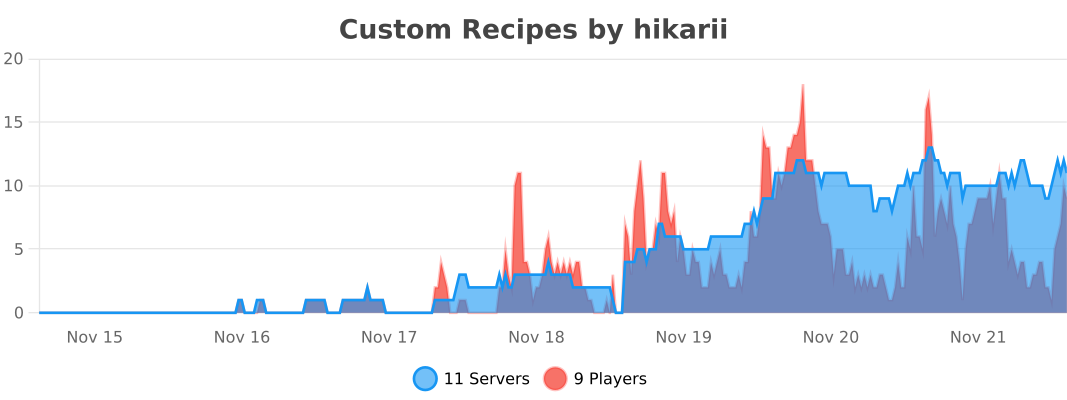
Statistics
Made with ❤️ for the Minecraft community
Комментарии
Загружаем…