 Mineforgian
GriefPrevention3D
A fork of GriefPrevention that adds 3D subdivisions
- Загрузки
- 5K
- Подписчики
- 8
- Обновлён
- 24 августа 2026 г.
- Лицензия
- GPL-3.0-only
Опубликован 20 июля 2025 г.
The self-service anti-griefing plugin for Minecraft servers — now with full 3D subdivisions




Stop responding to grief and prevent it instead. GriefPrevention stops grief before it starts automatically without any effort from administrators, and with very little (self service) effort from players.
GriefPrevention3D is a fork of the popular GriefPrevention plugin that adds full 3D subdivision support to land claims. Players can now create subdivisions with precise height boundaries for more complex builds.
Watch this video to learn more how GriefPrevention works in-game.
Key Features
- 3D Subdivisions
Create subdivisions with exact Y-level boundaries.
Use this command to switch to 3D subdivision mode./3dsubdivideclaims
- 3D Admin Claims
Create free, height-bounded administrative claims with exact Y coordinates.
Use this command or/3dadminclaims/aclaim mode admin3dto switch to 3D admin claim mode. Requires thegriefprevention.adminclaimspermission.
- Shaped Claims / SubClaims
Set to true to enable non-rectangular claims & subdivisions.AllowShapedClaims: false AllowShapedSubClaims: false/shapedclaims/shapedsubdivideclaimsUse this command to switch to the shaped claims mode.
- Merge Claims
Merge two of your claims into a single larger claim.
Stand in the first claim and run/mergeclaims/mergeclaims, then go to the second claim and run/mergeclaimsagain or right-click with your golden shovel. Both claims and the area between them become one claim. Can also be done with/shapedclaims— shape a path that overlaps another claim you own and they merge automatically.
- Nested Subclaims
Set to true to allow subdivisions inside other subdivisions.AllowNestedSubClaims: false
- Visualization Glow
Set to true to enable glowing claim boundary visualization. (Requires 1.19.3+)VisualizationGlow: false
- Unified Command Handler
In GriefPreventionData/alias.yml:
Provides unified commands like:enabled: true/claim create/claim trust/claim abandonView Docs
- Neighbor Trust & Minimum Distance
Enforce a minimum distance between top-level claims to prevent claim spam and overcrowding. When set, players cannot create claims within the configured distance of another player's claim.GriefPrevention: Claims: MinimumDistance: 0/claim trust <player> neighbor— Grant a player neighbor trust so they can bypass minimum distance checks for your claims./neighbortrust <player>(alias:/distancetrust <player>) — Standalone command for the same purpose./claim distance check— Show the configured minimum distance and list nearby claims./claim distance toggle— While standing in your own claim, toggle whether ALL players can bypass minimum distance for that claim.- Existing nearby claims auto-grant neighbor trust to each other, cleaned up automatically when claims are abandoned.
- Wither Explosion Toggle
/witherexplosionsUse this command to toggle wither explosions inside your claim.
Subtle Changes
- Per-Player Locale: Enabled by default. Players receive messages in their client language when a translation is available, falling back to English. Supported languages: Spanish, Portuguese (Brazil), German, French, Russian, Japanese, Chinese (Simplified), Ukrainian, Polish, Turkish. Disable with
PerPlayerLocale: falsein config.yml. - Action Bar Messages: You can now define a list of message keys that should be chosen to be shown in the action bar instead of chat.
- Resizing a claim now selects it and is accessible using common commands like
/claim abandonor/claim trustduring that resize session /restrictsubclaimwhile standing in main claims now instantly restricts all subdivisions inside/trustlistnow shows inherited permissions- Manager trust uses
/managetrustandgriefprevention.managetrust. Permission-node trust uses/permissiontrust <permission> <access|container|build|manage>or/aclaim trust permission <permission> <type>. It requiresgriefprevention.permissiontrust, inherited bygriefprevention.adminclaims; bare dotted nodes and bracketed[permission.node]targets are accepted. - Split the
griefprevention.eavesdroppermission togriefprevention.eavesdrop.pm&griefprevention.eavesdrop.softmutefor more granular permission control - Various bug fixes and quality-of-life improvements
- Full compatibility with original GriefPrevention features
- Works with Spigot, Paper, Purpur, and Folia
- Maintains all anti-grief protections
Supported Platforms: Spigot, Paper, Purpur, and Folia.
GriefPrevention3D targets and supports 1.8 - latest available version of these platforms.
Download
⬇ Download the GriefPrevention3D.jar plugin here.
Documentation
For usage instructions, see the official GriefPrevention3D Documentation.
Addons
Addons provide additional features to GriefPrevention. Some of these addons are listed in GitHub Discussions
Support
- 📖 Documentation - Learn how GriefPrevention3D works. Contains answers to most questions.
- Issue Tracker - Report problems or bugs on the issue tracker. Check if someone else reported your issue before posting.
- GitHub Discussions - New ideas, feature requests, or other general discussions.
- Discord Community
Original Plugin
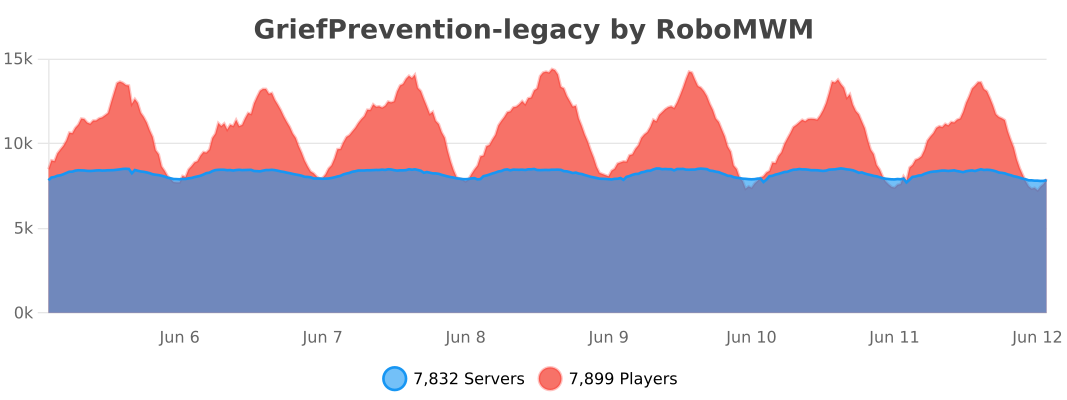
This is a fork of GriefPrevention by RoboMWM.
Ченджлог
18.3.7-fabric-1.21.11Альфа1.21.11 · 24 августа 2026 г.
GriefPrevention3D v18.3.7
Wiki: https://github.com/castledking/GriefPrevention3D/wiki
Overview
This is a fix release for the shaped claim cuts introduced in v18.3.6. Cut clicks only worked when every click landed at the same Y level; otherwise the path failed to close and players saw "The resulting shape is not valid".
Root cause
Cut click classification used the claim's 3D containment check
(claim.contains(location, ...)), which requires the clicked block's Y to fall inside the
claim's height range. Shaped claims are 2D — their geometry lives entirely in the X/Z plane — so
a player clicking on terrain above or below that band produced a point that counted as neither
interior nor boundary. The cut path could then never detect closure, and finalization rejected
the shape.
Fix
All six cut-flow classification checks now test the click's X/Z coordinates against the boundary
polygon directly (polygon.containsCell(x, z)) instead of the 3D location check:
- interior-cut-click detection (both handler paths);
- general interior-click detection;
- boundary-closure detection (clicking back onto the boundary to finish the cut).
Y level no longer plays any role in shaped claim cuts: you can seed, shape, and close a cut from any elevation.
Upgrade notes
No configuration, storage, or migration changes. Drop-in replacement for v18.3.6.
18.3.7Релиз26.1.1, 26.1.2, 26.2 · 24 августа 2026 г.
GriefPrevention3D v18.3.7
Wiki: https://github.com/castledking/GriefPrevention3D/wiki
Overview
This is a fix release for the shaped claim cuts introduced in v18.3.6. Cut clicks only worked when every click landed at the same Y level; otherwise the path failed to close and players saw "The resulting shape is not valid".
Root cause
Cut click classification used the claim's 3D containment check
(claim.contains(location, ...)), which requires the clicked block's Y to fall inside the
claim's height range. Shaped claims are 2D — their geometry lives entirely in the X/Z plane — so
a player clicking on terrain above or below that band produced a point that counted as neither
interior nor boundary. The cut path could then never detect closure, and finalization rejected
the shape.
Fix
All six cut-flow classification checks now test the click's X/Z coordinates against the boundary
polygon directly (polygon.containsCell(x, z)) instead of the 3D location check:
- interior-cut-click detection (both handler paths);
- general interior-click detection;
- boundary-closure detection (clicking back onto the boundary to finish the cut).
Y level no longer plays any role in shaped claim cuts: you can seed, shape, and close a cut from any elevation.
Upgrade notes
No configuration, storage, or migration changes. Drop-in replacement for v18.3.6.
18.3.6-fabric-1.21.11Альфа1.21.11 · 24 августа 2026 г.
GriefPrevention3D v18.3.6
Wiki: https://github.com/castledking/GriefPrevention3D/wiki
Overview
This release adds shaped claim cuts — the ability to carve inward cuts from an existing claim boundary using the shaped claim tool. Where v18.3.x introduced outward reshaping (extending claim boundaries into unclaimed land), this release completes the shaped-claim workflow by allowing players to subtract irregular shapes from their own claims.
A cut is started by clicking a boundary segment to seed the path, then clicking inward into the claim interior. Each interior click adds an orthogonal corner point (snapped automatically), and the cut is finalized by clicking back onto any boundary point. The carved region is unclaimed.
How it works
- Enter shaped claim mode (
/shapedclaimsor equivalent shovel mode). - Click a boundary point on your claim — this seeds the cut path from that boundary edge.
- Click inward into the claim interior — the first interior click starts the cut and shows a warning message.
- Continue clicking interior points to shape the cut — each point is snapped to be orthogonal with the previous point.
- Click back onto any boundary point to complete the cut — the shaped interior region is unclaimed.
Cut message
When a cut is started, the player sees:
Starting a shaped cut of your claim. Continue to shape and merge back to a boundary to complete the cut. Warning: cut means to unclaim that shaped land.
Technical details
- Cut points are validated to be inside the claim polygon (
containsCell), not just non-boundary points. This ensures interior cut clicks are distinguished from exterior reshape-extension clicks. - Interior points are automatically snapped to be orthogonal with the previous path point, matching the behavior of the existing shaped-claim extension path.
- The cut polygon is constructed by walking the claim boundary between the two cut-edge endpoints and inserting the cut path. The resulting polygon is validated via
OrthogonalPolygonValidator.validatePathfor self-intersection, orthogonal edges, and closed-path requirements. - Same-edge cuts (both cut points on the same boundary edge) produce correct non-overlapping polygon geometry with proper corner-to-cutPoint pairings.
Also in this release
- Fix: cut path interior points now snap orthogonally to the previous point when the click is not axis-aligned, matching the extension reshape path behavior.
18.3.6Релиз26.1.1, 26.1.2, 26.2 · 24 августа 2026 г.
GriefPrevention3D v18.3.6
Wiki: https://github.com/castledking/GriefPrevention3D/wiki
Overview
This release adds shaped claim cuts — the ability to carve inward cuts from an existing claim boundary using the shaped claim tool. Where v18.3.x introduced outward reshaping (extending claim boundaries into unclaimed land), this release completes the shaped-claim workflow by allowing players to subtract irregular shapes from their own claims.
A cut is started by clicking a boundary segment to seed the path, then clicking inward into the claim interior. Each interior click adds an orthogonal corner point (snapped automatically), and the cut is finalized by clicking back onto any boundary point. The carved region is unclaimed.
How it works
- Enter shaped claim mode (
/shapedclaimsor equivalent shovel mode). - Click a boundary point on your claim — this seeds the cut path from that boundary edge.
- Click inward into the claim interior — the first interior click starts the cut and shows a warning message.
- Continue clicking interior points to shape the cut — each point is snapped to be orthogonal with the previous point.
- Click back onto any boundary point to complete the cut — the shaped interior region is unclaimed.
Cut message
When a cut is started, the player sees:
Starting a shaped cut of your claim. Continue to shape and merge back to a boundary to complete the cut. Warning: cut means to unclaim that shaped land.
Technical details
- Cut points are validated to be inside the claim polygon (
containsCell), not just non-boundary points. This ensures interior cut clicks are distinguished from exterior reshape-extension clicks. - Interior points are automatically snapped to be orthogonal with the previous path point, matching the behavior of the existing shaped-claim extension path.
- The cut polygon is constructed by walking the claim boundary between the two cut-edge endpoints and inserting the cut path. The resulting polygon is validated via
OrthogonalPolygonValidator.validatePathfor self-intersection, orthogonal edges, and closed-path requirements. - Same-edge cuts (both cut points on the same boundary edge) produce correct non-overlapping polygon geometry with proper corner-to-cutPoint pairings.
Also in this release
- Fix: cut path interior points now snap orthogonally to the previous point when the click is not axis-aligned, matching the extension reshape path behavior.
18.3.5-fabric-1.21.11Альфа1.21.11 · 21 августа 2026 г.
GriefPrevention3D v18.3.5 — Fabric 1.21.11 (experimental alpha)
Wiki: https://github.com/castledking/GriefPrevention3D/wiki
Roadmap: platforms/fabric-1.21.11/ROADMAP.md — current target 1.21.11, next stop Minecraft 26.1.2 (first unobfuscated release; Loom swap, Java 25, mixin risk assessment inside).
Still an alpha, dedicated-server-only build. Not feature complete, not a drop-in replacement for the Paper plugin. Back up
GriefPreventionDatabefore running it. Requires Fabric API; LuckPerms optional but recommended.
Overview
This build retires the monolithic /gp3d command root in favor of the same standalone command
surface Paper players already know, and ports GP3D's alias.yml command-customization system to
Fabric so both platforms read one configuration. The same development cycle also delivered
player-facing denial feedback and messages.yml support, which are summarized below.
/gp3d subcommands become standalone commands
Every player-facing action that used to live under the single /gp3d Brigadier literal is now a
top-level command:
| Old | New |
|---|---|
/gp3d claim create ... |
/createclaim |
/gp3d claim trust <target> <type> |
/trust <target> <type> |
/gp3d claim untrust <target> |
/untrust <target> |
/gp3d claims list |
/claimslist |
/gp3d claim abandon |
/abandonclaim |
/gp3d blocks |
/claimblocks |
/gp3d claim here |
/claimhere |
/gp3d claim pvp on|off |
/claimpvp on|off |
/gpstatus and /gpreload keep their names — they were already top-level.
The old /gp3d ... spellings are gone rather than deprecated; this is an alpha and the rename is
the point. Anything scripted against /gp3d (test harnesses, command blocks) needs updating once.
The manual migration checklist in the platform README uses the new names throughout.
alias.yml is now shared with Paper
The command alias system moved from the Bukkit plugin into gp3d-core, and Fabric reads the same
alias.yml shape Paper does:
commands:lists map a canonical subcommand onto alternate literals;standalone:lists control which top-level commands exist at all;arguments:blocks drive Brigadier suggestion types (player, integers, fixed option lists);- per-subcommand and per-root
enable: falseremoves them from the tree.
A new registrar builds the Brigadier command tree directly from this merged configuration instead
of hand-written registrations, so a server operator can disable or rename commands once and both
platforms follow. Fabric honors the global standalone: switch: when standalone commands are
disabled, only the root trees remain registered.
Because Brigadier trees are built at registration time, command changes apply on /gpreload
through re-registration and the client's next command-tree sync.
Denial feedback and messages.yml
Shipped alongside the command work in the same cycle (see the platform README for the full checklist):
- Refused block breaks, block uses, entity attacks, and entity interactions reply in red chat with
the same message keys Paper uses (
NoBuildPermission,NoContainersPermission,NoAccessPermission), resolving{0}to the owner's name — subdivisions name the parent's owner, admin claims say "an administrator". - Protection denials are rate limited to one message per player per ten seconds, matching Bukkit's
sendRateLimitedErrorMessage; cooldowns drop on disconnect. - Player-facing text is read from
messages.yml, accepting both the plain-key and legacy<Key>.Textshapes, translating&/$codes,&#RRGGBBhex, and\nbefore placeholder substitution, falling back to shipped defaults for missing keys, and treating a blanked message as disabled. Unknown addon keys survive read-modify-write cycles.
Combat trust note
Paper's v18.3.5 adds opt-in PvP/PvE combat trust (see v18.3.5.md). The shared claim codec already
persists both trust sets, so Fabric claim files round-trip them today; wiring Fabric enforcement
and /trust type arguments to those sets is tracked in the roadmap rather than this alpha.
Also in this release
- Neighbor trust persistence hardening shared with Paper, including
allowAllNeighbors. - Upstream merge: interacting with an untamed horse no longer clears its equipment (#2624).
18.3.5Релиз26.1.1, 26.1.2, 26.2 · 21 августа 2026 г.
GriefPrevention3D v18.3.5
Wiki: https://github.com/castledking/GriefPrevention3D/wiki
Overview
This release adds two new claim trust types — PvP trust and PvE trust — that give claim owners per-player, per-claim consent over combat. They exist because wind charges, mace smash knockback, and the knockback protection introduced in v18.3.x made "who is allowed to shove whom" a real question, and neither of the existing answers was right:
- Container trust was the only thing gating animal knockback/damage, so handing someone chest access also handed them the right to yeet your horses across the pen;
- Access trust was the only early-allow for player-vs-player knockback, which conflated "can press buttons" with "may fight here".
Both new types are opt-in server features, disabled by default. With both flags off this release behaves exactly like v18.3.4 — no new commands appear, no protection rules change.
Configuration
GriefPrevention:
  Claims:
    AllowPvPTrust: false   # enables /pvptrust, PvP trust checks, and PvP trust in /trustlist
    AllowPvETrust: false   # enables /pvetrust, PvE trust checks, and PvE trust in /trustlist
The two flags are independent: a PvP server can enable only AllowPvPTrust, a PvE server only
AllowPvETrust. /gpreload applies flag changes immediately — see Hot reload below.
What each trust type does when enabled
| Target | Legacy gate | With flag on |
|---|---|---|
| Other players (knockback/combat early-allow in claims) | Access trust | PvP trust |
| Creatures — animals, villagers, copper golems, sulfur cubes | Container trust | PvE trust |
Unchanged on purpose:
- armor stands, item frames, and paintings still require Build trust (destruction, not combat);
- hostile monsters are never protected;
- self-knockback (wind charge jumping at your own feet) never required trust and still doesn't;
- PvP safe zones and fresh-spawn immunity are evaluated above the new trust checks, so spawn protection cannot be trusted away;
- buttons, levers, and doors triggered by explosions (wind charge flicks) remain an Access-trust question, not a combat one.
When a flag turns on, the legacy level stops covering that target entirely: enabling
AllowPvETrust means container-trusted players can open chests but can no longer hurt or knock
back creatures unless separately granted PvE trust. Enabling AllowPvPTrust means Access trust no
longer acts as the player-combat early-allow. Because the flags default to off, no existing claim
changes behavior until an admin asks for it.
Standalone by design
PvP/PvE trusts sit outside the normal implication hierarchy in both directions:
Owner/Edit -> Manage -> Build -> Container -> Access   (implies everything below it)
PvP, PvE                                            .  (implied by nothing, imply nothing)
Granting /trust <player> (build) does not silently hand out combat rights after an admin flips
the flag on, and granting /pvptrust never grants access to anything else. Combat trust is stored
in its own per-claim sets rather than the interaction trust map, so granting container trust after
pvp trust cannot overwrite it, and vice versa.
Inheritance matches every other trust level: first-child subdivisions inherit parent grants,
nested subdivisions do not, and a subdivision can block an inherited grant with a deny entry
(#pvp / #pve suffixes).
Commands
/pvptrust <player>                      standalone; permission griefprevention.pvptrust
/pvetrust <player>                      standalone; permission griefprevention.pvetrust
/claim trust <player> pvp|pve           typed grant through the unified interface
/claim trust permission <node> pvp|pve  permission-node grant
/aclaim trust permission <node> pvp|pve same, administrative form
/untrust <player>                       revokes combat trust along with everything else
Notes:
griefprevention.pvptrustandgriefprevention.pvetrustdefault to allowed and are children ofgriefprevention.claims, mirroring/accesstrustand/containertrust.- Permission-node identifiers (
[your.node]) andpublicwork exactly as they do for other trust levels. - Tab completion for the trust-type argument reads the config live, so
pvp/pvesuggestions appear and disappear with/gpreload. /trustlistlists PvP-trusted players in red and PvE-trusted players in aqua, with a legend entry for each — but only while the matching flag is enabled, so servers that never opted in see the exact same output as before.
Enforcement details
The knockback protection handlers branch on the flags at event time:
handleKnockbackPlayerrequires an explicit PvP grant where it previously accepted Access;handleKnockbackEntityrequires PvE instead of Container for protected creatures.
Everything downstream of those gates (safe-zone messaging, fresh-spawn immunity, rate-limited
errors, /gpdebug knockback tracing) is untouched. Debug output now names the specific rule that
fired, e.g. denied: attacker X lacks PvP trust in defender's claim N.
Storage
No migration is required or performed; the feature ships inert.
- Flat file claims gain optional
PvP Trusted/PvE Trustedlist keys. Older plugin versions ignore them; older files load unchanged. - The database schema moves from version 12 to 13. Startup adds two nullable TEXT columns via JDBC
metadata inspection (the MySQL-safe path used for the
deniedcolumn), then rewrites claims once. - The platform-neutral
gp3d-coreclaim codec carries both sets through document encode/decode, so Paper ↔ Fabric claim moves preserve combat trust losslessly. Grants persist even while their feature flag is disabled, so toggling a flag off and back on never loses anyone's trust.
Also in this release
- Neighbor trust (
/neighbortrust,/distancetrust,allowAllNeighbors) persistence was hardened on both Bukkit and Fabric, including manual-neighbor survival across flat-file migration. - Upstream merge: interacting with an untamed horse no longer clears its equipment (#2624).
18.3.4-fabric-1.21.11Альфа1.21.11 · 13 августа 2026 г.
GriefPrevention3D v18.3.4
Wiki: https://github.com/castledking/GriefPrevention3D/wiki
Overview
This maintenance release restores GriefPrevention's upstream manage-trust behavior. Players with manage trust may once again grant normal trust or manage trust to another player, and manage trust once again includes every lower interaction permission.
GP3D v18.3.0 separated manage trust from build, container, and access trust. It also restricted a manager to granting only permissions they separately held themselves, while granting manage trust was reserved for the claim owner. Together, those rules produced two confusing failures:
- a manager could grant container trust in some cases, but
/trust <player>appeared to do nothing; /managetrust <player>appeared to do nothing unless the command sender owned the claim.
Both restrictions are removed in v18.3.4. Holding manage trust is now the complete authorization needed to manage the claim's grantable trust list, matching upstream GriefPrevention.
Manage trust is hierarchical again
The effective trust hierarchy is restored to:
Owner/Edit
  -> Manage
    -> Build
      -> Container
        -> Access
          -> Neighbor
A manager can therefore build, use containers, and access the claim without needing a second trust entry. Manage trust still does not grant owner-only Edit permission: managers cannot resize, delete, transfer, or otherwise perform actions reserved for the claim owner merely because they can manage trust.
The hierarchy is applied consistently by the Bukkit claim implementation and the shared trust
model used by Fabric. Player UUIDs, public, and trusted permission-node identifiers all follow the
same ordering when their effective permission is evaluated.
Managers can delegate trust
Trust commands now require the sender to hold Manage permission on the selected or current claim. There is no additional requirement that the sender personally hold the level being granted, and granting manage trust is no longer owner-only.
A manager may use:
/accesstrust <player>;/containertrust <player>;/trust <player>; and/managetrust <player>.
This also applies when the commands are routed through GP3D's unified claim command interfaces.
The separate administrative gate for granting trust to arbitrary permission nodes remains in
place: /permissiontrust still requires griefprevention.permissiontrust.
Relationship to the owner-side trust-loss report
The clarification that the command sender owns the claim means the delegation restriction fixed in
this release did not block that sender: claim owners already satisfied every grant check. The
reported sequence is nevertheless consistent with the separate v18.3.1 storage bug. At that time a
claim could store only one trust value per player. An owner could successfully give Linkondorf
normal trust and then give him manage trust, but the second command replaced the first entry.
Loading the claim applied Managers last and could repeat the overwrite. Because manage trust did
not include interaction rights in v18.3.1, Linkondorf then appeared to have lost all useful
permissions.
There is also an important command-name difference between those releases:
- In v18.3.1,
/permissiontrust Linkondorfwas an alias for granting player manage trust and could trigger the one-slot overwrite. - Since v18.3.2, player manage trust is
/managetrust Linkondorf./permissiontrust <permission> <access|container|build|manage>now targets a permission node, so/permissiontrust Linkondorfis not a valid player-trust command.
v18.3.2 already fixed the destructive part by storing manage and interaction trust independently. v18.3.4 keeps that safer storage model while restoring the upstream hierarchy:
- granting manage trust does not overwrite an explicit build, container, or access grant;
- granting normal trust does not remove manage trust;
- both tracks survive claim loading and saving; and
- a surviving manager entry now provides lower interaction permissions by itself.
This means an existing player still listed under Managers regains build, container, and access
without a claim-data migration. If old server versions removed both entries entirely, the claim
owner must trust the player again. If a player should retain a particular interaction level after
their manage trust is later removed, the owner should also grant that interaction level explicitly;
the independent entry remains stored separately from manager status.
Subdivision scope can look like disappearing trust
Trust granted directly in a subdivision applies inside that subdivision and its inheriting descendants; it does not grant the same permission in the surrounding parent claim. With a 3D subdivision, moving above or below its Y bounds can therefore make working trust appear to vanish even though the subdivision entry is still present.
An untrusted parent does not asynchronously erase a direct subdivision grant. GP3D checks explicit
trust on the current subdivision before consulting its parent, so the direct grant wins while the
player remains inside that subdivision. A later /untrust performed on the parent can deliberately
propagate removal into children which inherit its permissions, but there is no timer which clears a
child grant merely because the parent lacks trust.
If /trust Linkondorf still appears ineffective after upgrading, confirm that the owner and
Linkondorf are testing the same claim and vertical layer, that no old golden-shovel claim-selection
session is targeting a different subdivision, and that /trustlist is being read from that exact
claim.
Upgrade notes
- No configuration changes are required.
- No permission nodes, commands, aliases, or message keys were added.
- No claim-data migration or automatic claim rewrite is required.
- Existing
Managersentries immediately receive the restored lower permissions. - The independent storage introduced in v18.3.2 remains in place; this release changes effective permission evaluation and command authorization, not the on-disk claim format.
/untrust <player>continues to remove both manage and interaction trust.
Verification
New command-level regression tests cover the upstream manager-delegation cases with a manager
standing inside another player's claim. They verify that /trust Linkondorf records Build trust
and that /managetrust Linkondorf records Manage trust. A separate owner-path test grants Build and
then Manage to the same player and verifies that both entries remain. Hierarchy tests verify that
Manage grants Build, Container, and Access while owner-only Edit remains denied.
The existing real flat-file round-trip test verifies that a player listed under both Builders and
Managers retains both entries after a Paper load and save. Fabric evaluator and repository tests
cover the same hierarchy for UUID and permission-node trust while retaining the explicit
interaction grant alongside manager status.
The full ./gradlew check pipeline passes: 439 tests, 0 failures, 0 errors — 250 in the Bukkit
plugin, 136 in the shared core, 51 on the Fabric platform, and 2 in the Fabric bootstrap. This also
includes the universal JAR audit, Java 8 legacy class loading, shaded-core isolation, and the Fabric
boot smoke test against the generated universal JAR.
Files Changed
 M gp3d-core/src/main/java/com/griefprevention/claims/ClaimTrustLevel.java
 M gp3d-core/src/main/java/com/griefprevention/claims/ClaimTrustSnapshot.java
 M gp3d-core/src/test/java/com/griefprevention/claims/ClaimTrustLevelTest.java
 M gp3d-core/src/test/java/com/griefprevention/claims/ClaimTrustSnapshotTest.java
 M gradle.properties
 M platforms/fabric-1.21.11/src/test/java/com/griefprevention/fabric/FabricClaimRepositoryTrustTest.java
 M platforms/fabric-1.21.11/src/test/java/com/griefprevention/fabric/FabricClaimTrustEvaluatorTest.java
 M pom.xml
 M src/main/java/me/ryanhamshire/GriefPrevention/Claim.java
 M src/main/java/me/ryanhamshire/GriefPrevention/ClaimPermission.java
 M src/main/java/me/ryanhamshire/GriefPrevention/GriefPrevention.java
 M src/test/java/me/ryanhamshire/GriefPrevention/ClaimPermissionTest.java
 M src/test/java/me/ryanhamshire/GriefPrevention/TrustCommandPermissionTest.java
18.3.4Релиз26.1.1, 26.1.2, 26.2 · 13 августа 2026 г.
GriefPrevention3D v18.3.4
Wiki: https://github.com/castledking/GriefPrevention3D/wiki
Overview
This maintenance release restores GriefPrevention's upstream manage-trust behavior. Players with manage trust may once again grant normal trust or manage trust to another player, and manage trust once again includes every lower interaction permission.
GP3D v18.3.0 separated manage trust from build, container, and access trust. It also restricted a manager to granting only permissions they separately held themselves, while granting manage trust was reserved for the claim owner. Together, those rules produced two confusing failures:
- a manager could grant container trust in some cases, but
/trust <player>appeared to do nothing; /managetrust <player>appeared to do nothing unless the command sender owned the claim.
Both restrictions are removed in v18.3.4. Holding manage trust is now the complete authorization needed to manage the claim's grantable trust list, matching upstream GriefPrevention.
Manage trust is hierarchical again
The effective trust hierarchy is restored to:
Owner/Edit
  -> Manage
    -> Build
      -> Container
        -> Access
          -> Neighbor
A manager can therefore build, use containers, and access the claim without needing a second trust entry. Manage trust still does not grant owner-only Edit permission: managers cannot resize, delete, transfer, or otherwise perform actions reserved for the claim owner merely because they can manage trust.
The hierarchy is applied consistently by the Bukkit claim implementation and the shared trust
model used by Fabric. Player UUIDs, public, and trusted permission-node identifiers all follow the
same ordering when their effective permission is evaluated.
Managers can delegate trust
Trust commands now require the sender to hold Manage permission on the selected or current claim. There is no additional requirement that the sender personally hold the level being granted, and granting manage trust is no longer owner-only.
A manager may use:
/accesstrust <player>;/containertrust <player>;/trust <player>; and/managetrust <player>.
This also applies when the commands are routed through GP3D's unified claim command interfaces.
The separate administrative gate for granting trust to arbitrary permission nodes remains in
place: /permissiontrust still requires griefprevention.permissiontrust.
Relationship to the owner-side trust-loss report
The clarification that the command sender owns the claim means the delegation restriction fixed in
this release did not block that sender: claim owners already satisfied every grant check. The
reported sequence is nevertheless consistent with the separate v18.3.1 storage bug. At that time a
claim could store only one trust value per player. An owner could successfully give Linkondorf
normal trust and then give him manage trust, but the second command replaced the first entry.
Loading the claim applied Managers last and could repeat the overwrite. Because manage trust did
not include interaction rights in v18.3.1, Linkondorf then appeared to have lost all useful
permissions.
There is also an important command-name difference between those releases:
- In v18.3.1,
/permissiontrust Linkondorfwas an alias for granting player manage trust and could trigger the one-slot overwrite. - Since v18.3.2, player manage trust is
/managetrust Linkondorf./permissiontrust <permission> <access|container|build|manage>now targets a permission node, so/permissiontrust Linkondorfis not a valid player-trust command.
v18.3.2 already fixed the destructive part by storing manage and interaction trust independently. v18.3.4 keeps that safer storage model while restoring the upstream hierarchy:
- granting manage trust does not overwrite an explicit build, container, or access grant;
- granting normal trust does not remove manage trust;
- both tracks survive claim loading and saving; and
- a surviving manager entry now provides lower interaction permissions by itself.
This means an existing player still listed under Managers regains build, container, and access
without a claim-data migration. If old server versions removed both entries entirely, the claim
owner must trust the player again. If a player should retain a particular interaction level after
their manage trust is later removed, the owner should also grant that interaction level explicitly;
the independent entry remains stored separately from manager status.
Subdivision scope can look like disappearing trust
Trust granted directly in a subdivision applies inside that subdivision and its inheriting descendants; it does not grant the same permission in the surrounding parent claim. With a 3D subdivision, moving above or below its Y bounds can therefore make working trust appear to vanish even though the subdivision entry is still present.
An untrusted parent does not asynchronously erase a direct subdivision grant. GP3D checks explicit
trust on the current subdivision before consulting its parent, so the direct grant wins while the
player remains inside that subdivision. A later /untrust performed on the parent can deliberately
propagate removal into children which inherit its permissions, but there is no timer which clears a
child grant merely because the parent lacks trust.
If /trust Linkondorf still appears ineffective after upgrading, confirm that the owner and
Linkondorf are testing the same claim and vertical layer, that no old golden-shovel claim-selection
session is targeting a different subdivision, and that /trustlist is being read from that exact
claim.
Upgrade notes
- No configuration changes are required.
- No permission nodes, commands, aliases, or message keys were added.
- No claim-data migration or automatic claim rewrite is required.
- Existing
Managersentries immediately receive the restored lower permissions. - The independent storage introduced in v18.3.2 remains in place; this release changes effective permission evaluation and command authorization, not the on-disk claim format.
/untrust <player>continues to remove both manage and interaction trust.
Verification
New command-level regression tests cover the upstream manager-delegation cases with a manager
standing inside another player's claim. They verify that /trust Linkondorf records Build trust
and that /managetrust Linkondorf records Manage trust. A separate owner-path test grants Build and
then Manage to the same player and verifies that both entries remain. Hierarchy tests verify that
Manage grants Build, Container, and Access while owner-only Edit remains denied.
The existing real flat-file round-trip test verifies that a player listed under both Builders and
Managers retains both entries after a Paper load and save. Fabric evaluator and repository tests
cover the same hierarchy for UUID and permission-node trust while retaining the explicit
interaction grant alongside manager status.
The full ./gradlew check pipeline passes: 439 tests, 0 failures, 0 errors — 250 in the Bukkit
plugin, 136 in the shared core, 51 on the Fabric platform, and 2 in the Fabric bootstrap. This also
includes the universal JAR audit, Java 8 legacy class loading, shaded-core isolation, and the Fabric
boot smoke test against the generated universal JAR.
Files Changed
 M gp3d-core/src/main/java/com/griefprevention/claims/ClaimTrustLevel.java
 M gp3d-core/src/main/java/com/griefprevention/claims/ClaimTrustSnapshot.java
 M gp3d-core/src/test/java/com/griefprevention/claims/ClaimTrustLevelTest.java
 M gp3d-core/src/test/java/com/griefprevention/claims/ClaimTrustSnapshotTest.java
 M gradle.properties
 M platforms/fabric-1.21.11/src/test/java/com/griefprevention/fabric/FabricClaimRepositoryTrustTest.java
 M platforms/fabric-1.21.11/src/test/java/com/griefprevention/fabric/FabricClaimTrustEvaluatorTest.java
 M pom.xml
 M src/main/java/me/ryanhamshire/GriefPrevention/Claim.java
 M src/main/java/me/ryanhamshire/GriefPrevention/ClaimPermission.java
 M src/main/java/me/ryanhamshire/GriefPrevention/GriefPrevention.java
 M src/test/java/me/ryanhamshire/GriefPrevention/ClaimPermissionTest.java
 M src/test/java/me/ryanhamshire/GriefPrevention/TrustCommandPermissionTest.java
Комментарии
Загружаем…