 Mineforgian
Glint & Glamour
A mod that allows you to use custom glints!
- Загрузки
- 2K
- Подписчики
- 17
- Обновлён
- 21 июля 2026 г.
- Лицензия
- MIT
Опубликован 29 апреля 2026 г.
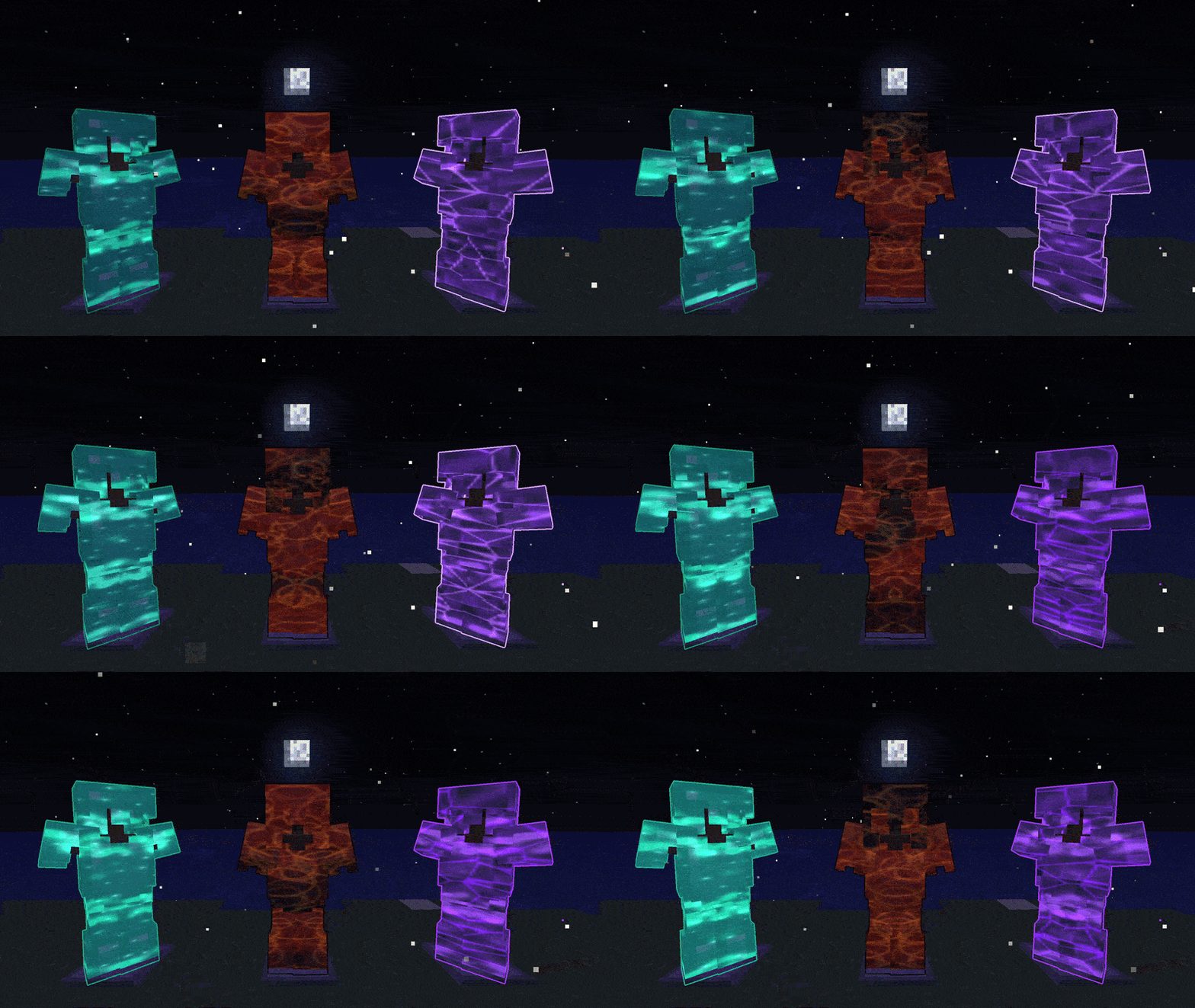
New Update v1.7.0 Quick Look:
- Mod Name Updated to Glint & Glamour
- Glint Bag - Auto collects glints, toggleable
- Trim Dust - Recycle trims
- QoL touches on Glint Table
- Advancements!
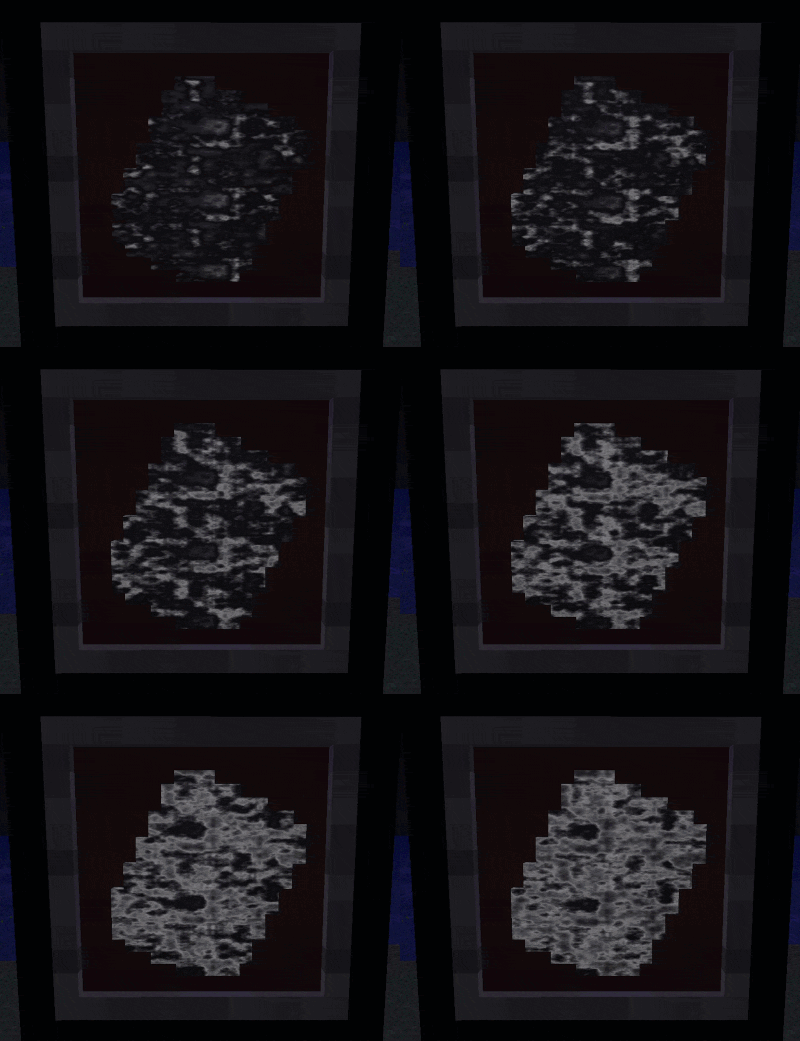
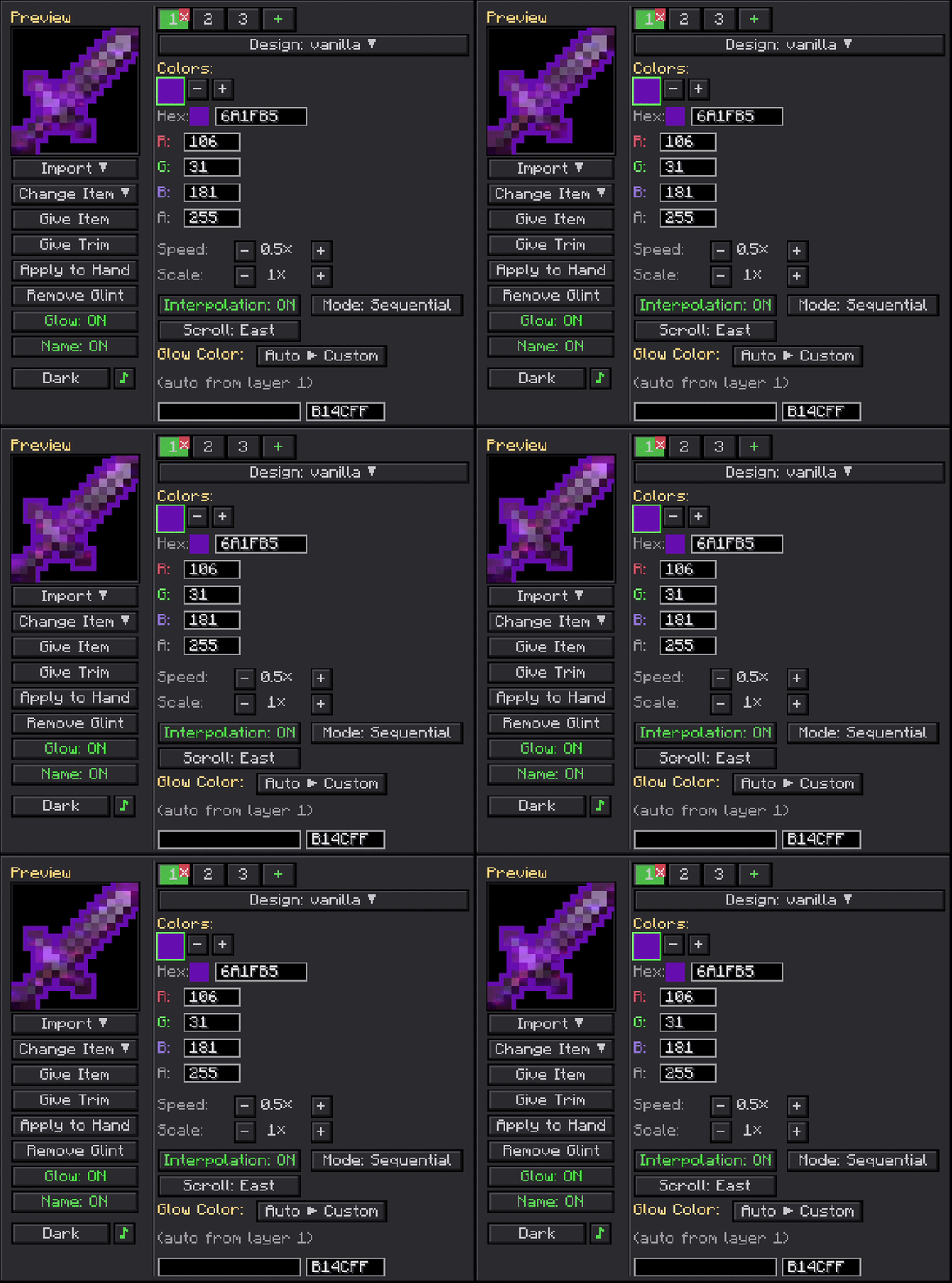
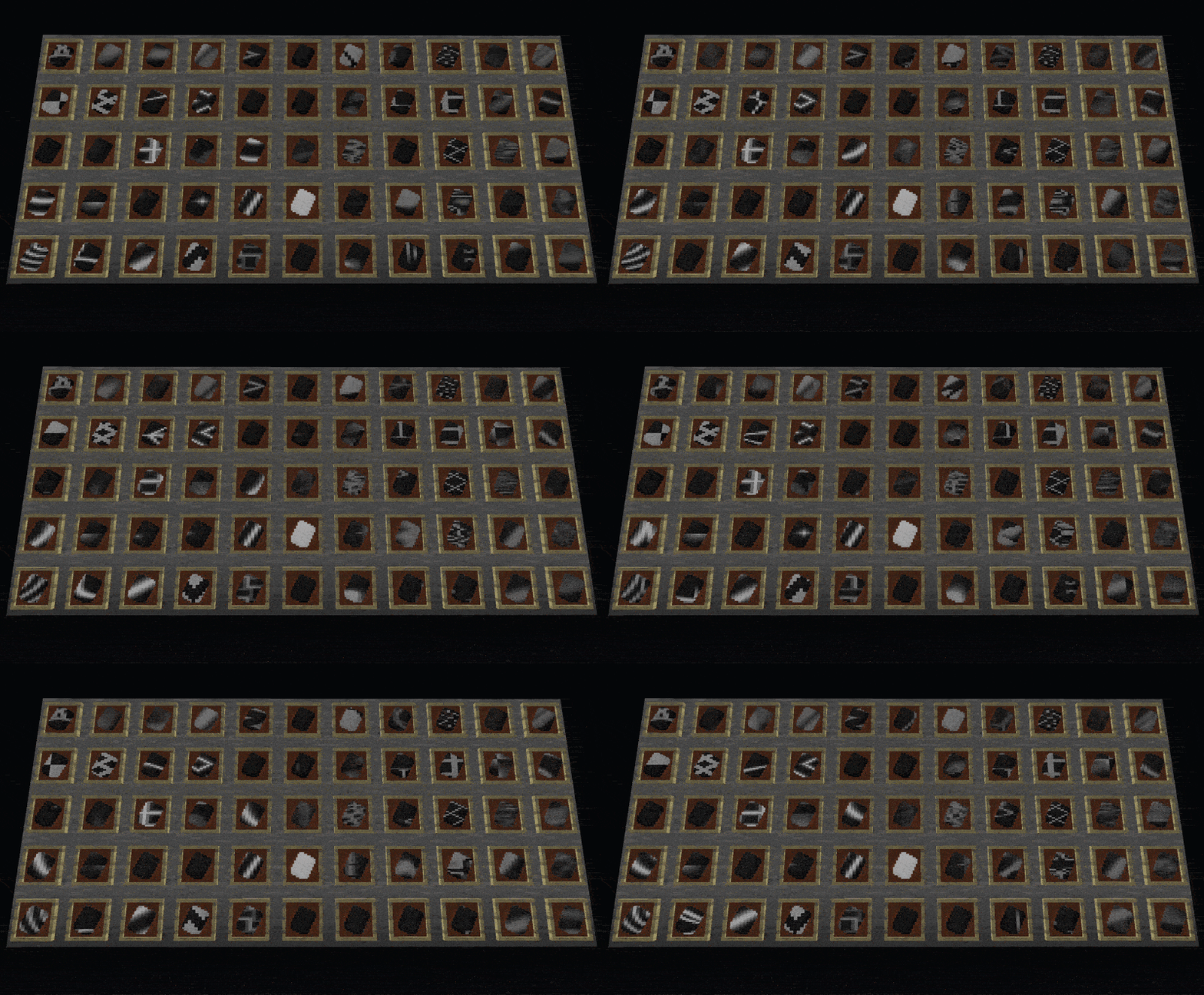
Glint & Glamour lets you paint animated, custom-colored enchantment glints onto any item, armor piece, or living entity, with an optional glowing outline on top.
Hunt down Glint Trims and Glow Trims in loot chests and smith them onto your gear to make it actually yours.
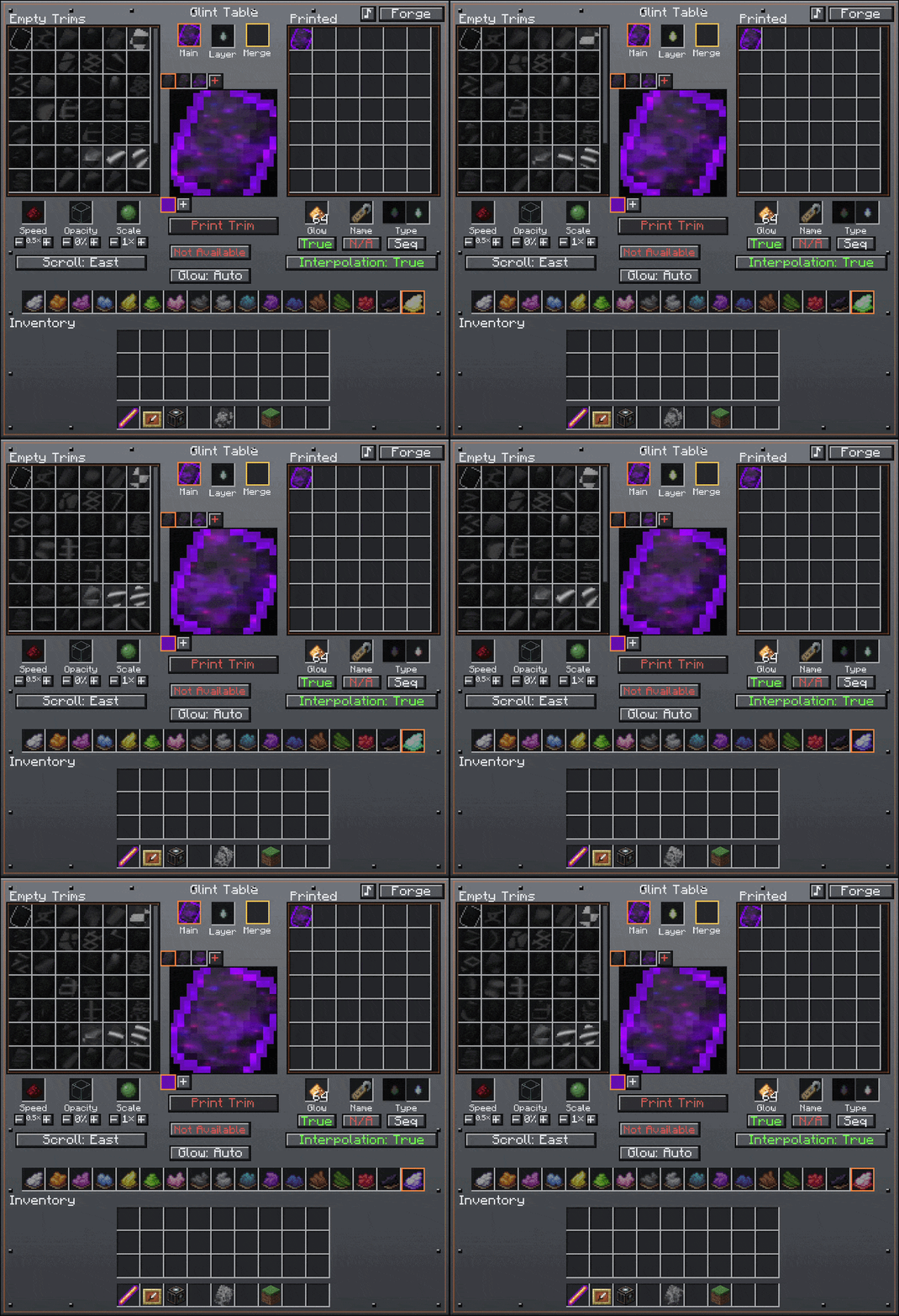
Use Glint Tears to push those trims further: merge up to 8 layers, swap between every-color-at-once or cycling one at a time, or wipe a trim clean and start over. Want full control? The Glint Wand from the creative tab opens a complete editor with patterns, colors, speed, layers, glow toggle, and custom names. Shift-right-click any mob, player, or animal to glint them too. 55 built-in patterns, up to 8 colors per layer, up to 8 layers, and data-pack support.
[1.20.1 - 1.21.1] Compatible and Tested with:
- Ice and Fire
- Epic Knights
- Elytra Slot
- Sophisticated Backpacks
- Silent Gear
- Spartan Weaponry
- Spartan Shields
- Iron's Spells and Spellbooks
- Immersive Armors
- Mekanism
- Artifacts
[26.1.2] Compatible and Tested with:
Recommended Shaders ive tested with:
For developers: The render pipeline ships as a standalone API jar you can bundle into your own mod with jarJar, so your players get custom glints on your items and entities without installing anything extra. JarJar only inlcudes Oculus/First-Person Mod compatability. Check the GitHub repo or the Wiki for setup, examples, and the full API surface.
Ченджлог
1.7.0-Forge-1.20.1Релиз1.20.1 · 21 июля 2026 г.
[1.7.0]
Renamed the mod to Glint & Glamour (formerly Custom Glints). Nothing in your worlds changes: same items, same saves.
Added:
- /glint cheat to unlock every Glint Table design at once
- Several Advancements
- Trim import to the Glint Table: save any build you preview to a file and pull it back later as a build target that unlocks once you print it
- On servers, operators can share a set of blueprint trims that everyone sees in the import list
- The Glint Table now lets you build and preview a trim from any design, dye, glow, or name freely; the materials are only required and consumed when you print
- Manual glow lets you pick up to 8 glow colors in the Glint Table's color strip (right-click the Auto/Manual button to edit them) instead of a single color
- The glow outline can now animate at its own speed and either blend smoothly or step between colors, set alongside the glow in the Glint Table
- You can build and print a standalone Glow Trim at the Glint Table, choosing its glow colors and cycle speed
- Save Design in the wand editor: save your current build to the server so anyone can import it later through the wand or the Glint Table (delete saved designs from the Import list with the trash icon)
- Hover tooltips on every button and control, in both the wand editor and the Glint Table
- Swap two colors, or two layers, by selecting one and shift-clicking another; shift-right-click a dye to remove just that color from a blend
- Rainbow Dye now has a JEI info page describing how it's used at the Glint Table
- Glint Bag: a pouch that holds Glint Trims, Tears, Rainbow Dye and Glint Table materials, auto-collects trims as you loot (shift-right-click to toggle it on or off), and unloads into a Glint Table when you shift-right-click it: trims go to its library, materials into its slots
- Trim Powder: smelt a trim you don't want into powder, then craft 4 powder with 2 Glowstone Dust for a fresh random trim
Fixed:
- The wand editor now works in survival as long as you're holding the wand, instead of requiring creative mode
- Importing a trim in the wand editor now keeps its glow colors instead of dropping them, and refills its custom name
- The wand editor's Import search box now accepts typed text
- Importing a trim you already own no longer leaves a duplicate in the Glint Table's printed list
- Every color on every layer of a printed trim now costs its own dye, counted separately each time a shade is reused (a matching dye per shade, a Rainbow Dye per custom color); the Print tooltip lists the dyes and the button waits until you have them
- The Glint Table's Import list now draws above item icons and glint effects instead of being hidden behind them
- The Glint Table's "add a color" warning shows whenever any layer is missing a color, not only the layer you are editing
- A glowing item's inventory halo now cycles in step with its tinted edge instead of drifting out of sync
- /glint glow no longer needs a glint on the item or entity; a glowing outline can stand on its own and shows white when there's no glint color
- The Glint Table now drops itself when broken
- Picking black for a glint color now hides that layer, so you can leave a gap in a design
- Fixed slimes rendering glint
- Fixed a memory buildup when many nearby entities used lots of differently colored glints
- Free palette trims taken from the Glint Table now drop at your feet instead of vanishing when your inventory is full
- Shared server blueprints now sync reliably even when a very large design was saved
- Chromatic glints now show on see-through surfaces like a slime's outer shell while shaders are on
- Horse armor now renders chromatic glint under shaders
Altered:
- Picker scroll bars in the Glint Table and wand editor can now be dragged with the mouse
- The Glint Table's Print tooltip is tidier, dropping the "Can't print yet" and "Consumes" headings
- The Glint Table's layer row now stays visible, and the color row appears once you start building a trim
- Glint Table tooltips are now a clean white to match the wand editor
- The Glint Table's main slot shows the trim you are building with all its committed layers; a trim in the merge slot only joins the preview until you commit it with the + button
- Making a trim glow now costs one glowstone per layer
- Sequential multi-color layers now cost a sequential tear, matching how simultaneous layers cost a simultaneous tear
- Chest loot now drops blank trims so matching ones stack, with Glow Trims mixed into the trim drop as the rarer variant instead of a separate roll
[Compat]
- Enhanced Visuals: a glowing item no longer turns the whole screen black, and blood and other damage effects no longer draw black boxes
- Gnetum: animated glints and glow outlines no longer freeze or flicker on the hotbar under its HUD caching
- Punchy: the held-item glow outline now renders correctly with its first-person animations
- Epic Fight: glowing entities keep their glow outline while Epic Fight renders them with its own animations
- Iron's Spells 'n Spellbooks and other GeckoLib armor: worn armor now takes custom glints and glow outlines
- Immersive Armors: the mod's layered armor now takes custom glints and glow outlines while worn
- Mekanism: the MekaSuit, Jetpacks, Free Runners and their armored variants, and the Scuba tank and mask now take custom glints and glow outlines while worn
- Artifacts: belts, necklaces, gloves, boots and other worn artifacts now take custom glints and glow outlines
- Shader packs: glints and glow outlines are tested and working on Bliss, BSL, Complementary and Photon
[Compat fixes]
- Improved JEI compatibility
- Ice and Fire: troll weapons and the deathworm gauntlet now show the Chromatic design instead of no glint at all
- Ice and Fire: a hippogryph or hippocampus with a glint no longer paints its saddle, bridle and harness as solid glinted shapes
- Elytra Slot: an elytra worn in the mod's elytra slot now shows the Chromatic design instead of no glint at all
- Sophisticated Backpacks: backpacks now show the Chromatic design instead of no glint at all
- Epic Knights: plumes, surcoats, crowns and the other armor decorations now show the Chromatic design instead of no glint at all
- Shader packs: a slime's glint is no longer dim or washed out with shaders on, and no longer erases the slime's own shell
- Photon: designs are no longer split between the dense ones rendering too dark to see and the sparse ones rendering vivid; they all land at the brightness every other pack gives them
- Photon: a chat note now explains that the pack draws glints with blending off, so only the last layer of a multi-layer glint shows, and which of its shader options to turn on to get them all back
- Shader packs: a held item's glint now renders in first person
- Ice and Fire: mount armor now shows the Chromatic design under shaders
1.7.0-NeoForge-1.21.1Релиз1.21.1 · 21 июля 2026 г.
**[1.7.0] ** Renamed the mod to Glint & Glamour (formerly Custom Glints). Nothing in your worlds changes: same items, same saves.
Added:
- /glint cheat to unlock every Glint Table design at once
- Several Advancements
- Trim import to the Glint Table: save any build you preview to a file and pull it back later as a build target that unlocks once you print it
- On servers, operators can share a set of blueprint trims that everyone sees in the import list
- The Glint Table now lets you build and preview a trim from any design, dye, glow, or name freely; the materials are only required and consumed when you print
- Manual glow lets you pick up to 8 glow colors in the Glint Table's color strip (right-click the Auto/Manual button to edit them) instead of a single color
- The glow outline can now animate at its own speed and either blend smoothly or step between colors, set alongside the glow in the Glint Table
- You can build and print a standalone Glow Trim at the Glint Table, choosing its glow colors and cycle speed
- Save Design in the wand editor: save your current build to the server so anyone can import it later through the wand or the Glint Table (delete saved designs from the Import list with the trash icon)
- Hover tooltips on every button and control, in both the wand editor and the Glint Table
- Swap two colors, or two layers, by selecting one and shift-clicking another; shift-right-click a dye to remove just that color from a blend
- Rainbow Dye now has a JEI info page describing how it's used at the Glint Table
- Glint Bag: a pouch that holds Glint Trims, Tears, Rainbow Dye and Glint Table materials, auto-collects trims as you loot (shift-right-click to toggle it on or off), and unloads into a Glint Table when you shift-right-click it; trims go to its library, materials into its slots
- Trim Powder: smelt a trim you don't want into powder, then craft 4 powder with 2 Glowstone Dust for a fresh random trim
Fixed:
- The wand editor now works in survival as long as you're holding the wand, instead of requiring creative mode
- Importing a trim in the wand editor now keeps its glow colors instead of dropping them, and refills its custom name
- The wand editor's Import search box now accepts typed text
- Importing a trim you already own no longer leaves a duplicate in the Glint Table's printed list
- Every color on every layer of a printed trim now costs its own dye, counted separately each time a shade is reused (a matching dye per shade, a Rainbow Dye per custom color); the Print tooltip lists the dyes and the button waits until you have them
- The Glint Table's Import list now draws above item icons and glint effects instead of being hidden behind them
- The Glint Table's "add a color" warning shows whenever any layer is missing a color, not only the layer you are editing
- A glowing item's inventory halo now cycles in step with its tinted edge instead of drifting out of sync
- /glint glow no longer needs a glint on the item or entity; a glowing outline can stand on its own and shows white when there's no glint color
- The Glint Table now drops itself when broken
- Picking black for a glint color now hides that layer, so you can leave a gap in a design
- JEI now lists every trim design, and clicking any trim shows all its recipes again (coloring, speed, scale, opacity, duplicating, merging)
- The opacity recipe (a trim plus glass) now shows in JEI
- The glow trim recipes in JEI now show the glow outline on their result
- A glowing item's outline in JEI recipe views now draws behind the tooltip instead of over it
- Glow Trims now show their dyeing recipe in JEI
- Fixed glint table recipe
- Chromatic glint designs now render with a shader pack installed instead of turning invisible
- Hotbar item glints no longer disappear after reloading shaders (they used to come back only when you opened chat or rejoined the world)
- A glowing armor's outline no longer bleeds over the wearer's bare arms and legs; the whole figure now takes one clean outline
- A glow outline is no longer washed out where a chromatic glint sits behind it
- The Glint Table no longer deletes a white color when you load or click a trim's layer; a real white shard stays, and only an empty layer starts colorless
- With a shader pack on, a glow outline no longer shows as a thin line through the wearer; the part hidden behind the body stays hidden
Altered:
- Picker scroll bars in the Glint Table and wand editor can now be dragged with the mouse
- The Glint Table's Print tooltip is tidier, dropping the "Can't print yet" and "Consumes" headings
- The Glint Table's layer row now stays visible, and the color row appears once you start building a trim
- Glint Table tooltips are now a clean white to match the wand editor
- The Glint Table's main slot shows the trim you are building with all its committed layers; a trim in the merge slot only joins the preview until you commit it with the + button
- Making a trim glow now costs one glowstone per layer
- Sequential multi-color layers now cost a sequential tear, matching how simultaneous layers cost a simultaneous tear
- Chest loot now drops blank trims so matching ones stack, with Glow Trims mixed into the trim drop as the rarer variant instead of a separate roll
[Compat]
- Punchy: the held-item glow outline now renders correctly with its first-person animations, including under shader packs
- Gnetum: works out of the box, no compatibility patch needed
- Enhanced Visuals: works out of the box, no compatibility patch needed
- Epic Fight: glowing entities keep their glow outline while Epic Fight renders them with its own animations
- Iron's Spells 'n Spellbooks and other GeckoLib armor: worn armor now takes custom glints and glow outlines
- Immersive Armors: the mod's layered armor now takes custom glints and glow outlines while worn
- Mekanism: the MekaSuit, Jetpacks, Free Runners and their armored variants, and the Scuba tank and mask now take custom glints and glow outlines while worn
- Artifacts: belts, necklaces, gloves, boots and other worn artifacts now take custom glints and glow outlines
- Elytra Slot: an elytra worn in the mod's dedicated slot now takes custom glints and glow outlines, including the Chromatic design
[Compat fixes]
- Ice and Fire (Community Edition): a glinted dragon's wings now cut to the membrane shape under a shader pack instead of drawing solid planes across each wing.
- Ice and Fire (Community Edition): hippogryph and hippocampus armor now shows the Chromatic design, and with shaders on a mount's chromatic no longer bleeds across its armor.
- Ice and Fire (Community Edition): a glinted hippogryph or hippocampus no longer paints its glint onto its saddle, bridle and chest harness.
- Ice and Fire (Community Edition): dragon armor now shows the Chromatic design.
- Ice and Fire (Community Edition): troll weapons and the deathworm gauntlet now show the Chromatic design, with shaders on or off.
- Epic Knights: armor decorations now show the Chromatic design, with shaders on or off.
- Sophisticated Backpacks: worn and held backpacks now show the Chromatic design, with shaders on or off.
- Photon: glints keep their colors while the pack is on. They used to drop to plain grey on items, armor and entities alike.
1.7.0-NeoForge-26.1.2Релиз26.1.2 · 21 июля 2026 г.
[1.7.0]
Renamed the mod to Glint & Glamour (formerly Custom Glints). Nothing in your worlds changes: same items, same saves.
Added:
- /glint cheat to unlock every Glint Table design at once
- Several Advancements
- Trim import to the Glint Table: save any build you preview to a file and pull it back later as a build target that unlocks once you print it
- On servers, operators can share a set of blueprint trims that everyone sees in the import list
- The Glint Table now lets you build and preview a trim from any design, dye, glow, or name freely; the materials are only required and consumed when you print
- Manual glow lets you pick up to 8 glow colors in the Glint Table's color strip (right-click the Auto/Manual button to edit them) instead of a single color
- The glow outline can now animate at its own speed and either blend smoothly or step between colors, set alongside the glow in the Glint Table
- You can build and print a standalone Glow Trim at the Glint Table, choosing its glow colors and cycle speed
- Save Design in the wand editor: save your current build to the server so anyone can import it later through the wand or the Glint Table (delete saved designs from the Import list with the trash icon)
- Hover tooltips on every button and control, in both the wand editor and the Glint Table
- Swap two colors, or two layers, by selecting one and shift-clicking another; shift-right-click a dye to remove just that color from a blend
- Glint Bag: a pouch that holds Glint Trims, Tears, Rainbow Dye and Glint Table materials, auto-collects trims as you loot (shift-right-click to toggle it on or off), and unloads into a Glint Table when you shift-right-click it — trims go to its library, materials into its slots
- Trim Powder: smelt a trim you don't want into powder, then craft 4 powder with 2 Glowstone Dust for a fresh random trim
Fixed:
- The wand editor now works in survival as long as you're holding the wand, instead of requiring creative mode
- Importing a trim in the wand editor now keeps its glow colors instead of dropping them, and refills its custom name
- The wand editor's Import search box now accepts typed text
- Importing a trim you already own no longer leaves a duplicate in the Glint Table's printed list
- Every color on every layer of a printed trim now costs its own dye, counted separately each time a shade is reused (a matching dye per shade, a Rainbow Dye per custom color); the Print tooltip lists the dyes and the button waits until you have them
- The Glint Table's Import list now draws above item icons and glint effects instead of being hidden behind them
- The Glint Table's "add a color" warning shows whenever any layer is missing a color, not only the layer you are editing
- A glowing item's inventory halo now cycles in step with its tinted edge instead of drifting out of sync
- /glint glow no longer needs a glint on the item or entity; a glowing outline can stand on its own and shows white when there's no glint color
- The Glint Table now drops itself when broken
- Picking black for a glint color now hides that layer, so you can leave a gap in a design
- The Chromatic slick now renders at the same scale on a held item, on worn armor, and on its inventory icon, instead of looking much finer on the item
- The Chromatic scale slider now tightens the pattern in place instead of stretching it out of the corner, and the slick is back to its old finer grain on armor and inventory icons
Altered:
- Picker scroll bars in the Glint Table and wand editor can now be dragged with the mouse
- The Glint Table's Print tooltip is tidier, dropping the "Can't print yet" and "Consumes" headings
- The Glint Table's layer row now stays visible, and the color row appears once you start building a trim
- Glint Table tooltips are now a clean white to match the wand editor
- The Glint Table's main slot shows the trim you are building with all its committed layers; a trim in the merge slot only joins the preview until you commit it with the + button
- Making a trim glow now costs one glowstone per layer
- Sequential multi-color layers now cost a sequential tear, matching how simultaneous layers cost a simultaneous tear
- Chest loot now drops blank trims so matching ones stack, with Glow Trims mixed into the trim drop as the rarer variant instead of a separate roll
[Compat]
- Sophisticated Backpacks: a glinted or glowing backpack now shows its glint and outline in hand (including first person), dropped, in the inventory, and worn on your back
- Artifacts: belts, necklaces, gloves, boots and other worn artifacts now take custom glints and glow outlines
- Gnetum: works out of the box, no compatibility patch needed
[Compat Fixes]
- With a shader pack on, the glint on elytra and capes no longer doubles into a bright strip where the two wings overlap
- Fixed Shader Pack Outline duplication with certain shader packs
- With a shader pack on, entity glints on slimes and sheep no longer flicker off at some angles or bleed through the model
- Improved JEI compatibility
- With a shader pack on, a slime with a Chromatic glint no longer loses it on some faces as you move around it
- Fixed Photon compatibility
- With a shader pack on, glow outlines no longer warp when you move away from what they are on
1.6.0-Forge-1.20.1Релиз1.20.1 · 30 июня 2026 г.
[1.6.0]
Added the Glint Table: a block for building and printing trims with a slot-based editor, crafted from iron blocks, a crafting table, a smithing table, and a Glint Trim
Added the Chromatic design, a procedural animated oil-slick that blends up to 8 colors
Added eight scroll directions and a manual offset for the glint animation
Added a Rainbow Dye item
Added crafting to set a trim's glint brightness
Glint Trim chest loot can now also drop Rainbow Dye and the layer and black tears
Fixed the wand editor's glint-import search box not filtering the list
The 16 named glint colors now match Minecraft's dye colors exactly
The Glint Table and wand editor are now fully translatable, with Spanish included
[Compat]
- Compatible with Oculus
1.6.0-NeoForge-1.21.1Релиз1.21.1 · 28 июня 2026 г.
[1.6.0]
Backported 26.1.2 Outlines. Complete Rework
Added the Glint Table: a block for building and printing trims with a slot-based editor, crafted from iron blocks, a crafting table, a smithing table, and a Glint Trim
Added the Chromatic design, a procedural animated oil-slick that blends up to 8 colors
Added eight scroll directions and a manual offset for the glint animation
Added a Rainbow Dye item
Added crafting to set a trim's glint brightness
Glint Trim chest loot can now also drop Rainbow Dye and the layer and black tears
Fixed the wand editor's glint-import search box not filtering the list
The 16 named glint colors now match Minecraft's dye colors exactly
The Glint Table and wand editor are now fully translatable, with Spanish included
[Compat]
- Compatible with Iris Shaders
1.6.0-NeoForge-26.1.2Релиз26.1.2 · 26 июня 2026 г.
[1.6.0]
Updated to NeoForge 26.1.2
Added the Glint Table: a block for building and printing trims with a slot-based editor, crafted from iron blocks, a crafting table, a smithing table, and a Glint Trim
Added the Chromatic design, a procedural animated oil-slick that blends up to 8 colors
Added eight scroll directions and a manual offset for the glint animation
Added a Rainbow Dye item
Added crafting to set a trim's glint brightness
Glint Trim chest loot can now also drop Rainbow Dye and the layer and black tears
Fixed the wand editor's glint-import search box not filtering the list
The 16 named glint colors now match Minecraft's dye colors exactly
The Glint Table and wand editor are now fully translatable, with Spanish included
[Compat]
- Compatible with Iris Shaders
- Jei
1.5.0-NeoForgeРелиз1.21.1 · 13 июня 2026 г.
[1.5.0]
Ported to NeoForge 1.21.1
Added:
- The wand now carries the glint you are editing. It updates live when you import a saved trim or change the preview item, so the wand in your hand always matches what is in the editor.
- Saved trim files now remember a custom display name and its color: /glint export writes them, and the wand's Import picker restores them when you load the trim back.
[Compat]
- Ice and Fire (Community Edition): player armor (copper, deathworm, dragonscale, sea serpent, troll, and the rest) now shows glints and glow outlines. CE routes this armor through its own renderer that bypassed the usual armor path, so it previously showed nothing.
- Ice and Fire (Community Edition): dragon, hippocampus, and hippogryph armor glints and glow outlines now stay on the armor instead of bleeding across the creature's body.
- Ice and Fire (Community Edition): glowing mount armor no longer leaks the back-side glow ring through transparent wings, feathers and fins, and water, clouds and ice behind those gaps stay visible instead of being hidden by an invisible plane.
- Ice and Fire (Community Edition): troll weapons now each get an outline that matches that weapon's shape, in hand and in the inventory, instead of every variant sharing one block-shaped glow.
- Ice and Fire (Community Edition): the tide trident's glow outline now traces the trident itself, both in hand and in the inventory slot, instead of filling a square.
- Epic Knights: armor decoration glints no longer disappear after toggling a shader pack off (they used to come back only after reloading the world).
Fixed:
- Glowing modded shields and other 3D-model items now trace the item's actual shape instead of covering the whole item with glow. This applies both held in hand and in the inventory slot.
- Held item glow outlines no longer shift or change shape as you turn the camera around them.
1.5.0-ForgeРелиз1.20.1 · 13 июня 2026 г.
[1.5.0]
- Ported to NeoForge 1.21.1
Added:
- The wand now carries the glint you are editing. It updates live when you import a saved trim or change the preview item, so the wand in your hand always matches what is in the editor.
- Saved trim files now remember a custom display name and its color: /glint export writes them, and the wand's Import picker restores them when you load the trim back.
[Compat]
- Epic Knights: armor decoration glints no longer disappear after toggling a shader pack off (they used to come back only after reloading the world).
- Ice and Fire: glowing dragon, hippogryph and hippocampus armor no longer paints the mount's body glint across the whole creature, and the glow outline stops bleeding through transparent wings, feathers and fins onto far-away parts. Water, clouds and ice behind those gaps stay visible.
- Ice and Fire: the glow outline on troll weapons and death worm gauntlets now traces the weapon instead of filling the entire item with glow color.
Fixed:
- Glowing modded shields and other 3D-model items now trace the item's actual shape instead of covering the whole item with glow. This applies both held in hand and in the inventory slot.
- Held item glow outlines no longer shift or change shape as you turn the camera around them.
Комментарии
Загружаем…