 Mineforgian
gChat - Chat for you
gChat - This is not just a chat plugin, it is a full-fledged communication system that will turn ordinary Minecraft chat into a powerful tool for your community!
- Загрузки
- 1K
- Подписчики
- 4
- Обновлён
- 24 августа 2026 г.
- Лицензия
- MIT
Опубликован 5 сентября 2025 г.
💬 gChat — The Ultimate Chat Management Solution
gChat is a modern, highly optimized, and feature-packed chat management plugin for Spigot/Paper servers. Whether you need simple local/global chat separation, stunning HEX gradients, interactive messages, or advanced regex moderation, gChat provides an all-in-one solution to make your server's communication beautiful and safe.
Addons:
✨ Core Features
- 🌍 Local & Global Chat: Easily separate conversations with configurable chat radius. Players can switch modes using
/land/g. - 🎨 RGB, HEX & Gradients: Full support for modern Minecraft colors. Create stunning gradients using
{#start_hex>}text{#end_hex<}or standard&#hexcodes! - 🖱️ Interactive Chat (JSON): Hover over player names to see their ranks or stats (PlaceholderAPI support), and click to quickly send a private message.
- 🗡️ Item Showcase (
[item]): Allow players to show off their gear! Typing[item]in chat displays the item in their main hand with a beautiful hoverable tooltip showing enchantments, lore, and amount. - 💭 Chat Bubbles: Bring your server to life! When players speak, holographic chat bubbles appear above their heads for a few seconds.
🛡️ Smart Moderation & Protection
- 🧠 Advanced Regex Filter: Block swears, insults, and advertisements. The smart regex engine catches bypass attempts (like
s.w.e.a.rorw.o.r.d). - 🛑 Anti-Spam & Anti-Caps: Prevent players from sending duplicate messages or spamming CAPITAL LETTERS.
- 🔗 Link & IP Blocker: Automatically block unauthorized links and server IPs in the chat.
- 🔇 Mute System Hooks: Seamlessly integrates with Essentials and AdvancedBan. If a player is muted there, gChat won't let them speak!
- 🧹 Chat Control: Clear the chat (
/clearchat) or mute the entire global chat globally (/mutechat) during emergencies.
⚙️ Deep Customization
- 🎭 Group-Specific Formats: Create unique chat formats, Join, and Quit messages for different LuckPerms ranks.
- 💀 Detailed Death Messages: Replaces boring vanilla deaths. Set unique, customizable messages based on the exact cause of death (Fall, Lava, Void, Fire, Drowning, Player Kill, Mob Kill).
- 🏆 Custom Advancements: Beautiful, hoverable advancement announcements that natively support both Vanilla and Datapack/Modded advancements!
- 📺 Custom Channels: Create specific channels (e.g., Staff Chat, Trade Chat) with their own permissions, aliases, and radius.
- 📢 Auto-Broadcaster: Scheduled server announcements with multi-line support, headers, footers, and clickable URL links.
🧑🤝🧑 Player Experience
- 🔔 Mentions & Pings: Type
@Playerto notify them with a sound and Action Bar message. Admins can use@everyone. - ✉️ Private Messages & Spy: Built-in
/msgand/replysystem. Admins can silently monitor conversations using Social Spy. - 🛠️ Personal Settings Menu (
/settings): Players can customize their chat experience! They can toggle global chat, disable death/join messages, change their mention sound, or even set a personal chat color theme.
🔌 Supported Integrations
gChat plays nicely with your favorite plugins to expand its functionality:
- LuckPerms: Prefix, Suffix, and group-based formatting.
- PlaceholderAPI: Use any placeholder in chat formats, hover texts, and join/quit messages.
- DiscordSRV: Two-way chat synchronization between your Minecraft server and Discord server.
- Towny: Add Town and Nation tags directly into the chat format.
- EssentialsX & AdvancedBan: Native mute checking.
📂 Installation & Setup
- Drop the
gChat.jarinto yourpluginsfolder. - Ensure you have LuckPerms and PlaceholderAPI installed (Optional, but highly recommended).
- Restart the server.
- Configure your formats, filters, and settings in the deeply commented
config.yml. - Run
/gchat reloadto apply changes instantly!
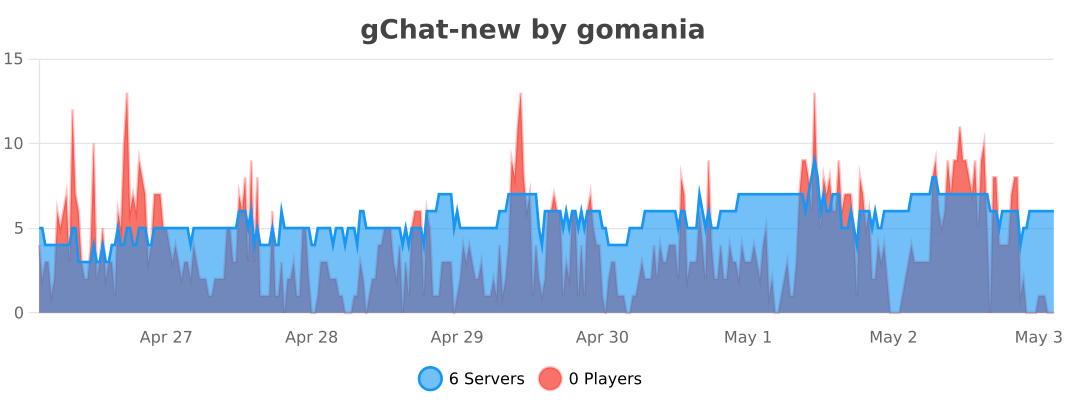
↗️ Stats
Ченджлог
2.9.0Релиз26.1.1, 26.1.2, 26.2 · 24 августа 2026 г.
✨ New Features
- First Join Messages: Added the ability to set unique, personalized welcome messages for players joining the server for the very first time. Configurable under the new
first-join-messagessection inconfig.yml(supports LuckPerms groups!). - Death Message Rotation: Say goodbye to repetitive death announcements! You can now define a list of multiple messages for the same death cause in
config.yml. The plugin will randomly pick one to display each time. - Markdown-Style Links in Broadcasts: Added support for clean, clickable words in autobroadcasts without exposing the full URL. Simply use the Markdown format in your
broadcast.yml:[Click here](https://example.com).
🐛 Bug Fixes
- Broadcast Command Truncation: Fixed an annoying issue where the old newline placeholder (
/n) would accidentally cut off commands in broadcast messages (e.g., turning/nickintoick). - Action Required: Please update your
broadcast.ymlto use%nl%or\nfor newlines moving forward to avoid any conflicts.

2.8.0Релиз26.1.1, 26.1.2, 26.2 · 15 июля 2026 г.
Updated click to reply.
2.7.1Релиз26.1, 26.1.1, 26.1.2 · 20 мая 2026 г.
Bug Fix & optimization
2.7.0Релиз26.1, 26.1.1, 26.1.2 · 16 мая 2026 г.
Update 2.7.0
🔄 Системные изменения / System Changes Понижение версии игры / Game version downgrade Текущая версия изменена с 1.17 на 1.16 / Changed from 1.17 to 1.16.
2.6.3Релиз26.1, 26.1.1, 26.1.2 · 4 мая 2026 г.
Authme login fixed /l
2.6.2Релиз1.21.9, 1.21.10, 1.21.11 · 11 апреля 2026 г.
🐛 gChat: Important Hotfix Custom Channels Privacy Fix:
Fixed a critical bug where regular players could see messages from restricted channels (e.g., the staffchat), even without the appropriate permissions.
The plugin now strictly checks receiver permissions: messages will only be visible to players who are explicitly allowed to access that specific channel.
2.6.1Релиз1.21.9, 1.21.10, 1.21.11 · 10 апреля 2026 г.
🐛 Bug Fixes: Fixed Custom Advancements Display: Resolved a bug where custom advancements would display their internal technical keys (e.g., advancements.intro_song.welcome_toast.title) instead of their readable names. The plugin now properly parses and displays readable names for non-vanilla advancements.
2.6.0Релиз1.21.9, 1.21.10, 1.21.11 · 9 апреля 2026 г.
🎉 gChat v2.6.0 Update: Smart Moderation and New Customizations!
In this update, we've added a ton of new tools for server administrators and significantly improved the plugin's stability.
🚀 What's New:
- Advanced Chat Filter (Regex): You can now use regular expressions! Rulebreakers can no longer bypass the swear and advertisement filter by inserting dots or spaces (e.g.,
i.d.i.o.t). - Spam Blocker: The plugin now automatically prevents players from sending the exact same message multiple times in a row.
- Smart Death Messages: Configure unique texts depending on the cause of death (e.g., fell into lava, suffered fall damage, burned, or fell into the void).
- Join/Quit by Group: Join and quit messages can now be customized individually for each LuckPerms group (with full support for HEX colors and gradients).
- Admin Notifications: The plugin will now check for new updates on Modrinth and politely notify administrators upon joining the server.
🐛 Main Fixes:
- Resolved errors and server crashes when showcasing items in chat (
[item]). - Player settings (toggling PMs, chat colors) no longer reset when the server is restarted or stopped.
- Optimized memory usage for long-running servers.
⚠️ Update Warning!
New parameters have been added to the configuration. For the new features to work, add the following lines to your config.yml (or delete the old file to let it regenerate automatically):
- The
filter.regex-enabledandfilter.regex-patternssections - The
message-cooldown.block-duplicatesoption - The expanded
death-messages.causessection - The new structure for
join-messagesandquit-messages
(Check the default config.yml inside the plugin archive for exact formatting examples).
Комментарии
Загружаем…