 Mineforgian
fresh block animations
Makes block placement feel alive with smooth animations. Vanilla-friendly, client-side, and fully customizable.
- Загрузки
- 16K
- Подписчики
- 54
- Обновлён
- 14 августа 2026 г.
- Лицензия
- All-Rights-Reserved
Опубликован 3 мая 2026 г.
Animated block placement and small interaction animations for Minecraft.


About
Fresh Blocks Animation adds animations to block placement without changing the actual placement itself.
Blocks are still placed instantly — the animation is purely visual.
Available placement animations:
- Scale
- Grow Up
- Pop
- Directional
- Fall
- Hand
- Flow
- Top Wobble
Extra animations
There are also animations for a few other things:
- Slime blocks squash when you land on them
- Jukeboxes pulse while playing music
- Note blocks pulse when used
- Armor stands pop when placed
- Small breaking particles
Config
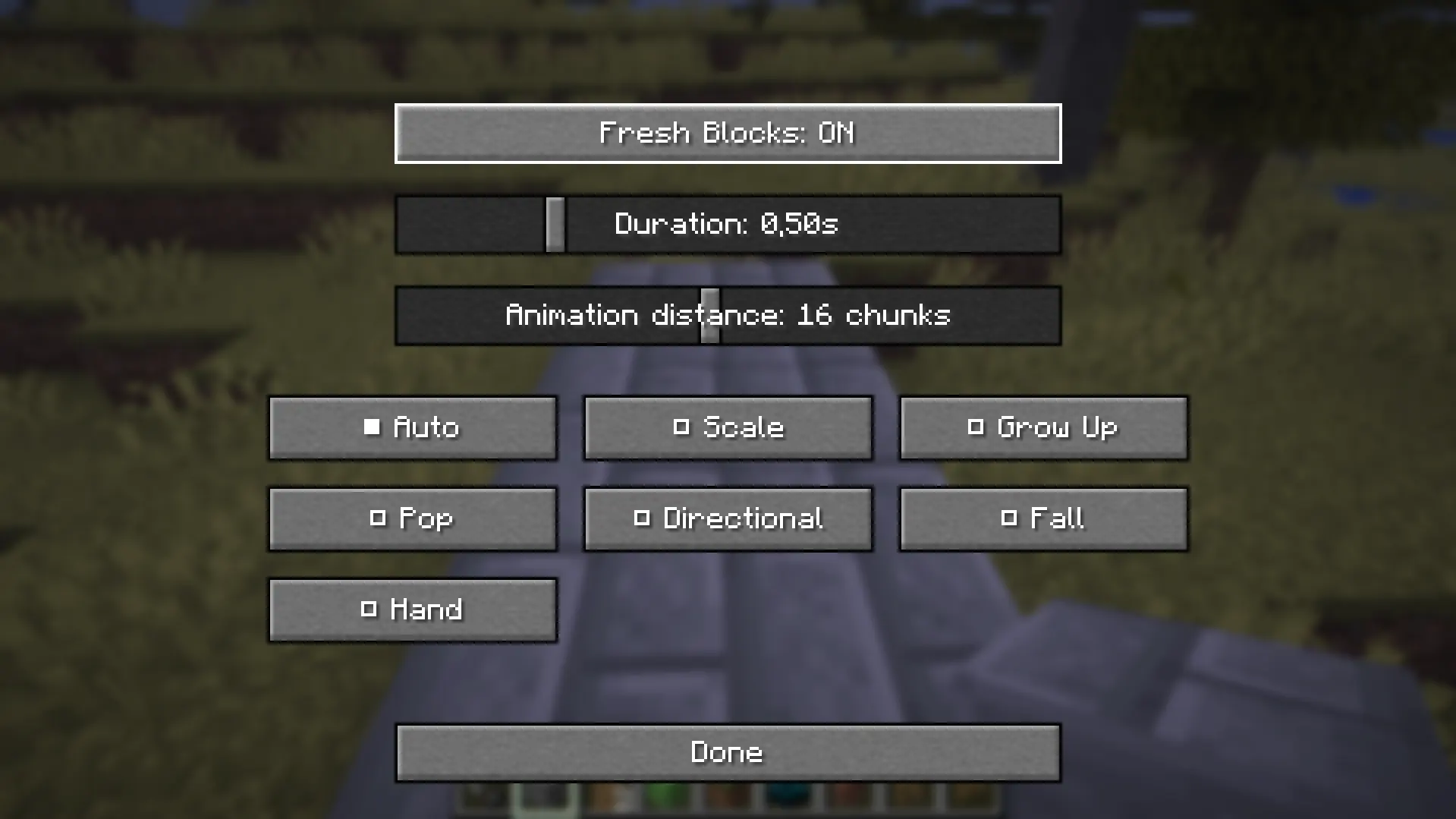
Animations, speed and extra effects can be changed from the in-game config screen.
The mod is fully client-side, so it works on servers without being installed server-side.
Inspiration
Inspired by A Good Place, with more placement animations, configuration and some extra interactions.
Ченджлог
1.3.0Релиз26.2 · 14 августа 2026 г.
Fresh Blocks Animation 1.3.0
A large update built from everything developed after 1.2.2.
Custom animations
Placement animations were moved to editable JSON files.
Added a modular expression system for scale, position, rotation, easing, direction and side-based motion.
Added automatic hot reload when animation JSON files are created, edited or deleted.
The Animations menu now builds itself from installed JSON animations.
Added + Add animation, Open animations folder, and Discord animations actions.
Custom animation IDs now survive config save/load correctly.
Added a complete README_CUSTOM_ANIMATIONS.md guide to the FBA config folder so players can build their own animations without external documentation.
New interface
Rebuilt the settings screen with Main / Animations / Fun tabs on the left.
Added Simple and Hard modes.
Added 2D animation previews and previews for later Shake, Spring and Twist animations.
Added Animation FPS control from 1 to 120 FPS.
Added per-placement Variation control.
Restored the Hands: One / Hands: Two option.
Added English hover tooltips for settings.
Added Throw Placement controls and configurable Throw Distance in Hard mode.
Rendering and compatibility
Reworked the Legacy placement renderer around safer temporary block handling.
Full blocks and partial/no-collision blocks now use different temporary render policies.
Doors, beds and trapdoors are excluded from placement animation to avoid multi-block problems.
Added collision proxy support so animated blocks keep useful placement collision.
Improved fence and wall collision behavior while building upward.
Prevented connection-only updates on fences, walls, panes, bars and grates from replaying placement animations.
Added a seamless two-stage handoff from the animated BlockDisplay to the real world block.
Added world-aware biome tint so animated grass/leaves better match the final block.
Added world-position lighting so the animated block and final block transition more naturally.
GeckoLib Motion
Added optional GeckoLib 5 support while keeping FBA fully usable without GeckoLib.
GeckoLib is used as a motion/easing backend while Minecraft still renders the real block model for resource-pack and mod compatibility.
Added GeckoLib easing support and per-placement motion variation without changing linear JSON t.
Added optional JSON Gecko motion metadata with preset, strength, and frequency.
Added three Gecko-focused showcase animations:
Shake — impact, damped shake and squash/stretch.
Spring — elastic bounce, recoil and secondary motion.
Twist — corkscrew motion, spin, wobble and scale pulse.
Throw Placement
Restored the original specialized long-distance Throw Placement behavior from the Legacy runtime.
When placement is far enough away, the visual block starts near the player and physically flies toward the target position with scale, arc and spin.
Throw Placement is a placement modifier, not a selectable JSON animation.
Added an ON/OFF toggle and configurable distance threshold.
Stability and fixes
Split the old tracker into a small event-facing facade and a dedicated runtime implementation.
Fixed the Minecraft 26.2 config-screen close path.
Fixed multiple config-menu layout and initialization regressions during the UI rewrite.
Fixed a JVM VerifyError in connected-state filtering.
Reworked render-frame animation updates so world/collision cleanup remains on the client tick while visual transforms can update at render speed.
Added a render-state extraction hook so high-FPS animation transforms are captured before Minecraft snapshots BlockDisplay render state.
Added safe fallbacks so a failed optional Gecko/render hook does not freeze or hide animated blocks.
Fixed custom animation selection being reset to Auto.
Fixed variation config path handling for launchers such as Prism/MultiMC.
Fixed external Animations-menu buttons so they no longer corrupt config-screen initialization.
1.3.0
1.3.0 marks the end of the 1.2.x architecture work: the placement-animation system is now modular, editable, hot-reloadable, renderer-aware and documented for custom animation authors.
1.2.2Релиз26.2 · 9 августа 2026 г.
bug fix
1.2.15Релиз26.2 · 25 июня 2026 г.
26.2 update
1.2.1Релиз26.1.2 · 19 мая 2026 г.
Fresh Blocks Animation 1.2.1 — Visual Polish Update
Fresh Blocks Animation 1.2.1 focuses on improving block placement feedback, adding new animation styles, particles, and small immersive interactions while keeping the mod fully client-side and vanilla-friendly.
✨ New Features
New Animation Mode: Push
Added a new Push block placement animation.
Instead of simply scaling or popping into place, blocks now make a small push-like movement before settling into their final position.
- Smooth push motion
- More stable easing
- Less visual shaking
- Designed to feel soft and responsive
New Animation Mode: Cartoon
Added a new Cartoon animation mode.
This mode gives block placement a more exaggerated, playful, and bouncy feeling.
- Squash-and-stretch style movement
- More expressive animation timing
- Fun alternative to realistic placement modes
Placement Particles
Added optional particles when placing blocks.
Particles can now appear around the placed block to make building feel more alive.
Configurable options:
- Enable/disable placement particles
- Particle type
- Particle amount
- Particle spread
- Particle speed
Available particle styles:
- Mixed
- Block Dust
- Smoke
Furnace Smoke
Added subtle smoke particles for active furnace-like blocks.
Smoke is now lighter and more controlled:
- Reduced particle count
- Smaller visual size
- Less aggressive spread
- Mixed smoke styles
- Occasional campfire-style smoke for variation
Anvil Press Animation
Added a small interaction animation for anvils.
When using an anvil, the anvil now visually presses down slightly and returns back to its normal position.
- Small compression animation
- Client-side only
- Designed as a subtle feedback effect
- Can be enabled or disabled in config
⚙️ Config Improvements
Added new configuration options for:
- Push animation behavior
- Cartoon animation mode
- Placement particles
- Particle amount
- Particle spread
- Particle speed
- Furnace smoke
- Anvil press animation
- Anvil press speed
🎨 Visual Improvements
- Improved animation smoothness
- Reduced excessive smoke density
- Made smoke more subtle and vanilla-friendly
- Improved Push animation stability
- Reduced unwanted shaking in some animations
- Improved visual feedback when placing blocks
🛠 Fixes & Stability
- Improved compatibility with Minecraft 26.1.2 mappings
- Removed unsafe direct references to internal block fields
- Improved barrier-based render hiding logic
- Reduced risk of startup crashes
- Improved client-side animation handling
- Fixed several animation edge cases
🧱 Vanilla-Friendly
This update does not change gameplay mechanics.
- Blocks are still placed instantly
- No server-side changes
- No gameplay delay
- No physics changes
- Works as a visual client-side enhancement
🔮 Planned for 1.3
Visible Storage Contents is planned for FBA 1.3.
This future feature may show actual visual items inside opened chests and barrels, based on their real contents.
1.2Релиз26.1.2 · 17 мая 2026 г.
Fresh Blocks Animation 1.2 — Interaction Update
This update expands Fresh Blocks Animation beyond block placement animations and adds new client-side interaction effects for blocks and entities.
Added
Added slime block bounce animation
- Slime blocks now visually squash and return to their normal shape when the player lands on them.
Added jukebox pulse animation
- Jukeboxes now gently pulse while playing music.
Added note block pulse animation
- Note blocks now briefly scale up when interacted with.
Added armor stand placement animation
- Armor stands now appear with a small pop animation when placed.
- The animation adapts to the player’s view direction.
- The real armor stand is temporarily hidden during the visual pop effect.
Added block breaking particle effects
- Breaking blocks now creates small vanilla-friendly particles using the block’s own texture.
- This replaces the old experimental breaking block shake as the default breaking effect.
Added adaptive lighting for animated blocks
- Animated blocks now better match the surrounding light level instead of always appearing fully bright.
Added Fun Animations config
- Fun/extra animations now have their own separate config file:
config/fresh-blocks-animation/fun_config.json
- Fun/extra animations now have their own separate config file:
Added in-game config screen
- Added a visual configuration screen for easier editing.
- Added scrolling support for the config menu.
- Simplified the Fun Animations section.
Changed
Reworked the breaking animation system.
- The previous full fake-block breaking animation caused visual flickering in Minecraft 26.x because the original block could not be reliably hidden.
- The default breaking effect is now particle-based for better stability and a cleaner vanilla-style look.
Improved interaction animation cleanup.
- Fixed stuck breaking animations when switching from one block to another while holding the mining button.
Improved animation lighting behavior.
- Animated displays now use nearby environmental lighting instead of forced maximum brightness.
Simplified the config layout.
- Removed unused and experimental options from the visible config screen.
Updated the Mod Menu metadata.
- Added a new mod description.
- Added support for linking the project/community through the Mod Menu website button.
Experimental / Disabled
Minecart placement animation was tested but is currently disabled.
- Minecart rendering behaves differently from armor stands and does not reliably respect temporary invisibility.
- This may return in a future update if a stable client-side render solution is found.
Experimental display-based block breaking animation is no longer the default.
- Particle-based breaking effects are now recommended for Minecraft 26.x.
Fixed
- Fixed animated blocks appearing too bright in dark areas, the Nether, and the End.
- Fixed some interaction animations getting stuck after cancelled block breaking.
- Fixed several config values not being saved or migrated correctly.
- Fixed Fun Config not updating properly between versions.
- Fixed note block animation not triggering reliably.
- Fixed armor stand pop animation direction and visibility behavior.
Notes
Fresh Blocks Animation remains fully client-side.
This update focuses on stable vanilla-friendly visual effects without modifying the actual world state.
1.1.1Релиз26.1.2 · 12 мая 2026 г.
Fresh Blocks Animation — Devlog 1.1.1
This update mainly focuses on stability, rendering improvements and fixing several annoying gameplay issues reported after release.
Fixed
- Fixed water and liquid interaction issues
- Fixed crops and thin blocks using incorrect collision behavior
- Fixed fences not animating correctly when connecting together
- Fixed multiple connected block rendering problems
- Fixed animation stacking when holding right click
- Fixed doors and trapdoors triggering placement animations during interaction
Rendering Improvements
- Improved smoothness of placement animations
- Reduced visual flickering
- Improved connected block updates
- Improved handling of secondary blocks
- Added animated block shadows
Experimental Features
- Added Fun Mode
- Blocks can now wobble, deform and stretch during placement
Work In Progress
The next updates are planned to include:
- Two-hand placement animations
- Throw placement animations
- Better ReplayMod support
- More vanilla-friendly interaction animations
Thank you for all downloads, comments and feedback. The mod started as a small project because I wanted a modern alternative to A Good Place for newer Minecraft versions — and seeing people already using and discussing it is honestly crazy.
More updates coming soon 👀
1.1Релиз26.1.2 · 9 мая 2026 г.
Fresh Blocks Animation 1.1
This update focuses on smoother animations, improved compatibility, and better customization.
Added
- Added Throw Placement animation
- Added Two Hands option
- Added animation render distance setting
- Added throw distance setting
- Added throw speed setting
- Added scroll support for the config screen
- Added more customization options
Improved
- Improved overall animation smoothness
- Improved animation timing and transitions
- Improved handling of connected blocks
- Improved fence placement animations
- Improved compatibility with special block types
- Improved configuration menu layout
- Improved overall stability
Fixed
- Fixed liquids behaving like solid blocks on the client
- Fixed water physics issues caused by placement animations
- Fixed MLG water / water drop issues
- Fixed plants and crops getting incorrect collision
- Fixed rails, buttons, pressure plates, torches, ladders, signs, and similar thin blocks receiving incorrect collision
- Fixed redstone dust, repeaters, comparators, and other thin redstone components using incorrect collision behavior
- Fixed coral fans and plant-like corals being handled like full blocks
- Fixed animations not playing when placing blocks over replaceable blocks such as grass, snow, water, or lava
- Fixed fences sometimes losing their animation when connecting to nearby fences or blocks
- Fixed several visual overlap issues with original block textures
- Fixed some secondary block states not updating correctly during animation
- Fixed config buttons not fitting on smaller screens
Notes
1.0.1Релиз26.1.2 · 5 мая 2026 г.
Fresh Blocks Animation 1.0.1
This update focuses on bug fixes, stability, and safer handling of special block types.
Fixed
- Fixed liquids being treated as solid blocks on the client
- Fixed water physics issues caused by placement animations
- Liquids are now ignored by the animation system to prevent gameplay issues
- Fixed water drop / MLG water placement issues
- Fixed transparent and non-full blocks sometimes rendering incorrectly
- Fixed thin blocks being replaced with collision blocks
- Fixed plants, rails, buttons, pressure plates, torches, ladders, signs, and similar blocks receiving incorrect collision during animation
- Fixed redstone dust, repeaters, comparators, and other thin redstone components using incorrect collision behavior
- Fixed coral fans and plant-like corals being handled like full blocks
- Fixed fences sometimes losing their animation when connecting to nearby fences
- Fixed some secondary block states not updating correctly during animation
- Fixed several cases where placement animations overlapped with the original block texture
- Fixed animation behavior for special block types that do not occupy a full block
- Reduced visual glitches when placing connected blocks
- Improved stability when placing blocks quickly
- Improved compatibility with vanilla building behavior
Комментарии
Загружаем…