 Mineforgian
Flashcards
Study while playing Minecraft!
- Загрузки
- 3K
- Подписчики
- 67
- Обновлён
- 19 июня 2026 г.
- Лицензия
- MIT
Опубликован 15 июня 2024 г.
Flashcards
Basically flashcards but inside Minecraft so you can study while playing.
Configuration
 Pressing the H key will open the config menu above. Here you can set the number of minutes between each question and toggle it on/off. When toggled off, you can press the G key (for 1.21.6+ this keybind may conflict with vanilla) to prompt a question on-demand. Pressing the "Edit Questions" button will open the screen below.
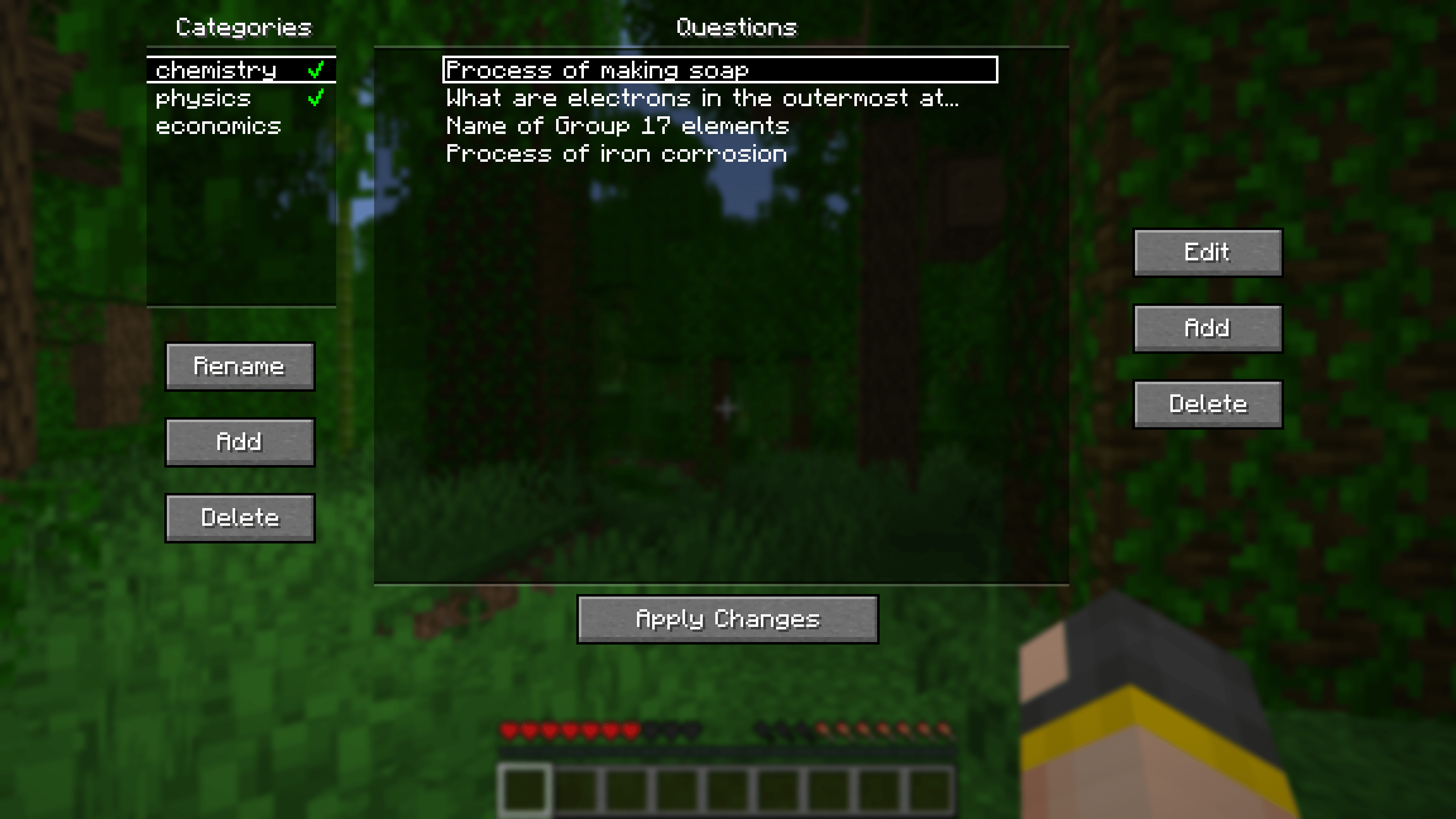
Here you can add, edit and delete questions. Questions can be seperated into different categories for organisational purposes. Clicking the green tick next to a category's name will enable/disable the questions in that category.
Other stuff
Additional Config

Pressing the "Additional Config..." button on the main config screen will open the menu above. Here you can set rewards/punishments for getting a question correct/wrong via commands. By default, there are no rewards/punishments set. You can do something simple like the image above or you can do something fancier. For example, you can create a loot table in a datapack and use the loot command to give you randomised loot each time you get a question correct.
For convenience, a default datapack with some presets is provided at .minecraft/config/flashcards/flashcards-dp.zip. To use it, copy the ZIP file into the datapacks folder of your world. The presets include:
- function flashcards:presets/random-bad-effect
- function flashcards:presets/random-good-effect
- function flashcards:presets/random-bad-mob
- loot give @s loot flashcards:presets/random-bad-item
- loot give @s loot flashcards:presets/random-good-item
Importing from Anki
Export your flashcards from Anki as a plain TXT file without HTML and media references. Rename the exported file to "anki.txt" and put it into the.minecraft/config/flashcards/questions/ folder. On startup, the mod will automatically convert that TXT file into the mod's own JSON files. You can import multiple different Anki decks at once as long as the word "anki" is in the name of each TXT file.
If you want to include images in your export, ensure "HTML and media references" is checked. Then, copy the image files from Anki's media folder into
.minecraft/config/flashcards/media/.
Importing from CSV/TSV
Place your CSV/TSV files into the.minecraft/config/flashcards/questions/ folder. On startup, the mod will automatically convert these files into the mod's own JSON files. The format is as follows:QUESTION_TEXTANSWER_TEXTQUESTION_IMAGE_FILENAME
QUESTION_IMAGE_FILENAME is optional. Copy the corresponding images into .minecraft/config/flashcards/media/.
Credit to this Reddit post for the original idea of this mod.
Ченджлог
2.0.0Релиз26.2 · 19 июня 2026 г.
- Update to 26.2
- Improved GUIs
- Most GUI elements should now scale properly according to the game window size
- Redesigned question add/edit screens
- Added support for attaching BMP/GIF images
- Added drag and drop image attaching
- The main config screen, general config screen and additional config screen now also update the config values if closed via ESC
- Sort question categories by category name
1.9.0Релиз26.1, 26.1.1, 26.1.2 · 24 марта 2026 г.
- Update to 26.1
- Add modmenu compat
1.8.0Релиз1.21.11 · 10 декабря 2025 г.
Updated for 1.21.11.
Due to some command permission changes in 1.21.11, Flashcards will now always execute the correct/wrong commands regardless of the player's permission level.
With this, a new mode OFF has been added to turn off the execution of these commands, mainly to be used when on a server with insufficient permissions.
1.7.0Релиз1.21.9, 1.21.10 · 30 сентября 2025 г.
- Updated for 1.21.9
- Various UI improvements
1.6.1Релиз1.21.6, 1.21.7, 1.21.8 · 19 июня 2025 г.
Updated to 1.21.6/7/8
1.6.0Релиз1.21.5 · 26 марта 2025 г.
- Updated for 1.21.5
- Added a toggle button in the Additional Config Screen to toggle between executing all commands and randomly choosing one.
1.5.0Релиз1.21.4 · 4 декабря 2024 г.
- Updated for 1.21.4
- Character limit for questions increased to 500 and answers increased to 300.
1.4.0Релиз1.21.2, 1.21.3 · 23 октября 2024 г.
- Updated for 1.21.2
- Added the option to manually validate answers in "General Config". This is useful if a majority of your questions have multiple valid answers. By default, answers are still validated automatically
Have any feedback? Send it here.
Комментарии
Загружаем…