 Mineforgian
Fiw Graves
Death graves done clean: packet-only markers, vanilla clients welcome, rollback for lost loot. Fabric + NeoForge.
- Загрузки
- 83
- Подписчики
- 2
- Обновлён
- 7 августа 2026 г.
- Лицензия
- MIT
Опубликован 6 июля 2026 г.
⚰ Fiw Graves
A place for your things when you're gone.
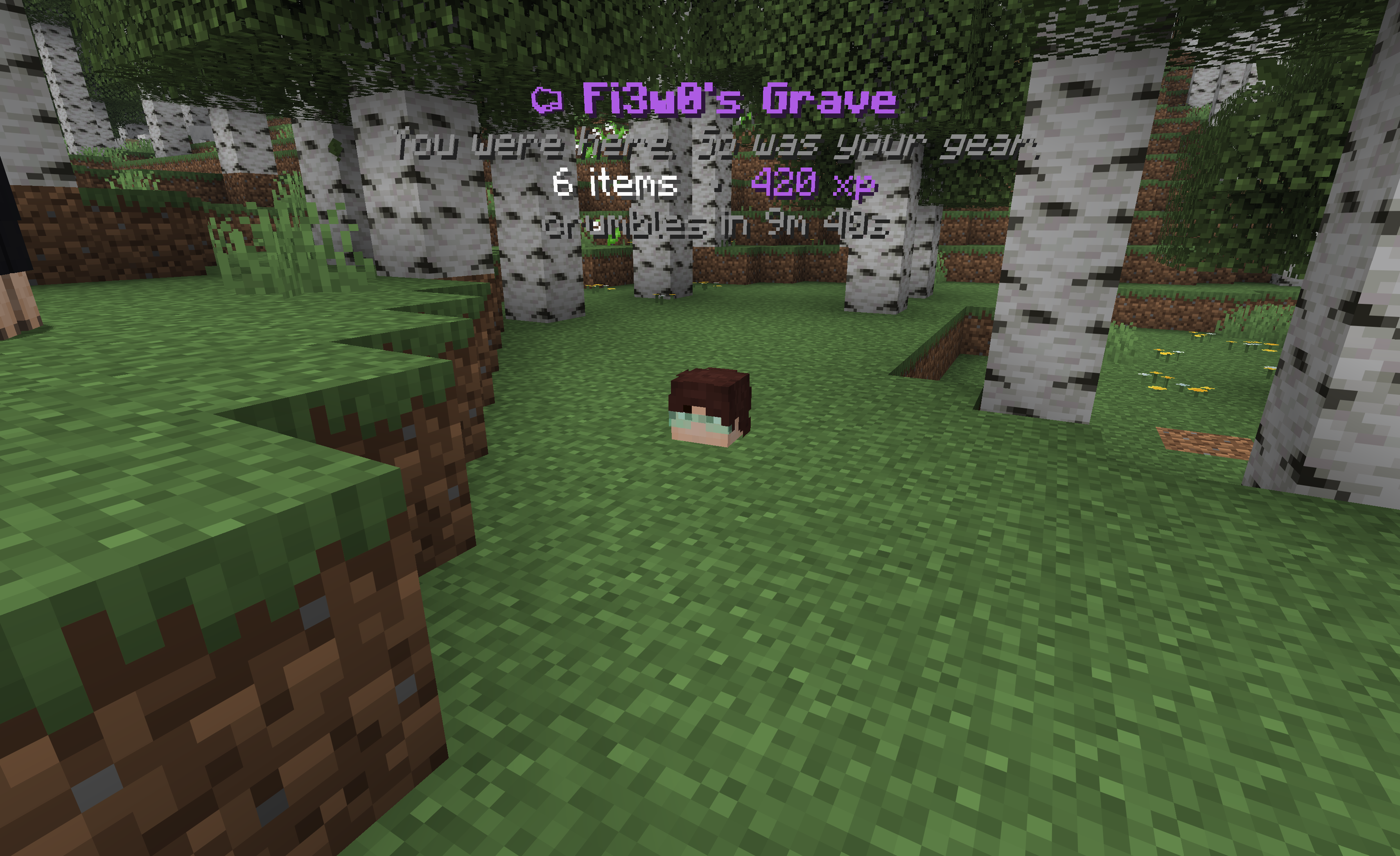
Die, and your items and XP settle into a grave — a floating head, a few lines of text, and one of seven dry epitaphs. Walk back, crack it open, move on with your life.
For Minecraft 1.21.11 on Fabric and NeoForge.
The graves aren't really there
The marker you see — head and hologram — is made of pure network packets. No armor stand, no display entity, nothing is ever written into your world or its chunks.
What that buys you:
- 🖥 Nothing on the client. Players join with a completely unmodified vanilla client. Drop the jar on the server and you're done.
- 💥 Crash-proof by construction. Server crash, world rollback, mod removed — there is
nothing to leak. No floating heads, no orphaned holograms, no ghost entities to
/kill. Markers are rebuilt from the save file on every boot. - 💾 World-native saves. Grave data rides Minecraft's own
SavedDatapipeline, so it backs up and restores with the world itself.
Griefed? Rolled back. Buggy? Backed up.
Every grave that expires or gets emptied by someone else is kept in a short per-player history. One command respawns the lost loot as a fresh grave:
/graves rollback <player>
On top of that, the original contents of every grave are separately backed up the moment it's created — kept for a configurable number of days regardless of whether the grave was collected normally. If a bug (in this mod or anywhere else) ever eats a player's loot, an operator can still pull it back:
/graves restore <player>
A safety net most grave mods don't have — twice over.
In the field
- Right-click the head to open the grave like a chest.
- Sneak + right-click to quick-collect everything — armor jumps straight into empty armor slots.
- XP comes back the moment you interact.
- Die in lava, deep water, or the void and the grave settles at the nearest open, dry spot instead of drowning with you.
- Graves crumble after 10 minutes (configurable) and drop whatever's left.
Commands
| Command | Who | Does |
|---|---|---|
/graves |
everyone | your graves + help |
/graves tp [index] |
ops* | warp to your latest (or nth) grave |
/graves list [player] |
ops for others | list graves — click an entry to warp |
/graves rollback <player> [index] |
ops | restore a lost grave from history |
/graves restore <player> [index] |
ops | restore from the loot-backup safety net (works even after collection) |
/graves reload |
ops | reload the config |
Admin commands gate on vanilla operator level 2 — no permission mod required.
* Grave teleporting is off for regular players by default — finding your way back is
part of the game. Set playerGraveTeleport to true if you want everyone to have it;
operators can always teleport.
Config
config/fiwgraves/config.json — gameplay only; all text lives in the mod.
{
  "despawnSeconds": 600,          // grave lifetime, -1 = forever
  "removeWhenEmptied": true,
  "dropItemsOnExpire": true,      // crumbling graves drop their leftovers

  "quickCollectEnabled": true,    // sneak-interact sweep
  "quickCollectOwnerOnly": false,
  "equipArmorOnCollect": true,
  "ownerOnlyAccess": false,       // lock graves to their owner

  "storeItems": true,
  "storeExperience": true,
  "overrideKeepInventory": false, // capture even when keepInventory is on
  "experienceStoredFraction": 1.0,

  "playerGraveTeleport": false,   // let non-ops use /graves tp

  "graveLimitPerPlayer": -1,      // oldest crumbles past the cap, 0/-1 = unlimited
  "rollbackHistoryPerPlayer": 5,
  "rollbackRetentionMinutes": 1440,
  "lootBackupRetentionDays": 7,   // safety-net copy, survives collection; 0 = off, -1 = forever

  "markerHeight": -0.6,           // head offset from the death spot
  "hologramHeight": 0.5,
  "headTextureOverride": "",      // base64 skin for every grave head, "" = owner's skin

  "disabledDimensions": [],       // e.g. "minecraft:the_end"
  "blacklistedDamageTypes": [],   // deaths that never make a grave
  "blacklistedItems": []          // items that drop instead of being stored
}
FAQ
Do players need the mod? No. Everything is server-side; vanilla clients see graves perfectly.
Does it work in singleplayer? Yes — install it like any mod. (Your game hosts the world, so the same server logic runs.)
What happens if the server crashes? Nothing bad. Markers are packets, not entities — the save file is the single source of truth and everything is rebuilt on boot.
keepInventory?
Respected by default; flip overrideKeepInventory if you want graves anyway.
More than a double-chest of loot? All of it is kept — overflow shifts into view as you empty slots, and quick-collect always sweeps everything.
Ченджлог
1.2.0Релиз1.21.1 · 7 августа 2026 г.
1.21.1 neoforge release
v1.1.0Бета1.21.11 · 8 июля 2026 г.
Fixed
- Quick-collect (sneak + right-click) could silently delete items. Vanilla's own
Inventory#addreturns success as soon as it merges any portion of a stack into an already-partially-filled inventory — not only when the stack is fully consumed. The mod trusted that return value to decide whether to drop the leftover, so a partial merge (common with a nearly-full inventory) left the remainder undropped and it was then discarded when the grave slot was cleared. Quick-collect now checks the actual leftover count on the stack and drops it on the floor, every time.
Added
- Loot-backup safety net. Every grave's original contents are now snapshotted the
moment it's created, independent of the live grave and of the existing anti-grief
rollback history — it survives normal collection, so a bug anywhere in the
pickup/expiry path (like the one above) still leaves a recoverable copy.
- New config:
lootBackupRetentionDays(default7). Days to keep a backup; recommended presets are1,3,7, or14, but any value works.0disables the feature,-1keeps every backup forever. - New command:
/graves restore <player> [index](operator-only) — restores a grave from its backup. Unlike/graves rollback, backups aren't consumed on restore and may still exist even if the player already collected the original grave, so check before using it to avoid duplicating loot.
- New config:
Update immediately if you've had reports of players losing items on quick-collect — this release fixes the root cause and gives you a recovery path (
/graves restore) for anything already lost, as far back as yourlootBackupRetentionDayswindow reaches.
v1.1.0Релиз1.21.11 · 8 июля 2026 г.
Fixed
- Quick-collect (sneak + right-click) could silently delete items. Vanilla's own
Inventory#addreturns success as soon as it merges any portion of a stack into an already-partially-filled inventory — not only when the stack is fully consumed. The mod trusted that return value to decide whether to drop the leftover, so a partial merge (common with a nearly-full inventory) left the remainder undropped and it was then discarded when the grave slot was cleared. Quick-collect now checks the actual leftover count on the stack and drops it on the floor, every time.
Added
- Loot-backup safety net. Every grave's original contents are now snapshotted the
moment it's created, independent of the live grave and of the existing anti-grief
rollback history — it survives normal collection, so a bug anywhere in the
pickup/expiry path (like the one above) still leaves a recoverable copy.
- New config:
lootBackupRetentionDays(default7). Days to keep a backup; recommended presets are1,3,7, or14, but any value works.0disables the feature,-1keeps every backup forever. - New command:
/graves restore <player> [index](operator-only) — restores a grave from its backup. Unlike/graves rollback, backups aren't consumed on restore and may still exist even if the player already collected the original grave, so check before using it to avoid duplicating loot.
- New config:
Update immediately if you've had reports of players losing items on quick-collect — this release fixes the root cause and gives you a recovery path (
/graves restore) for anything already lost, as far back as yourlootBackupRetentionDayswindow reaches.
Комментарии
Загружаем…