 Mineforgian
Find me
Find Me is a mod for storing, summoning, and managing creatures and vehicles.
- Загрузки
- 19K
- Подписчики
- 9
- Обновлён
- 16 августа 2026 г.
- Лицензия
- LGPL-3.0-only
Опубликован 11 июня 2026 г.
Overview
Find Me is a mod for storing, summoning, and managing creatures and vehicles.
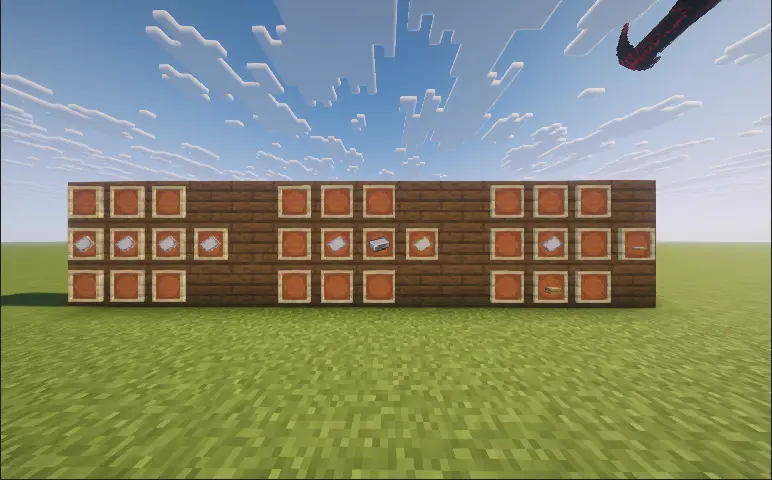
- You can register supported mounts and companions from vanilla Minecraft or other mods with Find Me, then quickly summon, switch, or recall them using radial wheels.
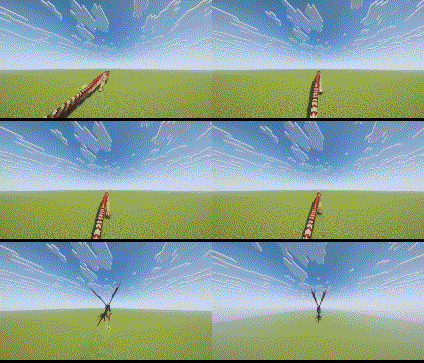
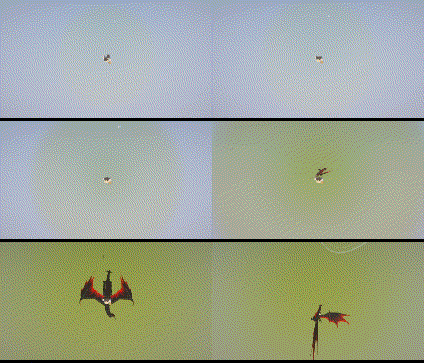
- Land, flying, and aquatic creatures use different approach animations when summoned;
- When switching mounts, the previous mount leaves while the new one actively approaches;
- When falling from a great height, players can also call a mount for an aerial rescue.
Main Features
- Issue follow, wait, guard, protect, and attack commands to individual creatures or entire teams;
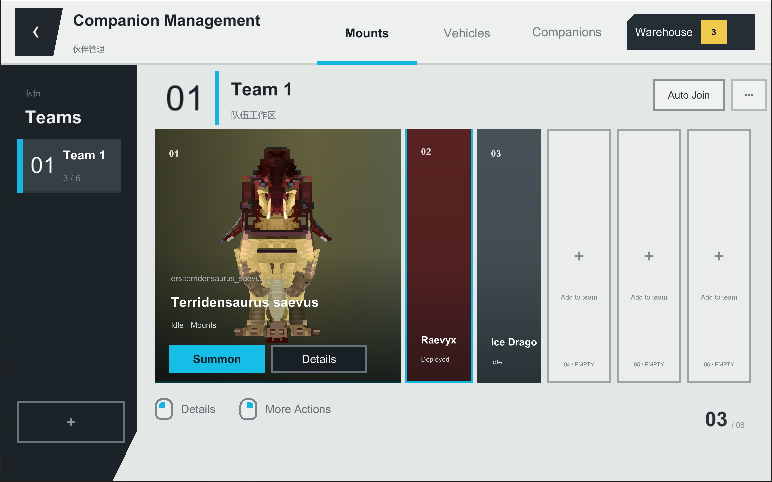
- Use the Manager to organize teams, storage, and radial wheel slots;
- Assign companions to Nests and set them to rest, wander, or guard;
- Registered creatures are protected from fatal damage by entering a critical state. Stored creatures recover health over time, while critically injured creatures can recuperate inside a Nest;
- Whenever a player wakes up, there is a chance that one eligible dead creature will be revived;
- Bind supported vehicles using the Vehicle Binder. Aeronautics vehicles require a Locator Seat to determine which seat will be used when summoned;
- Optional friendly-fire protection and companion block protection prevent accidental attacks and damage to your home.
Controls
- Right-click an eligible creature with a “Name Paper” to register it with Find Me;
- Right-click a supported vehicle with a “Vehicle Binder” to register it with Find Me;
- Right-click a Nest, then click or drag creatures from the list on the right to assign them to it.
- R: Press to summon or switch the active mount. Hold to open the mount wheel. It can also trigger a rescue while falling;
- V: Press to summon or switch the active companion. Hold to open the companion wheel;
- G: Open the Find Me Manager;
- While the wheel is open, point at a creature and right-click to open its individual command wheel;
- Middle-click while the wheel is open to access commands for the entire team.
Command System
- Follow Me: The creature follows the player. Flying creatures will follow from the air;
- Wait Here: The creature remains at its current position and stops following the player;
- Move Forward: The creature continuously moves forward. Press the corresponding summon key again to teleport to its current location, after which the creature will be stored;
- Move to Crosshair: The creature moves to the location targeted by the player’s crosshair;
- Guard Here: The creature guards the designated area and attacks nearby hostile targets;
- Protect Me: The creature follows and protects the player, attacking anything that threatens them;
- Attack Target: Orders the creature to attack the target currently selected by the player;
- Land: Orders a flying creature to find a suitable landing location;
- Ride Home: Summons a mount assigned to a Nest and has it carry the player back to that Nest;
- Teleport: Opens the Waystones destination list. After selecting a destination, the player and their current mount will teleport together. Requires Waystones;
- Stop Action: Immediately cancels the creature’s current command;
- Team Follow: All available creatures in the current team follow the player;
- Team Guard: All available creatures in the current team guard the designated area;
- Team Protect: All available creatures in the current team protect the player;
- Team Attack: All available creatures in the current team attack the designated target;
- Store Team: Stores all currently deployed creatures in the current team.
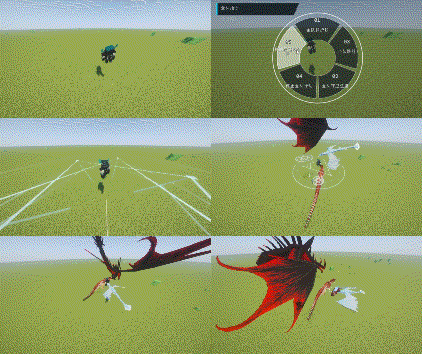
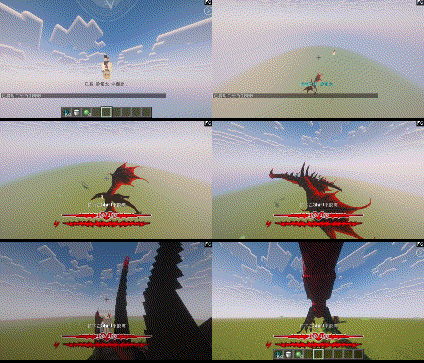
Manager and Nests
- The Manager allows you to create and organize teams, search for creatures, move storage members, assign radial wheel slots, and inspect models, health, locations, current states, and recovery records.
- Each Nest has its own capacity, wandering range, and maximum activity boundary. Companions assigned to a Nest can rest, wander, or work together to defend the surrounding area.
- If a creature enters a critical state while assigned to a Nest, it will automatically recuperate and reappear once its health has been fully restored.
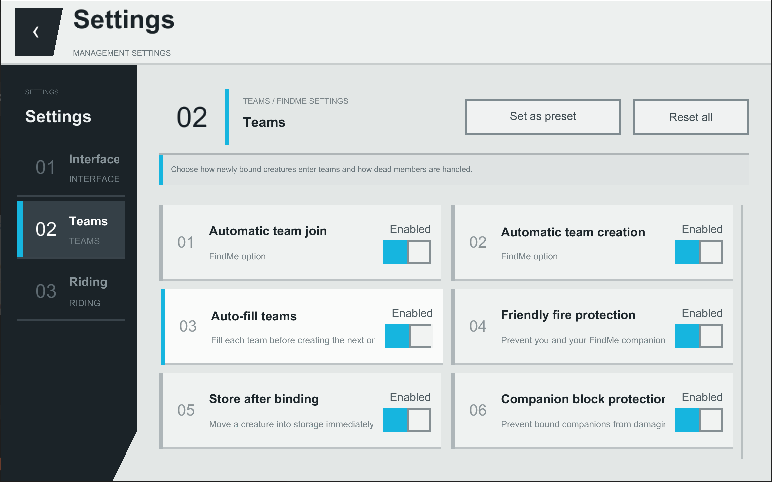
Player Settings
- Players can configure summon animations, creature sounds, wheel styles, interface animations, opacity, fonts, text size, the companion status HUD, riding camera behavior, automatic team assignment, deployment limits, friendly-fire protection, and companion block protection.
- Servers can configure summon cooldowns, deployment limits, rescue heights, default Nest capacity and activity ranges, backups, and sleep revival probability and cooldown.
Commands
- /findme manage: Opens the Manager;
- /findme hud edit: Edits the position of the companion status HUD;
- /findme hud reset: Resets the HUD layout;
- /findme reload: Reloads creature compatibility presets. Administrator permission required;
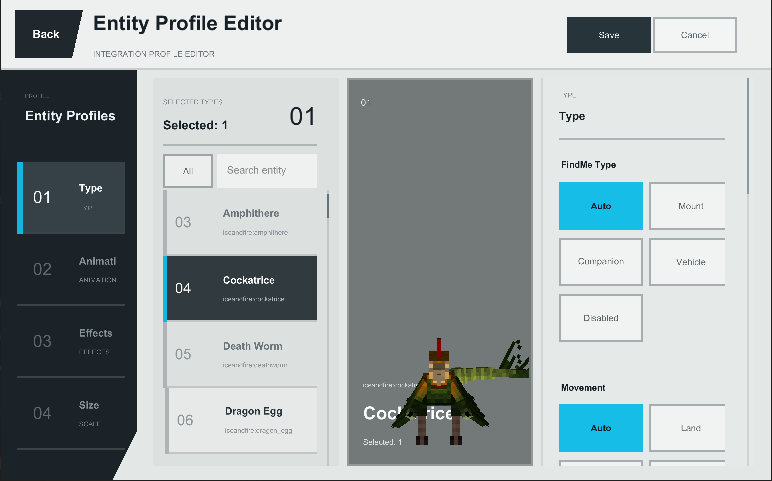
- /findme editor: Opens the visual compatibility editor, where creature categories, movement types, binding requirements, and other compatibility data can be configured;
- /findme tame: Force-tames the creature under the crosshair or a specified creature. Administrator permission required.
Mod Compatibility
- Find Me uses general-purpose entity logic to support many vanilla and modded creatures, with dedicated compatibility handling for Ice and Fire, Saint’s Dragons, and selected other mods.
- Ownership, animation, flight, and riding implementations differ greatly between mods. Modpack creators can use the built-in editor and entity presets to configure compatibility for individual creatures.
- Important Notes
- ApricityUI 1.2.0 or later must be installed on the client.
- For multiplayer, Find Me must be installed on both the server and every client.
- Before updating the mod, exit the world normally and keep a backup of your save.
- Frequently Asked Questions
- Why does a tamed creature not appear in the radial wheel?
- Find Me does not automatically register tamed creatures. Craft a “Name Paper” using 3 pieces of paper, then right-click the creature while holding it.
- How do I summon a registered creature?
- Hold R to open the mount wheel or hold V to open the companion wheel. Move the mouse to select a creature, then left-click.
- How do I issue commands to one creature or an entire team?
- Open the companion wheel, point at a creature, and right-click to open its individual command wheel. Middle-click within the companion wheel to open the command wheel for the current team.
- Why can’t I summon every companion in a team at once?
- Only registered companions that meet the deployment requirements will respond. By default, a player can deploy up to 2 companions at once. This can be adjusted under G → Settings.
- Why does right-clicking always mount a creature instead of feeding it or opening its original interface?
- The current version normally prioritizes the creature’s original right-click interaction. You can also check “Prioritize Native Mount Interaction” in the player settings. If the problem persists, please report the creature’s entity ID and attach your latest.log.
- How do I register a vehicle?
- Name Paper is used for creatures. Craft a “Vehicle Binder” using 1 Name Paper and 1 Iron Ingot, then right-click the vehicle. Some vehicles may require dedicated compatibility support. When reporting an issue, include the vehicle mod and entity ID.
- Can creatures that cannot normally be tamed still be registered?
- Modpack creators and administrators can use /findme editor, configure the relevant entity category, and set its binding requirement to “Ignore.”
- What should I do if a creature dies, turns red, or the server shuts down unexpectedly?
- Press G to open the Manager, then inspect the Backup page and restore a verified backup. It is recommended to back up the world before doing so.
- Is there a Fabric version?
- There is currently no official Fabric version. A port is planned after the Forge version is more complete.
- What should I do if the game reports a missing dependency or crashes during startup?
- The current version requires ApricityUI 1.2.0 or later. When reporting startup issues, include your Find Me version, ApricityUI version, and latest.log.
Feedback and Suggestions
If you encounter a problem or would like to request compatibility for a creature, please submit an issue here:
https://github.com/Ku00115/find-me-1.3/issues
Author’s Note
- Find Me aims to ensure that mounts and companions from every mod are no longer forgotten somewhere in the world, but instead become genuine members of the player’s journey.
- Creature implementations vary greatly between mods. Thank you to everyone who helps test the mod and provides detailed reports, logs, and suggestions.
Ченджлог
1.3.0-test.3-1.20.1-forgeРелиз1.20.4, 1.20.5, 1.20.6 · 28 июля 2026 г.
Added a dedicated team command wheel for Follow, Protect, Guard, Attack, contextual Pause/Resume, and Recall All. The mount wheel can no longer open team commands by mistake. Improved companion tactical control with stronger threat selection, distributed Protect/Guard positions, and safeguards against unwanted following, model stacking, and distant-target interference. Unified companion summon and tactical deployment presentation. Ordinary summons, single tactical deployments, and team deployments now use a center circle, white links, member circles, overhead arrival, and matching circle/reveal sounds. Emergency rescue remains an independent safety flow. Added summoned-entity outlines with black or white color selection, plus independent mount and companion summon-animation toggles. Added a disabled-by-default option to prefer a mount's native right-click interaction, allowing feeding and mod-native interactions when desired. Fixed settings scroll jumps, scrolling when assigning warehouse entries to later teams, death warehouse navigation and sleep revival, immersive dialogue settings, and related UI behavior. Prevented missing-snapshot tactical requests from retrying indefinitely, reduced team-command scheduling pressure and duplicate diagnostics, and kept all diagnostic output behind the master logging switch. Synchronized protocol, settings, commands, animation behavior, and regression tests across Forge 1.20.1 and NeoForge 1.21.1.
1.3.0-test.3-1.21.1-neoforgeРелиз1.21.1 · 28 июля 2026 г.
Added a dedicated team command wheel for Follow, Protect, Guard, Attack, contextual Pause/Resume, and Recall All. The mount wheel can no longer open team commands by mistake. Improved companion tactical control with stronger threat selection, distributed Protect/Guard positions, and safeguards against unwanted following, model stacking, and distant-target interference. Unified companion summon and tactical deployment presentation. Ordinary summons, single tactical deployments, and team deployments now use a center circle, white links, member circles, overhead arrival, and matching circle/reveal sounds. Emergency rescue remains an independent safety flow. Added summoned-entity outlines with black or white color selection, plus independent mount and companion summon-animation toggles. Added a disabled-by-default option to prefer a mount's native right-click interaction, allowing feeding and mod-native interactions when desired. Fixed settings scroll jumps, scrolling when assigning warehouse entries to later teams, death warehouse navigation and sleep revival, immersive dialogue settings, and related UI behavior. Prevented missing-snapshot tactical requests from retrying indefinitely, reduced team-command scheduling pressure and duplicate diagnostics, and kept all diagnostic output behind the master logging switch. Synchronized protocol, settings, commands, animation behavior, and regression tests across Forge 1.20.1 and NeoForge 1.21.1.
1.3Релиз1.20.4, 1.20.5, 1.20.6 · 27 июля 2026 г.
Test 2 includes fixes found after Test 1:
Connected the AUI immersive text setting to the creature dialogue system. Fixed sleep revival and preserved complete modded-entity recovery NBT. Kept the death warehouse open when switching mount, vehicle, and companion categories. Fixed vehicle roster entries becoming hidden after the first Sable vehicle binding. Improved handoffs between creatures, generic vehicles, Sable, and Cobblemon. Fixed Sable-to-Immersive-Aircraft boarding completion. Reduced AUI, home profiling, and preview logging overhead while diagnostics are disabled. This is a test build. Back up worlds before upgrading.
1.3.0-test.2-1.21.1-neoforgeРелиз1.21.1 · 27 июля 2026 г.
Test 2 includes fixes found after Test 1:
Connected the AUI immersive text setting to the creature dialogue system. Fixed sleep revival and preserved complete modded-entity recovery NBT. Kept the death warehouse open when switching mount, vehicle, and companion categories. Fixed vehicle roster entries becoming hidden after the first Sable vehicle binding. Improved handoffs between creatures, generic vehicles, Sable, and Cobblemon. Fixed Sable-to-Immersive-Aircraft boarding completion. Reduced AUI, home profiling, and preview logging overhead while diagnostics are disabled. This is a test build. Back up worlds before upgrading.
1.3.0-test.1-1.20.1-forgeРелиз1.20.4, 1.20.5, 1.20.6 · 27 июля 2026 г.
FindMe 1.3.0-test
Release note
FindMe 1.3 went through substantial feature expansion and repeated refactoring. This build is published as a test release so players and pack authors can validate it in real modpacks. It may be less stable or compatible than earlier releases. Back up your world before installing or upgrading.
Highlights
- Reworked mount, companion, and vehicle storage, summon, switch, and lifecycle flows.
- Added classic radial, six-wing, tactical strip, and folded-shard wheel styles; the classic radial wheel is the default.
- Added pending, deployed, switching, and dead states with teams, warehouse, and paging.
- Added fall rescue, tactical companion commands, ride-home flow, and riding camera settings.
- Added Small House residents, patrol boundaries, unloaded-area storage, and restoration.
- Reworked ApricityUI management, settings, details, diagnostics, backups, and entity editor.
- Added entity category, movement, binding, animation, effect, preview NBT, and scale overrides.
- Added automatic/manual backups, death records, and an opt-in diagnostic logging switch.
- Reduced chat commands to management, editor, reload, and administrator force-tame tools.
- Added recipes for Name Paper, Vehicle Binder, and Small House; NeoForge also has a Seat Cushion.
- Published separately identified Forge 1.20.1 and NeoForge 1.21.1 test builds.
Platform differences
- NeoForge 1.21.1 exposes optional Cobblemon, Sable/Aeronautics, MachineMax, and Waystones integrations.
- Forge 1.20.1 does not include Cobblemon or Sable-specific features; it retains integration paths appropriate to that version, including Waystones and MachineMax.
Known risks
- Modded entities with custom AI, riding controllers, multipart renderers, or unusual serialization may not be fully compatible.
- Rescue, vehicle handoff, cross-dimension ride-home, and entity previews carry higher risk.
- Do not remove a creature or vehicle mod while FindMe records still depend on it.
- Store deployed entries and create a manual backup before changing versions or configuration.
1.3.0-test.1-1.21.1-neoforgeРелиз1.21.1 · 27 июля 2026 г.
FindMe 1.3.0-test
Release note
FindMe 1.3 went through substantial feature expansion and repeated refactoring. This build is published as a test release so players and pack authors can validate it in real modpacks. It may be less stable or compatible than earlier releases. Back up your world before installing or upgrading.
Highlights
- Reworked mount, companion, and vehicle storage, summon, switch, and lifecycle flows.
- Added classic radial, six-wing, tactical strip, and folded-shard wheel styles; the classic radial wheel is the default.
- Added pending, deployed, switching, and dead states with teams, warehouse, and paging.
- Added fall rescue, tactical companion commands, ride-home flow, and riding camera settings.
- Added Small House residents, patrol boundaries, unloaded-area storage, and restoration.
- Reworked ApricityUI management, settings, details, diagnostics, backups, and entity editor.
- Added entity category, movement, binding, animation, effect, preview NBT, and scale overrides.
- Added automatic/manual backups, death records, and an opt-in diagnostic logging switch.
- Reduced chat commands to management, editor, reload, and administrator force-tame tools.
- Added recipes for Name Paper, Vehicle Binder, and Small House; NeoForge also has a Seat Cushion.
- Published separately identified Forge 1.20.1 and NeoForge 1.21.1 test builds.
Platform differences
- NeoForge 1.21.1 exposes optional Cobblemon, Sable/Aeronautics, MachineMax, and Waystones integrations.
- Forge 1.20.1 does not include Cobblemon or Sable-specific features; it retains integration paths appropriate to that version, including Waystones and MachineMax.
Known risks
- Modded entities with custom AI, riding controllers, multipart renderers, or unusual serialization may not be fully compatible.
- Rescue, vehicle handoff, cross-dimension ride-home, and entity previews carry higher risk.
- Do not remove a creature or vehicle mod while FindMe records still depend on it.
- Store deployed entries and create a manual backup before changing versions or configuration.
1.2.3Релиз1.21.1 · 5 июля 2026 г.
Compatible with Create: Aeronautics. Uses the Sable Schematic Tool API, so to use this feature you need to download the Sable Schematic Tool mod. Since it's a test, stability isn't guaranteed, so it's recommended to back up before downloading and using it.
1.2.2Релиз1.20.1 · 4 июля 2026 г.
Version 1.2.2
New: Name Paper Manual Binding
- Added Name Paper as the main manual binding item for creatures.
- Name Paper is crafted from three pieces of paper.
- A successful non-creative binding consumes one Name Paper.
- Manual binding is now the recommended way to add creatures.
- Automatic binding is disabled by default and can be re-enabled in config.
- Binding now blocks invalid targets more reliably, so unrelated creatures are less likely to be added by mistake.
Binding Ceremony And Magic Effects
- Added an optional Name Paper contract ceremony.
- The ceremony can use a temporary cinematic camera.
- Ceremony effects include hexagram-style magic circles, contract visuals, warding effects, and storage-style completion.
- Ceremony animation and cinematic camera can be disabled in config.
- Binding visuals were cleaned up by removing older effects that looked noisy or unclear.
Summon, Rescue, And Storage Visuals
- Added reusable magic-circle rendering for summon, rescue, storage, and binding effects.
- Mount summons usually use a vertical portal-style circle.
- Companion summons and companion rescue use horizontal ground circles.
- Rescue effects are brighter and faster than normal summons.
- Storage now uses a wrapping magic effect instead of an instant disappearance.
- Magic-circle colors now stay in a white/blue range with brightness changes instead of shifting through unrelated colors.
- Summon and rescue effects now try to appear before the creature becomes visible.
- Magic-circle size now uses visual bounds so large creatures receive larger circles.
Dialogue And Feedback
- Added optional small subtitle dialogue for summon, rescue, storage, home, registration, cooldowns, and warnings.
- Dialogue is disabled by default.
- When dialogue is disabled, Find me falls back to practical action-bar style messages.
- Dialogue text is configurable through Forge config.
- Dialogue entries support placeholders such as
{player},{name}, and{seconds}where applicable. - Creature arrival voice and magic effect volume are configurable separately.
Small House / Home System
- Added the Small House block for home management.
- Small House is crafted with Name Paper and any wooden slab.
- Right-clicking a Small House opens the manager in home mode.
- Creatures can be assigned to that house as their home.
- Home-bound creatures show an
Hmarker in the wheel and lists. - Storing a home-bound creature returns it home when possible.
- If the home area is loaded and valid, creatures may appear near the Small House as residents.
- Breaking the exact Small House clears the house marker for affected online players without deleting the creature.
Companion And Mount Improvements
- Companion deployment limit is enforced at the server state, not just the UI.
- Companion rescue is focused on combat rescue behavior.
- Rescue protection now reduces cases where the player or companion dies immediately after a rescue.
- Flying mount rescue and void handling were made stricter and safer.
- Flying mounts can be summoned directly in unsafe void conditions; non-flying mounts and companions refuse.
- Mount switching was revised to avoid dismount/remount jitter and to keep old rides safe until the new ride succeeds.
- Large and multipart mounts have improved contact-box handling.
UI / UX Improvements
- Added blacklist controls for entity types.
- Improved manager context menus, rename overlays, search layout, and home actions.
- The manager no longer shows old home action buttons in places where Small House mode owns those actions.
- Wheels show home markers and better active/summon/store state.
- Preview rendering now caches entities more effectively and supports non-living vehicle previews used later in 1.2.3.
Safety, Recovery, And Compatibility
- Improved player data copy handling for dimension return and clone-like situations.
- Added stronger backup/vault style recovery tools and safety checks.
- Sleep revive was moved to wake-up event handling for more reliable timing.
- External owned-entity recreation from other mods is handled more defensively.
- Stored entity NBT is cleaned so temporary animation, invisible, no-gravity, and NoAI states are not saved into long-term data.
- Restore logic avoids deleting stored NBT unless the entity was actually added successfully or a loaded same-UUID entity was safely reused.
- Added diagnostics config for contact boxes and Find me state debugging.
Комментарии
Загружаем…