 Mineforgian
Fetchr Bingo
A survival Minecraft item Bingo game - Try to get items quickly starting in a fresh world
- Загрузки
- 11K
- Подписчики
- 74
- Обновлён
- 27 июня 2026 г.
- Лицензия
- MIT
Опубликован 25 марта 2023 г.
Fetchr - Bingo v5
Fetchr is a custom gamemode where you play in survival Minecraft with a 5x5 Bingo board.
Try to collect all 5 items in a line for a quick Bingo or all 25 items for a longer Blackout game as quickly as possible!
Example of a Bingo Card as shown in the Fetchr lobby:
Example of a Bingo Card as shown in the Fetchr lobby: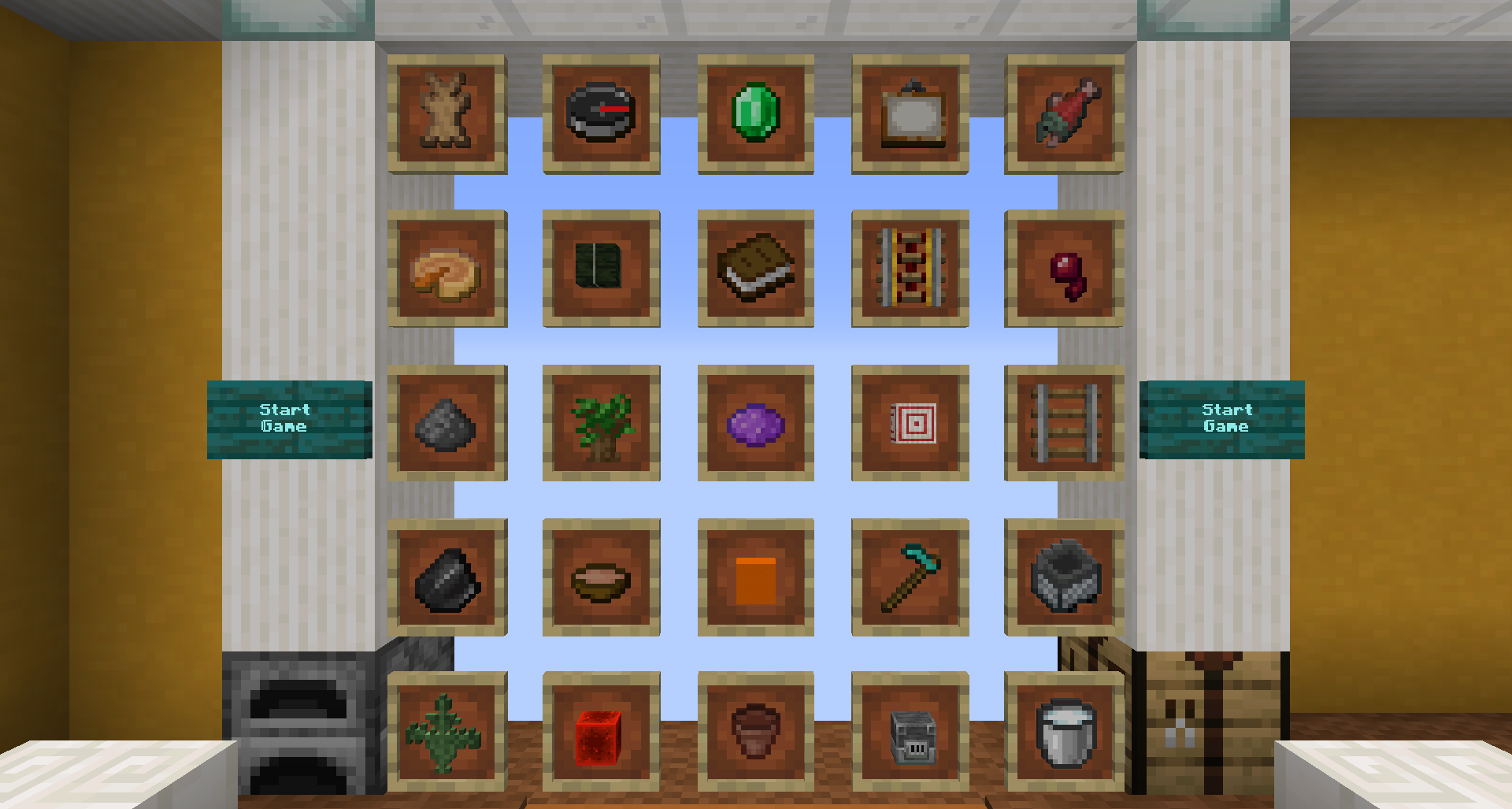
General information
Fetchr / Minecraft Bingo is quite a simple concept as it builds ontop of the vanilla survival gameplay. You will start with an empty inventory at a random, unknown spawn point within the world and get an experience similar to starting a new survival world.
Your goal is to get items from the Bingo Board. There are multiple goals that are detected by the pack:
- Bingo: All 5 items in any of the rows, columns, or diagonals
- Blackout: All 25 items on the board
- 20 No Bingo: Get 20 items while avoiding any Bingo. This is the maximum number of items that can be obtained without triggering a Bingo and requires careful planning
- Multi Bingo: Obtain multiple Bingos at once. This can be accomplished by obtaining items of two intersecting lines and getting the item at the intersection last, effectively unlocking a combination of 2-4 rows, columns and/or diagonals at once.
You may also play in either (or both at the same time):
- Lockout Mode: Only one team can obtain each item, locking other teams out from scoring it. Once a team has obtained more items than any other team still can, this team will win.
- Blind Mode: The card is not visible and items get revealed as any player gets them. Knowing possible items and mutual exclusivity from the category chests is expected for this mode.
The map will always detect all goals. Don't worry when a Bingo is announced while you want to go for a blackout - just keep going, there is no automatic mechanism that ends the game before you desire to do so.
Download and Installation
This requires a fresh world. You may also use the world version from CurseForge while Modrinth is not yet supporting worlds for an easier installation.
!Don't attempt to use this pack in an existing world!
Singleplayer
- Start the game and select singleplayer
- Make sure you are using the correct Minecraft Version (as indicated at the release you are downloading)
- Select "Create New World"
- Select "Data Packs" and drag the downloaded file into the screen
- Enable the data pack by clicking the arrow and moving it to the right section saying "selected".
- Select "Done"
- If you want to run this competitively, select "More World Options" and enter the seed
91into the text field at the top. This will make sure you get the same spawn points for the same Fetchr seeds as anyone else using this pack. - Select "Create New World"
- You will be prompted to download a resource pack. Download the pack, and enable it via Options -> Resource Packs and enable it like you did with the data pack before.
Multiplayer
- Make sure you are using a supported version (as indicated at the release you are downloading, vanilla, or Fabric with Lithium. Paper/Spigot are not supported.)
- Create a new world on the server and stop the server afterwards.
- Copy the downloaded file into the
datapackssub directory. - Delete the folder called
region. - Make sure the
server.propertiesfile is set according to this file. (For beta versions please look for an updated file in the changelog section)- Note that this file is made for the world version and assumes your world directory is called
Fetchr-5.1. Just ignore thelevel-namesetting - If you already have a custom server.properties, make sure all the settings mentioned in that file are set correctly.
- If you don't have a custom
server.propertiesoverride it with that file (and setlevel-nameto the name of the world folder of your server). When the server starts, all missing settings will be filled with default values
- Note that this file is made for the world version and assumes your world directory is called
- Start the server - everything is setup now.
Updating a previous installation
Always do a backup of your world before updating! There is a chance of corruption
- Make a backup of your previous save file
- Download the datapack
- Delete the old datapack in your saves//datapacks directory
- Add the new datapack to the directory
Detailed Feature Overview
Custom HUD
While in-game you will have a bunch of custom HUD elements around your hotbar. This utilizes a custom font and does not require any mods.
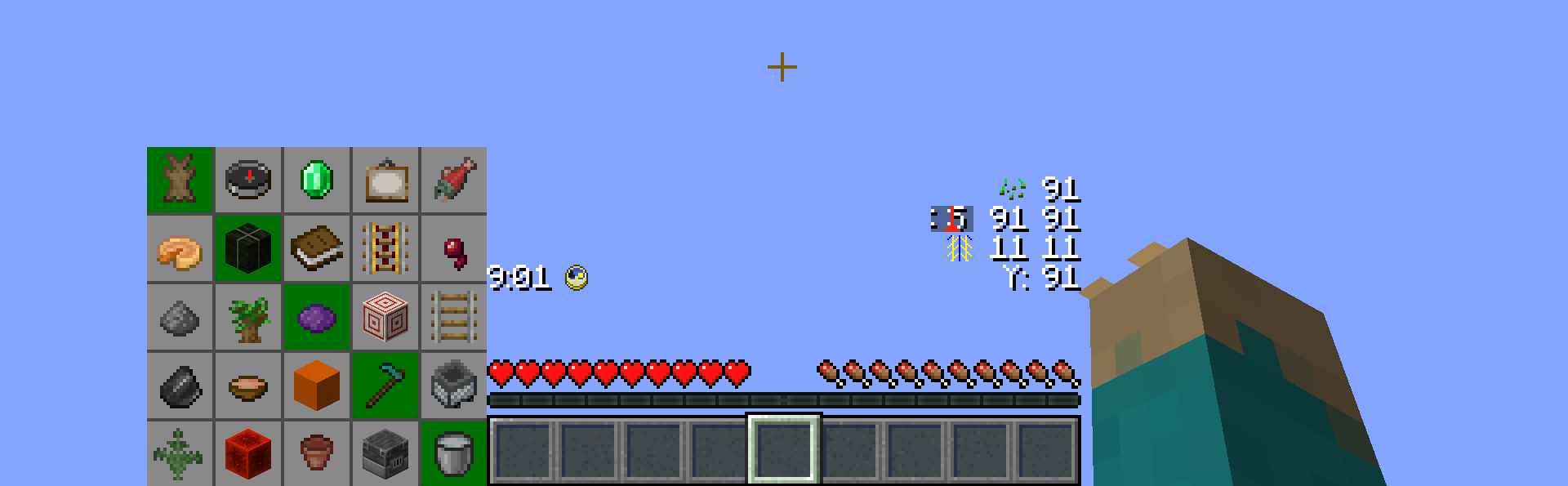
The HUD can be customized in the Lobby and elements can be moved however you prefer them to be layed out, or individual components can be removed.
Bingo Card
The Bingo card shows all items of the current game and a summary of which team obtained which item so far. Items your own team has already gotten appear a little bit darker. Depending on the amount of teams, this display will be adjusted to fit all teams in.
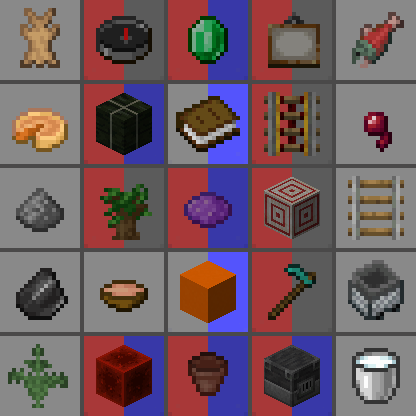
From the lobby, 10 team colors are available.
Timer
There is a timer that counts up. This allows you to keep track of your time without any third party software. There is no time limit imposed by the map, but you can of course set your own goal. The timer counts real time. The timer icon also represents a functional Minecraft clock, showing the time within the current day

Player position
There is a player position visible which shows the coordinates relative to the spawn point. The coordinates on your F3 screen will be extremely high and hard to parse / communicate, due to the random spawn point. The icon also functions as a regular compass and can be changed to appear like the Minecraft compass icon via the preference settings.
Below the regular coordinates, there is by default also a chunk coordinate display. This is useful during certain times, for example when following a treasure map, the treasure will always be located at chunk coordinates 9 9, or to keep track of chunk boarders if you want to use the Lapis Trick
And below that, there is also a separated Y coordinate display, which is useful when digging down without requiring F3.
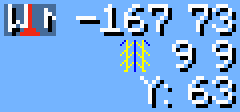
Fetchr Seed
Finally, there is a visible display for the Fetchr seed. Like a Minecraft world, where the same seed will generate the same world, the same Fetchr seed will generate the same Bingo Board and the same spawn point. When generating a card, you can choose to manually set a seed instead of generating a random card for competitive races or set-seed runs.

Custom Worldgen
Fetchr uses custom Worldgen to make certain items more reliable in a Bingo run.
Compressed World
Biome sizes are decreased to make finding biome-specific items more fun and reliable, and structure frequencies are increased.
No Nether
Owing to technical limitations with custom worlds, the Nether is disabled.
No Ites
All stone variants that end in -ite have been disabled from generating. This includes diorite, andesite and granite. This was done as a qol change to reduce inventory clutter and make digging for stone consistent.
Granite may still generate as part of copper ore veins.
Ambient lighting
There is a constant lighting factor in the overworld, similarly to the vanilla Nether. This allows seeing in caves clearly without torches.
Game Rule changes
- Weather is always sunny
- Phantoms, wandering traders and patrol spawns (which all work on a world-global timer) are disabled
Credits
Original idea and 1.11 implementation by Lorgon111: http://www.playminecraftbingo.com/
Code Contributors
NeunEinser - Main / Lead developer
Kri5t0fK
UnlucksMcGee
Translators
German by NeunEinser, gbegerow and LawrenceB
Polish by Kri5t0fK
Italian by Loweredgames
Dutch by ThomasToSpace
Portuguese (Brazil) by Draacoun
French by Aurélien
Spanish by Alvaro Orrego and HolaSoyElmo
Chinese (simplified) by 雨夢 YoMon and Sora
Contributing
This project is open source on Github.
Translating
Translations are hosted on Crowdin. Any contributions are appreciated.
If your language is missing, get in touch, and it can be added.
See Translation Help & Guidelines for more information.
Ченджлог
5.4-beta2Бета26.2-rc-2, 26.2, 26.3-snapshot-1 · 27 июня 2026 г.
Changelog
- 26.3-snapshot-1 is now supported
- Removed sulfur cave items
- Added dappled forest items
- Only available in 26.3-snapshot-1
- Added poplar shelf
- Added red shrub
- Added poplar sapling
- Added shelf mushroom (also part of mushroom category)
- Added yellow poplar leaves (also part of shearable category)
- Changes to mushroom category
- Added red mushroom
- Added brown mushroom
- Added shelf mushroom (also part of dappled forest category)
- Note that in 26.3, mushroom stew and suspicious stew can now be crafted with two muchrooms of any kind (even the same mushroom twice), including shelf mushroom.
Bug Fixes
- Fixed tipped arrows not getting detected in 26.1-snapshot-5 and later
- Fixed dye items showing the updated texture for old minecraft versions (#316)
5.4-beta1Бета26.2-rc-1, 26.2-rc-2, 26.2 · 12 июня 2026 г.
5.4 is intended to be a smaller release mostly bringing compatibility with up to 26.2.
Changelog
- Added compatibility with all versions from 1.21 - 26.2
- When playing in a 26.2 version, sulfur caves can now appear
- Error messages when opening Fetchr in an unsupported Minecraft version now
use the full development version name if the version name is in the new style
(e.g. the 26.x download will now say “This pack has been made compatible for
Minecraft versions 26.1 Snapshot 6 to 26.2 Release Candidate 2”, whereas it
is the following for the old format: “This pack has been made compatible for
Minecraft versions 1.21-1.21.10, or up to snapshot 25w44a”)
- Since all development versions are now possible to associate with their actual version name, this is now possible.
- Adjusted the item pool
- Renamed ”category chests” to “item pool display”
- The item pool chests now have a “Item Pool Display” name in their inventory
- All entities that are connected to another entity connected to the player will now be preserved correctly when returning to the lobby
Lobby Update Changes
There are now two world downloads. The one without a version name in their file name is compatible with all versions, and must be used when updating a old lobby from a Minecraft version prior to 26.1-snapshot-6, in order to apply the world format changes to your existing save file from that version.
The world download specifically for 26.x should be used to upgrade an existing world that originates from 26.1-snapshot-6 or later (which for this first beta should not happen yet, but is relevant for following versions).
Item Pool Changes
Sulfur Caves
Added new sulfur caves category which is available in 26.2-snapshot-1 and later.
Developer's Note: Suflur caves are quite a bit rarer compared to lush caves and dripstone caves. Feedback on the difficulty of these items is appreciated
- Sulfur Bricks
- Polished Cinnabar
- Bucket of Sulfur Cube
- Sulfur Spike
Gold and Ruined Portal
This category has been removed and split into three smaller categories with a couple of new entries
Gold
This category has been split from the previous “Gold and ruined portal” category
- Golden Dandelion (new item available in 26.1-snapshot-5 and later)
- Block of Gold
- Block of Raw Gold
- Golden Axe
- Golden Sword
- Golden Shovel
Gold with Redstone
This category has been split from the previous “Gold and ruined portal” category
- Powered Rail
- Clock
Ruined Portal
This category has been split from the previous “Gold and ruined portal” category
- Lodestone (previously only with lodestone compass)
- Magma Block
- Obsidian (Previously only with diamond)
- Netherrack (New item; available in all supported Minecraft versions)
- Nether Brick (New item; available in all supported Minecraft versions)
Books -> Paper
The “Books” category has been renamed to ”Paper”. Empty Map is intentionally not included.
- Added Name Tag (available in 26.1-snapshot-2 and later)
Night Time Mob Drops
- Poison arrow is now only available until version 1.21.11 (25w44a)
- Added Weeakness arrow (available in 1.21.11 (25w44a) and later)
- Also exclusive with Skeleton Drops and Warm Biome items
Taiga
- Removed Snow from Taiga category.
Snowy Biomes
- Includes snow
- Includes slowness arrow
Roots
Removed category and moved all items to new Village category
Shipwreck loot
- Removed emerald from category
- Added new item “Prismarine Crystals” (available in all Minecraft versions)
Village
New Category
- Contains all items from the previous ”Roots” category (carrot and potato- related)
- Emerald is now only in the village category
- Added Bell (available in all versions)
Developer's Note: Bell has been previously tested as part of the 5.0 release in 1.16 and has been deemed too uncommon. I feel like villages are more common in the updated generation. Feedback is appreciated.
Basic Iron
- Added Iron Spear
Bug Fixes
- Fixed item pools that featre a category where every item is also part of another category breaking card generation if no item is available in that category anymore
- Fixed entities getting dismounted during a lobby update (#315)
Technical Changes
- All internal references in function names, storages, scoreboards, tags, translation keys, and other references to “skybox” have now been renamed to “spawn_preview”
- All internal references in function names, storages, scoreboards, tags, translation keys, and other references to “points_goal” and “points_race” have now been renamed to “target_time”
- Updated structure version of
fetchr:tutorial- Translation keys
fetchr.lobby.tutorial.skybox.sign.line<1..4>andfetchr.lobby.tutorial.skybox.dummy_card_frame.<item_name>haveskyboxchanged tospawn_previewin their name - Translation key
fetchr.lobby.tutorial.chests.lectern.headinghas been changed tofetchr.lobby.tutorial.chests.heading
- Translation keys
- Updated structure version of
fetchr:card_generation- Translation keys
fetchr.settings.points_goal.sign.line1<1..4>,fetchr.settings.points_goal.lectern.page_<1..2>andfetchr.settings.points_goal.namehavepoints_goalchanged totarget_timein their name
- Translation keys
5.3.3Релиз1.21.9, 1.21.10-rc1, 1.21.10 · 11 июня 2026 г.
5.3.3 fixes an oversight where the team name on the points scoreboard did not show up correctly after generating a new card from the spawn preview (#317)
Upgrade a previous release
- Make a backup of your previous save file
- Download the datapack
- Delete the old datapack in your saves//datapacks directory
- Add the new datapack to the directory
5.3.2Релиз1.21.9, 1.21.10-rc1, 1.21.10 · 7 июня 2026 г.
5.3.2 fixes more bugs that didn't get caught before
Bug fixes
- Fixed blue trimmed boots and tipped arrows still being mis-detected on servers after a server restart under the same conditions as 5.3
- Fixed tipped arrows still being always mis-detected in versions 1.21-1.21.4
- Fixed entities in the lobby being killed during the game start sequence
instead of entities that were spawned after world generation in the game
dimension
- In order to restore the armor stands in the lobby, the tutorial section has updated its version in order to trigger a lobby update. There have been no changes to the structure.
Upgrade a previous release
- Make a backup of your previous save file
- Download the datapack
- Delete the old datapack in your saves//datapacks directory
- Add the new datapack to the directory
5.3.1Релиз1.21.9, 1.21.10-rc1, 1.21.10 · 6 июня 2026 г.
5.3.1 fixes two overlooked issues in 5.3.
Bug fixes
- Fixed blue trimmed boots not getting detected and any tipped arrow being
falsely detected as slowness or poison arrow after reloading the world under
certain conditions
- In 1.21-1.21.8 after reloading the world at any point
- In 1.21.9 and 1.21.10 after reloading the world during an active game
- Or if the worldspawn would not be in the lobby dimension for some other reason during a reload
- Fixed armor stands in the lobby tutorial area spawning without equipment in
version 1.21.5-1.21.10, and deleting equipment when doing a world upgrade from
earlier Fetchr versions (5.3-beta5 or earlier)
- The equipment will be restored when upgrading a world in those cases.
Upgrade a previous release
- Make a backup of your previous save file
- Download the datapack
- Delete the old datapack in your saves//datapacks directory
- Add the new datapack to the directory
5.3Релиз1.21.9, 1.21.10-rc1, 1.21.10 · 3 июня 2026 г.
5.3 brings compatability with all Minecraft versions from 1.21 to 1.21.10, brings support for updating a save file from a previous version, makes use of the new dialog system, and as always adds new items available in more recent Minecraft versions.
Changelog
- Updated to 1.21.10
- All versions starting from 1.21 are still supported
- It is now supported to update old Fetchr installations to the current release
- Updating version 5.0.1 and prior is not supported and will print an error message.
- 5.1, all its beta versions, and later is supported.
- Instructions below.
- It is also now always supported to change the Minecraft version without re-downloading Fetchr
- Updated the item pool
- Players now receive a spyglass in the spawn preview
- Added custom Fetchr options to main menu
- Added Quick Actions dialog
- Replaced some chat dialogs with new in-game dialogs when playing in 1.21.6 or later.
- Renamed “Blind Mode” to “Concealed Card”
- Renamed “Points Race” to “Target Time”
- Renamed “Preferences” to “Personal Preferences“ to highlight that these are settings that only apply to your player.
- Improved goal completion announcements
- If you win and your team only has one player, all goal announcement title messages now say “You” instead of “Your team” (e.g. “You got a blackout!”)
- When another team with only one player wins, all goal announcement title messages now say “” instead of “The ... team” (e.g. “NeunEinser got a blackout!”)
- Target Time and Lockout Mode announcements titles now work like other announcement titles and say the team name if another team wins (or the player name).
- Target Time and Lockout Mode now show a yellow title with a special message in case the game was tied (and you got the winning points).
- Target time announcemnt titles now show the number of points the winning team achieved.
- Target time announcements now have a special title announcement when playing in singleplayer: “You reached xx points” instead of “You won with xx points”.
- When a team has only a single player, the scoreboard on the right side of the screen will now show the player name instead of the team color.
- Credits for people that do not have a player head block now have a profile icon next to their name on the sign if their Minecraft in-game name is known.
- The worldspawn is no longer set in the overworld
- During a game, it is set to the game dimension
- When the last player returns to the lobby, or when first opening the world, it will be set to the lobby.
- This also means compasses will now function like in vanilla and point towards the spawn point
- The datapack and resourcepack are now packaged in a way that they should
always load and be able to spam an error message when trying to play in an
unsupported version.
- The error messages when playing in an unsupported version now tell you the supported version range exactly.
- Removed shadow behind icons in custom HUD
- Text still has shadow for readability
- This only applies for Minecraft version 1.21.4 and later.
- This restores the HUD to what it used to look like in 5.0 (1.16)
- In 1.21.9, pvp is now disabled by default using a gamerule
- Removed Twitter link from Community & Support book
- Deactivated random ticks during the spawn preview phase
- Improved performance with team name calculation in spawn preview, and only update them when it's actually necessary
- Error logs caused by the datapack have been reduced
- Only creating item frames in Minecraft versions 1.21.4 and lower still causes error logs.
- Resolves #294
- Fixed log error on first load due to missing DragonFight compound in level.dat
- Error message for spigot is changed.
Updating a previous installation
Always do a backup of your world before updating! There is a chance of corruption
- Make a backup
- Download the datapack
- Delete the old datapack
- Copy the new zip file
More information and caveats
When updating, player-placed blocks are preserved if possible, and dropped if the original block has changed compared to the new lobby version. If the part of the lobby has been entirely removed (like the machinery), blocks are dropped at the lobby spawn, otherwise they are dropped were they used to be placed.
For Fetchr versions that still had the machinery, the lobby will be moved slightly. In case there is a player-placed structure that partially intersects with the bounding box of a lobby section, the lobby section including that part of the player-placed structure will be moved, slicing the player-placed structure.
If you create a backup, you can safely test how the lobby update treats your lobby.
Entities that were changed will have their changed data updated, while preserving any changes that may have been made by the player (like switching the armor of an armor stand)
Dialogs
Quick Actions
A static quick actions dialog can now be accessed when pressing G by default
(see “Quick Actions” keybind in the Miscellenaeous section).
The Quick Actions dialog is only available when playing in Minecraft version 1.21.6 or later.
Quick actions allow:
- Genreate a random card
- A confirmation dialog to end the game will be shown if the player is currently in a game
- Genreate a card from seed
- A confirmation dialog to end the game will be shown if the player is currently in a game
- Return to Lobby or Join Game
- If the player is in the lobby, attempts to join a game, otherwise returns to the lobby
- Enter Spectator Mode
- During the game, allows to enter spectator mode
- Move Players to Lobby or Spawn Preview
- During an active game, moves all players to the lobby
- When the spawn preview is ready, moves all players to the spawn preview
- Reveal Bingo Card
- During a Concealed Card run, reveals the Bingo Card.
- Change Settings (see below)
- Find links to the issue tracker, Discord, and Map Download sources
Since there is no way to make the Quick Actions screen dynamic, all options will always be shown, even if they are not releveant.
You can also access the Quick Actions from the Fetchr Options screen, were they will be dynamically adjusted to only show relevant things.
Fetchr Options
In version 1.21.6 and later, all settings from the lobby have been added as a custom main menu entry. You can still change settings in the lobby as well.
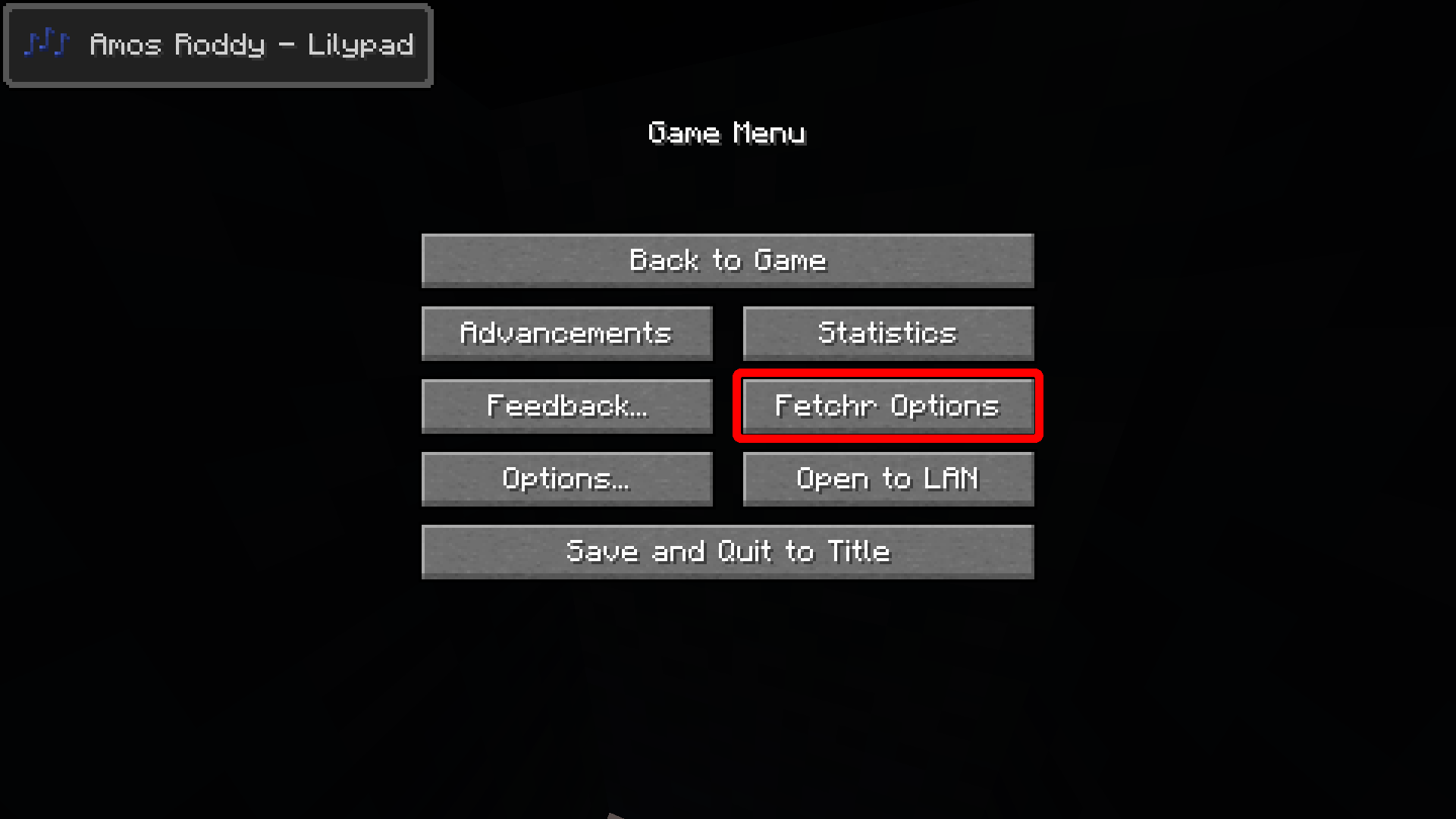
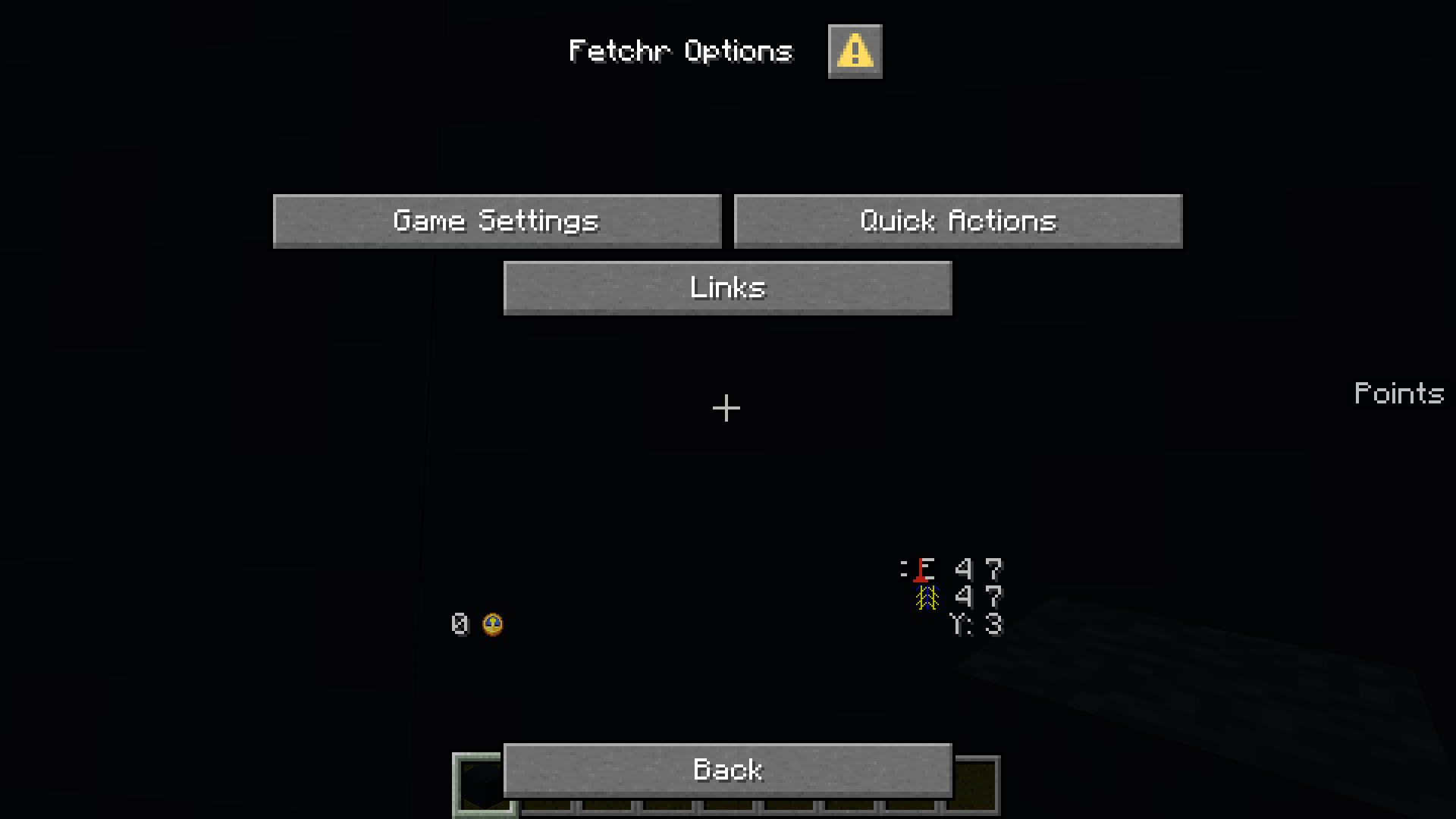
Game Settings
The game settings dialog lets you change all settings you can also access in the lobby:
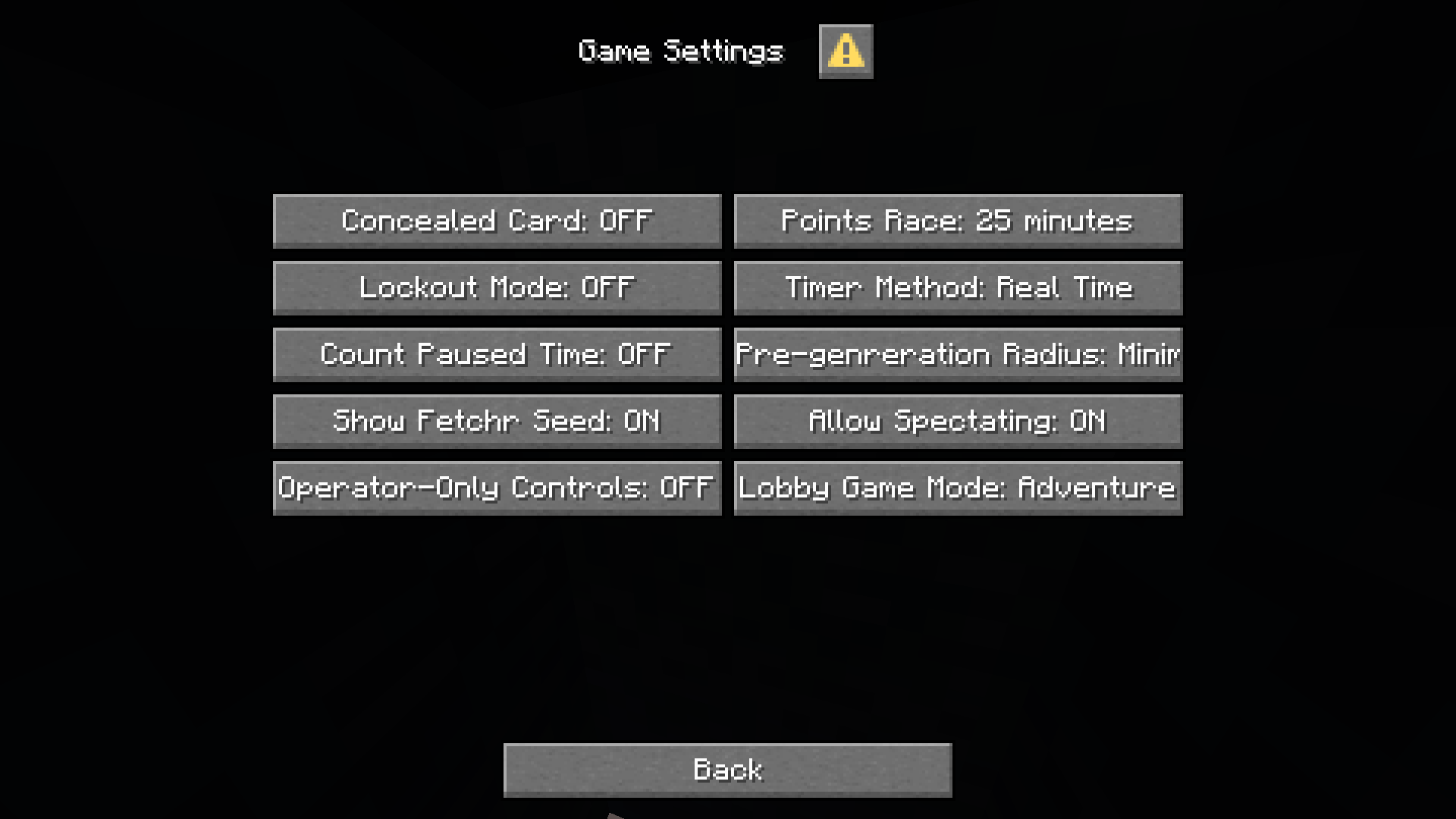
The settings screen is be reduced when in single player just like the lobby is.
On a server, you may be prompted to confirm your operator status first before being able to access this menu if operator-only controls are enabled.
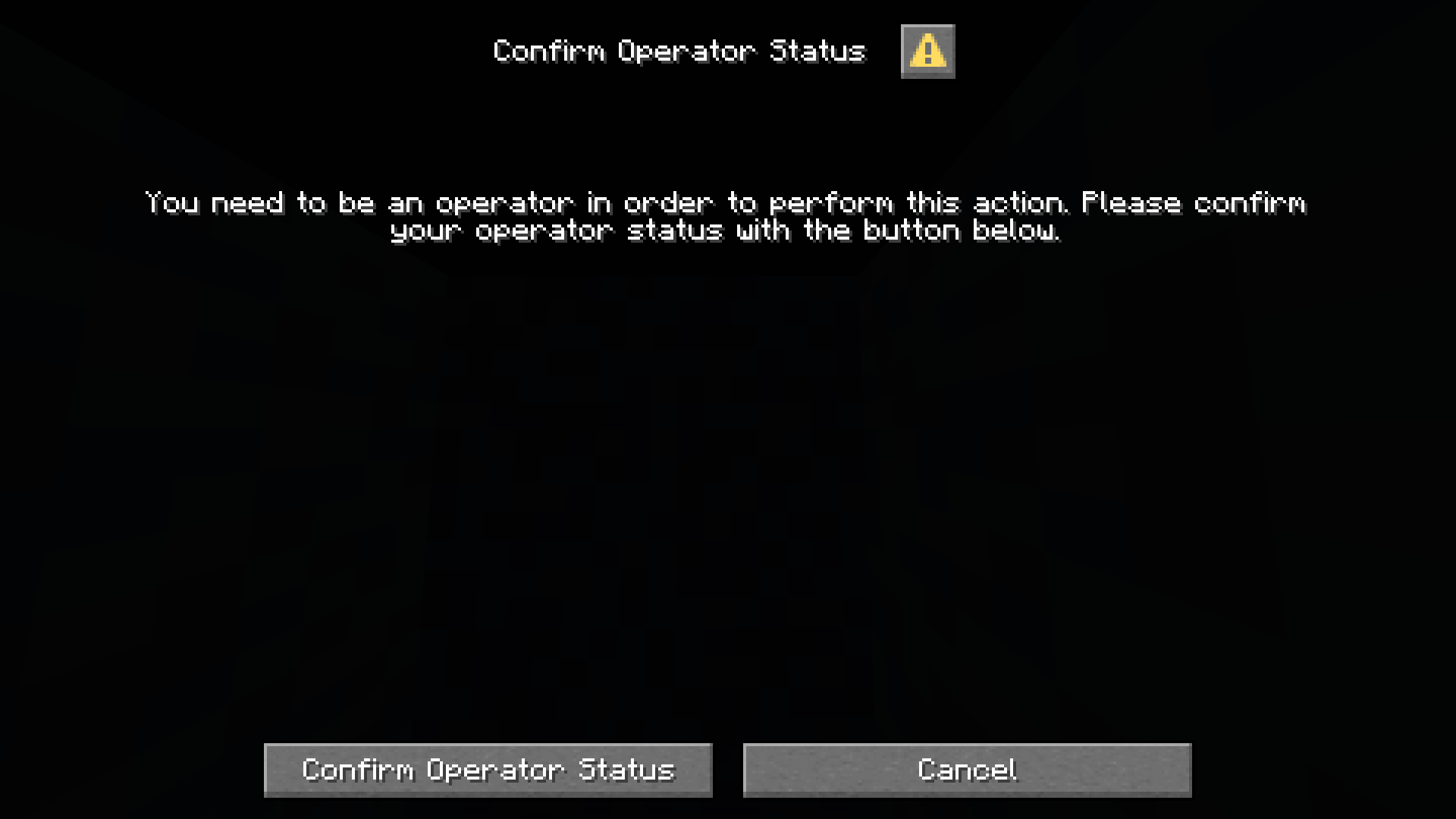
Confirm Operator status
In version 1.21.6 and later, the prompt to confirm your operator status is now implemented as a dialog.
Additionally, the game now remembers the action you tried to perform and upon successful confirmation executes that action without the need to click the same sign again.
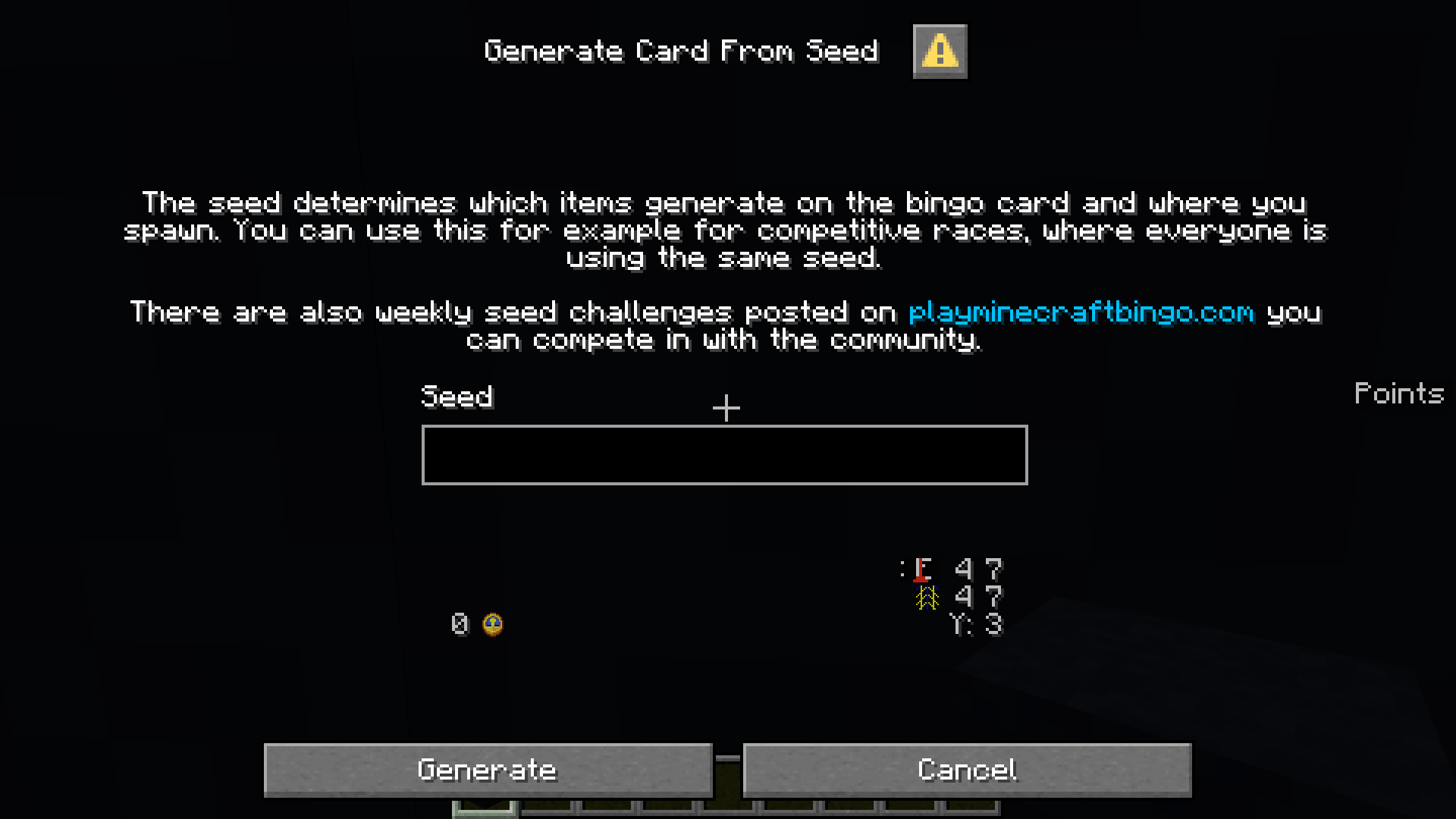
Generate Card from Seed
In version 1.21.6 and later, setting a seed is now done from a dialog. If you
prefer, you can still directly use /trigger fetchr.seed set <seed> as well
while in the lobby or the spawn preview area.
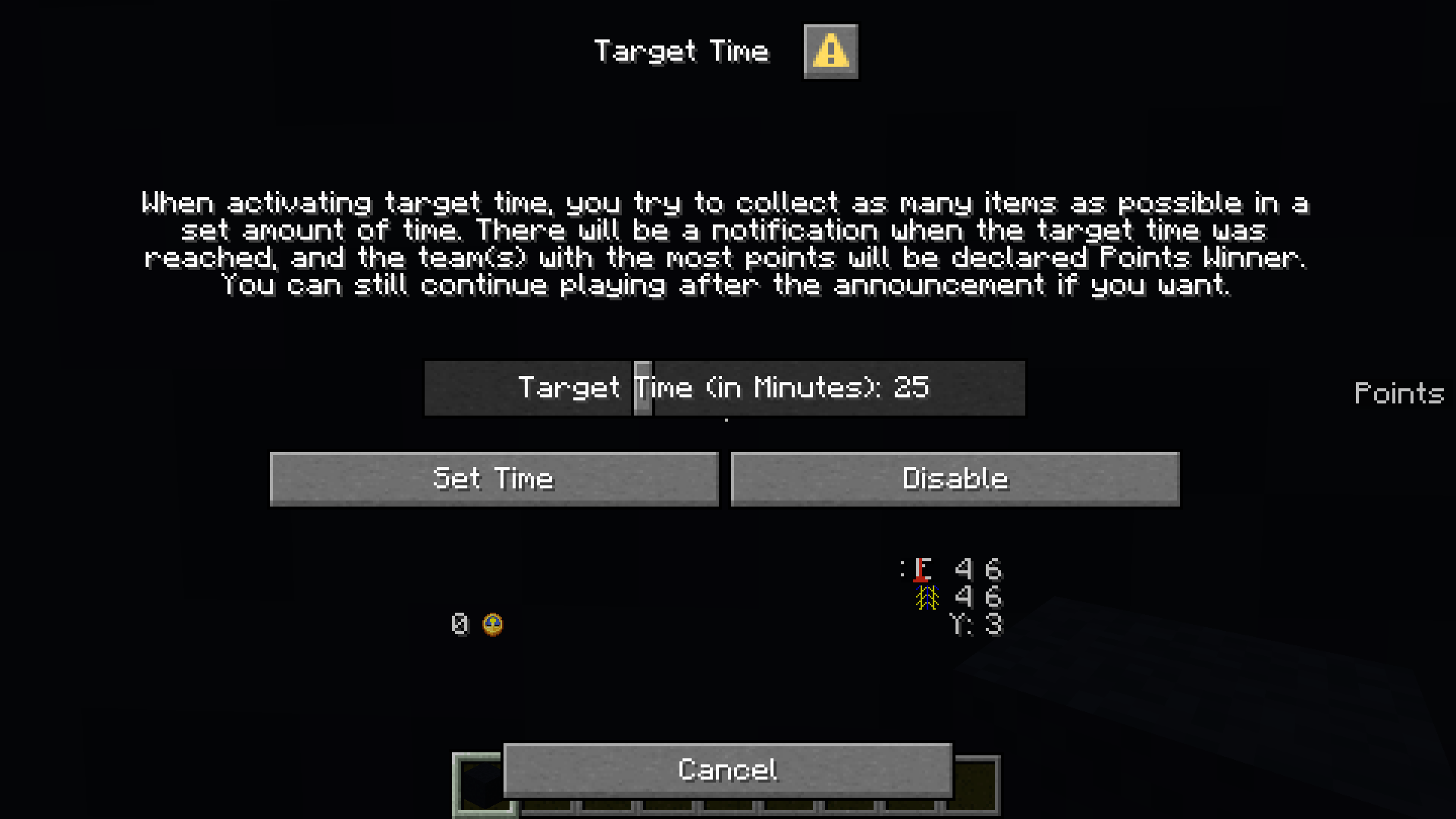
Target Time
In version 1.21.6 and later, setting a target time (previously “Points Race”) now happens through a dialog.
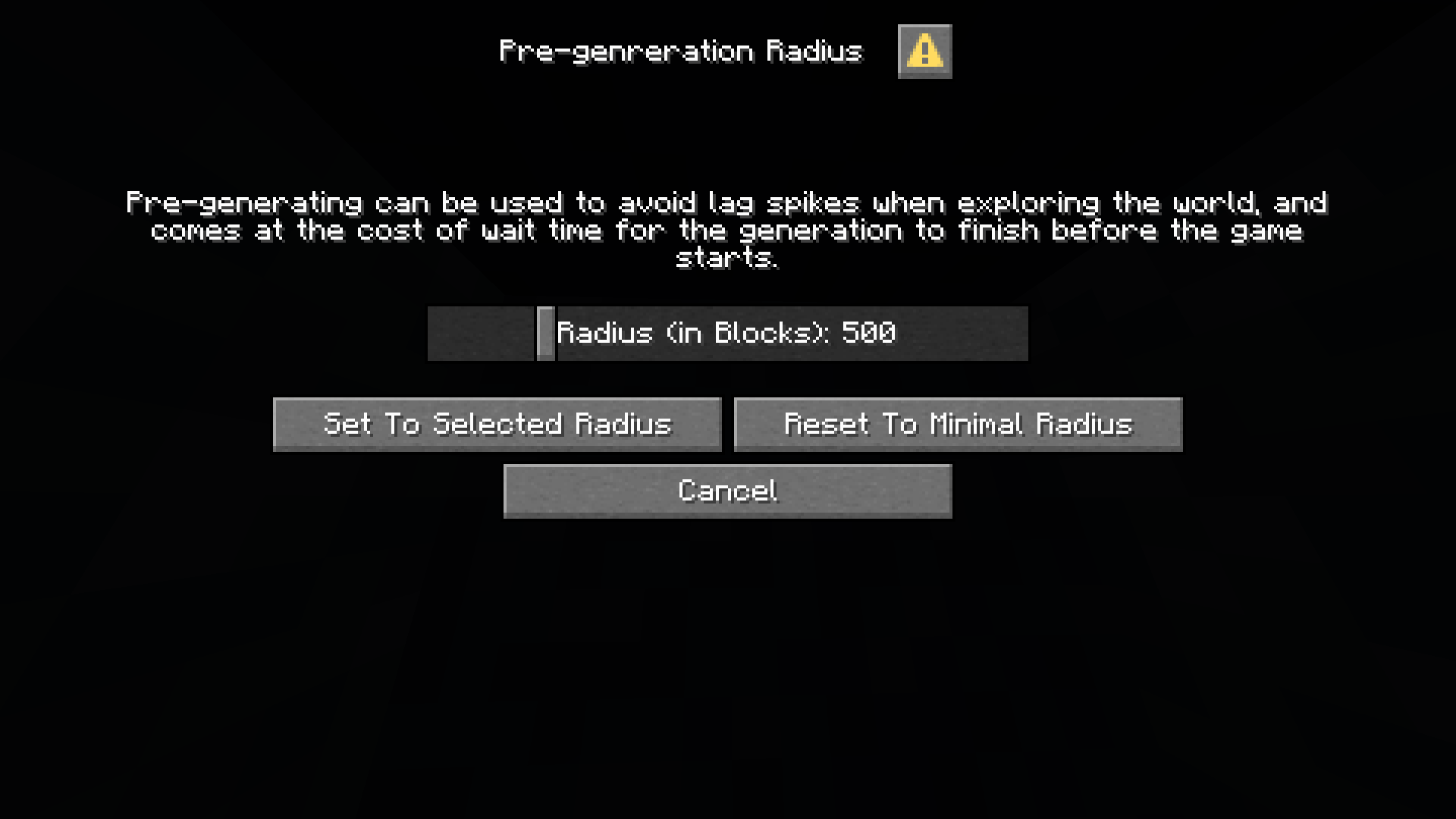
Pre-generation Radius
In version 1.21.6 and later, the selection of the area to pre-generate is now implemented as a dialog.
Item Changes
Leather Items
- Added Yellow Harness
- Only available in 1.21.6 and later
- Added Saddle
- Only available in 1.21.6 and later
- Now craftable with 3 leather and 1 iron
Lodestone
- New category
- Only available when playing 1.21.5
- Added Lodestone
- was changed in 1.21.5 to use an iron ingot instead of netherite
- Added Lodestone compass
- Also mutually exclusive with compass and map
- Likelihood is split with compass in that category, making map still as likely as before
Swamp
- New Category
- Only available when playing 1.21.5
- Contains existing items: slime ball, sticky piston, leash and poison arrow
- Added firefly bush
Warm Biomes
- Added dead bush to this category (previously only categorized as "shearable")
- Added Cactus Flower
- Only available when playing 1.21.5
- Added Short dry grass
- Only available when playing 1.21.5
- Also added to the shearables category
Miscellaneous
- Added bush
- Only available when playing 1.21.5
- Mutually exclusive with other shearable items
- Replaced pale moss block with pale moss carpet
- This is to make it easier to distinguish from tuff and other gray blocks
- Replaced moss carpet with moss block
- Cannot be found in mangrove swamps, and only shipwreck food chests and lush caves
- Added copper lantern to the copper category
- Only available in 1.21.9 or later
- Lead categories now depend on the Minecraft version
- Moved lead from slime category to spider category in 1.21.6 and later
- Now craftable with an additional string instead of slime ball in these MC versions
- Replaced blue trimmed leather boots with blue trimmed golden boots or blue
trimmed copper boots when playing in 1.21.9 or later
- This is to offset the leather usage from some of the newly added items
Worldgen
- Made armadillos more likely in badlands in 1.21.5
- Badlands can now spawn some warm farm animal variations, were previously only armadillos could spawn
- This was adjusted the same way as savanna previously, meaning armadillos take up a bit over half the peaceful spawns in these biomes
- Worldgen is updated to match 1.21.5 when playing in this version
- Most notably, pale gardens spawn about twice as often now
Blind Mode -> Concealed Card
“Blind Mode” has been renamed to “Concealed Card”. This is to diambiguate it with weekly “blind” seed challenges, which are played without knowing the card beforehand.
Bug Fixes
- Fixed lockout mode when playing with one team causing the colored card backgrounds of unlocked items to not show up properly
- Fixed players of the yellow team always getting the “Loser” notification when completing a Lockout or reaching the Target Time, even if they won.
- Fixed error chat spam not showing up when playing in a version that's too old
- Fixed resource pack check sign when joining a server for the first time with the resourcepack disabled not being lit up properly (mojank) (#241)
- Fixed players not being assigned correctly when multiple buttons are pressed by different players in the same game tick
- Fixed compass player position icon showing colors that are slightly off (due to the image using an outdated palette)
- Fixed lodestone compass spinning in the spawn preview
- Fixed github link in the Community & Support book going to NeunEinser/fetchr rather than NeunEinser/bingo (#266)
- Fixed pre-generation and target time signs not updating immediately after changing their value
- Fixed additional spaces in configure custom HUD chat menu (#287)
- Fixed scaffoldings dropping when reloading (or regenerating the item pool display) if the item pool exceeds a certain size (#301)
Technical changes
- It is now fully supported for extension packs to alter or add to the lobby.
- During a lobby update, all marker entities inside a lobby structure may be deleted.
- The topmost item pool display chest is no longer forced to be a double chest, and may be a single chest depending on the item pool now
- Most of the data and resource pack are now disabled when playing in an
unsupported version
- The only exception to this is the languages from the resource pack, and the ticking function which is responsible for posting the error message
- Everything in the build datapack and resoucepack is now part of an overlay
and no longer inside the root
dataandassetsdirectories, with the exception of language files.
- The HUD now updates after every reload and applies changes to selected components of players. New components are currently not automatically added. to existing player's HUDs as of now
- Images in the resourcepack are saved more efficiently now and have metadata stripped
- Release files now are generated with consistent meta contents, resulting in verifiable hashes when building locally
Registering a lobby structure
Use fetchr:registries structures
id- (namespaced id) The id of your structure fileoverride_id(optional, namespaced id) Should be left empty for structures you define. Can be used to override a structure from a foreign pack (e.g. vanilla Fetchr) with a different structure file you define.version(int) The numeric version of the structure. Should be changed when your structure file is updated, so that the lobby can be updated.This should be unique for the combination of
idandoverride_id.entrance_positionint array of length 3. Indicates the position of this structure's entrance. If the x position is set higher than 1, it is currently not supported to have any blocks in front of the entrance.after_structure(optional, namespaced id) The id of the structure to place this structure after. This can be used to insert a structure after another known structure. If set, this structure will be placed after the existing structure, or a structure that has set the sameafter_structure.This should not be set to a structure of your own pack. The order of your structures will be preserved. If you want to insert a structure after one of your own structures, simply set it to the same
after_structureas the other structure and register it later.
Removing a structure after it has been added is fully supported (e.g. if your pack is uninstalled).
#fetchr:lobby_update/manipulate_special_block & #fetchr:has_special_lobby_update_behavior tags
During a lobby update, if a block was changed in your structure, this change will be applied to the existing structure. In case this block has been altered by the player, it will be dropped. This will do a strict comparision, including nbt data and block states.
In some cases this can be too strict. For example, vanilla fetchr handles doors and player heads specially, and makes sure doors that were only opened or closed, and player heads that have additional data from a previous minecraft version when profile data was still resolved and saved on the block are treated equally.
You can add blocks you want to handle specially to the
#fetchr:has_special_lobby_update_behavior block tag. If you do this, in case
this block is detected altered, functions in the function tag
#fetchr:lobby_update/manipulate_special_block will be called.
#fetchr:lobby_update/manipulate_special_block context:
- location: This function will be executed at the location of the old block that has changed and will be dropped if there is a difference between this block and the previous unaltered structure
- macro arguments:
reference_x: The x location of the reference. The reference is an unaltered version of the lobby. This location will contain the unaltered block
You may alter either the block at the reference or the block that is compared against to make them equal, preventing the block in the lobby from being dropped.
You should check whether both the block in the reference and the old block are a block you want to handle.
#fetchr:lobby_update/manipulate_updated_entity
This function tag can be used to do additional changes to an entity after it has been updated.
Context:
- current entity (@s): The entity that has been updated
- location: The location of the entity
@e[tag=fetchr.current_new]: The unaltered new entity as it is defined in your structure
#fetchr:lobby_update/add_legacy_structures
This function tag can be used to update a lobby of an older version of fetchr.
You do not need this for updating structures when using this version of Fetchr or beyond. This is only for updating lobbies from 5.1-beta1 - 5.3-beta5.
Add the structures that would have been there in your version configured
correctly to storage io.fetchr:structures structures.
id should be the namespaced id of the structure which matches the structure
file of the new structure.
entrance_position should be the entrance position according to the old
structure
legacy_id should be the id of the structure file which produces the structure
as it has been part of the old lobby
#fetchr:lobby/generated
This function tag is called after the lobby has been genreated either for the first time, or a lobby update has been completed.
Use this to e.g. spawn marker entities. Make sure your marker entity doesn't exist already from a previous generation.
You should also run this function when your datapack is loaded for the first
time and the score $lobby_genreated in fetchr.state equals 4.
Other new function tags
#fetchr:goal_and_item_detection/achieved_goal: Any goal has been achieved@s: Player who got the last item@a[tag=fetchr.in_current_team]: Players who are in the team achieving the goal- storage
io.fetchr:find_team current_teamthe current team data
#fetchr:goal_and_item_detection/achieved_20_no_bingo@s: Player who got the last item@a[tag=fetchr.in_current_team]: Players who are in the team achieving the 20 no bingo- storage
io.fetchr:find_team current_teamthe current team data
#fetchr:goal_and_item_detection/achieved_bingo@s: Player who got the last item@a[tag=fetchr.in_current_team]: Players who are in the team achieving the bingo- storage
io.fetchr:find_team current_teamthe current team data
#fetchr:goal_and_item_detection/achieved_blackout@s: Player who got the last item@a[tag=fetchr.in_current_team]: Players who are in the team achieving the blackout- storage
io.fetchr:find_team current_teamthe current team data
#fetchr:goal_and_item_detection/achieved_lockout@s: Player who got the last item@a[tag=fetchr.in_winning_team]: Players who are in a team winning the lockout race. Maybe players of multiple teams in case of a tie.- storage
io.fetchr:find_team current_teamthe current team data
#fetchr:goal_and_item_detection/finished_points_race: The points race ended.@a[tag=fetchr.in_winning_team]: All players who were in a winning team
#fetchr:goal_and_item_detection/item_detected: A player got an item that is on the card. The item announcement has not happened yet.@s: The player who got the item@a[tag=fetchr.in_current_team]: All players who are in@s' teamio.fetchr:find_team current_team: Team id color, and other team data- Macro parameters according to
::fetchr::storages::card::CardSlot - Slot information also available in storage using a macro as
fetchr:card slots[$(slot_id)]
#fetchr:goal_and_item_detection/item_get_announced: Player @s got an item that is on the card and the announcement has been made.@s: The player who got the item@a[tag=fetchr.in_current_team]: All players who are in@s' teamio.fetchr:find_team current_team: Team id color, and other team data- Macro parameters according to
::fetchr::storages::card::CardSlot - Slot information also available in storage using a macro as
fetchr:card slots[$(slot_id)]
#fetchr:game/tickTicking function that is called while a game is in progress#fetchr:lobby/tick: Ticking function that is called while the lobby is loaded by at least one player#fetchr:spawn_preview/tick: Ticking function that is called while the spawn preview is available#fetchr:lobby/tick: Ticking function that is called while the lobby is loaded by at least one player#fetchr:player_tick: Ticking function that is called for every player@s: The current player who is in the lobby- Position: Function is executed at the player's location
#fetchr:game/player_tick: Ticking function that is called for every player in a running game@s: The current player who is playing in the game- Position: Function is executed at the player's location
#fetchr:lobby/player_tick: Ticking function that is called for every player@s: The current player- Position: Function is executed at the player's location
#fetchr:spawn_preview/player_tick: Ticking function that is called for every player in the spawn preview@s: The current player who is in the spawn preview- Position: Function is executed at the player's location
#fetchr:spawn_preview/created: The spawn preview area has been created- Position: Function executed at the center of the spawn preview
#fetchr:spawn_preview/player_entered: Player entered the spawn preview area@s: Player who entered- Position: Function executed at spawn preview center
#fetchr:spawn_preview/teleported_all_players: All players have been forcefully teleported to the spawn preview area@s: Player who triggered the teleport
#fetchr:spawn_preview/joined_team: During the spawn preview phase, a player has joined a team.@s: Player who joined the team- Team color available from @s[team=fetchr.color] from this point onward.
#fetchr:start_sequence/start_sequence: The “start game” sign has just been activated, and the spawn sequence starts@s: Player who activated the sequence- Position: The center of the spawn preview
#fetchr:start_sequence/players_start_falling: Players start falling as part of the spawn sequence- @e[type=minecraft:marker, tag=fetchr.spawn, limit=1]: Marker for position at the top of the drop chute
#fetchr:start_sequence/all_players_landed: Players landed as part of the start sequence- Position: The location on the ground that will become the spawn point.
#fetchr:start_sequence/advance_countdown: Countdown before a game starts decreases- @e[type=minecraft:marker, tag=fetchr.spawn, limit=1]: Marker at the location of the spawn point.
#fetchr:start_sequence/countdown_ended: The countdown ended and the game starts- Position: The location on the ground that will become the spawn point.
#fetchr:game/ended: A card generation was requested, and the current game has ended (players returned to lobby, game state changed, etc). The card generation will take place after this tag has been called.#fetchr:game/revealed_concealed_card: While the concealed card setting is active, player@shas revealed the card.#fetchr:game/joined_as_spectator: Player@shas entered a running game as a spectator#fetchr:dialog/add_to_quick_actions: The dynamic Quick Actions dialog acessible from the pause menu under Fetchr Options is about to be generated.Use this tag to add your own Quick Actions.
Note that this is not related to the Quick Actions dialog accessible from the
Ghotkey- storage
io.fetchr:dialog dialog: The dialog to show to the user. This is always a typemulti_actiondialog.
- storage
#fetchr:lobby/player_returned: Player@shas returned to the lobby#fetchr:lobby/teleported_all_players: All players have been forcefully teleported to the lobby@s: Player who activated the teleport
#fetchr:confirmed_operator_status: Player@shas successfully confirmed their operator status#fetchr:lobby/before_item_pool_chest_incremented: During item pool chest generation, a new chest is about to be added- Position: The location at the bottom of the chest stack and the lower z coordinate
- Macro parameter
height: The current height of the chest stack
#fetchr:lobby/item_pool_chest_incremented: During item pool chest generation, a new chest has been added- Position: The location at the bottom of the chest stack and the lower z coordinate
- Macro parameter
height: The current height of the chest stack
#fetchr:lobby/item_pool_chests_generated: The item pool chest generation has completed- Position: The location at the bottom of the chest stack and the lower z coordinate
#fetchr:hud_component_updated: A HUD component has been updated after a reload. You can do custom updates for your components here to support older versions of your pack being updated- storage
io.fetchr:custom_hud custom: The custom part of the component.
- storage
#fetchr:item_pool_changed: The item pool has changed.
Item pool registrations
- Removed
fetchr:negated_componentitem_test - Added
fetchr:component_existsitem_test also supporting negated funcionality - Category lists now support a mixed typed list
fetchr:component_exists item_test
New item test that can bes specified in the item pool to check for an item component to exist
- Requires the item component to exist on this item, with any contents
id- The item component idnegated- Optional. When set totrue, requires the component to not exist (same as previousfetchr:negated_component)
Heterogeneously typed category lists
When registering items, category lists can now be heterogeneous in 1.21.5 (in 1.21.4, this would be an SNBT syntax error)
This means instead of specifying a compound with only an id and no weight, you can now always specify a string, even when there is another compound in the same list
For example, [ {id: "fetchr:pumpkin" }, {id: "fetchr:egg", weight: 2 } ] can
now be written as [ "fetchr:pumpkin", {id: "fetchr:egg", weight: 2 } ]
Text Components
In accordance with the 1.21.5 changes, text components are now in SNBT format and no longer stored as stringified JSON in Minecraft versions 1.21.5 and later
This affects all storages that stored text components before.
5.3-rc4Бета1.21.9, 1.21.10-rc1, 1.21.10 · 29 мая 2026 г.
Bug Fixes
- Fixed blue trimmed golden boots showing up as copper boots in 1.21-1.21.4
- Fixed blue trimmed golden boots showing as a blank tile in 1.21.5-1.21.8 (#312)
5.3-rc3Бета1.21.9, 1.21.10-rc1, 1.21.10 · 27 мая 2026 г.
Bug Fixes
- Fixed item pool generation not waiting until marker in lobby is loaded
- This would cause card generation to be completely broken on servers after a restart.
- Fixed some remaining error logs caused by item frames on initial load
- Fixed item pool being generated twice on initial load
- This didn't actually cause any visible bugs, but was just unnecessary.
- Fixed spawn preview generating too high when generating a card from seed and inputting the same seed that is currently loaded
Комментарии
Загружаем…