 Mineforgian
EvetLight
lightweight, and customizable Fullbright / Night Vision mod
- Загрузки
- 46
- Подписчики
- 0
- Обновлён
- 26 июля 2026 г.
- Лицензия
- MIT
Опубликован 26 июля 2026 г.
EverLight (エバーライト)
EverLight は、明暗調整・暗視(Fullbright)Mod です。
✨ 主な機能
- 💡 ワンタッチ視界全開 (Fullbright): 洞窟や夜間、水中でもワンキーで即座に昼間同様の明瞭な視界を確保。
- 🎚️ 明るさレベルの自由調整 (1.0 〜 10.0):
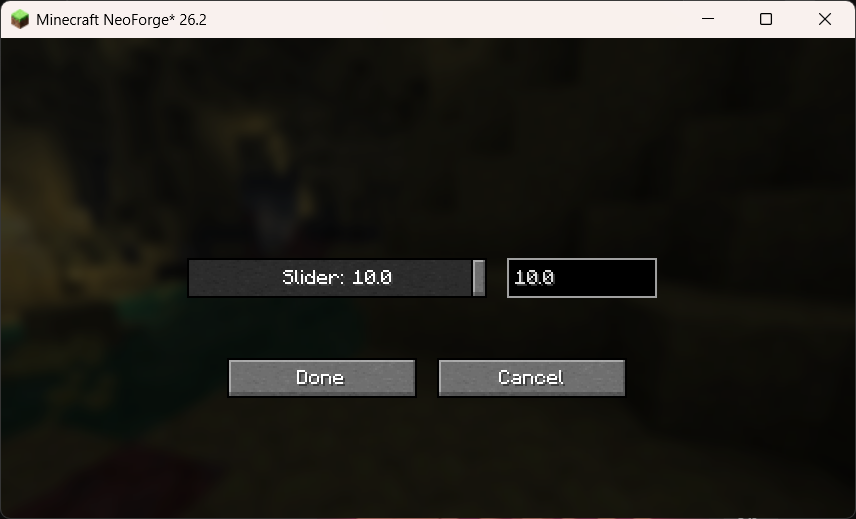
- スライドバー + 数値入力ボックス による直感的な設定 GUI。
- 🔌 ローダー標準設定メニューとの統合:
- NeoForge: 組み込み Mod リスト画面の「設定 / Config」ボタンから遷移。
- Fabric: ModMenu の GUI メニューから遷移。
- 💾 設定の自動永続化: 変更した設定は
config/mc_ever_light.propertiesへ自動保存されます。
⌨️ 操作方法・キー割り当て
| 操作 | デフォルトキー | 説明 |
|---|---|---|
| ライト ON / OFF 切替 | G |
ゲーム中に EverLight の有効・無効を切り替えます(HUDメッセージ表示)。 |
| 設定画面表示 | 各Modメニュー | スライダーで明るさレベル(1.0 〜 10.0)を調整する設定画面を開きます。 |
※キー割り当てはバニラの「操作設定 (Key Binds)」から自由に変更できます。
⚙️ 設定 GUI メニュー
EverLight の設定画面は、スライダーと数値入力ボックスが双方向に連動します:
- スライダー操作: マウスドラッグで数値を連続変更。
- 数値入力: キーボードで
1.0〜10.0の数値を直接入力すると、スライダー位置が即座に同期。 - Done (完了) ボタン押下で即座にゲーム内に反映され、設定ファイルへ保存されます。
📄 ライセンス
本 Mod は MIT License の下で公開されています。Modpack への組み込みや再配布は自由に行っていただけます。
(English)
EverLight is a clean, lightweight, and customizable Fullbright / Night Vision mod for Minecraft .
✨ Features
- 💡 Instant Fullbright Toggle: Toggle full daylight visibility in caves, underwater, and night with a single keypress.
- 🎚️ Customizable Brightness Level (1.0 - 10.0):
- Interactive Slider + Numeric Input Box configuration GUI.
- Adjust brightness dynamically from subtle enhancement to full illumination.
- 🔌 Seamless Mod Loader Integration:
- NeoForge: Configurable directly from the built-in Mod List option screen.
- Fabric: Fully integrated with ModMenu GUI.
- 💾 Persistent Settings: Automatically saved to
config/mc_ever_light.properties.
⌨️ Controls & Usage
| Action | Default Key | Description |
|---|---|---|
| Toggle Light | G |
Toggles EverLight ON or OFF with an in-game HUD message. |
| Config Screen | Mod Menu / Mods List | Opens the interactive brightness slider settings screen. |
⚙️ Configuration GUI
EverLight features a bi-directionally synchronized Slider + Numeric Input Box:
- Move the slider to update the numeric value in real time.
- Type any precise number between
1.0and10.0to set the slider position automatically. - Changes are applied live in game and saved upon pressing Done.
📄 License
This mod is available under the MIT License. Feel free to include it in your modpacks!
Ченджлог
1.0.0-neoforge-mc26.2Релиз26.2 · 26 июля 2026 г.
EverLight v1.0.0 リリースノート / Release Notes
🇯🇵 日本語
Minecraft 1.21.4 (26.2) 向け EverLight v1.0.0 へようこそ!
✨ 主な機能・ハイライト
- 💡 ワンタッチ視界全開 (Fullbright): 洞窟や夜間、水中でもワンキー(デフォルト
G)で即座に昼間同様の明瞭な視界を確保。 - 🧘 画面を汚さないクリア設計: 暗視パーティクル粒子や右上のバフエフェクトアイコン、画面点滅は一切表示されません。
- 🎚️ 明るさレベルの自由調整 (1.0 〜 10.0):
- スライドバー + 数値入力ボックス による直感的な設定 GUI。
- 控えめな明暗補正(
1.0)から完全な全開暗視(10.0)までレベルに合わせて動的に可変設定可能。
- 🔌 ローダー標準設定メニューとの統合:
- NeoForge: 組み込み Mod リスト画面の「設定 / Config」ボタンから遷移。
- Fabric: ModMenu の GUI メニューから遷移。
- 💾 設定の自動永続化: 変更した設定は
config/mc_ever_light.propertiesへ自動保存されます。
📦 動作環境
- Minecraft バージョン: 1.21.4 (26.2)
- Java バージョン: 25+
- 対応 Mod Loader: NeoForge (26.2.0+), Fabric (0.19.3+)
🇬🇧 English
Welcome to the initial release of EverLight for Minecraft 1.21.4 (26.2)!
✨ Highlights & Features
- 💡 Instant Fullbright Toggle: Toggle full daylight visibility in caves, underwater, and night with a single keypress (Default
G). - 🧘 Clean & Invisible: No potion particle effects, no HUD status icons, and no screen clutter.
- 🎚️ Customizable Brightness Level (1.0 - 10.0):
- Interactive Slider + Numeric Input Box configuration GUI.
- Adjust brightness dynamically from subtle enhancement (
1.0) to maximum night vision (10.0).
- 🔌 Seamless Integration:
- NeoForge: Configurable directly from the built-in Mod List option screen.
- Fabric: Fully integrated with ModMenu GUI.
- 💾 Persistent Configuration: Settings are saved automatically to
config/mc_ever_light.properties.
📦 Supported Environment
- Minecraft Version: 1.21.4 (26.2)
- Java Version: 25+
- Loaders: NeoForge (26.2.0+), Fabric (0.19.3+)
1.0.0-fabric-mc26.2Релиз26.2 · 26 июля 2026 г.
EverLight v1.0.0 リリースノート / Release Notes
🇯🇵 日本語
Minecraft 1.21.4 (26.2) 向け EverLight v1.0.0 へようこそ!
✨ 主な機能・ハイライト
- 💡 ワンタッチ視界全開 (Fullbright): 洞窟や夜間、水中でもワンキー(デフォルト
G)で即座に昼間同様の明瞭な視界を確保。 - 🧘 画面を汚さないクリア設計: 暗視パーティクル粒子や右上のバフエフェクトアイコン、画面点滅は一切表示されません。
- 🎚️ 明るさレベルの自由調整 (1.0 〜 10.0):
- スライドバー + 数値入力ボックス による直感的な設定 GUI。
- 控えめな明暗補正(
1.0)から完全な全開暗視(10.0)までレベルに合わせて動的に可変設定可能。
- 🔌 ローダー標準設定メニューとの統合:
- NeoForge: 組み込み Mod リスト画面の「設定 / Config」ボタンから遷移。
- Fabric: ModMenu の GUI メニューから遷移。
- 💾 設定の自動永続化: 変更した設定は
config/mc_ever_light.propertiesへ自動保存されます。
📦 動作環境
- Minecraft バージョン: 1.21.4 (26.2)
- Java バージョン: 25+
- 対応 Mod Loader: NeoForge (26.2.0+), Fabric (0.19.3+)
🇬🇧 English
Welcome to the initial release of EverLight for Minecraft 1.21.4 (26.2)!
✨ Highlights & Features
- 💡 Instant Fullbright Toggle: Toggle full daylight visibility in caves, underwater, and night with a single keypress (Default
G). - 🧘 Clean & Invisible: No potion particle effects, no HUD status icons, and no screen clutter.
- 🎚️ Customizable Brightness Level (1.0 - 10.0):
- Interactive Slider + Numeric Input Box configuration GUI.
- Adjust brightness dynamically from subtle enhancement (
1.0) to maximum night vision (10.0).
- 🔌 Seamless Integration:
- NeoForge: Configurable directly from the built-in Mod List option screen.
- Fabric: Fully integrated with ModMenu GUI.
- 💾 Persistent Configuration: Settings are saved automatically to
config/mc_ever_light.properties.
📦 Supported Environment
- Minecraft Version: 1.21.4 (26.2)
- Java Version: 25+
- Loaders: NeoForge (26.2.0+), Fabric (0.19.3+)
Комментарии
Загружаем…