 Mineforgian
Emote
Server-side emotes rendered with your player skin
- Загрузки
- 861
- Подписчики
- 6
- Обновлён
- 21 августа 2026 г.
- Лицензия
- Apache-2.0
Опубликован 28 марта 2026 г.
Emote
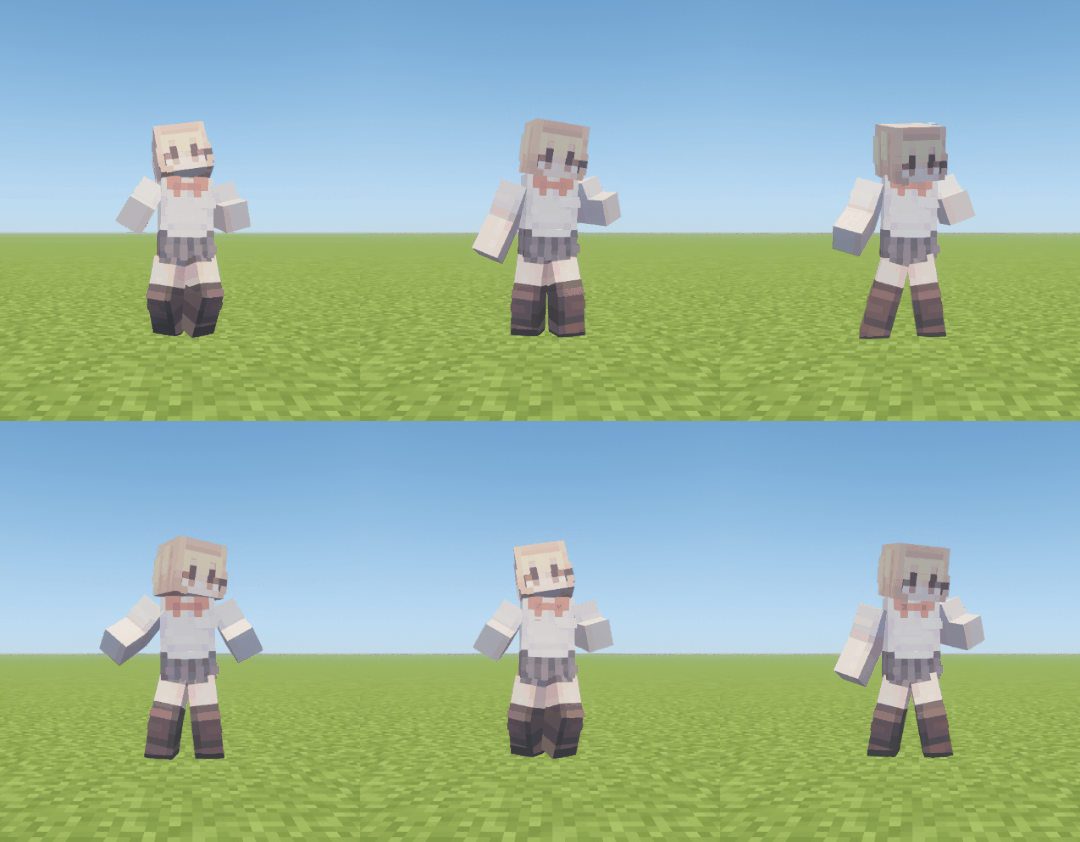
Thanks to Popular Vibe for allowing us to use their animation!


Join the Discord server to share emotes you have made.
Features
Emote is a server-side emote mod that plays animations with Minecraft display entities. All server features work when the mod is installed only on the server. Installing it on the client is optional and adds an emote wheel and automatic third-person view during playback.
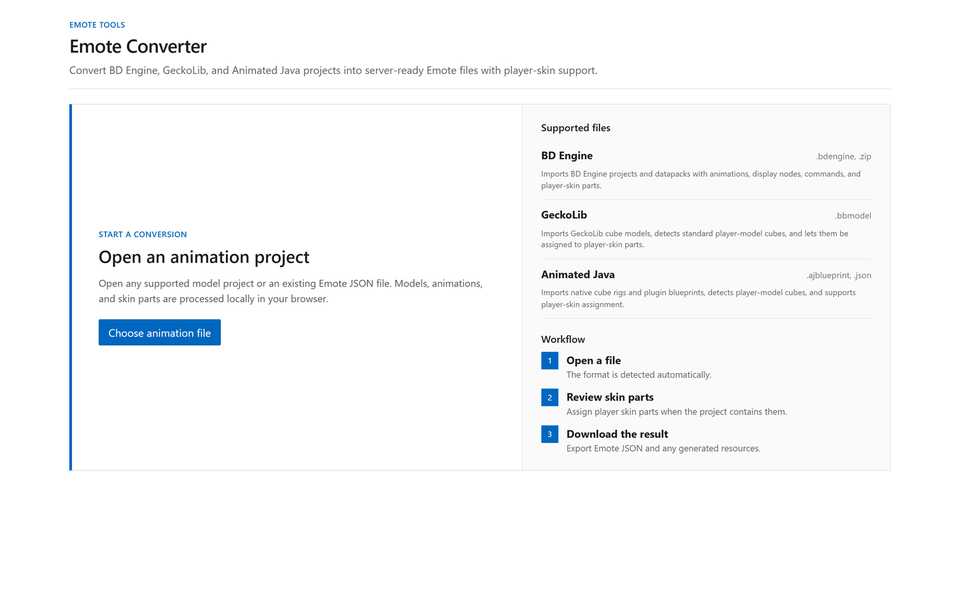
The web converter supports BD Engine, GeckoLib, and Animated Java. Configure skin parts, metadata, playback settings, and commands without editing Animation JSON, then export the resource pack as well.
On the server, LuckPerms permissions can assign emotes and idle emotes per player. Sequences can connect multiple animations or coordinate two players in a collaborative emote, with each player's skin applied to compatible animations. A server API is also available for other mods to register emotes, control playback, and receive events.
Commands
Player
| Command | Description |
|---|---|
/emote |
Opens the emote menu. |
/emote play <id> |
Plays an emote by ID. |
V |
Opens the client emote wheel. |
Use the wheel's Edit Wheel button to add, remove, or reorder entries. The order is stored on the client separately for each server.
Administration
| Command | Description |
|---|---|
/emote list |
Lists loaded emotes and their sources. |
/emote reload |
Reloads configuration and animations. |
/emote enable/disable <id> |
Enables or disables an emote. |
/emote stop <player>, /emote stop-all |
Stops one player's emote or all emotes. |
/emote stress-test [count] |
Plays multiple emotes to measure server performance. |
Administrative commands use the emote.manage permission and are granted to game master operators by default.
Server management
config/emote/
├── config.json
├── emotes.json
└── animations/
The directory and configuration files are created automatically on first startup, with sample emotes included under animations.
Place JSON exported by the converter under animations. Subdirectories are loaded as well, and emotes use the id in the JSON rather than the filename. Invalid files are skipped individually, while every file sharing a duplicate ID is rejected.
config.json
{
  "schema_version": 1,
  "menu_page_size": 6,
  "mineskin_api_key": "",
  "mineskin_poll_interval_seconds": 3,
  "mineskin_cache_retention_days": 30,
  "mineskin_cache_max_mib": 256,
  "max_active_display_entities": 512
}
Set mineskin_api_key to apply player skins.
emotes.json
{
  "schema_version": 2,
  "disabled": ["example:disabled"],
  "permissions": [
    {
      "permission": "emote.vip",
      "emotes": ["example:dance", "example:cry"],
      "idle": {
        "delay": "300s",
        "emote": ["example:dance", 70, "example:cry", 30]
      }
    },
    {
      "permission": "emote.default",
      "emotes": ["example:hello", "example:wave"]
    },
    {
      "permission": "emote.admin",
      "emotes": ["*"]
    }
  ]
}
disabled turns off emotes, while permissions determines the emotes and idle emotes available to each player. Every player receives emote.default, and * grants every enabled emote. emote.bypass is an administrator and development override that ignores standalone, disabled IDs, permissions, and cooldowns.
Web converter
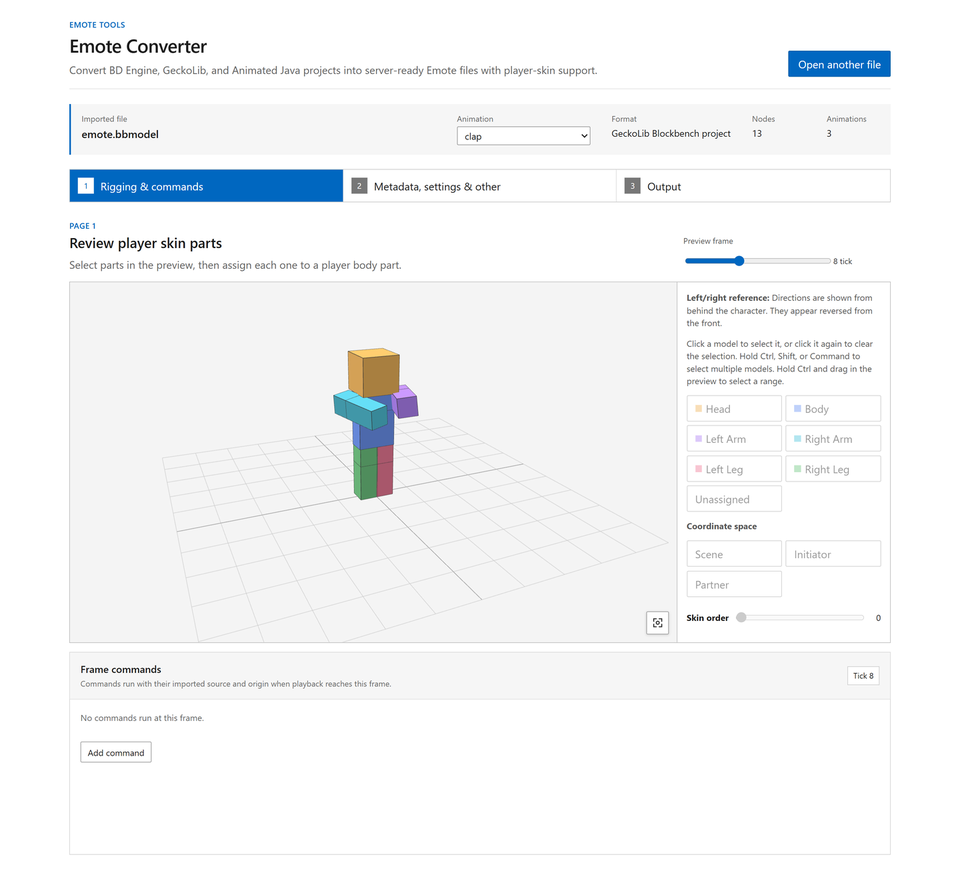
Emote Converter converts and configures projects without requiring direct edits to Animation JSON. All processing happens locally in the browser.
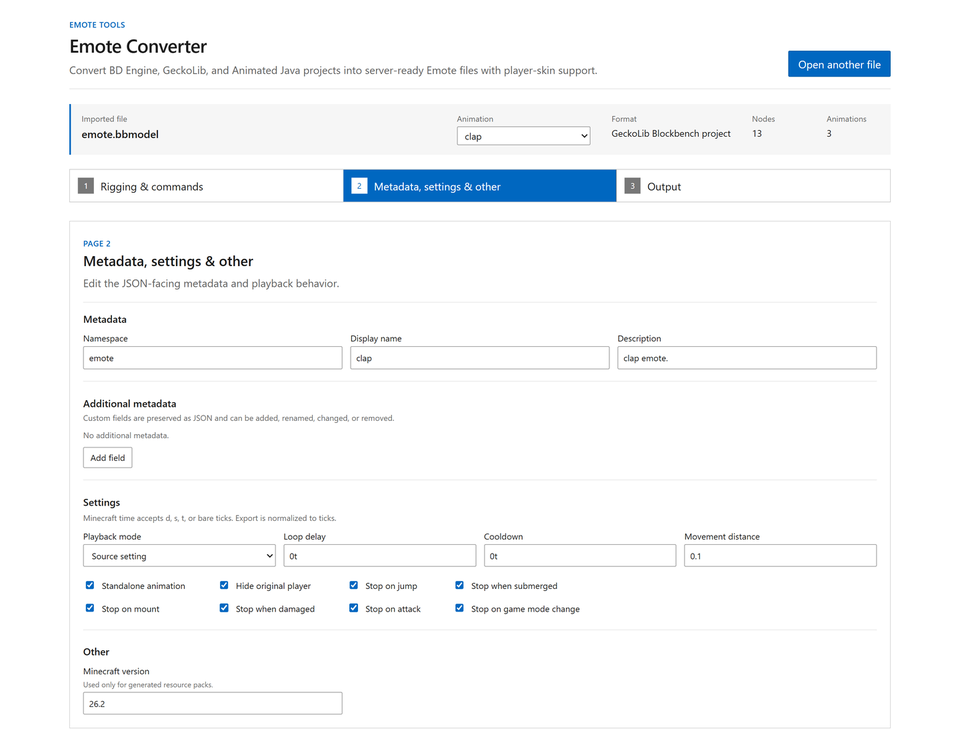
Use the 3D preview to assign skin parts and coordinate spaces, then configure metadata, playback behavior, stop conditions, and frame commands. Export individual Animation and Sequence JSON files, download a resource pack, or merge the result into an existing resource pack.
Animation conversion
The web converter recalculates the source animation's easing and interpolation curves for Minecraft ticks. It preserves important points in Bézier, Catmull-Rom, bounce, and elastic motion, then selects the keyframe placement with the lowest position, rotation, and scale error to keep the result as close to the original movement as possible.
Each animation can define a cooldown, player visibility, stop conditions such as movement, jumping, attacking, and taking damage, and frame commands.
Sequence
Connect short animation clips in order and combine waits, weighted random choices, and repeats to create a single emote.
{
  "type": "sequence",
  "schema_version": 4,
  "id": "example:sit",
  "steps": [
    {"emote": "example:sit_down"},
    {"wait": "10t"},
    {
      "emote": [
        "example:sit_idle_1", 45,
        "example:sit_idle_2", 45,
        "emote:break", 10
      ],
      "repeat": 3
    },
    {"emote": "example:stand_up"}
  ]
}
Collaborative emotes
Combine animations for two players in a sequence to create a collaborative emote. Nearby players facing each other are connected, then the matched or timeout branch is played. Symmetrical motion is automatically mirrored for the other player, while separate initiator and partner nodes can create asymmetric performances with different motion and skins.
{
  "type": "sequence",
  "schema_version": 4,
  "id": "emote:handshake",
  "participants": {
    "initiator": {"position": "~ ~ ~", "rotation": "~ 0"},
    "partner": {"position": "^ ^ ^1.2", "rotation": "~180 0"}
  },
  "steps": [{
    "await_partner": {"emote": "emote:handshake_offer", "timeout": "10s"},
    "matched": [
      {"emote": "emote:handshake", "repeat": 2},
      {"wait": "1s"},
      {"emote": "emote:handshake_close"}
    ],
    "timeout": [{"emote": "emote:handshake_close"}]
  }]
}
Mod API
EmoteApi.getInstance() provides playback control, runtime registration, state queries, cancellable play listeners, and playback lifecycle listeners. State changes must run on the server thread, and runtime registrations survive reloads.
Troubleshooting
| Problem | Check |
|---|---|
| An emote does not appear | Check the /emote reload result, server log, duplicate IDs, disabled, and whether the animation is sequence-only. |
| A player skin is not applied | Check the converter's skin part assignments and mineskin_api_key. Run the emote again after a new skin finishes processing. If MineSkin is unavailable, the animation's default texture is used. |
| A player skin is applied incorrectly | Reassign each node's skin part and order in the web converter. For two-player animations, also check the initiator and partner coordinate spaces. |
If the problem is not covered here, report it on Discord or GitHub Issues.
License
This project is distributed under the Apache License 2.0.
Ченджлог
2.0.0+26.2-beta2Бета26.3-snapshot-8, 26.3-snapshot-9, 26.3-snapshot-10 · 21 августа 2026 г.
2.0 Beta is not compatible with 1.1, and the current converter only supports 2.0.
v2.0.0 Update
Since 2.0.0-beta, the animation format and playback engine have been reworked, with expanded Molang support and improved handling of advanced animations.
Animation Schema 4
- Migrated the animation format to Schema 4.
- Added hierarchical nodes and local transforms.
- Position, rotation, scale, and visibility can now be defined as independent tracks.
- Added support for step and linear interpolation, easing, and discontinuous keyframes.
- Schema 4 tracks can be played in both animations and sequences.
- Added the
rotation_deadzonesetting to control how closely an animation follows player rotation.
Molang Support
- Molang can now be used in animation initialization and tick programs.
- Molang expressions can be used in position, rotation, scale, and visibility tracks.
- Added queries for animation timing, player look and body rotation, movement, pose, swimming, gliding, item use, and other player states.
- Molang expressions from Bedrock, GeckoLib, and Animated Java animations are preserved where possible.
- The web converter preview can evaluate supported Molang expressions.
- When an animation cannot be fully previewed, supported animation data is preserved and a fallback preview is used where possible.
Web Converter
- Added conversion from legacy Schema 1 and Schema 3 animations to Schema 4.
- Improved Bedrock coordinate conversion and player query handling.
- Improved preservation of advanced Schema 4 runtime data when re-exporting animations.
- Animations that cannot be fully previewed can fall back to the Create pose.
- Repeated conversion warnings are grouped to make conversion results easier to review.
Playback and Sequences
- Sequences can now contain animations with different node layouts.
- Skin bindings without an explicitly specified participant now default to the initiating player.
- Idle playback is handled independently from normal emote-use permissions.
- Disabled emotes are excluded from idle and automatic playback.
Stability and Performance
- Invalid Schema 4 animation files are isolated so that a single broken animation does not prevent the entire reload.
- Improved animation file parsing and keyframe lookup.
- Improved sequence segment lookup during playback.
- Fixed unnecessary duplication of skin items.
- Refactored internal playback handling around the new animation system.
Compatibility
- The server now directly loads Schema 4 animations.
- Existing Schema 1 and Schema 3 animations must be converted to Schema 4 using the web converter.
- Some Molang or advanced animation features from legacy formats are preserved where supported; unsupported expressions may produce conversion warnings.
2.0.0+26.2-betaБета26.3-snapshot-7, 26.3-snapshot-8, 26.3-snapshot-9 · 17 августа 2026 г.
Emote v2.0.0
This update redesigns the overall Emote workflow and Animation format.
The web converter, Animation and Sequence formats, cooldown and permission management, random Emotes, two-player collaborative Sequences, the client-side Emote Wheel, and many other areas have been significantly changed. The internal playback system has also undergone a major overhaul.
Important: Starting with v2.0.0, the server uses the new Schema 3 format.
Existing Schema 1 Animations and Sequences can be imported into the web converter and exported again in Schema 3 format.
Web Converter
The web converter has been redesigned from the ground up.
Instead of the previous single-page interface, it now uses the following step-based workflow so that you can more easily understand where you are in the process:
Review → Settings → Export
Project and Editing Features
- Supports importing Animated Java
.ajblueprintand.jsonprojects. - Automatically detects player models in Animated Java and GeckoLib projects, making player skin configuration easier.
- Supports exporting Emotes that use player skins.
- Converts GeckoLib command, particle, and sound events into Emote Timeline Commands.
- Commands executed on individual frames can be added, edited, and removed directly in the web converter.
- Metadata, cooldowns, player visibility, stop conditions, and playback behavior can be configured individually for each Animation.
Multiple Animation Support
Project state management has been improved for projects containing multiple Animations.
- When switching to another Animation during editing, each Animation's player skin configuration, space settings, frame commands, metadata, and other settings are preserved independently.
- Returning to an Animation restores it exactly as you left it.
- Projects containing multiple Animations can be configured individually and then exported together.
Export Improvements
- Animations can be downloaded directly as individual JSON files.
- Multiple Animations in a project can be exported at once.
- A Sequence ZIP can be generated by connecting the project's Animations in order.
- Individual Animations included in the Sequence are automatically exported with
standalone: false. - Generated Sequence JSON files use indentation and line breaks for improved readability.
- Individual Animations included in the Sequence are automatically exported with
- Required resource packs can be generated together with Animation JSON files or merged into an existing resource pack.
- Fixed unnecessary suffixes being added to filenames, names, descriptions, and other fields.
- Fixed incorrect handling of Timeline names in BD projects.
Animation Conversion Improvements
The Animation conversion process has also been significantly improved.
Instead of simply snapping original Keyframes to Minecraft Ticks, the converter now analyzes the original Animation's easing and interpolation curves to preserve the original motion as closely as possible.
Important points in the following interpolation and easing types are taken into account:
- Bézier
- Catmull-Rom
- Bounce
- Elastic
- Step
- Linear
Even when an original Keyframe falls between Minecraft's 20 TPS frames, the converter automatically selects the Tick placement that produces the smallest positional, rotational, and scale error.
This reduces cases where important frames are lost or where Animations containing easing behave significantly differently from the original.
Format Changes
Schema 3
The schema version used by Animations and Sequences has been changed from Schema 1 to Schema 3.
Settings that were previously located in multiple places have also been consolidated under settings.
"settings": {
  "standalone": true,
  "cooldown": "5s",
  "player": {
    ...
  },
  "playback": {
    ...
  }
}
Major changes include:
standalone→settings.standaloneplayer→settings.player- Playback-related settings →
settings.playback - Added
settings.cooldown - Removed
minecraft_version - Removed
tick_rate - Removed
transform_space
Playback modes have been reorganized into:
onceholdloopserver_sync
Existing Schema 1 Animations and Sequences can be imported into the web converter and exported again in Schema 3 format.
Minecraft Time
Settings that represent time now consistently use the Minecraft Time format.
20
20t
5s
1d
- No suffix or
t→ Ticks s→ Secondsd→ Minecraft Days
1s is equivalent to 20t.
This format is shared across time-related settings such as cooldowns, loop_delay, Sequence wait, and collaborative Sequence timeout.
Cooldowns
Animations and Sequences now support settings.cooldown.
"cooldown": "5s"
- Cooldowns are tracked separately for each player and Emote ID.
- The cooldown of one Emote does not affect other Emotes.
- A cooldown begins only when playback actually starts successfully.
- If playback fails because of insufficient permissions, player skin preparation failure, Display Entity limits, cancellation by another mod, or similar reasons, the cooldown does not begin.
- For Sequences, only the Sequence's own cooldown is applied. Cooldowns of the Animations contained within the Sequence are ignored.
- Players with the
emote.bypasspermission can bypass cooldowns. - Remaining cooldown state is now cleaned up properly when the server shuts down.
Random Emotes
Random selection in Sequences and Idle Emotes in emotes.json has been improved.
When only IDs are listed, every candidate has an equal probability of being selected.
"emote": [
  "example:idle_1",
  "example:idle_2",
  "example:idle_3"
]
Alternating IDs and numbers enables weighted random selection.
"emote": [
  "example:idle_1", 50,
  "example:idle_2", 40,
  "example:idle_3", 10
]
The sum of all weights must equal 100.
In Sequences, a new candidate is selected for every repeat.
When multiple actual Animation candidates are available, the previously selected Animation is excluded whenever possible so that the same Animation is not immediately selected twice in a row. The probabilities of the remaining candidates are recalculated automatically.
Sequence
Sequence functionality has been significantly expanded.
Wait
A new wait step can be used to pause between Sequence steps.
{
  "wait": "1s"
}
After the specified amount of time passes, the Sequence proceeds to the next step.
Repeat Control
Two special IDs have been added for controlling repetition in random Sequences.
emote:continue
Consumes one iteration of the current repeat and proceeds to the next random selection.
No Animation or loop_delay is added, and it may be selected multiple times consecutively.
emote:break
Ends repetition for the current Animation step and moves to the next Sequence step.
It does not terminate the entire Sequence or the entire branch of a two-player collaborative Sequence.
{
  "emote": [
    "example:idle_1", 50,
    "example:idle_2", 30,
    "emote:continue", 15,
    "emote:break", 5
  ],
  "repeat": 10
}
Two-Player Collaborative Sequences
A new Collaborative Emote system allows two players to play a single Sequence together.
Collaborative Sequences can be constructed using the following flow:
await_partner— Waits for another player.matched— Runs when a partner has successfully been matched.timeout— Runs when no partner is matched within the specified time.
When two players start the same collaborative Sequence, they can be linked together after distance, orientation, and other conditions are checked.
The default matching conditions are:
- Both players must be alive.
- Both players must be in the same Dimension.
- Horizontal distance must be within 2 blocks.
- Vertical difference must be no greater than 1 block.
- Both players must be facing each other within approximately 45 degrees.
- The initiating player must be able to see the partner.
If multiple matching candidates are available, the closest initiator is given priority.
While waiting for a match, the collaborative Emote now tracks changes in the player's facing direction, allowing playback to use a more natural orientation when a match actually occurs.
Space System
New coordinate spaces have been introduced for two-player collaborative Animations.
scene— Shared scene space used by both players.initiator— Space relative to the player who initiated the collaborative Emote.partner— Space relative to the partner player.
Each node can use one of these spaces.
Player skins can also independently use initiator and partner, allowing each player's own skin to be used.
Automatic Mirrored Animations
If a collaborative Animation does not contain dedicated partner nodes, the initiator Animation is automatically duplicated for the partner, allowing it to be used as a mirrored collaborative Animation.
If partner nodes are explicitly defined, the initiator and partner can instead perform different actions, allowing asymmetric collaborative Animations.
Collaborative Emote Example
A handshake example Animation and Sequence has been added so that the two-player collaborative Sequence system can be tested immediately.
Client-Side Emote Wheel
The editing capabilities of the Emote Wheel available when the mod is installed on the client have been significantly improved.
- Open Edit Wheel from the Wheel to add or remove Emotes.
- Drag selected Emotes to directly rearrange their order in the Wheel.
- Wheel configurations are stored separately for each server.
- Newly available server Emotes are added to the list of Wheel candidates without resetting existing user configuration.
- Emotes that are no longer available are automatically removed from the actual Wheel.
Instead of using a fixed Wheel layout, players can now configure the Emotes they want to use independently for each server.
Permission Management
The permission system has been reorganized, and new administrative permissions have been added.
emote.manage
Allows access to Emote administration commands and features.
It is used for:
/emote list/emote reload/emote enable/emote disable- Stopping another player's Emote
/emote stop-all- Stress Test
By default, this permission is granted to Operators with Game Master-level privileges.
emote.bypass
Allows players to bypass the following server policies:
disabled- Normal Emote permissions
- Cooldowns
However, it does not bypass system-level restrictions such as:
- Nonexistent Emotes
- Animations or Sequences that failed to load
- Direct playback of Animations with
standalone: false - Display Entity limits
- Administrative commands requiring
emote.manage
Changes to Disabled Emotes
The behavior of disabled has been changed.
Disabled Emotes are still loaded normally, but they are hidden from regular players in menus, search results, command suggestions, the client-side Wheel, and direct playback.
As a result, a disabled Animation can still be used internally by another Sequence.
Server Management
- Improved
/emote reloadresults and error diagnostics. - Reformatted and color-coded reload results so successfully loaded entries and problematic entries are easier to distinguish.
- Bundled Emote examples located in subdirectories are now included correctly.
Mod API
The Mod API and internal Emote information structures have been reorganized.
The API provides functionality for:
- Registering and removing Runtime Emotes
- Starting and stopping player Emotes
- Querying current playback state
- Cancellable playback request listeners
- Playback start and end lifecycle listeners
EmoteInfo has also been expanded to expose:
- Metadata
- Player behavior and stop conditions
- Duration
- Cooldown
- Loop Mode
Additional Metadata is also preserved and can be accessed through the API.
Default Emotes
- Improved the default
yes,no, andcryEmotes. - Added a new
clapEmote.
Experimental Features
Bedrock Edition Emote Import
The web converter now includes experimental Bedrock Edition (BE) Emote import support.
- Bedrock Animation JSON/JSONC data can be imported into the web converter.
- Animations based on the Bedrock player Rig can be imported.
- Both static Animations and Keyframe Animations are supported.
- Bedrock Animation Keyframes are baked into Emote Animations.
- Time-dependent Molang Animation behavior can also be baked during conversion.
This feature is currently Experimental, and some Animations, Molang expressions, or data may not convert perfectly.
Documentation
The project documentation has also been extensively reorganized for v2.0.0.
Installation and server operation, permissions, playback policies, Sequences, Animation and Sequence formats, and the Mod API have been separated into dedicated documents so that relevant information is easier to find.
Separate Reference JSON files are also provided for Animations and Sequences.
Other Changes
- Major redesign of the internal Playback system.
- Improved Sequence compilation architecture.
- Improved Display Entity creation and reuse during Sequence playback.
- Improved player skin and MineSkin handling.
- Completely redesigned the web converter's input, editing, and export architecture.
- Reorganized client-only and server-shared code.
- Fixed various stability issues and bugs.
- Added various performance and memory optimizations.
1.1.0+26.2Релиз26.3-snapshot-6, 26.3-snapshot-7, 26.3-snapshot-8 · 12 августа 2026 г.
1.1.0 Update
This update adds emote sequences, client-side wheel shortcut editing, and per-emote player behavior controls. It also improves player skin support for GeckoLib conversions, server load management, playback stability, and the web converter.
Emote Sequences
- Added a new sequence format that allows multiple existing animations to be played in order as a single emote.
- Individual sequence steps can repeat animations a specified number of times.
- Player visibility and playback stop conditions can be configured for the entire sequence.
- Animations used only as sequence steps can set
standalone: falseto hide them from the regular emote menu, wheel, search, and command suggestions. - Animations referenced by a sequence can use different player behavior settings when played independently.
- Animation files can now be organized into subdirectories under
config/emote/animations, which are loaded recursively.
Emote Wheel Shortcuts
- Added client-side management of emote wheel shortcuts.
- The new Order screen allows emotes to be added, removed, and reordered.
- The first six configured shortcuts appear on the first wheel page.
- Wheel shortcut settings are stored separately for each server.
- Newly discovered emotes are automatically appended without changing the existing shortcut order.
Player Behavior Controls
- Added per-emote player visibility and playback stop conditions.
- Emotes can be configured to stop when the player:
- moves beyond a configured distance;
- jumps;
- becomes submerged;
- starts riding;
- takes damage;
- attacks; or
- changes game mode.
- These settings are supported by both regular animations and sequences.
GeckoLib Converter Improvements
- Improved GeckoLib conversion to support applying the playing player's skin.
- Player body parts in GeckoLib models are converted to use the corresponding player skin regions.
- Parts that are not assigned to the player skin keep their original GeckoLib textures.
- Fixed an issue where stale animator bone references could remain during GeckoLib animation conversion.
Server Load Management
- Replaced several fixed animation complexity limits with a server-wide active Display Entity limit.
- Added the
max_active_display_entitiessetting toconfig.json. - Playback is rejected before entities are spawned if starting an emote would exceed the configured server-wide limit.
- The default limit is
512Display Entities, and0disables the limit. - The 8 MiB animation JSON file size limit and 10-minute animation duration limit remain in place.
Admin and Server Changes
- Renamed
/emote load-testto/emote stress-test. - Improved
/emote listto show more detailed source and registration information. - Sequence-only animations remain visible to administrators and can still be enabled or disabled.
/emote reloadnow stops active playback before applying the newly loaded animation state.
Web Converter Improvements
- Added a loading screen while conversions are being processed.
- Prevented multiple conversions from running at the same time and conflicting with each other.
- Added a control for resetting the preview view.
- Improved preservation of additional Emote metadata during conversion.
- Exported animations are now limited to a maximum duration of 10 minutes to match the server runtime limit.
- Improved resource pack export and merging behavior.
Bug Fixes and Stability Improvements
- Improved restoration of player visibility and equipment when an emote ends.
- Improved handling of playback lifecycle events when they trigger additional playback state changes.
- Fixed MineSkin notifications appearing after their associated task had already been cancelled.
- Improved cleanup of active emotes and related resources during server shutdown.
1.0.0+26.2Релиз26.3-snapshot-5, 26.3-snapshot-6, 26.3-snapshot-7 · 5 августа 2026 г.
1.0.0 Update
This update improves emote playback performance and stability, adds a command for measuring real server load, and enhances file handling and resource pack merging in the web converter.
Emote Playback Improvements
- Emotes now smoothly rotate to follow the player’s viewing direction during playback.
- Rotation interpolation and update thresholds make movement smoother while reducing unnecessary rotation updates.
- Playback plans and transformation data are precomputed to reduce work performed every tick.
- Unchanged transformations and rotations are no longer reapplied.
- In a high-load simulation with 100 emotes, transformation applications were reduced by approximately 37%, and playback computation became approximately 2.2 times faster.
These results measure only the emote playback computation path. Display entity processing and network transmission costs are not included.
Server Load Testing
Added the administrator-only /emote load-test [count] command.
- Runs multiple emotes simultaneously to measure their impact on server TPS and MSPT.
- Creates 100 emotes when the count is omitted, with a maximum of 1,000.
- Randomly selects registered emotes, places them in a grid, and distributes their playback start times.
- Use
/emote load-test stopto stop the test and view the number of created Displays, failed instances, and the following performance statistics:- TPS before the test, average TPS, and minimum TPS
- MSPT before the test, average MSPT, and maximum MSPT
- Emote creation and cleanup time
- Average and maximum emote tick processing time
- Number of measured server ticks
- Emote instances that encounter errors during the test are automatically removed and counted as failures.
Animation Stability
- Added complexity limits to prevent excessively complex animations from affecting server performance.
- The same limits apply to animations loaded from files and animations registered through the runtime API.
- Text Display parsing failures are now treated as errors instead of continuing playback with empty text.
- Player skin settings are now validated to ensure they are used only with player head items.
- Active emotes and related resources are now properly cleaned up when the server shuts down.
The current limits are:
- File size: 8 MiB
- Total nodes: 48
- Display nodes: 32
- Playback duration: 10 minutes
- Average transformations per tick: 24
- Average visibility changes per tick: 8
- Commands executed at the same time: 16
- Total commands: 4,096
MineSkin Improvements
- Fixed an issue where cancelled MineSkin tasks could be scheduled again later.
- Improved task lifecycle handling so tasks from a previous generation cannot run after a server shutdown or configuration reload.
Web Converter Improvements
- Animated Java animation start delays and keyframe timing are now preserved correctly.
- Duplicate Animated Java keyframes at the same timestamp are now detected to prevent invalid conversion results.
- Supported formats can now be detected by inspecting file contents even when the file extension is incorrect.
- BD Engine projects that would generate an excessive amount of transformation data are now rejected before conversion.
Resource Pack Merging Improvements
- ZIP extraction and creation are now processed asynchronously to reduce browser freezing.
- Reduced unnecessary memory copying during resource pack merging.
- Excessively large or malformed ZIP files and resource packs are now rejected before processing.
- Strengthened validation against unsafe file paths, including absolute paths and parent-directory traversal.
0.10.0+26.2Бета26.3-snapshot-4, 26.3-snapshot-5, 26.3-snapshot-6 · 30 июля 2026 г.
0.10.0 Update
All features originally planned for this project have now been implemented. Unless additional bugs are discovered, the stable release is scheduled for next week.
If you encounter a bug, please report it on GitHub Issues.
This update adds permission-based idle emotes and a server API, while improving the stability and performance of emote playback and the web converter.
New Features
- Idle durations and lists of emotes to play automatically can now be configured per permission group in
emotes.json. - If a player remains idle, idle emotes are replayed at intervals defined by
delay_seconds. - When multiple idle emotes are configured, the next emote is selected randomly, excluding the one that was played most recently.
- The default configuration now includes the
drink:defaultidle emote, which plays after five minutes of inactivity. - Added a server API that allows other mods to control emotes.
- Start and stop emote playback
- Query the current playback state
- Register emotes at runtime
- Cancellable playback events
- Playback start and end events
Configuration Changes
- Added the
mineskin_cache_retention_daysoption for configuring the MineSkin cache retention period. The default value is 30 days. - Added the
mineskin_cache_max_miboption for configuring the maximum MineSkin cache size. The default value is 256 MiB. - MineSkin cache files that exceed the retention period or maximum size are now automatically removed, starting with the oldest files.
- Configuration files and animation directories are now prepared when the server starts rather than during mod initialization.
Usability Improvements
- When an emote starts on the client, the camera now switches to the front-facing third-person view and returns to the previous perspective when the emote ends.
- The emote wheel now directly uses the key binding registered with Minecraft.
- Reassigned emote wheel keys now work correctly with both keyboard and mouse inputs.
- Simplified the web converter workspace and changed the 3D preview so that it is loaded only when needed.
Bug Fixes
- Fixed an issue where emotes could appear to vibrate or stutter in certain situations.
- Fixed an issue where the local player’s equipment was hidden even when
hide_playerwas disabled for the emote. - Fixed an issue where player skins were not applied to invisible display nodes.
- Fixed an issue where the MineSkin queue could stop processing after a skin generation task failed.
- Fixed an issue where emote entities and player visibility states were not fully cleaned up when a player disconnected.
- Fixed an issue where display entities created at runtime were saved to the world.
- Fixed an issue where emote search queries containing spaces were truncated in commands.
- Added validation to prevent the web converter from exporting invalid resource pack paths.
- Fixed player heads without the explicit
minecraft:namespace so that they are also recognized as skin parts. - Updated the web converter’s validation rules to match those used by the mod loader.
- Fixed an issue where the default pose of generated nodes did not match the starting pose of the animation.
Performance Improvements
- Reduced repeated calculations and object allocations during emote loading and playback initialization.
- Improved performance by reusing emote wheel geometry and player skin images.
- Added caching for idle emote permission checks.
- Reduced the cost of MineSkin cache lookups and queue processing.
- Reduced unnecessary synchronization packets that were repeatedly sent while maintaining a player’s hidden state.
0.9.0+26.2Бета26.2 · 27 июля 2026 г.
Changes
- Optimized network and skin data handling
- Improved emote display entity data processing
- Added 5 built-in emotes
- Improved emote playback stability and caching
0.8.0+26.2Бета26.2 · 17 июля 2026 г.
Emote is currently in beta. Versions 0.6 and earlier use a completely different format and are not compatible with the current version.
Mod
Changes
- Improved player skin preparation feedback with progress and failure states.
- Added automatic retries when MineSkin requests are rate-limited.
- Changed
/emote listto an administrator-only command. - Limited the number of loaded emotes to 512 per server.
Bug Fixes
- Fixed the camera perspective not being restored when playback state was cleared.
- Fixed tick 0 events being duplicated or skipped when starting or looping an animation.
- Fixed MineSkin skin generation tasks being duplicated or skipped.
- Fixed cancelled or completed skin generation tasks being executed again.
Web Converter
New Format Support
- Added support for importing BD Engine datapack ZIP files.
- Added support for importing GeckoLib Blockbench
.bbmodelprojects.
Import Improvements
- Fixed Animated Java project files and animations not being parsed correctly.
- Improved conversion of Animated Java position, rotation, and scale channels.
- Added proper handling for Animated Java Molang expressions, easing, and interpolation baking.
- Added support for converting multiple animations and display data changes from BD Engine datapacks.
- Added support for converting BD Engine sound tracks into timeline events.
- BD Engine projects with multiple animation entries now convert the stored timeline and show a warning instead of failing.
- GeckoLib bones, cubes, embedded textures, and animations can now be converted into an emote and its resource pack.
Preview and Skin Assignment
- Clicking a selected model again now clears the selection.
- Added range selection by holding Ctrl and dragging in the preview.
- Improved skin-part previewing by allowing models to be viewed in their default pose.
Export
- Generated models and textures are now exported as an installable resource pack ZIP.
- Resource packs now include generated
pack.mcmetametadata for the selected Minecraft version. - Emote JSON and resource packs are exported for the selected animation.
- Multiple animations can be exported as separate Emote JSON files.
Safety and Validation
- Added a warning when an imported project contains executable commands.
- Empty descriptions and events without commands are now accepted.
- Added validation to ensure generated resources match the selected Minecraft version.
Interface
- Added supported file formats and extensions to the import screen.
- Redesigned the import, skin assignment, and export workflow for clearer navigation.
0.7.0Бета26.2 · 15 июля 2026 г.
0.7.0
Highlights
- Replaced the previous datapack-based emote system with a new animation JSON runtime.
- Updated the web converter to support the new format for BD Engine and Animated Java projects.
- Added support for Item Display, Block Display, Text Display, and Anchor nodes.
- Added keyframe transforms, node visibility changes, and interpolation.
- Added
once,loop, andserver_syncplayback modes. - Added an event system for running Minecraft commands when an animation starts, during playback, on loop, and when it stops.
- Reworked player skin support for the new animation format.
Server
- Animation files are now loaded directly from
config/emote/animations. - Minecraft version, nodes, keyframes, events, and commands are validated while loading.
- Invalid animation files are skipped independently without preventing valid files from loading.
- If multiple files declare the same emote ID, all conflicting files are rejected.
/emote reloadnow reloads both configuration and animation files.- Added a new timeline system for playing Display Entities relative to the emote position and rotation.
- Added per-node transform interpolation and visibility changes.
- Added
server_syncmode to synchronize playback using the server game time. - Event command sources and positions can be based on the player, server, emote root, or a specific node.
- Improved player state and equipment restoration when playback ends.
- Improved cleanup when a player moves, changes dimensions, or changes riding state.
Commands and Permissions
- Replaced command-name-based identification with full
namespace:pathemote IDs. /emote play <id>,/emote enable <id>, and/emote disable <id>now use exact emote IDs.- The emote wheel, search menu, and command suggestions now use the new ID system.
- Renamed the default permission group from
defaulttoemote.default. *can be used to grant access to every enabled emote.
Configuration
- Replaced
packs.jsonwithemotes.json. - The disabled list now accepts exact emote IDs instead of namespaces.
- Invalid configuration changes no longer replace the currently active valid configuration.
Fixes
- Fixed the emote wheel storing the last selected emote by command name instead of its full ID.
- Fixed the fallback emote menu not opening correctly before the server emote list was synchronized.
- Fixed the web converter preview camera resetting when the preview was recreated.
- Invalid Minecraft commands in animation events are now detected while loading.
- Invalid or conflicting animation files no longer prevent unrelated valid animations from loading.
Комментарии
Загружаем…