
EMI++ Forked
A fork of a mod that adds many small features to EMI!
Обновлён 2 июля 2026 г. · опубликован 23 декабря 2025 г.
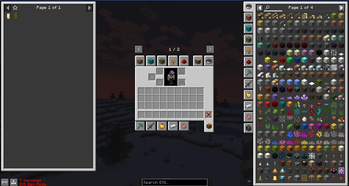
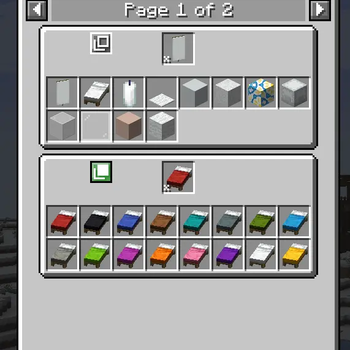
EMI++



EMI++ is a Minecraft mod that acts as an extension to EMI, adding a variety of useful features, improvements, and customization options to enhance the EMI experience.
Features
EMI++ provides the following enhancements:
Stack Grouping: Cleans up the EMI item list by grouping related items together (e.g., keeping all colored wools in one expandable entry).
- Includes built-in groups for: Animal Armor, Banner Patterns, Copper Blocks, Infested Blocks, Minecarts, Pressure Plates, Spawn Eggs, and more.
Creative Mode Tabs: Displays vanilla and modded Creative Mode tabs directly within the EMI interface for easy browsing.
Item Tabs: Improved navigation with Creative Mode-style item tabs.
Vanilla/Modern Theme: A unique visual theme for the sidebar, depending on the EMI theme.
Configuration
EMI++ offers extensive configuration options to tailor the interface to your needs. You can configure the mod via the in-game config screen or by editing the configuration file directly.
In-Game Config
- Open the EMI overlay.
- Click the Config (gear) icon.
- Scroll down to the EMI++ section.
- From here you can toggle features and access sub-menus (such as the "Manage" button for Creative Mode Tabs).
File Config
The configuration file is located at config/emixx/emixx-common.toml.
Creative Mode Tabs Settings
Controls the display and behavior of the creative tabs sidebar.
| Option | Type | Default | Description |
|---|---|---|---|
enableCreativeModeTabs |
Boolean | true |
Master switch to enable or disable the creative mode tab sidebar entirely. |
syncSelectedCreativeModeTab |
Boolean | true |
If enabled, clicking a tab in EMI++ will attempt to open that tab in the actual Creative Inventory screen (if open). |
disabledCreativeModeTabs |
List | ["minecraft:op_blocks"] |
A list of tabs that should be hidden from the EMI++ interface. |
Stack Groups Settings
Controls the item grouping behavior.
| Option | Type | Default | Description |
|---|---|---|---|
enableStackGroups |
Boolean | true |
Master switch to enable or disable stack grouping. If disabled, all items will appear individually in the list. |
Customizing Stack Groups
You can define new custom stack groups or modify existing ones using JSON files (via Resource Packs).
JSON Configuration (Resource Packs)
EMI++ loads stack groups from the stack_groups directory within the assets of the game (loaded via Resource Packs).
To create a custom group, create a JSON file in assets/<namespace>/stack_groups/my_group.json.
JSON Structure:
| Field | Type | Description |
|---|---|---|
id |
String | A unique identifier (e.g., "mypack:currency"). |
name |
String (Optional) | A translatable translation key for the group's name (e.g., "mypack.group.currency"). |
type |
String | Determines how the group is built. Can be "emixx:group", "emixx:tag", or "emixx:regex". |
enabled |
Boolean | Set to false to disable this group. |
contents |
List | (For emixx:group) A list of items or tags to include. |
exclusions |
List | (For emixx:group) Items to remove from the group (useful when using broad tags). |
regex |
String | (For emixx:regex) A regular expression pattern used to match item IDs dynamically. |
Example: Creating a shiny things group (standard list)
{
  "id": "mypack:shiny_things",
  "type": "emixx:group",
  "contents": [
    "minecraft:diamond",
    "minecraft:emerald",
    "minecraft:gold_ingot",
    "#c:glass_blocks"
  ],
  "exclusions": [
    "minecraft:purple_stained_glass"
  ]
}
Example: Creating a group using Regex
You can use the "emixx:regex" type to dynamically group items based on their naming patterns. The example below groups
all items that end in _sword (from any namespace):
{
  "id": "mypack:swords",
  "type": "emixx:regex",
  "regex": ".*:.*_sword",
  "name": "Swords"
}
Virtual Objects (Fluids, Modifiers, etc.):
EMI++ supports grouping non-item objects such as Fluids, Tinkers' Construct Modifiers, or JEED effects. To do this,
prefix the entry with its EMI registry type using the format <type>:<namespace>:<path>.
Example: Creating a special group
{
  "id": "mypack:basic_fluids",
  "name": "mypack.stack_group.basic_fluids",
  "type": "emixx:group",
  "contents": [
    "fluid:minecraft:water",
    "fluid:minecraft:lava",
    "jeed:effect:minecraft:speed"
  ]
}
Disabling Default Groups:
To disable a default stack group (e.g., spawn eggs), you must override its definition using a Resource Pack. Create a
file with the same path/ID as the default group and set "enabled": false.
Example: Disabling the spawn eggs group
File: assets/emixx/stack_groups/spawn_eggs.json
{
  "enabled": false
}
License

Версии
| Версия | Канал | Игра | Загрузчики | Дата | Скачать |
|---|---|---|---|---|---|
| 3.1.1-1.21.1-fabric | Релиз | 1.21.1 | fabric | 2 июля 2026 г. | .jar (157 КБ) |
| 3.1.1-1.21.1-neoforge | Релиз | 1.21.1 | neoforge | 2 июля 2026 г. | .jar (157 КБ) |
| 3.1.0-1.21.1-fabric | Релиз | 1.21.1 | fabric | 19 июня 2026 г. | .jar (157 КБ) |
| 3.1.0-1.21.1-neoforge | Релиз | 1.21.1 | neoforge | 19 июня 2026 г. | .jar (157 КБ) |
| 3.0.0-1.21.1-neoforge | Релиз | 1.21.1 | neoforge | 19 июня 2026 г. | .jar (156 КБ) |
| 3.0.0-1.21.1-fabric | Релиз | 1.21.1 | fabric | 19 июня 2026 г. | .jar (155 КБ) |
| 1.5.1 | Релиз | 1.20.1 | forge | 18 июня 2026 г. | .jar (390 КБ) |
| 1.5.1 | Релиз | 1.20.1 | fabric | 18 июня 2026 г. | .jar (204 КБ) |
| 2.3.0 | Релиз | 1.21.1 | fabric | 18 июня 2026 г. | .jar (382 КБ) |
| 2.3.0 | Релиз | 1.21.1 | neoforge | 18 июня 2026 г. | .jar (212 КБ) |
| 1.5.0 | Релиз | 1.20.1 | fabric | 18 июня 2026 г. | .jar (203 КБ) |
| 1.5.0 | Релиз | 1.20.1 | forge | 18 июня 2026 г. | .jar (389 КБ) |
| 2.2.0 | Релиз | 1.21.1 | fabric | 6 июня 2026 г. | .jar (380 КБ) |
| 2.2.0 | Релиз | 1.21.1 | neoforge | 6 июня 2026 г. | .jar (211 КБ) |
| 2.1.3 | Релиз | 1.21.1 | fabric | 30 мая 2026 г. | .jar (380 КБ) |
Показаны последние 15 из 73 версий. Все версии — на Modrinth.
Ченджлог
3.1.1-1.21.1-fabricРелиз1.21.1 · 2 июля 2026 г.
Fixed
- Improved automatic tag translations.
3.1.1-1.21.1-neoforgeРелиз1.21.1 · 2 июля 2026 г.
Fixed
- Improved automatic tag translations.
3.1.0-1.21.1-fabricРелиз1.21.1 · 19 июня 2026 г.
Added
- Added an optional
"priority"field to stack group configurations (default: 0). - Exclusions, tags, regex, and content rules can now be combined.
- You can now search for stack groups by name/ID directly in EMI.
- The previous method of using
%still works.
- The previous method of using
Fixed
- Fixed issues with custom Recreative icons.
3.1.0-1.21.1-neoforgeРелиз1.21.1 · 19 июня 2026 г.
Added
- Added an optional
"priority"field to stack group configurations (default: 0). - Exclusions, tags, regex, and content rules can now be combined.
- You can now search for stack groups by name/ID directly in EMI.
- The previous method of using
%still works.
- The previous method of using
Fixed
- Fixed issues with custom Recreative icons.
3.0.0-1.21.1-neoforgeРелиз1.21.1 · 19 июня 2026 г.
Added
- Added a config page to quickly disable any built-in (or added) stack groups.
- Items inside stack groups can now be rearranged in the config screen, or through the
stackGroupItemOrderconfig option.
Changed
- Rewrote the mod using Java instead of Kotlin.
- Fabric Language Kotlin and Kotlin for Forge are no longer dependencies.
Fixed
- Fixed issues with Create Simulated tabs.
- Performance improvements.
3.0.0-1.21.1-fabricРелиз1.21.1 · 19 июня 2026 г.
Added
- Added a config page to quickly disable any built-in (or added) stack groups.
- Items inside stack groups can now be rearranged in the config screen, or through the
stackGroupItemOrderconfig option.
Changed
- Rewrote the mod using Java instead of Kotlin.
- Fabric Language Kotlin and Kotlin for Forge are no longer dependencies.
Fixed
- Fixed issues with Create Simulated tabs.
- Performance improvements.
1.5.1Релиз1.20.1 · 18 июня 2026 г.
Fixed
- Ported fixes from 1.21.
1.5.1Релиз1.20.1 · 18 июня 2026 г.
Fixed
- Ported fixes from 1.21.
Полная история изменений — на Modrinth.
Комментарии
Загружаем…