 Mineforgian
Embellish Chat
Enhance Minecraft chat with item and inventory showcases, mentions, and formatting.
- Загрузки
- 4K
- Подписчики
- 27
- Обновлён
- 12 августа 2026 г.
- Лицензия
- Apache-2.0
Опубликован 10 июня 2025 г.




Embellish Chat enhances Minecraft chat with item and inventory showcases, built-in icons, mentions, and rich formatting. Players can show off gear, open showcased inventories, and use more expressive chat features without requiring the mod on their client.
✨ Key Features
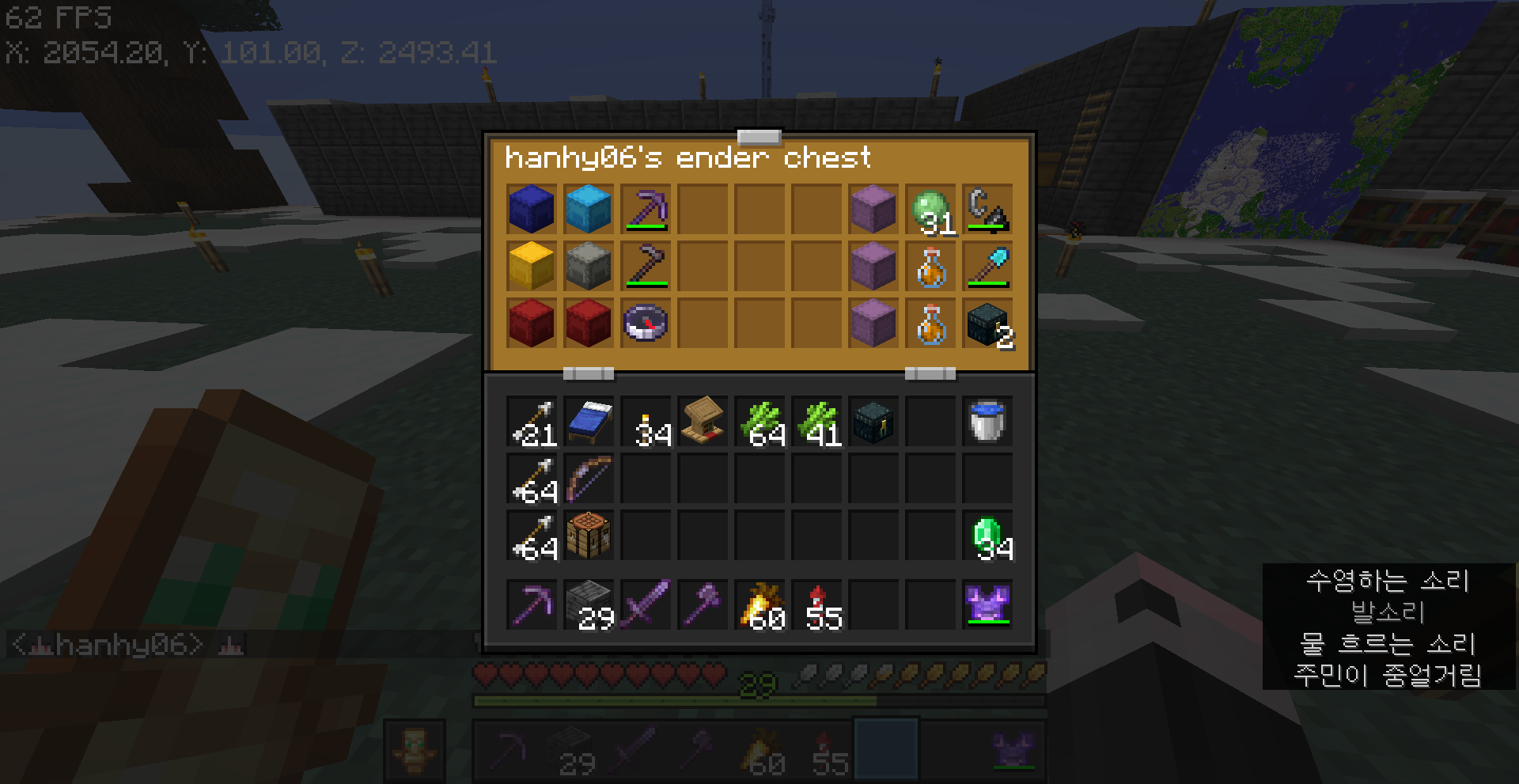
Item and Inventory Showcases Showcase your held item, inventory, or ender chest directly in chat with
[i],[inv], and[end], allowing other players to inspect them interactively.Built-in Chat Icons Use
:name:syntax to insert built-in Minecraft-based icons into messages.Rich Chat Formatting Style messages with bold, italic, underline, strikethrough, custom fonts, hex colors, gradients, presets, and rainbow effects.
Smart Mention System Mention players,
@here,@team(name),@world(name), or@everyonewith clear notifications. LuckPerms group mentions are also supported.Useful Chat Utilities Hover messages to see exact timestamps and click them to copy their content with the timestamp.
Server-side mod with optional client features Embellish Chat works fully server-side for all core chat features. Players do not need to install the mod on their client. It is marked as Server & Client only because an optional client-side mention autocomplete feature is available when the mod is installed on the client.
🛠️ Styling System
Use the following patterns directly in the chat window to apply styles:
| Feature | Syntax | Example | Showcase |
|---|---|---|---|
| Bold | **Text** |
**You really need to read this!** |
 |
| Italic | _Text_ |
_This is top secret..._ |
 |
| Underline | __Text__ |
__Check this out__ |
 |
| Strikethrough | ~~Text~~ |
~~We don’t talk about this anymore~~ |
 |
| Obfuscated | ||Text|| |
||Unreadable text|| |
 |
| Color (Hex) | [Text]<#RRGGBB> |
[Blue]<#0000FF> like the deep ocean |
 |
| Color (Gradient) | [Text]<#RRGGBB #R...> |
[Grraaaaaaadieeeeent]<#ffaaaa #aaaaff #aaffaa> |
 |
| Color (Preset) | [Text]<preset> |
[pink]<pink> pig |
 |
| Color (Rainbow) | [Text]<RAINBOW> |
look at this [rainbow]<RAINBOW> |
 |
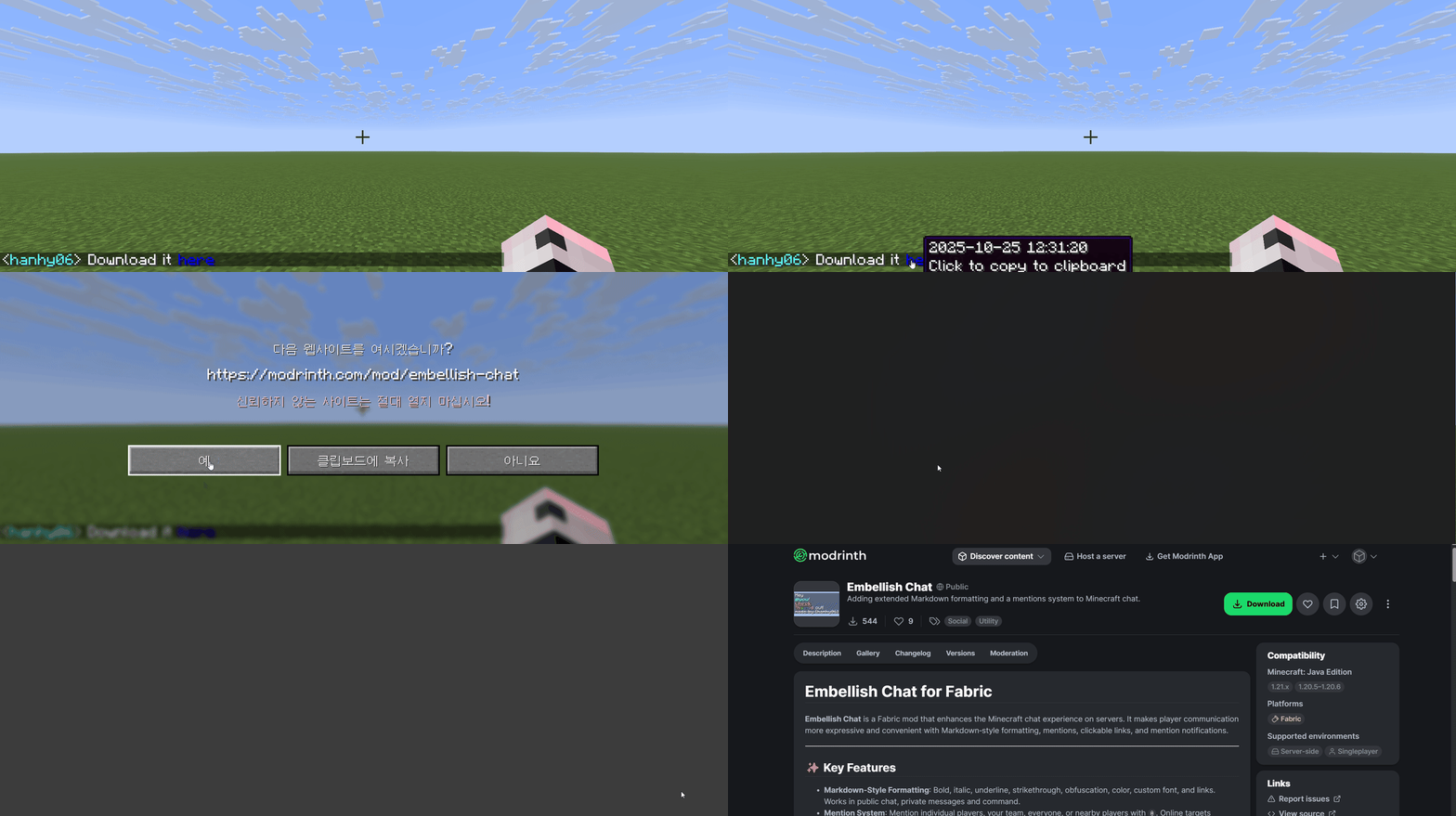
| Link | [Text](URL) |
Download it [here](https://modrinth.com/mod/embellish-chat) |
 |
| Font | [Text]{path} |
[Blorp Zorp]{minecraft:alt} |
 |
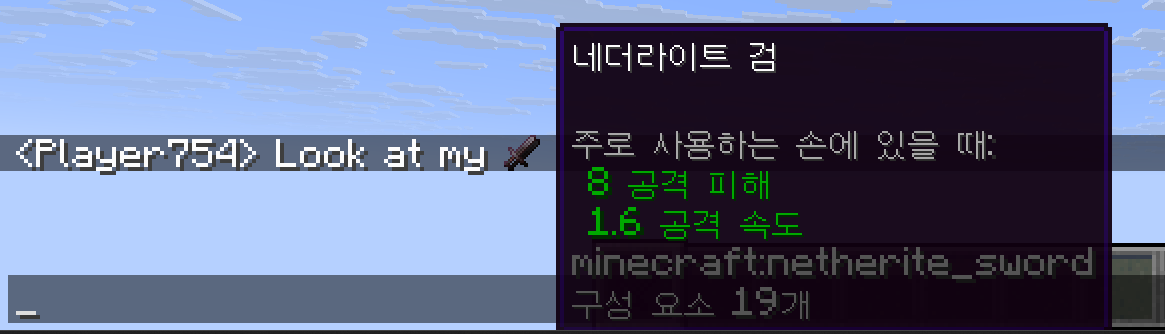
| Item | [i] |
Look at my [i] |
 |
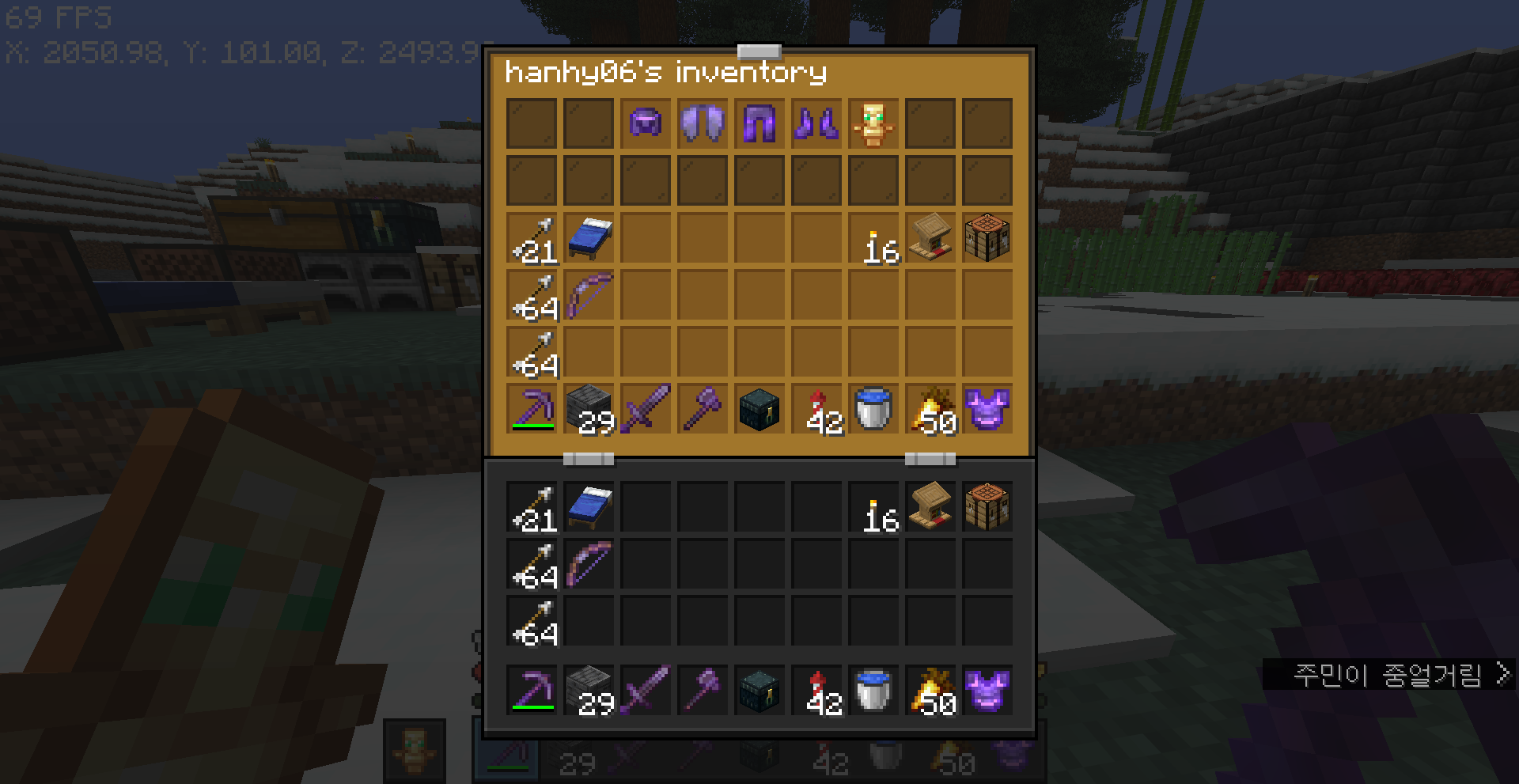
| Inventory | [inv] |
Look at my [inv] |
 |
| Ender Chest | [end] |
Look at my [end] |
 |
| Icon | :name: |
I :love: you |
 |
| Mention | @PlayerName |
Hello, @User |
 |
Notes
- Links: The built-in default link rules only match
https://URLs.- Colors: Presets (e.g.,
pink) are defined inpresets.json/color.- Fonts: The
pathrequires a namespaced ID (e.g.,minecraft:alt).- Icons & Item Sprites: Icon presets and item sprite rendering use atlas-backed components, so they are not supported on older Minecraft versions.
- More Info: For advanced syntax, style combinations, and detailed rules, refer to
/embellish-chat help styleor the StyleWiki.
🗣️ Mention System
| Target | Behavior |
|---|---|
@PlayerName |
Mentions a specific player. |
@team(name) |
Mentions all players in the specified team. |
@group(name) |
Mentions all players in the specified LuckPerms group. |
@world(name) |
Mentions all players in the specified world. |
@everyone |
Mentions every player on the server. |
@here |
Mentions players within a configurable radius (default: 64 blocks) in the same world. |
Notes
- Behavior: Successful mentions send a notification sound to the target and automatically tint the text (e.g., to the team color).
- Dependencies:
@grouprequires LuckPerms. Without it, the mention will be ignored.- Colors:
@teamand@Playermentions start from theteam_colorvalue inconfig.json, then use the target's team/display styling when available. Ifteam_colorisnull, the mention text is left uncolored.- Sound: The notification sound uses the UI category (falls back to the PLAYER category on Minecraft 1.21.5 and earlier).
- More Info: For a full list of mention types and advanced usage, refer to MentionWiki.
⌨️ Commands
Admin Commands
Requires OP Level 2 (or
GAMEMASTERS_CHECKon 1.21.11+).
/embellish-chat reloadReloads all configuration files under/config/embellish-chat/immediately./embellish-chat ban/pardon <player>Blocks or restores a player's access to all mod features./embellish-chat stress_test <ticks> <count> <text>Repeatedly simulates<count>messages for<ticks>to stress-test the server's message-processing performance./embellish-chat regex_test <regex> <text>Tests the provided<regex>against<text>and highlights capture groups to analyze the match result.
User Commands
Available to all players (no permission required).
/embellish-chat open <player>Opens the last shared inventory/ender/item of the specified player./embellish-chat help mentionDisplays the mention rules available to you based on your permissions./embellish-chat help styleDisplays the styling rules available to you based on your permissions./embellish-chat help iconDisplays available icon presets frompresets.json/iconinname - iconformat./embellish-chat notificationToggles your personal mention notification preferences. (Enabled/disabled globally bynotify_command_enabledin the config).
⚙️ Configuration
Embellish Chat provides powerful functionality through the use of regular expressions. Because regular expressions are inherently difficult, it is recommended to leverage various AI tools for rule creation and optimization.
Config
The configuration file is located at config/embellish-chat/config.json.
{
  //version
  "version": "current mod version",

  //setting
  "delimiter": ",",
  "timestamp": "yyyy-MM-dd HH:mm:ss",
  "command_alias": "ec",
  "url_color": "#0000EE",
  "team_color": "#FF55FF",
  "notify_command_enabled": true,
  "notify_mention_enabled": true,
  "require_same_channel": true,
  "disable_vanilla_chat_format": false,

  //player list
  "banned_players": [],
  "notify_off_players": []
}
- The
versionfield must not be modified manually. ConfigManagerwritesconfig.json,styles.json,mentions.json, andpresets.jsonseparately, then merges them into one runtimeConfigwhen loading.- Missing sections are restored from the built-in defaults during that merge step.
- If the stored
versiondoes not match the running mod version, the mod keeps the current in-memory configuration and ignores the mismatched load. - The core configuration logic is defined in
style_rulesandmention_rules. - Rules are processed from top to bottom, so placing a catch-all rule earlier may override more specific rules defined below.
- The
delimitervalue is internally handled as a regular expression; special characters such as|must be properly escaped. command_aliasregisters an additional root command that redirects to/embellish-chatwhen the config is loaded with a non-blank value.team_coloris the base color used when styling@teamand@Playermentions.- If
team_coloris missing or set tonull, those mentions are left without an automatic color. require_same_channellimitsADVANCED_CHAT_CHANNELmentions to the sender's current Advanced Chat channel when enabled.- Reloading the config refreshes the runtime style and mention processors, so updated
style_rules,mention_rules,timestamp,url_color,whitelist,color,icon, anditemvalues take effect immediately. - To avoid JSON syntax errors and ensure valid configurations, using the Web Config Generator is strongly recommended.
Styling
The configuration file is located at config/embellish-chat/styles.json.
{
  "style_rules": {
    "embellish-chat.chat": [
      {
        "pattern": " ... ",
        "comment": "...",
        "styles": [
          {
            "styleType": " ... ",
            "preset": " ... "
          }
        ]
      }
      ...
    ]
  }
}
pattern: This is a regular expression for scanning text. It must have two capture groups.group 1: This is text to be styled.group 2: This is text passed as an option.
comment: This comment is used in/embellish-chat help style.styles: Defines the styles to be applied to captured group 1.styleType: This is the style type. You can use all types listed in the StyleWiki.preset: This is a preset value. If a value is provided, it is always used; if it is empty, the content of the user's captured group 2 is used instead.
- Each top-level key such as
embellish-chat.chatis also treated as a permission node. - Each
styleTypename must match a handler registered in the runtimeStyleRegistry.
Mention
The configuration file is located at config/embellish-chat/mentions.json.
{
  "mention_rules": {
    "embellish-chat.mention": [
      {
        "pattern": " ... ",
        "comment": "...",

        "title": " ... ",
        "sound": { ... },

        "cooldown": 0,
        "onlyTarget": false,

        "mentions": [
          {
            "mentionType": " ... ",
            "preset": " ... "
          }
        ],
        "styles": [ ... ]
      }
      ...
    ]
  }
}
pattern: This is a regular expression for scanning text. It must have one capture group.- This is the mention option (e.g. team name, LuckPerms group).
comment: This comment is used in/embellish-chat help mention.title: This is the title shown on the mentioned player's screen.%player:displayname%is the display name of the player who sent the mention.
sound: Defines the notification sound settings.id: Sound identifier.category: Sound category.volume: Sound volume.pitch: Sound pitch.
cooldown: This is the mention cooldown time in seconds.- Set to
0to disable the cooldown.
- Set to
onlyTarget:- When set to
true, prevents the message from being broadcast globally and sends it only to the target.
- When set to
mentions: Defines the mention actions to be executed.mentionType: This is the mention type. You can use all types listed in the MentionWiki.preset: This is an optional preset value.
styles: Defines the styles to be applied when the mention is triggered.- Works the same way as in the styling rules section.
Presets
The configuration file is located at config/embellish-chat/presets.json.
{
  "message_header": {
    " ... ": " ... "
  },
  "whitelist": [
    " ... "
  ],
  "icon": {
    " ... ": {
      "atlas": " ... ",
      "sprite": " ... "
    }
  },
  "item": {
    " ... ": {
      "atlas": " ... ",
      "sprite": " ... "
    }
  },
  "color": {
    " ... ": " ... "
  }
}
message_header: Uses permission nodes as its keys, and each value is a message header parsed as a text component with placeholder tags.whitelist: This is used in theURLstyle type. If left empty, all URLs are allowed.icon: This is used byICON_PRESETand/embellish-chat help icon.item: This overrides atlas sprites used bySHOW_ITEMfor specific item IDs.color: This is used in the color presets for styling.
📜 Compatibility
✅ Fully Supported
- Fabric Permissions API (Embedded)
- The keys defined in
style_rulesandmention_rulesdirectly function as permission nodes. - Rules are evaluated from top to bottom based on the player's permissions.
- The keys defined in
- Text Placeholder API (Embedded)
- Supports dynamic placeholders in mention titles and style presets.
- Exclusive: Use
%embellish-chat:content%to access the raw, unparsed chat message.
- Styled Nicknames
- Supports mentioning players by nickname.
- LuckPerms
- Required for the
@groupmention type. Without it, group mentions will be ignored.
- Required for the
- Advanced Chat
- Required for the
@channelmention type. Without it, channel mentions will be ignored.
- Required for the
- Geyser (Bedrock Edition)
- Mentions between Java and Bedrock editions work seamlessly.
- Note: Advanced styling (hover text, click events) may not fully render on Bedrock clients.
- Minecraft LAN Play
- Tested in standard LAN worlds.
❗ Known Conflicts
- Styled Chat
- Styled Chat takes priority. If installed, Embellish Chat's styling features will be overridden.
- Mentions still work: The mention and notification system remains functional.
- Performance Tip: If you must use both, remove all entries in Embellish Chat's
style_rulesto prevent unnecessary background processing.
📜 License & Links
This project is licensed under the Apache License 2.0.
Please download the mod from the official sources below to ensure you have the latest, safest version. Linking to these pages is appreciated; please avoid re‑hosting files.
- Official Download (Modrinth): https://modrinth.com/mod/embellish-chat
- Source Code (GitHub): https://github.com/hanhy06/embellish-chat
✨ Feedback & Support
Found a bug or have a feature request? Please open an issue or reach out on the project’s Discord server.
If you want to receive updates sooner, please press the heart ❤️ on our Modrinth page! Your support means a lot!
Ченджлог
3.8.0+26.2-beta2Бета26.3-snapshot-8, 26.3-snapshot-9, 26.3-snapshot-10 · 12 августа 2026 г.
Fixed a bug where message_header (prefix) was not applied to players banned from using the mod's features.
3.8.0+26.2-beta1Бета26.3-snapshot-5, 26.3-snapshot-6, 26.3-snapshot-7 · 5 августа 2026 г.
3.8.0 Update
This update improves message formatting configuration and adds built-in LuckPerms prefix and suffix support.
Configuration Changes
- Renamed the
prefixconfiguration option tomessage_headerto better reflect its purpose. - Existing configurations using
prefixmust be updated to usemessage_header.
LuckPerms Integration
- Added built-in
%embellish-chat:prefix%and%embellish-chat:suffix%placeholders. - LuckPerms prefixes and suffixes can now be used without installing an additional placeholder integration mod.
3.7.0+26.2Релиз26.3-snapshot-1, 26.3-snapshot-2, 26.3-snapshot-3 · 20 июня 2026 г.
v3.7.0 Update
This v3.7.0 update focuses on adding optional client-side mention autocomplete and improving overall code stability.
New Features
Mention Autocomplete
- Mention autocomplete has been added.
- Function: Players with the client-side mod installed can see mention suggestions while typing in chat.
- Suggestions can be selected using
Tab, arrow keys, or the mouse wheel. - The core chat features still work with the mod installed only on the server.
Improvements
Code Stability Improvements
- Several internal systems have been cleaned up and improved.
- Function: Configuration handling, mention processing, selector error handling, notification toggling, and stress-test logic have been refined for better stability and maintainability.
3.7.0+26.2-beta1Бета26.2-pre-6, 26.2-rc-1, 26.2-rc-2 · 28 мая 2026 г.
- Restored placeholder support. Names should now appear correctly again in features such as mentions.
3.7.0+26.2-alpha1Альфа26.2-snapshot-7 · 16 мая 2026 г.
- Added mention auto-suggestions in the chat box. This feature requires client-side installation.
3.6.1+26.1Релиз26.1, 26.1.1, 26.1.2 · 16 мая 2026 г.
Hotfix
- Fixed a bug where types other than
PLAYERcouldn't perform actions.
3.6.0+26.1Релиз26.1, 26.1.1, 26.1.2 · 8 мая 2026 г.
v3.6.0 Update
This v3.6.0 update focuses on adding Advanced Chat channel mentions and making invalid input handling more explicit.
It also improves log readability for server operators and makes chat processing more stable when unexpected errors occur.
New Features & Improvements
Advanced Chat Channel Mention Support
- A new
ADVANCED_CHAT_CHANNELmention type has been added. - Function: You can now mention players who are currently in a specific Advanced Chat channel.
- In addition to player, team, world, LuckPerms group, permission-based, and custom targeting, channel-based targeting is now supported as well.
Same-Channel Mention Restriction
- A new
require_same_channelconfiguration option has been added. - Function: When enabled, players can only mention the Advanced Chat channel they are currently in.
- This option is enabled by default to help prevent players from unintentionally calling users in other channels.
Message Block Feedback
- Blocked messages can now show the reason directly to the sender.
- Function: When a message is blocked because of cooldown, invalid input, missing items, or channel restrictions, the sender receives a red notice.
- This makes it easier for users to understand why their message was not sent.
Input Handling Policy Changes
Invalid Mention Input Now Stops the Message
- Invalid mention targets are now treated as explicit input errors.
- Function: If a player tries to mention a non-existent player, team, world, selector, or Advanced Chat channel, the message is stopped and the sender is notified.
- Instead of silently ignoring invalid mentions, the mod now gives clear feedback so users can fix their input.
Mention Cooldown Now Stops the Message
- Messages that trigger an active mention cooldown are now stopped.
- Function: If a player tries to use a mention rule while it is still on cooldown, the message is not sent and a cooldown notice is shown.
- This makes mention cooldown behavior clearer and more predictable.
Item Style Handling Changed
- Item-related styles now require a valid item to be present.
- Function: If a player uses an item showcase style without an available item, the message is stopped and the sender is notified.
- Instead of sending an empty item showcase message, the mod now explains what is missing.
Logging & System Changes
Structured Log Prefixes Added
- Server logs now include clearer
embellish-chatcategory prefixes. - Function: Config, command, mention, style, integration, stress-test, lifecycle, and chat-log messages are now easier to distinguish.
- This makes troubleshooting configuration issues, integration problems, and chat processing failures more convenient.
Integration Logging Improved
- LuckPerms, Discord, and Advanced Chat integration logs have been clarified.
- Function: Missing integrations, failed Discord webhook delivery, and unavailable external APIs now produce more identifiable log messages.
- This helps server operators tell whether a problem comes from Embellish Chat itself or from an external integration.
Stability & Bug Fixes
Unexpected errors during style or mention processing are now handled more safely. → Intended message blocks still stop the message, while unexpected processing errors are logged and the original chat message can continue.
Config loading and saving logs have been made more specific. → Config read, validation, parse, and write failures are easier to identify from the server console.
3.6.0+26.1-beta2Бета26.1, 26.1.1, 26.1.2 · 7 мая 2026 г.
- Code stabilization
Комментарии
Загружаем…