 Mineforgian
Elite Holograms
Elite Holograms is a lightweight, server-side or single-player Minecraft mod for creating, managing, and customizing floating text (holograms). Perfect for server info, leaderboards, waypoints, dynamic stats, instructions, and decorative text.
- Загрузки
- 3K
- Подписчики
- 4
- Обновлён
- 2 июня 2026 г.
- Лицензия
- MIT
Опубликован 1 января 2026 г.
Elite Holograms
Elite Holograms is a lightweight, server-side or single-player Minecraft mod for creating, managing, and customizing floating text (holograms). Perfect for server info, leaderboards, waypoints, dynamic stats, instructions, and decorative text.
Inspired by Advanced Holograms. Supports Forge (1.19.2, 1.20.1) and NeoForge (1.21.1).
For full details, see the Wiki.
New in this release
- MiniMessage & Gradients – Full Kyori MiniMessage support means you can use gradients, hex colors, and advanced formatting in every hologram line.
- Item Holograms –
/eh createitem <id> <item> <text|with|pipes>spawns a floating item (armor stand head) above the caption, ideal for shops or showcases. - Animated Lines –
/eh animateline <id> <line#> <intervalSeconds> <frame1|frame2|...>rotates text automatically for countdowns, tips, etc. - Scoreboard Reliability – Scoreboard holograms no longer duplicate entries on restart; they reload clean data each time and store configs under
config/eliteholograms/scoreboard_holograms.json.
Key Features
- Persistent Holograms – Survive restarts with synchronous saves on shutdown.
- Easy Commands + Tab Completion – Intuitive syntax with Brigadier suggestions everywhere.
- Multi-Line Management – Add, insert, remove, and set text lines (including MiniMessage formatting).
- Position Control – Create at your location, teleport to holograms, and adjust vertically (
/eh movevertical). - Item & Scoreboard Holograms – Display floating items or top-player leaderboards with customizable update intervals.
- Animated Text – Per-line animation support for rotating messages.
- Advanced Permissions – Works with LuckPerms and FTB Ranks, OP level 2 fallback, granular nodes like
eliteholograms.create,eliteholograms.edit, etc. - Built-in Placeholder System – Real-time server/player stats without external APIs.
- Nearby Discovery –
/eh nearshows holograms around you. - Performance-Optimized – Separate manager thread, graceful shutdown, minimal overhead.
- Cross-Platform & Server-Side Only – Forge 1.19.2, Forge 1.20.1, NeoForge 1.21.1 (client not required for players).
Quick Command Reference
/eh create <id> <text...>/eh createitem <id> <item> <text|line|line>/eh addline|setline|insertline|removeline .../eh animateline <id> <line#> <interval> <frame1|frame2|...>/eh movehere <id>,/eh teleport <id>/eh movevertical <id> <up|down> <amount>(e.g.,up 1.5)/eh createscoreboard <id> <objective> [topCount] [updateInterval]/eh list,/eh near [page],/eh info <id>,/eh delete <id>,/eh reload
Placeholder Highlights
Server-Wide
%players%,%maxplayers%,%tps%,%uptime%,%memory%,%server_time%
Player-Specific
%player%,%player_rank%,%player_health%,%player_level%,%player_world%,%player_coords%,%player_gamemode%
Example: /eh addline motd Welcome %player%! Your rank is %player_rank%.
Permissions Overview
- Integrates with LuckPerms & FTB Ranks; OP fallback.
- Key nodes:
eliteholograms.create,eliteholograms.delete,eliteholograms.edit,eliteholograms.list,eliteholograms.info,eliteholograms.near,eliteholograms.teleport,eliteholograms.admin. - See the Permissions Guide for setup.
Screenshot:
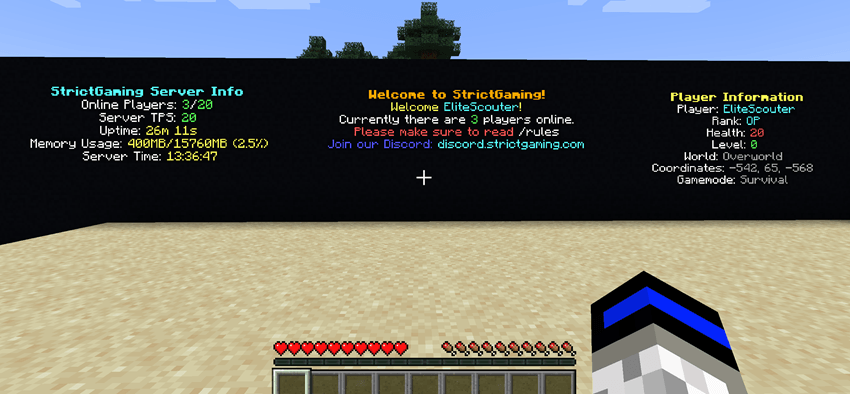
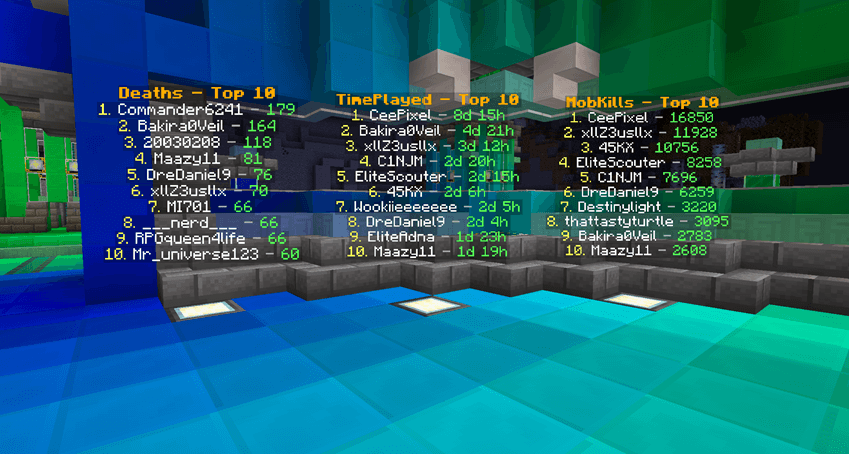
Designed for Forge 1.19.2 / 1.20.1 and NeoForge 1.21.1.
Ченджлог
26.1.2-1.1.0Релиз26.1.2 · 2 июня 2026 г.
All Editions - 1.1.0 - Scoreboard themes, backlights, tab-completion & live reload - 2026-06-01
Added
/eh backlight <id> <on|off|toggle> [height 1-10]- lights up a hologram with a vertical column of invisibleminecraft:lightblocks (the same block WorldEdit's//set lightuses) that rises from the ground directly below the hologram and goes straight up.1places a single light block on the ground behind the hologram;10places a ten-block-tall pillar. Every block in the column emits at full brightness (15). Defaults to a height of 3 when none is given. Backlights persist across restarts, follow the hologram when it moves or teleports, and are removed automatically when the hologram is deletedeliteholograms.backlightpermission - controls who can toggle backlights (OPs always have it)- The backlight column will not overwrite existing solid world content - cells that are air or water receive a light block (water stays waterlogged), and any cell already holding a non-air, non-water block is skipped
- Scoreboard holograms now support named themes for styling. Instead of the fixed orange/yellow/white/green look, server owners can pick a theme that restyles the header, player rows, and the "no data" line. Usage is now
/eh createscoreboard <id> <objective> [topCount] [interval] [theme]. When no theme is given, the configured default theme is applied so existing styling still works out of the box - A new editable config file
config/eliteholograms/scoreboard_themes.jsonships with starter themes (default,ocean,blood,mono,gold,rainbow) that owners can freely edit or extend with their own entries to match their server theme. The file is created on first run with inline help, is never overwritten once it exists (edits are preserved), and deleting it restores the starters. AdefaultThemekey controls which theme new boards use when none is specified - Theme format strings accept legacy
&colour codes (e.g.&a,&6,&l) as well as MiniMessage tags like<gradient:#FF0000:#00FF00>text</gradient>and<rainbow>text</rainbow>. Supported tokens are{objective}and{count}in headers and{rank},{player},{score}, and{time}in player rows. Themes can define a separatetimePlayerrow format for time-based objectives (playtime etc.); if omitted, the standardplayerformat is reused - New
/eh settheme <id> <theme>command to restyle an existing scoreboard hologram without recreating it. Both arguments tab-complete:<id>suggests existing scoreboard holograms and<theme>suggests the available theme names. The board re-renders immediately with the new style - The
<objective>argument now tab-completes every objective currently registered on the server scoreboard, and the[theme]argument tab-completes the available theme names, so owners no longer have to remember exact names
Changed
/eh reloadnow refreshes scoreboard themes from disk without a server restart. The chosen theme name is saved with each scoreboard hologram, so editingscoreboard_themes.jsonand running reload restyles every board using that theme. Boards created before this update keep working using their stored formats
Fixed
- The backlight column did not cover the full height of tall holograms (such as a Top-10 scoreboard), leaving the rows nearest the ground dark. A tall hologram stacks its lines downward from the anchor, so its lowest rows sit at or below the surface, while the old column rose a fixed number of blocks up from the ground and never lit the cells beside those bottom rows. The column now spans the entire hologram - from the ground (or the lowest line, whichever is lower) up through the top line - placing a light in every open cell along the way, with the configured height acting as a minimum. Solid/underground cells are still skipped so player builds are never overwritten
- Backlights applied to scoreboard holograms were lost on
/eh reloadand server restart. Scoreboard holograms are stored in their own config file (scoreboard_holograms.json) separate from regular holograms, and that file did not record backlight state, so a light column applied to a scoreboard board vanished as soon as the board was recreated. The scoreboard config now saves the backlight enabled flag and column height, and reapplies the light column when the board is recreated on load - Hologram armor stands highlighted by Forbidden & Arcanus' Spectral Eye (NeoForge 1.21.1 & 26.1 only) - the hologram armor stands were tagged with a scoreboard tag (
spectral_vision_unaffected), but Forbidden & Arcanus checks theforbidden_arcanus:spectral_vision_unaffectedentity-type tag, which is populated by a data pack rather than a per-entity scoreboard tag. Each NeoForge edition now ships that entity-type tag inside its jar (data/forbidden_arcanus/tags/entity_type/spectral_vision_unaffected.jsonaddingminecraft:armor_stand), so the Spectral Eye no longer reveals holograms. The Forge editions were unaffected
1.21.1-1.1.0Релиз1.21.9, 1.21.10, 1.21.11 · 2 июня 2026 г.
All Editions - 1.1.0 - Scoreboard themes, backlights, tab-completion & live reload - 2026-06-01
Added
/eh backlight <id> <on|off|toggle> [height 1-10]- lights up a hologram with a vertical column of invisibleminecraft:lightblocks (the same block WorldEdit's//set lightuses) that rises from the ground directly below the hologram and goes straight up.1places a single light block on the ground behind the hologram;10places a ten-block-tall pillar. Every block in the column emits at full brightness (15). Defaults to a height of 3 when none is given. Backlights persist across restarts, follow the hologram when it moves or teleports, and are removed automatically when the hologram is deletedeliteholograms.backlightpermission - controls who can toggle backlights (OPs always have it)- The backlight column will not overwrite existing solid world content - cells that are air or water receive a light block (water stays waterlogged), and any cell already holding a non-air, non-water block is skipped
- Scoreboard holograms now support named themes for styling. Instead of the fixed orange/yellow/white/green look, server owners can pick a theme that restyles the header, player rows, and the "no data" line. Usage is now
/eh createscoreboard <id> <objective> [topCount] [interval] [theme]. When no theme is given, the configured default theme is applied so existing styling still works out of the box - A new editable config file
config/eliteholograms/scoreboard_themes.jsonships with starter themes (default,ocean,blood,mono,gold,rainbow) that owners can freely edit or extend with their own entries to match their server theme. The file is created on first run with inline help, is never overwritten once it exists (edits are preserved), and deleting it restores the starters. AdefaultThemekey controls which theme new boards use when none is specified - Theme format strings accept legacy
&colour codes (e.g.&a,&6,&l) as well as MiniMessage tags like<gradient:#FF0000:#00FF00>text</gradient>and<rainbow>text</rainbow>. Supported tokens are{objective}and{count}in headers and{rank},{player},{score}, and{time}in player rows. Themes can define a separatetimePlayerrow format for time-based objectives (playtime etc.); if omitted, the standardplayerformat is reused - New
/eh settheme <id> <theme>command to restyle an existing scoreboard hologram without recreating it. Both arguments tab-complete:<id>suggests existing scoreboard holograms and<theme>suggests the available theme names. The board re-renders immediately with the new style - The
<objective>argument now tab-completes every objective currently registered on the server scoreboard, and the[theme]argument tab-completes the available theme names, so owners no longer have to remember exact names
Changed
/eh reloadnow refreshes scoreboard themes from disk without a server restart. The chosen theme name is saved with each scoreboard hologram, so editingscoreboard_themes.jsonand running reload restyles every board using that theme. Boards created before this update keep working using their stored formats
Fixed
- The backlight column did not cover the full height of tall holograms (such as a Top-10 scoreboard), leaving the rows nearest the ground dark. A tall hologram stacks its lines downward from the anchor, so its lowest rows sit at or below the surface, while the old column rose a fixed number of blocks up from the ground and never lit the cells beside those bottom rows. The column now spans the entire hologram - from the ground (or the lowest line, whichever is lower) up through the top line - placing a light in every open cell along the way, with the configured height acting as a minimum. Solid/underground cells are still skipped so player builds are never overwritten
- Backlights applied to scoreboard holograms were lost on
/eh reloadand server restart. Scoreboard holograms are stored in their own config file (scoreboard_holograms.json) separate from regular holograms, and that file did not record backlight state, so a light column applied to a scoreboard board vanished as soon as the board was recreated. The scoreboard config now saves the backlight enabled flag and column height, and reapplies the light column when the board is recreated on load - Hologram armor stands highlighted by Forbidden & Arcanus' Spectral Eye (NeoForge 1.21.1 & 26.1 only) - the hologram armor stands were tagged with a scoreboard tag (
spectral_vision_unaffected), but Forbidden & Arcanus checks theforbidden_arcanus:spectral_vision_unaffectedentity-type tag, which is populated by a data pack rather than a per-entity scoreboard tag. Each NeoForge edition now ships that entity-type tag inside its jar (data/forbidden_arcanus/tags/entity_type/spectral_vision_unaffected.jsonaddingminecraft:armor_stand), so the Spectral Eye no longer reveals holograms. The Forge editions were unaffected
1.20.1-1.1.0Релиз1.20.4, 1.20.5, 1.20.6 · 2 июня 2026 г.
All Editions - 1.1.0 - Scoreboard themes, backlights, tab-completion & live reload - 2026-06-01
Added
/eh backlight <id> <on|off|toggle> [height 1-10]- lights up a hologram with a vertical column of invisibleminecraft:lightblocks (the same block WorldEdit's//set lightuses) that rises from the ground directly below the hologram and goes straight up.1places a single light block on the ground behind the hologram;10places a ten-block-tall pillar. Every block in the column emits at full brightness (15). Defaults to a height of 3 when none is given. Backlights persist across restarts, follow the hologram when it moves or teleports, and are removed automatically when the hologram is deletedeliteholograms.backlightpermission - controls who can toggle backlights (OPs always have it)- The backlight column will not overwrite existing solid world content - cells that are air or water receive a light block (water stays waterlogged), and any cell already holding a non-air, non-water block is skipped
- Scoreboard holograms now support named themes for styling. Instead of the fixed orange/yellow/white/green look, server owners can pick a theme that restyles the header, player rows, and the "no data" line. Usage is now
/eh createscoreboard <id> <objective> [topCount] [interval] [theme]. When no theme is given, the configured default theme is applied so existing styling still works out of the box - A new editable config file
config/eliteholograms/scoreboard_themes.jsonships with starter themes (default,ocean,blood,mono,gold,rainbow) that owners can freely edit or extend with their own entries to match their server theme. The file is created on first run with inline help, is never overwritten once it exists (edits are preserved), and deleting it restores the starters. AdefaultThemekey controls which theme new boards use when none is specified - Theme format strings accept legacy
&colour codes (e.g.&a,&6,&l) as well as MiniMessage tags like<gradient:#FF0000:#00FF00>text</gradient>and<rainbow>text</rainbow>. Supported tokens are{objective}and{count}in headers and{rank},{player},{score}, and{time}in player rows. Themes can define a separatetimePlayerrow format for time-based objectives (playtime etc.); if omitted, the standardplayerformat is reused - New
/eh settheme <id> <theme>command to restyle an existing scoreboard hologram without recreating it. Both arguments tab-complete:<id>suggests existing scoreboard holograms and<theme>suggests the available theme names. The board re-renders immediately with the new style - The
<objective>argument now tab-completes every objective currently registered on the server scoreboard, and the[theme]argument tab-completes the available theme names, so owners no longer have to remember exact names
Changed
/eh reloadnow refreshes scoreboard themes from disk without a server restart. The chosen theme name is saved with each scoreboard hologram, so editingscoreboard_themes.jsonand running reload restyles every board using that theme. Boards created before this update keep working using their stored formats
Fixed
- The backlight column did not cover the full height of tall holograms (such as a Top-10 scoreboard), leaving the rows nearest the ground dark. A tall hologram stacks its lines downward from the anchor, so its lowest rows sit at or below the surface, while the old column rose a fixed number of blocks up from the ground and never lit the cells beside those bottom rows. The column now spans the entire hologram - from the ground (or the lowest line, whichever is lower) up through the top line - placing a light in every open cell along the way, with the configured height acting as a minimum. Solid/underground cells are still skipped so player builds are never overwritten
- Backlights applied to scoreboard holograms were lost on
/eh reloadand server restart. Scoreboard holograms are stored in their own config file (scoreboard_holograms.json) separate from regular holograms, and that file did not record backlight state, so a light column applied to a scoreboard board vanished as soon as the board was recreated. The scoreboard config now saves the backlight enabled flag and column height, and reapplies the light column when the board is recreated on load - Hologram armor stands highlighted by Forbidden & Arcanus' Spectral Eye (NeoForge 1.21.1 & 26.1 only) - the hologram armor stands were tagged with a scoreboard tag (
spectral_vision_unaffected), but Forbidden & Arcanus checks theforbidden_arcanus:spectral_vision_unaffectedentity-type tag, which is populated by a data pack rather than a per-entity scoreboard tag. Each NeoForge edition now ships that entity-type tag inside its jar (data/forbidden_arcanus/tags/entity_type/spectral_vision_unaffected.jsonaddingminecraft:armor_stand), so the Spectral Eye no longer reveals holograms. The Forge editions were unaffected
1.19.2-1.1.0Релиз1.19.2, 1.19.3, 1.19.4 · 2 июня 2026 г.
All Editions - 1.1.0 - Scoreboard themes, backlights, tab-completion & live reload - 2026-06-01
Added
/eh backlight <id> <on|off|toggle> [height 1-10]- lights up a hologram with a vertical column of invisibleminecraft:lightblocks (the same block WorldEdit's//set lightuses) that rises from the ground directly below the hologram and goes straight up.1places a single light block on the ground behind the hologram;10places a ten-block-tall pillar. Every block in the column emits at full brightness (15). Defaults to a height of 3 when none is given. Backlights persist across restarts, follow the hologram when it moves or teleports, and are removed automatically when the hologram is deletedeliteholograms.backlightpermission - controls who can toggle backlights (OPs always have it)- The backlight column will not overwrite existing solid world content - cells that are air or water receive a light block (water stays waterlogged), and any cell already holding a non-air, non-water block is skipped
- Scoreboard holograms now support named themes for styling. Instead of the fixed orange/yellow/white/green look, server owners can pick a theme that restyles the header, player rows, and the "no data" line. Usage is now
/eh createscoreboard <id> <objective> [topCount] [interval] [theme]. When no theme is given, the configured default theme is applied so existing styling still works out of the box - A new editable config file
config/eliteholograms/scoreboard_themes.jsonships with starter themes (default,ocean,blood,mono,gold,rainbow) that owners can freely edit or extend with their own entries to match their server theme. The file is created on first run with inline help, is never overwritten once it exists (edits are preserved), and deleting it restores the starters. AdefaultThemekey controls which theme new boards use when none is specified - Theme format strings accept legacy
&colour codes (e.g.&a,&6,&l) as well as MiniMessage tags like<gradient:#FF0000:#00FF00>text</gradient>and<rainbow>text</rainbow>. Supported tokens are{objective}and{count}in headers and{rank},{player},{score}, and{time}in player rows. Themes can define a separatetimePlayerrow format for time-based objectives (playtime etc.); if omitted, the standardplayerformat is reused - New
/eh settheme <id> <theme>command to restyle an existing scoreboard hologram without recreating it. Both arguments tab-complete:<id>suggests existing scoreboard holograms and<theme>suggests the available theme names. The board re-renders immediately with the new style - The
<objective>argument now tab-completes every objective currently registered on the server scoreboard, and the[theme]argument tab-completes the available theme names, so owners no longer have to remember exact names
Changed
/eh reloadnow refreshes scoreboard themes from disk without a server restart. The chosen theme name is saved with each scoreboard hologram, so editingscoreboard_themes.jsonand running reload restyles every board using that theme. Boards created before this update keep working using their stored formats
Fixed
- The backlight column did not cover the full height of tall holograms (such as a Top-10 scoreboard), leaving the rows nearest the ground dark. A tall hologram stacks its lines downward from the anchor, so its lowest rows sit at or below the surface, while the old column rose a fixed number of blocks up from the ground and never lit the cells beside those bottom rows. The column now spans the entire hologram - from the ground (or the lowest line, whichever is lower) up through the top line - placing a light in every open cell along the way, with the configured height acting as a minimum. Solid/underground cells are still skipped so player builds are never overwritten
- Backlights applied to scoreboard holograms were lost on
/eh reloadand server restart. Scoreboard holograms are stored in their own config file (scoreboard_holograms.json) separate from regular holograms, and that file did not record backlight state, so a light column applied to a scoreboard board vanished as soon as the board was recreated. The scoreboard config now saves the backlight enabled flag and column height, and reapplies the light column when the board is recreated on load - Hologram armor stands highlighted by Forbidden & Arcanus' Spectral Eye (NeoForge 1.21.1 & 26.1 only) - the hologram armor stands were tagged with a scoreboard tag (
spectral_vision_unaffected), but Forbidden & Arcanus checks theforbidden_arcanus:spectral_vision_unaffectedentity-type tag, which is populated by a data pack rather than a per-entity scoreboard tag. Each NeoForge edition now ships that entity-type tag inside its jar (data/forbidden_arcanus/tags/entity_type/spectral_vision_unaffected.jsonaddingminecraft:armor_stand), so the Spectral Eye no longer reveals holograms. The Forge editions were unaffected
26.1.2-1.0.0Релиз26.1.2 · 1 мая 2026 г.
NeoForge 26.1.2 - 1.0.0 - 2025-05-01
Added
- Initial release for Minecraft 26.1 (NeoForge 26.1.2)
- Full port of all features from the NeoForge 1.21.1 edition
- Updated to Java 25, Gradle 9.2.1, and ModDevGradle 2.0.141
- Adapted to Minecraft 26.1 API changes including the new permission system, deobfuscated mappings, and updated network packets
1.21.1-1.0.9Релиз1.21.9, 1.21.10, 1.21.11 · 30 апреля 2026 г.
NeoForge 1.21.1 - 1.0.9 - 2025-04-29
Fixed
- Reload command wiping all holograms - the
/eh reloadcommand called an async save then immediately cleared the hologram map. The async save would run after the map was already empty, writing 0 holograms to disk and permanently deleting them. Reload now uses a synchronous save and letsload()handle the clear internally - Placeholders never updating - server placeholders like
%players%,%tps%,%uptime%, and player-specific placeholders like%player%were only resolved once when a hologram was created or a player first saw it. Static hologram lines now refresh placeholders every second for all nearby players - Excessive config save spam from scoreboard holograms - scoreboard holograms (e.g.
TimePlayed) triggered a full config save to disk every time their display updated. For tick-based objectives where scores change constantly, this caused saves every few seconds. Scoreboard display updates now rebuild lines without triggering a save, since the scoreboard config is persisted separately
1.21.1-1.0.8Релиз1.21.9, 1.21.10, 1.21.11 · 4 марта 2026 г.
1.0.8
Fixes
- Scoreboard holograms – Holograms now show offline players. Previously they only listed online players because the 1.21 Scoreboard API had changed and the old reflection-based code failed, causing a fallback to online-only data. Neo21 now uses
listPlayerScoresso offline player scores are displayed correctly.
1.21.1-1.0.5Релиз1.21.9, 1.21.10, 1.21.11 · 1 января 2026 г.
Changelog 1.0.7
New Features
Command Block Support
- Added
/eh moveto <id> <x> <y> <z> [world]- Move holograms to specific coordinates - Works with command blocks
- Optional world parameter (defaults to current world)
- Example:
/eh moveto myHolo 100 64 200
- Added
/eh createat <id> <x> <y> <z> [text]- Create holograms at specific coordinates - Works with command blocks
- Optional text parameter (defaults to example text)
- Example:
/eh createat myHolo 100 64 200 Hello World
Enhanced Text Formatting
Added support for MiniMessage named color tags in hologram text:
- Basic colors:
<red>,<blue>,<green>,<yellow>,<gold>,<aqua>,<white>,<black>,<gray>,<dark_gray> - Dark variants:
<dark_red>,<dark_blue>,<dark_green>,<dark_aqua>,<dark_purple> - Special:
<light_purple>
Added support for formatting tags:
<bold>or<b>- Bold text<italic>or<i>- Italic text<underlined>or<u>- Underlined text<strikethrough>or<st>- Strikethrough text<obfuscated>or<obf>- Obfuscated/magic text<reset>- Reset formatting
Example usage: /eh create test <red>Red Text</red> <bold>Bold</bold> <gradient:#FF0000:#00FF00>Gradient</gradient>
Improvements
- Command blocks now have full access to create and move commands with coordinate parameters
- Existing gradient and rainbow text formatting continues to work as before
- All commands maintain backward compatibility
Applies To
- Forge 1.19.2
- Forge 1.20.x
- NeoForge 1.21.x
Комментарии
Загружаем…