 Mineforgian
Effortless Building
Makes building easier by providing tools like mirrors, arrays, build modes and a block randomizer. For survival and creative mode.
- Загрузки
- 1.2M
- Подписчики
- 1K
- Обновлён
- 1 августа 2026 г.
- Лицензия
- LGPL-3.0-only
Опубликован 29 июля 2023 г.
Many mods make it easier to break blocks, but not many focus on placing them. Even the most experienced players still often place blocks one by one. This mod makes building easier by providing tools like mirrors, arrays, build modes and a block randomizer.
- Place and break multiple blocks at once
- Mirror blocks in realtime
- Place random blocks using the Randomizer Bag
- Undo and redo
- Fully supported in survival mode
Build Modes
Hold ALT to open the radial menu and select a build mode. With a block in hand, right-click to pick the starting position. Aim somewhere else, then right-click again to build the shape.
Build modes can be used to place blocks, break blocks, and interact with certain blocks. When holding a tool, right-clicking will interact with all the blocks in the shape. For example, stripping logs with an axe, pathing with a shovel, tilling with a hoe, and placing liquids with a bucket.
Available build modes:
- Disabled
- Single
- Line
- Wall
- Floor
- Cube
- Diagonal Line
- Diagonal Wall
- Slope Floor
- Circle
- Cylinder
- Sphere
On the right side of the radial menu you can find additional options for each build mode. On the left side you can find buttons for undo/redo, replace options, opening the modifier settings and config screens.
More videos
Build Modifiers
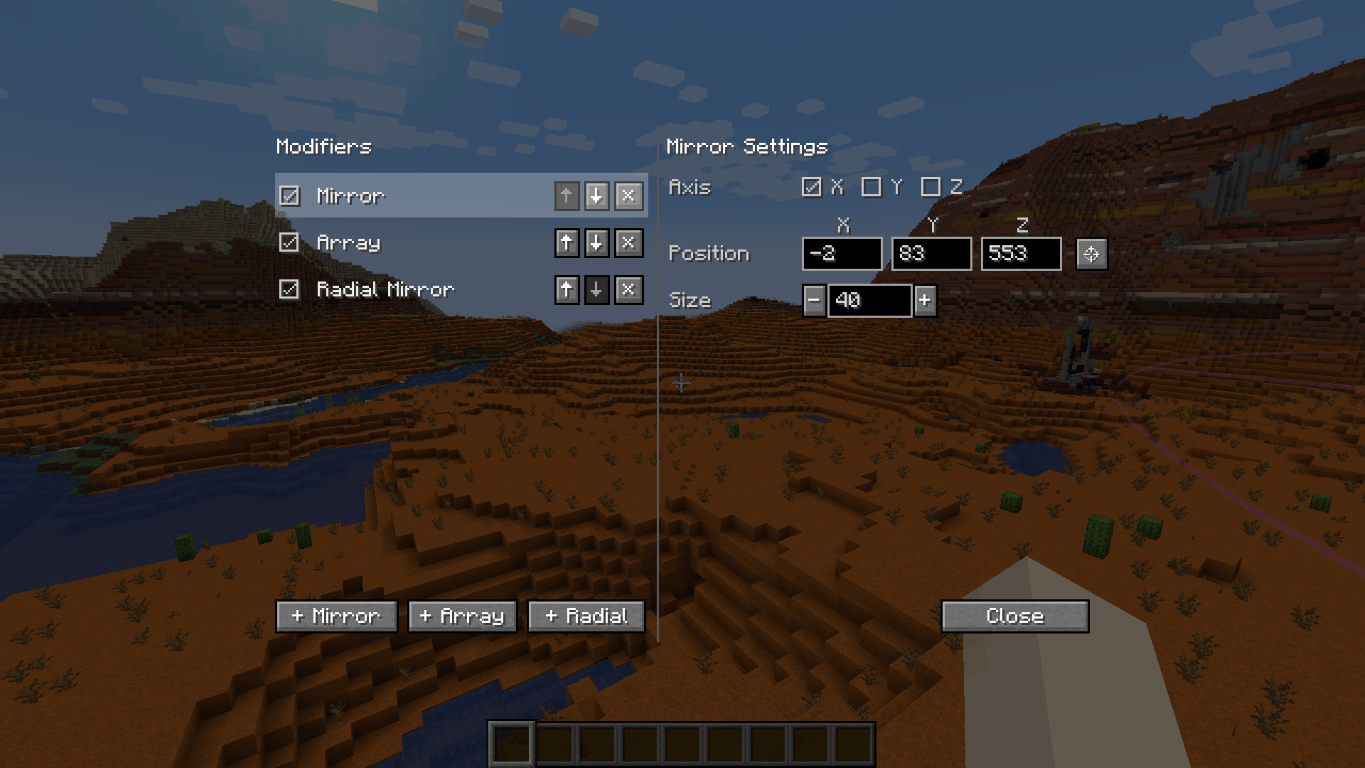
Modifiers can place additional blocks for each block you placed. You can enable any number of modifiers in the modifier settings. Open the modifier settings with the button in the radial menu, or use the keybind (default NUMPAD+).
- Mirror. Place a mirror at a position of a certain size. Each block placed on one side gets mirrored to the other side.
- Array. Copies the block you placed in a certain direction a certain number of times. Useful for repeated builds like tunnels and walls.
- Radial Mirror. Divides an area in slices around a central point. Each slice copies your block placements.
Randomizer Tool
This item allows you to place random blocks. Configure the tool by shift-rightclicking when in hand.
- Use it in combination with build modes and build modifiers.
- While placing a shape, you can open the randomizer tool and change its settings. You can preview those settings in realtime!
- Setting the ratio of an empty slot will cause air gaps to appear in your shape.
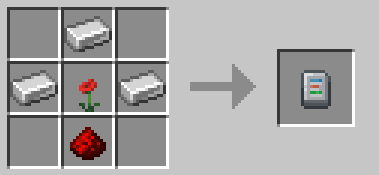
Crafting recipe: 3 iron ingots, 1 redstone dust, 1 any flower.
Replace Options
Use the button to the left of the radial menu to cycle through replace options.
- Replace Only Air: You can only place blocks where there was air. Replaceables such as short grass and ferns can still be replaced.
- Replace Blocks And Air: You can replace blocks and air.
- Replace Only Blocks: You can only replace blocks, not air.
- Filter By Offhand: You can only replace blocks that match the block in your offhand.
Undo and Redo
Press CTRL+Z to undo and CTRL+Y to redo placing blocks.
Survival-friendly
Playing this mod in survival mode is fully supported. All actions consume the right number of blocks from your inventory. It is fully configurable, so you can find settings that feel balanced for you.
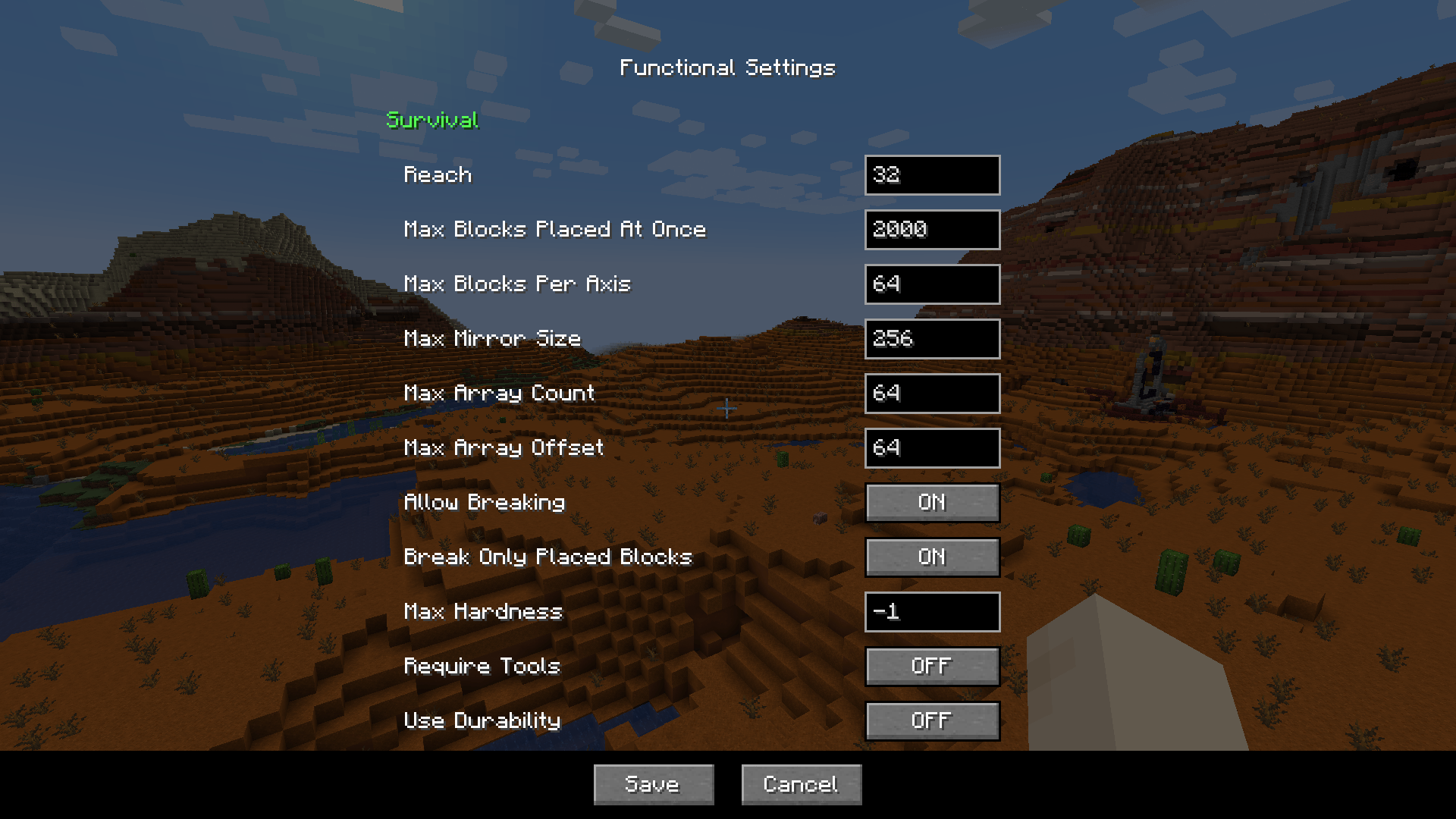
Here's a small sample of what you can configure:
- How far away you can place blocks
- The maximum number of blocks placed at once
- The maximum size of the mirror and array
- Whether you can break and replace multiple blocks at once, including if tools are required, if they should use durability, etc. By default, you can break and replace blocks that you placed in the same play session.
The functional settings can be found in the radial menu. On a server, you can only edit functional settings if you are an admin.
FAQ
"Can I add this mod to my modpack?"
Yes, certainly!
"Is this mod available for bedrock edition?"
Yes, ExterLeo made a version that works in Bedrock Edition.
"Is this a client-side only mod?"
No, it needs to be installed on both server and client. The server part places the blocks in bulk. If there was no server part, the client would need to send all the blocks individually, which will overload most servers.
"Am I allowed to make my own version of this mod?"
Yes, as long as you comply with the LGPL-3.0 license (usually this means: link to this page, license your modification under LGPL-3.0, make the code visible and state significant changes).
Mod Spotlights
Mod Spotlights
Credits
Many thanks to Grimmauld for porting to 1.16, Dashos for fixing 'fake player' related crashes and manapart for porting to 1.19!
Radial Menu inspired by Chisels & Bits by AlgorithmX2
Ченджлог
4.3Релиз26.2 · 1 августа 2026 г.
- Added the Randomizer Tool, with ghost item slots, ratios, a smart tooltip and synergy with build modes and modifiers.
- Added Applied Energistics 2 integration. If you have a wireless terminal, it will automatically pull items from the system. Only on NeoForge, as there is no AE2 fabric version for 1.21.1 yet.
- Added a welcome message to first time users, explaining to hold ALT to open the build menu. This can be disabled in the server config (aka Functional Settings).
- Added a hint that shows up the first time activating a build mode.
- Fixed a bug where Functional Settings were not accessible in singleplayer.
- Fixed a bug where switching to Disable build mode did not cancel the placing and breaking sequence that was in progress.
- Left-clicking a block that you arent allowed to break in survival now lets you break it the vanilla way.
- Items with custom data such as shulker boxes are now handled correctly.
- Shulker boxes no longer lose their inventory when placed with this mod.
- Fixed block count not showing up.
- Fixed water and block previews not showing up behind mirror planes.
4.3Релиз26.2 · 1 августа 2026 г.
- Added the Randomizer Tool, with ghost item slots, ratios, a smart tooltip and synergy with build modes and modifiers.
- Added Applied Energistics 2 integration. If you have a wireless terminal, it will automatically pull items from the system. Only on NeoForge, as there is no AE2 fabric version for 1.21.1 yet.
- Added a welcome message to first time users, explaining to hold ALT to open the build menu. This can be disabled in the server config (aka Functional Settings).
- Added a hint that shows up the first time activating a build mode.
- Fixed a bug where Functional Settings were not accessible in singleplayer.
- Fixed a bug where switching to Disable build mode did not cancel the placing and breaking sequence that was in progress.
- Left-clicking a block that you arent allowed to break in survival now lets you break it the vanilla way.
- Items with custom data such as shulker boxes are now handled correctly.
- Shulker boxes no longer lose their inventory when placed with this mod.
- Fixed block count not showing up.
- Fixed water and block previews not showing up behind mirror planes.
4.3Релиз26.1.2 · 1 августа 2026 г.
- Fixed block count not showing up.
- Fixed water and block previews not showing up behind mirror planes.
4.3Релиз26.1.2 · 1 августа 2026 г.
- Fixed block count not showing up.
- Fixed water and block previews not showing up behind mirror planes.
4.3Релиз1.21.11 · 1 августа 2026 г.
- Fixed block count not showing up.
- Fixed water and block previews not showing up behind mirror planes.
4.2Релиз26.1.2 · 1 августа 2026 г.
- Added the Randomizer Tool, with ghost item slots, ratios, a smart tooltip and synergy with build modes and modifiers.
- Added Applied Energistics 2 integration. If you have a wireless terminal, it will automatically pull items from the system. Only on NeoForge, as there is no AE2 fabric version for 1.21.1 yet.
- Added a welcome message to first time users, explaining to hold ALT to open the build menu. This can be disabled in the server config (aka Functional Settings).
- Added a hint that shows up the first time activating a build mode.
- Fixed a bug where Functional Settings were not accessible in singleplayer.
- Fixed a bug where switching to Disable build mode did not cancel the placing and breaking sequence that was in progress.
- Left-clicking a block that you arent allowed to break in survival now lets you break it the vanilla way.
- Items with custom data such as shulker boxes are now handled correctly.
- Shulker boxes no longer lose their inventory when placed with this mod.
4.2Релиз26.1.2 · 1 августа 2026 г.
- Added the Randomizer Tool, with ghost item slots, ratios, a smart tooltip and synergy with build modes and modifiers.
- Added Applied Energistics 2 integration. If you have a wireless terminal, it will automatically pull items from the system. Only on NeoForge, as there is no AE2 fabric version for 1.21.1 yet.
- Added a welcome message to first time users, explaining to hold ALT to open the build menu. This can be disabled in the server config (aka Functional Settings).
- Added a hint that shows up the first time activating a build mode.
- Fixed a bug where Functional Settings were not accessible in singleplayer.
- Fixed a bug where switching to Disable build mode did not cancel the placing and breaking sequence that was in progress.
- Left-clicking a block that you arent allowed to break in survival now lets you break it the vanilla way.
- Items with custom data such as shulker boxes are now handled correctly.
- Shulker boxes no longer lose their inventory when placed with this mod.
4.2Релиз1.21.11 · 31 июля 2026 г.
- Added the Randomizer Tool, with ghost item slots, ratios, a smart tooltip and synergy with build modes and modifiers.
- Added Applied Energistics 2 integration. If you have a wireless terminal, it will automatically pull items from the system. Only on NeoForge, as there is no AE2 fabric version for 1.21.1 yet.
- Added a welcome message to first time users, explaining to hold ALT to open the build menu. This can be disabled in the server config (aka Functional Settings).
- Added a hint that shows up the first time activating a build mode.
- Fixed a bug where Functional Settings were not accessible in singleplayer.
- Fixed a bug where switching to Disable build mode did not cancel the placing and breaking sequence that was in progress.
- Left-clicking a block that you arent allowed to break in survival now lets you break it the vanilla way.
- Items with custom data such as shulker boxes are now handled correctly.
- Shulker boxes no longer lose their inventory when placed with this mod.
Комментарии
Загружаем…