 Mineforgian
Discord Presence
Take control of your Discord Rich Presence (RPC) from in game. Click the live Discord card to edit text, images and buttons, use 26 real time placeholders, and set a custom Discord status per server. Client side only. Fabric, NeoForge and Forge.
- Загрузки
- 2K
- Подписчики
- 3
- Обновлён
- 16 августа 2026 г.
- Лицензия
- MIT
Опубликован 14 апреля 2026 г.
Show your Minecraft session on Discord, exactly the way you want it
DiscordPresence is a Discord Rich Presence mod for Minecraft. Instead of config files, you get a live editor: press F6 (or the Config button in the mod list) and the actual Discord card appears on screen. Click the text to change the text. Click an image to pick an image. Click a button to add a link. What you see is what Discord shows, updating as you type.
Client side only. Nothing to install on the server, and it works in singleplayer, on any server, and in every menu.
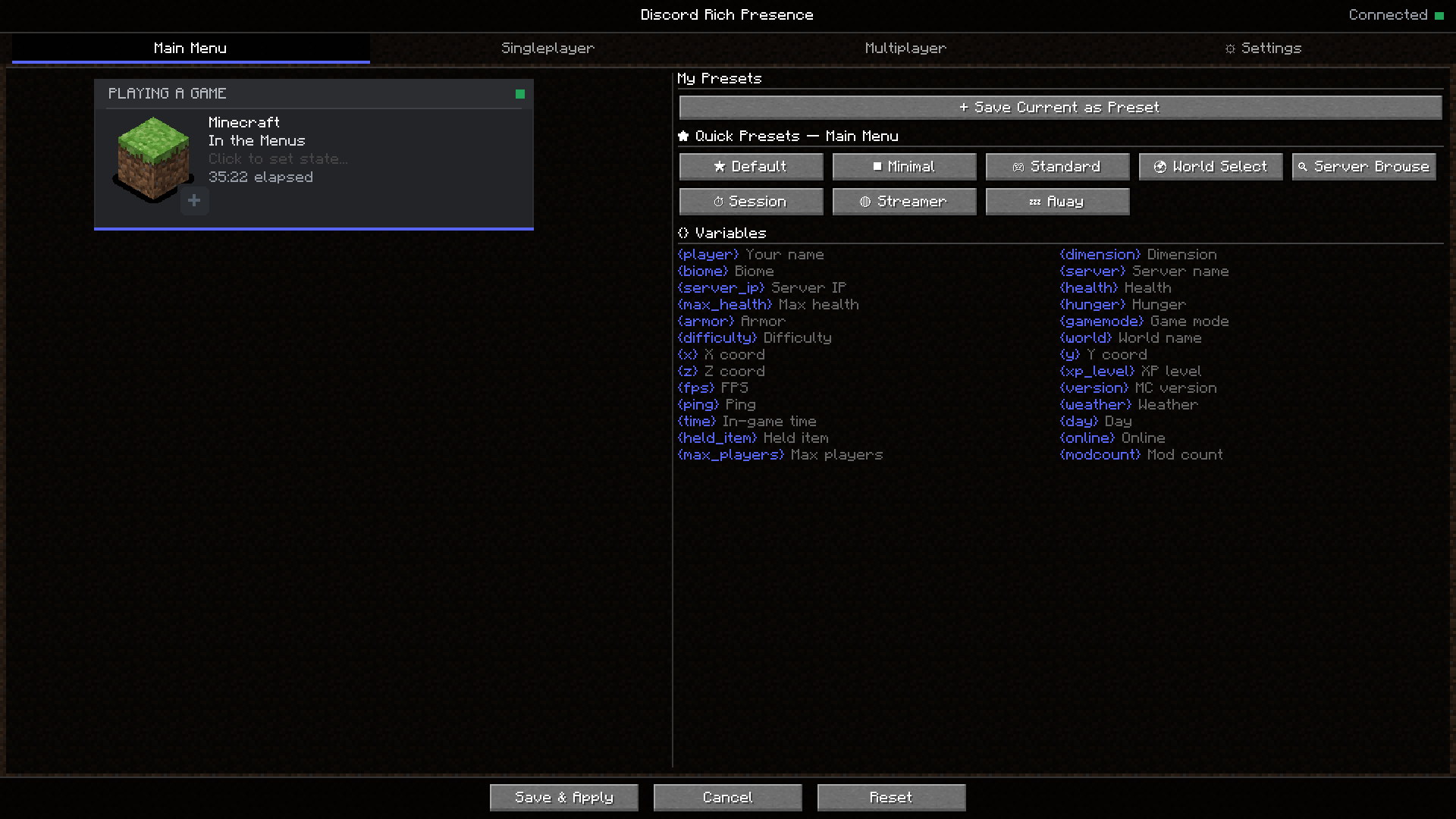
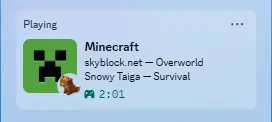
A custom Discord status without touching a config file
The editor shows the real card, not a form. Details line, state line, large and small images with hover text, the timestamp, and up to two clickable buttons (stream link, server IP, anything) are all edited in place. Presets let you save a look and come back to it later, and profiles can be exported and imported as JSON to share with friends.
Different presence for menus, worlds and servers
- Context profiles: separate presence for the main menu, singleplayer and multiplayer, switched automatically as you play.
- Per-server profiles: give any server its own look, matched by address
(for example
hypixel.net). - Overrides: change only what matters per dimension (Overworld, Nether, End, or any modded dimension) or per screen (title, server list, world list). Everything you do not touch inherits from the parent profile.
26 live placeholders
Use them in any text field and they update in real time: {player},
{server}, {dimension}, {biome}, {x} {y} {z}, {health},
{hunger}, {armor}, {xp_level}, {gamemode}, {difficulty}, {online},
{max_players}, {ping}, {fps}, {time}, {day}, {weather},
{held_item}, {version}, {world} and more.
Custom images and privacy
Drop PNG files into config/discordrpc/images/ and they show up in the image
picker, no Discord developer portal needed. One click hides your server IP or
coordinates from the card, and AFK detection can swap your status after a
configurable idle time.
Discord not showing your Minecraft status?
Discord displays the activity of whichever app connected to it first. Launchers with a built-in Discord status (the Modrinth App, GDLauncher, XMCL) grab the connection before any mod can, so your custom presence is accepted but never shown. DiscordPresence detects this and warns you in chat with the exact fix: turn the launcher's Discord integration off, fully quit the launcher (check the system tray), and launch again.
Two more things worth checking: Discord's own setting Activity Privacy, Share your detected activities with others, must be on, and the Discord desktop app must be running (the browser version cannot show rich presence from mods).
Supported versions
| Minecraft | Loader |
|---|---|
| 26.2 | NeoForge, Fabric |
| 26.1.x | NeoForge, Fabric |
| 1.21.11 | NeoForge |
| 1.21.1 | NeoForge |
| 1.20.1 to 1.20.4 | Forge |
Every version needs ZambieLib, and the Fabric builds also need Fabric API; your launcher installs both automatically with the mod. Mod Menu is optional on Fabric and adds a Configure button.
FAQ
Is this client side? Yes, fully. Servers never see it.
Does it work on multiplayer servers? Yes, on any server. You can even give each server its own presence.
How is this different from other Discord RPC mods? Most rich presence mods are set up through config files or menus of text fields. DiscordPresence puts the actual Discord card on screen and you click the part you want to change. If you want per-server profiles and live placeholders without editing JSON, that is what this mod is for.
Does it reconnect if Discord restarts? Yes, automatically, with backoff. It also works with Flatpak and Snap installs of Discord on Linux.
Where do I report a bug? On the issue tracker.
More from ZambieD
- Wildlore: every creature rolls its own size, sex and bloodline traits, with real pregnancies and a zoology journal.
- Broadback: creatures are solid, stand on a cow and ride along.


Want to host your own server? My servers are hosted with BisectHosting.
Use my link and promo code ATK to get 25% off your first month.
Join my Discord! https://discord.gg/CzyVaqb
Ченджлог
1.2.1+26.2-fabricРелиз26.2 · 16 августа 2026 г.
Stability and correctness release: no new features, a lot of fixed ones.
Also in this build: a proper mod icon, a full metadata pass so the mod list entry finally looks right, and the builds now run on ZambieLib, which it requires from here on.
Your config can no longer be lost
- Saves are atomic (written to a temp file, then swapped in), so a crash or
power loss mid-save can never truncate
config.json. - A config that fails to parse is preserved as
config.json.corruptinstead of being silently overwritten with defaults; hand-recoverable, never destroyed. - One bad value no longer discards the whole file: every setting and every profile is loaded independently, and malformed entries are skipped.
Discord updates: deduplicated and rate limited
- Identical presence payloads are no longer re-sent every few seconds.
- Updates are rate limited to one per 4 seconds (Discord allows ~5 per 20s), with rapid changes coalesced into a single trailing update, so fast menu clicking or dimension hopping can no longer make the presence go stale.
- A transient game-state race (e.g. leaving a world mid-update) no longer tears down a healthy Discord connection; only real I/O failures trigger reconnect.
- The connection lifecycle now lives entirely on the worker thread (no more cross-thread races on reconnect state), replies are matched by nonce, and game exit can no longer hang on a wedged pipe read.
Fixed features
- Bundled images actually install again: the manifest referenced CamelCase
filenames while the jar contains lowercase ones, so 0 of 14 images were being
copied to
config/discordrpc/images/from a release jar. Image keys also resolve case-insensitively now (fixes defaults on Linux/macOS). - Buttons are editable everywhere: empty button slots now render as clickable ghost rows in the preview card; previously a fresh install had no way to add a presence button outside server overrides.
- The small-image badge is clickable: it used to hit-test as the large image and open the wrong editor.
- Party size on servers: no more permanently-full "(5 of 5)"; the real
capacity comes from the server-list ping when known, and the party is omitted
when it isn't.
{max_players}shows "?" instead of echoing the online count. - "Show in main menu" works: the toggle existed but was never read.
- Importing a Main Menu / Singleplayer / Multiplayer profile now applies it onto that tab's profile instead of creating an invisible duplicate that could hijack the presence via priority.
- Unsaved Multiplayer-tab edits survive a detour into a server-profile editor.
- Export failures are reported instead of always claiming success.
Safety and polish
- Destructive actions (deleting a profile file, removing a server profile, Reset Everything) now require a confirming second click.
- Config screen no longer re-decodes every image on each open and window resize; directory listings are no longer leaked (one file handle per rendered frame on the import screen).
- The Modrinth App conflict check re-runs periodically instead of caching a
one-shot result, and no longer false-positives on developers with
MODRINTH_*environment variables. - The "is Discord running?" warning logs once instead of every reconnect attempt; server profile names auto-uniquify (duplicate names collided as export filenames); emoji are no longer split in half by length truncation.
- Client-only marking (
displayTest,side="CLIENT") in all Forge/NeoForge metadata; no more red version mismatch in the server list; mod-list logo added; 1.21.1pack_formatcorrected to 34; LICENSE file shipped. - The mod version now lives in exactly one place (root Gradle build) instead of thirteen.
1.2.1+26.2-neoforgeРелиз26.2 · 16 августа 2026 г.
Stability and correctness release: no new features, a lot of fixed ones.
Also in this build: a proper mod icon, a full metadata pass so the mod list entry finally looks right, and the builds now run on ZambieLib, which it requires from here on.
Your config can no longer be lost
- Saves are atomic (written to a temp file, then swapped in), so a crash or
power loss mid-save can never truncate
config.json. - A config that fails to parse is preserved as
config.json.corruptinstead of being silently overwritten with defaults; hand-recoverable, never destroyed. - One bad value no longer discards the whole file: every setting and every profile is loaded independently, and malformed entries are skipped.
Discord updates: deduplicated and rate limited
- Identical presence payloads are no longer re-sent every few seconds.
- Updates are rate limited to one per 4 seconds (Discord allows ~5 per 20s), with rapid changes coalesced into a single trailing update, so fast menu clicking or dimension hopping can no longer make the presence go stale.
- A transient game-state race (e.g. leaving a world mid-update) no longer tears down a healthy Discord connection; only real I/O failures trigger reconnect.
- The connection lifecycle now lives entirely on the worker thread (no more cross-thread races on reconnect state), replies are matched by nonce, and game exit can no longer hang on a wedged pipe read.
Fixed features
- Bundled images actually install again: the manifest referenced CamelCase
filenames while the jar contains lowercase ones, so 0 of 14 images were being
copied to
config/discordrpc/images/from a release jar. Image keys also resolve case-insensitively now (fixes defaults on Linux/macOS). - Buttons are editable everywhere: empty button slots now render as clickable ghost rows in the preview card; previously a fresh install had no way to add a presence button outside server overrides.
- The small-image badge is clickable: it used to hit-test as the large image and open the wrong editor.
- Party size on servers: no more permanently-full "(5 of 5)"; the real
capacity comes from the server-list ping when known, and the party is omitted
when it isn't.
{max_players}shows "?" instead of echoing the online count. - "Show in main menu" works: the toggle existed but was never read.
- Importing a Main Menu / Singleplayer / Multiplayer profile now applies it onto that tab's profile instead of creating an invisible duplicate that could hijack the presence via priority.
- Unsaved Multiplayer-tab edits survive a detour into a server-profile editor.
- Export failures are reported instead of always claiming success.
Safety and polish
- Destructive actions (deleting a profile file, removing a server profile, Reset Everything) now require a confirming second click.
- Config screen no longer re-decodes every image on each open and window resize; directory listings are no longer leaked (one file handle per rendered frame on the import screen).
- The Modrinth App conflict check re-runs periodically instead of caching a
one-shot result, and no longer false-positives on developers with
MODRINTH_*environment variables. - The "is Discord running?" warning logs once instead of every reconnect attempt; server profile names auto-uniquify (duplicate names collided as export filenames); emoji are no longer split in half by length truncation.
- Client-only marking (
displayTest,side="CLIENT") in all Forge/NeoForge metadata; no more red version mismatch in the server list; mod-list logo added; 1.21.1pack_formatcorrected to 34; LICENSE file shipped. - The mod version now lives in exactly one place (root Gradle build) instead of thirteen.
1.2.1+26.1.2-fabricРелиз26.1.2 · 16 августа 2026 г.
Stability and correctness release: no new features, a lot of fixed ones.
Also in this build: a proper mod icon, a full metadata pass so the mod list entry finally looks right, and the builds now run on ZambieLib, which it requires from here on.
Your config can no longer be lost
- Saves are atomic (written to a temp file, then swapped in), so a crash or
power loss mid-save can never truncate
config.json. - A config that fails to parse is preserved as
config.json.corruptinstead of being silently overwritten with defaults; hand-recoverable, never destroyed. - One bad value no longer discards the whole file: every setting and every profile is loaded independently, and malformed entries are skipped.
Discord updates: deduplicated and rate limited
- Identical presence payloads are no longer re-sent every few seconds.
- Updates are rate limited to one per 4 seconds (Discord allows ~5 per 20s), with rapid changes coalesced into a single trailing update, so fast menu clicking or dimension hopping can no longer make the presence go stale.
- A transient game-state race (e.g. leaving a world mid-update) no longer tears down a healthy Discord connection; only real I/O failures trigger reconnect.
- The connection lifecycle now lives entirely on the worker thread (no more cross-thread races on reconnect state), replies are matched by nonce, and game exit can no longer hang on a wedged pipe read.
Fixed features
- Bundled images actually install again: the manifest referenced CamelCase
filenames while the jar contains lowercase ones, so 0 of 14 images were being
copied to
config/discordrpc/images/from a release jar. Image keys also resolve case-insensitively now (fixes defaults on Linux/macOS). - Buttons are editable everywhere: empty button slots now render as clickable ghost rows in the preview card; previously a fresh install had no way to add a presence button outside server overrides.
- The small-image badge is clickable: it used to hit-test as the large image and open the wrong editor.
- Party size on servers: no more permanently-full "(5 of 5)"; the real
capacity comes from the server-list ping when known, and the party is omitted
when it isn't.
{max_players}shows "?" instead of echoing the online count. - "Show in main menu" works: the toggle existed but was never read.
- Importing a Main Menu / Singleplayer / Multiplayer profile now applies it onto that tab's profile instead of creating an invisible duplicate that could hijack the presence via priority.
- Unsaved Multiplayer-tab edits survive a detour into a server-profile editor.
- Export failures are reported instead of always claiming success.
Safety and polish
- Destructive actions (deleting a profile file, removing a server profile, Reset Everything) now require a confirming second click.
- Config screen no longer re-decodes every image on each open and window resize; directory listings are no longer leaked (one file handle per rendered frame on the import screen).
- The Modrinth App conflict check re-runs periodically instead of caching a
one-shot result, and no longer false-positives on developers with
MODRINTH_*environment variables. - The "is Discord running?" warning logs once instead of every reconnect attempt; server profile names auto-uniquify (duplicate names collided as export filenames); emoji are no longer split in half by length truncation.
- Client-only marking (
displayTest,side="CLIENT") in all Forge/NeoForge metadata; no more red version mismatch in the server list; mod-list logo added; 1.21.1pack_formatcorrected to 34; LICENSE file shipped. - The mod version now lives in exactly one place (root Gradle build) instead of thirteen.
1.2.1+26.1.2-neoforgeРелиз26.1, 26.1.1, 26.1.2 · 16 августа 2026 г.
Stability and correctness release: no new features, a lot of fixed ones.
Also in this build: a proper mod icon, a full metadata pass so the mod list entry finally looks right, and the builds now run on ZambieLib, which it requires from here on.
Your config can no longer be lost
- Saves are atomic (written to a temp file, then swapped in), so a crash or
power loss mid-save can never truncate
config.json. - A config that fails to parse is preserved as
config.json.corruptinstead of being silently overwritten with defaults; hand-recoverable, never destroyed. - One bad value no longer discards the whole file: every setting and every profile is loaded independently, and malformed entries are skipped.
Discord updates: deduplicated and rate limited
- Identical presence payloads are no longer re-sent every few seconds.
- Updates are rate limited to one per 4 seconds (Discord allows ~5 per 20s), with rapid changes coalesced into a single trailing update, so fast menu clicking or dimension hopping can no longer make the presence go stale.
- A transient game-state race (e.g. leaving a world mid-update) no longer tears down a healthy Discord connection; only real I/O failures trigger reconnect.
- The connection lifecycle now lives entirely on the worker thread (no more cross-thread races on reconnect state), replies are matched by nonce, and game exit can no longer hang on a wedged pipe read.
Fixed features
- Bundled images actually install again: the manifest referenced CamelCase
filenames while the jar contains lowercase ones, so 0 of 14 images were being
copied to
config/discordrpc/images/from a release jar. Image keys also resolve case-insensitively now (fixes defaults on Linux/macOS). - Buttons are editable everywhere: empty button slots now render as clickable ghost rows in the preview card; previously a fresh install had no way to add a presence button outside server overrides.
- The small-image badge is clickable: it used to hit-test as the large image and open the wrong editor.
- Party size on servers: no more permanently-full "(5 of 5)"; the real
capacity comes from the server-list ping when known, and the party is omitted
when it isn't.
{max_players}shows "?" instead of echoing the online count. - "Show in main menu" works: the toggle existed but was never read.
- Importing a Main Menu / Singleplayer / Multiplayer profile now applies it onto that tab's profile instead of creating an invisible duplicate that could hijack the presence via priority.
- Unsaved Multiplayer-tab edits survive a detour into a server-profile editor.
- Export failures are reported instead of always claiming success.
Safety and polish
- Destructive actions (deleting a profile file, removing a server profile, Reset Everything) now require a confirming second click.
- Config screen no longer re-decodes every image on each open and window resize; directory listings are no longer leaked (one file handle per rendered frame on the import screen).
- The Modrinth App conflict check re-runs periodically instead of caching a
one-shot result, and no longer false-positives on developers with
MODRINTH_*environment variables. - The "is Discord running?" warning logs once instead of every reconnect attempt; server profile names auto-uniquify (duplicate names collided as export filenames); emoji are no longer split in half by length truncation.
- Client-only marking (
displayTest,side="CLIENT") in all Forge/NeoForge metadata; no more red version mismatch in the server list; mod-list logo added; 1.21.1pack_formatcorrected to 34; LICENSE file shipped. - The mod version now lives in exactly one place (root Gradle build) instead of thirteen.
1.2.1+1.21.11-neoforgeРелиз1.21.11 · 16 августа 2026 г.
Stability and correctness release: no new features, a lot of fixed ones.
Also in this build: a proper mod icon, a full metadata pass so the mod list entry finally looks right, and the builds now run on ZambieLib, which it requires from here on.
Your config can no longer be lost
- Saves are atomic (written to a temp file, then swapped in), so a crash or
power loss mid-save can never truncate
config.json. - A config that fails to parse is preserved as
config.json.corruptinstead of being silently overwritten with defaults; hand-recoverable, never destroyed. - One bad value no longer discards the whole file: every setting and every profile is loaded independently, and malformed entries are skipped.
Discord updates: deduplicated and rate limited
- Identical presence payloads are no longer re-sent every few seconds.
- Updates are rate limited to one per 4 seconds (Discord allows ~5 per 20s), with rapid changes coalesced into a single trailing update, so fast menu clicking or dimension hopping can no longer make the presence go stale.
- A transient game-state race (e.g. leaving a world mid-update) no longer tears down a healthy Discord connection; only real I/O failures trigger reconnect.
- The connection lifecycle now lives entirely on the worker thread (no more cross-thread races on reconnect state), replies are matched by nonce, and game exit can no longer hang on a wedged pipe read.
Fixed features
- Bundled images actually install again: the manifest referenced CamelCase
filenames while the jar contains lowercase ones, so 0 of 14 images were being
copied to
config/discordrpc/images/from a release jar. Image keys also resolve case-insensitively now (fixes defaults on Linux/macOS). - Buttons are editable everywhere: empty button slots now render as clickable ghost rows in the preview card; previously a fresh install had no way to add a presence button outside server overrides.
- The small-image badge is clickable: it used to hit-test as the large image and open the wrong editor.
- Party size on servers: no more permanently-full "(5 of 5)"; the real
capacity comes from the server-list ping when known, and the party is omitted
when it isn't.
{max_players}shows "?" instead of echoing the online count. - "Show in main menu" works: the toggle existed but was never read.
- Importing a Main Menu / Singleplayer / Multiplayer profile now applies it onto that tab's profile instead of creating an invisible duplicate that could hijack the presence via priority.
- Unsaved Multiplayer-tab edits survive a detour into a server-profile editor.
- Export failures are reported instead of always claiming success.
Safety and polish
- Destructive actions (deleting a profile file, removing a server profile, Reset Everything) now require a confirming second click.
- Config screen no longer re-decodes every image on each open and window resize; directory listings are no longer leaked (one file handle per rendered frame on the import screen).
- The Modrinth App conflict check re-runs periodically instead of caching a
one-shot result, and no longer false-positives on developers with
MODRINTH_*environment variables. - The "is Discord running?" warning logs once instead of every reconnect attempt; server profile names auto-uniquify (duplicate names collided as export filenames); emoji are no longer split in half by length truncation.
- Client-only marking (
displayTest,side="CLIENT") in all Forge/NeoForge metadata; no more red version mismatch in the server list; mod-list logo added; 1.21.1pack_formatcorrected to 34; LICENSE file shipped. - The mod version now lives in exactly one place (root Gradle build) instead of thirteen.
1.2.1+1.21.1-neoforgeРелиз1.21.1 · 16 августа 2026 г.
Stability and correctness release: no new features, a lot of fixed ones.
Also in this build: a proper mod icon, a full metadata pass so the mod list entry finally looks right, and the builds now run on ZambieLib, which it requires from here on.
Your config can no longer be lost
- Saves are atomic (written to a temp file, then swapped in), so a crash or
power loss mid-save can never truncate
config.json. - A config that fails to parse is preserved as
config.json.corruptinstead of being silently overwritten with defaults; hand-recoverable, never destroyed. - One bad value no longer discards the whole file: every setting and every profile is loaded independently, and malformed entries are skipped.
Discord updates: deduplicated and rate limited
- Identical presence payloads are no longer re-sent every few seconds.
- Updates are rate limited to one per 4 seconds (Discord allows ~5 per 20s), with rapid changes coalesced into a single trailing update, so fast menu clicking or dimension hopping can no longer make the presence go stale.
- A transient game-state race (e.g. leaving a world mid-update) no longer tears down a healthy Discord connection; only real I/O failures trigger reconnect.
- The connection lifecycle now lives entirely on the worker thread (no more cross-thread races on reconnect state), replies are matched by nonce, and game exit can no longer hang on a wedged pipe read.
Fixed features
- Bundled images actually install again: the manifest referenced CamelCase
filenames while the jar contains lowercase ones, so 0 of 14 images were being
copied to
config/discordrpc/images/from a release jar. Image keys also resolve case-insensitively now (fixes defaults on Linux/macOS). - Buttons are editable everywhere: empty button slots now render as clickable ghost rows in the preview card; previously a fresh install had no way to add a presence button outside server overrides.
- The small-image badge is clickable: it used to hit-test as the large image and open the wrong editor.
- Party size on servers: no more permanently-full "(5 of 5)"; the real
capacity comes from the server-list ping when known, and the party is omitted
when it isn't.
{max_players}shows "?" instead of echoing the online count. - "Show in main menu" works: the toggle existed but was never read.
- Importing a Main Menu / Singleplayer / Multiplayer profile now applies it onto that tab's profile instead of creating an invisible duplicate that could hijack the presence via priority.
- Unsaved Multiplayer-tab edits survive a detour into a server-profile editor.
- Export failures are reported instead of always claiming success.
Safety and polish
- Destructive actions (deleting a profile file, removing a server profile, Reset Everything) now require a confirming second click.
- Config screen no longer re-decodes every image on each open and window resize; directory listings are no longer leaked (one file handle per rendered frame on the import screen).
- The Modrinth App conflict check re-runs periodically instead of caching a
one-shot result, and no longer false-positives on developers with
MODRINTH_*environment variables. - The "is Discord running?" warning logs once instead of every reconnect attempt; server profile names auto-uniquify (duplicate names collided as export filenames); emoji are no longer split in half by length truncation.
- Client-only marking (
displayTest,side="CLIENT") in all Forge/NeoForge metadata; no more red version mismatch in the server list; mod-list logo added; 1.21.1pack_formatcorrected to 34; LICENSE file shipped. - The mod version now lives in exactly one place (root Gradle build) instead of thirteen.
1.2.1+1.20.1-forgeРелиз1.20.2, 1.20.3, 1.20.4 · 16 августа 2026 г.
Stability and correctness release: no new features, a lot of fixed ones.
Also in this build: a proper mod icon, a full metadata pass so the mod list entry finally looks right, and the builds now run on ZambieLib, which it requires from here on.
Your config can no longer be lost
- Saves are atomic (written to a temp file, then swapped in), so a crash or
power loss mid-save can never truncate
config.json. - A config that fails to parse is preserved as
config.json.corruptinstead of being silently overwritten with defaults; hand-recoverable, never destroyed. - One bad value no longer discards the whole file: every setting and every profile is loaded independently, and malformed entries are skipped.
Discord updates: deduplicated and rate limited
- Identical presence payloads are no longer re-sent every few seconds.
- Updates are rate limited to one per 4 seconds (Discord allows ~5 per 20s), with rapid changes coalesced into a single trailing update, so fast menu clicking or dimension hopping can no longer make the presence go stale.
- A transient game-state race (e.g. leaving a world mid-update) no longer tears down a healthy Discord connection; only real I/O failures trigger reconnect.
- The connection lifecycle now lives entirely on the worker thread (no more cross-thread races on reconnect state), replies are matched by nonce, and game exit can no longer hang on a wedged pipe read.
Fixed features
- Bundled images actually install again: the manifest referenced CamelCase
filenames while the jar contains lowercase ones, so 0 of 14 images were being
copied to
config/discordrpc/images/from a release jar. Image keys also resolve case-insensitively now (fixes defaults on Linux/macOS). - Buttons are editable everywhere: empty button slots now render as clickable ghost rows in the preview card; previously a fresh install had no way to add a presence button outside server overrides.
- The small-image badge is clickable: it used to hit-test as the large image and open the wrong editor.
- Party size on servers: no more permanently-full "(5 of 5)"; the real
capacity comes from the server-list ping when known, and the party is omitted
when it isn't.
{max_players}shows "?" instead of echoing the online count. - "Show in main menu" works: the toggle existed but was never read.
- Importing a Main Menu / Singleplayer / Multiplayer profile now applies it onto that tab's profile instead of creating an invisible duplicate that could hijack the presence via priority.
- Unsaved Multiplayer-tab edits survive a detour into a server-profile editor.
- Export failures are reported instead of always claiming success.
Safety and polish
- Destructive actions (deleting a profile file, removing a server profile, Reset Everything) now require a confirming second click.
- Config screen no longer re-decodes every image on each open and window resize; directory listings are no longer leaked (one file handle per rendered frame on the import screen).
- The Modrinth App conflict check re-runs periodically instead of caching a
one-shot result, and no longer false-positives on developers with
MODRINTH_*environment variables. - The "is Discord running?" warning logs once instead of every reconnect attempt; server profile names auto-uniquify (duplicate names collided as export filenames); emoji are no longer split in half by length truncation.
- Client-only marking (
displayTest,side="CLIENT") in all Forge/NeoForge metadata; no more red version mismatch in the server list; mod-list logo added; 1.21.1pack_formatcorrected to 34; LICENSE file shipped. - The mod version now lives in exactly one place (root Gradle build) instead of thirteen.
1.2.0Релиз1.21.1 · 9 августа 2026 г.
DiscordPresence 1.2.0
a full settings-screen overhaul, Fabric support, Minecraft 26.2 support, and a fix for presence not showing on the Modrinth App.
presence not showing (Modrinth/Presence Apps)
DiscordPresence now detects and tells you exactly how to fix its presence not showing (a one-time chat notice plus step-by-step instructions in Settings).
The fix on your end: Modrinth App settings → turn Discord RPC off → fully quit the Modrinth App (check the system tray) → reopen it → launch the game. Other launchers with built-in Discord status (GDLauncher, XMCL, ...) need the same treatment.
New settings screen
The editor has been rebuilt:
- New tabs, standard buttons, text boxes and sliders - full keyboard navigation included
- The live Discord card preview stays: click any part of it (text, images, buttons, timestamp) to edit that part and watch it update as you type
- Cleaner override editing with a proper Back button, and clear "inherits / overrides" labels on every field
- Connection status in Settings ("Connected to Discord as ...") with a Reconnect button
- Every label is now translatable
New versions and loaders
- Fabric support for Minecraft 26.1.x and 26.2 (requires Fabric API; Mod Menu supported)
- Minecraft 26.2 on both NeoForge and Fabric
- Updated builds for 1.21.1, 1.21.11 and 26.1.x (NeoForge) and 1.20.1–1.20.4 (Forge)
More reliable connection
- Reconnects automatically with backoff when Discord starts late or restarts
- Validates the Discord handshake and answers Discord's pings
- Finds the Discord socket for Flatpak and Snap installs on Linux
Notes
- Settings and profiles from 1.1.0 carry over — no config changes needed.
Комментарии
Загружаем…