 Mineforgian
Dimension Notifier
Server-side dimension change notifications with action bar coordinates, chat broadcasts, and live Tab list labels.
- Загрузки
- 196
- Подписчики
- 3
- Обновлён
- 31 июля 2026 г.
- Лицензия
- NOASSERTION
Опубликован 20 мая 2026 г.
Dimension Notifier





Dimension Notifier adds server-side dimension change notifications, coordinates, chat broadcasts, and live Tab list labels without requiring client installs.
- See every dimension change — a short action bar cue the moment a player enters the Nether, the End, or the Overworld.
- Broadcast travel to the server — an optional chat message when anyone changes dimension.
- Read the room from the Tab list — live dimension labels next to player names.
- Server-first — the core features run on the server; players do not need to install anything.
- Yours to tune — optional client settings and live Mod Menu controls.
Features
See where you arrive, instantly
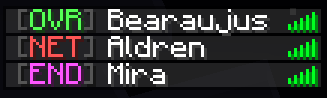
A short action bar message confirms where you arrived without filling chat. Hide coordinates for a cleaner line, or show them when your group wants exact arrival points. Compact labels such as OVR, NET, and END keep alerts tight.



Tell the server who is on the move
Broadcast a compact chat message when a player enters another dimension — useful for survival groups, events, and operator visibility when players spread across worlds. Switch to short labels for less noise, and choose whether the traveling player sees it too.



A Tab list that shows where everyone is
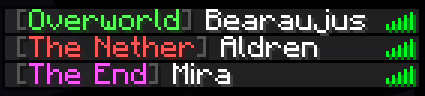
Dimension labels make the vanilla Tab list easy to scan. Use full labels when clarity matters most, compact badges for a tighter column, and aligned names for a tidy layout.
Settings when you want them
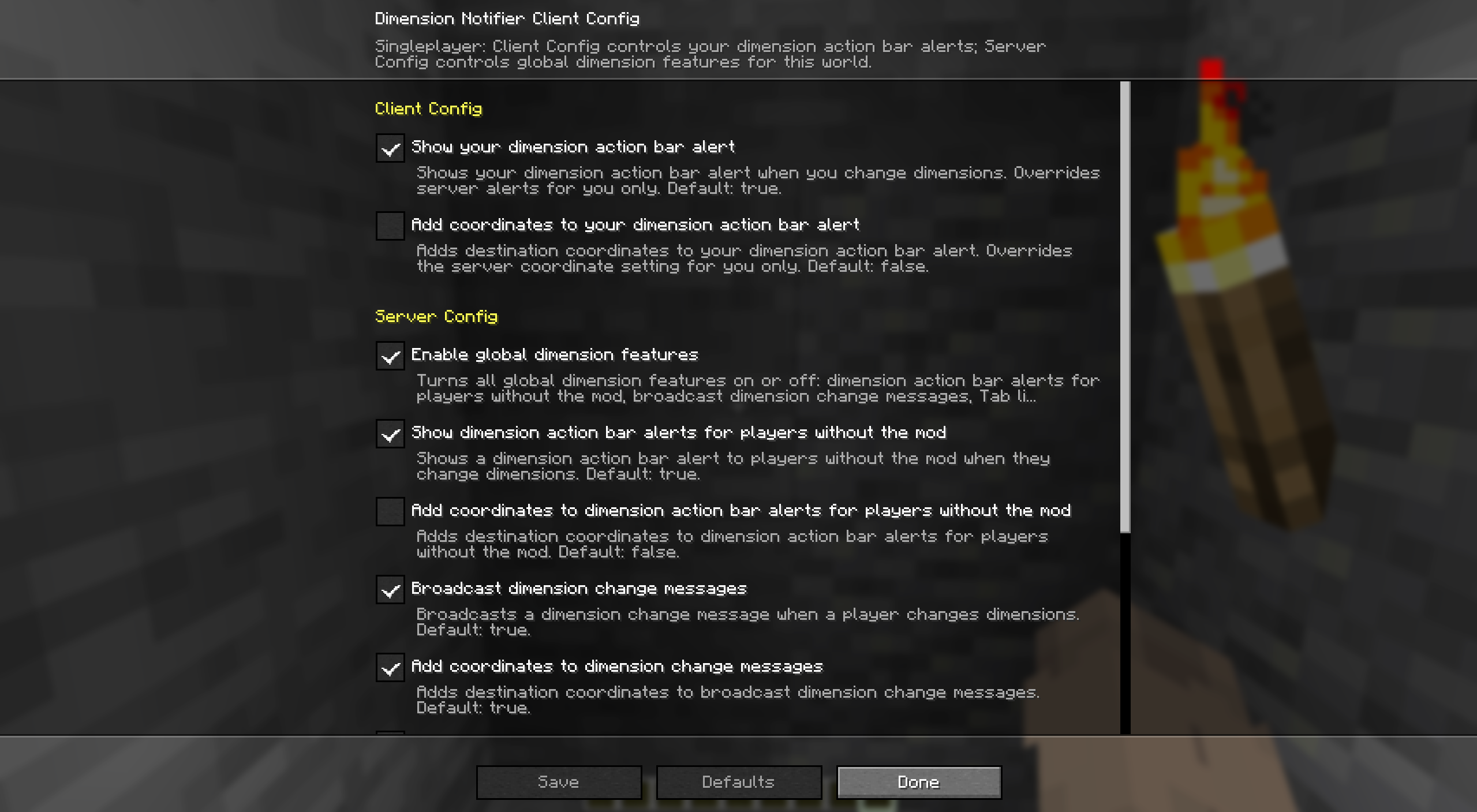
With Mod Menu, leave your action bar inheriting Server Config by default, or turn inheritance off while keeping your local values saved for later. In singleplayer, or on a server where you have operator permission, Server Config also exposes the global dimension features.
Quickstart
- Install Fabric Loader and Fabric API on your server.
- Drop Dimension Notifier into the server's
mods/folder and start it. Every player now sees dimension cues, broadcasts, and Tab list labels — no client install required. - Want personal action bar control or live settings? Add the mod (and Mod Menu) on your client.
- Change anything later in Mod Menu — Server Config needs operator permission — or in the config file below.
Compatibility
Dimension Notifier is server-first. Here is where each piece runs and what it needs.
- Dedicated server (required): broadcast dimension-change messages, action bar alerts for players without the mod, and Tab list labels.
- Client (optional): personal action bar alerts, Client Config, Mod Menu settings, and singleplayer.
- Required dependency: Fabric API, wherever the mod is installed.
- Optional dependency: Mod Menu on clients for Client Config and permission-gated Server Config.
| Feature | Singleplayer | Multiplayer with server mod | Client-only install |
|---|---|---|---|
| Dimension change messages | This world | Everyone sees the broadcast | Not available |
| Dimension action bar alerts | Client and Server Config | Your client, or server settings for players without the mod | Client Config only |
| Tab list dimension labels | This world | Server-controlled labels for everyone | Not available |
| Mod Menu settings | Client and Server Config | Client on this computer; Server Config with operator permission | Client Config only |
Make it yours
Dimension Notifier keeps client settings separate from server settings.
- Client settings control your dimension-change action bar on this computer after you turn inheritance off.
- Client Config can inherit overlapping Server Config values without overwriting your saved local values.
- Server settings control the action bar for players without the mod, broadcast messages, and Tab list labels.
- Each scope has its own master toggle, so either side can stay on or off.
- In singleplayer, Server Config edits the server settings in the local file. On remote servers, Server Config is editable only with operator permission.
Config file
After first launch, edit config/dimension-notifier.json. File edits need a game or server restart; Mod Menu changes apply immediately where editable.
Show the default dimension-notifier.json
{
  "schema_version": 1,
  "server": {
    "enabled": true,
    "action_bar": {
      "on_dimension_change": {
        "enabled": true,
        "include_dimension": true,
        "include_coordinates": false,
        "use_short_labels": false
      }
    },
    "broadcasts": {
      "on_dimension_change": {
        "enabled": true,
        "include_coordinates": false,
        "use_short_labels": false,
        "send_to_triggering_player": false
      }
    },
    "tab_list": {
      "dimension_labels": {
        "enabled": true,
        "use_short_labels": false,
        "add_space_before": false,
        "add_space_after": true
      }
    }
  },
  "client": {
    "enabled": true,
    "inherit_server_settings": true,
    "action_bar": {
      "on_dimension_change": {
        "enabled": true,
        "include_dimension": true,
        "include_coordinates": false,
        "use_short_labels": false
      }
    }
  }
}
More from bearaujus
Browse every Bearaujus mod, current version, and install link at modrinth.bearaujus.com.
More server-first Fabric mods in the same family:
- Death Respawn Notifier — Server-side death coordinates, respawn notifications, personal death-screen details, and live Tab list dead markers.
- Improved Sleep — Multiplayer sleep percentage or fixed-player thresholds, daytime and storm rules, wake times, and sleeper rewards.
- Sleep Wake-Up Notifier — Live multiplayer sleep progress, wake-up notifications, custom bed messages, and morning broadcasts with Improved Sleep integration.
Support & license
Report issues at issues.
Dimension Notifier is distributed under the Bearaujus Proprietary License v1.0. Full terms ship inside the downloaded jar as LICENSE.txt.
Dimension Notifier is not official Minecraft content and is not endorsed by or associated with Mojang or Microsoft.
Ченджлог
0.2.5+26.2Релиз26.2 · 31 июля 2026 г.
Changed
- Improved launcher and Modrinth discovery with a clearer dimension-change summary, focused categories, and capability-first README copy.
- Added distinct Mod Menu summary and detail text plus direct links to Modrinth, the Bearaujus mod catalog, and the public issue tracker.
- Corrected Fabric issue metadata to use the public HTTPS issue tracker and aligned every project link with this mod's listing.
- Added descriptive Modrinth gallery titles sourced from the README screenshot captions.
Notes
- No gameplay behavior changed in this metadata-focused release.
- This build targets Minecraft
>=26.2 <26.3.0and retains the existing boot-tested Fabric runtime minimums.
0.2.4+26.2Релиз26.2 · 31 июля 2026 г.
Changed
- Added tested Minecraft
26.2support, including26.2.xpatch releases through the~26.2dependency range. - Compiled against Fabric Loader
0.19.3and Fabric API0.156.0+26.2while keeping the boot-tested runtime minimums at Loader0.19.0and Fabric API0.147.1+26.2. - Hardened dimension-change delivery across joins, respawns, vanilla-client fallbacks, broadcasts, and composed Tab-list labels.
- Improved custom-dimension and signed-coordinate formatting across action bars, broadcasts, and the Tab list.
- Improved Config screen synchronization, draft recovery, keyboard and read-only accessibility, narrow-screen layout, resizing, and save feedback.
Notes
- This build targets Minecraft
>=26.2 <26.3.0; Minecraft26.1.xis no longer supported.
0.2.3+26.1.2Релиз26.1.2 · 10 июня 2026 г.
Changed
- Lowered the declared Fabric Loader runtime minimum from
0.19.3to0.19.0.
Notes
- Metadata-only patch release. No gameplay, config, icon, or README changes from the previous published build.
0.2.2+26.1.2Релиз26.1.2 · 8 июня 2026 г.
Changed
- Relaxed the Minecraft dependency from exact
26.1.2to patch-tolerant~26.1.2so the mod keeps loading across26.1.xpatches. - Lowered the declared Fabric API runtime minimum from
0.150.0+26.1.2to0.145.4+26.1.2. - Relaxed the optional Mod Menu suggestion metadata from
>=18.0.0-beta.1to*.
Notes
- Metadata-only patch release. No gameplay, config, icon, or README changes from the previous published build.
0.2.1+26.1.2Релиз26.1.2 · 8 июня 2026 г.
Changed
- Refreshed the packaged and release icons.
- Rewrote the short description across the Modrinth summary,
fabric.mod.json, and Mod Menu text. - Reworked the release README with clearer highlights, quickstart steps, and compatibility guidance.
0.2.0+26.1.2Релиз26.1.2 · 7 июня 2026 г.
Added
- Short-label toggles for dimension-change action bars and broadcasts.
- An option to also show the dimension-change broadcast to the player who triggered it.
- Tab list label formatting controls for short-label alignment plus spacing before and after the label.
- Optional client inheritance for overlapping server action bar settings.
Changed
- Reworked Client Config and Server Config into the shared scoped JSON config system.
- Config storage moved from
dimension-notifier.propertiestodimension-notifier.json. - Dimension-change broadcasts now go to other players by default, with an opt-in toggle for the triggering player.
- Server broadcast coordinates now default to off.
Removed
- Tab list dimension sorting and the custom dimension sort-order setting.
Notes
0.1.0settings are not migrated automatically. Review the new JSON config after upgrading.
0.1.0+26.1.2Релиз26.1.2 · 26 мая 2026 г.
Added
- Initial release.
Комментарии
Загружаем…