 Mineforgian
Daily TODO
A lightweight client-side TODO overlay for tracking daily tasks directly in Minecraft.
- Загрузки
- 61
- Подписчики
- 1
- Обновлён
- 9 июня 2026 г.
- Лицензия
- MIT
Опубликован 2 июня 2026 г.
Daily TODO
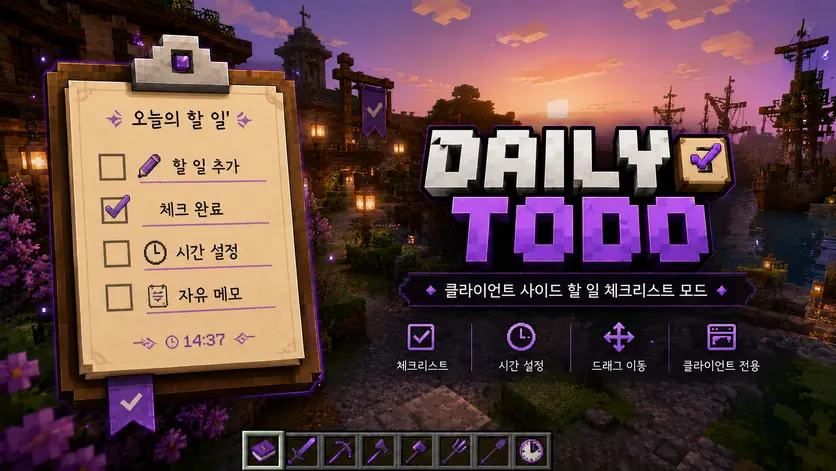
Daily TODO is a lightweight client-side Minecraft mod that lets you keep track of your daily tasks directly on your screen.
It works like a small in-game memo pad or checklist.
You can add your own daily routines, set optional deadlines, check completed tasks, and move the overlay freely by dragging it while a mouse cursor is available.
✨ Features
- 📝 Add your own daily TODO items
- ✅ Click checkboxes to mark tasks as completed
- 🕒 Optional deadline support
- ⏰ Real-time clock display
- 🖱️ Drag the overlay directly on screen
- 🧹 Delete completed tasks
- 🌐 English and Korean language support
- 🎮 Client-side only
🖱️ How to use
- Press M to open the Daily TODO screen.
- Add a task name.
- Optionally enter a deadline using 24-hour format, such as
1500. - Click the checkbox to mark a task as completed.
- Hover over shortened text to view the full task.
- Drag the overlay while a mouse cursor is available, such as when chat or another GUI screen is open.
📌 Notes
This mod does not automatically sync with server quests, missions, or custom server systems.
It is designed as a simple personal checklist for players who want to remember daily routines such as:
- Daily quests
- Any custom task you want to track
한국어 설명
Daily TODO는 마인크래프트 화면 위에 매일 할 일을 기록하고 체크할 수 있는 가벼운 클라이언트 전용 TODO 오버레이 모드입니다.
메모장이나 체크리스트처럼 사용할 수 있으며, 서버 시스템과 자동으로 연동되지 않아도 사용자가 원하는 루틴을 직접 등록해서 관리할 수 있습니다.
✨ 주요 기능
- 📝 원하는 할 일 직접 등록
- ✅ 체크박스 클릭으로 완료 처리
- 🕒 선택적 마감 시간 입력
- ⏰ 실시간 시간 표시
- 🖱️ 오버레이 직접 드래그 이동
- 🧹 완료 항목 삭제
- 🌐 한국어 / 영어 지원
- 🎮 클라이언트 전용 모드
🖱️ 사용 방법
- M 키를 눌러 Daily TODO 설정 화면을 엽니다.
- 할 일 이름을 입력합니다.
- 필요하면
1500같은 24시간제 형식으로 마감 시간을 입력합니다. - 체크박스를 클릭하면 완료 처리됩니다.
- 생략된 문구에 마우스를 올리면 전체 문구를 확인할 수 있습니다.
- 채팅창이나 GUI 화면처럼 마우스 커서가 보이는 상태에서 오버레이를 드래그해 위치를 조정할 수 있습니다.
📌 참고
이 모드는 서버의 의뢰, 퀘스트, 미션 시스템과 자동 연동되지 않습니다.
대신 사용자가 직접 원하는 루틴을 기록하는 개인용 체크리스트 모드입니다.
예시:
- 오늘 할 일
- 기타 개인 루틴
Ченджлог
1.1.1Релиз1.21.4 · 9 июня 2026 г.
Daily TODO 1.1.1
A stability and usability update focused on safer overlay behavior and better control over when the TODO overlay appears.
✨ Added
Added overlay ON/OFF hotkey
- Press
Nto show or hide the TODO overlay. - The overlay visibility state is saved in the config.
- Press
Added safer overlay position handling
- If the overlay moves outside the screen after changing resolution or GUI scale, it is now automatically moved back into the visible screen area.
🎨 Improved
Changed the overlay reset button text
Resethas been changed toUncheck All.- This makes it clearer that the button only unchecks completed TODO items and does not delete tasks.
Improved keybind behavior
Mopens the Daily TODO settings screen only while in-game.Ntoggles the overlay only while in-game.- Keybinds no longer affect the mod state from the main menu or world selection screens.
🛠 Fixed
Fixed an issue where Daily TODO could interfere with Minecraft’s default UI buttons.
- The mod now only handles mouse clicks when the TODO overlay is actually visible and usable.
- Main menu, singleplayer menu, world selection, pause menu, inventory-like screens, and other unrelated screens are no longer affected.
Fixed possible unwanted click interception from invisible or inactive overlay areas.
Fixed overlay position problems after screen size or GUI scale changes.
📌 Notes
Daily TODO is designed to stay within its own overlay behavior. This update reduces the chance of the mod affecting Minecraft’s default menus or buttons.
Daily TODO 1.1.1
TODO 오버레이의 안정성과 사용성을 개선한 패치입니다. 이번 업데이트는 모드가 마인크래프트 기본 UI에 영향을 주지 않도록 동작 범위를 더 안전하게 제한하는 데 초점을 맞췄습니다.
✨ 추가
오버레이 ON/OFF 단축키 추가
N키를 눌러 TODO 오버레이를 표시하거나 숨길 수 있습니다.- 오버레이 표시 상태는 설정 파일에 저장됩니다.
오버레이 위치 자동 보정 기능 추가
- 해상도 변경, 창 크기 변경, GUI 크기 변경 등으로 오버레이가 화면 밖으로 나갈 경우 자동으로 화면 안쪽으로 이동합니다.
🎨 개선
오버레이 하단 버튼 문구 변경
초기화문구를전체 체크 해제로 변경했습니다.- 할 일이 삭제되는 기능이 아니라 체크된 항목만 해제하는 기능임을 더 명확하게 표시했습니다.
단축키 동작 범위 개선
M키는 게임 접속 중일 때만 Daily TODO 설정창을 열 수 있습니다.N키는 게임 접속 중일 때만 TODO 오버레이를 켜거나 끌 수 있습니다.- 메인 메뉴나 월드 선택 화면에서는 모드 단축키가 불필요하게 동작하지 않습니다.
🛠 수정
Daily TODO가 마인크래프트 기본 UI 버튼 클릭에 영향을 줄 수 있던 문제를 수정했습니다.
- 이제 TODO 오버레이가 실제로 표시되고 상호작용 가능한 상황에서만 마우스 클릭을 처리합니다.
- 메인 메뉴, 싱글플레이어 화면, 월드 선택 화면, ESC 메뉴, 상자 화면 등 모드와 직접 관련 없는 화면에서는 클릭을 가로채지 않습니다.
보이지 않거나 비활성화된 오버레이 영역이 클릭을 가로챌 수 있던 문제를 수정했습니다.
화면 크기나 GUI 크기 변경 후 오버레이 위치가 화면 밖으로 밀릴 수 있던 문제를 수정했습니다.
📌 참고
Daily TODO는 클라이언트 전용 TODO 오버레이 모드입니다. 이번 업데이트를 통해 모드가 자신의 기능 범위 밖의 마인크래프트 기본 동작에 영향을 주지 않도록 안정성을 강화했습니다.
1.1.0Релиз1.21.4 · 9 июня 2026 г.
Daily TODO 1.1.0
A major quality-of-life update focused on better task management, improved scaling, and smoother UI feedback.
✨ Added
Added task editing support
- You can now edit existing TODO items from the settings screen.
- Task title and deadline can both be modified.
- Added edit mode, save edit, and cancel edit controls.
Added responsive overlay scaling
- The TODO overlay now automatically adjusts based on the Minecraft GUI resolution.
- This improves readability on larger displays and higher resolutions.
Expanded overlay scale range
Overlay scale can now be adjusted from 50% to 200%.
Added scale preset buttons:
- 50%
- 75%
- 100%
- 150%
- 200%
Added reset overlay position button
- You can now reset the overlay position from the settings screen.
Added checked-task reset button
- The overlay now has a reset button that unchecks all completed TODO items at once.
🎨 Improved
Increased the default overlay size by about 50%.
Changed the overlay bottom buttons to:
- Manage
- Reset
Improved the settings screen button design with a cleaner gray style.
Added visual feedback when pressing Daily TODO settings buttons.
Improved button alignment in the settings screen.
Matched the reset overlay position button width with the scale preset button group.
Fine-tuned text positioning for scale labels and preset buttons.
Improved scale slider text rendering so the percentage value aligns more naturally.
🛠 Fixed
Fixed the TODO overlay reappearing on other screens after opening the ESC menu.
- The overlay now stays hidden until the player fully returns to the game screen.
Fixed unclear button press feedback in the Daily TODO settings screen.
Fixed inconsistent layout alignment in the lower settings area.
📌 Notes
Daily TODO remains a lightweight client-side checklist overlay. It does not automatically sync with server quests, missions, or custom server systems.
Daily TODO 1.1.0
할 일 관리 기능, 오버레이 크기 조절, 설정창 UI 사용성을 개선한 주요 업데이트입니다.
✨ 추가
등록된 TODO 수정 기능 추가
- 설정창에서 기존 TODO 항목을 수정할 수 있습니다.
- 할 일 이름과 마감 시간을 모두 수정할 수 있습니다.
- 수정 모드, 수정 저장, 수정 취소 기능이 추가되었습니다.
반응형 오버레이 크기 조절 기능 추가
- 마인크래프트 GUI 해상도에 따라 TODO 오버레이 크기가 자동으로 보정됩니다.
- 큰 모니터나 높은 해상도에서 오버레이가 너무 작게 보이던 문제를 개선했습니다.
오버레이 크기 조절 범위 확장
오버레이 크기를 50%부터 200%까지 조절할 수 있습니다.
크기 프리셋 버튼이 추가되었습니다.
- 50%
- 75%
- 100%
- 150%
- 200%
오버레이 위치 초기화 버튼 추가
- 설정창에서 오버레이 위치를 기본 위치로 되돌릴 수 있습니다.
체크 초기화 버튼 추가
- 오버레이 하단의 초기화 버튼을 통해 체크된 TODO 항목을 한 번에 모두 체크 해제할 수 있습니다.
🎨 개선
TODO 오버레이 기본 크기를 약 50% 증가시켰습니다.
오버레이 하단 버튼 구성을 변경했습니다.
- 등록 및 수정
- 초기화
설정창 버튼 디자인을 깔끔한 회색 스타일로 변경했습니다.
Daily TODO 설정창 버튼에 클릭 피드백을 추가했습니다.
설정창 하단 버튼 정렬을 개선했습니다.
오버레이 위치 초기화 버튼의 길이를 크기 프리셋 버튼 그룹과 동일하게 맞췄습니다.
크기 표시 텍스트와 프리셋 버튼 텍스트 위치를 미세 조정했습니다.
크기 조절 슬라이더 내부 텍스트 표시를 더 자연스럽게 개선했습니다.
🛠 수정
ESC 메뉴 진입 후 다른 화면에서 TODO 오버레이가 다시 표시되던 문제를 수정했습니다.
- 이제 게임 화면으로 완전히 돌아가기 전까지 오버레이가 다시 표시되지 않습니다.
설정창 버튼을 눌렀는지 알기 어려웠던 문제를 개선했습니다.
설정창 하단 UI 정렬이 어색하던 부분을 수정했습니다.
📌 참고
Daily TODO는 가벼운 클라이언트 전용 체크리스트 오버레이 모드입니다. 서버 퀘스트, 미션, 커스텀 서버 시스템과 자동으로 연동되지는 않습니다.
1.0.0Релиз1.21.4 · 2 июня 2026 г.
Daily TODO 1.0.0
Initial release of Daily TODO.
✨ Added
- Added a client-side daily TODO overlay
- Added custom task registration
- Added optional deadline input
- Added real-time clock display
- Added checkbox-based task completion
- Added completed task delete support
- Added hover tooltip for shortened tasks
- Added direct overlay dragging
- Added overlay size adjustment
- Added Korean and English language support
📌 Notes
Daily TODO is a personal checklist-style mod.
It does not automatically connect to server quests, missions, or custom server systems.
Daily TODO 1.0.0
Daily TODO의 첫 번째 정식 릴리스입니다.
✨ 추가
- 클라이언트 전용 Daily TODO 오버레이 추가
- 사용자 지정 할 일 등록 기능 추가
- 선택적 마감 시간 입력 기능 추가
- 실시간 시간 표시 기능 추가
- 체크박스 기반 완료 처리 기능 추가
- 완료 항목 삭제 기능 추가
- 생략된 문구 마우스 오버 툴팁 추가
- 오버레이 직접 드래그 이동 기능 추가
- 오버레이 크기 조절 기능 추가
- 한국어 / 영어 언어 지원 추가
📌 참고
Daily TODO는 개인 체크리스트 스타일의 모드입니다.
서버 의뢰, 미션, 퀘스트 시스템과 자동 연동되지는 않습니다.
Комментарии
Загружаем…