 Mineforgian
CustomScreenMenu
A groundbreaking plugin that completely customizes players' screen option menus and features 3D mode
- Загрузки
- 634
- Подписчики
- 12
- Обновлён
- 11 июля 2026 г.
- Лицензия
- GPL-3.0-or-later
Опубликован 27 июля 2025 г.
CustomScreenMenu Plugin Documentation
A high-performance, fully customizable in-game menu plugin for modern Minecraft servers.
Native Folia support included.
For bug reports or suggestions, join the official Discord.
The open-source version doesn't come with tech support. Buying or donating is just a great way to encourage the author to keep developing and also get support and help for the plugin.
Core Features
- Future-proof: Stable on the latest Minecraft releases, compatible with Folia.
- Command-driven: Open or close any screen with a single command.
- Scenario-ready: Auto-display a personal start menu when a player first joins.
- 3-D item showcase: Hovering, rotatable models of held items.
- Extensible: Seamless integration with ItemsAdder, betterhud, and more.
Commands
| Command | Description |
|---|---|
/cursormenu run <name> |
Opens the custom menu with the given name. |
/cursormenu stop |
Instantly closes the active menu. |
/cursormenu items <item_name> |
Displays a 3-D model of the item in your hand. |
/cursormenu itemsstop |
Ends the current 3-D item preview. |
/cursormenu reload |
Reloads all configuration files (required after edits). |
Highlights
- 360° camera orbit around the menu or item.
- Join-trigger: Decide whether the menu should open automatically on every login.
- 3-D model settings: custom model-data, rotation toggle, glow toggle.
- Text placement: precise X, Y, Z offsets and tilt angles for any on-screen text.
- Instant teleport: warp the player the moment they enter the menu.
- …and many more configurable options.
PlaceholderAPI:
%cursormenu_current_menu% – the name of the menu currently open
%cursormenu_selected_option% – the name of the currently highlighted option
%cursormenu_display_item_id% – the ID of the item currently shown
%cursormenu_clicked_option% – the key of the text layout component that was just clicked
%cursormenu_menu_world% – the world in which the menu is located
%cursormenu_button_x% – X coordinate of the selected button
%cursormenu_button_y% – Y coordinate of the selected button
%cursormenu_button_z% – Z coordinate of the selected button
%cursormenu_is_attacking_or_breaking% – Determine whether the player is currently attacking and destroying blocks, with true as yes and false as no
Integrations
| Plugin | Added Capabilities |
|---|---|
| ItemsAdder | Floating 3-D models, live enchants & lore display, custom item panels. |
| betterhud | Render menu elements directly onto the player HUD for a seamless look. |
Demo Videos
- Demo 1 – Menu Interaction
- [Demo 2 – Menu example for registration and login
- Demo 3 – Advanced Menu Design
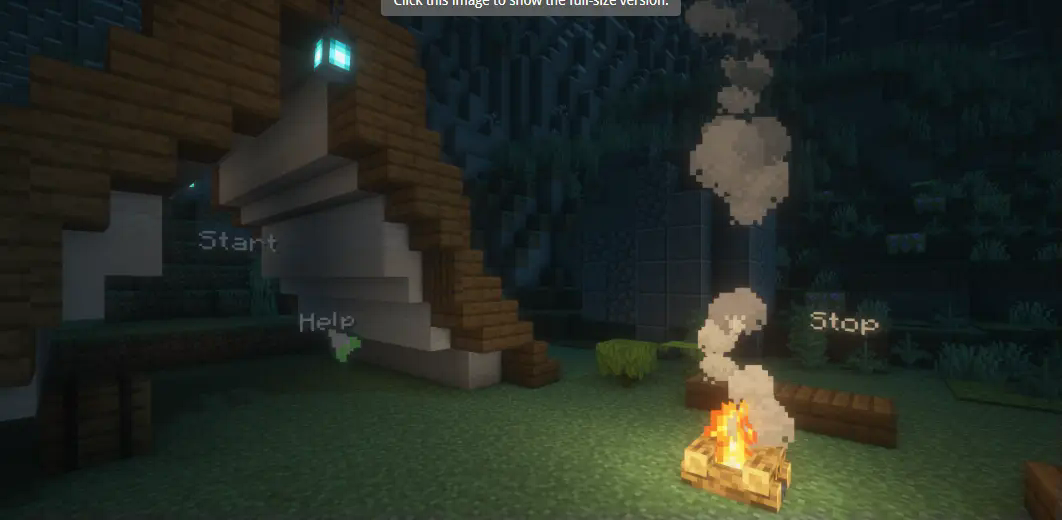 # CustomScreenMenu Plugin Documentation
Ченджлог
1.4.5Релиз1.21.11, 26.1.1, 26.1.2 · 11 июля 2026 г.
📌 Changelog – v1.4.5
🔧 Bug Fixes
Paper 26.1 Compatibility
Left-click: Fixed the issue where left-clicking menu text did not execute commands in version 26.1. Left-click swing events now trigger properly.
⚡ Optimizations
Built-in SQLite Driver: Bundled sqlite-jdbc directly into the plugin to prevent load failures caused by server environment download issues.
Language File Caching: getLangMessage now uses cached reads, reducing performance overhead from frequent IO operations.
Database Thread Safety: Added synchronization control to key DatabaseManager methods to lower SQLite concurrency access risks.
Improved State Cleanup: Strengthened menu state cleanup for player quit, kick, reload, and abnormal scenarios to reduce memory leak risks.
1.4.4Релиз1.21.10, 1.21.11, 26.1.2 · 16 июня 2026 г.
Bug Fixes:
- Fixed inconsistent hover/click detection range between menu text and cursor when adjusting text-size and cursor scale New Features:
- Added cursor movement sensitivity config sensitivity (1.0 = default, lower values = slower movement)
- Added cursor smoothing factor config smoothing (0.05-1.0, 1.0 = no filter zero delay, lower = smoother but more drag)
- Text size now supports unlimited scaling up or down Optimizations:
- Fixed several known performance-related errors
[code]version: "1.4.4" # 不要修改 Debug: false
是否开启南瓜头
use-pumpkin-overlay: false
是否以玩家当前所在位置/朝向作为菜单相机坐标
true -> 忽略菜单 yml 里的 camera-position,用玩家当前脚下
false -> 使用菜单 yml 里写死的坐标(原有逻辑)
use-player-location: false
是否设置自定义的玩家结束菜单的朝向
exit-camera: yaw: 0.0 pitch: 0.0
生物生成限制配置
creature-spawn-limits: enabled: false # 是否启用生物生成限制 radius: 10 # 以菜单为中心的禁止生物生成的半径(方块)
摄像机视角方块检测配置
camera-block-check: enabled: true radius: 1 # 以玩家为中心的检测半径(方块)
按钮访问控制配置
button-access-control:
需要登录才能点击的按钮标识配置
login-required: # 在按钮名称中包含的标识文本 name-tags: - "[需要登录]" - "%img_logo%" # 在按钮键名中包含的标识文本 key-tags: - "login_required" - "%img_logo%"
防止重复注册的按钮标识配置
no-duplicate-registration: # 在按钮名称中包含的标识文本 name-tags: - "%img_logo%" - "[NO_DUPLICATE_REG]" # 在按钮键名中包含的标识文本 key-tags: - "no_duplicate_reg" - "防止重复注册"
IP绑定安全配置
ip-binding:
是否启用IP绑定(同一IP只能注册一个账号)
enabled: true
是否严格模式:IP不匹配时直接拒绝登录
false -> IP不匹配时发出警告但仍允许登录
true -> IP不匹配时直接拒绝登录
strict: false
是否允许同一IP的用户登录已注册的账号
allow-same-ip-login: true
锁定时间(分钟):密码错误多次后锁定
lockout-duration: 5
最大登录尝试次数
max-login-attempts: 5
IP白名单配置
whitelist: # 是否启用IP白名单 enabled: false # 白名单IP列表(支持CIDR格式,如 192.168.1.0/24) ips: [] # - "192.168.1.1" # - "10.0.0.0/8"
IP黑名单配置
blacklist: # 是否启用IP黑名单 enabled: false # 黑名单IP列表(支持CIDR格式,如 192.168.1.0/24) ips: [] # - "192.168.1.100" # - "10.0.0.50"
管理员IP白名单配置(仅对OP玩家生效)
admin-ip-whitelist: # 是否启用管理员IP白名单 enabled: false # 允许登录的IP列表(支持CIDR格式,如 192.168.1.0/24) ips: [] # - "192.168.1.1" # - "10.0.0.0/8"
messages: prefix: '&f[&eCustomScreenMenu&f] ' command_blocked: '&c固定视角下无法使用命令!'
sound: name: 'music.menu' volume: 1 pitch: 1
循环音效
loop: # 是否开启 enabled: true # 每隔多少秒播放一次 duration: 30
加入游戏就执行菜单
join-run: enabled: false
延迟多少秒执行
delay: 3
执行的菜单
menu: 'test' commands: - "[console] say 欢迎玩家 %player% 加入游戏!" - "[player] msg %player% 欢迎来到服务器!" - "[op] gamemode survival %player%"
cursor-item: material: 'ARROW' custom-model-data: 0 scale: 0.5
光标移动灵敏度 (1.0 为默认,数值越小移动越慢)
sensitivity: 1.0
光标平滑系数 (0.05-1.0,1.0=无滤波零延迟;越小越丝滑但会有拖手感)
smoothing: 1.0
自定义光标大小
size: x: 1.0 y: 1.0 z: 1.0
最大3个X轴 已经为屏幕横向可容纳最大
max-x: 2
最大1.5个Y轴 已经为屏幕纵向可容纳最大
max-y: 3 x: 0.0 # X轴偏移 y: 0.0 # Y轴偏移 z-offset: 0.0 # 光标Z轴偏移量
光标移动范围限制
movement-range: # 启用自定义光标移动范围限制 enabled: false # 光标在X轴上的最小和最大位置 x: min: -2.0 max: 2.0 # 光标在Y轴上的最小和最大位置 y: min: -3.0 max: 3.0
光标默认位置
default-position: # 启用自定义光标默认位置 enabled: false # 光标默认的X和Y坐标 x: 0.0 y: 0.0[/code]
1.4.3Релиз1.21.10, 1.21.11, 26.1.2 · 28 мая 2026 г.
Typewriter Effect – Character-by-character text animation for text elements
Configurable display speed (interval between characters)
Configurable start delay (ticks before animation begins)
Configurable cursor character (blinking cursor at text end)
Supports hot-reload via /cmenu reload Hover Sound Effect – Sound playback when hovering over text elements
Configurable sound name (supports all Minecraft sounds)
Configurable volume and pitch
Configurable cooldown time (prevents excessive sound playback)
Built-in fallback mechanism for invalid sound configurations 🔧 Bug Fixes
Fixed join-run command placeholder replacement issue in config.yml
Built-in placeholders now correctly replace regardless of PlaceholderAPI installation
Supported: %player% , %player_name% , %player_uuid% , %player_displayname% , %player_x% , %player_y% , %player_z% , %player_world% , %player_health% , etc. ⚡ Optimizations
Thread safety: Replaced HashMap with ConcurrentHashMap in HoverEnlargeManager
Memory: Optimized CursorMenuPlugin.getPlayerTextDisplays() using Collections.emptyList()
Stability: Fixed duplicate cleanup in TypewriterEffect with completed flag
   # Hover enlarge effect
      # ========== Typewriter Effect (New) ==========
      typewriter:
        enabled: true          # Enable typewriter effect
        speed: 2               # Display one character every 2 ticks (lower value = faster)
        start-delay: 10        # Delay 10 ticks before starting display (~0.5 seconds)
        cursor-char: "|"       # Cursor character, can also use "_" or "▌"
      # ========== Hover Sound (New) ==========
      hover-sound:
        name: "minecraft:block.lever.click"   # Sound name (required)
        volume: 0.8                 # Volume 0.0-1.0 (optional, default 1.0)
        pitch: 1.2                  # Pitch 0.5-2.0 (optional, default 1.0)
        cooldown: 20                # Cooldown time in ticks (optional, default 20)
1.4.2Релиз1.20.4, 1.21.10, 1.21.11 · 21 мая 2026 г.
📌 Changelog – v1.4.2 Full Message Configuration - All prompt messages can now be customized in lang.yml.
Hot reload support, changes take effect after /cursormenu reload Added 50+ configurable messages Configuration categories: login, register, permission, command, player management, menu, system, NPC, WASD navigation
========================================
CursorMenu 提示信息配置文件
该文件包含插件所有的提示信息配置
支持热加载,修改后使用 /cursormenu reload 即可生效
========================================
========================================
登录相关提示
========================================
login: success: "&a[CursorMenu] 登录成功!" wrong_password: "&c[CursorMenu] 密码错误" empty_password: "&c[CursorMenu] 密码不能为空" user_not_found: "&c[CursorMenu] 用户不存在" locked: "&c[CursorMenu] 账户已被锁定,请稍后再试" too_many_attempts: "&c[CursorMenu] 登录尝试次数过多,请稍后再试"
========================================
注册相关提示
========================================
register: success: "&a[CursorMenu] 用户 %player_name% 注册成功!" failed: "&c[CursorMenu] 注册失败,请稍后重试" password_mismatch: "&c[CursorMenu] 两次输入的密码不一致" invalid_password_length: "&c[CursorMenu] 密码长度必须在6-12位之间" weak_password: "&c[CursorMenu] 密码过于简单,请使用更复杂的密码" user_exists: "&c[CursorMenu] 该账户已注册" empty_password: "&c[CursorMenu] 密码不能为空" empty_confirm_password: "&c[CursorMenu] 确认密码不能为空" error: "&c[CursorMenu] 注册失败,请稍后重试" ip_blacklisted: "&c[CursorMenu] 您的IP地址已被禁止注册" ip_not_in_whitelist: "&c[CursorMenu] 您的IP地址不在允许注册的列表中"
========================================
输入相关提示
========================================
input: field_set: "&a[CursorMenu] 当前输入字段已设置为: %field%" data_saved: "&a[CursorMenu] %field% 已设置为: %value%" incomplete: "&c[CursorMenu] 请先完成所有输入项"
========================================
密码可见性相关提示
========================================
password: visibility_toggled: "&a[CursorMenu] 密码可见性已切换" visibility_shown: "&a[CursorMenu] 密码已显示" visibility_hidden: "&a[CursorMenu] 密码已隐藏" visibility_button_shown: "[密码:隐藏]" visibility_button_hidden: "[密码:显示]"
========================================
权限相关提示
========================================
permission: no_permission: "&c[CursorMenu] 你没有权限使用该命令" no_permission_button: "&c[CursorMenu] 你没有权限执行该按钮" no_permission_menu: "&c[CursorMenu] 你没有权限打开该菜单" player_only: "&c[CursorMenu] 仅玩家可用"
========================================
命令相关提示
========================================
command: unknown_argument: "&c[CursorMenu] 未知参数" reload: "&a[CursorMenu] 插件重载..." reload_complete: "&a[CursorMenu] 插件重载完成!" menu_not_found: "&c[CursorMenu] 菜单 '%menu%' 未找到,请检查配置文件!" menu_opened: "&a[CursorMenu] 已为玩家 %player% 打开菜单 %menu%" text_display_opened: "&a[CursorMenu] 已为玩家 %player% 打开文字显示: %text_id%" text_display_not_found: "&c[CursorMenu] 文字显示ID不存在: %text_id%" item_disabled: "&a[CursorMenu] 已关闭物品显示" item_not_found: "&c[CursorMenu] 物品ID不存在: %item_id%" input_menu_hint: "&c[CursorMenu] 输入对应的菜单选项" menu_option_not_found: "&c[CursorMenu] 无该菜单选项"
========================================
玩家管理相关提示
========================================
player: not_found: "&c[CursorMenu] 玩家 %player% 不存在或不在线" not_registered: "&c[CursorMenu] 玩家 %player% 不存在于注册列表中" delete_success: "&a[CursorMenu] 玩家 %player% 的注册信息已成功删除,该玩家现在可以重新注册" delete_failed: "&c[CursorMenu] 删除玩家 %player% 的注册信息失败" delete_notify: "&e[CursorMenu] 您的注册信息已被管理员删除,请重新注册" reset_password_success: "&a[CursorMenu] 玩家 %player% 的密码已成功重置" reset_password_failed: "&c[CursorMenu] 重置玩家 %player% 的密码失败" reset_password_notify: "&e[CursorMenu] 您的密码已被管理员重置,请重新登录"
========================================
菜单相关提示
========================================
menu: require_login: "&c[CursorMenu] 请先登录后再执行此操作" already_registered: "&c[CursorMenu] 您已注册,请直接登录" condition_not_met: "&c[CursorMenu] 条件不满足,无法执行该操作" cursor_activated: "&a[CursorMenu] 光标菜单已激活!" cursor_deactivated: "&c[CursorMenu] 光标菜单已关闭!"
========================================
系统相关提示
========================================
system: ip_warning: "&e[警告] 您的IP与注册时不同!" server_transfer_failed: "&c[CursorMenu] 跨服传送失败: %error%" config_reloaded: "&a[CursorMenu] 配置文件已重新加载"
========================================
NPC相关提示
========================================
npc: toggle_on: "&a[CursorMenu] NPC创建已启用" toggle_off: "&c[CursorMenu] NPC创建已禁用" status_enabled: "&a[CursorMenu] NPC创建状态: 已启用" status_disabled: "&c[CursorMenu] NPC创建状态: 已禁用" reloaded: "&a[CursorMenu] NPC配置已重载" rotated: "&a[CursorMenu] NPC已旋转 %angle% 度" rotate_usage: "&c[CursorMenu] 用法: /cursormenu npc rotate <角度>" invalid_angle: "&c[CursorMenu] 无效的角度值: %angle%" system_disabled: "&e[CursorMenu] NPC镜像系统未启用(需要安装FancyNpcs插件)"
========================================
WASD导航相关提示
========================================
wasd: enabled: "&a[CursorMenu] WASD导航已启用" disabled: "&c[CursorMenu] WASD导航已禁用"
1.4.1Релиз1.21.4, 1.21.10, 1.21.11 · 15 апреля 2026 г.
📌 Changelog – v1.4.1 🔒 Security Updates
- Password Hash Algorithm Upgrade - Upgraded from insecure SHA-256 to BCrypt encryption algorithm.
- New registrations automatically use BCrypt encryption. Existing users' passwords are automatically upgraded to the new format upon first successful login.
- Temporary OP Operation Security Enhancement - Improved security mechanism for [op] command execution to ensure OP status is correctly restored. 🧵 Concurrency Safety Fixes
- Fixed Non-Thread-Safe Collections - Replaced all HashMap/HashSet with thread-safe ConcurrentHashMap, resolving potential concurrency issues in multi-threaded environments. 🧹 Code Quality Improvements
- New Command Execution Utility Class - Unified command execution logic, supporting command prefixes such as [console] , [op] , [player] , [server] .
- Code Cleanup - Removed duplicate import statements and simplified code structure.
- Added support for version 1.21.11 ⚠️ Notes
- BCrypt computation is slower than SHA-256; this is a normal security characteristic and not a performance concern.
1.4.0Релиз1.20, 1.21.4, 1.21.11 · 6 апреля 2026 г.
CustomScreenMenu 更新日志 / Changelog
[1.4.0] - 2026-03-01
🆕 新增功能 / New Features
NPC镜像系统 / NPC Mirror System
新增NPC镜像模块 - 在3D菜单中创建玩家镜像NPC
- 自动同步玩家装备(头盔、胸甲、护腿、靴子、主手、副手)
- 支持SkinsRestorer皮肤同步
- 可配置NPC位置偏移和朝向
- 支持菜单关联配置,可指定哪些菜单启用NPC
- NPC名称支持自定义格式和PlaceholderAPI变量
- 玩家可单独禁用自己的NPC创建
Added NPC Mirror Module - Create player mirror NPCs in 3D menus
- Auto-sync player equipment (helmet, chestplate, leggings, boots, main hand, off hand)
- Support SkinsRestorer skin synchronization
- Configurable NPC position offset and orientation
- Menu association configuration to specify which menus enable NPCs
- NPC name supports custom format and PlaceholderAPI variables
- Players can individually disable their own NPC creation
WASD导航系统 / WASD Navigation System
新增WASD导航模块 - 使用键盘导航菜单
- W/S 键上下选择菜单项
- A/D 键左右选择菜单项
- 空格键确认执行命令
- 与原有光标控制系统完全兼容,可同时使用
- 支持菜单关联配置
- 选择时自动放大选中项并播放音效
- 选择冷却机制防止快速连续选择
Added WASD Navigation Module - Navigate menus using keyboard
- W/S keys for up/down selection
- A/D keys for left/right selection
- Space key to confirm and execute commands
- Fully compatible with existing cursor control system, can be used simultaneously
- Menu association configuration support
- Auto-enlarge selected item and play sound effect on selection
- Selection cooldown mechanism to prevent rapid consecutive selections
PlaceholderAPI变量 / PlaceholderAPI Variables
新增WASD导航PAPI变量
%cmp_wasd_menu%- 当前WASD菜单名称%cmp_wasd_enabled%- 是否启用WASD导航%cmp_wasd_index%- 当前选中索引%cmp_wasd_x%- 当前X坐标%cmp_wasd_y%- 当前Y坐标%cmp_wasd_z%- 当前Z坐标%cmp_wasd_location%- 完整位置信息(格式:菜单名,x,y,z)%cmp_<菜单名>_xyz%- 指定菜单的坐标
Added WASD Navigation PAPI Variables
%cmp_wasd_menu%- Current WASD menu name%cmp_wasd_enabled%- Whether WASD navigation is enabled%cmp_wasd_index%- Current selected index%cmp_wasd_x%- Current X coordinate%cmp_wasd_y%- Current Y coordinate%cmp_wasd_z%- Current Z coordinate%cmp_wasd_location%- Full location info (format: menu_name,x,y,z)%cmp_<menu_name>_xyz%- Coordinates for specified menu
⚙️ 配置文件 / Configuration Files
新增配置文件 / New Configuration Files
npc_config.yml- NPC镜像系统配置- 启用/禁用NPC功能
- NPC位置偏移配置
- 菜单关联设置(白名单/黑名单模式)
- 名称显示配置(支持PAPI变量)
- 装备和皮肤同步开关
wasd_config.yml- WASD导航系统配置- 启用/禁用WASD导航
- 导航阈值配置
- 选择冷却时间
- 音效配置
- 菜单关联设置
npc_config.yml- NPC mirror system configuration- Enable/disable NPC feature
- NPC position offset configuration
- Menu association settings (whitelist/blacklist mode)
- Name display configuration (supports PAPI variables)
- Equipment and skin sync toggles
wasd_config.yml- WASD navigation system configuration- Enable/disable WASD navigation
- Navigation threshold configuration
- Selection cooldown time
- Sound effect configuration
- Menu association settings
菜单配置扩展 / Menu Configuration Extensions
- 新增
wasd-enabled选项 - 单独控制每个菜单的WASD导航开关 - Added
wasd-enabledoption - Individually control WASD navigation for each menu
🔧 命令 / Commands
NPC命令 / NPC Commands
/cursormenu npc toggle- 切换NPC创建状态/cursormenu npc enable- 启用NPC创建/cursormenu npc disable- 禁用NPC创建/cursormenu npc status- 查看NPC状态/cursormenu npc reload- 重载NPC配置/cursormenu npc rotate <角度>- 旋转NPC
🔌 依赖 / Dependencies
新增软依赖 / New Soft Dependencies
FancyNpcs (可选) - NPC镜像功能必需
SkinsRestorer (可选) - NPC皮肤同步支持
FancyNpcs (optional) - Required for NPC mirror feature
SkinsRestorer (optional) - NPC skin synchronization support
📝 权限 / Permissions
新增权限 / New Permissions
cursormenu.npc.toggle- 切换NPC创建状态cursormenu.npc.status- 查看NPC状态cursormenu.npc.reload- 重载NPC配置cursormenu.npc.rotate- 旋转NPC
🔄 兼容性 / Compatibility
✅ NPC镜像系统和WASD导航系统均为模块化设计
✅ 不修改原有CMP核心功能
✅ 所有新功能可独立启用/禁用
✅ 与原有光标控制系统完全兼容
✅ NPC mirror system and WASD navigation system are modularly designed
✅ No modifications to original CMP core functionality
✅ All new features can be independently enabled/disabled
✅ Fully compatible with existing cursor control system
📦 文件结构 / File Structure
com.cmenu.ui/
├── npc/                          # NPC镜像模块
│   ├── NPCModule.java
│   ├── NPCMirrorManager.java
│   ├── NPCMirrorHook.java
│   ├── NPCConfig.java
│   └── NPCCommandHandler.java
└── wasd/                         # WASD导航模块
    ├── WASDModule.java
    ├── WASDNavigationManager.java
    ├── WASDNavigationHook.java
    ├── WASDConfig.java
    ├── WASDSession.java
    └── WASDExpansion.java
升级说明 / Upgrade Notes
从 1.3.x 升级到 1.4.0 / Upgrading from 1.3.x to 1.4.0
备份配置文件 - 升级前请备份现有配置
删除旧版本jar - 删除
CustomScreenMenu-1.3.x.jar放入新版本jar - 将
CustomScreenMenu-1.4.0.jar放入 plugins 目录首次启动 - 会自动生成
npc_config.yml和wasd_config.yml安装依赖插件(可选)- 安装 FancyNpcs 和 SkinsRestorer 以启用完整功能
Backup configuration files - Please backup existing configurations before upgrading
Delete old jar - Delete
CustomScreenMenu-1.3.x.jarPlace new jar - Put
CustomScreenMenu-1.4.0.jarin plugins directoryFirst startup - Will auto-generate
npc_config.ymlandwasd_config.ymlInstall dependency plugins (optional) - Install FancyNpcs and SkinsRestorer for full functionality
1.3.7Релиз1.21.8, 1.21.10, 1.21.11 · 15 марта 2026 г.
🚀 Milestone Update This version is a turning point. The plugin is set to enter the 1.4.0 era in the next release.
New Features
Fully Customizable Login/Registration System
Complete support for player registration, login, password visibility, and account record-keeping.
Local SQL player data storage is now supported.
Improvements
All remaining ProtocolLib-related code has been removed.
Enhanced IP binding and admin IP whitelist functionality.
Improved menu loading speed and responsiveness.
Bug Fixes
Fixed the issue with teleportation not supporting return to a specified coordinate in version 1.21.8.
Fixed password errors during player login and registration in the test version.
1.3.6Релиз1.19.2, 1.19.3, 1.19.4 · 10 марта 2026 г.
Changelog – v1.3.6
New Features
Added link functionality: Add link: "[link]https://xxxxxxx" in the configuration to send a clickable link that redirects to a webpage.
# Text component 1 layout5: permission: cursormenu.button.test.layout4 name: Join Official QQ Group # X-axis of the text component x: 2 # Y-axis of the text component y: -1.0 # Z-axis of the text component z: 3.5 tilt: x: 0.0 # Pitch (up/down tilt) y: 0.0 # Yaw (left/right tilt) z: 0.0 # Roll (forward/backward tilt) command: [] link: "[link]https://XXXXX|&cClick to join our official QQ group"
Fixes
Fixed an issue where, when a player was in a menu and used the /cmenu reload command to reload the configuration, if camera-block-check was enabled, the blocks that were removed would not be restored after exiting the menu.
Комментарии
Загружаем…