 Mineforgian
Custom Team Manager
Create and manage your teams as an admin
- Загрузки
- 843
- Подписчики
- 3
- Обновлён
- 19 июня 2026 г.
- Лицензия
- All-Rights-Reserved
Опубликован 5 июля 2025 г.
English
Menu
With the command /trigger ctm_menu you can open the menu
Join
All teams are listed. Just click on the team you want to join
Leave
Uh yeah you leave the team
AFK
You join in the AFK team. When you change your rotation, you either join your team you was before or just the AFK team.
Menu for admins
Add
Click on a color for suggesting you the command in the chat. Fill the other 3 arguments.
/function ctm:manage/add/add_team {id:"", name:"", color:"color", trigger:""}
Remove
Select one team, you will get suggested a command for deleting it
Edit
You can edit following arguments:
- name (and the color)
- suffix (and the color)
- player color
- trigger
You cannot edit the id. For that you have to delete and recreate it.
Version 1.0.0
Menu
The command opens the menu. You can execute it by clicking on the respective text.
/trigger customteammanager_menu
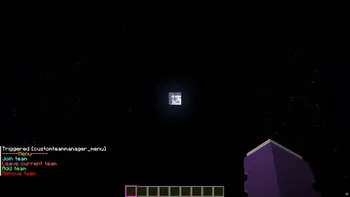
Join
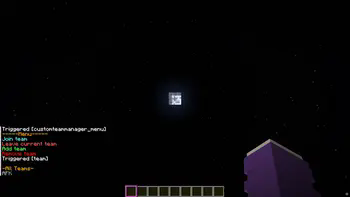
The teams that have been created are listed, and you can join the respective team by clicking on it again.
Leave
You can only leave your current team by clicking on “Leave current team.”
Add team
Only admins can create a team.
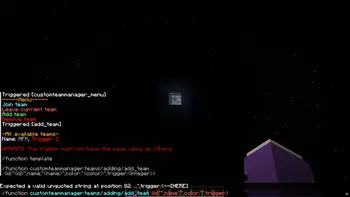
You can click on the template and the /function will be suggested, where you only need to insert the information in the curly brackets.
It is important not to use the same trigger value, as this could lead to confusion in the “code”.
A suffix is created for this purpose -> [] This is displayed after the name.
Remove team
Click on the template and then enter the ID of the team you want to delete.
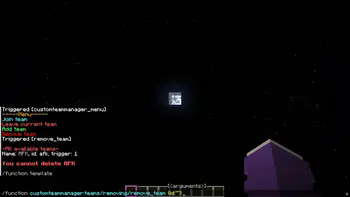
In the future
I still plan to add a feature that allows users to edit teams so that they don't have to delete them just because they made a mistake.
I also plan to add a feature that allows users to edit the suffix.
Ченджлог
2.0.0+modРелиз26.1.1, 26.1.2, 26.2 · 19 июня 2026 г.
New Features
AFK button
In the menu you can change your status directly with the AFK button
Show members
In the Show members menu you can click on a team and see the members
Edit
Instead of deleting and recreating a team because of a small mistake, you can now edit the team
UI
Redesigned the Menu and moved the features for admins into a separate tab
Technical
Changed the pack format to 107.1 (what is this number?)
2.0.0Релиз26.1.1, 26.1.2, 26.2 · 16 июня 2026 г.
New Features
AFK button
In the menu you can change your status directly with the AFK button
Show members
In the Show members menu you can click on a team and see the members
Edit
Instead of deleting and recreating a team because of a small mistake, you can now edit the team
UI
Redesigned the Menu and moved the features for admins into a separate tab
Technical
Changed the pack format to 107.1 (what is this number?)
Комментарии
Загружаем…