 Mineforgian
Create: Molten Vents
Adds a renewable source of the orestones found in the Create mod, and by extension, many resources.
- Загрузки
- 735K
- Подписчики
- 146
- Обновлён
- 23 июля 2025 г.
- Лицензия
- MIT
Опубликован 30 мая 2023 г.
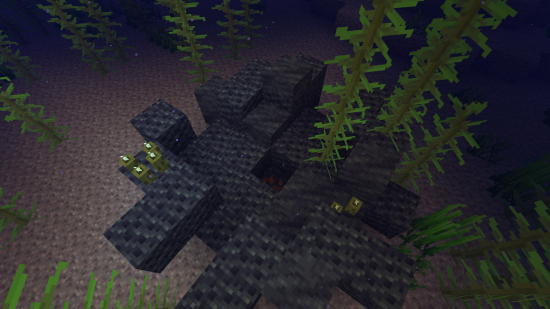
Molten Vents is a mod which adds a renewable source of the orestones found in the Create mod, and by extension the many resources that can be processed from them.
How to use:
- Locate a vent; Vents are found anywhere on the surface, but are more easily found underwater. (Configurable)
- Dig out the blocks inside of the vent until you find a block that looks like the orestones the vent is made of except with magma on it, that is the dormant orestone.
- Explode the dormant orestone by any means.
- Notice that the dormant molten vent is now an active molten vent by seeing the magma in it become brighter.
- Dump lava (preferrably via an automated method) on the active molten vent and watch as the lava turns into the corresponding orestone.
- Process the orestones into resources, or use them for building.
Default Vents:
- Veridium Vent
- Asurine Vent
- Crimsite Vent
- Ochrum Vent
- Scorchia Vent
- Scoria Vent
How to add a custom molten block
Just add the name of the block to this list (a .json file that generates in the config folder)
{"values":["asurine","veridium","crimsite","ochrum","scorchia","scoria","exampleblock"]}
And then depending on your modloader:
Neoforge
- Copy paste any other file in the config/molten_vents/conductive & config/molten_vents/convertible folders.
- Rename the files to the name of the custom block.
- Change values inside the files (Conductive is a list of blocks the molten vent can convert blocks through, it must contain the active molten vent at minimum. Convertible is a list of blocks the molten vent can convert into the new block. (ex. lava -> asurine))
Forge
Make a datapack that adds these two jsons: data/molten_vents/molten_vents/blocks/conductive/exampleblock.json (You can add whatever blocks you want here but definitely include these three) ```json { "replace": false, "values": [ "examplemodthataddsblock:exampleblock", "molten_vents:dormant_molten_exampleblock", "molten_vents:active_molten_exampleblock" ] } ``` data/molten_vents/molten_vents/blocks/convertible/exampleblock.json (The lava can be changed to any other block and other blocks can be additionally added) ```json { "replace": false, "values": [ "minecraft:lava" ] } ``` Example datapack can be found in the #datapacks channel in the discord ([https://discord.gg/HHqKa8vTAN]((https://discord.gg/HHqKa8vTAN)))Then make a resourcepack that adds the name translations, blockstates, models, and textures for "molten_vents.active_molten_exampleblock" and "molten_vents.dormant_molten_exampleblock" (optional)
How to make a custom molten vent feature
Just recreate your own copy of the placed and configured feature jsons available in the base mod in the respective directories within your own datapack: data/yourdatapackname/worldgen/configured_feature/examplevent.json data/yourdatapackname/worldgen/placed_feature/examplevent.json Then add your placed feature to the forge biome modifiers: data/yourdatapackname/forge/biome_modifier/add_vents.json
Examples are here:
Discord: https://discord.gg/HHqKa8vTAN
This mod may be used in any modpack.

Ченджлог
2.1.1Релиз1.21.6, 1.21.7, 1.21.8 · 23 июля 2025 г.
- Fixed active molten blocks being pushable via pistons.
2.1.0Релиз1.21.3, 1.21.4, 1.21.5 · 19 мая 2025 г.
- Added config option to disable aquatic vent generation.
- Added config to disable land vent generation.
- Moved molten block properties to the config folder instead of being data-pack driven.
- Molten block property json changes are now reloaded every 10 seconds without the need to relaunch the game or re-open the world.
- Moved custom blocks config into the molten vents folder inside of the config folder.
- Added russian translations. (Thanks to mpustovoi)
- Fixed occasional crash on world load.
2.0.9Релиз1.21.2, 1.21.3, 1.21.4 · 14 марта 2025 г.
- Ported to NeoForge.
2.0.9Релиз1.21.2, 1.21.3, 1.21.4 · 10 декабря 2024 г.
- Fixed dormant molten blocks being pushable by pistons.
2.0.8Релиз1.20, 1.20.1 · 3 июля 2024 г.
- Moved the molten_vents_custom_blocks.json into the config folder.
- Added korean translations.
2.0.8Релиз1.19.2 · 3 июля 2024 г.
- Moved the molten_vents_custom_blocks.json into the config folder.
- Added korean translations.
2.0.8Релиз1.18.2 · 3 июля 2024 г.
- Moved the molten_vents_custom_blocks.json into the config folder.
- Added korean translations.
2.0.7Релиз1.18.2 · 20 февраля 2024 г.
- Changed the placement stage vents are placed during to an earlier one to prevent vents generating ontop of trees when used alongside certain worldgen mods.
- This only affects 1.18.2 so 1.19.2 and 1.20.x will skip this version.
Комментарии
Загружаем…