 Mineforgian
Create: Mechanical Companion
Get ready to explore the world with a mechanical friend! Equippable with new modules that integrate with the classic Create experience!
- Загрузки
- 58K
- Подписчики
- 59
- Обновлён
- 24 апреля 2026 г.
- Лицензия
- MIT
Опубликован 13 мая 2025 г.

Remember to install Create and CuriosAPI and use Forge 47.3.10. or above.
This mod adds a new craftable mob to be with you on your journeys, the Mechanical Wolf!
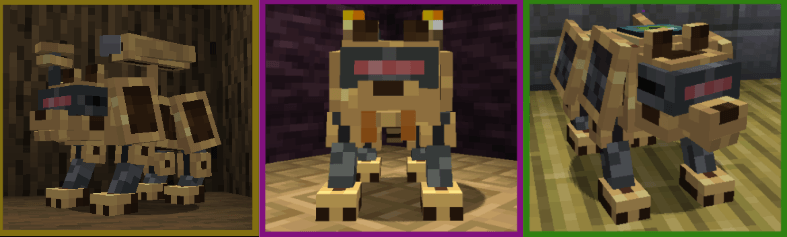
The wolf is summoned by equipping the Mechanical Wolf Link in the Curios Head Slot.
You can right click it to open the module interface or use a wrench to heal it.
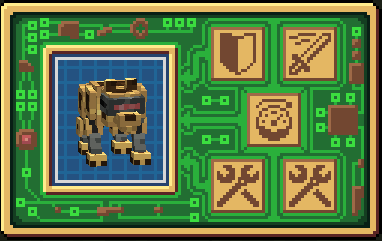
Here you can equip the wolf with the modules that best fit the situation. There are currently 4 module categories:
 Defensive modules
These modules are focused on enhancing the survival capabilities of your wolf.
Reinforced plates
Gives the Mechanical Wolf more health and armor.
Netherite plates
An upgraded version of the reinforced plates that also give fire immunity.
undefined
 Offensive modules
These modules upgrade the the wolf's attack or equip additional weapons.
Smelting Fangs
Adds additional fire damage to the default attack.
Tesla Tail
Shocks whoever attacks the Mechanical Wolf.
Mounted Crossbow
Equips the Mechanical Wolf with a smart crossbow that can only damage its target.
 Movement modules
Enhances the Mechanical Wolf's movement options.
Booster Rocket
Gives the Mechanical Wolf a speed boost with a short cooldown.
Quantum Drive
Gives the Mechanical Wolf teleportation abilities.
 Utility modules
You can equip 2 different modules from this category.
Mob Radar
Pings nearby hostile entity with a glowing effect every few seconds.
Mounted Light
Gives the Mechanical Wolf a portable light. Doesn't work underwater or in dense foliage.
Regenerative Casing
Gives the Mechanical Wolf a slow regeneration effect so you don't have to manually heal it.
NEW FEATURES
Version 1.4.
As of version 1.4. there's a new way to acquire the pieces for the Mechanical Wolf, The Illager Workshop. A map to the Illager Workshop can be found by trading with cartographers or wandering traders.
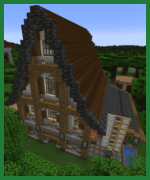
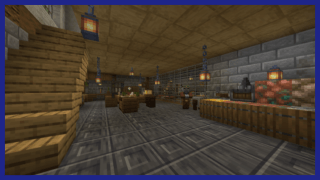
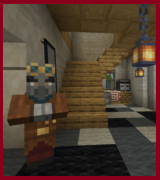
The Illager Workshop introduces two new Illager mobs. The Illager Engineer and the Illager Supervisor.
The Illager Engineer attacks with a wrench, dealing powerful melee damage to whoever gets close.
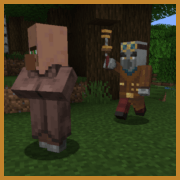
The Illager Supervisor uses a potato cannon to strike from a safe distance. It fires a variery of ammunitions so be prepared for unexpected projectiles!
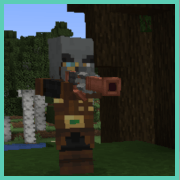
The Illager Workshop is filled with valuable loot and new items essential for the creation of the Mechanical Wolf. It also houses captured villagers and Create blocks, making it a great place to settle once the occupants are cleared out.
Version 1.5
Version 1.5. introduces a new decoration block: the Blueprint Schematic.
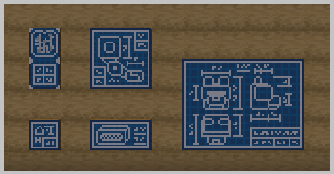
It can be found in Illager Workshops or crafted with schematics.
There are currently five variants, each with a different size 1×1, 1×2, 2×1, 2×2, and 3×4.
Additional features
- The module menu can't be opened by other players.
- You can name the Mechanical Wolf using a nametag.
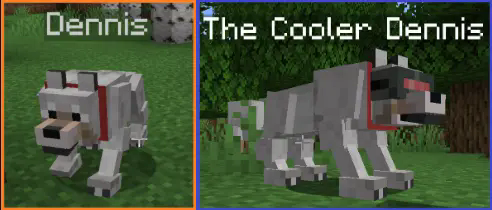
- There are currently 2 easter eggs skins.
FAQ
Q: Does this work with the new version of Create?
A: Yes, it should work on the new and old versions.
Q: Are you going to add additional languages.
A: If you're fluent in a language and want to give me a .json file with the translation I'll be more than happy to add it.
Q: Are you going to add additional easter egg textures?
A: If you have any ideas/textures I'd be glad to add them in the next update.
Check out my other mods!

Want to report bugs, share reviews, suggest features and get updates about the game? Join our official discord channel!

If you enjoy this mod and want to support its development, donations are greatly appreciated ❤️
Ченджлог
1.9-neoforge-1.21.1Релиз1.21.1 · 24 апреля 2026 г.
New Features
- New respawn timer in config.
- Mechanical Wolf Link now displays what modules are equipped on the tooltip.
Fixes
- Renderer now displays the Mechanical Wolf Link when it is equipped.
- Fixed bug where the Mechanical Wolf would duplicate when the Mechanical Wolf Link was equipped on the curio slot.
1.8-hotfix-neoforgeРелиз1.21.1 · 18 января 2026 г.
Fixed
- Recipes not working
- Paintings not beeing placeable
1.8-neoforge-1.21.1Альфа1.21.1 · 17 января 2026 г.
Neoforge port of version 1.8
1.8-1.20.1Релиз1.20.1 · 24 октября 2025 г.
Added:
- You can now customize the following properties from the config file:
- wrenchHealAmount
- reinforcedPlatesArmorValue
- reinforcedPlatesHealthIncrease
- reinforcedPlatesKnockBackResistance
- netheritePlatesArmorValue
- netheritePlatesHealthIncrease
- netheritePlatesKnockBackResistance
- mountedCrossbowCooldown
- teslaTailDamage
- smeltingFangsFireDuration
- boosterRocketSpeedIncrease
- boosterRocketDuration
- boosterRocketCooldown
- quantumDriveCooldown
- regenerativeCasingHealAmount
- mobRadarRange
- mobRadarCooldown
1.7-1.20.1Релиз1.20.1 · 11 сентября 2025 г.
Added:
- A new warning that appears if you try to equip two Mechanical Wolf Links at the same time.
- Translation files for the new warning.
Changed:
- Disabled Mechanical Wolf traveling through portals without the user.
Fixed:
- Duplication glitch fixed.
- Illager Engineers and Supervisors don't despawn with distance.
1.6.2-1.20.1Релиз1.20.1 · 21 августа 2025 г.
Added:
- Translation file update
Fixes:
- Fixed an issue with blueprints not placing correctly in certain spots.
1.6.1-1.20.1Релиз1.20.1 · 27 июля 2025 г.
Updated simplified chinese translation by ZombieArchive
1.6-1.20.1Релиз1.20.1 · 27 июня 2025 г.
New features:
- Added a new config file that includes a blacklist of entities that the Mechanical Wolf won't attack
- To modify the blacklist add or remove the mob ids from the array. By default the Wolf won't attack creepers, ghasts or robit from mekanism.
- If you want to resest the blacklist delete the config file and a new one will be created.
- If you're playing multiplayer, the config of the server will apply to all clients.
Комментарии
Загружаем…