 Mineforgian
Create: Improve
This mod adds a series of features and tools that enhance the Create mod experience.
- Загрузки
- 28K
- Подписчики
- 10
- Обновлён
- 14 августа 2026 г.
- Лицензия
- MIT
Опубликован 19 июня 2026 г.
This mod adds a series of features and tools that enhance the Create mod experience.
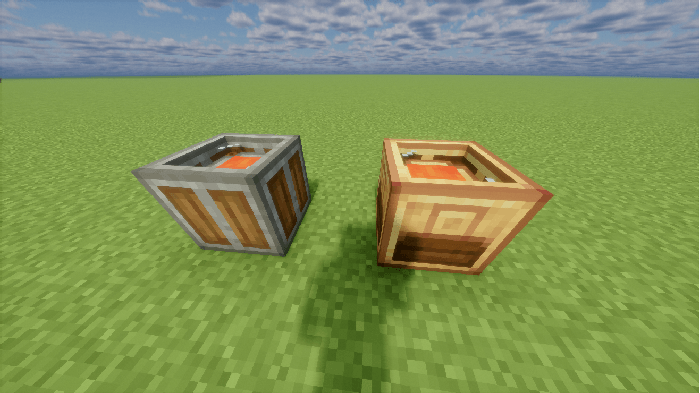
Scrap Bucket
Available in Andesite and Brass variants.
The Andesite Scrap Bucket destroys any items or fluids inserted into it via logistics components.
The Brass Scrap Bucket additionally extracts EXP Ingots from destroyed items and fluids at a low efficiency. EXP Ingots can be retrieved by sneaking and right-clicking empty-handed, or extracted via logistics components.
Items or filters can be placed in the side filter slot of the Brass Scrap Bucket, or configured via its GUI, to restrict insertion by filter.
Furthermore, when placed beneath a storage container (for either items or fluids), a target stock level for a specific item or fluid can be set in the GUI. When the filtered item's stock (or total stock if no filter is set) in the container above exceeds this value, the excess will be automatically inserted into the Scrap Bucket and destroyed.
Network Manager
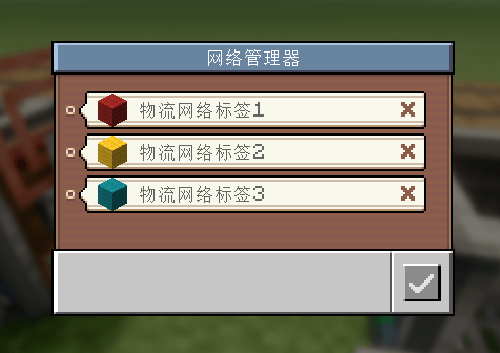
The Network Manager allows you to create and manage tags for existing logistics networks, and assign names and icons to these tags.
It also enables quick configuration of the network connections for placed logistics components using existing tags.
Labeled Redstone Link
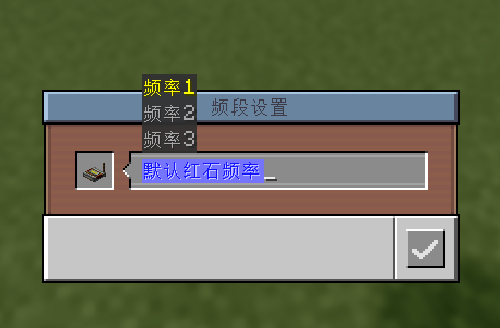
The Labeled Redstone Link functions essentially the same as Create's Redstone Link, but uses text strings as frequencies.
Only Labeled Redstone Links with matching text frequencies can transmit redstone signals. Like the Wireless Redstone Link, frequencies can be copied and pasted using the Clipboard.
Additionally, similar to how prepending # to a logistics network address in the Clipboard allows quick network assignment, prepending @ to a frequency lets players quickly configure the Link's frequency, with shortcut suggestions provided during configuration.
Batch Mechanical Crafter
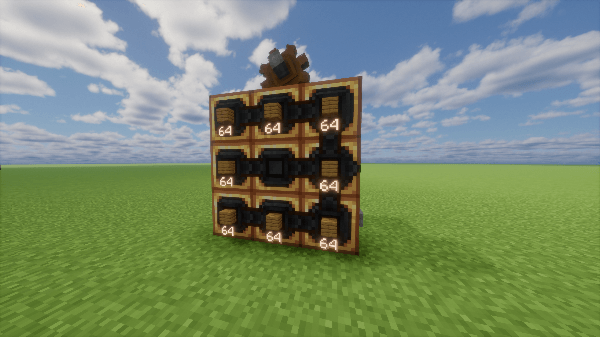
A Mechanical Crafter that supports batch crafting. Works the same as a regular Mechanical Crafter, but each slot can hold a full stack of items and crafts them simultaneously. When processing packages with crafting requests, it always needs to be paired with a Batch Repackager.
When processing packages that carry crafting requests, if the amount of materials in a package exceeds the quantity that can be used in a single batch craft, the package will remain in the packager to wait for the next batch of crafting.
Batch Repackager
Functions the same as a Repackager, processing packages from Batch Crafting requests into a format the Batch Mechanical Crafter can accept. Supports multiple package input/output when raw material quantity exceeds a single package capacity, and also supports packages where a single request contains multiple recipes.
For raw material packages carrying crafting requests, the Batch Repackager will always output packages containing integer multiples of the materials required for a single craft of the corresponding recipe.
To make this easier to understand, assume a request uses 128 Iron Ingots and 768 Planks to craft 128 Shields:
The Input: There are three raw material packages: one containing 2x64 Iron Ingots, one with 9x64 Planks, and one with 3x64 Planks.
The Output: In this scenario, the Repackager will output them as follows:
First Package: Contains 74 Iron Ingots (64+10) and 444 Planks (6x64+60). It fills the package as much as possible while ensuring the output always contains integer multiples of the required crafting materials.
Second Package: Contains 54 Iron Ingots and 324 Planks (5x64+4).
Multiple Recipes: In cases where a single request contains multiple recipes (typically when manually requested via the Storage Manager), it will process the recipes sequentially and output the required raw material packages for each specific recipe.
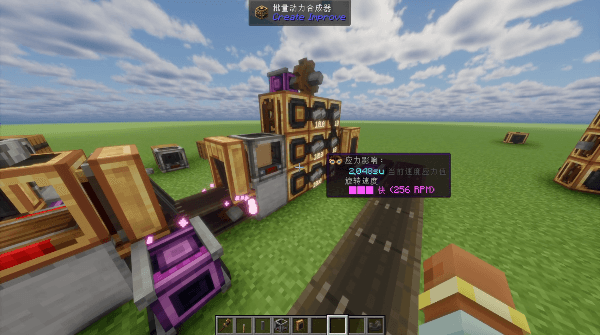
Template Panel
Added a new type of Factory Gauge used to define a Template Chain for template production.
A valid Template Chain must have ordinary Factory Gauges as leaf nodes, and every Template Panel must have an address configured.
Template Panels are configured in the same way as Factory Gauges, and support demand‑mode requests and Mechanical Crafting, but cannot initiate requests on their own and must be used together with a Work Warehouse.
In a valid Template Chain, all items set on Template Panels can be used for template production.
After configuring a Template Chain, you can see available template productions in the Stock Keeper menu, and request template production if there is an available Work Warehouse.
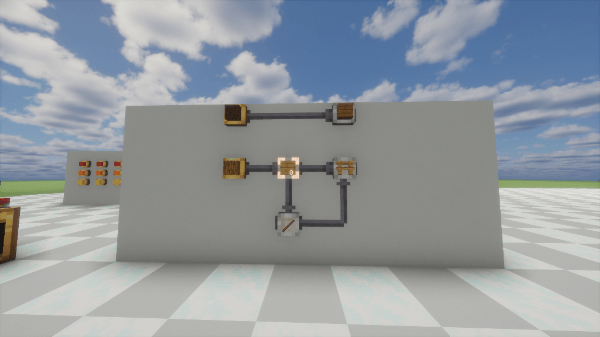
Work Warehouse
A block used for template crafting, with two placement modes: standalone or placed flush against a block. The Work Warehouse must be configured with an address for receiving materials. When placed flush against a storage block, its address should be set to that connected storage's address.
There must be at least one valid Work Warehouse in the logistics network to perform template production. The number of Work Warehouses determines how many template productions can run simultaneously.
A standalone Work Warehouse must be connected to a Packager (no Stock Link required) and will input/output materials and products through that Packager. A Work Warehouse placed flush against a storage block connected to the same logistics network will retrieve items directly from the connected storage and ship them via that storage's Packager, which is more convenient and efficient.
After a template request is made, the Work Warehouse will obtain all materials needed to complete the request at once, either via package requests or directly from the connected storage.
Then, it will sequentially send materials through the Packager attached to the Work Warehouse or the Packager of the connected storage to the address configured on the Template Panel for production.
When the corresponding products are detected in the connected storage or logistics network, they will be transferred directly or requested into the Work Warehouse.
This process repeats until the requested template item is fully produced. The Work Warehouse will then output both the main product and byproducts to the address set when the request was made.
Additionally, if the address set for the request is the routing address of the connected storage (configurable, default is /back), the final product will be output to the connected storage instead of being sent via Packager.
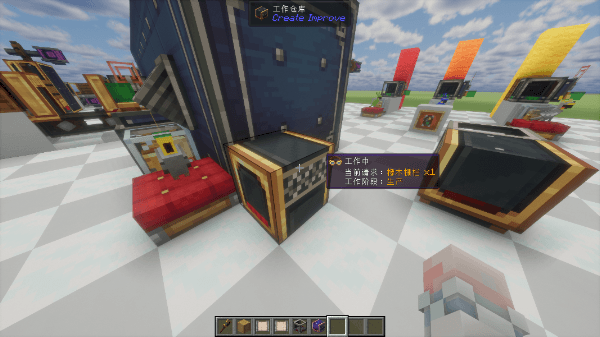
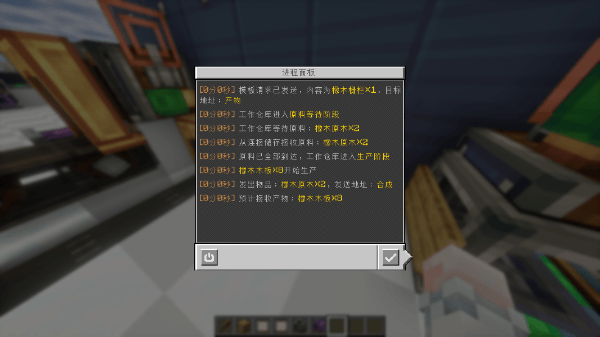
Process Manager
A panel used to monitor template crafting progress. It shows all ongoing template productions, and you can click to enter the detail interface to view detailed logs.
It also keeps up to 10 (configurable) history logs of completed or interrupted template requests, viewable in the history log interface.
Additionally, you can interrupt an ongoing request from the log detail interface of that template production.
After interruption, the Work Warehouse will send all materials currently stored in it to the address set for the request and refuse any further incoming materials.
Redstone Link Router
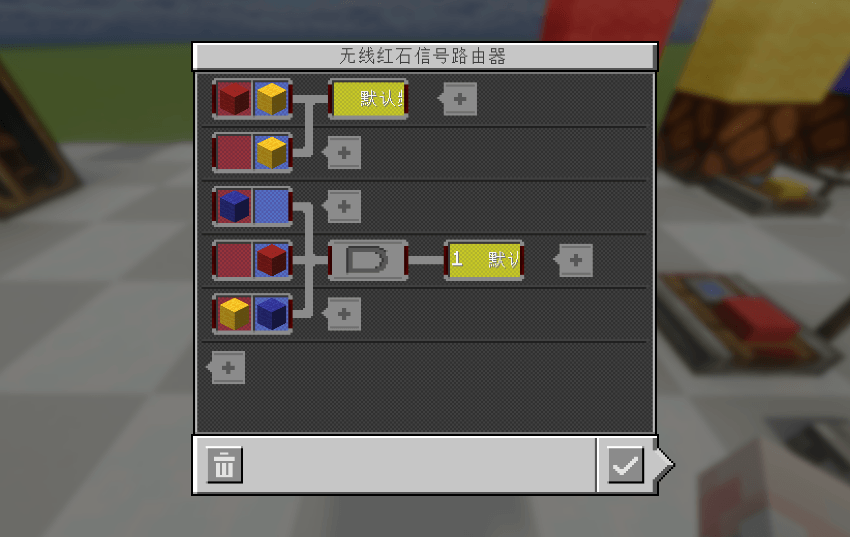
The Redstone Link Router allows players to arbitrarily add and connect Wireless Redstone Link frequencies within its interface, including the item frequencies of vanilla Create Wireless Redstone Links and the text frequencies added by this mod. When two frequencies are connected, the frequency on the left transmits its redstone signal to the frequency on the right. It also supports connecting a single frequency to multiple frequencies, allowing one frequency to control multiple others, and vice versa.
On top of that, players are allowed to use basic Logic Gates to control the transmission of redstone signals between frequencies. The add-frequency window supports adding AndGate and OrGate. Meanwhile, left-clicking a connection line between frequencies allows you to configure a NOT gate on the input end of that connection.
In this way, you can also control Labeled Redstone Links with the vanilla Create Redstone Remote.
Packager Outbound Address Filtering
In vanilla Create, when requesting items from a storage that is connected to multiple Packagers on the same network, one of those Packagers is chosen at random to ship the items.
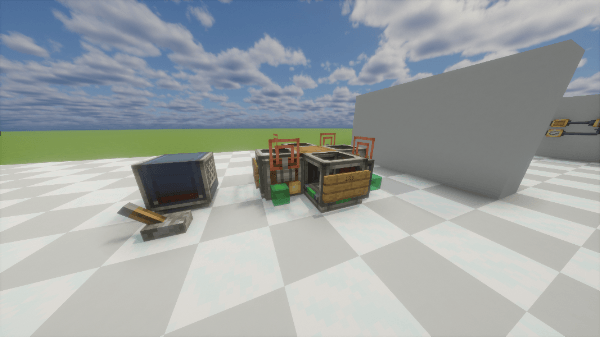
This mod adds a feature that allows players to place Signs on Packagers that have a Stock Link attached. When requesting items from that storage, the shipment will be sent through the Packager whose Sign matches the request address.
Furthermore, similar to the package filter in vanilla Create, the text on the Sign supports Glob syntax for matching. For example, "?23" can match addresses like 123, 223, or 323.
If no Packager with a matching address is found, it will attempt to output through a Packager that has no Sign. If there is no such Sign‑less Packager either, it will pick a Packager at random.
Factory Panel Demand Request Mode
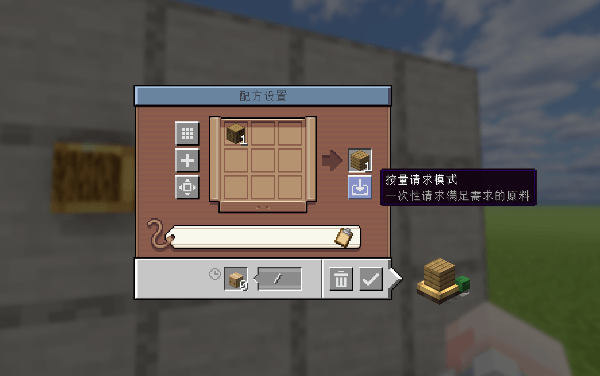
A new button has been added to the recipe mode of the Factory Panel to toggle Demand Request Mode on or off for that panel. This button is only visible when the panel is connected to other Factory Panels.
In Demand Request Mode, the recipe configured in the panel is treated as a single-craft recipe, which utilizes the minimum amount of materials required to satisfy the crafting conditions.
If the monitored materials for the panel fall below the set threshold, it will attempt to request all raw materials needed to fill the material gap to the specified address at once, based on the configured minimum recipe.
Building on this, if there is an insufficient supply of raw materials in the network, the panel will attempt to send out the maximum possible batches of raw materials to fill the gap as much as it can.
To make this easier to understand, assume the panel is set to produce 1 Stripped Oak Log using 1 Oak Log, Demand Request Mode is enabled, and the monitored quantity for Stripped Oak Logs is configured to 64:
When the amount of Stripped Oak Logs in the logistics network is 20, the panel will attempt to request 44 Oak Logs to the specified address at once, based on the set minimum recipe.
If there are only 30 Oak Logs left in the network, it will request all 30 Oak Logs to the specified address at once, and the promised amount will correspondingly be exactly 30.
Quick Unpacking
Allows players to right-click Packages inside inventory or any container GUI to quickly unpack them.
The contents will first fill the current container or inventory, then the hotbar. If there is insufficient space, items will be dropped at the player's feet.
Compatibilities
Added compatibility with Create: Fluid Logistics, enabling fluids to participate in template production and allowing players to create Fluid Templates. Work Warehouses can receive and send fluid packages via their attached Packager or the Packager of the connected storage, without requiring an additional Fluid Packager. The outgoing address filter for Packagers also applies to Fluid Packagers. Scrap Buckets can now use a Fluid Packager to unpack fluids and destroy them.The hand pointer from Create: Fluid Logistics can be used on the Batch Mechanical Crafter.
Added compatibility with Create: Phantom, allowing the tunable portable ticker from Phantom Logistics to see and request templates. Fluid Templates are also supported.
Added compatibility with Create: Extra Gauges, enabling Template Panels to configure Mechanical Crafting recipes larger than 3x3 and participate normally in template production.
Added compatibility with Create: Additional Logistics, ensuring that the Demand Request Mode of Factory Panels is properly limited by the promise cap added by Additional Logistics.
It has been confirmed that, due to the new version of Create: Mobile Packages being incompatible with the latest version 1.2.6 of Create: Fluid Logistics, and since this mod's compatibility with Fluid Logistics is based on that version, it will not be compatible with Mobile Packages until it updates.
It has been confirmed that, due to Mixin architecture conflicts, this mod will not be compatible with Create: Factory Logistics in the short term.
Ченджлог
1.4.1Релиз1.21.1 · 14 августа 2026 г.
- 对于进程面板,将多余的物品数据剔除以大幅缩减进程面板日志数据大小,添加了进程面板日志大小限制,超过大小的早期日志会被剔除并呈现提示。
- 修复了1.2.7版本流体包裹兼容时由于其自行修复多打包机承诺问题导致的mixin注入失效,仅在1.2.6版本提供该修复与相应配置选项。
- 修改标码无线红石信号终端配方,使其采用告示牌标签而非固定橡木告示牌。
- 新增了黄铜废料桶的配置项,可以控制指定物品/流体的经验颗粒生产效率。 ————————————————————————————————————————
- For the Process Manager, removed redundant item data to significantly reduce process log sizes. Added a log-size limit; older entries are discarded with a warning when the limit is exceeded.
- Fixed a Mixin injection failure when compatible with Fluid Logistics 1.2.7, which now fixes the multi-packager promise issue itself. The fix and its configuration option are now available only for version 1.2.6.
- Updated the Labeled Redstone Link recipe to use the sign tag instead of requiring an oak sign.
- Added Brass Scrap Bucket configuration options for setting experience nugget production efficiency for specific items and fluids.
1.4.0Релиз1.21.1 · 31 июля 2026 г.
新增:
- 添加了无线红石信号路由器,可以在它的GUI内任意添加并连接频率,连接的频率会传递红石信号。在此之上还可以使用逻辑门管理红石信号频率的触发逻辑。同时,标码无线红石信号终端的文本频率也可以依此方式接入原版无线红石信号终端的物品频率。
- 兼容了机械动力:流体包裹,使得流体可以参与模板制作,并允许玩家创建流体模板。工作仓库可以通过连接的打包机或者连接储存的打包机接收与发送流体包裹,不需要额外放置流体打包机。同时,出库打包机筛选功能也适用于流体打包机。废料桶现在可以用流体打包机解包流体并销毁。指读棒可以使用在批量动力合成器上。
- 兼容了机械动力:幻翼物流,使得幻翼物流的可调频便携发报机能看到并请求模板。同时,也兼容流体模板。
- 兼容了机械动力:更多仪表,使得模板仪表可以配置超过3*3的动力合成配方并正常参与模板制作。
- 兼容了机械动力:物流附加,使得工厂仪表的按量请求模式能正常限制于物流附加添加的承诺上限内。
- 修改了配置样式使其更直观便捷。
- 在配置中添加了所有涉及的物品/功能的开关,禁用物品只会禁用其创造标签页与合成表,依旧可以通过指令获取该物品,世界中存在的该物品也不会消失。
- 修复了机械动力的在仓储连接多个同网络打包机时,一份到达的材料会满足多次仪表承诺的问题,该项修复可以在配置中开关。
- 现在手持物品放置于连接的批量动力合成器上时会尽可能均分至每一格,使用动力臂放置物品于连接的批量动力合成器上时同理。
- 废料桶现在可以用打包机解包物品并销毁。
修复:
- 修复了标码无线红石信号终端被处理为动态结构时掉落自身掉落物的问题。
- 修复了在工作仓库生产中途退出游戏时导致的中断问题和进程面板显示故障问题。
- 修复了英文环境下标码无限红石信号终端默认频率依旧是中文的问题。
不兼容:
- 经过确认,由于机械动力:无人机物流新版本不兼容机械动力:流体包裹的最新1.2.6版本,而本模组对流体包裹的兼容正是基于该版本,所以直到无人机物流更新为止不会兼容它。
- 经过确认,本模组由于Mixin架构冲突,短期内不会兼容机械动力:流体物流。
—————————————————————————————————————
New:
- Added the Redstone Link Router, which allows arbitrary frequencies to be added and connected within its GUI. Connected frequencies will transmit redstone signals. On top of that, Logic Gates can be used to manage the triggering logic of redstone signal frequencies. At the same time, the text frequencies of Labeled Redstone Links can also be connected to the item frequencies of vanilla Wireless Redstone Links in this manner.
- Added compatibility with Create: Fluid Logistics, enabling fluids to participate in template production and allowing players to create Fluid Templates. Work Warehouses can receive and send fluid packages via their attached Packager or the Packager of the connected storage, without requiring an additional Fluid Packager. The outgoing address filter for Packagers also applies to Fluid Packagers. Scrap Buckets can now use a Fluid Packager to unpack fluids and destroy them.The hand_pointer from Create: Fluid Logistics can be used on the Batch Mechanical Crafter.
- Added compatibility with Create: Phantom, allowing the tunable_portable_ticker from Phantom Logistics to see and request templates. Fluid Templates are also supported.
- Added compatibility with Create: Extra Gauges, enabling Template Panels to configure Mechanical Crafting recipes larger than 3x3 and participate normally in template production.
- Added compatibility with Create: Additional Logistics, ensuring that the Demand Request Mode of Factory Panels is properly limited by the promise cap added by Additional Logistics.
- Reworked the config UI to be more intuitive and convenient.
- Added toggles in the config for all involved items/features. Disabling an item only disables its creative tab and recipe; the item can still be obtained via commands, and existing instances in the world will not disappear.
- Fixed an issue where, when a storage is connected to multiple Packagers on the same network, a single arriving batch of materials would satisfy multiple gauge promises. This fix can be toggled in the config.
- Items placed onto a connected Batch Mechanical Crafter while held by hand are now evenly distributed across all slots as much as possible. The same applies when a Mechanical Arm places items onto a connected Batch Mechanical Crafter.
- Scrap Buckets can now use a Packager to unpack items and destroy them.
Fixes:
- Fixed an issue where Labeled Redstone Links would drop their own item entity when processed as a contraption.
- Fixed interruption issues and Process Manager display faults that occurred when quitting the game mid-production in a Work Warehouse.
- Fixed the default frequency of Labeled Redstone Links still being in Chinese under the English language environment.
Incompatibilities:
- It has been confirmed that, due to the new version of Create: Mobile Packages being incompatible with the latest version 1.2.6 of Create: Fluid Logistics, and since this mod's compatibility with Fluid Logistics is based on that version, it will not be compatible with Mobile Packages until it updates.
- It has been confirmed that, due to Mixin architecture conflicts, this mod will not be compatible with Create: Factory Logistics in the short term.
1.3.5Релиз1.21.1 · 22 июля 2026 г.
修复了工作仓库在具有中间节点的初始原料时的需求计算错误; 修复了批量动力合成器面对有充足空间的容器时依旧成组输出的问题; 添加了批量理包机与动力臂的兼容; 修复了存在模板的情况下仓管合成配方请求的异常问题; Fixed a demand calculation error in the Work Warehouse when initial ingredients have intermediate nodes; Fixed an issue where the Batch Mechanical Crafter still output in groups even when facing a container with ample space; Added Mechanical Arm compatibility for the Batch Repackager; Fixed an issue where Stock Keeper's crafting recipe requests behaved abnormally when templates were present;
1.3.4Релиз1.21.1 · 19 июля 2026 г.
修复问题:修复了现代化修复导致的批量动力合成器连接纹理问题;修复了使用蓝图旋转并放置带批量动力合成器蓝图时导致的问题;修复了批量动力合成器尝试将超过64的产物输出到传送带或分液池上时导致的游戏崩溃问题;修复了输出容器爆满、批量动力合成器产物堵在输出口时,产物下方显示存量数值不随着部分输出减少的问题;
新增功能:红石请求器现在可以在仓管处配置并请求模板,同时红石请求器的部分请求模式也添加了对模板的支持;蓝图大炮填写的材料清单现在可以在仓管处请求模板;添加了配置中可修改的模板在仓管中显示样式;添加了配置中可选的在仓管中将模板与普通物品合并显示的选项;批量动力合成器现在兼容动力臂;标码无线红石信号终端现支持连接工厂仪表
Bugfixes: Fixed a connection texture issue with the Batch Mechanical Crafter caused by ModernFix; fixed an issue that occurred when using Schematicannon rotation and placing schematics containing a Batch Mechanical Crafter; fixed a game crash that occurred when the Batch Mechanical Crafter tried to output more than 64 of a product onto a belt or basin; fixed an issue where, when the output container was full and the Batch Mechanical Crafter's output was backed up at its outlet, the stock count displayed below the output did not decrease as items were partially output.
New Features: The Stock Keeper can now configure and request Templates on the Redstone Requester, and the Redstone Requester's partial request mode now also supports Templates; material lists filled in via the Schematicannon can now request Templates at the Stock Keeper; added a configurable option to change how Templates are displayed at the Stock Keeper; added a configurable option to merge Templates with regular items in the Stock Keeper display; the Batch Mechanical Crafter is now compatible with the Deployer Arm; the Labeled Wireless Redstone Link now supports connecting to the Factory Gauge.
1.3.3Релиз1.21.1 · 16 июля 2026 г.
-修复了服务端下计算可用工作仓库的问题; -增加了模板仪表物品配置界面的JEI兼容; -修复黄铜废料桶界面JEI兼容问题; -为黄铜废料桶生产的物品添加可配置项; -Fixed an issue with calculating available Work Warehouses on the server side; -Added JEI compatibility for the Template Panel item configuration screen; -Fixed JEI compatibility issue in the Brass Scrap Bucket screen; -Added a configurable option for the item produced by the Brass Scrap Bucket;
1.3.2Релиз1.21.1 · 15 июля 2026 г.
-修复了与Create: Better Stock Ticker的兼容问题; -修复了工作仓库的一个需求产物数量计算问题; -标码无线红石信号终端现在可以通过空手蹲下右键以改变模式; -Fixed compatibility issues with Create: Better Stock Ticker; -Fixed a requirement product quantity calculation problem in WorkWarehouse; -Labeled Redtonelink can now change modes by squatting with the right hand empty-handed;
1.3.1-hotfixРелиз1.21.1 · 14 июля 2026 г.
Fixed compatibility issue with Create: Compatible Storage. Fixed an issue where server-side code was mixing in client-only classes. Added a toggle for experience nugget generation in the Scrap Bucket. Fixed missing sound effect when quick-unpacking in the Creative inventory.
1.3.0Релиз1.21.1 · 13 июля 2026 г.
Added Template Panel, Work Warehouse, and Process Manager.
Added packager outbound address filtering.
Fixed various issues with the Mechanical Crafter.
Комментарии
Загружаем…