 Mineforgian
Create: Improved Display Link Experience
Sprucing up the functionality of Display Links from Create mod
- Загрузки
- 11K
- Подписчики
- 40
- Обновлён
- 28 мая 2026 г.
- Лицензия
- MIT
Опубликован 7 февраля 2026 г.

Create: Improved Display Link Experience






The project description is not up to date at the moment. While it's going through total rework, check out the Modrinth Changelog or the GitHub Changelog for details about latest additions.
Create: Improved Display Link Experience (C: IDLX) is a little Quality-of-Life add-on for Create mod aimed at sprucing up some of Display Link features, mainly the underrated Attached Label option.
Features
Placeholders for the Attached Label
The way Create mod currently handles displaying information (let's call one an input string) with the attached label is by simply concatenating both with a space in between - it's a simple way, but thus, in terms of customization, a severely limiting one:
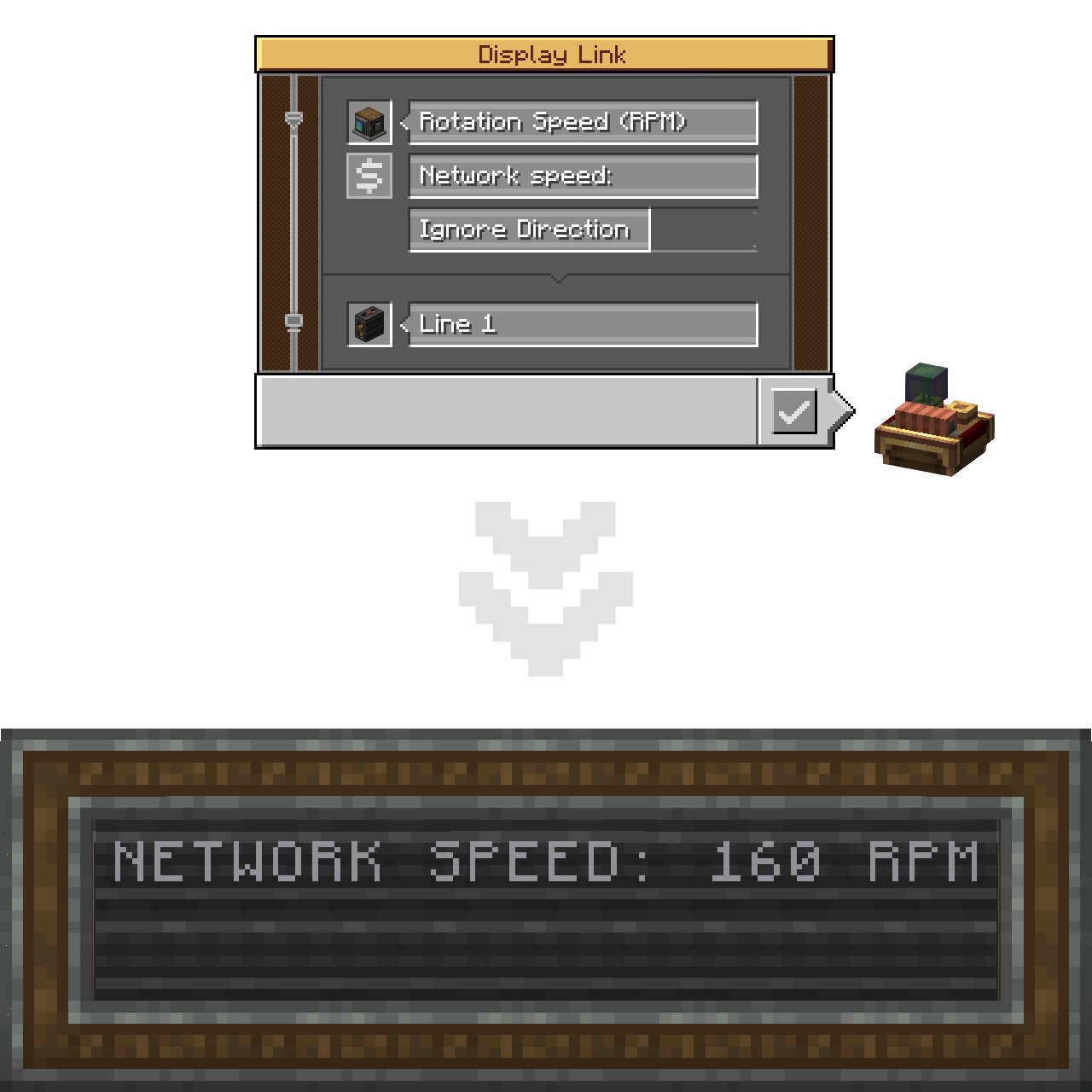
This add-on pushes the boundaries apart by introducing the $ and {} placeholders.
Placing one (or more) marks the place where the input string should be inserted.
In short, the Attached Label can now act like a formatted string!
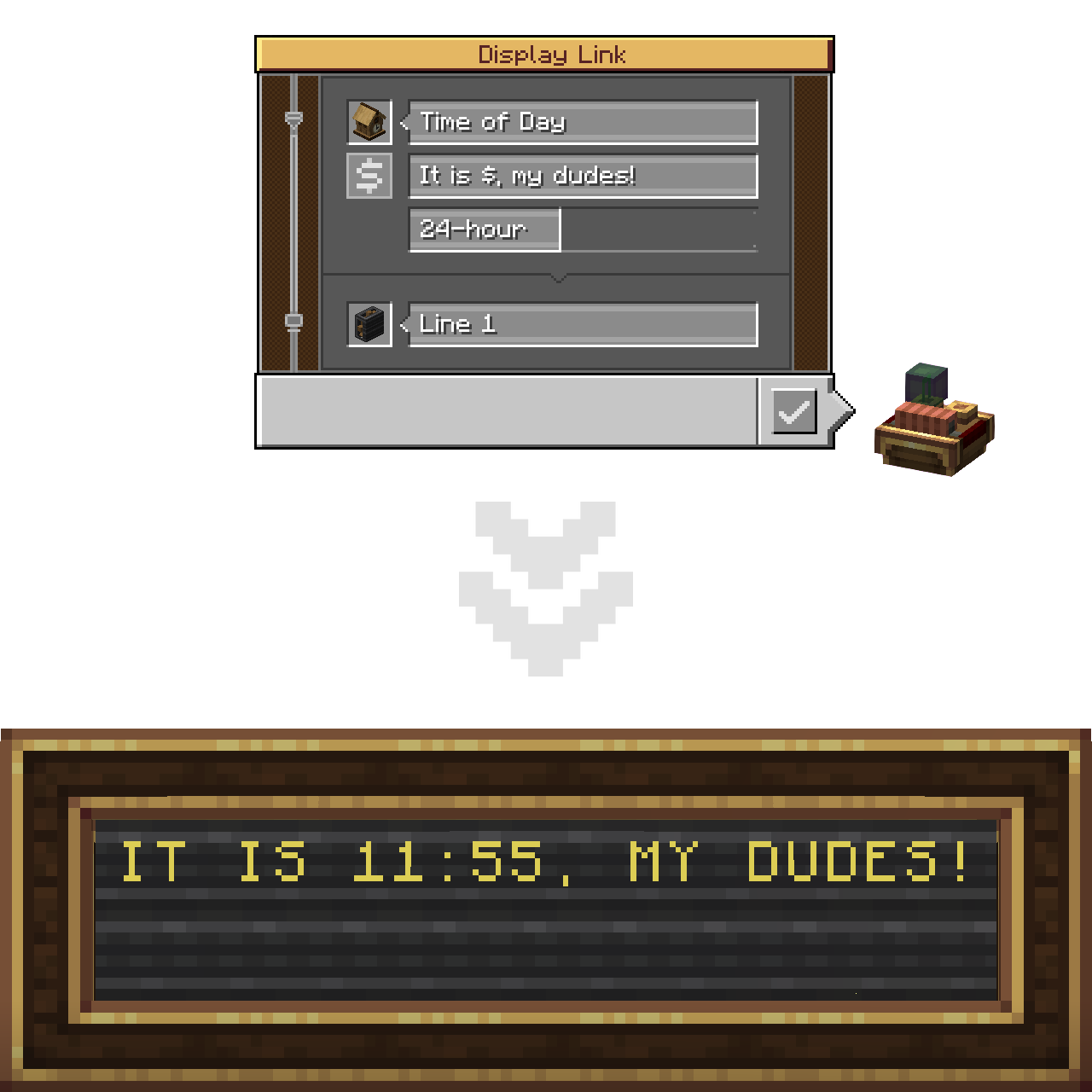
You can utilize as many placeholders as you want in one string. Mixing both types of them doesn't cause any issues as well!
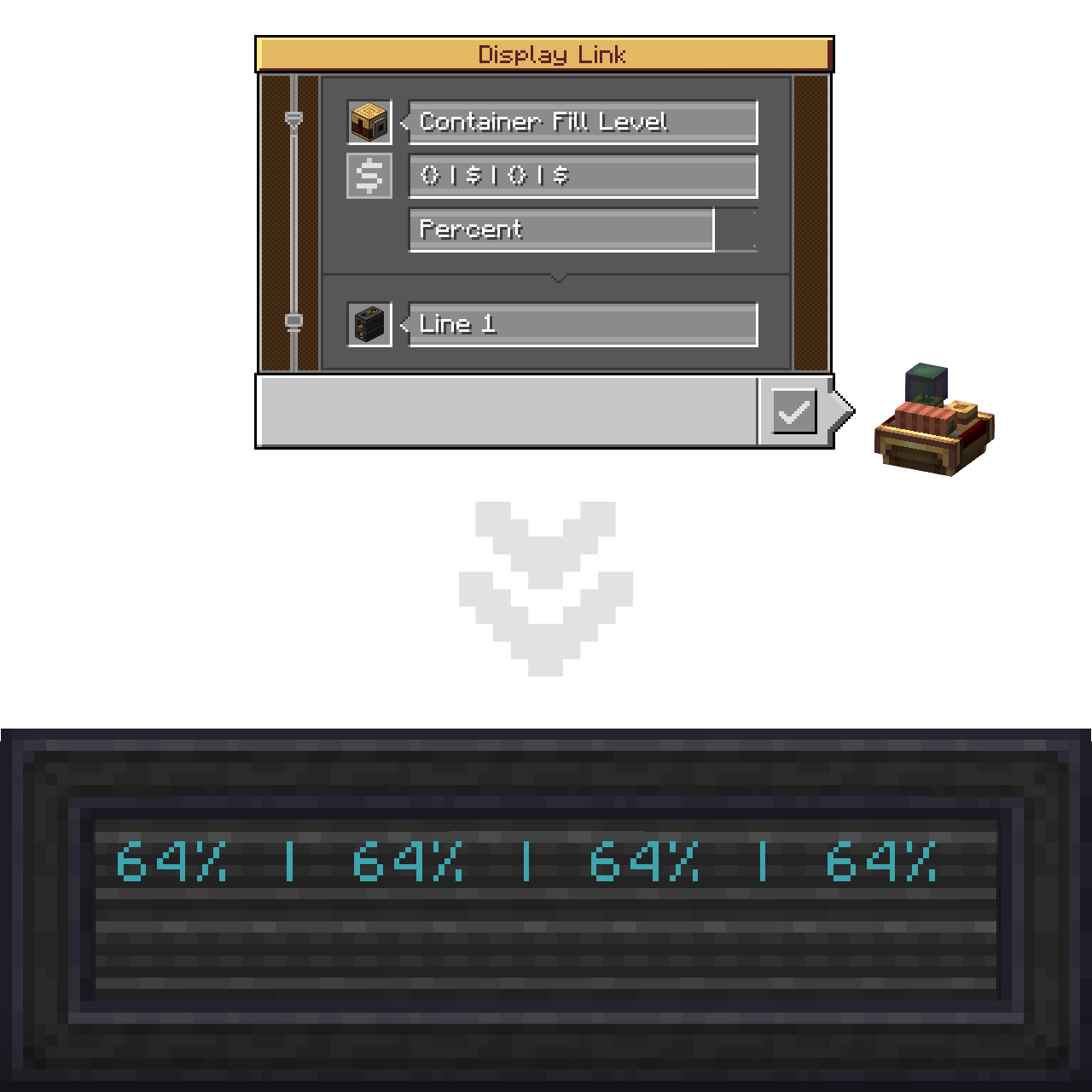
If you need to insert a $ character literally (same applies to {}), without it turning into a placeholder, use backslash-escaping on it.
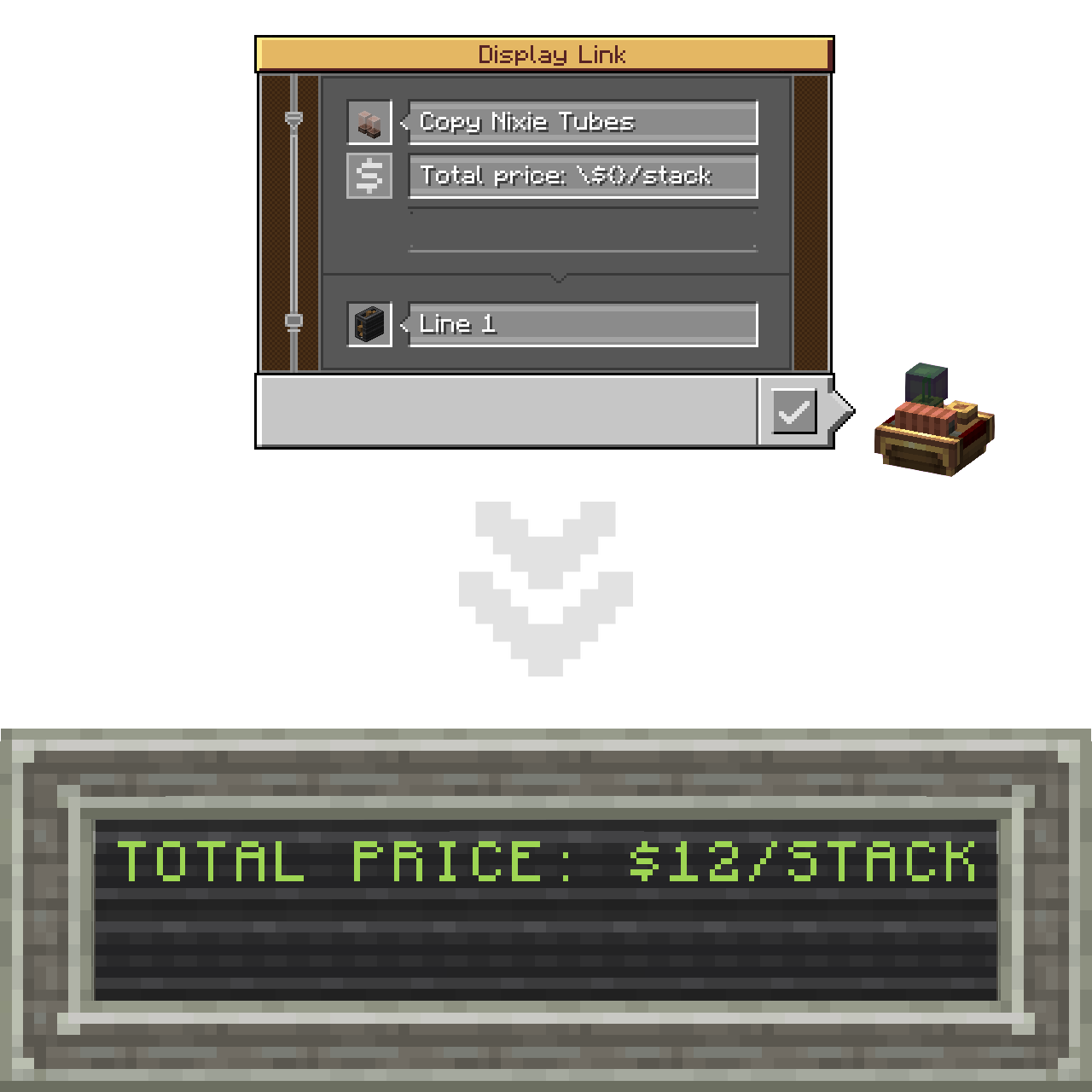
In case of no unescaped placeholders present in the label altogether, default (base Create's) concatenation will be applied.
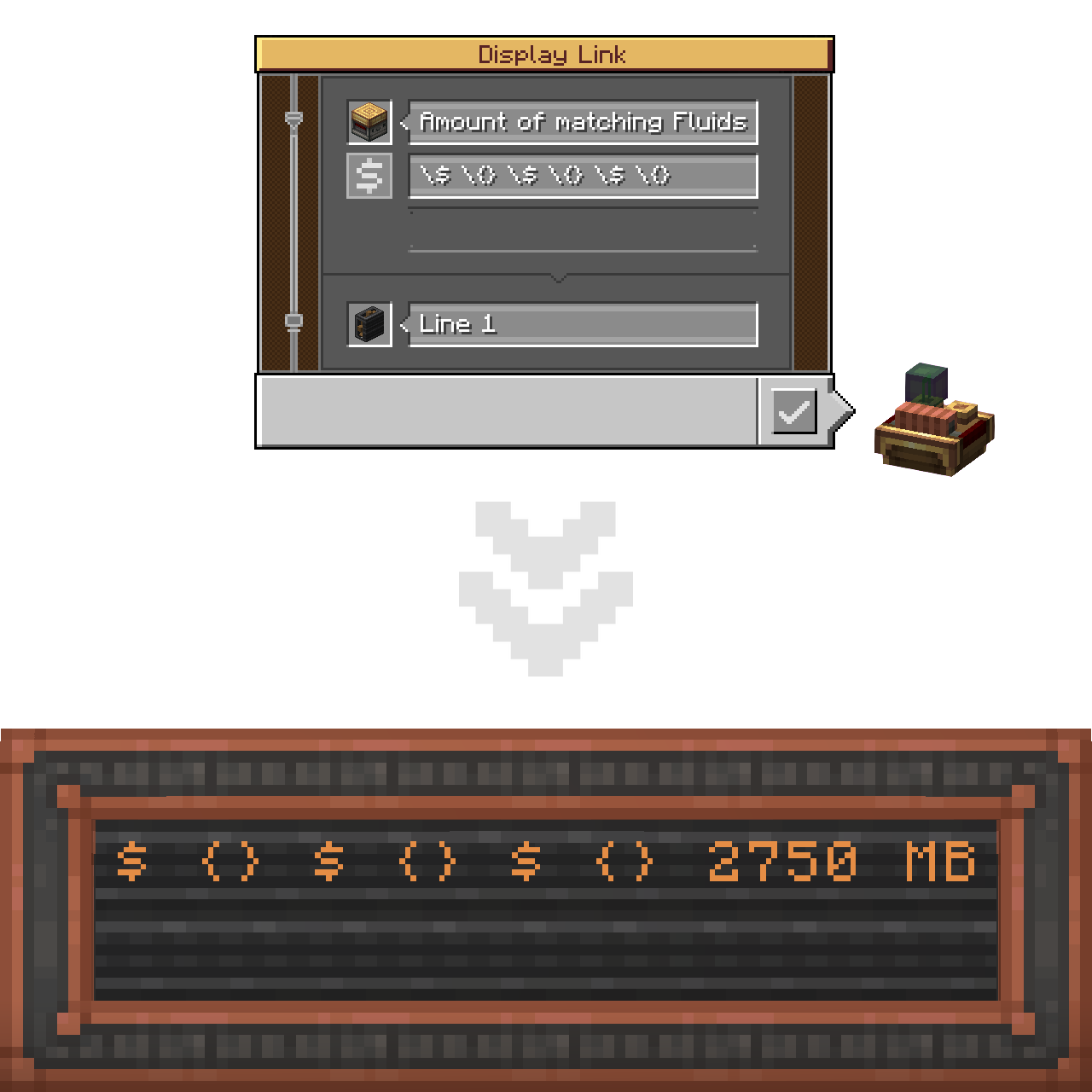
Lastly, there's a new hover-on button that displays a Placeholders Usage Guide tooltip containing all the abovementioned.
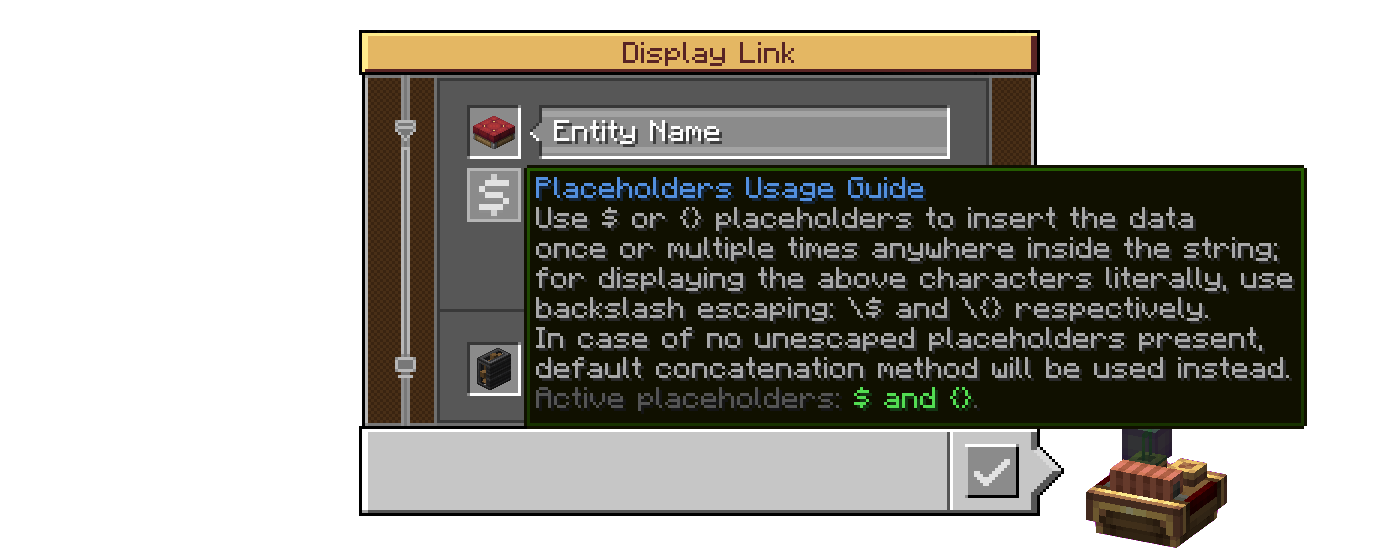
Its last string displays which placeholders are active (available to use in this world/server, which is specified by the server config of the mod).


(A .webp version if the one above doesn't play properly)
Config
C: IDLX has a proper Create-styled config for both the client (visuals) and the server (per-world).
Client settings
Enable Guide Buttons: toggling that off will hide the abovementioned hover-on button in the Display Link interface.- Tooltip Customization:
Enable (Active Placeholders / Progress Bar Support) Tooltip: those two add their additional strings into the Placeholders Usage Guide tooltip, that change the text, reflecting the states of their respective config options in Server settings.
Server settings
Hide Escaping Of Disabled Placeholders: by default, when a disabled placeholder is escaped, the backslash stays visible as if placed before a regular character; enable to make it get hidden like if it did its job;Enable Crude Progress Bar Support: currently the progress bar characters are being rendered incorrectly (appear squashed together) if used with placeholders, so the support for this display format is disabled altogether by default (see Known Issues).- Placeholders Availability:
Enable (Dollar Sign / Curly Brackets) Placeholder: with those two it is possible to limit the placeholder functionality to only one option - the Dollar Sign or the Curly Brackets respectively - or disable the feature altogether by ticking both as off (affects the last string of the Placeholders Usage Guide tooltip);
Known Issues
Essentially C: IDLX provides a single flap display section with default formatting options, unlike Create that makes two for the label (default formatting) and the value (formatting specific to its display format) respectively. The consequence of the first method is that the progress bar characters are being rendered as literal characters (non-wide), and thus appear squashed together. Fixing that would involve rewriting the code to instead generate an array of sections. I started working on it but didn't have time to finish after running into numerous issues, and decided to postpone it for when I get more time on my hands. Currently, placeholders support for the progress bar is put behind config (off by default).
If anybody has the will to help me with this issue, I would appreciate the contribution very much.
Porting Plans
C: IDLX is planned to be backported to Forge 1.20.1. However I currently can not say exactly when that will happen.
Credits
Mod Development
- @LIUKRAST and @salem-5 for valuable Mixin advices at the early stage of C: IDLX development;
- @realRobotix for help with making my mod config always open through Catnip (be Create-styled);
- GG_Gnom (
gg_gnomon Discord) for testing the mod (literally the only case of testing this mod I know).
Mod Page Decoration
- Devin's Badges for most badges used in this README;
- @flikrheist for the NeoForge badge specifically;
- FOR THE BADGE for the "Available For: 1.21.1" and "License: MIT" badges.
Translation
- @KEricMinecraft for Chinese Simplified (
zh_cn).
My first Minecraft mod, by the way!
Ченджлог
mc1.20.1-1.5Релиз1.20.1 · 28 мая 2026 г.
1.5 - 2026-05-26 (26.05.2026)
Additions
- Added Visualization Settings to the Display Link Interface:
- Center Text:
the displayed text will be center-aligned on the Board; - Mark Truncation with Ellipsis:
in case of the displayed text not fitting onto the Board and getting truncated, its last visible character will be replaced with ellipsis (…);
- Center Text:
Currently, those options are available only for single line display sources and only for Display Boards as Target Displays (expanded support for both the sources and the targets is in the works).
Improvements
- Massively improved - revamped from the ground-up, to be precise - the core architecture of the flap display sections assembly, thanks to which all the flap cycling animations now look how they were supposed to.
Fixes
- Fixed progress bars rendering incorrectly when used with placeholders (being the mod's oldest issue) thanks to the abovementioned rework (#1);
- Fixed crashing on dedicated server (#14) thanks to a Pull Request (#19) by @Flinkpfote;
- Fixed crashing on opening the Types of Copiable Display Link Properties ponder scene (#15);
- Fixed some formats of Mechanical Piston Extension State display source being incorrectly transposed (#16);
- Fixed visual glitching of Guide Buttons in the Display Link Interface when scrolling through available sources.
mc1.20.1-1.4Релиз1.20.1 · 28 мая 2026 г.
1.4 - 2026-04-18 (18.04.2026)
Additions
- Added ability to duplicate Display Link properties using a Clipboard: However, unlike how it's done with existing Create mod components being the simple R-click here and L-click there, the properties of Display Links to copy & apply are selected through a brand-new GUI;
- Added two new ponder scenes that explain Clipboard interaction with Display Links in the tiniest details;
- Added a Duplicating Display Link Properties button to the Display Link Interface, that opens the abovementioned ponder scenes on clicked;
- Added a fancy block outline for Display Links when holding a Clipboard (somewhat conditional and highly configurable);
- Added a new display source:
- Mechanical Piston Extension State (for Mechanical Piston, both regular and sticky): with the idea taken from the Create Addon Hub Discord server (suggested by Nerd), it displays how much the Piston is currently retracted in the following display formats:
Progress Bar;Used Extension Poles Percentage;Spare Extension Poles Percentage;Used Extension Poles;Spare Extension Poles;Total Extension Poles;Used to Total Extension Poles Ratio;Spare to Total Extension Poles Ratio.
- Mechanical Piston Extension State (for Mechanical Piston, both regular and sticky): with the idea taken from the Create Addon Hub Discord server (suggested by Nerd), it displays how much the Piston is currently retracted in the following display formats:
Improvements
- Improved the Placeholders Usage Guide button in the Display Link Interface: now clicking it will open the respective ponder scene, and the Placeholders status details were hidden behind holding Shift;
- Improved the Mysterious Cuckoo Clock from Create: now it supports all the Display Sources as its normal counterpart.
Fixes
- Fixed hours not being displayed by the by Countdown display source (#13).
mc1.21.1-1.5Релиз1.21.1 · 26 мая 2026 г.
1.5 - 2026-05-26 (26.05.2026)
Additions
- Added Visualization Settings to the Display Link Interface:
- Center Text:
the displayed text will be center-aligned on the Board; - Mark Truncation with Ellipsis:
in case of the displayed text not fitting onto the Board and getting truncated, its last visible character will be replaced with ellipsis (…);
- Center Text:
Currently, those options are available only for single line display sources and only for Display Boards as Target Displays (expanded support for both the sources and the targets is in the works).
Improvements
- Massively improved - revamped from the ground-up, to be precise - the core architecture of the flap display sections assembly, thanks to which all the flap cycling animations now look how they were supposed to.
Fixes
- Fixed progress bars rendering incorrectly when used with placeholders (being the mod's oldest issue) thanks to the abovementioned rework (#1);
- Fixed crashing on dedicated server (#14) thanks to a Pull Request (#19) by @Flinkpfote;
- Fixed crashing on opening the Types of Copiable Display Link Properties ponder scene (#15);
- Fixed some formats of Mechanical Piston Extension State display source being incorrectly transposed (#16);
- Fixed visual glitching of Guide Buttons in the Display Link Interface when scrolling through available sources.
mc1.21.1-1.4Релиз1.21.1 · 18 апреля 2026 г.
1.4 - 2026-04-18 (18.04.2026)
Additions
- Added ability to duplicate Display Link properties using a Clipboard: However, unlike how it's done with existing Create mod components being the simple R-click here and L-click there, the properties of Display Links to copy & apply are selected through a brand-new GUI;
- Added two new ponder scenes that explain Clipboard interaction with Display Links in the tiniest details;
- Added a Duplicating Display Link Properties button to the Display Link Interface, that opens the abovementioned ponder scenes on clicked;
- Added a fancy block outline for Display Links when holding a Clipboard (somewhat conditional and highly configurable);
- Added a new display source:
- Mechanical Piston Extension State (for Mechanical Piston, both regular and sticky): with the idea taken from the Create Addon Hub Discord server (suggested by Nerd), it displays how much the Piston is currently retracted in the following display formats:
Progress Bar;Used Extension Poles Percentage;Spare Extension Poles Percentage;Used Extension Poles;Spare Extension Poles;Total Extension Poles;Used to Total Extension Poles Ratio;Spare to Total Extension Poles Ratio.
- Mechanical Piston Extension State (for Mechanical Piston, both regular and sticky): with the idea taken from the Create Addon Hub Discord server (suggested by Nerd), it displays how much the Piston is currently retracted in the following display formats:
Improvements
- Improved the Placeholders Usage Guide button in the Display Link Interface: now clicking it will open the respective ponder scene, and the Placeholders status details were hidden behind holding Shift;
- Improved the Mysterious Cuckoo Clock from Create: now it supports all the Display Sources as its normal counterpart.
Fixes
- Fixed hours not being displayed by the by Countdown display source (#13).
mc1.20.1-1.3Релиз1.20.1 · 29 марта 2026 г.
1.3 - 2026-03-29 (29.03.2026)
Additions
- Added two new display sources:
- Elevator Target Floor (for Elevator Contact): oppositely to Elevator Location with Extra Formats displaying the floor the elevator has just passed, this one displays the floor the elevator was called to, and utilizes the same display formats:
Floor Name;Floor Description;Floor Identifier & Description;Floor Description & Identifier;
- Elevator Movement Direction (for Elevator Pulley): with the idea taken from the
@suggestionschannel of Create's Discord server (suggested twice, by The Tiny Desk Engineer and Pfluck respectively), it simply displays the elevator's movement direction one of the available formats:Arrows:×,↑and↓;Triangles:■,▲and▼;Words:standing still,heading upandheading down;
- Elevator Target Floor (for Elevator Contact): oppositely to Elevator Location with Extra Formats displaying the floor the elevator has just passed, this one displays the floor the elevator was called to, and utilizes the same display formats:
- Added a new client config option:
- Show Tooltip For Single Option Selector:
show the 'Type of Information' selector tooltip if it only has a single option(should be useful if that single option is truncated, but you need to see it the whole for a moment);
- Show Tooltip For Single Option Selector:
- Added
fr_fr(French) translation by @JustArthur.
Improvements
- Improved the Display Link Interface further by also truncating the overflowing Source Type strings even if they are not part of a selection, i.e. the single available option (#7);
- Improved the Current Floor Extended display source - now it features a simple
Show Empty Floor Descriptions as '????'toggler to indicate whether the empty descriptions of floors that don't have it specified should be ignored or displayed as????; - Improved the Countdown display source - now it features a simple
Overlap the Attached Label with the Finish Labeltoggler to indicate whether the Finish Label, once the time is out, should be put in place of the placeholders or straight up overlap the whole string; - Improved the "Display Sources" Ponder Tag from base Create - now it features the Elevator Contact (and, since now, the Elevator Pulley as well).
Fixes
- Fixed the Countdown display source, specifically its Countdown Finish Label, not overriding the attached label if no placeholders are present (that eventually inspired the
Overlap the Attached Label with the Finish Labeltoggler) (#8); - Fixed the Target widget tooltip (
Set To) being unrendered in the Display Link interface (#9); - Fixed the Current Floor Extended display source displaying the description of the floor the elevator was called to, not the floor the elevator has just passed (that eventually inspired the new Elevator Target Floor display source) (#10).
mc1.21.1-1.3Релиз1.21.1 · 28 марта 2026 г.
1.3 - 2026-03-29 (29.03.2026)
Additions
- Added two new display sources:
- Elevator Target Floor (for Elevator Contact): oppositely to Elevator Location with Extra Formats displaying the floor the elevator has just passed, this one displays the floor the elevator was called to, and utilizes the same display formats:
Floor Name;Floor Description;Floor Identifier & Description;Floor Description & Identifier;
- Elevator Movement Direction (for Elevator Pulley): with the idea taken from the
@suggestionschannel of Create's Discord server (suggested twice, by The Tiny Desk Engineer and Pfluck respectively), it simply displays the elevator's movement direction one of the available formats:Arrows:×,↑and↓;Triangles:■,▲and▼;Words:standing still,heading upandheading down;
- Elevator Target Floor (for Elevator Contact): oppositely to Elevator Location with Extra Formats displaying the floor the elevator has just passed, this one displays the floor the elevator was called to, and utilizes the same display formats:
- Added a new client config option:
- Show Tooltip For Single Option Selector:
show the 'Type of Information' selector tooltip if it only has a single option(should be useful if that single option is truncated, but you need to see it the whole for a moment);
- Show Tooltip For Single Option Selector:
- Added
fr_fr(French) translation by @JustArthur.
Improvements
- Improved the Display Link Interface further by also truncating the overflowing Source Type strings even if they are not part of a selection, i.e. the single available option (#7);
- Improved the Current Floor Extended display source - now it features a simple
Show Empty Floor Descriptions as '????'toggler to indicate whether the empty descriptions of floors that don't have it specified should be ignored or displayed as????; - Improved the Countdown display source - now it features a simple
Overlap the Attached Label with the Finish Labeltoggler to indicate whether the Finish Label, once the time is out, should be put in place of the placeholders or straight up overlap the whole string; - Improved the "Display Sources" Ponder Tag from base Create - now it features the Elevator Contact (and, since now, the Elevator Pulley as well).
Fixes
- Fixed the Countdown display source, specifically its Countdown Finish Label, not overriding the attached label if no placeholders are present (that eventually inspired the
Overlap the Attached Label with the Finish Labeltoggler) (#8); - Fixed the Target widget tooltip (
Set To) being unrendered in the Display Link interface (#9); - Fixed the Current Floor Extended display source displaying the description of the floor the elevator was called to, not the floor the elevator has just passed (that eventually inspired the new Elevator Target Floor display source) (#10).
mc1.20.1-1.2Релиз1.20.1 · 25 марта 2026 г.
1.2 - 2026-03-22 (22.03.2026)
Additions
- Added a ponder about using Display Links' Attached Label and Placeholders (can be found after Create's ponders for the Display Link);
- Added two new display sources:
- Elevator Location with Extra Formats (for Elevator Contact): a format-richer alternative to the existing Elevator Location display source - instead of just the
Floor Identifier, the new version allows to also display:Floor Description;Floor Identifier & Description;Floor Description & Identifier;
- Countdown (for Cuckoo Clock): a counterpart to the Create's Stopwatch display source, has the following input fields:
Countdown Timer(Scroll to select seconds, Scroll with Ctrl to select minutes, hold Shift to multiply the step value by 10);Countdown Finish Label(the text that will be displayed once the time is out);
- Elevator Location with Extra Formats (for Elevator Contact): a format-richer alternative to the existing Elevator Location display source - instead of just the
- Added
nl_nl(Dutch) translation by @Siepert123.
Improvements
- Improved the Display Link interface by truncating the overflowing strings in selection input fields and giving them the "Marquee" (AKA "Running Line") effect, which can be turned off or thoroughly customized in the client config - the changeable values are:
- Fixed Chat Travel Time:
the fixed time for the truncated string to scroll through, per overflowing character.; - Fixed String Travel Time (disabled by default):
the fixed time for the truncated string to scroll through, independently of its length.; - Maximal String Travel Time (disabled by default):
the maximal time for the truncated string to scroll through, independently of its length.; - Minimal String Travel Time (disabled by default):
the minimal time for the truncated string to scroll through, independently of its length.; - String Pause Time:
the fixed time for the truncated string to stay still once at the start or the end of scrolling.;
- Fixed Chat Travel Time:
- Improved the Current Floor and Train Status display sources from base Create - now both have Attached Label functionality (can be reverted in the server config).
mc1.21.1-1.2Релиз1.21.1 · 22 марта 2026 г.
1.2 - 2026-03-22 (22.03.2026)
Additions
- Added a ponder about using Display Links' Attached Label and Placeholders (can be found after Create's ponders for the Display Link);
- Added two new display sources:
- Elevator Location with Extra Formats (for Elevator Contact): a format-richer alternative to the existing Elevator Location display source - instead of just the
Floor Identifier, the new version allows to also display:Floor Description;Floor Identifier & Description;Floor Description & Identifier;
- Countdown (for Cuckoo Clock): a counterpart to the Create's Stopwatch display source, has the following input fields:
Countdown Timer(Scroll to select seconds, Scroll with Ctrl to select minutes, hold Shift to multiply the step value by 10);Countdown Finish Label(the text that will be displayed once the time is out);
- Elevator Location with Extra Formats (for Elevator Contact): a format-richer alternative to the existing Elevator Location display source - instead of just the
- Added
nl_nl(Dutch) translation by @Siepert123.
Improvements
- Improved the Display Link interface by truncating the overflowing strings in selection input fields and giving them the "Marquee" (AKA "Running Line") effect, which can be turned off or thoroughly customized in the client config - the changeable values are:
- Fixed Chat Travel Time:
the fixed time for the truncated string to scroll through, per overflowing character.; - Fixed String Travel Time (disabled by default):
the fixed time for the truncated string to scroll through, independently of its length.; - Maximal String Travel Time (disabled by default):
the maximal time for the truncated string to scroll through, independently of its length.; - Minimal String Travel Time (disabled by default):
the minimal time for the truncated string to scroll through, independently of its length.; - String Pause Time:
the fixed time for the truncated string to stay still once at the start or the end of scrolling.;
- Fixed Chat Travel Time:
- Improved the Current Floor and Train Status display sources from base Create - now both have Attached Label functionality (can be reverted in the server config).
Комментарии
Загружаем…