 Mineforgian
copypaster
Copy and paste Minecraft structures with player-relative positioning, ghost preview, persistent undo, and an optional browser editor.
- Загрузки
- 285
- Подписчики
- 0
- Обновлён
- 22 августа 2026 г.
- Лицензия
- MIT
Опубликован 17 мая 2026 г.
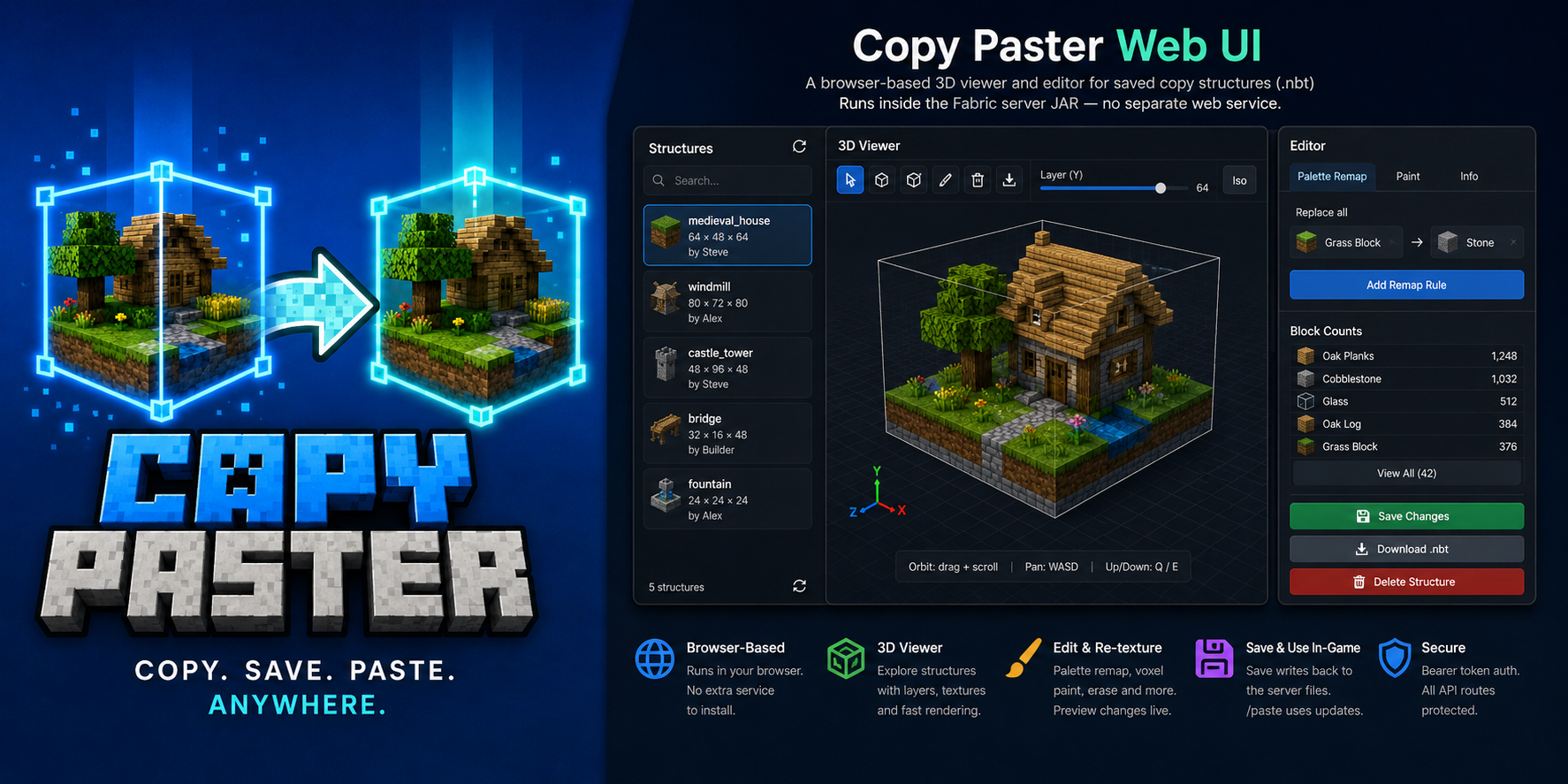
Copy cuboid regions to files. Paste them back exactly where you mean to — anchored to your position.




Copy Paster is a Fabric client + server mod for survival and creative builders who want a fast, visual way to duplicate structures without leaving the game. Select a box with keybinds, name it in chat, then paste it later — position follows where you stand at copy time and paste time, so offsets stay intuitive.
[/]copy — two corners, live wireframe preview, name in chat- Paste options — absolute coords, rotation, mirror, skip air, overwrite confirm
- Paste ghost preview — cyan box when blocks would be overwritten (respects rotation/mirror)
- Post-paste edits —
/pasterotate,/pastemirror,/pastemovewith cascaded undo - Undo —
/pasteundowith persistent snapshots undercopypaster/undos/(survives restart) - LuckPerms — grant
copypaster.*nodes to non-ops; vanilla operators always allowed - Web UI (optional) — browser 3D viewer/editor with texture-accurate preview, palette remap, voxel paint, import/export
.nbt - Ukrainian (
uk_ua) — full UI strings alongside English
Source: github.com/matrunchyk/copypaster · Changelog · Issues
Install
| Where | What |
|---|---|
| Dedicated server | Matching copy_paster-<version>+<mc>.jar in mods/ + Fabric API |
| Each player who copies | Same JAR (same MC version) in client mods/ + bind [ / ] |
Pick your JAR (server and every copying client must match):
| Minecraft | Java | Example artifact |
|---|---|---|
| 1.21.11 | 21 | copy_paster-3.4.1+1.21.11.jar |
| 26.2 | 25 | copy_paster-3.4.1+26.2.jar |
Requires Fabric Loader 0.19.3+ and Fabric API.
Server-only mode: /paste, /copylist, /copyinfo, /copyblocks, /copydelete, /copyweb, and the web UI still work. World copy requires the client mod and keybinds (or /copy with coords).
Optional: Mod Menu + Cloth Config for in-game client settings.
Quick start
1 · Save a region
- Stand at the anchor point you want for this copy.
- Press
[on corner 1, then]on corner 2 (wireframe follows your crosshair for the end corner). Or run/copy x1 y1 z1 x2 y2 z2without the client mod (requirescopypaster.copy). - Type a structure name in chat (
a–z,0–9,_,-, max 64 chars). Typecancelto abort (timeout from server config, default 60 s).
2 · Paste it back
- Stand in the same relative spot you used when copying (or use
at— see commands). /paste <name>— if the ghost warns about overwrites, run the suggested… confirmcommand.- Use
/pasteinfowhile looking at the build, or/pasteundolist, then/pasteundo <id>.
Examples:
/paste house
/paste house at 100 64 -20
/paste house rotate 90 mirror left_right noair confirm
Commands
| Command | Description |
|---|---|
/copyhelp |
Command summary (copy, paste, undo, web UI) |
/copy x1 y1 z1 x2 y2 z2 |
Copy region via coordinates (chat naming) |
/copyblocks <name> [page] |
Block type shopping list (paginated) |
/paste <name> |
Paste at player-relative anchor |
/paste <name> at <x> <y> <z> |
Paste with min corner at world coordinates |
/paste <name> rotate <90|180|270> |
Rotate before placing |
/paste <name> mirror <left_right|front_back> |
Mirror before placing |
/paste <name> noair |
Skip air blocks in the structure |
/paste <name> … confirm |
Paste after overwrite warning |
/pasteundo [id] |
Undo latest paste or a specific undo id |
/pasteinfo [distance] |
Undo ID and details for paste at crosshair |
/pasteundolist |
List pastes still available for undo |
/pastecancel |
Dismiss overwrite preview without pasting |
/pasteselect <undo id> |
Highlight a paste; transforms target it |
/pasterotate [90|180|270] |
Rotate an existing paste (cascaded undo) |
/pastemirror x|z |
Mirror an existing paste |
/pastemove <dx> <dy> <dz> |
Nudge an existing paste |
/pastemove at <x> <y> <z> |
Move paste min corner to coordinates |
/copylist |
List saved structures |
/copyinfo <name> |
Size, dimension, offset, metadata |
/copydelete <name> |
Remove .nbt + .json |
/copyweb |
Print web UI URL (when enabled) |
Access: vanilla operator always has full access. With LuckPerms, non-ops need copypaster.* nodes (see README for the full permission table).
Controls
| Input | Action |
|---|---|
[ |
Set corner 1 (look at a solid block) |
] |
Set corner 2 and send region to server |
| Chat name | Save structure after corners are set |
cancel in chat |
Abort naming session |
Keybinds default to [ and ] on new installs — rebind under Options → Controls → Copy Paster if needed.
Web UI (optional)
Browser 3D viewer/editor for saved structures. Enable in config/copypaster-server.yml (web.enabled: true), restart, then run /copyweb. Features: orbit + WASD pan, Colors/Textures modes, palette remap, voxel paint, import/export .nbt.
Limits & storage
| Max volume | limits.maxVolume in server config (default 32 768) |
| Copy session timeout | limits.sessionTimeoutSeconds (default 60) |
| Files | Server copypaster/structures/ — <name>.nbt + <name>.json |
| Undo | Saved under copypaster/undos/ until /pasteundo; survives restart |
License
MIT — Copyright (c) 2026 Serhii Matrunchuk
Ченджлог
3.4.1Релиз26.2 · 22 августа 2026 г.
Minecraft 26.2 · Java 25 · Fabric Loader 0.19.3
Artifact: copy_paster-3.4.1+26.2.jar
Added
/copy x1 y1 z1 x2 y2 z2— copy a region from coordinates (chat naming; needscopypaster.copy). Works without client keybinds./copyhelp— in-game command summary for copy, paste, undo, and transforms./copyblocks <name> [page]— block shopping list (paginated); needscopypaster.copyinfo.- Default
[/]keybinds on fresh installs; one-time hint if keys are still unbound. - Web UI import — upload
.nbtin the browser (POST /api/structures/{name}); export unchanged (Download .nbt). - MIT license — open source under
LICENSE.
Changed
- Web save-after-edit — keeps block entity NBT (chests, banners, skulls) when saving palette/voxel edits.
- Web download — warns if you have unsaved edits (downloads last saved file on disk).
- Modrinth release notes — full changelog inline on every upload (no “see CHANGELOG.md” stub).
Install
Pick the JAR for your Minecraft version — server and every player who copies must use the same line:
copy_paster-3.4.1+1.21.11.jar— Java 21copy_paster-3.4.1+26.2.jar— Java 25
Requires Fabric Loader 0.19.3+ and Fabric API. Bind [ and ] under Options → Controls → Copy Paster (or use /copy).
3.4.1Релиз1.21.11 · 22 августа 2026 г.
Minecraft 1.21.11 · Java 21 · Fabric Loader 0.19.3
Artifact: copy_paster-3.4.1+1.21.11.jar
Added
/copy x1 y1 z1 x2 y2 z2— copy a region from coordinates (chat naming; needscopypaster.copy). Works without client keybinds./copyhelp— in-game command summary for copy, paste, undo, and transforms./copyblocks <name> [page]— block shopping list (paginated); needscopypaster.copyinfo.- Default
[/]keybinds on fresh installs; one-time hint if keys are still unbound. - Web UI import — upload
.nbtin the browser (POST /api/structures/{name}); export unchanged (Download .nbt). - MIT license — open source under
LICENSE.
Changed
- Web save-after-edit — keeps block entity NBT (chests, banners, skulls) when saving palette/voxel edits.
- Web download — warns if you have unsaved edits (downloads last saved file on disk).
- Modrinth release notes — full changelog inline on every upload (no “see CHANGELOG.md” stub).
Install
Pick the JAR for your Minecraft version — server and every player who copies must use the same line:
copy_paster-3.4.1+1.21.11.jar— Java 21copy_paster-3.4.1+26.2.jar— Java 25
Requires Fabric Loader 0.19.3+ and Fabric API. Bind [ and ] under Options → Controls → Copy Paster (or use /copy).
3.4.0Релиз26.2 · 22 августа 2026 г.
Minecraft 26.2 · Java 25 · Fabric Loader 0.19.3
See CHANGELOG.md for full release notes.
Server and copying clients must use the JAR built for their Minecraft version.
3.4.0Релиз1.21.11 · 22 августа 2026 г.
Minecraft 1.21.11 · Java 21 · Fabric Loader 0.19.3
See CHANGELOG.md for full release notes.
Server and copying clients must use the JAR built for their Minecraft version.
3.3.0Релиз26.2 · 22 августа 2026 г.
Minecraft 26.2 · Java 25 · Fabric Loader 0.19.3
Forward port from 26.1.2. Server and copying clients must use this JAR (not the 1.21.11 build).
Added
- Multi-version support — Stonecutter builds for 26.2 and 1.21.11 from one repo.
Changed
- Primary dev target is 26.2 (was 26.1.2).
- JAR names:
copy_paster-3.3.0+<minecraft>.jar. - Fabric Loader 0.19.3; updated for 26.2 APIs.
Install
copy_paster-3.3.0+26.2.jaron server + client (for keybind copy).- Requires Java 25 on server and client.
Saved structure .nbt files work across 1.21.11 and 26.2 builds.
3.3.0Релиз1.21.11 · 22 августа 2026 г.
Minecraft 1.21.11 · Java 21 · Fabric Loader 0.19.3
First Modrinth release for the 1.21.x audience. Server and copying clients must use this JAR (not the 26.2 build).
Added
- Multi-version support — dedicated 1.21.11 build alongside 26.2 (Stonecutter).
- All 3.2.x features on this line:
[/]copy, paste rotate/mirror/noair, persistent undo,/pasteselect, post-paste transforms, LuckPerms nodes, optional web UI.
Install
copy_paster-3.3.0+1.21.11.jaron server + client (for keybind copy).- Bind
[and]under Options → Controls → Miscellaneous. - Requires Java 21+.
Saved structure .nbt files work across 1.21.11 and 26.2 builds.
2.1.0Релиз26.1.2 · 17 мая 2026 г.

Copy cuboid regions to files. Paste them back exactly where you mean to — anchored to your position.



Copy Paster is a Fabric client + server mod for survival and creative builders who want a fast, visual way to duplicate structures without leaving the game. Select a box in the world, name it in chat, then paste it later — position follows where you stand at copy time and paste time, so offsets stay intuitive.
- Interactive
/copy— click two corners; live wireframe preview while you aim - Paste ghost preview — cyan outline when blocks would be overwritten
- Undo —
/pasteundorestores the last paste (in-memory until restart) - Ukrainian (
uk_ua) — full UI strings alongside English - Configurable highlights —
config/copypaster.ymlor optional Mod Menu + Cloth Config
Maintainer docs:
CLAUDE.md· Release notes:CHANGELOG.md
Install
| Where | What |
|---|---|
| Dedicated server | copy_paster-<version>.jar in mods/ + Fabric API |
| Each player | Same JAR in client mods/ (required for /copy, previews, HUD) |
Server-only mode: coordinate /copy x1 y1 z1 x2 y2 z2 and all /paste commands still work; bare /copy needs the client mod.
Optional: Mod Menu + Cloth Config for in-game highlight colour.
Quick start
1 · Save a region
- Stand at the anchor point you want for this copy.
- Run
/copy. - Attack corner 1, then corner 2 (blue wireframe follows your crosshair).
- Use (right-click) to cancel anytime.
- Type a structure name in chat (
a–z,0–9,_,-, max 64 chars). Typecancelto abort (60 s).
Legacy: /copy <x1> <y1> <z1> <x2> <y2> <z2> then name in chat — or bind [ / ] under Options → Controls → Miscellaneous (unbound by default).
2 · Paste it back
- Stand in the same relative spot you used when copying.
/paste <name>— confirm with/paste <name> confirmif the ghost preview warns about overwrites.- Save the undo ID from chat for
/pasteundo <id>.
Commands
| Command | Description |
|---|---|
/copy |
Interactive block selection (client mod) |
/copy <x1> <y1> <z1> <x2> <y2> <z2> |
Coordinate selection |
/paste <name> |
Paste at player-relative anchor |
/paste <name> confirm |
Paste after overwrite warning |
/pasteundo <id> |
Restore blocks from one paste |
/copylist |
List saved structures |
/copyinfo <name> |
Size, dimension, offset, metadata |
/copydelete <name> |
Remove .nbt + .json |
All commands require operator on the server.
Controls
| Input | Action |
|---|---|
/copy |
Start interactive selection |
| Attack block | Set corners 1 → 2 |
| Use | Cancel selection |
[ / ] (if bound) |
Legacy corner shortcut |
Limits & storage
| Max volume | 32 768 blocks |
| Files | Server copypaster/structures/ — <name>.nbt + <name>.json |
| Undo | In memory only; cleared on server restart |
| Highlight colour | Client config/copypaster.yml |
Build
./gradlew clean jar
# → build/libs/copy_paster-<version>.jar
Requires Java 25. See CLAUDE.md for deploy runbook (Fabric on gserver).
License
See repository license file if present; otherwise treat as private CrazyHouse tooling until a license is added.
Комментарии
Загружаем…